
WM-5 - Anemometer Ambient Weather - Free user manual and instructions
Find the device manual for free WM-5 Ambient Weather in PDF.


User questions about WM-5 Ambient Weather
0 question about this device. Answer the ones you know or ask your own.
Ask a new question about this device
Download the instructions for your Anemometer in PDF format for free! Find your manual WM-5 - Ambient Weather and take your electronic device back in hand. On this page are published all the documents necessary for the use of your device. WM-5 by Ambient Weather.
USER MANUAL WM-5 Ambient Weather
www.ambientweather.com
WM-5 Manual v 1.00
English
Français
Español
Deutsch
Italiano
text_image
english ançais pañol utsch aliano MODE: SIT - 10 mm x 20 mm x 30 mm x 40 mm x 50 mm ambient weather WM-5 17:57 10 AM 10 AM 10 AM ambient weather WM-5
ambient weather
6845 W. Frye Road (480) 346-3380
Chandler, AZ 85226 USA www.ambientweather.com
WM-5 Manual V 1.00 — Italiano
Per cominciare
text_image
Replaceable Impeller Humidity Sensor Temperature Sensor Pressure History Value Screen Ambient weather WM-5 Tripod Mountother
| Indicator | Value | |---|---| | Heat Index Indicator | HI | | Deeppoint Indicator | DP | | F — Unit of Measure Fattambeet (F) or Delicate (C) | 75.8 |bar
| Parameter | Value | |---|---| | Pressure History Barchart | -16h, -8h, -6h, -4h, -20s, 0 | | Unit of Measure Index of Mercury (in Hg) or Millions (million tonnes) | 29.64 | | Subminder Indicator | - | | Bar chart: Bar values range from -16h to 0, with maximum at 29.64 in Hg and minimum at 0.0000000000000000000000000000000000000000000000000000000000000000000000000000000000000000000000000000 | 29.64 in Hg |text_image
-16h -8ft -4ft -2ft 0 ALT 300 FT Unit of Measure Fleet (FT) or Meters (M) Altitude Mode Icontext_image
700 RH% → 3000 RH%Figura A
Figura B
Low Battery Indicator:
General Temperature:
General Relative Humidity:
text_image
BAR -16h -8h -4h -2h 0 Pressure History Bergraph 29.64 inHg Unit of Measure Inches of Mercury (inHg) or Millibars (hpa mbar) Barometer indicatorBarometer Indicator:
Pressure History Bar Graph:
text_image
-16h -8h -4h -2h 0 300 FT Unit of Measure Feet (FT) or Meters (M) ALT Altitude Mode IconWICHTIGE INFORMATIONEN:
General Altitude Mode:
text_image
BAR 1003 hpa mbar 165MHöhe:
text_image
700 RH% → 3000 RH%Figure A
Figure B
text_image
-16h -8h -4h -2h 300 FT ALT Altitude Moda Icon Unit of Measure Fleet (FT) or Meters (M)text_image
BAR 1003 hpa mbar → AU 165MAltitud:
text_image
700 RH% 3000 RH%Figura A
Figura B
other
Heat Index Indicator Developed Indicator -16h -80 -60 -20 0 75.8 F — Unit of Measure Fair/Verbal (F) or Calculus (C)text_image
BAR -16h -8h -4h -2h 0 29.64 inHg Pressure History Bargraph Unit of Measure Inches of Mercury (inHg) or NHBars (ppa mbar) Barometer Indicatortext_image
-16h -8h -4h -2h 0 300 FT ALT Unit of Measure Fect (FT) or Meters (M) Altitude Mode IconMode Altitude Générale:
text_image
700 RH% → 3000 RH%Illustration A
Illustration B
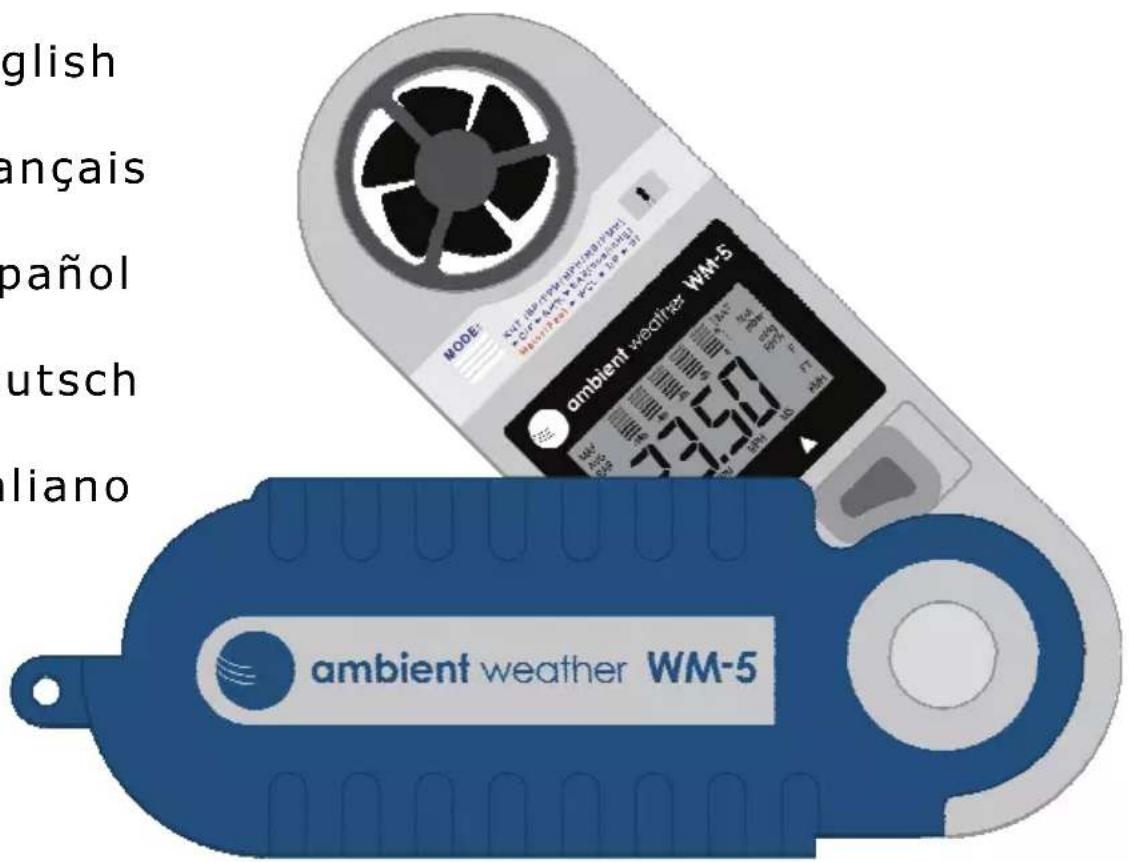
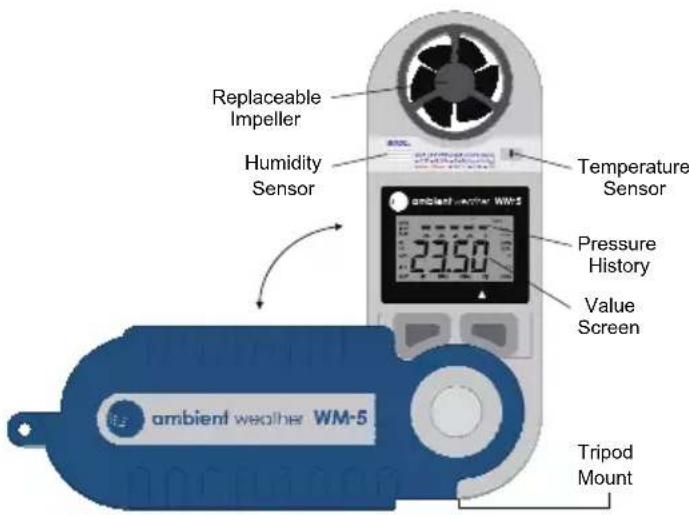
Your WM-5 package contains one 400-Hr Lithium CR2032 battery, a lanyard, and voltage input numbers for humidity calibration. It is very important that you keep the calibration numbers for future calibration needs. Each instrument has unique voltage input numbers. To install the lanyard, feed one end through the hole at the bottom of the handle and tie it to the other end. Open case and click into fully opened position or, if using a tripod, click to the 90-degree position. Your WM-5 sensors are extremely sensitive. Hold the WM-5 at the bottom of the handle, away from your face and body, to avoid getting false readings. It is also important that you do not touch the sensors.
text_image
Replaceable Impeller Humidity Sensor Temperature Sensor 23.50 Pressure History Value Screen ambient weather WM-5 Tripod MountOperating Modes:
Turn the unit on using the ON/OFF button on the left. Use the MODE button on the right to scroll to the desired function. To turn off the unit, press and hold the ON/OFF button for 3 seconds, until the display is blank, then release.
Changing the Units of Measure:
With the WM-5 on, change the units of measure by selecting the mode you wish to change (i.e. Wind speed). Next, press and hold the ON/OFF button and, while holding, press the MODE button to change the units of measure.
General Indicators

text_image
BAT Low Battery Indicator Pressure Value indicator Data Screen -16h -8h -4h -2b 0 Hour Indicator Barometric Pressure HistoryBar Graph:
Using the bar graph: The bar graph represents a 16-hour history of the barometric pressure. The column labeled "0" indicates the current pressure. Each horizontal bar represents +/-2 mb/hpa as indicated by the pressure value indicator. (Please note that the bar graph will not be displayed until barometric history has accumulated, as the WM-5 only records barometric pressure while the unit is on.)
Low Battery Indicator:
Indicates the battery is running dry.
Data Screen:
Indicates the value of data being collected by the WM-5.
Modes
Wind Speed
text_image
Maximum Wind Speed MAX AVG -16h -8h -4h -2h 0 Wind-coll WCL 18.2 Knots KNT BF FPM MPH MS KMH Beaufort Feet Per Minute Miles Per Hour Glometers Per Hour Netem Par SecondUnits of Measure:
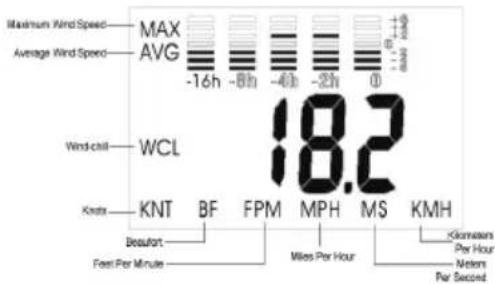
The WM-5 measures wind speed in six different units of measure: Knots, Beaufort, Feet Per Minute, Miles Per Hour, Meters Per Second, and Kilometers Per Hour. To switch between units of measure please see the Units of Measure section for instructions.
Current Wind speed:
In current wind speed mode, only the unit of measure will be shown.
Maximum Wind speed:
Displays maximum speed recorded since the unit was turned on.
Average Wind speed:
Displays a running average over ten seconds.
Wind-Chill:
Displays the effect that air temperature combined with wind speed has on human skin.
Temperature
text_image
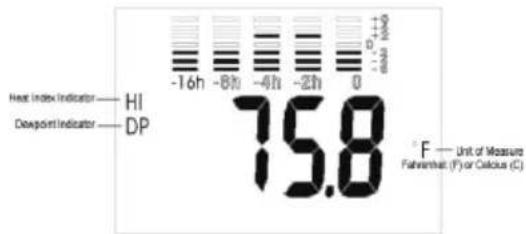
Heat Index Indicator -16h -8h -4h -2h 0 Deeppoint Indicator HI DP 75.8 F — Unit of Measure Fisharmath (F) or Calculus (C)General Temperature:
Displays the temperature in Fahrenheit or Celsius.
Heat Index:
Displays the measure of how humidity acts along with high temperatures to reduce the body's ability to cool itself. In most cases, the heat index will be higher than the temperature.
Dew point:
Displays the temperature at which air becomes saturated with moisture (the temperature at which fog will form).
Relative Humidity
other
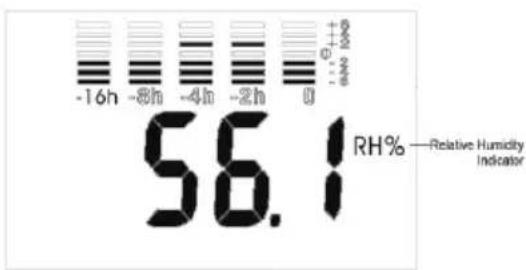
| Parameter | Value | |---|---| | -16h | 56.1 | | -8h | 56.1 | | -4h | 56.1 | | -2h | 56.1 | | 0 | 56.1 | | Relative Humidity Indicator | RH% |General Relative Humidity:
Displays the current relative humidity. Relative humidity is the amount of water vapor measured in the air, divided by the potential amount of vapor that the air can hold – at that temperature. The relative humidity comes factory calibrated.
However, the WM-5 can be calibrated manually for more demanding field requirements. To calibrate the relative humidity, see the Humidity Calibration section.
Barometric Pressure
text_image
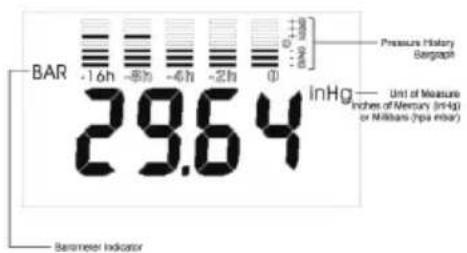
BAR -16h -8h -4h -2h 0 Pressure History Bergaph Unit of Measure Inches of Mercury (mHg) or Molluson (rpa mbar) 29.64 Barometer IndicatorUnit of Measure:
The WM-5 can display barometric pressure in inches of mercury (inHg) or in millibars / hectopascals (hpa mb).
Barometer Indicator:
BAR - Indicates the unit is barometer mode.
Pressure History Bar Graph:
Displays barometric pressure history for the past 16 hours. Note: The unit must be on for 16 hours before the complete graph is displayed. For more information, please see section titled Bar Graph.
Altitude
text_image
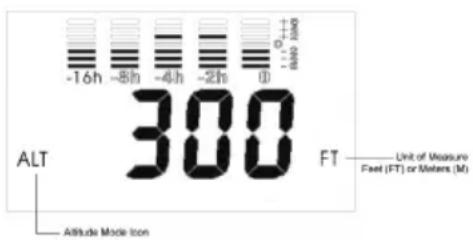
-16h -8h -4h -2h 0 300 FT Unit of Measure Fuel (FT) or Meters (M) Altitude Mode IconUnit of Measure:
The WM-5 can display altitude in feet FT or meters M
General Altitude Mode:
The WM-5 can register altitudes between -600 to 7000 feet.
Altitude Mode Icon:
ALT - Indicates the unit is in altitude mode.
IMPORTANT INFORMATION: The WM-5 altimeter calculates altitude based on changing air pressure. Changes in the air pressure (caused by changes in altitude or weather patterns) will cause the altitude reading to rise or fall. Your altitude should always be calibrated right before use as an altimeter.
You should re-calibrate altitude if your ascent or descent takes more then a short period of time. This will maintain instrument accuracy, since slight changes in pressure will cause the altitude readings to change while you rest at one location.
Remember that changing weather patterns will also affect your altitude readings. For example: If the pressure changes .50 InHg, you will experience a change of altitude of +/- 470 feet, if you are near sea level. Also note that changes of altitude will change your barometric pressure reading. For accurate relative pressure readings while climbing or descending, you will need to enter your altitude in calibration mode. Allow 15 minutes for the barometric pressure readings to respond to the newly calibrated altitude.
Calibration
If you calibrate your altitude, you do not need to calibrate your barometer. It will calibrate itself to the relative pressure after 15 minutes. However, you may wish to calibrate your unit to a nearby reading obtained from a reliable weather source. Please remember that barometric pressure can change over a distance of just a few miles.
Barometric Pressure:
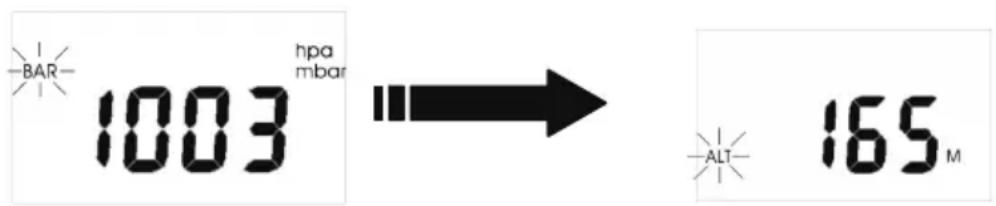
You may calibrate your unit in mb or inHg. Be sure to select your preferred mode prior to calibration. While the unit is off, press and hold the on/off key for 2 seconds. The screen will display current pressure with a flashing "BAR" indicator on the left side. When you see the indicator flashing, release the on/off button. Press the on/off key to go up in units, press the mode key to go down in units. After calibrating barometric pressure, wait 5 seconds and the unit will automatically go into altitude calibration. If you do not wish to calibrate altitude, simply leave the unit on and it will return to its normal operating mode. The changes have now been stored until you recalibrate it.
text_image
BAR 1003 hpa mbar 165MAltitude: First obtain your local altitude.
Note: You may calibrate your altimeter in meters or feet. Be sure to select the mode prior to calibration. With the unit off, press and hold the on/off key for 2 seconds. You will see the flashing "BAR" indicator on the left. After flashing for 5 seconds, it automatically moves to Altitude calibration mode and you will see the current altitude and a flashing "ALT" indicator. Press the on/off key to go up in units, press the mode key to go down in units. When you have completed the calibration, the unit will automatically return to normal operation in a few seconds. The changes have now been stored until you recalibrate it.
Humidity
NOTE: The relative humidity comes factory calibrated.

text_image
700 RH% 3000 RH%Figure A
Figure B
First, locate the calibration sticker that was supplied with your WM-5. It will have two numbers displayed. You will need to calibrate your unit to these numbers.
With the unit on, press and hold the on/off button for 10 seconds. The display will turn off and then back on, displaying the number 700 (Fig. A). Enter the first voltage input number (in the above example, the number is 744) into this screen by pressing the mode button to scroll up (omitting the decimal). Note: When in humidity calibration mode, the mode button only scrolls up, not down, so it is important that you do not miss the number you are entering. When finished, press the on/off button again, you will see the number 3000 (Fig. B). Enter the second voltage input number (3056 in the example above), using the same procedure as before. To store the changes, press the on/off button. The unit will then shut off with the new values stored internally. NOTE: Each unit has unique voltage input numbers. It is crucial that you do not lose your instrument's numbers.
Impeller Replacement:
To replace the impeller, use a small screwdriver to loosen the set-screw found on the back of the weather monitor. Remove the impeller by twisting the impeller assembly clockwise (if you are facing the back of the windmeter) to the "O" position marked on the rear of the meter.
Battery:
To replace the battery, turn the compartment cover in a counter-clockwise direction to remove it. The battery will be visible in the battery compartment. Insert a new CR2032 lithium battery “+” side facing you. CR2032 batteries can be purchased anywhere batteries are sold.
NOTE: Different modes have different drains on the battery life. When left on in barometer mode, the battery will last 400 hours. Wind speed &humidity will drain the battery quickest
Severe Weather Alarm:
The severe weather alarm will sound if there is a dramatic change in pressure. The feature is set to go off if the air pressure changes by 6 millibars (up or down) within a 3-hour period. (This is a good indication of severe weather approaching.) The alarm will sound once for five seconds. If the pressure continues to change by the same amount, the alarm will continue to sound once every hour.
NOTE: the storm alarm feature is disabled when the WM-5 is in Altitude mode. This is to prevent the alarm from sounding false alarms as your altitude changes (due to the altitude's effect on air density).
ambient weather
6845 W. Frye Road (480) 346-3380 Chandler, AZ 85226 USA www.ambientweather.com
ACCURACY: +/- 3% Windspeed; +/- 2 F° Temp/Windchill; +/-3% rH, Dew Point, & Heat Index; +/- .09 in Hg Barometric Pressure
RANGES: Wind .4-89 MPH; Temp 32° to +122°F; Windchill -22° to +158°F; Dew Point -31.2° to +155.8°F ; Heat Index +69.8 to +155.8°F; rH 0-99%; Barometer 11.8\~32.5inHg; Altitude -900 to 9000 meters
OPTIONAL UNITS: Knots, MPH, KPH, M/Sec, Ft/Min, Beaufort Scale - F or C; hpa/mb or inHg
RESPONSE TIMES: Current Windspeed; Ave. over 2 sec; Ave. Wind 5 sec; Max Wind 2 sec gust; Temp/windchill/rH/dew point 1 min; 15 min sampling Barometer
POWER: CR2032 Lithium battery