WS-0270 - Thermometer Ambient Weather - Free user manual and instructions
Find the device manual for free WS-0270 Ambient Weather in PDF.


| Product Type | Wireless Indoor/Outdoor Thermometer with Indoor Humidity |
| Brand | Ambient Weather |
| Model | WS-0270 |
| Display Console Dimensions (LxHxW) | 3 x 3.5 x 1 in |
| Display Console LCD Dimensions (LxW) | 2.5 x 2.25 in |
| Thermometer Transmitter Dimensions (LxHxW) | 2.75 x 1.75 x 0.75 in |
| Power - Display Console | 1 x AA alkaline or lithium battery (not included) |
| Power - Remote Sensor | 1 x AA alkaline or lithium battery (not included) |
| Battery Life - Display Console | Approximately 2 years |
| Battery Life - Remote Sensor | Minimum 12 months (use lithium in cold climates below -4°F) |
| Wireless Frequency | 433 MHz |
| Transmission Range (Line of Sight) | 265 ft |
| Transmission Range (Typical) | 100 ft under most conditions |
| Update Rate | 60 seconds |
| Indoor Temperature Range | 14 to 140°F |
| Outdoor Temperature Range | -40 to 140°F |
| Temperature Accuracy | ±1°F |
| Temperature Resolution | 0.1°F |
| Indoor Humidity Range | 1 to 99% |
| Indoor Humidity Accuracy | ±3% (20-90%) |
| Indoor Humidity Resolution | 1% |
| Display Console Buttons | °C/°F toggle, High/Low Record reset |
| Mounting - Console | Desk stand or wall hanging |
| Mounting - Sensor | Zip tie, nail, or screw (cap ≤5mm diameter) |
| Warranty | 1-year limited warranty |
| FCC Classification | Class B digital device |
Frequently Asked Questions - WS-0270 Ambient Weather
User questions about WS-0270 Ambient Weather
0 question about this device. Answer the ones you know or ask your own.
Ask a new question about this device
Download the instructions for your Thermometer in PDF format for free! Find your manual WS-0270 - Ambient Weather and take your electronic device back in hand. On this page are published all the documents necessary for the use of your device. WS-0270 by Ambient Weather.
USER MANUAL WS-0270 Ambient Weather
Ambient Weather WS-0270 Wireless Indoor / Outdoor Thermometer with Indoor Humidity User Manual

ambient weather
Table of Contents
1 Introduction....1
2 Getting Started....1
2.1 Parts List....2
2.2 Recommend Tools....2
2.3 Thermometer Sensor Set Up 2
2.4 Display Console Set Up 3
2.4.1 Display Console Layout....4
2.4.2 Sensor Operation Verification....4
3 Wireless Sensor Installation....4
3.1 Mounting with Zip Tie 5
3.2 Mounting with Nail or Screw 5
4 Console Operation....5
4.1 Temperature Units of Measure....5
4.2 High Low Record....5
4.3 Sensor Resynchronization 6
4.3.1 Best Practices for Wireless Communication 6
5 Glossary of Terms 7
6 Specifications....7
6.1 Wireless Specifications 7
6.2 Measurement Specifications....7
6.3 Power Consumption 7
7 Troubleshooting Guide....7
8 Liability Disclaimer .... 8
9 FCC Statement....9
10 Warranty Information 9
1 Introduction
Thank you for your purchase of the Ambient Weather WS-0270 Wireless Indoor/Outdoor Thermometer with Indoor Humidity. The following user guide provides step by step instructions for installation, operation and troubleshooting. To download the latest manual and additional troubleshooting tips, please visit:
http://AmbientWeather.net/help
2 Getting Started
Note: The power up sequence must be performed in the order shown in this section (insert batteries in the remote transmitter(s) first, Display Console second).
The WS-0270 weather station consists of a display console (receiver), and a thermometer (remote
transmitter).
2.1 Parts List
| QTY | Item |
| 1 | Display ConsoleFrame Dimensions (LxHxW): 3 x 3.5 x 1 inLCD Dimensions (LxW): 2.5 x 2.25"LCD Segment Height: 0.75 inch |
| 1 | Thermometer transmitter (WH19)Dimensions (LxHxW): 2.75" x 1.75" x 0.75" |
| 1 | User Manual |
2.2 Recommend Tools
Hammer for hanging remote thermometer transmitter.
2.3 Thermometer Sensor Set Up
Note: Do not use rechargeable batteries. They tend to have a lower operating voltage, do not have a wide temperature range, and do not last as long as non-rechargeable batteries.
We recommend fresh alkaline batteries for outdoor temperature ranges between -4^ and 140^ and fresh lithium batteries for outdoor temperature ranges between -40^ and 140^ .
- Remove the battery door on the back of the sensor by sliding the compartment door down, as shown in Figure 1.
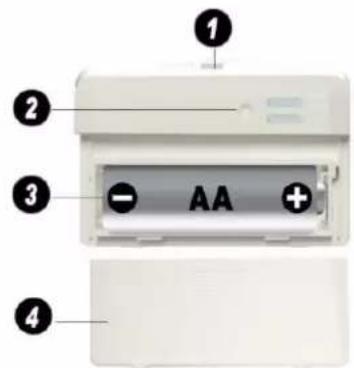
Figure 1
1 Integrated hanger for zip tie
2 Wireless transmitter LED
3 AA Battery
4 Battery Compartment Cover
- Insert one AA battery.
- After inserting the battery, the remote sensor LED indicator will light for 4 seconds, and then flash once per 60 seconds thereafter. Each time it flashes, the sensor is transmitting data.
- Close the battery door.
2.4 Display Console Set Up
-
Move the remote thermometer(s) about 5 to 10' away from the display console (if the sensor is too close, it may not be received by the display console).
-
Remove the battery door on the back of the display, as shown in Figure 2. Insert one AA (alkaline or lithium, avoid rechargeable) battery in the back of the display console.

Figure 2
1 Suspension eye for wall hanging
2 Desk Stand
3 °C / °F button
4 High / Low Record button
5 Battery Compartment
6 Battery Compartment door
All of the LCD segments will light up for a few seconds to verify all segments are operating properly.
- Replace the battery door, and fold out the desk stand and place the console in the upright position.
The console will instantly display indoor temperature and humidity. The remote temperature will update on the display within a few minutes.
While in the search mode, the reception search icon .fish.
If the remote does not update, please reference the troubleshooting guide in Section 7.
2.4.1 Display Console Layout

Figure 3
1 Outdoor Temperature
2 Indoor Temperature
3 Indoor Humidity
4 Outdoor Temperature High / Low Record
5 Indoor Temperature High / Low Record
6 Indoor Humidity High / Low Record
7 Wireless Reception Icon
2.4.2 Sensor Operation Verification
Verify the indoor and outdoor temperature match closely with the console and sensor array in the same location (about 5 to 10' apart). The sensors should be within 2°F (the accuracy is ± 1°F). Allow about 30 minutes for both sensors to stabilize.
3 Wireless Sensor Installation
It is recommended you mount the remote sensor in a shaded area. Direct sunlight and radiant heat sources will result in inaccurate temperature readings. Although the sensor is water resistant, it is best to mount in a well-protected area, such as under an eve.
3.1 Mounting with Zip Tie
Mounting the sensor with a zip tie will result in better accuracy when mounting outside, since it is not touching another object. Other objects will store and radiate heat (or cold).

natural_image
Line drawing of a rectangular electronic device with a loop handle and mounting holes (no text or symbols)Figure 4
3.2 Mounting with Nail or Screw
To mount the sensor with a nail or screw, the cap must be less than or equal to 5.0 mm in diameter.

Figure 5
4 Console Operation
Note: The console has two buttons for easy operation: °C / °F button (on the left), and High / Low Record button (on the right).
4.1 Temperature Units of Measure
To change the temperature units of measure, press the C / ^ button (on the left).
4.2 High Low Record
The indoor temperature, indoor humidity, and outdoor temperature can be reset every 24 hours (based on when the batteries are inserted), or never.
Press the High / Low Record button (on the right) to switch between reset 24 hours or never.
To reset the highs and lows, remove and reinsert the battery inside the console. If Reset 24 hour option
is selected, the highs and lows will reset 24 hours after the battery is inserted.
4.3 Sensor Resynchronization
If the remote sensor is lost, dashes will be displayed. To resynchronize, press both the °C / °F and High / Low Record buttons at the same time for five seconds.
While in the search mode, the reception search icon _flash.
4.3.1 Best Practices for Wireless Communication

Note: To insure proper communication, mount the remote sensor on a vertical surface, such as a 1. Do not lay the sensor flat.
Wireless communication is susceptible to interference, distance, walls and metal barriers. We recommend the following best practices for trouble free wireless communication.
- Electro-Magnetic Interference (EMI). Keep the console several feet away from computer monitors and TVs.
- Radio Frequency Interference (RFI). If you have other 433 MHz devices and communication is intermittent, try turning off these other devices for troubleshooting purposes. You may need to relocate the transmitters or receivers to avoid intermittent communication.
- Line of Sight Rating. This device is rated at 300 feet line of sight (no interference, barriers or walls) but typically you will get 100 feet maximum under most real-world installations, which include passing through barriers or walls.
- Metal Barriers. Radio frequency will not pass through metal barriers such as aluminum siding. If you have metal siding, align the remote and console through a window to get a clear line of sight.
The following is a table of reception loss vs. the transmission medium. Each “wall” or obstruction decreases the transmission range by the factor shown below.
| Medium | RF Signal Strength Reduction |
| Glass (untreated) | 5-15% |
| Plastics | 10-15% |
| Wood | 10-40% |
| Brick | 10-40% |
| Concrete | 40-80% |
| Metal | 90-100% |
5 Glossary of Terms
| Term | Definition |
| Accuracy | Accuracy is defined as the ability of a measurement to match the actual value of the quantity being measured. |
| Hygrometer | A hygrometer is a device that measures relative humidity. Relative humidity is a term used to describe the amount or percentage of water vapor that exists in air. |
| Range | Range is defined as the amount or extent a value can be measured. |
6 Specifications
6.1 Wireless Specifications
• Line of sight wireless transmission (in open air): 265 feet, 100 feet under most conditions.
• Frequency: 433 MHz
- Update Rate: 60 seconds
6.2 Measurement Specifications
The following table provides specifications for the measured parameters.
| Measurement | Range | Accuracy | Resolution |
| Indoor Temperature | 14 to 140 °F | ±1 °F | 0.1 °F |
| Outdoor Temperature | -40 to 140 °F | ±1 °F | 0.1 °F |
| Indoor Humidity | 1 to 99 % | ±3% (only guaranteed between 20 to 90%) | 1 % |
6.3 Power Consumption
- Base station (display console) : 1 x AA Alkaline or Lithium batteries (not included)
• Remote sensor : 1 x AA 1.5V Alkaline or Lithium batteries (not included) - Battery life: About 2 years for base station with one sensor and excellent reception. Intermittent reception and multiple sensors may reduce the battery life. Minimum 12 months for thermometer sensor (use lithium batteries in cold weather climates less than -4 °F)
7 Troubleshooting Guide
If your question is not answered here, you can contact us as follows:
- Email Support: support@ambientweather.com
- Technical Support: 480-346-3380 (M-F 8am to 3pm Arizona Time)
| Problem | Solution |
| Wireless remote (thermometer) not reporting in to console.There are dashes (--.-) on the display console. | If sensor communication is lost, dashes (--.-) will be displayed on the screen. To reacquire the signal, To resynchronize, press both the °C / °F and High / Low Record buttons at the same time for five seconds., and the remote search icon .will flash. Once the signalis reacquired, the remote search icon will turn on, and the current values will be displayed.The maximum line of sight communication range is 265' and 100' under most conditions. Move the sensor assembly closer to the display console.If the sensor assembly is too close (less than 5'), move the sensor assembly away from the display console.Make sure the remote sensor transmitter light is flashing once per 60 seconds.Install a fresh set of batteries in the remote thermometer. For cold weather environments, install lithium batteries.Make sure the remote sensors are not transmitting through solid metal (acts as an RF shield), or earth barrier (down a hill).Move the display console around electrical noise generating devices, such as computers, TVs and other wireless transmitters or receivers.Move the remote sensor to a higher location. Move the remote sensor to a closer location. |
| Temperature sensor reads too high in the day time. | Make sure the thermometer is mounted in a shaded area on the north facing wall. Consider the following radiation shield if this is not possible:http://www.ambientweather.com/amwesrpatean.html |
| Display console contrast is weak | Replace console batteries with a fresh set of batteries. |
8 Liability Disclaimer
Please help in the preservation of the environment and return used batteries to an authorized depot. The electrical and electronic wastes contain hazardous substances. Disposal of electronic waste in wild country and/or in unauthorized grounds strongly damages the environment.
Reading the “User manual” is highly recommended. The manufacturer and supplier cannot accept any responsibility for any incorrect readings and any consequences that occur should an inaccurate reading take place.
This product is designed for use in the home only as indication of weather conditions. This product is not to be used for medical purposes or for public information.
The specifications of this product may change without prior notice.
This product is not a toy. Keep out of the reach of children.
No part of this manual may be reproduced without written authorization of the manufacturer.
Ambient, LLC WILL NOT ASSUME LIABILITY FOR INCIDENTAL, CONSEQUENTIAL, PUNITIVE, OR OTHER SIMILAR DAMAGES ASSOCIATED WITH THE OPERATION OR MALFUNCTION OF THIS PRODUCT.
9 FCC Statement
Statement according to FCC part 15.19:
This device complies with part 15 of the FCC rules. Operation is subject to the following two conditions:
- This device may not cause harmful interference.
- This device must accept any interference received, including interference that may cause undesired operation.
Statement according to FCC part 15.21:
Modifications not expressly approved by this company could void the user's authority to operate the equipment.
Statement according to FCC part 15.105:
NOTE: This equipment has been tested and found to comply with the limits for a Class B digital device, pursuant to Part 15 of the FCC Rules. These limits are designed to provide reasonable protection against harmful interference in a residential installation. This equipment generates, uses and can radiate radio frequency energy and, if not installed and used in accordance with the instructions, may cause harmful interference to radio communications.
However, there is no guarantee that interference will not occur in a particular installation. If this equipment does cause harmful interference to radio or television reception, which can be determined by turning the equipment off and on, the user is encouraged to try to correct the interference by one or more of the following measures:
• Reorient or relocate the receiving antenna.
- Increase the separation between the equipment and receiver.
- Connect the equipment into an outlet on a circuit different from that to which the receiver is connected.
- Consult the dealer or an experienced radio/TV technician for help.
10 Warranty Information
Ambient, LLC provides a 1-year limited warranty on this product against manufacturing defects in materials and workmanship.
This limited warranty begins on the original date of purchase, is valid only on products purchased and only to the original purchaser of this product. To receive warranty service, the purchaser must contact Ambient, LLC for problem determination and service procedures.
Warranty service can only be performed by a Ambient, LLC. The original dated bill of sale must be presented upon request as proof of purchase to Ambient, LLC.
Your Ambient, LLC warranty covers all defects in material and workmanship with the following specified exceptions: (1) damage caused by accident, unreasonable use or neglect (lack of reasonable and necessary maintenance); (2) damage resulting from failure to follow instructions contained in your owner's manual; (3) damage resulting from the performance of repairs or alterations by someone other than an authorized Ambient, LLC authorized service center; (4) units used for other than home use (5) applications and uses that this product was not intended (6) the products inability to receive a signal
due to any source of interference or metal obstructions and (7) extreme acts of nature, such as lightning strikes or floods.
This warranty covers only actual defects within the product itself, and does not cover the cost of installation or removal from a fixed installation, normal set-up or adjustments, claims based on misrepresentation by the seller or performance variations resulting from installation-related circumstances.
- Ambient Weather WS-0270 Wireless Indoor / Outdoor Thermometer with Indoor Humidity User Manual
- ambient weather
- Table of Contents
- Introduction
- Getting Started
- Parts List
- Recommend Tools
- Thermometer Sensor Set Up
- Display Console Set Up
- Display Console Layout
- Sensor Operation Verification
- Wireless Sensor Installation
- Mounting with Zip Tie
- Mounting with Nail or Screw
- Console Operation
- Temperature Units of Measure
- High Low Record
- Sensor Resynchronization
- Best Practices for Wireless Communication
- Glossary of Terms
- Specifications
- Wireless Specifications
- Measurement Specifications
- Power Consumption
- Troubleshooting Guide
- Liability Disclaimer
- FCC Statement
- Statement according to FCC part 15.19:
- Statement according to FCC part 15.21:
- Statement according to FCC part 15.105:
- Warranty Information
Brand : Ambient Weather
Model : WS-0270
Category : Thermometer