F007PF - Thermometer Ambient Weather - Free user manual and instructions
Find the device manual for free F007PF Ambient Weather in PDF.


User questions about F007PF Ambient Weather
0 question about this device. Answer the ones you know or ask your own.
Ask a new question about this device
Download the instructions for your Thermometer in PDF format for free! Find your manual F007PF - Ambient Weather and take your electronic device back in hand. On this page are published all the documents necessary for the use of your device. F007PF by Ambient Weather.
USER MANUAL F007PF Ambient Weather
Ambient Weather F007PF 8-Channel Wireless Floating Pool and Spa Thermometer User Manual

ambient weather
Table of Contents
1 Introduction....2
2 Warnings 2
3 Getting Started 2
2.1 Parts List 2
2.2 Floating Pool and Spa Thermometer Sensor Set Up 2
2.3 Sensor Placement 9
4 Maintenance....9
5 Glossary of Terms 10
6 Specifications....10
4.1 Wireless Specifications 10
4.2 Measurement Specifications .... 10
4.3 Power Consumption....10
7 Troubleshooting Guide....10
8 Accessories 11
9 Liability Disclaimer 12
10 FCC Statement....12
11 Warranty Information....13
1 Introduction
Thank you for your purchase of the Ambient Weather F007PF 8-Channel Wireless Floating Pool and Spa Thermometer. The following user guide provides step by step instructions for installation, operation and troubleshooting. To download the latest manual and additional troubleshooting tips, please visit the FAQ website:
http://ambientweather.wikispaces.com/f007pf
The P007PF transmits wirelessly to any compatible Ambient Weather receiver, including the WS-07, WS-08 and WS-09, WS-10, WS-14, WS-15, WS-16, and WS-21 wireless weather station display consoles. Other console models may be added later, and will be listed on the FAQ website.
2 Warnings

Desiccant Pack Warning
Do not remove the enclosed desiccant pack(s). We recommend replacing the pack(s) once per year.
3 Getting Started

Note: The power up sequence must be performed in the order shown in this section (insert series in the remote transmitter(s) first, Display Console second).
2.1 Parts List
| QTY | Item |
| 1 | Thermometer transmitter (F007PF) for pool/SPADimensions (LxHxW): 8.5” x 4.2” x 3.7” (216x106x95mm)LCD Dimensions (LxW): 1.1 x 0.62” (27x16mm)Remote sensor depth: 7.1” (180mm) |
| 2 | User Manual |
2.2 Floating Pool and Spa Thermometer Sensor Set Up

Note: We recommend fresh alkaline batteries for temperature ranges between -4 °F and 140 °F fresh lithium batteries for temperature ranges between -40 °F and 140 °F. The solar panel does not range the batteries, so rechargeable batteries are not needed or recommended.
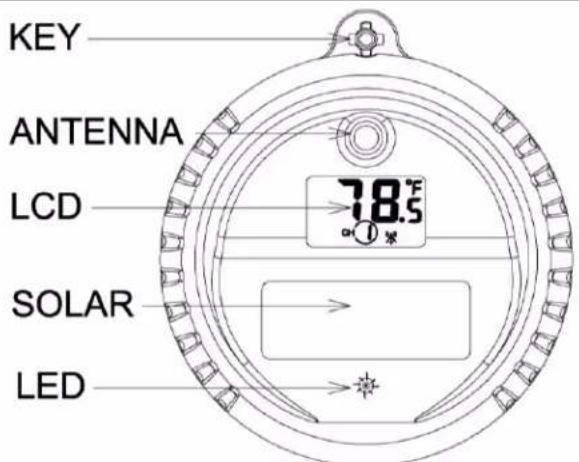
text_image
KEY ANTENNA LCD 78.5 SOLAR LEDFigure 1
- To insert the batteries, (1) Twist the KEY lid to unlock, (2) remove the key, and (3) twist the main body of the sensor by removing the lid, as shown in Figure 2.

IMPORTANT NOTE: Turn the lid counter clockwise to open, like the lid of a jar.
Turning the lid clockwise may overtighten the lid.

natural_image
Technical line drawing of a mechanical device with a 90-degree rotation indicator (no text or symbols)①
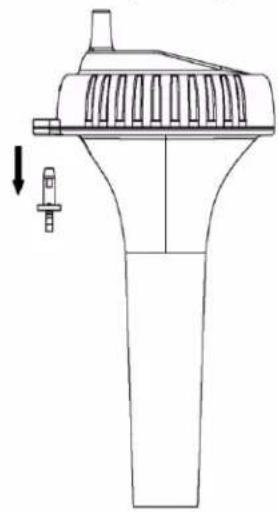
natural_image
Technical line drawing of a mechanical component with no visible text or symbols②

text_image
Open class CE FC X1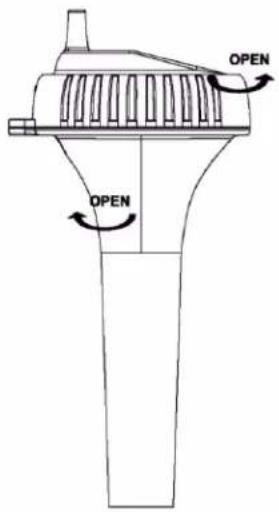
text_image
OPEN OPEN③
Figure 2

IMPORTANT NOTE: Turn the lid counter clockwise to open, like the lid of a jar (Figure 3).
Turning the lid clockwise may overtighten the lid.

text_image
5.83 openFigure 3
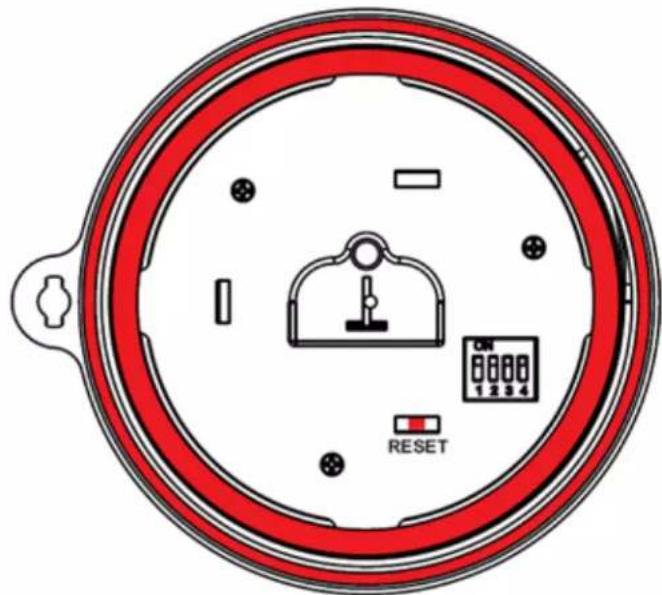
- The floating thermometer includes dip switches for assigning channel numbers. BEFORE inserting the batteries, locate the dip switches on the inside cover of the lid of the transmitter. Figure 5 displays all four switches in the OFF position (factory default setting).
NOTE: The second generation pool float includes a reset button.
If the display does not power up after inserting the batteries, press the reset button shown in Figure 4.
If your pool float does not include a reset button, cover the solar panel with one hand, remove the batteries, wait 60 seconds, reinsert the batteries, and uncover the solar panel.
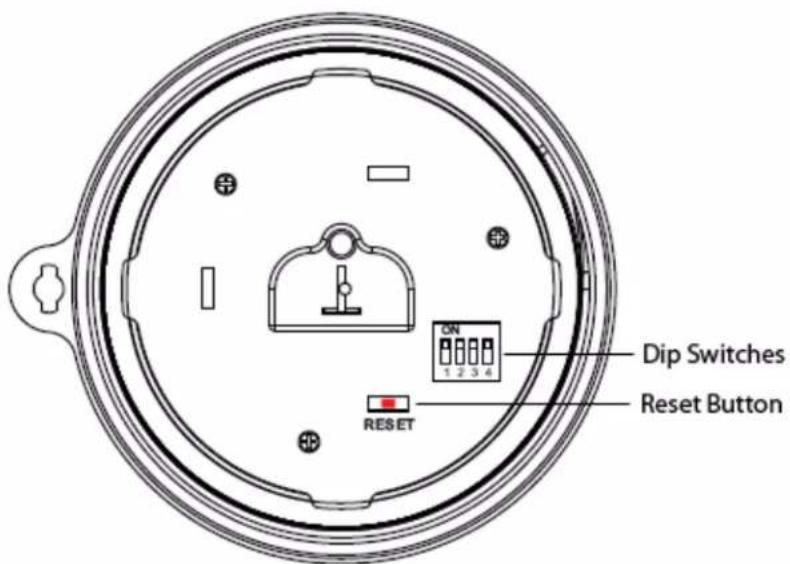
text_image
ON 1 2 3 4 Dip Switches Reset Button RESETFigure 4

text_image
ON 1 2 3 4Figure 5
Channel Number: The F007PF supports up to eight transmitters. To set each channel number (the default is Channel 1), change Dip Switches 1, 2 and 3, as referenced in Table 1.
Temperature Units of Measure: To change the transmitter display units of measure (°F vs. °C), change Dip Switch 4, as referenced in Table 1.
| DIP SWITCH | FUNCTION | |||
| 1 | 2 | 3 | 4 | |
| DOWN | DOWN | DOWN | --- | Channel 1 (pool) |
| DOWN | DOWN | UP | --- | Channel 2 (SPA) |
| DOWN | UP | DOWN | --- | Channel 3 (optional) |
| DOWN | UP | UP | --- | Channel 4 (optional) |
| UP | DOWN | DOWN | --- | Channel 5 (optional) |
| UP | DOWN | UP | --- | Channel 6 (optional) |
| UP | UP | DOWN | --- | Channel 7 (optional) |
| UP | UP | UP | --- | Channel 8 (optional) |
| --- | --- | --- | DOWN | °F |
| --- | --- | --- | UP | °C |
Table 1
- Reference Figure 6. Install 4 x AAA batteries.
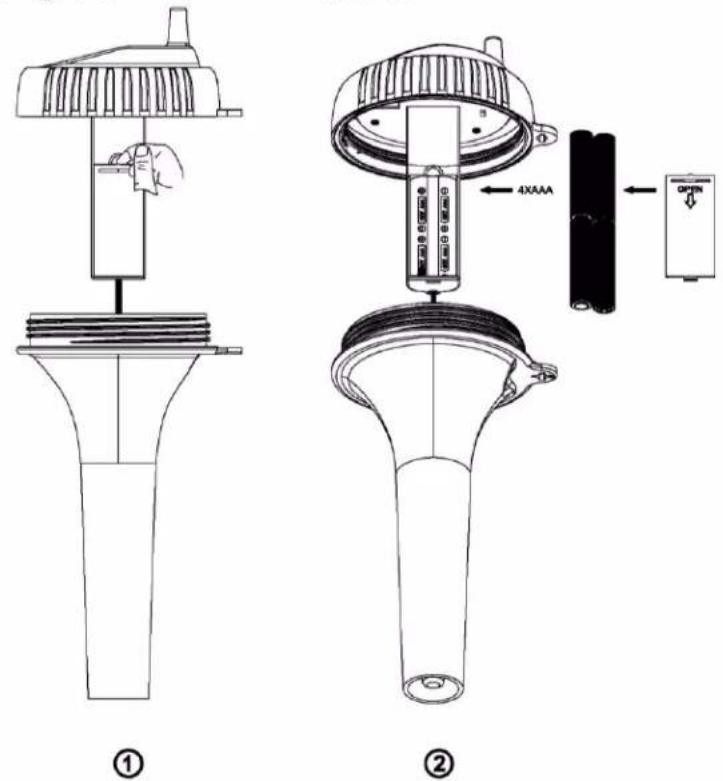
Figure 6
(1) Open the battery compartment and (2) insert 4 x AAA batteries into the battery compartment, observing the correct battery polarity.
- After inserting the batteries, the remote sensor LED indicator will light for 4 seconds, and then flash once per 60 seconds thereafter. Each time it flashes, the sensor is transmitting data.
- Verify the correct channel number (CH) and temperature units of measure (°F vs. °C) are on the display, as shown in Figure 7.

text_image
-18.8.8 °E CH 8 3 2Figure 7
(1) temperature
(2) temperature units (°F vs. °C)
(3) channel number
- Close the battery door. Make sure both red colored gaskets are properly seated in their traces prior to closing the battery door, as shown in Figure 8. Failure to properly seal the floating thermometer will result in water leakage and damage.
text_image
RESET 1 2 3 4Figure 8
- To close the lid, (1) Twist the lid until it is firmly locked and the key is aligned. (2) Insert the key and turn 90 degrees to lock the lid, as shown in Figure 9.

text_image
CLOSE CLOSE ① ② ③ 90°Figure 9
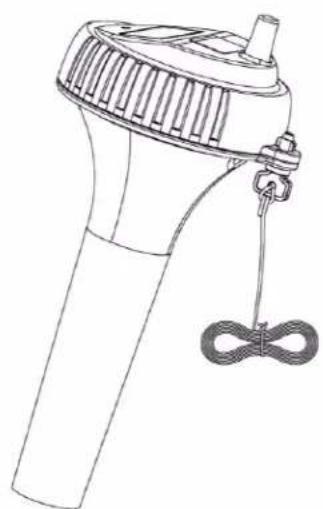
A tether can be added into the key as shown in Figure 10.
natural_image
Line drawing of a handheld device with a handle and cord, no text or symbols presentFigure 10
Place the sensor in the water and make sure that it is within the effective transmission range from the display console.
2.3 Sensor Placement
-
Place the sensor in the pool or spa within 100 feet of the display console (Figure 11, reference A). Avoid transmitting through solid earth or ground (Figure 11, reference B). Use a tether (string) to fix the sensor in the pool or spa.
-
Place the console at least three feet away from computers. TVs and wireless phones.
-
Avoid transmitting through solid metal barriers.
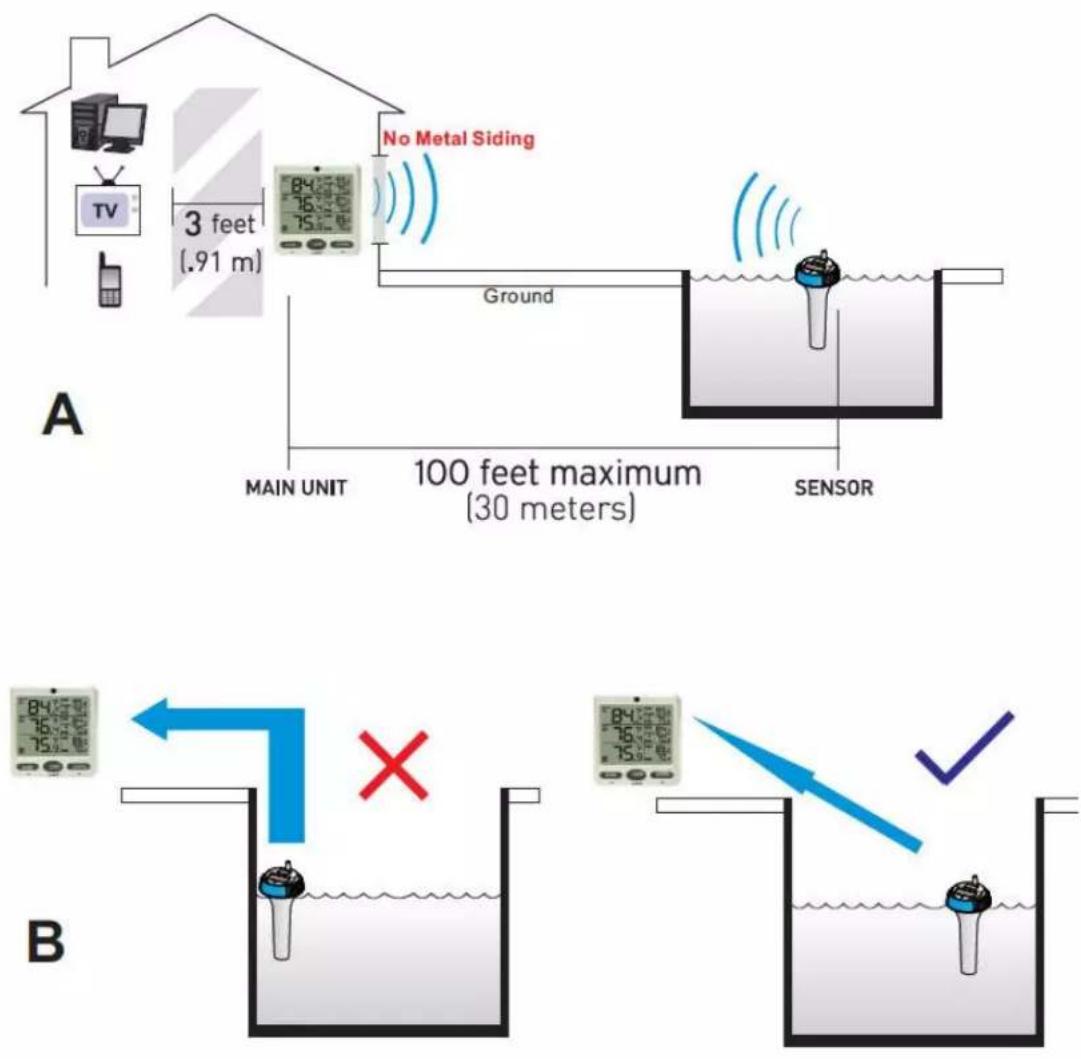
Figure 11
NOTE: The F007PF is designed to float. If the F007PF is used under a cover and the sensor is constantly submerged, the additional pressure will lead to premature gasket failure. Moisture will enter the sensor compartment and cause sensor failure.
4 Maintenance
During each battery change (1-2 years), we recommend applying waterproof silicon grease to the
seals:
http://en.wikipedia.org/wiki/Silicone_grease
Silicone grease is available at most hardware and pool stores.
5 Glossary of Terms
| Term | Definition |
| Accuracy | Accuracy is defined as the ability of a measurement to match the actual value of the quantity being measured. |
| Range | Range is defined as the amount or extent a value can be measured. |
6 Specifications
4.1 Wireless Specifications
• Line of sight wireless transmission (in open air): 150 feet, 100 feet under most conditions.
• Frequency: 433 MHz
- Update Rate: 60 seconds
4.2 Measurement Specifications
The following table provides specifications for the measured parameters.
| Measurement | Range | Accuracy | Resolution |
| Channel 1-8 Temperature | -40 to 140 °F | ±1 °F | 0.1 °F |
4.3 Power Consumption
• Remote sensor : 4 x AAA 1.5V Alkaline or Lithium batteries (not included)
- Battery life:
Minimum 24 months for floating thermometer sensor (use lithium batteries for temperatures less than -4 °F)
7 Troubleshooting Guide
If your question is not answered here, you can contact us as follows:
- Email Support: support@ambientweather.com
- Live Chat Support: www.ambientweather.com/chat.html (M-F 8am to 4pm Arizona Time)
- Technical Support: 480-346-3380 (M-F 8am to 4pm Arizona Time)
| Problem | Solution |
| Wireless remote (floating thermometer) not reporting in to console.There are dashes (--.-) on the display console. | The maximum line of sight communication range is 150' and 100' under most conditions. Move the sensor closer to the display console.If the sensor assembly is too close (less than 5'), move the sensor assembly away from the display console.Make sure the remote sensor LCD display is working and the transmitter light is flashing once per 60 seconds.Install a fresh set of batteries in the remote thermometer. For cold water environments, install lithium batteries.Make sure the remote sensors are not transmitting through solid metal (acts as an RF shield), or earth barrier (down a hill).Move the display console around electrical noise generating devices, such as computers, TVs and other wireless transmitters or receivers.Use the tether to fix the sensor as close as possible to the console. |
| Pool float does not power up. | If the display does not power up after inserting the batteries, press the reset button shown in Figure 4. If your pool float does not include a reset button, cover the solar panel with one hand, remove the batteries, wait 60 seconds, reinsert the batteries, and uncover the solar panel. |
| LCD display fading or unreadable. | Replace batteries in the floating thermometer.Extreme heat or cold will cause the display to fade but does not affect the wireless functionality. Bring into house to restore display. |
8 Accessories
The following software and hardware accessories are available for this weather station at www.AmbientWeather.com.
| Accessory Part Number | Description |
| F007PF | Additional float thermometers. Console supports up to 8 channels. |
| F007T | Wireless thermometer. Consoles support up to 8 channels. |
| F007TH | Wireless thermometer-hygrometer. WS-07, WS-08 supports up to 8 channels. |
| F007TP | Wireless temperature probe. Consoles support up to 8 channels. |
| WS-07-C | Ambient Weather WS-07 Big Digit 8-Channel Wireless Thermo-Hygrometer Console. Add as many consoles as you like. |
| WS-08-C | Ambient Weather WS-08 Wireless Indoor/Outdoor 8-Channel Thermo-Hygrometer with Daily Min/Max Display Console. Add as many consoles as you like. |
| WS-09 | Ambient Weather WS-09 8-Channel Wireless Refrigerator/Freezer Thermometer console. Add as many consoles as you like. |
9 Liability Disclaimer
Please help in the preservation of the environment and return used batteries to an authorized depot. The electrical and electronic wastes contain hazardous substances. Disposal of electronic waste in wild country and/or in unauthorized grounds strongly damages the environment.
Reading the “User manual” is highly recommended. The manufacturer and supplier cannot accept any responsibility for any incorrect readings and any consequences that occur should an inaccurate reading take place.
This product is designed for use in the home only as indication of weather conditions. This product is not to be used for medical purposes or for public information.
The specifications of this product may change without prior notice.
This product is not a toy. Keep out of the reach of children.
No part of this manual may be reproduced without written authorization of the manufacturer.
Ambient, LLC WILL NOT ASSUME LIABILITY FOR INCIDENTAL, CONSEQUENTIAL, PUNITIVE, OR OTHER SIMILAR DAMAGES ASSOCIATED WITH THE OPERATION OR MALFUNCTION OF THIS PRODUCT.
10 FCC Statement
Statement according to FCC part 15.19:
This device complies with part 15 of the FCC rules. Operation is subject to the following two conditions:
- This device may not cause harmful interference.
- This device must accept any interference received, including interference that may cause undesired operation.
Statement according to FCC part 15.21:
Modifications not expressly approved by this company could void the user's authority to operate the equipment.
Statement according to FCC part 15.105:
NOTE: This equipment has been tested and found to comply with the limits for a Class B digital device, pursuant to Part 15 of the FCC Rules. These limits are designed to provide reasonable protection against harmful interference in a residential installation. This equipment generates, uses and can radiate radio frequency energy and, if not installed and used in accordance with the instructions, may cause harmful interference to radio communications.
However, there is no guarantee that interference will not occur in a particular installation. If this equipment does cause harmful interference to radio or television reception, which can be determined by turning the equipment off and on, the user is encouraged to try to correct the interference by one or more of the following measures:
• Reorient or relocate the receiving antenna.
- Increase the separation between the equipment and receiver.
- Connect the equipment into an outlet on a circuit different from that to which the receiver is connected.
- Consult the dealer or an experienced radio/TV technician for help.
11 Warranty Information
Ambient, LLC provides a 1-year limited warranty on this product against manufacturing defects in materials and workmanship.
This limited warranty begins on the original date of purchase, is valid only on products purchased and only to the original purchaser of this product. To receive warranty service, the purchaser must contact Ambient, LLC for problem determination and service procedures.
Warranty service can only be performed by a Ambient, LLC. The original dated bill of sale must be presented upon request as proof of purchase to Ambient, LLC.
Your Ambient, LLC warranty covers all defects in material and workmanship with the following specified exceptions: (1) damage caused by accident, unreasonable use or neglect (lack of reasonable and necessary maintenance); (2) damage resulting from failure to follow instructions contained in your owner's manual; (3) damage resulting from the performance of repairs or alterations by someone other than an authorized Ambient, LLC authorized service center; (4) units used for other than home use (5) applications and uses that this product was not intended (6) the products inability to receive a signal due to any source of interference or metal obstructions and (7) extreme acts of nature, such as lightning strikes or floods.
This warranty covers only actual defects within the product itself, and does not cover the cost of installation or removal from a fixed installation, normal set-up or adjustments, claims based on misrepresentation by the seller or performance variations resulting from installation-related circumstances.