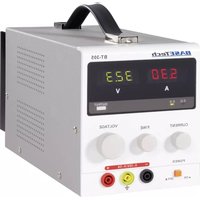
BT-305 - Power supply BASETECH - Free user manual and instructions
Find the device manual for free BT-305 BASETECH in PDF.


User questions about BT-305 BASETECH
0 question about this device. Answer the ones you know or ask your own.
Ask a new question about this device
Download the instructions for your Power supply in PDF format for free! Find your manual BT-305 - BASETECH and take your electronic device back in hand. On this page are published all the documents necessary for the use of your device. BT-305 by BASETECH.
USER MANUAL BT-305 BASETECH
GB Operating instructions Page 15 - 27
www.business.conrad.at
- Introduction ...... 16
- Intended Use 16
- Scope of Delivery 17
- Product Description 17
- Explanation of Symbols 18
- Safety Information....19
- Connection Contacts and Control Elements ...... 21
- Commissioning and Operation 23
a) Connection and Operation 23
b) Setting the Output Voltage 23
c) Setting the Current Limitation 24
d) Connecting Consumers 24
- Cleaning and Maintenance 25
a) General Care 25
b) Fuse Replacement 25
- Functional Problems ...... 26
- Disposal 26
- Technical Data 27
1. Introduction
Dear Customer,
Thank you for purchasing this product.
This product meets the requirements of statutory European and national requirements. To maintain this status and to ensure safe operation, you as the user must observe these operating instructions!

Read the complete operating instructions before taking the product into operation and observe all operation and safety information!
All company names and product names are trademarks of their respective owners. All rights reserved.
In case of any technical questions, contact or consult:
Germany: Tel. no.: +49 9604 / 40 88 80
Fax. no.: +49 9604 / 40 88 48
E-mail: tkb@conrad.de
Mon. to Thur. 8.00am to 4.30pm, Fri. 8.00am to 2.00pm
2. Intended Use
The lab mains adapter is a potential-free voltage source for operating small low-voltage consumers. It was developed for universal use in research, development, production, service and training. Consumers are connected via the sockets at the front of the device.
The connected consumer's power consumption must not exceed the maximum ampere value indicated in the technical data.

Observe all safety information in these operating instructions. They contain important information on handling of the product.
Before taking the product into operation, read the complete operating instructions carefully. They contain important information on proper operation of the device. Please keep them for later use.
3. Scope of Delivery
- Lab mains adapter
- Mains connection cable
- Operating instructions
4. Product Description
The lab mains adapter is used as a power supply for small low-voltage consumers. For easy handling, the operating elements and displays are aligned in a well-structured manner. The respective values for current and voltage can be read easily on the high-contrast LED display. The current and voltage values are set via rotary controls at the front of the device.
The lab mains adapter is overload- and short-circuit-proof due to its integrated current limitation and corresponds to protection category I. It is only approved for connection to earthed mains sockets and an alternating voltage of 230 V/50 Hz. Operation in damp rooms or under unfavourable ambient conditions is not permitted. Unfavourable ambient conditions are:
- dampness or high humidity
- dust and flammable gases, vapours or solvents
- thunderstorms or thunderstorm conditions (strong electrostatic fields generally must be avoided)
Any use other than described above is forbidden and may harm the lab mains adapter and connection line, resulting in risks like short circuit, fire, electric shock, etc. The entire product must not be modified or converted.
5. Explanation of Symbols

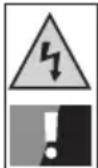
The triangle containing a lightning symbol warns against danger of electric shock or impairment of the electrical safety of the device.

An exclamation mark indicates important notes in these operating instructions that must be strictly observed.

The “arrow” symbol indicates that special advice and notes on operation are provided here.

The product is intended for use in dry indoor rooms only; it must not become damp or wet.

This device is CE-compliant and meets the applicable European directives.

Earth potential

Protective earth connection; this screw must not be loosened.
The guarantee/warranty will expire if damage is incurred resulting from non-compliance with these operating instructions. We do not assume any liability for consequential damage!
We do not assume any liability for property damage and personal injury caused by improper use or non-compliance with the safety information! In such cases the warranty/guarantee will expire.
Dear Customer,
this safety information serves not only to protect the product, but also your own safety and the safety of other persons. Therefore, read this chapter very carefully before taking the product into operation!
This lab mains adapter left the manufacturer's factory in a safe and perfect condition.
To maintain this condition and ensure safe operation, the user must observe the safety information and warning notes in these operating instructions.
- The unauthorized conversion and/or modification of the product is prohibited for safety and approval reasons (CE).
- The lab mains adapter corresponds to protection category I. It is only approved for connection to an earthed mains socket (230 V/50 Hz). Ensure that the earth connection is not defective/interrupted. It would pose fatal danger in case of malfunction.
- The product is not a toy and must be kept out of the reach of children.
Children cannot judge the dangers involved when handling electrical devices. Children may also change settings or push objects into the mains adapter's ventilation slits. There is danger to life from electric shock! Therefore, always operate the product out of the reach of children. - The lab mains adapter must only be set up and operated in dry, closed indoor rooms. It must not become damp or wet. The mains adapter also must not be exposed to extreme temperatures, direct sunlight, vibration or mechanical stress.
- Only operate the lab mains adapter in moderate climate, never in tropical climate. For more information on acceptable environmental conditions, see the chapter “Technical Data”.
- Choose a solid, flat, clean and sufficiently large surface for the lab mains adapter.
- Do not use any open fire in direct proximity to the lab mains adapter and do not place any containers with liquids on or next to the lab mains adapter.
- If the lab mains adapter is taken from a cold into a warm room, condensation may form. This poses a risk of potentially fatal electrical shock. Therefore, allow the lab mains adapter to reach room temperature before connecting it to mains voltage or operating it.
- Before taking the lab mains adapter into operation and during operation, ensure that your hands, shoes, clothes, the floor and the device itself are dry.
- Disconnect the lab mains adapter's mains plug from the mains socket during thunderstorms to prevent damage from overvoltage.
-
Ensure that the insulation of the lab mains adapter, the safety sockets, connected cables and mains cable are not damaged or destroyed. Do not use blank metal conductors.
-
Use connection cables of sufficient size with intact insulation.
- Do not wear any conductive metal objects or jewellery like necklaces, bracelets, rings, etc. when operating the device.
- Never operate the lab mains adapter unattended.
- Protect the connected consumers from operating interference and overvoltage.
- Serial connection of several mains adapters may lead to voltages dangerous to touch that may be potentially fatal. Observe the low-voltage directive in this context.
- Operation of the lab mains adapter generates heat. Never push any objects between the device's cooling fins and do not obstruct ventilation in any other manner. The mains adapter is mainly cooled by convection. Therefore, never cover the lab mains adapter.
- If it can be assumed that safe operation is no longer possible, the lab mains adapter must be turned off and secured against inadvertent operation. Unplug the mains adapter from the mains socket. It can be assumed that safe operation is no longer possible if:
- the lab mains adapter shows visible damage,
- the lab mains adapter no longer functions,
- the lab mains adapter was stored under unfavourable conditions for an extended period or
- if it was subjected to heavy stress during transport.
- Do not use the lab mains adapter as a charger.
- The lab mains adapter is not designed for application to humans and animals.
- Maintenance, adjustments and repairs must only be carried out by a specialist or a specialised repair shop.
- Live components may be exposed if covers are opened or parts are removed (unless this can be done without tools). There is danger to life from electric shock!
- The lab mains adapter must be disconnected from all power sources before it is opened. Unplug the mains adapter from the mains socket.
- Capacitors inside the lab mains adapter may still be charged after the lab mains adapter was disconnected from all power sources.
- Only fuses of the indicated type and rated current must be used. Use of mended fuses is not permissible. There is a danger of fire!
- On industrial sites, the accident prevention regulations of the association of the industrial workers' societies for electrical equipment and utilities must be followed.
- If the lab mains adapter is used at schools, training facilities, do-it-yourself and hobby workshops, it must be supervised by trained, responsible personnel.
Also observe the safety information in the different chapters or in the operating instructions of the connected devices.
If you are not sure about the correct operation or if questions arise which are not covered by the operating instructions, please do not hesitate to contact us or another specialist.
For contact information, see chapter 1.
7. Connection Contacts and Control Elements

The figures are located on the next page.
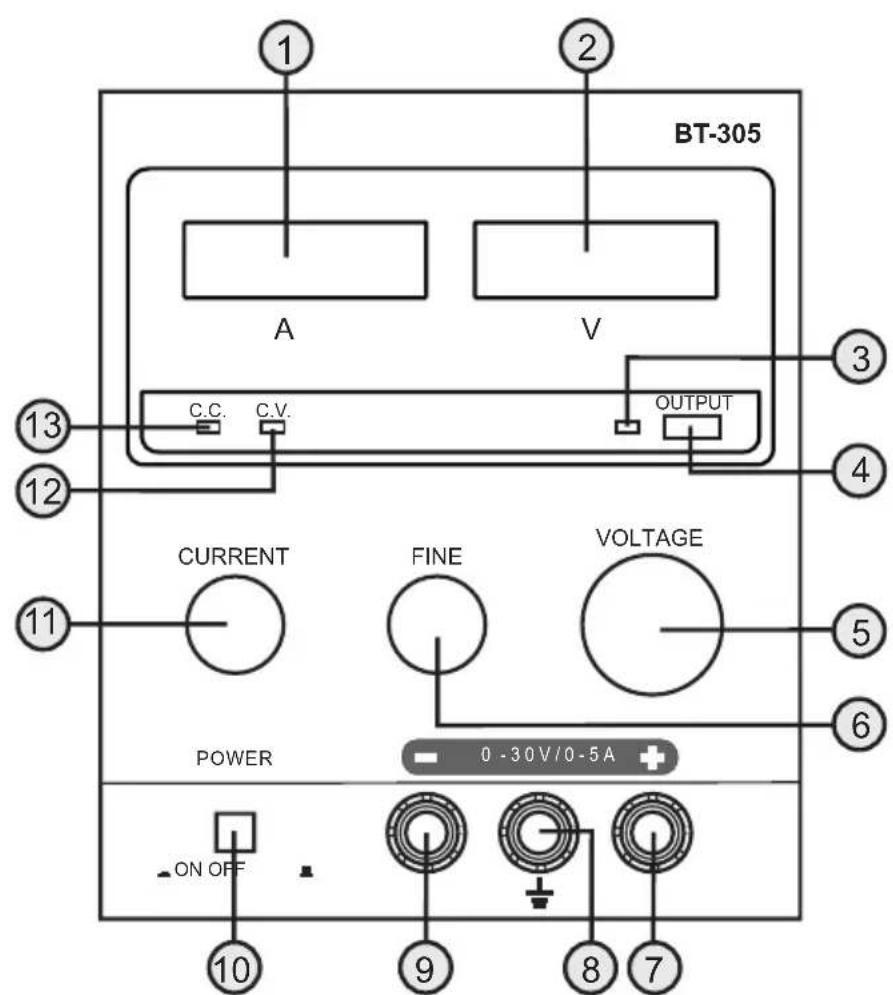
(1) LED display "A" for output current
(2) LED display "V" for output voltage
(3) LED display for active output sockets
(4) Pushbutton for activation/deactivation of the output sockets
(5) Rotary control "VOLTAGE" for general voltage adjustment
(6) Rotary control "FINE" for fine voltage adjustment
(7) Plus connection sockets for direct current output
(8) Connection socket for earth connection (yellow-green)
(9) Minus connection sockets for direct current output
(10) On/off switch
(11) Rotary control "CURRENT" to limit output current
(12) LED display "CV" for voltage control for the output
(13) LED display "CC" for current control for the output
(14) Cooling fins
(15) Fuse holder
(16) Mains input socket
text_image
BT-305 A V C.C. C.V. OUTPUT CURRENT FINE VOLTAGE POWER 0 -30V/0 -5A + ON OFF 10 9 8 7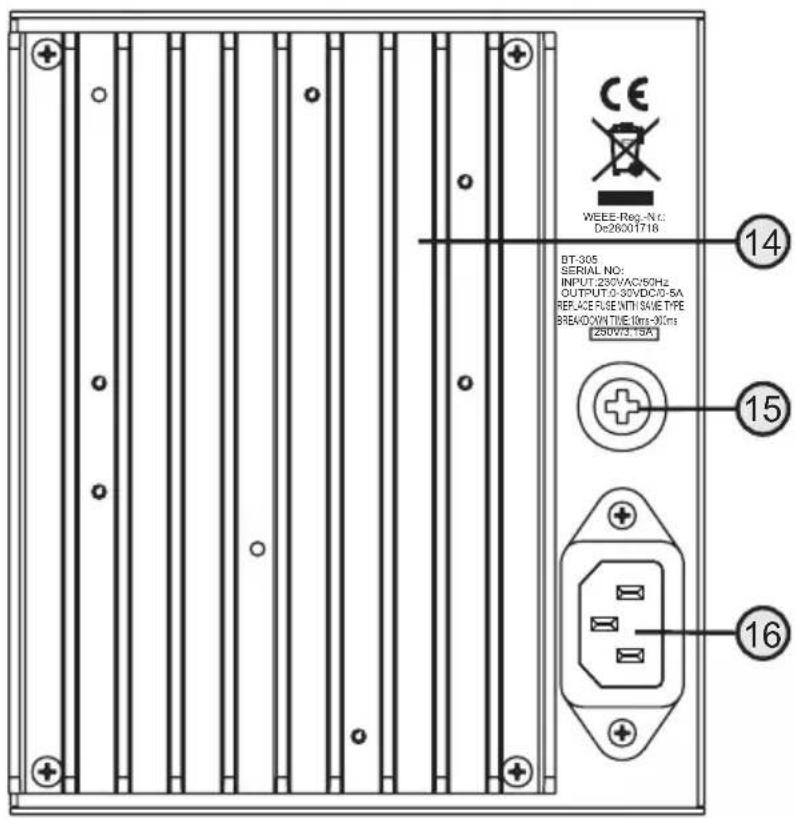
text_image
WEEE-Reg.-N: De26001718 BT-305 SERIAL NO: INPUT:230VAC/50Hz OUTPUT:0-30VDC/0-5A REPLACE PULSE WITH SAVE TYPE BREAKDOWN TIME:10ms-30ms 250VAC/15A 14 15 168. Commissioning and Operation
a) Connection and Operation
- Place the lab mains adapter on a firm and level surface.
- The on/off switch must be in the "OFF" position initially.
- Plug the low-power device plug of the included mains cable into connection (16) on the rear of the device and the mains plug in a mains socket with 230 V/50 Hz alternating current.
- Switch on the lab mains adapter by pressing the on/off switch (10) ("ON" position).
- The two LED displays (1 and 2) light up and display the currently set current and voltage values.
- Depending on the position of the rotary control "CURRENT" (11) for output current limitation, either the LED display "CV" (12) for output voltage control or the LED display "CC" (13) for output current control are lit.
- The lab mains adapter is now ready for setting the output voltage and current limitation.
b) Setting the Output Voltage
For the correct output voltage to be set, the lab mains adapter output must be operated in voltage-controlled condition.
- Turn the rotary control “CURRENT” (11) for output current limitation clockwise from the left stop until the red LED “CC” (13) for current limitation goes out and the green LED “CV” (12) for voltage control lights up.
- Check the rotary control "FINE" (6) for fine voltage adjustment. This control should be in the centre position.
- Then set the desired output voltage approximately with the rotary control "VOLTAGE" (5). The currently set voltage is displayed by the LED "V" (2). If the control is turned clockwise, the voltage increases. If the control is turned counter-clockwise, the voltage decreases.
- Then precise settings are performed with the rotary control "FINE" (6).

If the rotary control "FINE" (6) has to be turned to the stop, return it to the centre position and adjust the voltage value with the rotary control "VOLTAGE" (5) before returning to fine adjustment.

Attention!
The set voltage is only put on the output sockets when the pushbutton (4) for activation/deactivation of the output sockets is pressed. In this case, the LED display (3) also lights up for the active output sockets.
c) Adjusting the Current Limitation

First set the permissible operating voltage for the consumer to be operated using the two voltage controls "VOLTAGE" (5) and "FINE" (6) (see chapter 8. b).
The set voltage must not be put on the output sockets and the LED display (3) for active output sockets must not be lit.
If the LED display (3) is lit, press the pushbutton (4) for activation/deactivation of the output sockets so that the voltage at the output sockets is switched off and the LED display (3) goes out.
- Then set the desired maximum current with the rotary control “CURRENT” (11) for output current limitation. The currently set current value is displayed by the LED “A” (1).
- If the control is turned clockwise, the current increases. If the control is turned counter-clockwise, the current decreases.
- When the desired maximum current is set, switch off the lab mains adapter using the on/off switch ("OFF" position).

When both rotary controls for setting the voltage (5 and 6) are turned to the left stop, the voltage display indicates 00.0 Volt.
If the rotary control "CURRENT" (11) for current limitation is then moved to the left stop, the lab mains adapters switches into current-controlled condition and the voltage display indicates a minimum value.
This is due to the circuit and not an error of the lab mains adapter.
d) Connecting Consumers
First ensure that the total power of all consumers together does not exceed the maximum output of the lab mains adapter.
- The consumers should always be switched off when they are connected to the lab mains adapter. Otherwise, there may be sparks that may damage both the output sockets and the plugs.
- Switch on the lab mains adapter.
- Set the required operating voltage for the respective consumers.
- Set the current limitation to the required value.
- Connect the plus connection (+) of the consumer to the plus output socket (7) of the lab mains adapter and the minus connection (-) of the consumer to the minus output socket (9) of the lab mains adapter. Use sufficiently large cables with 4mm banana plugs or use standardised lab cables.
- Earth the consumers using the intended earthing connection (8) of the lab mains adapter.
- Press the pushbutton (4) for activation/deactivation of the output sockets so that the voltage for the output sockets is cleared and the LED display (3) lights up.

Once voltage is cleared for the output sockets and the consumer is switched on, the current values for current and voltage are displayed in the LED displays (1 and 2).
Depending on operating condition of the lab mains adapter (current- or voltage-controlled), the red LED display "CC" (13) for current limitation or the green LED "CV" (12) for voltage control is lit.
If required, you can also readjust the current limitation or voltage control value with the output sockets cleared.
To switch off voltage at the output sockets again, press the pushbutton (4) for activation/deactivation of the output sockets again, so that LED display (3) goes out.

Attention!
The lab mains adapter has a protective switch that limits current in case of short circuit. TO prevent the lab mains adapter from overheating, always switch it off right away and disconnect the consumers. Let the lab mains adapter cool off and ensure unhindered air circulation. The cooling fins (14) should be clean and dust-free, and the casing openings must not be covered.
The maximum uninterrupted operating time of the lab mains adapter is 8 hours. Then turn off the lab mains adapter and let it cool down to ambience temperature.
9. Cleaning and Maintenance
a) General Care
Always switch off the lab mains adapter before cleaning. Clean the exterior of the lab mains adapter with a soft, dry cloth or brush only. Never use any aggressive cleaning agents or chemical solutions. They may damage the casing surface.
b) Fuse Replacement

Attention!
Switch off the lab mains adapter first and remove all connection cables from the lab mains adapter. Unplug the lab mains adapter's mains plug from the mains socket.
Use a suitable flat screwdriver to push the rear fuse holder (15) in slightly, and open the bayonet lock with a quarter turn counter-clockwise.
Replace the defective fuse with a new fine-wire fuse of the same type and the same rated current (see chapter "Technical Data").
Replace the fuse holder, press it in slightly and tighten it again with a screw driver by turning it clockwise. Then check the lab mains adapter for correct function.
10. Functional Problems
The lab mains adapter does not work, the displays are not lit.
- Check the on/off switch.
- Check that the low-power connection plug is connected to the mains socket (16) at the rear of the device correctly.
- Check the functional safety of the mains connection (mains sockets, fuses, circuit breakers, etc.).
- Verify that the correct mains voltage is applied.
The connected consumers do not work.
- Connect the polarity of the connection sockets (7 and 9).
- Check if current limitation is active.
- Reduce load placed on the lab mains adapter by the consumers.
- Check the technical data of the consumers.
11. Disposal
At the end of its service life, dispose of the product according to the relevant statutory regulations.
12. Technical Data
General:
Operating voltage 230 V/AC (±10%)
Frequency 50 Hz (±2 Hz)
Power consumption 345 VA max.
Controllable output voltage 0 - 30 V/DC
Controllable output current.... 0 - 5 A
Duration of uninterrupted operation .... max. 8 h
Main fuse (5 x 20 mm) F3A / 250V
Dimensions (W x H x D) 130 x 155 x 295 mm
Weight 4.95 kg
Operating temperature ....+5 °C to +40 °C
Ambient air humidity .... max. 90% rel. humidity ( non-condensing)
Protection class .... I
Output voltage:
Idle operation ....≤ 0.01% + 1 mV
Stability at 10 - 100 % load ....≤ 0.2% +2 mV
Residual ripple (5 Hz - 1 MHz) .... ≤ 0.5 mVrms / ≤ 20 mVss
Output current:
Idle operation ....≤ 0.01% + 2 mA
Stability at 0 - 100 % load ....≤ 0.2% + 6 mA
Residual ripple (5 Hz - 1 MHz) .... ≤ 3 mArms / ≤ 30 mAss
Display accuracy:
Voltage ±1% + 2 digit
Current ±2% + 2 digit
Page
Chère client, cher client,
Chère client, cher client,
text_image
Warning sign with triangular warning symbol and exclamation mark, commonly used in safety or hazard prevention contextGeneral information:
© Copyright 2011 by Conrad Electronic SE.
GB Legal Notice
These operating instructions are a publication by Conrad Electronic SE, Klaus-Conrad-Str. 1, D-92240 Hirschau (www.conrad.com).
All rights including translation reserved. Reproduction by any method, e.g. photocopy, microfilming, or the capture in electronic data processing systems require the prior written approval by the editor. Reprinting, also in part, is prohibited.
These operating instructions represent the technical status at the time of printing. Changes in technology and equipment reserved.
© Copyright 2011 by Conrad Electronic SE.
© Copyright 2011 by Conrad Electronic SE.
NL Colofon
© Copyright 2011 by Conrad Electronic SE.
V1_0411_01