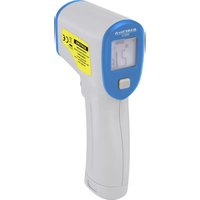
350C12 - Thermometer BASETECH - Free user manual and instructions
Find the device manual for free 350C12 BASETECH in PDF.


User questions about 350C12 BASETECH
0 question about this device. Answer the ones you know or ask your own.
Ask a new question about this device
Download the instructions for your Thermometer in PDF format for free! Find your manual 350C12 - BASETECH and take your electronic device back in hand. On this page are published all the documents necessary for the use of your device. 350C12 by BASETECH.
USER MANUAL 350C12 BASETECH
text_image
Labeled diagram of a handheld device with numbered parts and a digital display showing measurement indicators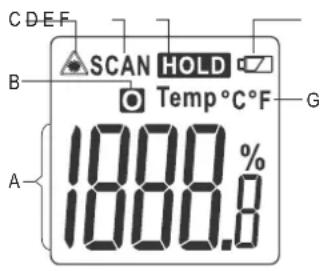
text_image
C D E F SCAN HOLD Temp °C °F B G 1800.8% ACopyright 2018 by Conrad Electronic SE.
*1586224_v2_0118_02_DS_m_4L_(1)
GB Operating instructions
Basetech IR thermometer 350 °C 12:1
Item no. 1586224
Intended use
The infrared thermometer is a measuring device for contactless temperature measurement. It determines the temperature by infrared energy that is emitted by an object and by its emissivity. It is especially useful for measuring the temperature of hot, difficult to access or moving objects. The thermometer measures the surface temperature of an object. It cannot measure through transparent surfaces such as glass or plastics. The temperature measuring range is -50^ to +350^ . A 9 V block battery is required for the voltage supply.
Diagnostic application for medical purposes is not permissible.
For safety and approval purposes, you must not rebuild and/or modify this product. Using the product for purposes other than those described above may damage the product. In addition, improper use can cause hazards such as a short circuit or fire. Read the operating instructions carefully and store them in a safe place. Only make this product available to third parties together with its operating instructions.
This product complies with statutory, national and European regulations. All company and product names are trademarks of their respective owners. All rights reserved.
Delivery contents
- IR thermometer
- 9 V block battery
- Operating instructions
Up-to-date operating instructions
Download the latest operating instructions at www.conrad.com/downloads or scan the QR code shown. Follow the instructions on the website.
Explanation of symbols

The symbol with an exclamation mark in a triangle is used to highlight important information in these operating instructions. Always read this information carefully.

The arrow symbol indicates special information and advice on how to use the product.
Safety instructions

Read the operating instructions and safety information carefully. If you do not follow the safety instructions and information on proper handling in these operating instructions, we will assume no liability for any resulting personal injury or damage to property. Such cases will invalidate the warranty/guarantee.
a) General information
• This product is not a toy. Keep it out of the reach of children and pets.
- Do not leave packaging material lying around carelessly. This may become dangerous playing material for children.
- Protect the product from extreme temperatures, direct sunlight, strong jolts, high humidity, moisture, flammable gases, vapours and solvents.
- Do not place the product under any mechanical stress.
- If it is no longer possible to operate the product safely, stop using it and prevent unauthorized use. Safe operation can no longer be guaranteed if the product:
- is visibly damaged,
- is no longer working properly,
- has been stored for extended periods in adverse ambient conditions or
- has been subjected to any serious transport-related stress.
• Always handle the product carefully. Jolts, impacts or a fall even from a low height may damage the product.
- Consult a technician if you are not sure how to use or connect the product.
- Maintenance, modifications and repairs must be done by a technician or a specialist repair centre.
- If you have questions which remain unanswered by these operating instructions, contact our technical support service or other technical personnel.

b) Persons and product
- The product is suitable only for use in dry environments. If you want to use the product outdoors, make sure that the weather conditions permit use of the product. If necessary, use suitable protective devices, in order to keep the product dry.
- Moisture, dust, fume and/or vapours can affect the optics of the thermometer and lead to incorrect measurements.
- Do not use in the immediate proximity of strong magnetic or electromagnetic fields or transmission aerials. These may distort the measurements.
- Do not subject the thermometer to high temperatures in the vicinity of heat sources or use it to measure explosive gases, vapours or dusts.
- Always comply with the accident prevention regulations for electrical equipment when using the product in industrial facilities.
- Trained personnel must supervise the use of electrical appliances in schools, training facilities and DIY workshops.
- Never switch the device on immediately after taking it from the cold into a warm environment. The condensation generated may destroy the product. Condensation on the lens can lead to inaccurate measurements. Leave the device switched off and allow it to reach room temperature.
c) (Rechargeable) battery
• Always check that the battery is inserted in the correct polarity.
- To prevent battery leakage, the battery should be removed from the device if it is not used for a long period of time. Leaking or damaged batteries may cause acid burns if they come into contact with your skin. Always use suitable protective gloves when handling damaged batteries.
- The battery must be kept out of the reach of children. Do not leave batteries lying around, as there is a risk that children or pets may swallow them.
- Batteries must not be dismantled, short-circuited or thrown into fire. Never recharge non-rechargeable batteries. There is a risk of explosion!
d) Laser safety
- When operating the laser equipment, always make sure that the laser beam is directed so that no one is in the projection area and that unintentionally reflected beams (e.g. from reflective objects) cannot be directed into areas where people are present.
- Laser radiation can be dangerous if the laser beam or its reflection enters unprotected eyes. Before using the thermometer, familiarise yourself with the statutory regulations and instructions for operating such a laser device.
- Never look into the laser beam or point it at people or animals. Laser radiation can cause serious eye damage.
- If laser radiation enters your eyes, close your eyes immediately and move your head away from the beam.
- If your eyes have been irritated by laser radiation, do not continue to perform hazardous tasks, such as working with machines, working at heights or working near to high voltages. Do not drive any vehicles until the irritation has completely subsided.
- Do not point the laser beam at mirrors or other reflective surfaces. The uncontrolled, reflected beam may strike people or animals.
- Never open the device. Configuration or maintenance tasks must only be completed by a trained specialist who is familiar with the potential hazards. Improper maintenance work may result in dangerous laser radiation.
- The product is equipped with a class 2 laser. Laser signs in different languages are included with the product. If the sign on the laser is not in your local language, attach the appropriate sign to the laser.
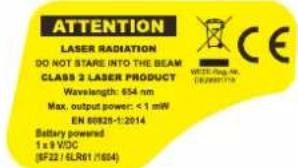
text_image
ATTENTION LASER RADIATION DO NOT STARE INTO THE BEAM CLASS 2 LASER PRODUCT Wavelength: 654 nm Max. output power: <1 mW EN 00820-1:2014 Battery powered 1 x 8 VDC (5F22 / ELR01 / 004)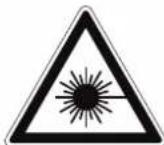
- Caution: Using equipment or procedures other than those described in these instructions could lead to exposure to dangerous radiation.
Controls and LCD display
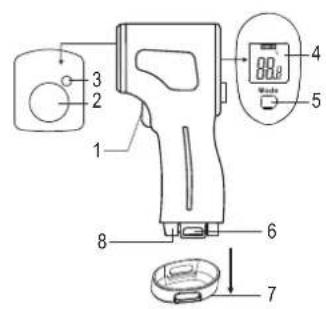
text_image
Labeled diagram of a handheld device with numbered parts and a digital display showing measurement ranges.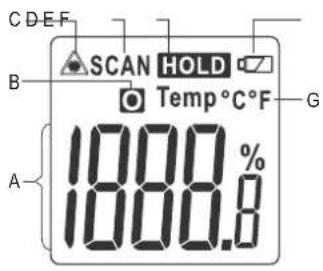
text_image
C D E F SCAN HOLD Temp °C °F B G 1800 % A 1000.81 Trigger
2 Infrared sensor
3 Laser outlet
4 LCD display
5 Mode button
6 Locking latch (battery compartment)
7 Battery compartment cover
8 Battery compartment
A Temperature display range
B Temperature symbol for the object temperature
C Laser symbol
D "SCAN" measuring indicator (displayed during measurements)
E "HOLD" display symbol (the measured value is displayed continuously)
F Low battery indicator
G Temperature unit (this symbol displays the measuring unit used)
Setup
a) Inserting/replacing the battery
- Insert the battery before using the thermometer for the first time. Replace the battery when the low battery indicator [empty battery] (F) is displayed.
- Press the locking latch (6) inwardly on both sides at the same time and pull the battery compartment cover (7) downwards, in order to open the battery compartment (8).
- Remove the used battery from the compartment and insert a new battery of the same type in the correct polarity. The battery clip is designed so the battery can be only be connected in the correct polarity. Do not use force when plugging the battery in onto the contacts.
- Stow the battery in the battery compartment (8).
- Close the battery compartment (8) by closing the battery compartment cover (7) using the locking latch (6). Be careful not to pinch the cables.
b) Function
- Infrared thermometers measure the surface temperature of an object. The sensor on the product records the heat radiation emitted, reflected and transmitted through the object, and converts this information into a temperature value.
- Temperature measurements on shiny or reflective surfaces are imprecise. Transparent materials cannot be measured. To measure such materials, apply a layer of opaque adhesive paper tape to the object, allow the tape to reach the temperature of the object, and then measure the surface temperature of the transparent object at the taped location.
- Emissivity is used to describe the energy emission characteristics of a material. The higher the emissivity, the more radiation a material can emit. Many organic materials and surfaces have an emission level of approx. 0.95. Metallic surfaces or shiny materials have low emissivity. This results in imprecise measuring values.
- The thermometer's emissivity settings cannot be changed.
Emissivity of different surfaces
The emissivity levels listed in the following table are approximate values. Parameters such as the shape and characteristics of the material can affect the emissivity of an object. Measuring materials with an emissivity that is different from the preset emissivity may lead to slightly inaccurate readings.
| Surface Emissivity | Surface Emissivity | ||
| Asphalt | 0.90 – 0.98 | Plastic | 0.85 – 0.95 |
| Varnish (matt) | 0.97 | Hard plaster | 0.80 – 0.90 |
| Concrete | 0.94 | Sand | 0.90 |
| Human skin | 0.98 | Glass/ceramics | 0.90 – 0.95 |
| Ice 0.96 – 0.98 | Textiles | 0.90 | |
| Mortar | 0.89 – 0.91 | Rubber (black) | 0.94 |
| Ferric oxide | 0.78 – 0.82 | Water | 0.92 – 0.96 |
| Paper | 0.70 – 0.94 | Varnish | 0.80 – 0.95 |
| Soil/humus | 0.92 – 0.96 | Bricks | 0.93 – 0.96 |
c) Switching on
- Press the trigger (1) to switch on the infrared thermometer.
The product must first adjust to the ambient temperature, in order to be able to supply precise measurement values. When using the product in a new location, wait until it has had time to adjust to the new ambient temperature.
d) Measurement of surface temperatures
- For a measurement, point the infrared sensor (2) and the laser outlet (3), preferably perpendicular to the object to be measured. Make sure that the object to be measured is not smaller than the product IR measuring spot (see "e) IR measuring spot size - distance-to-spot ratio; D/S"). - Press the trigger (1) and hold it down while it takes measurements and until the measured value in the LCD display (4) has stabilized. "SCAN" (D) will appear on the display while the temperature is being measured. The temperature displayed is the surface temperature of the measured object. The symbol for the object temperature (B) is displayed.
→ Make sure that the lens of the infrared sensor is clean. Dust, smoke or fluff on the lens may distort the results.
- The temperature display range (A) shows the measurement value in the selected unit. The displayed measurement value corresponds to the average surface temperature of the IR-measuring spot.
- After releasing the trigger (1), the last measured value will be displayed continuously in the display. The measurement value is frozen, in order to avoid fluctuation. "HOLD" (E) will also be displayed. The current measurement process is completed.
• To locate hot or cold spots on the measured object, sweep along the object in broad strokes back and forth or up and down whilst you pull the entire object laterally. Observe the measurements whilst doing so. The laser beam indicates the measured area. - When you release the trigger, the thermometer turns off automatically after 10 seconds if no other buttons are pressed.
- "Hi" will be displayed if the temperature exceeds the measuring range (>350 °C). "Lo" will be displayed if the temperature is lower than the measuring range (<-50 °C).
→ Longer measurements of high temperatures, with a close measuring distance, lead to heating of the measuring device itself and thus to inaccurate measurements. Adhere to the following rule in order to obtain exact measuring values: The higher the temperature the greater the measuring distance and the shorter the measuring time.
e) IR measuring spot size - distance-to-spot ratio (D/S)
- In order to obtain precise measuring results, the measured object must be larger than the IR measuring spot. The measured temperature is calculated using the average temperature of the measured area. The smaller the object, the closer it must be to the thermometer. It is also indicated on the thermometer. To ensure precise measurements, the measured object should be at least twice the size of the measuring spot.
- The exact size of the IR measuring spot is shown in the following diagram.
D:S=12:1
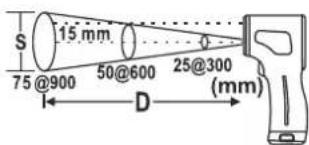
text_image
S 15 mm 75 @900 50@600 25@300 (mm) DSettings
- Switch the thermometer on for setup. Press the trigger (1) to switch on.
a) Changing the temperature unit (°C / °F)
The temperature unit can be switched between ^ C / ^ F .
- Press and hold the trigger (1) to measure the temperature. The temperature unit can only be changed, if a temperature indicator is shown in the LCD display (4).
- Press the MODE button (5) once to change the temperature unit (G). The temperature unit can be switched from ^ (degrees Celsius) to ^ (degrees Fahrenheit) or vice versa. The character of the measuring unit appears after every key press in the LCD display (4).
b) Switching the backlight on and off
- Press and hold the Mode button for 3 seconds, to enter settings mode.
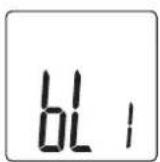
- To deactivate the backlight, press down the trigger (1) several times until "0" appears in the LCD display. The backlight is switched off.
- To activate the backlight, press down the trigger (1) until "1" appears in the LCD display. The backlight is switched on.
- The backlight lights up, as soon as "1" is selected, and goes off when set to "0".
- Press and hold the Mode button for 3 seconds to confirm the setting.
c) Enable/disable target laser
The target laser can be switched on and off. When the laser is switched on, the laser symbol (triangle with radiation symbol) is shown on the display.
- Press and hold the Mode button for 3 seconds, to enter settings mode.
- Release the Mode button again to enter settings mode for the target laser.
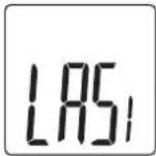
- To disable the laser, hold down the trigger (1) until "0" appears in the LCD display. To enable the laser, hold down the trigger (1) until "1" appears in the LCD display. The laser will automatically be turned on when you take a measurement.
- The target laser is automatically turned on when you take a measurement as long as the trigger (1) is kept pressed, if "1" was selected. The measuring process takes place without turning on the target laser support, if set to "0".
- Press and hold the Mode button for 3 seconds to confirm the setting.
Troubleshooting
| Problem Cause Solution | ||
| Blank display. The product is switched off. Press the trigger button (1) to switch the product on. | ||
| The low battery indicator (F) will appear on the display. | Battery too weak. Replace the battery. | |
| Battery weak. Replace the battery. | ||
| No temperature is measured. | Malfunction. Briefly press the trigger button (1) and start the measurement process again. | |
| "Hi" appears on the display. | The temperature of the measured object exceeds the measuring range (> +350 °C). | Observe the measuring range. |
| "Lo" appears on the display. | The temperature of the measured object is below the measuring range (<-50 °C). | Observe the measuring range. |
Care and cleaning
- Before cleaning the product, disconnect it from the power supply by removing the battery.
- Do not immerse the product in water.
- Never use aggressive detergents, rubbing alcohol or other chemical solutions, as these may damage the housing or cause the product to malfunction.
- Remove loose particles from the lens with clean compressed air, and then wipe off any remaining residue with a fine lens brush. Clean the surface of the lenses using a lens cloth or a soft, lint-free cloth. The cloth can be moistened with water or a lens cleaning solution to remove fingerprints and other residues. Do not use a rough, fluffy cloth to clean the lens. Avoid applying too much pressure when cleaning the lens.
- Use a dry, lint-free cloth to clean the product housing.
Disposal
a) Product

Electronic devices are recyclable waste and must not be placed in household waste. At the end of its service life, dispose of the product in accordance with applicable regulatory guidelines.
If a battery is inserted, remove it and dispose of it separately from the product.
b) Batteries

You are required by law to return all used batteries (Battery Directive). Batteries must not be placed in household waste.
Batteries containing hazardous substances are labelled with this symbol to indicate that disposal in household waste is forbidden. The abbreviations for heavy metals in batteries are: Cd = Cadmium, Hg = Mercury, Pb = Lead (indicated on the battery, e.g. below the trash icon on the left).
Used batteries can be returned to local collection points, our stores or battery retailers.
You thus fulfil your statutory obligations and contribute to protection of the environment.
Technical data
| Temperature measuring range | Accuracy |
| -50 to -19 °C (-58 to -2.2 °F) | ± 5 °C |
| -20 to 79 °C (-5 to 174.2 °F) | ± 4 °C |
| +80 to +149 °C (+176 to +300.2 °F) | ± 3 °C |
| +150 to +350 °C (+302 to +662 °F) | ±(3% of the measured value or +1 °C) |
Operating voltage....9 V/DC block battery (1 included in delivery contents)
Current consumption....30 mA (with display lighting and target laser switched on)
Battery life.... 20 hours (with backlight and target laser)
Standby power consumption .... 3.3 μA (when switched off)
Temperature display range....-50 to +350 °C (-58 to +662 °F)
Resolution 0.1 °C /°F
Measuring range indicator..... Temperature too high "Hi"/temperature too low "Lo"
Measurement value fixing.....Yes, measurement values are fixed in the display
Switch temperature
units between ^ C/ ^ F
Emissivity.... 0.95 fixed (non-adjustable)
IR measuring spot size ....Approx. 12:1 (DS)
Spectrum (IR) 8 -14 μm
Response time....1 second
Laser class 2
Laser output power....< 1 mW
Laser wavelength 654 nm
LCD display 23.5 x 24 mm
Display backlight.....Yes, (white)
Battery level indicator.... Yes, with 6.5 V \~ 7.0 V
Automatic power off..... after 10 seconds of inactivity
Operating conditions.... 0 to +50 °C, 10 - 80 % relative humidity (non-condensing)
Storage conditions....-10 to +60 °C, 10 – 80 % relative humidity (non-condensing)
Dimensions (L x W x H)....153 x 72 x 42 mm
Weight 115 g
This is a publication by Conrad Electronic SE, Klaus-Conrad-Str. 1, D-92240 Hirschau (www.conrad.com).
All rights including translation reserved. Reproduction by any method, (e.g. photocopying, microfilming, or capture in electronic data processing systems) requires prior written approval from the editor. Reprinting, also in part, is prohibited. This publication represents the technical status at the time of printing.
Copyright 2018 by Conrad Electronic SE.
*1586224_v2_0118_02_DS_m_4L_(1)
F Mode d'emploi
Thermomètre IR Basetech 350 °C 12:1
text_image
Technical diagram of a handheld device with numbered components and a digital display showing measurement values.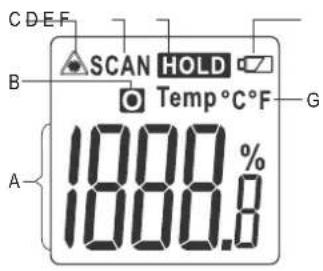
text_image
C D E F SCAN HOLD Temp °C °F B G 1800.8% ASpectre (IR) 8 -14 μm
Copyright 2018 by Conrad Electronic SE. *1586224_v2_0118_02_DS_m_4L_(1)
text_image
Labeled diagram of a handheld device with numbered parts and a digital display showing measurement indicators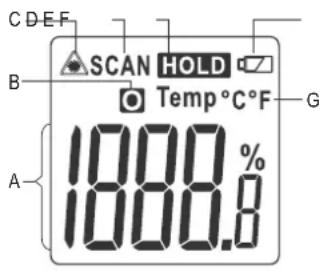
text_image
C D E F SCAN HOLD Temp °C °F B 1800 % A 1800.8Copyright 2018 by Conrad Electronic SE.
*1586224_v2_0118_02_DS_m_4L_(1)