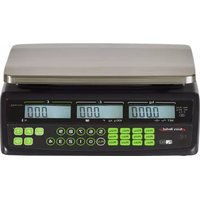
AVERY BERKEL FX50 - Scale

FX50 - Scale AVERY BERKEL - Free user manual and instructions

Find the device manual for free FX50 AVERY BERKEL in PDF.

📄 169 pages English EN Download 💬 AI Question 10 questions ⚙️ Specs
Notice AVERY BERKEL FX50 - page 9
Pick your language and provide your email: we'll send you a specifically translated version.
Product typeElectronic counter scale
BrandAvery Berkel
ModelFX50
DisplayOperator and customer displays, adjustable backlight (ON/OFF/AUTO)
Maximum weighing capacityUp to 85 kg (depending on version) / 15 kg (Europe version) / 30 lb (US version)
AccuracyFrom 0.005 kg (5 g) depending on capacity
Weight unitsKilograms (kg) or pounds (lb) depending on version
PlatformStainless steel
Power supplyMains via 220-240 V AC adapter; internal rechargeable battery (built-in charger)
BatteryRechargeable, charge indicator (red/green); autonomy not specified
Tare functionsManual tare (known), deposit tare (unknown), proportional tare (percentage)
PLU keys12 direct PLU keys + 38 indirect PLU (numbers 13 to 50); unit price programming
Special functionsTotal price multiplication by 2 or 4 (US/Canada versions); unit price lock (F/Save key)
Auto-offConfigurable: disabled (0) or after 1, 5 or 30 minutes of inactivity
CleaningSoft damp cloth with mild detergent; do not use solvents, abrasives or alkaline products
SafetyLeveling via bubble and adjustable feet; on/off switch; overcurrent protection
RepairabilityReplaceable battery (see manual §3.6); calibration and service by authorized distributor for error codes
Net weightApproximately 5 to 8 kg depending on version (not exactly specified)
Dimensions (W x D x H)Approximately 350 x 400 x 150 mm (monobloc version); column: additional height (not exactly specified)
Included accessoriesMains adapter, rechargeable battery, stainless steel platform

Frequently Asked Questions - FX50 AVERY BERKEL

How to turn on the Avery Berkel FX50 scale?
Press the On/Off switch located under the scale. The scale emits a first beep, then a second during the verification routine. The display lights up and the scale is ready after a few seconds.
How to change the backlight mode?
Turn on the scale. During the second beep, hold down the F/▶ key. Use the ▲/Tare key to cycle through ON, OFF and AUTO modes (displayed on the total price screen). Press F/▶ to confirm. You can cancel with Ⓦ-0-.
How to set the auto-off?
Turn on the scale. During the verification routine (when numbers scroll), press the ▲/Tare key. The total price screen shows the current mode. Use ▲/Tare to select 0 (never), 1, 5 or 30 minutes. Press F/▶ to save and return to weighing.
How to perform a weigh with a known tare?
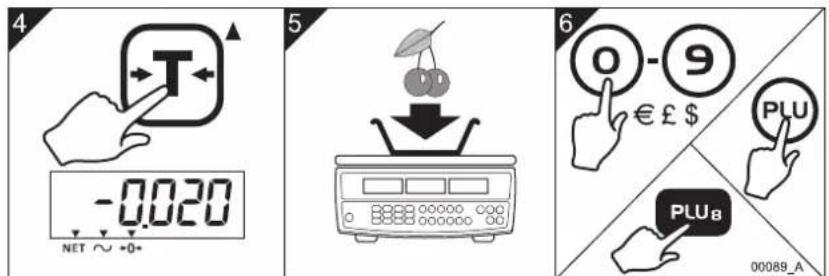
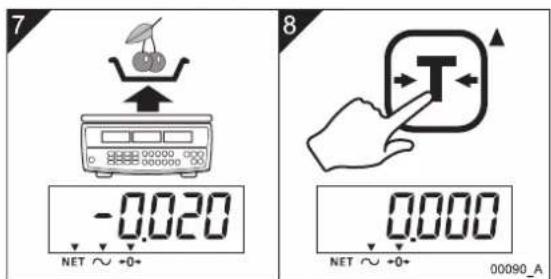
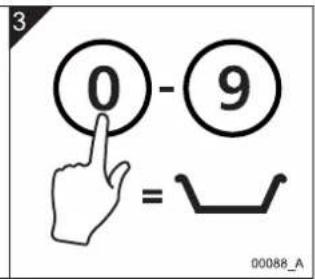
Place the empty container on the platform. Press the Tare key to record its weight (the display shows a negative number). Then enter the unit price with the numeric keys or recall a PLU. Place the item in the container: the display shows the net weight and total price.
How to program a direct PLU?
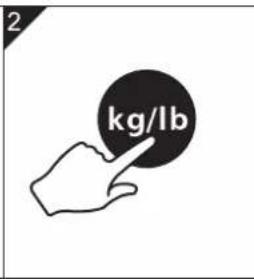
Make sure no item is on the platform. Enter the unit price with the numeric keys, then select the weight unit (kg/lb) or price base (€/kg or €/100g) if needed. Press and hold the desired direct PLU key (PLU1 to PLU12) for 3 seconds. The screen confirms the save.
What does error code Err 4 mean?
Err 4 indicates that the load on the platform exceeds 4% of the maximum capacity during zeroing. Remove any weight from the platform and turn the scale back on. Press Zero. If the problem persists, calibration or service by your Avery Berkel distributor is required.
How to clean the scale?
Unplug the scale. Use a clean cloth dampened with water and a small amount of mild detergent or unscented dish soap. Wipe gently. Never use solvents, abrasives or alkaline products (such as soda).
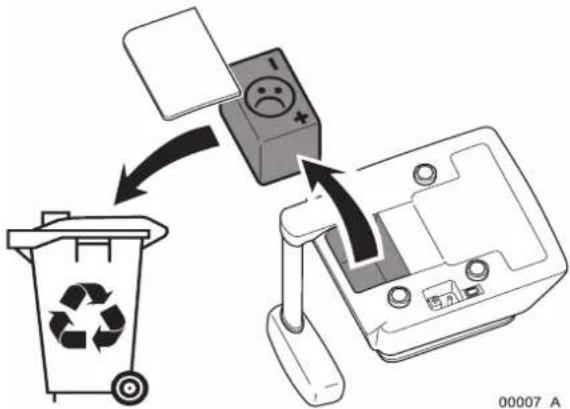
How to replace the internal battery?
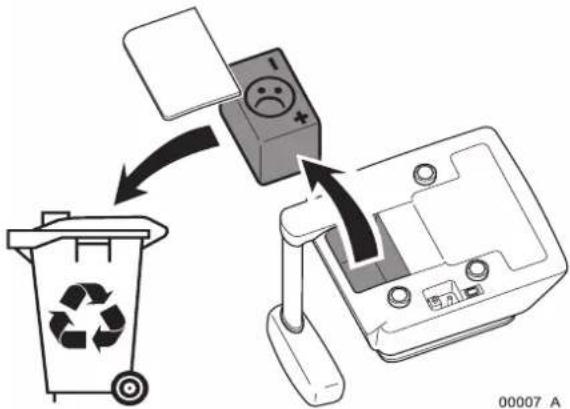
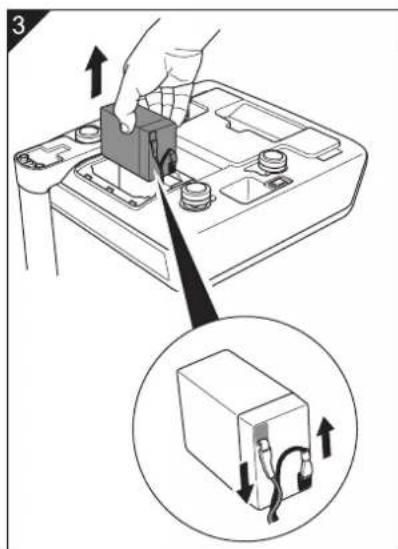
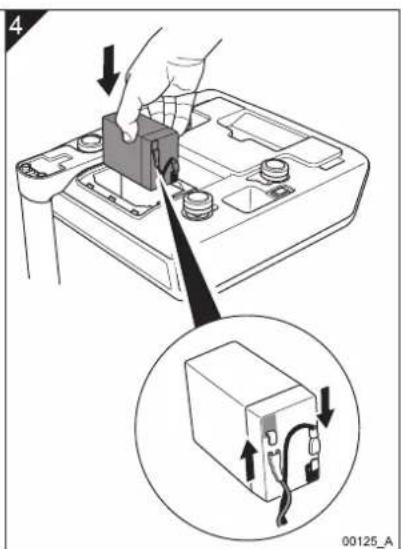
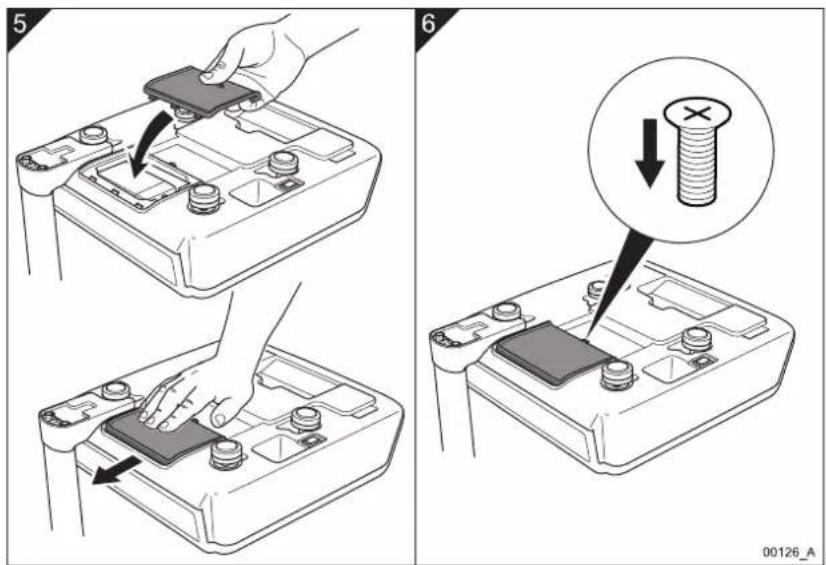
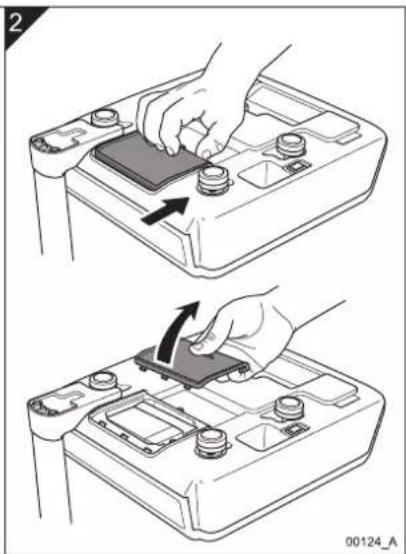
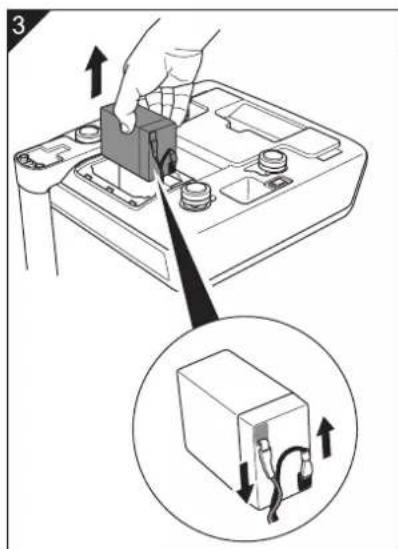
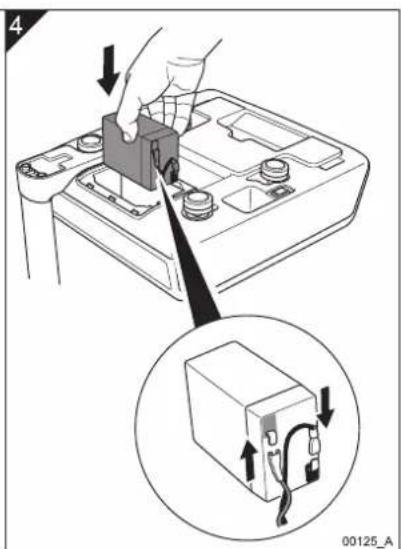
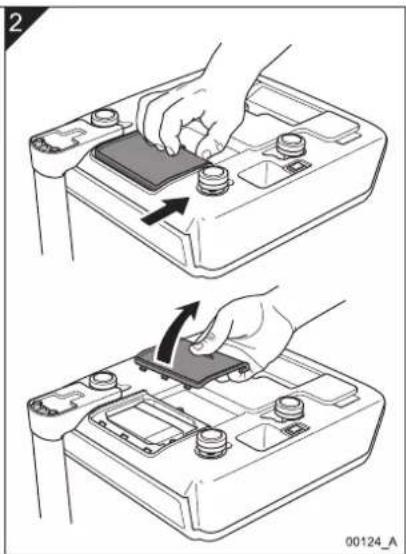
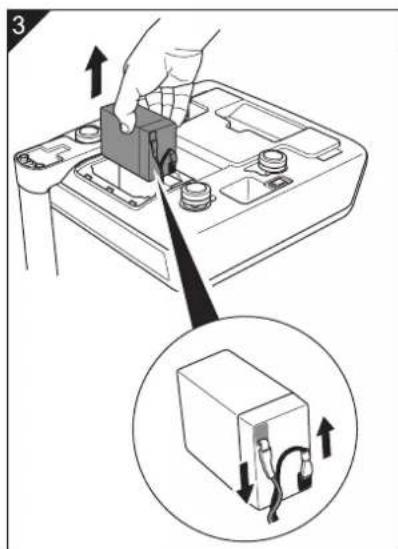
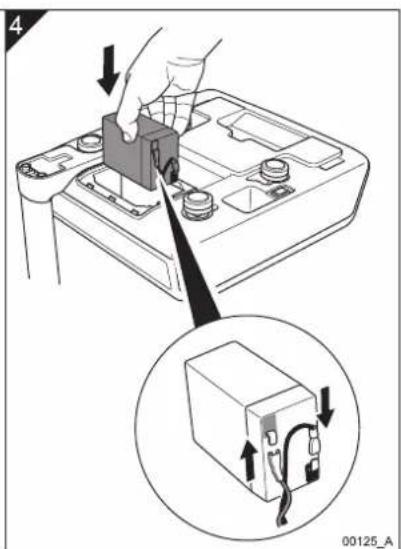
Turn off the scale and unplug the adapter. Remove the battery compartment cover (under the scale). Disconnect the connector and replace with an identical battery. Reconnect, close and fully recharge before first use (red LED turns green).
How to use proportional tare?
This function is available on US and Canada versions. Enter the tare percentage via the keyboard (e.g., 25.00 for 25%). Press Tare. The screen shows the percentage. Place the item (with its packaging): the scale subtracts the percentage from the gross weight to calculate the net weight.
What is the maximum weighing capacity of the FX50?
The capacity depends on the version. On models for the United States and Canada, it can reach 85 kg with an accuracy of 0.005 kg. For Europe/Rest of World models, the capacity is 15 kg (accuracy 5 g). The Australian version weighs only in kilograms.

User questions about FX50 AVERY BERKEL

0 question about this device. Answer the ones you know or ask your own.

Ask a new question about this device

The email remains private: it is only used to notify you if someone responds to your question.

No questions yet. Be the first to ask one.

Download the instructions for your Scale in PDF format for free! Find your manual FX50 - AVERY BERKEL and take your electronic device back in hand. On this page are published all the documents necessary for the use of your device. FX50 by AVERY BERKEL.

USER MANUAL FX50 AVERY BERKEL

natural_image Two digital balance scales with gold and black plates, one displaying a 0.000 digital display and the other a black stand labeled 'Aure Berkel' (no visible text or symbols on the scales themselves)

User Instructions

FX50 User.book Page 2 Thursday, August 23, 2007 2:31 PM
AVERY BERKEL FX50 - 1

AVERY BERKEL FX50 - 2

AVERY BERKEL FX50 - 3

AVERY BERKEL FX50 - 4

AVERY BERKEL FX50 - 5

AVERY BERKEL FX50 - 6

AVERY BERKEL FX50 - 7

AVERY BERKEL FX50 - 8

AVERY BERKEL FX50 - 9

AVERY BERKEL FX50 - 10

AVERY BERKEL FX50 - 11

AVERY BERKEL FX50 - 12

AVERY BERKEL FX50 - 13

AVERY BERKEL FX50 - 14

AVERY BERKEL FX50 - 15

AVERY BERKEL FX50 - 16

ENGLISH

© Avery Berkel Limited 2007. All rights reserved.

The information contained herein is the property of Avery Berkel Limited and is supplied without liability for errors or omissions. No part may be reproduced or used except as authorised by contract or other written permission. The copyright and the foregoing restriction on reproduction and use extend to all media in which the information may be embodied.

Trademarks and acknowledgements

Avery, Avery Berkel and Avery Weigh-Tronix are registered trademarks in certain jurisdictions and owned and registered by companies within the Avery Weigh-Tronix Group.

All brands and product names used within this document are trademarks or registered trademarks of their respective holders.

IMPORTANT

When programming or configuring the equipment you must ensure that you comply with all relevant standards and legislation. The example settings given in this book may not be legal for trade with the public.

ESPANOL

FX50 User.book Page iv Thursday, August 23, 2007 2:31 PM

AVERY BERKEL FX50 - ESPANOL - 1

AVERY BERKEL FX50 - ESPANOL - 2

AVERY BERKEL FX50 - ESPANOL - 3

AVERY BERKEL FX50 - ESPANOL - 4

AVERY BERKEL FX50 - ESPANOL - 5

AVERY BERKEL FX50 - ESPANOL - 6

AVERY BERKEL FX50 - ESPANOL - 7

AVERY BERKEL FX50 - ESPANOL - 8

AVERY BERKEL FX50 - ESPANOL - 9

AVERY BERKEL FX50 - ESPANOL - 10

AVERY BERKEL FX50 - ESPANOL - 11

AVERY BERKEL FX50 - ESPANOL - 12

AVERY BERKEL FX50 - ESPANOL - 13

AVERY BERKEL FX50 - ESPANOL - 14

AVERY BERKEL FX50 - ESPANOL - 15

AVERY BERKEL FX50 - ESPANOL - 16

Contents

1. Warnings and cautions 5

1.1 Installing the scale safely 5
1.2 Cautions for using the scale safely 5
1.3 Cleaning the scale 7

2. Main parts, keyboard and display 9

2.1 Main parts 9
2.2 Keyboard variants ..... 11

3. Installing the scale 17

3.1 Assembling the tower variant ..... 17
3.2 Levelling the scale 18
3.3 Charging the battery 19
3.4 Changing the display backlight mode 19
3.5 Setting the auto power off mode 20
3.6 Changing the battery 21

4. Operating the scale 23

4.1 Key to symbols used ..... 23
4.2 Switching on and setting up the scale 25
4.3 Weighing individual items 26
4.4 Weighing items of the same unit price 27
4.5 Weighing using known tares 28
4.6 Weighing using unknown tares 30
4.7 Using proportional tares 31
4.8 Multiplying a unit price 33
4.9 Programming direct PLUs 34
4.10 Weighing using direct PLUs 35

FX 50 User Instructions 1

AVERY BERKEL FX50 - Operating the scale 23 - 1

AVERY BERKEL FX50 - Operating the scale 23 - 2

AVERY BERKEL FX50 - Operating the scale 23 - 3

natural_image Pure geometric crosshair symbols without any text or labels

AVERY BERKEL FX50 - Operating the scale 23 - 4

natural_image Pure geometric diagram with intersecting lines and a central circular pattern (no text or symbols)

AVERY BERKEL FX50 - Operating the scale 23 - 5

AVERY BERKEL FX50 - Operating the scale 23 - 6

FX50 User.book Page 2 Thursday, August 23, 2007 2:31 PM

AVERY BERKEL FX50 - Operating the scale 23 - 7

AVERY BERKEL FX50 - Operating the scale 23 - 8

Contents

4.11 Programming indirect PLUs 36
4.12 Weighing using indirect PLUs .....37

5. Error codes

39

2 FX 50 User Instructions

AVERY BERKEL FX50 - Error codes - 1

AVERY BERKEL FX50 - Error codes - 2

AVERY BERKEL FX50 - Error codes - 3

AVERY BERKEL FX50 - Error codes - 4

AVERY BERKEL FX50 - Error codes - 5

AVERY BERKEL FX50 - Error codes - 6

Thank you for choosing this Avery Berkel product.

Please read these safety and user instructions before you use this product.

Please read all the sections of this document that have Danger, Warning and Caution symbols and notices.

AVERY BERKEL FX50 - Thank you for choosing this Avery Berkel product. - 1

WARNING! This is a Warning symbol. Warnings mean that failure to follow specific practices and procedures may have major consequences such as injury to personnel or serious corruption to data or loss of data.

AVERY BERKEL FX50 - Thank you for choosing this Avery Berkel product. - 2

DANGER! This is a Danger symbol. Danger means that failure to follow specific practices or procedures may result in an electrical shock that could cause personal injury or death.

AVERY BERKEL FX50 - Thank you for choosing this Avery Berkel product. - 3

CAUTION! This is a Caution symbol. Cautions give information about procedures that, if not observed, could result in damage to equipment or corruption to and loss of data.

AVERY BERKEL FX50 - Thank you for choosing this Avery Berkel product. - 4

NOTE: This is a Note symbol. Notes give additional and important information, hints and tips that help you to use your product.

AVERY BERKEL FX50 - Thank you for choosing this Avery Berkel product. - 5

AVERY BERKEL FX50 - Thank you for choosing this Avery Berkel product. - 6

AVERY BERKEL FX50 - Thank you for choosing this Avery Berkel product. - 7

AVERY BERKEL FX50 - Thank you for choosing this Avery Berkel product. - 8

AVERY BERKEL FX50 - Thank you for choosing this Avery Berkel product. - 9

AVERY BERKEL FX50 - Thank you for choosing this Avery Berkel product. - 10

AVERY BERKEL FX50 - Thank you for choosing this Avery Berkel product. - 11

AVERY BERKEL FX50 - Thank you for choosing this Avery Berkel product. - 12

AVERY BERKEL FX50 - Thank you for choosing this Avery Berkel product. - 13

FX50 User.book Page 4 Thursday, August 23, 2007 2:31 PM

AVERY BERKEL FX50 - Thank you for choosing this Avery Berkel product. - 14

AVERY BERKEL FX50 - Thank you for choosing this Avery Berkel product. - 15

AVERY BERKEL FX50 - Thank you for choosing this Avery Berkel product. - 16

AVERY BERKEL FX50 - Thank you for choosing this Avery Berkel product. - 17

AVERY BERKEL FX50 - Thank you for choosing this Avery Berkel product. - 18

AVERY BERKEL FX50 - Thank you for choosing this Avery Berkel product. - 19

AVERY BERKEL FX50 - Thank you for choosing this Avery Berkel product. - 20

AVERY BERKEL FX50 - Thank you for choosing this Avery Berkel product. - 21

AVERY BERKEL FX50 - Thank you for choosing this Avery Berkel product. - 22

AVERY BERKEL FX50 - Thank you for choosing this Avery Berkel product. - 23

AVERY BERKEL FX50 - Thank you for choosing this Avery Berkel product. - 24

AVERY BERKEL FX50 - Thank you for choosing this Avery Berkel product. - 25

AVERY BERKEL FX50 - Thank you for choosing this Avery Berkel product. - 26

AVERY BERKEL FX50 - Thank you for choosing this Avery Berkel product. - 27

AVERY BERKEL FX50 - Thank you for choosing this Avery Berkel product. - 28

AVERY BERKEL FX50 - Thank you for choosing this Avery Berkel product. - 29

1.1 Installing the scale safely

1. Warnings and cautions

1.1 Installing the scale safely

AVERY BERKEL FX50 - Installing the scale safely - 1

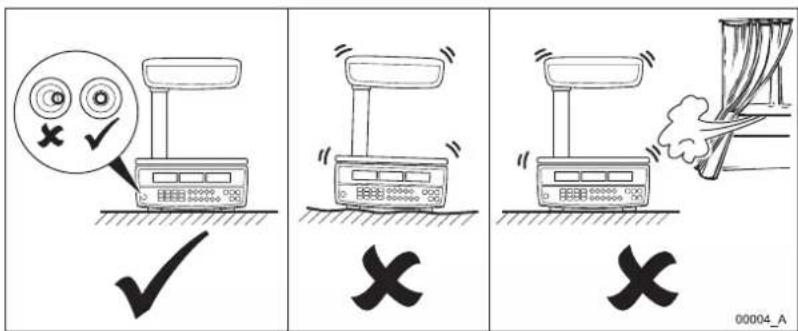
WARNING: You must install pluggable equipment near to an easily accessible socket outlet. The electrical supply to the outlet must give over-current protection of an appropriate rating.

AVERY BERKEL FX50 - Installing the scale safely - 2

WARNING: If in doubt, ask a qualified electrician for advice.

1.2 Cautions for using the scale safely

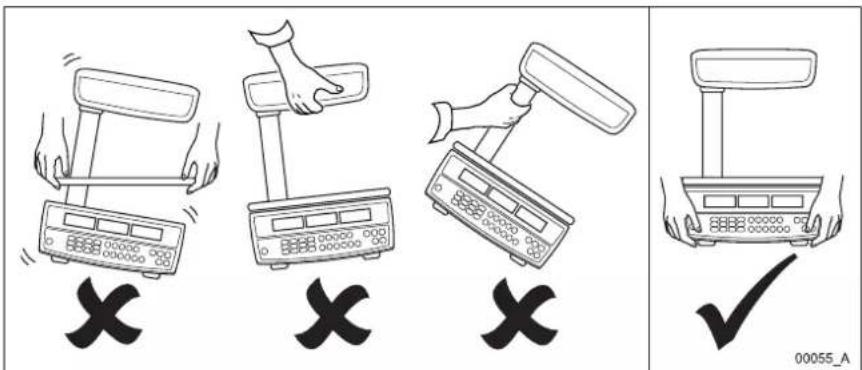
AVERY BERKEL FX50 - Cautions for using the scale safely - 1

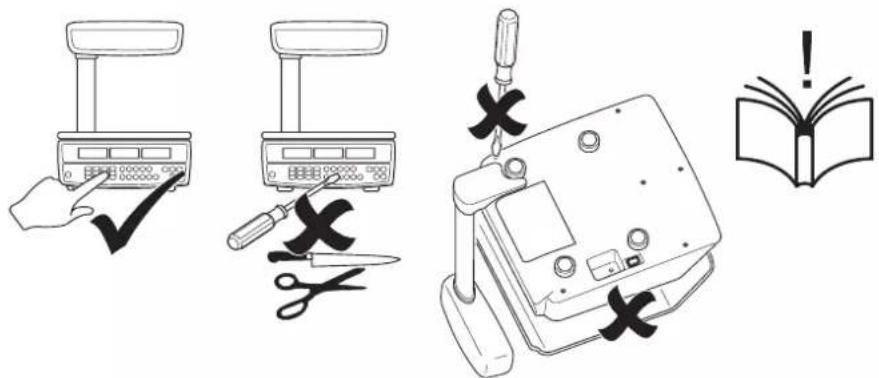
text_image Illustration showing four different hand gestures on a scale, with X marks indicating cancellation or error, and a checkmark for the right.

Fig 1-1. Picking up the scale correctly

AVERY BERKEL FX50 - Cautions for using the scale safely - 2

natural_image Pure geometric crosshair symbols without any text or labels

FX 50 User Instructions 5

AVERY BERKEL FX50 - Cautions for using the scale safely - 3

AVERY BERKEL FX50 - Cautions for using the scale safely - 4

natural_image Pure geometric diagram with intersecting lines and a central circular pattern (no text or symbols)

AVERY BERKEL FX50 - Cautions for using the scale safely - 5

AVERY BERKEL FX50 - Cautions for using the scale safely - 6

FX50 User.book Page 6 Thursday, August 23, 2007 2:31 PM

1. Warnings and cautions

AVERY BERKEL FX50 - Warnings and cautions - 1

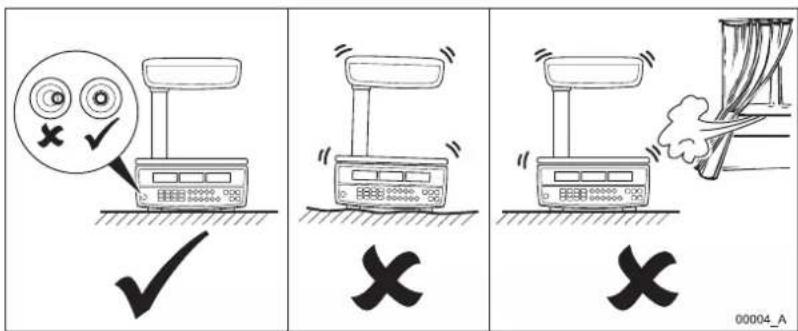
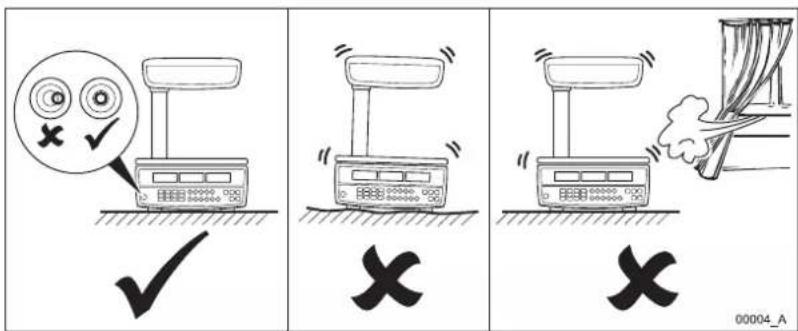
text_image Illustration showing three scenarios of a weather control device with checkmarks and X marks indicating failure or rejection.

AVERY BERKEL FX50 - Warnings and cautions - 2

AVERY BERKEL FX50 - Warnings and cautions - 3

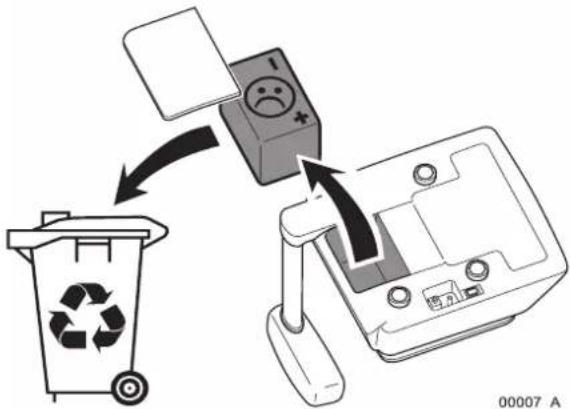
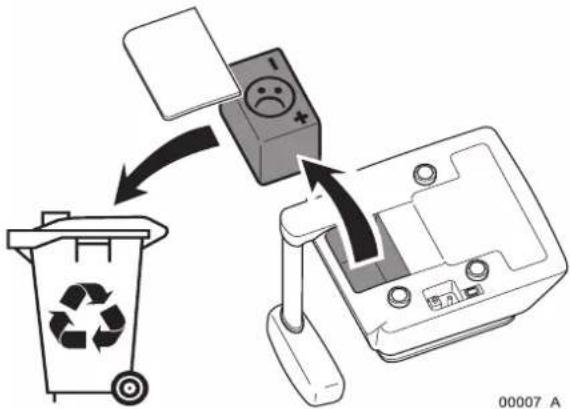
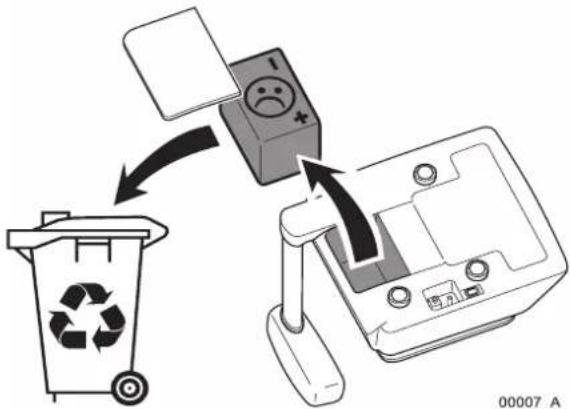
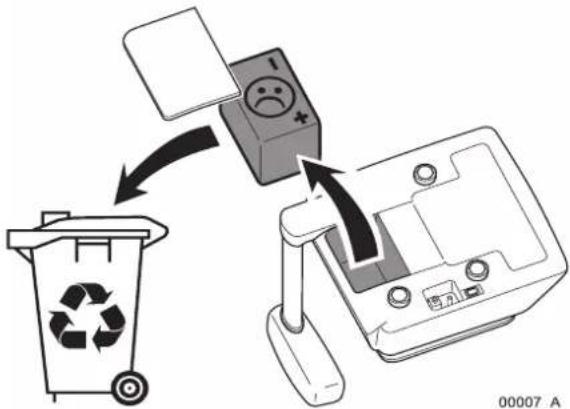
text_image Diagram illustrating a recycling process with a trash bin, switch, and sad face icon emerging from a computer screen.

AVERY BERKEL FX50 - Warnings and cautions - 4

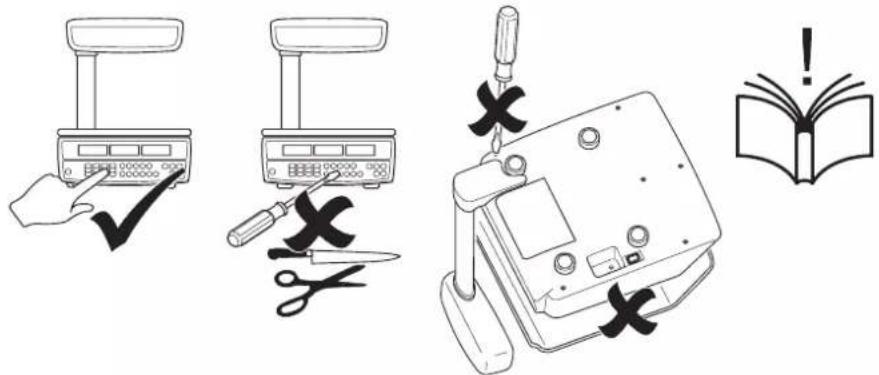
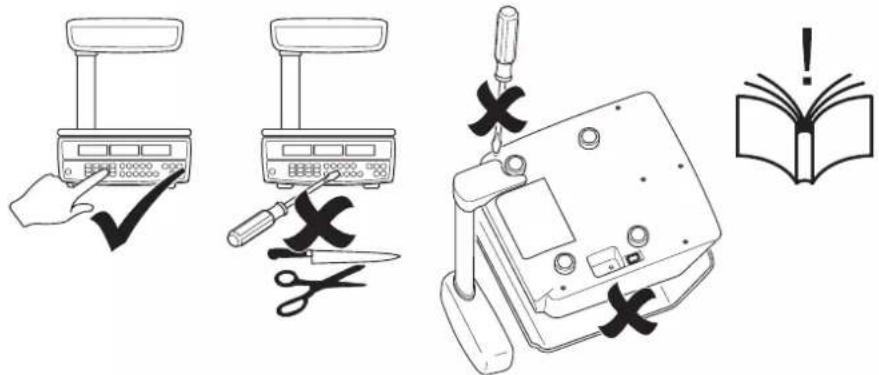
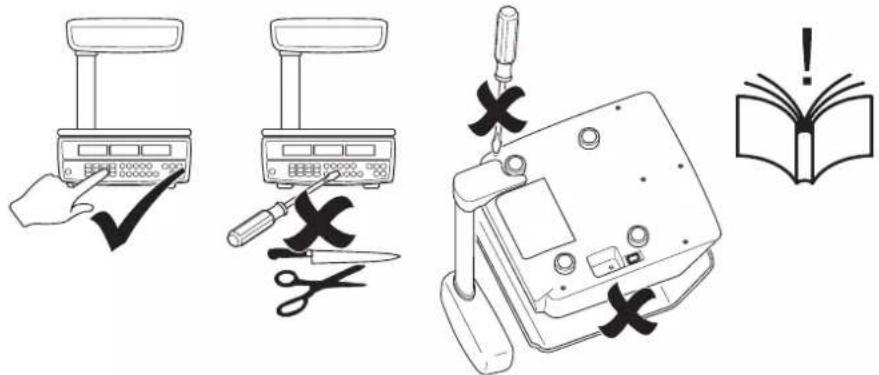
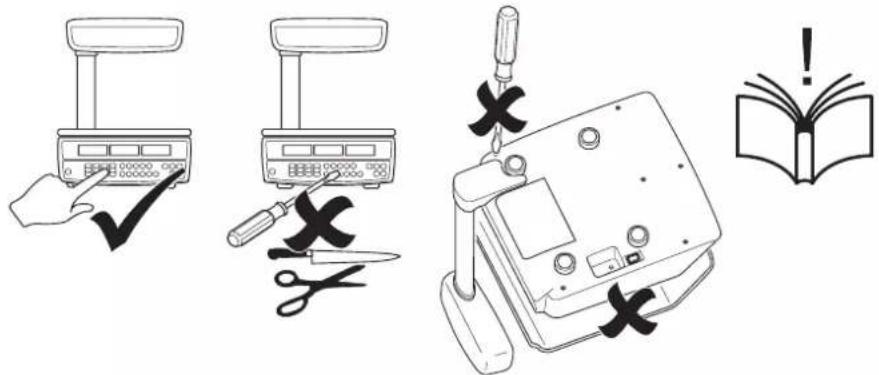
text_image Illustration showing five different tools and a warning symbol: a hand using a scale, a tool with scissors, a device with cross marks, and an open book.

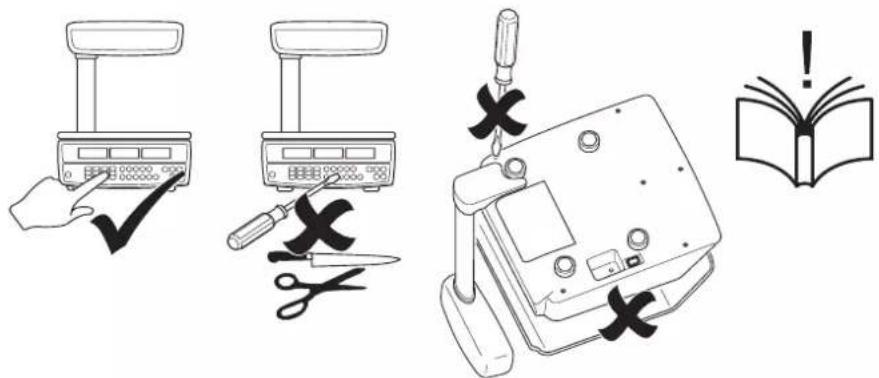
Fig 1-2. Cautions for using the scale

6 FX 50 User Instructions

AVERY BERKEL FX50 - Warnings and cautions - 5

AVERY BERKEL FX50 - Warnings and cautions - 6

AVERY BERKEL FX50 - Warnings and cautions - 7

AVERY BERKEL FX50 - Warnings and cautions - 8

AVERY BERKEL FX50 - Warnings and cautions - 9

AVERY BERKEL FX50 - Warnings and cautions - 10

AVERY BERKEL FX50 - Warnings and cautions - 11

AVERY BERKEL FX50 - Warnings and cautions - 12

natural_image Pure geometric diagram with intersecting lines and a central circular pattern (no text or symbols)

1.3 Cleaning the scale

AVERY BERKEL FX50 - Cleaning the scale - 1

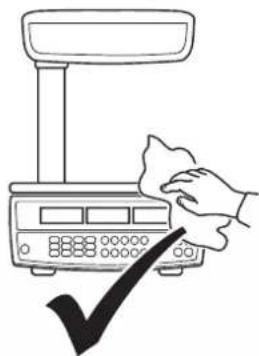
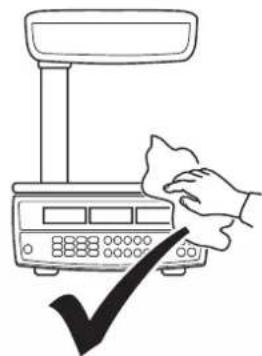
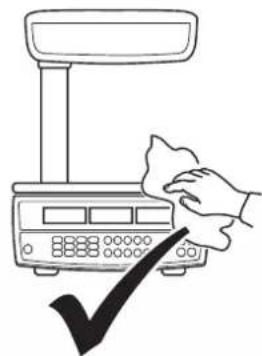
CAUTION: Do not use harsh abrasives, solvents, scouring cleaners and alkaline cleaning solutions, such as washing soda, to clean the outside of the scale.

English

AVERY BERKEL FX50 - Cleaning the scale - 2

natural_image Illustration of cleaning products including spray bottles, a container with star patterns, and a bottle with a water drop (no text or symbols)

AVERY BERKEL FX50 - Cleaning the scale - 3

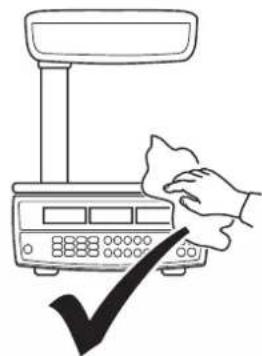
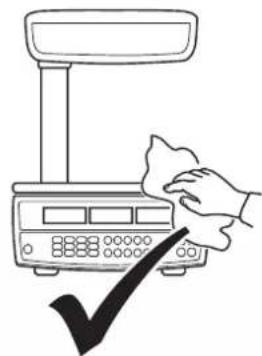
natural_image Line drawing of a hand cleaning a digital scale with a checkmark (no text or symbols)

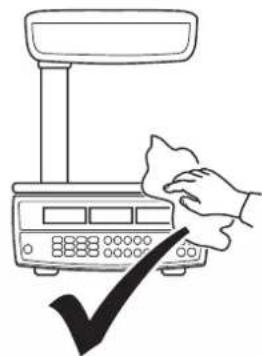
Fig 1-3. Cleaning the scale

To clean the outside of the scale, wipe it down with a clean cloth moistened with water containing a small amount of mild detergent or unscented washing-up liquid.

AVERY BERKEL FX50 - Cleaning the scale - 4

AVERY BERKEL FX50 - Cleaning the scale - 5

FX50 User.book Page 8 Thursday, August 23, 2007 2:31 PM

AVERY BERKEL FX50 - Cleaning the scale - 6

AVERY BERKEL FX50 - Cleaning the scale - 7

AVERY BERKEL FX50 - Cleaning the scale - 8

AVERY BERKEL FX50 - Cleaning the scale - 9

AVERY BERKEL FX50 - Cleaning the scale - 10

AVERY BERKEL FX50 - Cleaning the scale - 11

AVERY BERKEL FX50 - Cleaning the scale - 12

AVERY BERKEL FX50 - Cleaning the scale - 13

AVERY BERKEL FX50 - Cleaning the scale - 14

AVERY BERKEL FX50 - Cleaning the scale - 15

AVERY BERKEL FX50 - Cleaning the scale - 16

AVERY BERKEL FX50 - Cleaning the scale - 17

AVERY BERKEL FX50 - Cleaning the scale - 18

AVERY BERKEL FX50 - Cleaning the scale - 19

AVERY BERKEL FX50 - Cleaning the scale - 20

AVERY BERKEL FX50 - Cleaning the scale - 21

2. Main parts, keyboard and display

2.1 Main parts

AVERY BERKEL FX50 - Main parts - 1

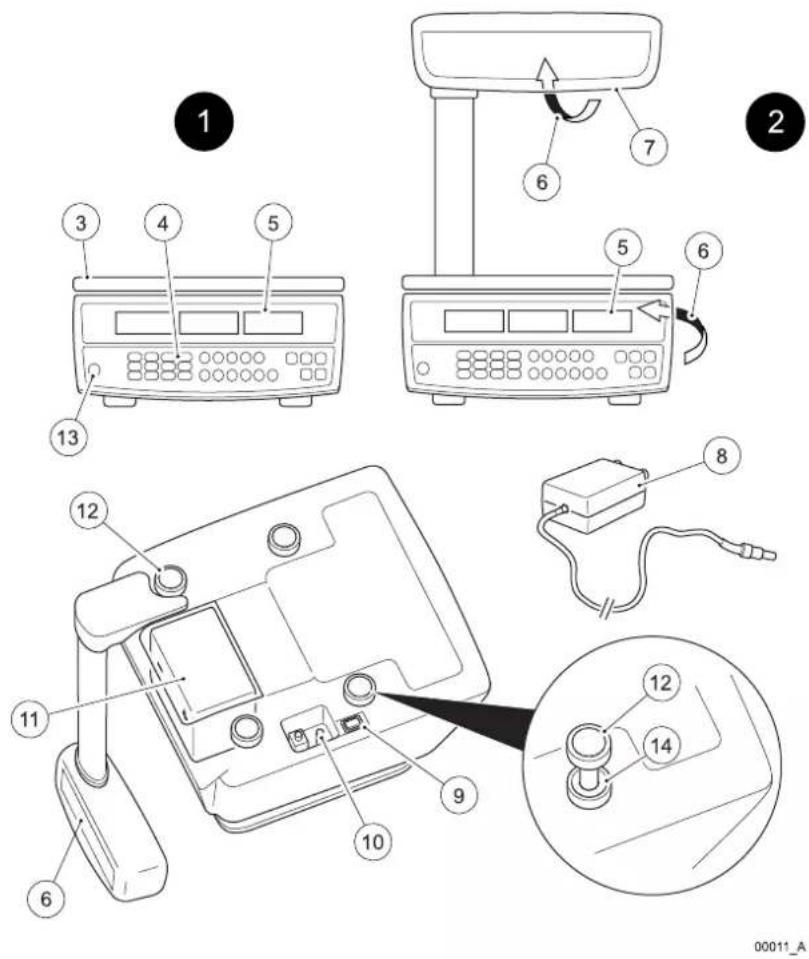
text_image Technical diagram showing labeled components of a device with numbered parts and an inset view of the device's internal structure.

Fig 2-1. Main parts of the FX 50 monoblock & tower variants

  1. Main parts, keyboard and display
Item Part Item Part
1 Monoblock variant 8 AC adaptor
2 Tower variant 9 On/Off switch
3 Stainless steel weigh pan 10 AC adaptor socket
4 Keyboard 11 Rechargeable battery
5 Operator display 12 Levelling feet
6 Customer display 13 Levelling bubble
7 Tower assembly 14 Locknut for levelling feet

AVERY BERKEL FX50 - Main parts - 2

AVERY BERKEL FX50 - Main parts - 3

AVERY BERKEL FX50 - Main parts - 4

AVERY BERKEL FX50 - Main parts - 5

AVERY BERKEL FX50 - Main parts - 6

AVERY BERKEL FX50 - Main parts - 7

AVERY BERKEL FX50 - Main parts - 8

AVERY BERKEL FX50 - Main parts - 9

2.2 Keyboard variants
AVERY BERKEL FX50 - Main parts - 10

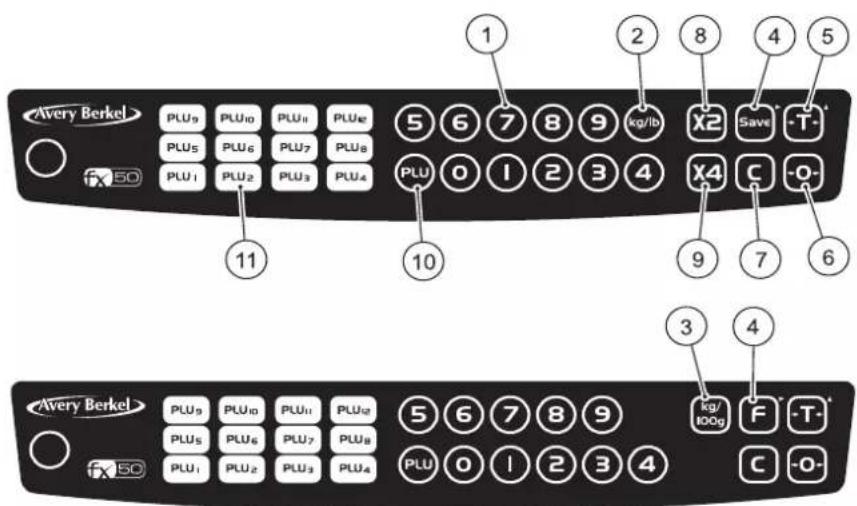
text_image Avery Berkel PLU9 PLU10 PLU11 PLU12 PLU5 PLU6 PLU7 PLU8 PLU1 PLU2 PLU3 PLU4 1 2 8 4 5 X2 Save -T- PLU 0 I 2 3 4 X4 C -O- 11 10 9 7 6 Avery Berkel PLU9 PLU10 PLU11 PLU12 PLU5 PLU6 PLU7 PLU8 PLU1 PLU2 PLU3 PLU4 5 6 7 8 9 PLU 0 I 2 3 4 kg/ IOOg F -T- C -O-

English
00012_A

Fig 2-2. USA & Canada keyboard (above) and Europe & Rest of the World (RoW) keyboard (below)

2. Main parts, keyboard and display

No.KeyKey namePress this key to ...
1 Numeric keys Enter individual unit prices, unit prices for direct PLUs and indirect PLUs, known tares and proportional tares.
2 Units of Weight AVERY BERKEL FX50 - Main parts, keyboard and display - 1key (USA & Canada option)Switch between kilogram and pound units of weight. An arrow ▼ appears in the display above the units you selected.
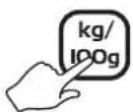
3 Price Base AVERY BERKEL FX50 - Main parts, keyboard and display - 2Selection key (UK, Europe & RoW option)Switch between a price per kilogram and a price per 100 grams price base. An arrow ▼ appears in the display above the price base you selected.
4 Fix key (UK, AVERY BERKEL FX50 - Main parts, keyboard and display - 3)Europe & RoW) or Save key (USA & Canada). Also Menu Navigation key (▶).Fix or save a weight or price you entered until you cancel it. You also press this key (▶) to scroll through the menu options.
5 Tare key. Also AVERY BERKEL FX50 - Main parts, keyboard and display - 4Select Menu Option key (▲).Enter and clear tare weights such as item containers and wrappers. The scale subtracts the tare weight when items are packaged for weighing. You also press this key (▲) to select an option from the menu.
6 Zero key Manually AVERY BERKEL FX50 - Main parts, keyboard and display - 5zero the scale and return the unit price and total weight displays to zeros.
7 Clear key Clear in AVERY BERKEL FX50 - Main parts, keyboard and display - 6incorrect entries and error conditions.
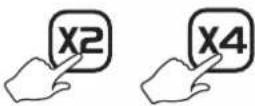
8 Multiply by 2 key AVERY BERKEL FX50 - Main parts, keyboard and display - 7(USA & Canada only)Multiply the total price by two.

2.2 Keyboard variants

No.KeyKey namePress this key to ...
9 Multiply by 4 keyX4(USA & Canada only)Multiply the total price by four.
10 Indirect PLU keyPLURecall and set up prices against up to38 indirect Price Look-Up (PLU) keys.
11 Direct PLU keysPLU1 - PLU12Recall and set up prices against up to12 direct Price Look-Up (PLU) keys.

English

AVERY BERKEL FX50 - Main parts, keyboard and display - 8

AVERY BERKEL FX50 - Main parts, keyboard and display - 9

FX50 User.book Page 14 Thursday, August 23, 2007 2:31 PM

2. Main parts, keyboard and display

AVERY BERKEL FX50 - Main parts, keyboard and display - 1

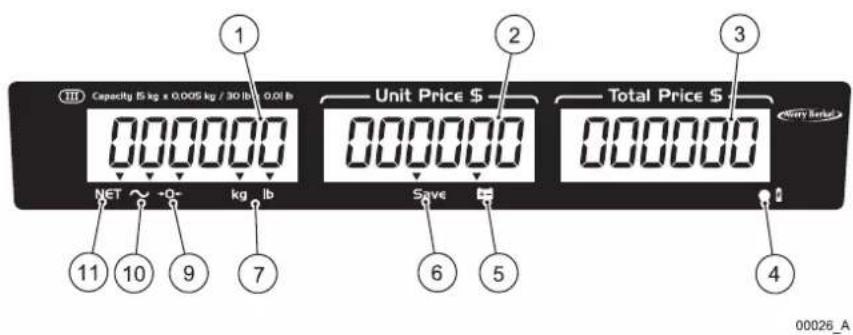
text_image Capacity 85 kg x 0.005 kg / 30 lb 0.01 lb Unit Price $ 000000 000000 Total Price $ 000000 NET ~ +Q- kg lb Save 6 5 11 10 9 7 6 5 4 00026_A

Fig 2-3. USA & Canada display

AVERY BERKEL FX50 - Main parts, keyboard and display - 2

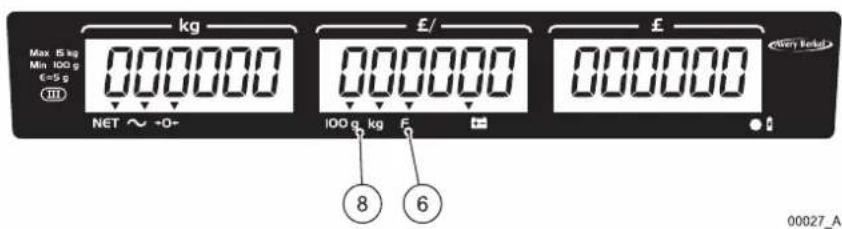
text_image kg Max 5 kg Min 100 g €=5 g NET ~ -0- £/ 100 g kg £ 8 6 00027_A

Fig 2-4. UK display

AVERY BERKEL FX50 - Main parts, keyboard and display - 3

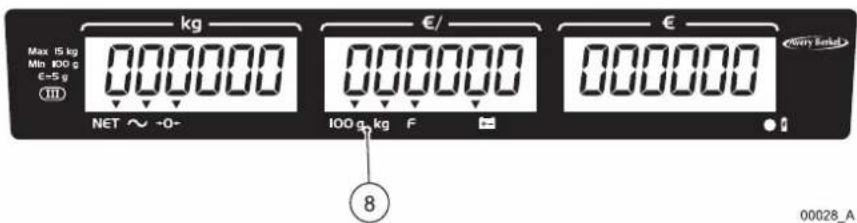
text_image kg Max 15 kg Min 100 g E=5 g NET ~ +0- €/ 100 g/kg F € 8 00028_A

Fig 2-5. Europe & Rest of the World (RoW) display

14 FX 50 User Instructions

AVERY BERKEL FX50 - Main parts, keyboard and display - 4

AVERY BERKEL FX50 - Main parts, keyboard and display - 5

AVERY BERKEL FX50 - Main parts, keyboard and display - 6

AVERY BERKEL FX50 - Main parts, keyboard and display - 7

AVERY BERKEL FX50 - Main parts, keyboard and display - 8

AVERY BERKEL FX50 - Main parts, keyboard and display - 9

AVERY BERKEL FX50 - Main parts, keyboard and display - 10

AVERY BERKEL FX50 - Main parts, keyboard and display - 11

AVERY BERKEL FX50 - Main parts, keyboard and display - 12

AVERY BERKEL FX50 - Main parts, keyboard and display - 13

AVERY BERKEL FX50 - Main parts, keyboard and display - 14

AVERY BERKEL FX50 - Main parts, keyboard and display - 15

AVERY BERKEL FX50 - Main parts, keyboard and display - 16

Item Name & Symbol Purpose
1 Weight display Shows the gross or net weight of the item.
2 Unit price display Shows the unit price of the item.
3 Total price display Shows the total price of the item.
4Battery is charging indicatorA red light shows that the battery is charging.A green light shows that the battery is fully charged.
5Battery charge is low indicatorA light comes on to show that the battery charge is low so you must recharge it immediately.
6F / Save Fix or Save indicatorAn arrow▼shows you pressed the F / Save key before any operation to stop the weight display and the unit price display from clearing automatically.
7 Units of weight indicatorAn arrow▼shows that the units of weight you selected is either kilograms or pounds (USA/Canada variant only).
8 Price-based selection indicatorAn arrow▼shows that the price base you selected is either price per 100 grams or price per kilogram (UK/Europe/RoW variant only).NOTE: The Australian variant is fixed to kilogram only.
9-0-Zero indicatorAn arrow▼shows that the scale is at gross zero (there is no tare weight). Arrows above both NET and -0- show that the scale is at net zero (includes a tare weight).
10~ Stable indicatorAn arrow▼shows that the item weight is stable.
11NET Net weight indicatorAn arrow▼shows that a tare weight is set and the displayed weight is a net weight (the displayed weight excludes the tare weight).

AVERY BERKEL FX50 - Main parts, keyboard and display - 17

AVERY BERKEL FX50 - Main parts, keyboard and display - 18

FX50 User.book Page 16 Thursday, August 23, 2007 2:31 PM

AVERY BERKEL FX50 - Main parts, keyboard and display - 19

AVERY BERKEL FX50 - Main parts, keyboard and display - 20

AVERY BERKEL FX50 - Main parts, keyboard and display - 21

AVERY BERKEL FX50 - Main parts, keyboard and display - 22

AVERY BERKEL FX50 - Main parts, keyboard and display - 23

AVERY BERKEL FX50 - Main parts, keyboard and display - 24

AVERY BERKEL FX50 - Main parts, keyboard and display - 25

AVERY BERKEL FX50 - Main parts, keyboard and display - 26

AVERY BERKEL FX50 - Main parts, keyboard and display - 27

AVERY BERKEL FX50 - Main parts, keyboard and display - 28

AVERY BERKEL FX50 - Main parts, keyboard and display - 29

AVERY BERKEL FX50 - Main parts, keyboard and display - 30

AVERY BERKEL FX50 - Main parts, keyboard and display - 31

AVERY BERKEL FX50 - Main parts, keyboard and display - 32

AVERY BERKEL FX50 - Main parts, keyboard and display - 33

AVERY BERKEL FX50 - Main parts, keyboard and display - 34

3. Installing the scale

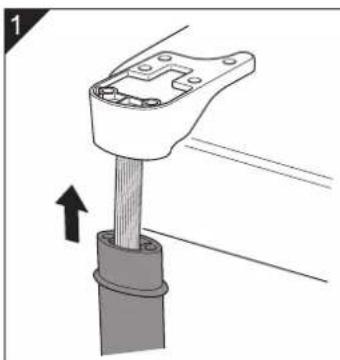
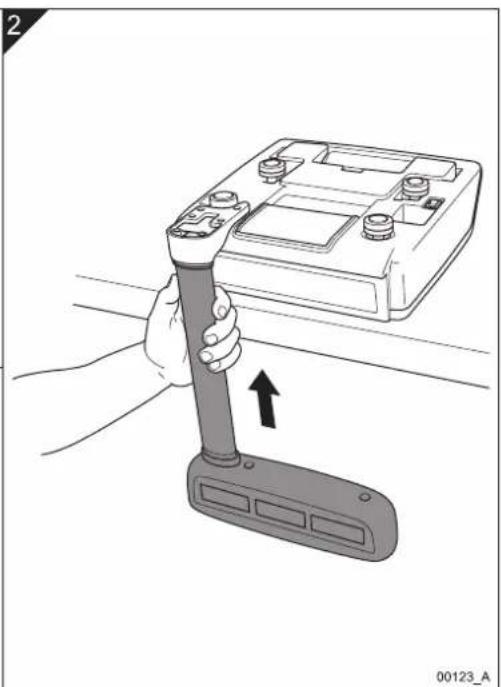
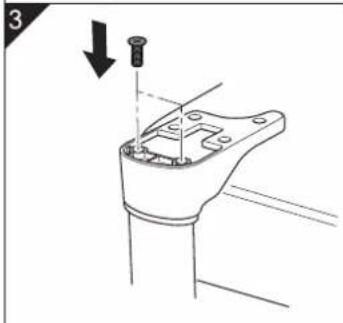
3.1 Assembling the tower variant

AVERY BERKEL FX50 - Assembling the tower variant - 1

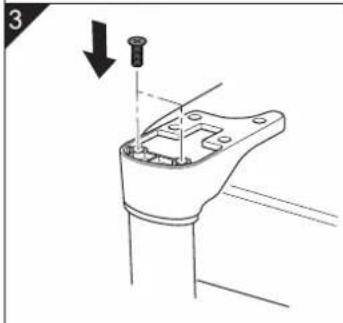
natural_image Mechanical assembly diagram showing a clamping tool interacting with a cylindrical component (no text or symbols)

AVERY BERKEL FX50 - Assembling the tower variant - 2

natural_image Illustration of a hand holding a flashlight next to a battery pack, with an upward arrow indicating motion (no text or symbols)

AVERY BERKEL FX50 - Assembling the tower variant - 3

natural_image Technical line drawing of a mechanical component with a downward arrow indicating direction (no text or symbols)

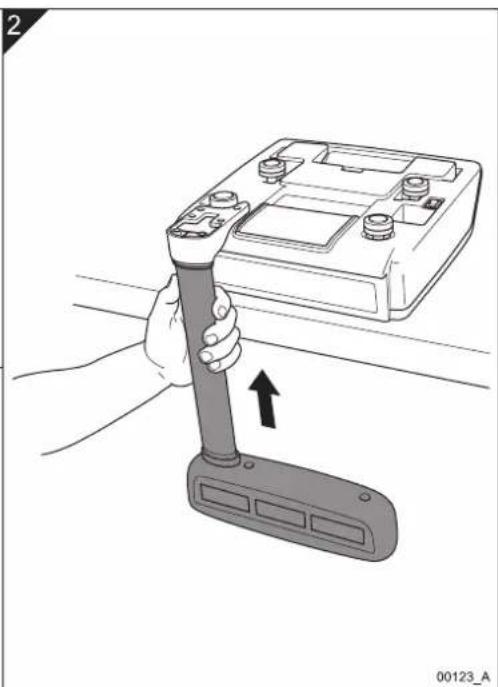
Fig 3-1. Assembling and installing the tower variant

AVERY BERKEL FX50 - Assembling the tower variant - 4

AVERY BERKEL FX50 - Assembling the tower variant - 5

AVERY BERKEL FX50 - Assembling the tower variant - 6

AVERY BERKEL FX50 - Assembling the tower variant - 7

AVERY BERKEL FX50 - Assembling the tower variant - 8

AVERY BERKEL FX50 - Assembling the tower variant - 9

AVERY BERKEL FX50 - Assembling the tower variant - 10

AVERY BERKEL FX50 - Assembling the tower variant - 11

AVERY BERKEL FX50 - Assembling the tower variant - 12

FX50 User.book Page 18 Thursday, August 23, 2007 2:31 PM

AVERY BERKEL FX50 - Assembling the tower variant - 13

AVERY BERKEL FX50 - Assembling the tower variant - 14

3. Installing the scale

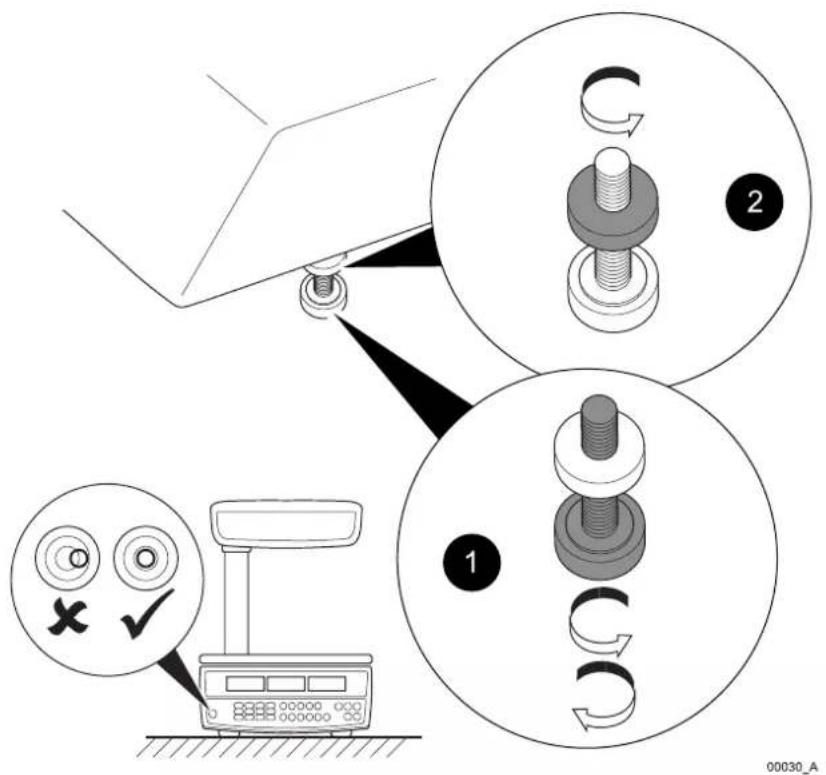
3.2 Levelling the scale

AVERY BERKEL FX50 - Levelling the scale - 1

text_image Diagram illustrating mechanical assembly steps with labeled components and check/cancel icons

Fig 3-2. Levelling the scale

18 FX 50 User Instructions

AVERY BERKEL FX50 - Levelling the scale - 2

AVERY BERKEL FX50 - Levelling the scale - 3

AVERY BERKEL FX50 - Levelling the scale - 4

AVERY BERKEL FX50 - Levelling the scale - 5

AVERY BERKEL FX50 - Levelling the scale - 6

3.3 Charging the battery

You can power and operate the scale using:

  • mains power supply from the AC adaptor (with the rechargeable battery fitted); or
  • a re-chargeable battery located inside the scale.

When you connect the scale to the mains power supply using the AC adaptor the battery charging indicator comes on to show that the power is connected and the battery is charging.

  • Red battery charging indicator = Battery needs charging.
  • Green battery charging indicator = Battery is fully charged.

You need to fully charge the battery before the first time that you use the scale.

If you do not use the scale over a long period of time, you need to charge the battery every three to six months to maintain its performance.

3.4 Changing the display backlight mode

You can set the backlights for the operator and customer displays to operate in one of these three different modes:

  • ON = always on.
  • OFF = always off.
    • AUTO = the backlight comes on when you start to use the scale.

To change the display backlight mode do the steps as follows:

  1. Press the On switch to turn the scale on. The scale makes the first beep.
  2. Press and hold down the key and release it when you hear a second beep and the display comes on.
  3. Press the key to scroll through the three backlight modes (ON, OFF and AUTO) that the scale displays in the total price display.

AVERY BERKEL FX50 - Changing the display backlight mode - 1

NOTE: To cancel changing the backlight mode and return to weighing press the key.

  1. Press the key to save the backlight mode you selected and return to weighing.

FX 50 User Instructions 19

AVERY BERKEL FX50 - Changing the display backlight mode - 2

AVERY BERKEL FX50 - Changing the display backlight mode - 3

3. Installing the scale

AVERY BERKEL FX50 - Installing the scale - 1

NOTE: If you have the backlight ON all the time or set to AUTO it reduces the life of the battery in between charges.

3.5 Setting the auto power off mode

You can change the auto power off mode so that the scale stays on all the time or it automatically turns off after a pre-set amount of inactivity of 1, 5 or 30 minutes.

Do the steps as follows to set the auto power off mode:

  1. Press the On switch to turn the scale on.
  2. While the scale is checking itself (when all the numbers on the scale's three displays count down from all zeros to all nines), press the F / Save key. The total price display shows the current power off mode.

  3. Press the key to scroll through the following auto power off modes:

  4. 0 = Scale stays on (as the auto power mode is disabled).

  5. 1 = Scale turns off after 1 minute of inactivity.
  6. 5 = Scale turns off after 5 minutes of inactivity.
  7. 30 = Scale turns off after 30 minutes of inactivity.

  8. Press the key to save the auto power off mode you selected and return to weighing.

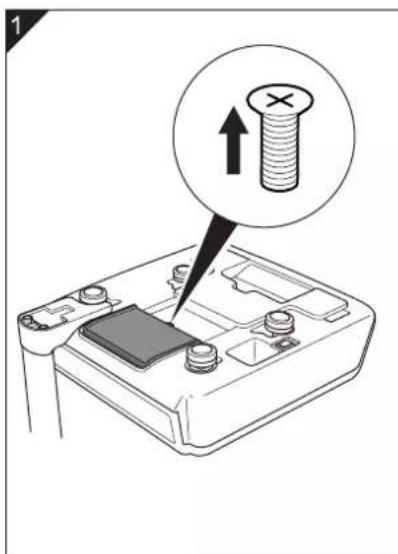
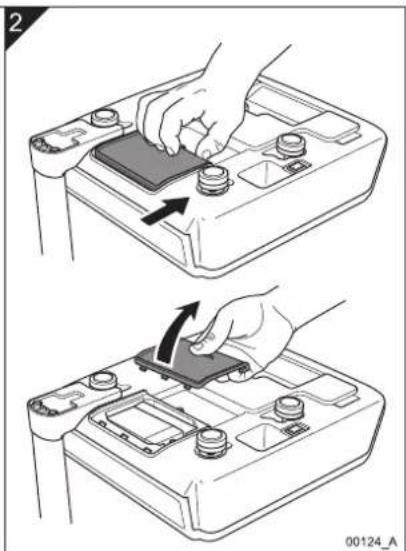
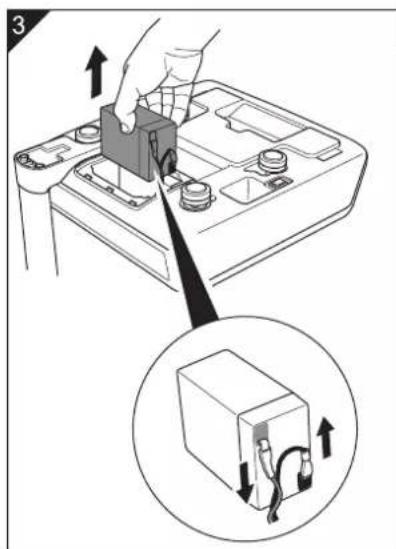
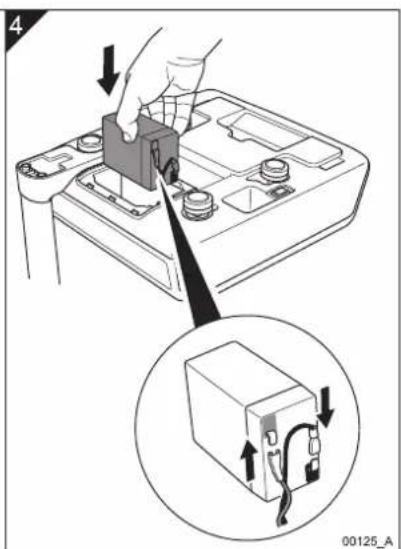
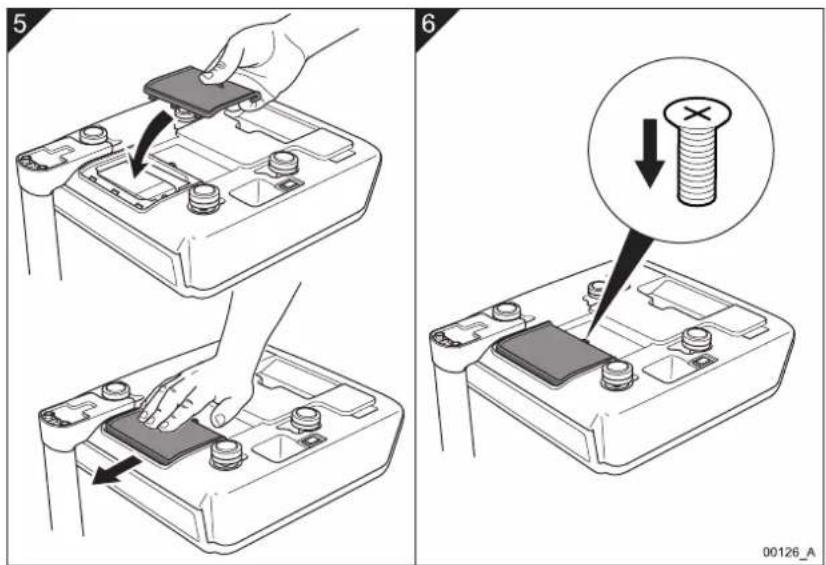
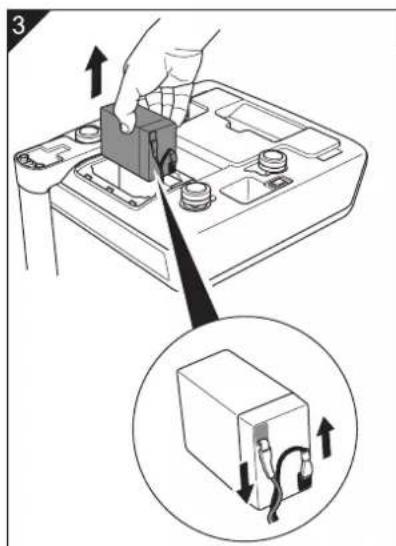
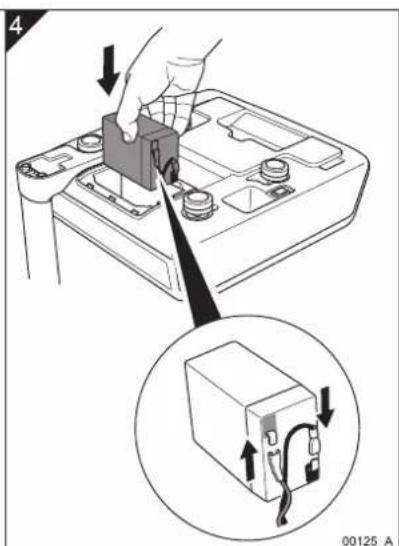
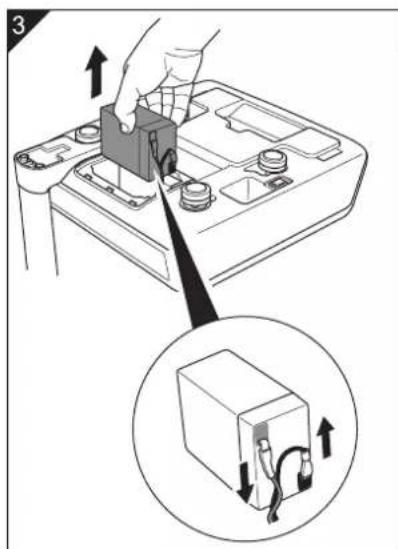
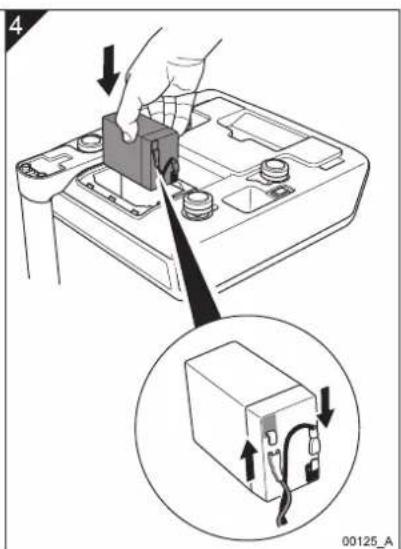
3.6 Changing the battery

AVERY BERKEL FX50 - Changing the battery - 1

text_image Diagram showing a battery switch with a magnified view of the screw and its upward arrow, labeled with number 1.

AVERY BERKEL FX50 - Changing the battery - 2

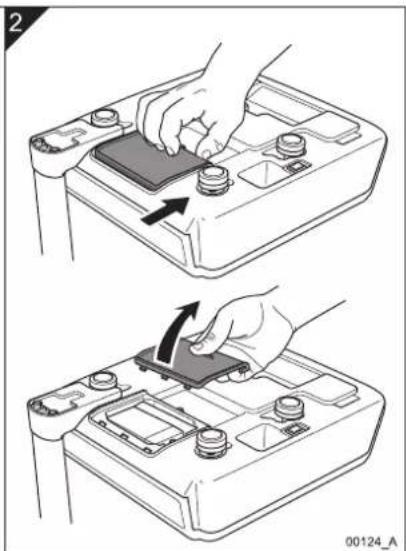
natural_image Two-step diagram showing hand pressing a component on a battery cover, with an arrow indicating the motion (no text or symbols present)

AVERY BERKEL FX50 - Changing the battery - 3

text_image Diagram showing battery charging process with hand inserting a component and magnified view of internal components with wiring

AVERY BERKEL FX50 - Changing the battery - 4

text_image 4 00125_A

Fig 3-3. Changing the battery

AVERY BERKEL FX50 - Changing the battery - 5

AVERY BERKEL FX50 - Changing the battery - 6

FX50 User.book Page 22 Thursday, August 23, 2007 2:31 PM

3. Installing the scale

AVERY BERKEL FX50 - Installing the scale - 1

text_image Diagram illustrating battery mounting process with labeled steps and magnified detail showing bolt disassembly

Fig 3-4. Changing the battery (continued)

22 FX 50 User Instructions

AVERY BERKEL FX50 - Installing the scale - 2

AVERY BERKEL FX50 - Installing the scale - 3

AVERY BERKEL FX50 - Installing the scale - 4

AVERY BERKEL FX50 - Installing the scale - 5

AVERY BERKEL FX50 - Installing the scale - 6

AVERY BERKEL FX50 - Installing the scale - 7

AVERY BERKEL FX50 - Installing the scale - 8

AVERY BERKEL FX50 - Installing the scale - 9

natural_image Pure geometric diagram with intersecting lines and a central circular pattern (no text or symbols)

4. Operating the scale

4.1 Key to symbols used

Symbol Action
AVERY BERKEL FX50 - Key to symbols used - 1Press the On/Off switch below the scale to turn the scale on or off.
AVERY BERKEL FX50 - Key to symbols used - 2Press the Price Base Selection key to select the price base for the item you want to weigh.NOTE: This key is for the UK, Europe and the Rest of the World (RoW) variants only.NOTE: The Australian variant is Kg only.
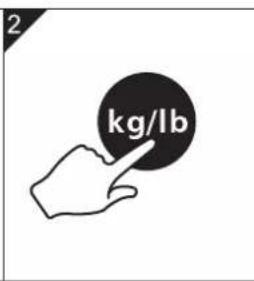
AVERY BERKEL FX50 - Key to symbols used - 3Press the Units of Weight key to select the units of weight for the item you want to weigh.NOTE: This key is for the USA and Canada variant only.
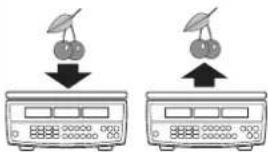
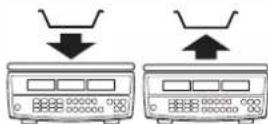
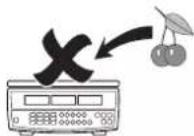
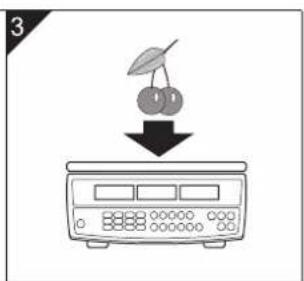
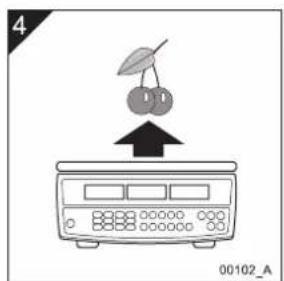
AVERY BERKEL FX50 - Key to symbols used - 4Put an item without a container or wrapping on the weigh pan ↓. Remove the item ↑.
AVERY BERKEL FX50 - Key to symbols used - 5Put an empty container or wrapping (or another type of tare weight) on the weigh pan ↓. Remove the container ↑.
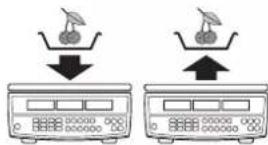
AVERY BERKEL FX50 - Key to symbols used - 6Put the item in a container or wrapping (or another type of tare weight) on the weigh pan ↓. Remove the item and the container ↑.
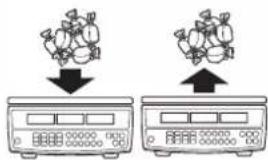
AVERY BERKEL FX50 - Key to symbols used - 7Put items of the same unit price on the weigh pan ↓ such as ‘pick and mix’ sweets. Remove the items ↑.

4. Operating the scale

Symbol Action
AVERY BERKEL FX50 - Operating the scale - 1Do not put any items on the weigh pan.
AVERY BERKEL FX50 - Operating the scale - 2Depending on the functional mode of the scale, either press the keyboard numbers to enter the unit price of an item or press the keyboard numbers to type the unit prices for direct and indirect PLUs, known tare weights and proportional tares.
AVERY BERKEL FX50 - Operating the scale - 3If necessary, with no item on the weigh pan, press the Zero key to zero the scale.
AVERY BERKEL FX50 - Operating the scale - 4Clear the unit price you entered.
AVERY BERKEL FX50 - Operating the scale - 5Multiplies the total net price of the item the scale has weighed by either two or four.NOTE: These keys are for the USA and Canada variant only.
AVERY BERKEL FX50 - Operating the scale - 6Select a Direct PLU key.
AVERY BERKEL FX50 - Operating the scale - 7Select the Indirect PLU key.
AVERY BERKEL FX50 - Operating the scale - 8Repeat the numbered steps shown.

4.2 Switching on and setting up the scale

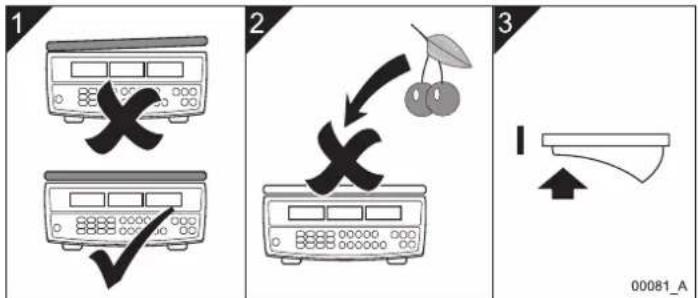
To switch on and set up the scale so that it is ready to use do the steps as follows:

AVERY BERKEL FX50 - Switching on and setting up the scale - 1

text_image 1 2 3 00081_A

English

AVERY BERKEL FX50 - Switching on and setting up the scale - 2

flowchart
graph TD
    A["999999"] --> B["000000"]
    C["999999"] --> D["000000"]
    E["999999"] --> F["000000"]
    G["000000"] --> H["Device"]
    I["Speaker Output"] --> J["Output"]

Fig 4-1. Switching on and setting up the scale

AVERY BERKEL FX50 - Switching on and setting up the scale - 3

AVERY BERKEL FX50 - Switching on and setting up the scale - 4

FX50 User.book Page 26 Thursday, August 23, 2007 2:31 PM

AVERY BERKEL FX50 - Switching on and setting up the scale - 5

AVERY BERKEL FX50 - Switching on and setting up the scale - 6

4. Operating the scale

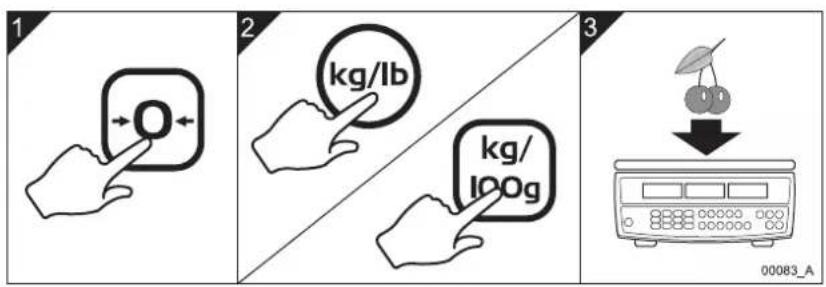
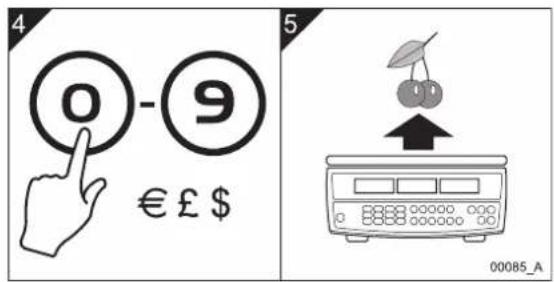
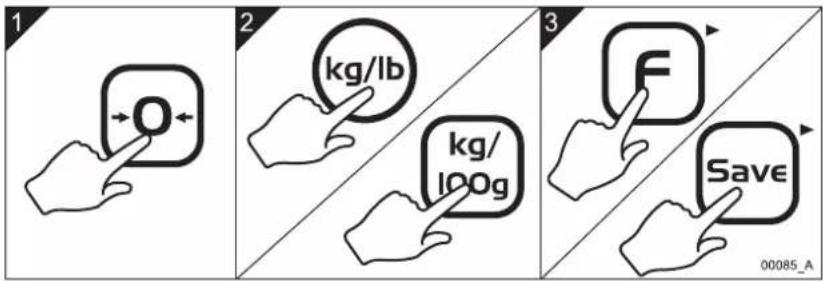
4.3 Weighing individual items

Do these steps to weigh items that have different weights and different unit prices:

AVERY BERKEL FX50 - Weighing individual items - 1

text_image 1 2 3 00083_A

AVERY BERKEL FX50 - Weighing individual items - 2

text_image 4 0 - 9 € £ $ 5 00085_A

Fig 4-2. Weighing individual items

26 FX 50 User Instructions

AVERY BERKEL FX50 - Weighing individual items - 3

AVERY BERKEL FX50 - Weighing individual items - 4

AVERY BERKEL FX50 - Weighing individual items - 5

AVERY BERKEL FX50 - Weighing individual items - 6

natural_image Pure geometric diagram with intersecting lines and a central circular pattern (no text or symbols)

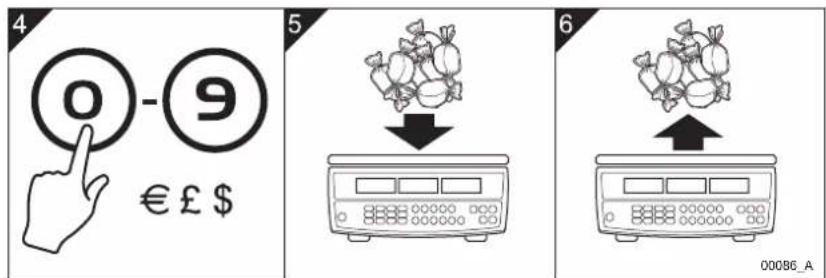
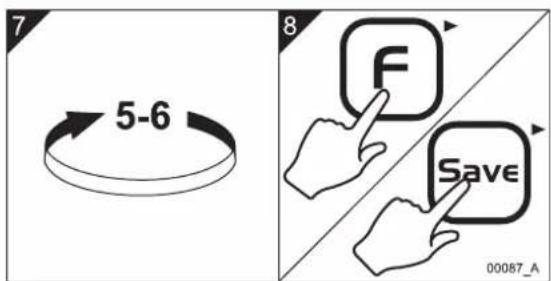
4.4 Weighing items of the same unit price

You can weigh the same type of items or different items that have the same unit price without the need to keep keying the unit price into the scale. To do this you enter and save the unit price in the scale until you decide to either change or cancel the price.

To weigh items of the same unit price do the steps as follows:

AVERY BERKEL FX50 - Weighing items of the same unit price - 1

text_image 1 2 3 00085_A

AVERY BERKEL FX50 - Weighing items of the same unit price - 2

AVERY BERKEL FX50 - Weighing items of the same unit price - 3

text_image 4 0 - 9 € £ $ 5 6 00086_A

AVERY BERKEL FX50 - Weighing items of the same unit price - 4

text_image 7 5-6 8 F Save 00087_A

Fig 4-3. Weighing items of the same unit price

AVERY BERKEL FX50 - Weighing items of the same unit price - 5

text_image FX 50 User Instructions 27

4. Operating the scale

AVERY BERKEL FX50 - Operating the scale - 1

NOTE: You can change the unit price that the scale has saved. To do this, retype the price and the scale will save the new unit price until you press the key to cancel it.

4.5 Weighing using known tares

AVERY BERKEL FX50 - Weighing using known tares - 1

NOTE: This function is for the USA and Canada variant only.

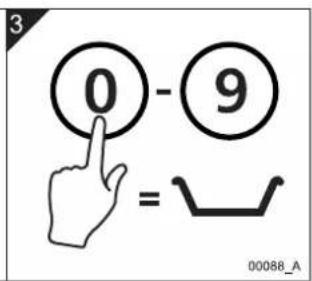
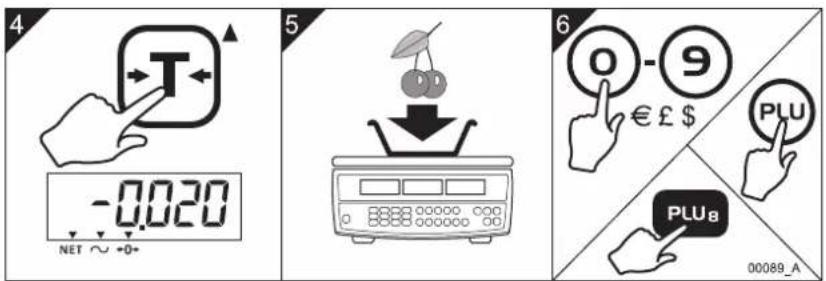
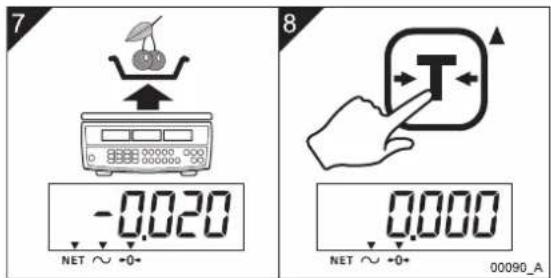
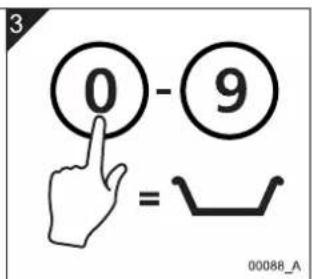
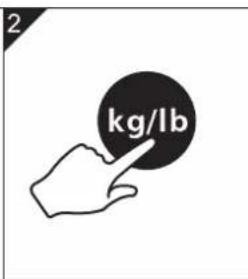
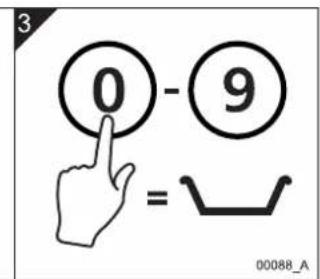
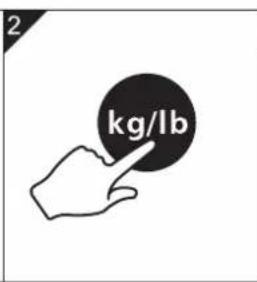
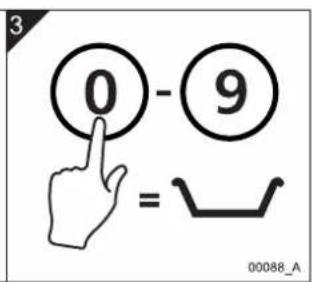
If you know the weight of an item such as a food container or wrapping that you use to contain or pack items on the scale and you want to use this as a tare weight, you can manually enter the tare weight into the scale. The scale deducts the weight of the tare item from the total gross weight and displays the net weight and the total price of the item only.

AVERY BERKEL FX50 - Weighing using known tares - 2

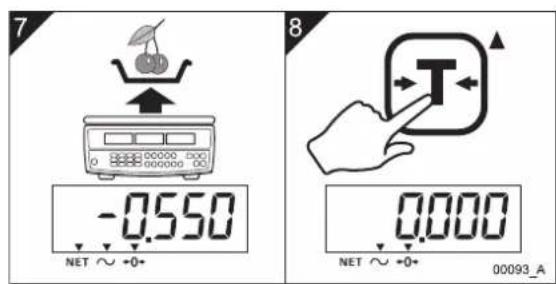
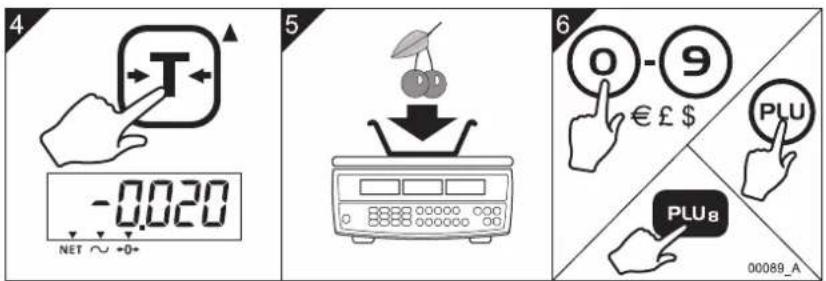
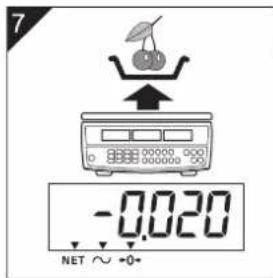
NOTE: When you have entered a tare weight the scale displays a minus figure in the weight display to represent the tare weight.

AVERY BERKEL FX50 - Weighing using known tares - 3

NOTE: At step 6 you can manually enter the unit price of the item or you can recall the item price using either a direct PLU or an indirect PLU. See Sections 4.9 - 4.12 for information about PLUs.

To enter a tare weight that you know and then weigh an item that has the same tare weight do the steps as follows:

AVERY BERKEL FX50 - Weighing using known tares - 4

natural_image Hand icon pointing at a black circular button with an arrow, no text or symbols present

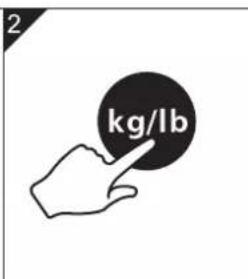
AVERY BERKEL FX50 - Weighing using known tares - 5

text_image 2 kg/lb

AVERY BERKEL FX50 - Weighing using known tares - 6

text_image 3 0 - 9 = 00088_A

Fig 4-4. Weighing using known tares

28 FX 50 User Instructions

AVERY BERKEL FX50 - Weighing using known tares - 7

AVERY BERKEL FX50 - Weighing using known tares - 8

AVERY BERKEL FX50 - Weighing using known tares - 9

AVERY BERKEL FX50 - Weighing using known tares - 10

AVERY BERKEL FX50 - Weighing using known tares - 11

AVERY BERKEL FX50 - Weighing using known tares - 12

AVERY BERKEL FX50 - Weighing using known tares - 13

AVERY BERKEL FX50 - Weighing using known tares - 14

natural_image Pure geometric diagram with intersecting lines and a central circle, no text or symbols present

4.5 Weighing using known tares
AVERY BERKEL FX50 - Weighing using known tares - 15

text_image 4 -0.020 NET ~ +0+ 5 6 0 - 9 € £ $ PLU PLU8 00089_A

English

AVERY BERKEL FX50 - Weighing using known tares - 16

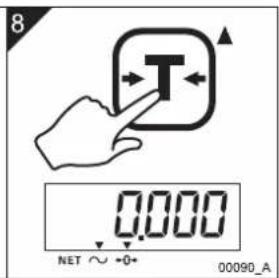
text_image 7 -0.020 NET ∼ +0+ 8 0.000 NET ∼ +0+ 00090_A

Fig 4-5. Weighing using known tares (continued)

4. Operating the scale

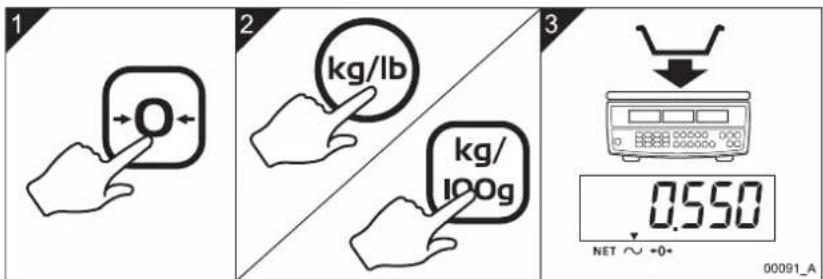
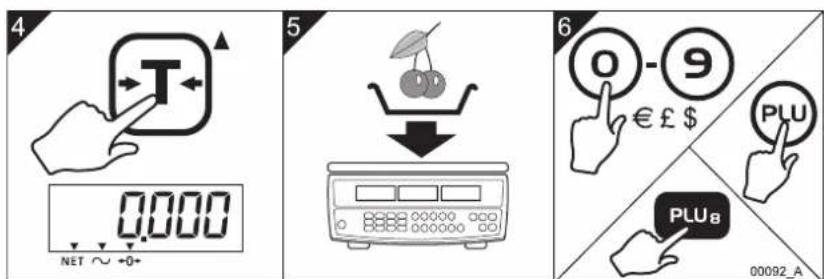
4.6 Weighing using unknown tares

You can weigh items such a food containers and wrapping you use to contain or pack items on the scale and save their tare weights before you weigh the items. You do this so that, when you put items on the scale in a container, the scale deducts the tare weight from the total gross weight and displays the net weight and the total price of the items only.

AVERY BERKEL FX50 - Weighing using unknown tares - 1

NOTE: At step 6 you can manually enter the unit price of the item or you can recall the item price using either a direct PLU or an indirect PLU. See Sections 4.9 - 4.12 for information about PLUs.

Do the steps as follows to weigh and save an unknown tare weight:

AVERY BERKEL FX50 - Weighing using unknown tares - 2

text_image 1 2 kg/lb kg/ 100g 3 0.550 NET ∼ 0+ 00091_A

AVERY BERKEL FX50 - Weighing using unknown tares - 3

text_image 4 0.000 NET ~ +0+ 5 6 0 - 9 € £ $ PLU PLU_B 00092_A

Fig 4-6. Weighing using unknown tares

30 FX 50 User Instructions

AVERY BERKEL FX50 - Weighing using unknown tares - 4

AVERY BERKEL FX50 - Weighing using unknown tares - 5

AVERY BERKEL FX50 - Weighing using unknown tares - 6

AVERY BERKEL FX50 - Weighing using unknown tares - 7

AVERY BERKEL FX50 - Weighing using unknown tares - 8

AVERY BERKEL FX50 - Weighing using unknown tares - 9

AVERY BERKEL FX50 - Weighing using unknown tares - 10

4.7 Using proportional tares

AVERY BERKEL FX50 - Weighing using unknown tares - 11

text_image 7 -0.550 NET ~ +0+ 8 0.000 NET ~ +0+ 00093_A

English
Fig 4-7. Weighing using unknown tares (continued)

4.7 Using proportional tares

AVERY BERKEL FX50 - Using proportional tares - 1

NOTE: This function is for the USA and Canada variant only.

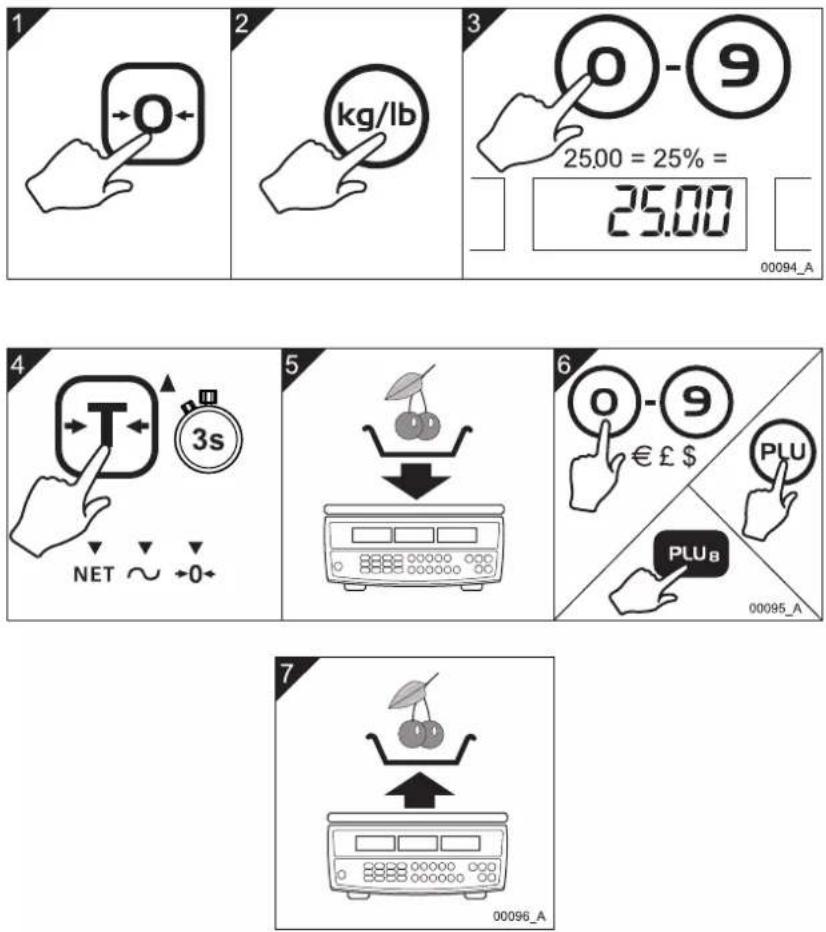
You can enter the tare weight of items such as a containers as a percentage proportion of the total gross weight of the item and the tare. For example, you can enter a proportional tare of 25% if the gross weight of the items you want to weigh includes a tare weight that is 25% of the gross weight to package the item.

AVERY BERKEL FX50 - Using proportional tares - 2

NOTE: At step 6 you can manually enter the unit price of the item or you can recall the item price using either a direct PLU or an indirect PLU. Refer to Sections 4.9 - 4.12 for information about PLUs.

AVERY BERKEL FX50 - Using proportional tares - 3

AVERY BERKEL FX50 - Using proportional tares - 4

FX50 User.book Page 32 Thursday, August 23, 2007 2:31 PM

AVERY BERKEL FX50 - Using proportional tares - 5

AVERY BERKEL FX50 - Using proportional tares - 6

4. Operating the scale

To enter an example proportional tare weight of 25% do the steps as follows:

AVERY BERKEL FX50 - Operating the scale - 1
Fig 4-8. Using proportional tares

32 FX 50 User Instructions

AVERY BERKEL FX50 - Operating the scale - 2

AVERY BERKEL FX50 - Operating the scale - 3

AVERY BERKEL FX50 - Operating the scale - 4

AVERY BERKEL FX50 - Operating the scale - 5

AVERY BERKEL FX50 - Operating the scale - 6

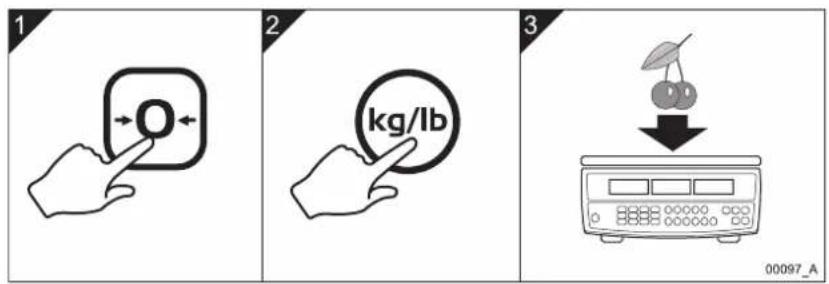
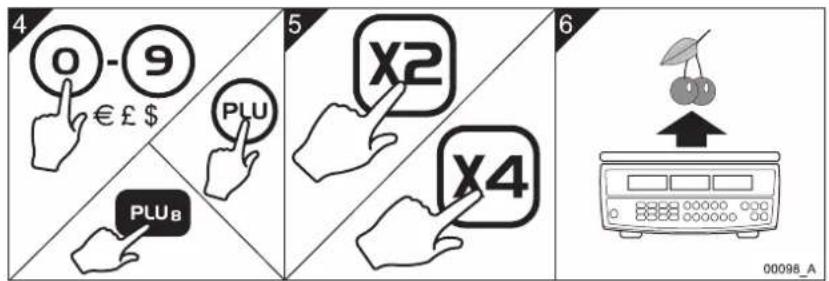
4.8 Multiplying a unit price

AVERY BERKEL FX50 - Multiplying a unit price - 1

NOTE: This function is for the USA and Canada variant only.

You can weigh items, enter a unit price and then multiply the total price you entered by either two or four. You do this to multiply the total price of items that are priced in divisions of pound units, such as a quarter pound and half a pound.

AVERY BERKEL FX50 - Multiplying a unit price - 2

NOTE: At step 6 you can manually enter the unit price of the item or you can recall the item price using either a direct PLU or an indirect PLU. Refer to Sections 4.9 - 4.12 for information about PLUs.

To multiply a unit price you entered by a multiple of either two or four do these steps:

AVERY BERKEL FX50 - Multiplying a unit price - 3

text_image 1 2 3 00097_A

AVERY BERKEL FX50 - Multiplying a unit price - 4

text_image 4 0 - 9 € £ $ PLU PLU_B 5 X2 X4 6 00098_A

Fig 4-9. Multiplying a unit price

AVERY BERKEL FX50 - Multiplying a unit price - 5

natural_image Pure geometric crosshair symbols without any text or labels

FX 50 User Instructions 33

AVERY BERKEL FX50 - Multiplying a unit price - 6

AVERY BERKEL FX50 - Multiplying a unit price - 7

natural_image Pure geometric diagram with intersecting lines and a central circular pattern (no text or symbols)

4. Operating the scale

4.9 Programming direct PLUs

AVERY BERKEL FX50 - Programming direct PLUs - 1

NOTE: You can press the direct PLU keys 1 - 2 to recall the units of weight and the item prices of particular items after you have saved this information in the scale's memory.

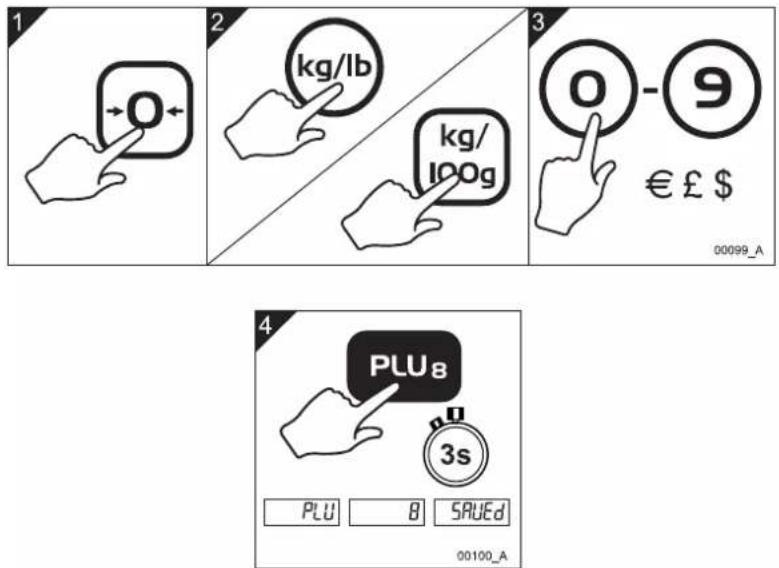
You can enter and store the units of weight (or the price base for UK, Europe and RoW scale variants) together with different unit prices to the twelve direct Price Look-Up (PLU) keys on the keyboard. This allows you to recall and use a unit price that you have already stored in the scale's memory against a direct PLU key. This means you can quickly weigh items that you sell a lot of without the need to type unit prices for particular items each time you weigh them.

To store the units of weight (or the price base) together with a price against an example direct PLU of number 8 do the steps as follows:

AVERY BERKEL FX50 - Programming direct PLUs - 2

text_image 1 2 kg/lb kg/ 100g 3 0 - 9 € £ $ 00099_A 4 PLU8 3s PLU B SAEEd 00100_A

Fig 4-10. Programming direct PLUs

AVERY BERKEL FX50 - Programming direct PLUs - 3

NOTE: An additional 38 indirect PLUs are available. See Sections 4.11 and 4.12.

34 FX 50 User Instructions

AVERY BERKEL FX50 - Programming direct PLUs - 4

AVERY BERKEL FX50 - Programming direct PLUs - 5

AVERY BERKEL FX50 - Programming direct PLUs - 6

AVERY BERKEL FX50 - Programming direct PLUs - 7

AVERY BERKEL FX50 - Programming direct PLUs - 8

AVERY BERKEL FX50 - Programming direct PLUs - 9

AVERY BERKEL FX50 - Programming direct PLUs - 10

AVERY BERKEL FX50 - Programming direct PLUs - 11

natural_image Pure geometric diagram with intersecting lines and a central circular pattern (no text or symbols)

4.10 Weighing using direct PLUs

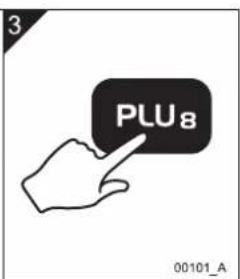
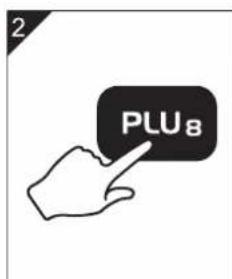
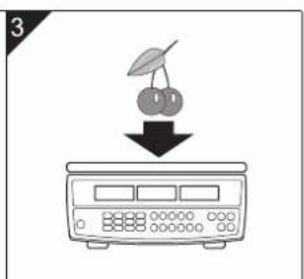
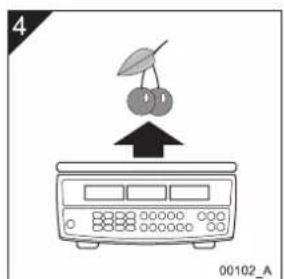
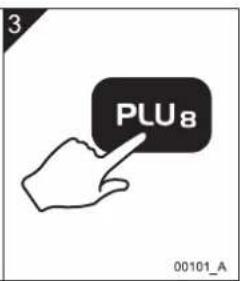
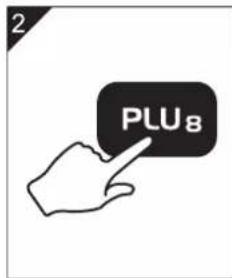
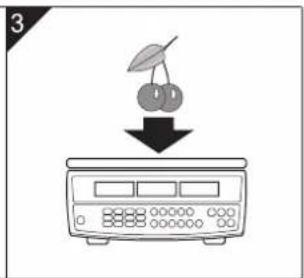
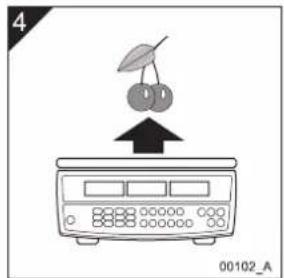
When you have programmed unit prices against direct PLU keys you can weigh items more quickly by recalling the preset unit prices you programmed using the direct PLU keys such as PLU.

To weigh an item using an example direct PLU of number 8 do the steps as follows:

AVERY BERKEL FX50 - Weighing using direct PLUs - 1

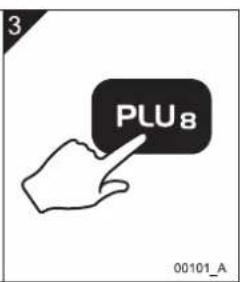
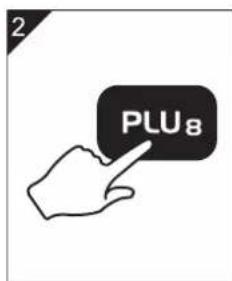
NOTE: You can use two methods to weigh items using direct PLUs. You can put the item on the scale and then press the direct PLU key or you can press the direct PLU key and then put the item on the scale (see steps 2 & 3 below).

AVERY BERKEL FX50 - Weighing using direct PLUs - 2

text_image 1

AVERY BERKEL FX50 - Weighing using direct PLUs - 3

text_image 2

AVERY BERKEL FX50 - Weighing using direct PLUs - 4

text_image 3 PLU8 00101_A

AVERY BERKEL FX50 - Weighing using direct PLUs - 5

text_image 2 PLU8

AVERY BERKEL FX50 - Weighing using direct PLUs - 6

text_image 3

AVERY BERKEL FX50 - Weighing using direct PLUs - 7

text_image 4 00102_A

Fig 4-11. Weighing using direct PLUs

4. Operating the scale

4.11 Programming indirect PLUs

AVERY BERKEL FX50 - Programming indirect PLUs - 1

NOTE: Indirect PLUs work the same way as direct PLUs except that, to recall an indirect PLU, you press the key and then manually type the indirect PLU number.

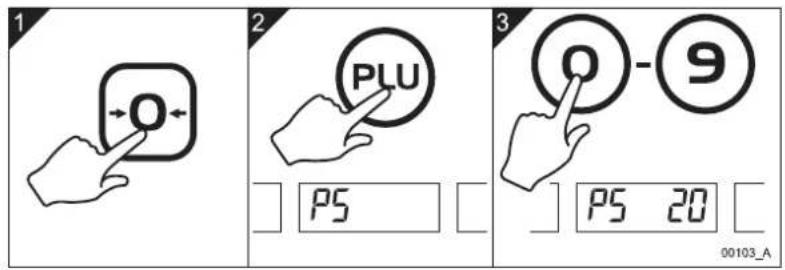
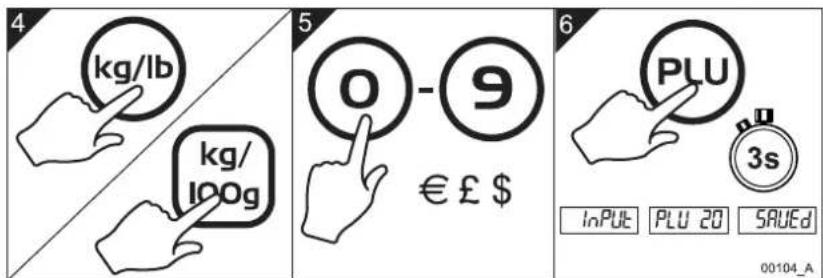
You can enter and store the units of weight (or the price base for UK, Europe and RoW scale variants) together with different unit prices against up to 38 indirect PLU keys that have PLU numbers from 13 to 50 assigned to them. This allows you to recall and use a unit price that you have already stored in the scale's memory. This means you can quickly weigh items that you sell a lot of without the need to type unit prices for particular items each time you weigh them.

To store the units of weight (or the price base) together with a price against an example indirect PLU of number 20 do the steps as follows:

AVERY BERKEL FX50 - Programming indirect PLUs - 2

text_image 1 2 3 PLU 0 - 9 PS PS 20 00103_A

AVERY BERKEL FX50 - Programming indirect PLUs - 3

text_image 4 kg/lb kg/ 100g 5 0 - 9 € £ $ 6 PLU 3s INPUT PLU 20 SAEED 00104_A

Fig 4-12. Programming indirect PLUs

AVERY BERKEL FX50 - Programming indirect PLUs - 4

natural_image Pure geometric crosshair symbol with no text or labels

AVERY BERKEL FX50 - Programming indirect PLUs - 5

AVERY BERKEL FX50 - Programming indirect PLUs - 6

AVERY BERKEL FX50 - Programming indirect PLUs - 7

AVERY BERKEL FX50 - Programming indirect PLUs - 8

4.12 Weighing using indirect PLUs

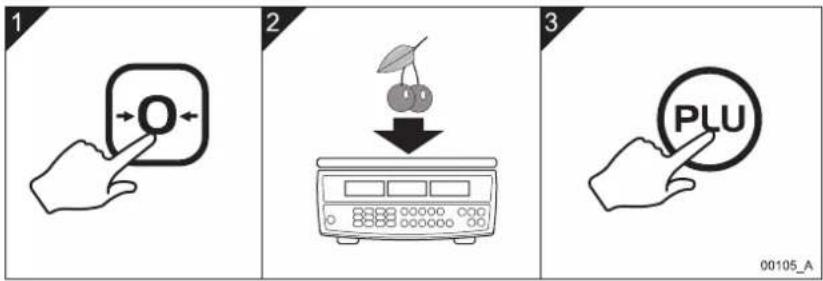
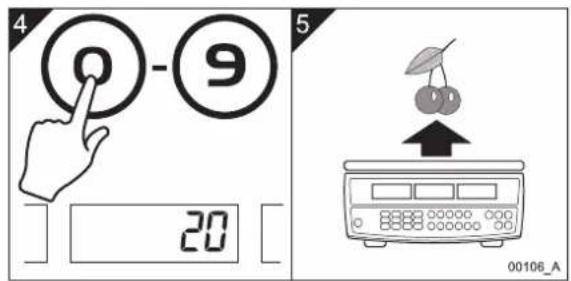
When you have programmed prices against the indirect PLU keys you can weigh items more quickly by recalling the preset price you programmed against an indirect PLU.

To weigh an item using an example indirect PLU of number 20 do the steps as follows:

AVERY BERKEL FX50 - Weighing using indirect PLUs - 1

text_image 1 2 3 00105_A

AVERY BERKEL FX50 - Weighing using indirect PLUs - 2

AVERY BERKEL FX50 - Weighing using indirect PLUs - 3

text_image 4 0 - 9 20 5 00106_A

Fig 4-13. Weighing using indirect PLUs

AVERY BERKEL FX50 - Weighing using indirect PLUs - 4

AVERY BERKEL FX50 - Weighing using indirect PLUs - 5

FX50 User.book Page 38 Thursday, August 23, 2007 2:31 PM

AVERY BERKEL FX50 - Weighing using indirect PLUs - 6

AVERY BERKEL FX50 - Weighing using indirect PLUs - 7

AVERY BERKEL FX50 - Weighing using indirect PLUs - 8

AVERY BERKEL FX50 - Weighing using indirect PLUs - 9

AVERY BERKEL FX50 - Weighing using indirect PLUs - 10

AVERY BERKEL FX50 - Weighing using indirect PLUs - 11

AVERY BERKEL FX50 - Weighing using indirect PLUs - 12

AVERY BERKEL FX50 - Weighing using indirect PLUs - 13

AVERY BERKEL FX50 - Weighing using indirect PLUs - 14

AVERY BERKEL FX50 - Weighing using indirect PLUs - 15

AVERY BERKEL FX50 - Weighing using indirect PLUs - 16

AVERY BERKEL FX50 - Weighing using indirect PLUs - 17

5. Error codes

If persistent error messages appear on the scale's display:

  1. Remove the battery to disconnect the scale from the power supply.
  2. Reinstall the battery to reconnect the power supply.
Error CodeProblem Action
Err 4 Theinitial zero or the zero key is attempting to zero the load that is more than 4% of the scale's maximum capacity.Remove all weight from the weigh pan then turn on the scale. Press the Zero key to zero the scale. If this does not work the scale needs calibration or service.
Err 5 Keyboard error. The keyboard has a short circuit so it must be replaced.Please contact your Avery Berkel dealer.
Err 6 A/Dconverter error. The scale needs calibration or service.Please contact your Avery Berkel dealer.

AVERY BERKEL FX50 - Error codes - 1

AVERY BERKEL FX50 - Error codes - 2

FX50 User.book Page 40 Thursday, August 23, 2007 2:31 PM

AVERY BERKEL FX50 - Error codes - 3

AVERY BERKEL FX50 - Error codes - 4

AVERY BERKEL FX50 - Error codes - 5

AVERY BERKEL FX50 - Error codes - 6

AVERY BERKEL FX50 - Error codes - 7

AVERY BERKEL FX50 - Error codes - 8

AVERY BERKEL FX50 - Error codes - 9

AVERY BERKEL FX50 - Error codes - 10

AVERY BERKEL FX50 - Error codes - 11

AVERY BERKEL FX50 - Error codes - 12

AVERY BERKEL FX50 - Error codes - 13

AVERY BERKEL FX50 - Error codes - 14

AVERY BERKEL FX50 - Error codes - 15

AVERY BERKEL FX50 - Error codes - 16

AVERY BERKEL FX50 - Error codes - 17

AVERY BERKEL FX50 - Error codes - 18

Contenido

natural_image Pure geometric crosshair symbols without any text or labels

AVERY BERKEL FX50 - Contenido - 1

natural_image Pure geometric diagram with intersecting lines and a central circular pattern (no text or symbols)

AVERY BERKEL FX50 - Contenido - 2

AVERY BERKEL FX50 - Contenido - 3

SPANISH.book Page 2 Thursday, August 23, 2007 2:35 PM

Contenido

natural_image Pure geometric diagram with intersecting lines and a central circular pattern (no text or symbols)

SPANISH.book Page 4 Thursday, August 23, 2007 2:35 PM

AVERY BERKEL FX50 - Contenido - 1

AVERY BERKEL FX50 - Contenido - 2

AVERY BERKEL FX50 - Contenido - 3

AVERY BERKEL FX50 - Contenido - 4

AVERY BERKEL FX50 - Contenido - 5

AVERY BERKEL FX50 - Contenido - 6

AVERY BERKEL FX50 - Contenido - 7

AVERY BERKEL FX50 - Contenido - 8

AVERY BERKEL FX50 - Contenido - 9

AVERY BERKEL FX50 - Contenido - 10

AVERY BERKEL FX50 - Contenido - 11

AVERY BERKEL FX50 - Contenido - 12

AVERY BERKEL FX50 - Contenido - 13

AVERY BERKEL FX50 - Contenido - 14

AVERY BERKEL FX50 - Contenido - 15

AVERY BERKEL FX50 - Contenido - 16

text_image Illustration showing four different types of appliance control scales with X marks indicating failure or rejection, alongside a checkmark for the rightmost scale.

SPANISH.book Page 6 Thursday, August 23, 2007 2:35 PM

text_image Illustration showing three scenarios of a weather control device with checkmarks and X marks indicating failure or rejection.

AVERY BERKEL FX50 - Contenido - 17

AVERY BERKEL FX50 - Contenido - 18

text_image Diagram illustrating a recycling process with a trash bin, switch, and sad face icon emerging from a computer screen.

AVERY BERKEL FX50 - Contenido - 19

text_image Illustration showing five different tools and a warning symbol: a hand using a balance scale, a tool with scissors, a switch, a device with X marks, and an open book with an exclamation mark.
natural_image Pure geometric diagram with intersecting lines and a central circular pattern (no text or symbols)
natural_image Illustration of cleaning products including spray bottles, a bottle with a black X mark, and a plastic bag (no text or symbols)

AVERY BERKEL FX50 - Contenido - 20

natural_image Line drawing of a hand cleaning a digital scale with a checkmark (no text or symbols)

SPANISH.book Page 8 Thursday, August 23, 2007 2:35 PM

AVERY BERKEL FX50 - Contenido - 21

AVERY BERKEL FX50 - Contenido - 22

AVERY BERKEL FX50 - Contenido - 23

AVERY BERKEL FX50 - Contenido - 24

AVERY BERKEL FX50 - Contenido - 25

AVERY BERKEL FX50 - Contenido - 26

AVERY BERKEL FX50 - Contenido - 27

AVERY BERKEL FX50 - Contenido - 28

AVERY BERKEL FX50 - Contenido - 29

AVERY BERKEL FX50 - Contenido - 30

AVERY BERKEL FX50 - Contenido - 31

AVERY BERKEL FX50 - Contenido - 32

AVERY BERKEL FX50 - Contenido - 33

AVERY BERKEL FX50 - Contenido - 34

AVERY BERKEL FX50 - Contenido - 35

AVERY BERKEL FX50 - Contenido - 36

SPANISH.book Page 14 Thursday, August 23, 2007 2:35 PM

natural_image Mechanical assembly diagram showing a clamping device inserted into a cylindrical component with an upward arrow indicating motion (no text or symbols present)

AVERY BERKEL FX50 - Contenido - 37

natural_image Illustration of a hand holding a flashlight next to a battery pack, with an upward arrow indicating motion (no text or symbols)

Español

AVERY BERKEL FX50 - Contenido - 38

natural_image Technical line drawing of a mechanical component with a downward arrow indicating direction (no text or symbols)

SPANISH.book Page 18 Thursday, August 23, 2007 2:35 PM

AVERY BERKEL FX50 - Contenido - 39

AVERY BERKEL FX50 - Contenido - 40

text_image Diagram illustrating mechanical assembly steps with labeled components and check/cancel icons
natural_image Pure geometric crosshair symbols without any text or labels

AVERY BERKEL FX50 - Contenido - 41

natural_image Pure geometric diagram with intersecting lines and a central circular pattern (no text or symbols)
text_image Diagram showing a battery terminal with a magnified view of a screw and an upward arrow, indicating a process or operation.

AVERY BERKEL FX50 - Contenido - 42

natural_image Two-step diagram showing hand pressing a component on a battery cover, with an arrow indicating the motion (no text or symbols present)

Español

AVERY BERKEL FX50 - Contenido - 43

text_image Diagram showing a hand inserting a component into a battery, with an inset close-up illustrating the internal structure.

AVERY BERKEL FX50 - Contenido - 44

text_image 4 00125_A

SPANISH.book Page 22 Thursday, August 23, 2007 2:35 PM

text_image Diagram illustrating battery charging process with labeled steps and magnified view of screw assembly
natural_image Pure geometric diagram with intersecting lines and a central circular pattern (no text or symbols)
natural_image Three geometric crosshair symbols: a target, a circular target with a grid pattern, and an inverted target with a black dot (no text or labels)
natural_image Pure geometric diagram with intersecting lines and a central circular pattern (no text or symbols)

AVERY BERKEL FX50 - Contenido - 45

AVERY BERKEL FX50 - Contenido - 46

SPANISH.book Page 26 Thursday, August 23, 2007 2:35 PM

AVERY BERKEL FX50 - Contenido - 47

AVERY BERKEL FX50 - Contenido - 48

natural_image Pure geometric diagram with intersecting lines and a central circular pattern (no text or symbols)
natural_image Hand pressing a button with an arrow, no text or symbols present

AVERY BERKEL FX50 - Contenido - 49

text_image 2 kg/lb

AVERY BERKEL FX50 - Contenido - 50

text_image 3 0 - 9 = 00088_A
natural_image Pure geometric diagram with intersecting lines and a central circular pattern (no text or symbols)

SPANISH.book Page 32 Thursday, August 23, 2007 2:35 PM

AVERY BERKEL FX50 - Contenido - 51

AVERY BERKEL FX50 - Contenido - 52

natural_image Pure geometric diagram with intersecting lines and a central circular pattern (no text or symbols)
natural_image Three geometric crosshair symbols: a target, a circular target with grid pattern, and an inverted target with crosshairs (no text or labels)
natural_image Pure geometric diagram with intersecting lines and a central circular pattern (no text or symbols)

SPANISH.book Page 38 Thursday, August 23, 2007 2:35 PM

AVERY BERKEL FX50 - Contenido - 53

AVERY BERKEL FX50 - Contenido - 54

AVERY BERKEL FX50 - Contenido - 55

AVERY BERKEL FX50 - Contenido - 56

AVERY BERKEL FX50 - Contenido - 57

AVERY BERKEL FX50 - Contenido - 58

AVERY BERKEL FX50 - Contenido - 59

AVERY BERKEL FX50 - Contenido - 60

AVERY BERKEL FX50 - Contenido - 61

AVERY BERKEL FX50 - Contenido - 62

AVERY BERKEL FX50 - Contenido - 63

AVERY BERKEL FX50 - Contenido - 64

5. Códigos de error

SPANISH.book Page 40 Thursday, August 23, 2007 2:35 PM

AVERY BERKEL FX50 - Códigos de error - 1

AVERY BERKEL FX50 - Códigos de error - 2

AVERY BERKEL FX50 - Códigos de error - 3

AVERY BERKEL FX50 - Códigos de error - 4

AVERY BERKEL FX50 - Códigos de error - 5

AVERY BERKEL FX50 - Códigos de error - 6

AVERY BERKEL FX50 - Códigos de error - 7

AVERY BERKEL FX50 - Códigos de error - 8

AVERY BERKEL FX50 - Códigos de error - 9

AVERY BERKEL FX50 - Códigos de error - 10

AVERY BERKEL FX50 - Códigos de error - 11

AVERY BERKEL FX50 - Códigos de error - 12

AVERY BERKEL FX50 - Códigos de error - 13

AVERY BERKEL FX50 - Códigos de error - 14

AVERY BERKEL FX50 - Códigos de error - 15

AVERY BERKEL FX50 - Códigos de error - 16

Table des matières

1. Avertissements 3

FRENCH.book Page 2 Thursday, August 23, 2007 2:38 PM

Table des matières

natural_image Pure geometric diagram with intersecting lines and a central circular pattern (no text or symbols)

FRENCH.book Page 4 Thursday, August 23, 2007 2:38 PM

AVERY BERKEL FX50 - Table des matières - 1

AVERY BERKEL FX50 - Table des matières - 2

AVERY BERKEL FX50 - Table des matières - 3

AVERY BERKEL FX50 - Table des matières - 4

AVERY BERKEL FX50 - Table des matières - 5

AVERY BERKEL FX50 - Table des matières - 6

AVERY BERKEL FX50 - Table des matières - 7

AVERY BERKEL FX50 - Table des matières - 8

AVERY BERKEL FX50 - Table des matières - 9

AVERY BERKEL FX50 - Table des matières - 10

AVERY BERKEL FX50 - Table des matières - 11

AVERY BERKEL FX50 - Table des matières - 12

AVERY BERKEL FX50 - Table des matières - 13

AVERY BERKEL FX50 - Table des matières - 14

AVERY BERKEL FX50 - Table des matières - 15

AVERY BERKEL FX50 - Table des matières - 16

1. Avertissements

1.1 Installation sans danger

AVERY BERKEL FX50 - Installation sans danger - 1

text_image Illustration showing four different hand gestures on a scale, with X and check symbols indicating selection or confirmation.

FRENCH.book Page 6 Thursday, August 23, 2007 2:38 PM

1. Avertissements

AVERY BERKEL FX50 - Avertissements - 1

text_image Illustration showing three scenarios of a weather control device with checkmarks and X marks indicating failure or rejection.

AVERY BERKEL FX50 - Avertissements - 2

AVERY BERKEL FX50 - Avertissements - 3

text_image Diagram illustrating a recycling process with labeled components including a trash bin, switch, and computer monitor.

AVERY BERKEL FX50 - Avertissements - 4

text_image Illustration showing five different tools and a warning symbol: a hand using a scale, a tool with scissors, a device with cross marks, and an open book.
natural_image Pure geometric diagram with intersecting lines and a central circular pattern (no text or symbols)

1.3 Nettoyage de la balance

AVERY BERKEL FX50 - Nettoyage de la balance - 1

natural_image Illustration of cleaning products including spray bottles, a bottle with a black X mark, and a spray can (no text or symbols)

AVERY BERKEL FX50 - Nettoyage de la balance - 2

natural_image Line drawing of a hand cleaning a digital scale with a checkmark (no text or symbols)

Fig 1-3. Nettoyage de la balance

FRENCH.book Page 8 Thursday, August 23, 2007 2:38 PM

AVERY BERKEL FX50 - Nettoyage de la balance - 3

AVERY BERKEL FX50 - Nettoyage de la balance - 4

AVERY BERKEL FX50 - Nettoyage de la balance - 5

AVERY BERKEL FX50 - Nettoyage de la balance - 6

AVERY BERKEL FX50 - Nettoyage de la balance - 7

AVERY BERKEL FX50 - Nettoyage de la balance - 8

AVERY BERKEL FX50 - Nettoyage de la balance - 9

AVERY BERKEL FX50 - Nettoyage de la balance - 10

AVERY BERKEL FX50 - Nettoyage de la balance - 11

AVERY BERKEL FX50 - Nettoyage de la balance - 12

AVERY BERKEL FX50 - Nettoyage de la balance - 13

AVERY BERKEL FX50 - Nettoyage de la balance - 14

AVERY BERKEL FX50 - Nettoyage de la balance - 15

AVERY BERKEL FX50 - Nettoyage de la balance - 16

AVERY BERKEL FX50 - Nettoyage de la balance - 17

AVERY BERKEL FX50 - Nettoyage de la balance - 18

text_image Technical diagram showing labeled components of a device with numbered parts and an inset view of the device's internal structure.

FRENCH.book Page 14 Thursday, August 23, 2007 2:38 PM

text_image Technical diagram showing three-step assembly steps of a mechanical device, with arrows indicating movement and component positioning.

FRENCH.book Page 18 Thursday, August 23, 2007 2:38 PM

AVERY BERKEL FX50 - Nettoyage de la balance - 19

AVERY BERKEL FX50 - Nettoyage de la balance - 20

3. Installation de la balance

text_image Diagram illustrating mechanical assembly steps with labeled components and check/cancel icons
natural_image Pure geometric crosshair symbols without any text or labels

AVERY BERKEL FX50 - Installation de la balance - 1

AVERY BERKEL FX50 - Installation de la balance - 2

AVERY BERKEL FX50 - Installation de la balance - 3

3. Installation de la balance

AVERY BERKEL FX50 - Installation de la balance - 1

natural_image Two-step diagram showing hand pressing a button on a battery cover, with no text or symbols present.

AVERY BERKEL FX50 - Installation de la balance - 2

text_image Diagram showing a hand inserting a component into a battery, with an inset close-up illustrating the internal structure.

AVERY BERKEL FX50 - Installation de la balance - 3

text_image Diagram showing a hand pressing a component into a battery, with an inset close-up of the component being inserted.
natural_image Pure geometric crosshair symbols without any text or labels

AVERY BERKEL FX50 - Installation de la balance - 4

AVERY BERKEL FX50 - Installation de la balance - 5

natural_image Pure geometric diagram with intersecting lines and a central circular pattern (no text or symbols)

AVERY BERKEL FX50 - Installation de la balance - 6

AVERY BERKEL FX50 - Installation de la balance - 7

FRENCH.book Page 22 Thursday, August 23, 2007 2:38 PM

3. Installation de la balance

AVERY BERKEL FX50 - Installation de la balance - 1

text_image Diagram illustrating battery charging process with labeled steps and magnified view of screw assembly
natural_image Pure geometric diagram with intersecting lines and a central circular pattern (no text or symbols)

FRENCH.book Page 26 Thursday, August 23, 2007 2:38 PM

AVERY BERKEL FX50 - Installation de la balance - 2

AVERY BERKEL FX50 - Installation de la balance - 3

natural_image Pure geometric diagram with intersecting lines and a central circular pattern (no text or symbols)
natural_image Three geometric crosshair symbols: a circle with center dots, an ellipse, and a target-like shape (no text or labels)
natural_image Pure geometric diagram with intersecting lines and a central circular pattern (no text or symbols)

AVERY BERKEL FX50 - Installation de la balance - 4

text_image 1 2 3 0 - 9 = 00088_A

AVERY BERKEL FX50 - Installation de la balance - 5

text_image 4 T -0.020 NET ∼ +0+ 5 6 0 - 9 € £ $ PLU PLU8 00089_A

Français

AVERY BERKEL FX50 - Installation de la balance - 6

text_image 7 -0.020 NET ∼ +0+ 8 0.000 NET ∼ +0+ 00090_A

FRENCH.book Page 32 Thursday, August 23, 2007 2:38 PM

natural_image Pure geometric diagram with intersecting lines and a central circular pattern (no text or symbols)
natural_image Illustration of a digital scale with a pointer and a cherries above it (no text or symbols)

AVERY BERKEL FX50 - Installation de la balance - 7

text_image 3 PLU₈ 00101_A

Français

AVERY BERKEL FX50 - Installation de la balance - 8

text_image 2 PLU8

AVERY BERKEL FX50 - Installation de la balance - 9

text_image 3

AVERY BERKEL FX50 - Installation de la balance - 10

text_image 4 00102_A
natural_image Three geometric crosshair symbols: a target, a circular target with a central dot, and a diagonal target with crosshairs (no text or labels)
natural_image Pure geometric diagram with intersecting lines and a central circular pattern (no text or symbols)

AVERY BERKEL FX50 - Installation de la balance - 11

AVERY BERKEL FX50 - Installation de la balance - 12

FRENCH.book Page 38 Thursday, August 23, 2007 2:38 PM

AVERY BERKEL FX50 - Installation de la balance - 13

AVERY BERKEL FX50 - Installation de la balance - 14

AVERY BERKEL FX50 - Installation de la balance - 15

AVERY BERKEL FX50 - Installation de la balance - 16

AVERY BERKEL FX50 - Installation de la balance - 17

AVERY BERKEL FX50 - Installation de la balance - 18

AVERY BERKEL FX50 - Installation de la balance - 19

AVERY BERKEL FX50 - Installation de la balance - 20

AVERY BERKEL FX50 - Installation de la balance - 21

AVERY BERKEL FX50 - Installation de la balance - 22

AVERY BERKEL FX50 - Installation de la balance - 23

AVERY BERKEL FX50 - Installation de la balance - 24

AVERY BERKEL FX50 - Installation de la balance - 25

AVERY BERKEL FX50 - Installation de la balance - 26

AVERY BERKEL FX50 - Installation de la balance - 27

AVERY BERKEL FX50 - Installation de la balance - 28

5. Codes d'erreur

FRENCH.book Page 40 Thursday, August 23, 2007 2:38 PM

AVERY BERKEL FX50 - Codes d'erreur - 1

AVERY BERKEL FX50 - Codes d'erreur - 2

AVERY BERKEL FX50 - Codes d'erreur - 3

AVERY BERKEL FX50 - Codes d'erreur - 4

AVERY BERKEL FX50 - Codes d'erreur - 5

AVERY BERKEL FX50 - Codes d'erreur - 6

AVERY BERKEL FX50 - Codes d'erreur - 7

AVERY BERKEL FX50 - Codes d'erreur - 8

AVERY BERKEL FX50 - Codes d'erreur - 9

AVERY BERKEL FX50 - Codes d'erreur - 10

AVERY BERKEL FX50 - Codes d'erreur - 11

AVERY BERKEL FX50 - Codes d'erreur - 12

AVERY BERKEL FX50 - Codes d'erreur - 13

AVERY BERKEL FX50 - Codes d'erreur - 14

AVERY BERKEL FX50 - Codes d'erreur - 15

AVERY BERKEL FX50 - Codes d'erreur - 16

Inhalt

1. Warnhinweise 5

GERMAN.book Page 2 Thursday, August 23, 2007 2:41 PM

AVERY BERKEL FX50 - Warnhinweise 5 - 1

AVERY BERKEL FX50 - Warnhinweise 5 - 2

Inhalt

GERMAN.book Page 4 Thursday, August 23, 2007 2:41 PM

AVERY BERKEL FX50 - Inhalt - 1

AVERY BERKEL FX50 - Inhalt - 2

AVERY BERKEL FX50 - Inhalt - 3

AVERY BERKEL FX50 - Inhalt - 4

AVERY BERKEL FX50 - Inhalt - 5

AVERY BERKEL FX50 - Inhalt - 6

AVERY BERKEL FX50 - Inhalt - 7

AVERY BERKEL FX50 - Inhalt - 8

AVERY BERKEL FX50 - Inhalt - 9

AVERY BERKEL FX50 - Inhalt - 10

AVERY BERKEL FX50 - Inhalt - 11

AVERY BERKEL FX50 - Inhalt - 12

AVERY BERKEL FX50 - Inhalt - 13

AVERY BERKEL FX50 - Inhalt - 14

AVERY BERKEL FX50 - Inhalt - 15

AVERY BERKEL FX50 - Inhalt - 16

1. Warnhinweise

text_image Illustration showing four different hand positions on a scale with X marks and a checkmark, likely illustrating a manual or mechanical operation.

GERMAN.book Page 6 Thursday, August 23, 2007 2:41 PM

1. Warnhinweise

AVERY BERKEL FX50 - Warnhinweise - 1

text_image Illustration showing three scenarios of a weather control device with checkmarks and X marks indicating failure or rejection.

AVERY BERKEL FX50 - Warnhinweise - 2

AVERY BERKEL FX50 - Warnhinweise - 3

text_image Diagram illustrating a recycling process with labeled components including a trash bin, switch, and computer monitor.

00007_A

AVERY BERKEL FX50 - Warnhinweise - 4

text_image Illustration showing five different tools and a warning symbol: a hand using a scale, a tool with scissors, a device with cross marks, and an open book.
natural_image Illustration of cleaning products including spray bottles, a canister, and a bottle with a warning symbol (no text or labels)

AVERY BERKEL FX50 - Warnhinweise - 5

natural_image Line drawing of a hand cleaning a digital scale with a checkmark (no text or symbols)

GERMAN.book Page 8 Thursday, August 23, 2007 2:41 PM

AVERY BERKEL FX50 - Warnhinweise - 6

AVERY BERKEL FX50 - Warnhinweise - 7

AVERY BERKEL FX50 - Warnhinweise - 8

AVERY BERKEL FX50 - Warnhinweise - 9

AVERY BERKEL FX50 - Warnhinweise - 10

AVERY BERKEL FX50 - Warnhinweise - 11

AVERY BERKEL FX50 - Warnhinweise - 12

AVERY BERKEL FX50 - Warnhinweise - 13

AVERY BERKEL FX50 - Warnhinweise - 14

AVERY BERKEL FX50 - Warnhinweise - 15

AVERY BERKEL FX50 - Warnhinweise - 16

AVERY BERKEL FX50 - Warnhinweise - 17

AVERY BERKEL FX50 - Warnhinweise - 18

AVERY BERKEL FX50 - Warnhinweise - 19

AVERY BERKEL FX50 - Warnhinweise - 20

AVERY BERKEL FX50 - Warnhinweise - 21

text_image Technical diagram showing labeled components of a device with numbered parts and an inset view of the device's internal structure.
natural_image Three geometric crosshair symbols: a target, a circular target, and an inverted target with intersecting lines (no text or labels)

AVERY BERKEL FX50 - Warnhinweise - 22

AVERY BERKEL FX50 - Warnhinweise - 23

natural_image Pure geometric diagram with intersecting lines and a central circular pattern (no text or symbols)

GERMAN.book Page 14 Thursday, August 23, 2007 2:41 PM

GERMAN.book Page 16 Thursday, August 23, 2007 2:41 PM

AVERY BERKEL FX50 - Warnhinweise - 24

AVERY BERKEL FX50 - Warnhinweise - 25

AVERY BERKEL FX50 - Warnhinweise - 26

AVERY BERKEL FX50 - Warnhinweise - 27

AVERY BERKEL FX50 - Warnhinweise - 28

AVERY BERKEL FX50 - Warnhinweise - 29

AVERY BERKEL FX50 - Warnhinweise - 30

AVERY BERKEL FX50 - Warnhinweise - 31

AVERY BERKEL FX50 - Warnhinweise - 32

AVERY BERKEL FX50 - Warnhinweise - 33

AVERY BERKEL FX50 - Warnhinweise - 34

AVERY BERKEL FX50 - Warnhinweise - 35

AVERY BERKEL FX50 - Warnhinweise - 36

AVERY BERKEL FX50 - Warnhinweise - 37

AVERY BERKEL FX50 - Warnhinweise - 38

AVERY BERKEL FX50 - Warnhinweise - 39

text_image Technical diagram showing three-step assembly steps of a mechanical device, with arrows indicating movement and component positioning.
natural_image Three geometric crosshair targets with central dots and alignment lines (no text or symbols)
natural_image Pure geometric diagram with intersecting lines and a central circular pattern (no text or symbols)

AVERY BERKEL FX50 - Warnhinweise - 40

AVERY BERKEL FX50 - Warnhinweise - 41

GERMAN.book Page 18 Thursday, August 23, 2007 2:41 PM

AVERY BERKEL FX50 - Warnhinweise - 42

AVERY BERKEL FX50 - Warnhinweise - 43

text_image Diagram illustrating mechanical adjustment steps with labeled circular diagrams and icons for inspection and reassembly.
text_image Diagram showing a battery terminal with a magnified view of a screw and a cross symbol indicating rotation or dislocation.

AVERY BERKEL FX50 - Warnhinweise - 44

natural_image Two-step diagram showing hand pressing a button on a battery casing, with arrows indicating the action (no text or symbols present)

AVERY BERKEL FX50 - Warnhinweise - 45

text_image Diagram showing a hand inserting a component into a battery, with an inset close-up illustrating the internal structure.

AVERY BERKEL FX50 - Warnhinweise - 46

text_image 4 00125_A
natural_image Three geometric crosshair symbols: a circle, a target, and an arrowhead (no text or labels)
natural_image Pure geometric diagram with intersecting lines and a central circular pattern (no text or symbols)

AVERY BERKEL FX50 - Warnhinweise - 47

AVERY BERKEL FX50 - Warnhinweise - 48

GERMAN.book Page 22 Thursday, August 23, 2007 2:41 PM

text_image Diagram illustrating battery charging process with labeled steps and magnified view of screw assembly
natural_image Pure geometric diagram with intersecting lines and a central circular pattern (no text or symbols)
flowchart
graph TD
    A["999999"] --> B["000000"]
    C["999999"] --> D["000000"]
    E["999999"] --> F["000000"]
    G["000000"] --> H["000000"]
    I["000000"] --> J["000000"]
    K["00082_A"] --> L["Speaker"]
natural_image Three geometric crosshair symbols: a target, a circular target with a dark center, and a diagonal target with crosshairs (no text or labels)
natural_image Pure geometric diagram with intersecting lines and a central circular pattern (no text or symbols)

AVERY BERKEL FX50 - Warnhinweise - 49

AVERY BERKEL FX50 - Warnhinweise - 50

GERMAN.book Page 26 Thursday, August 23, 2007 2:41 PM

AVERY BERKEL FX50 - Warnhinweise - 51

AVERY BERKEL FX50 - Warnhinweise - 52

natural_image Pure geometric diagram with intersecting lines and a central circular pattern (no text or symbols)
natural_image Hand icon pointing at a black circular button with arrows, no text or symbols present

AVERY BERKEL FX50 - Warnhinweise - 53

text_image 2 kg/lb

AVERY BERKEL FX50 - Warnhinweise - 54

text_image 3 0 - 9 = 00088_A
natural_image Pure geometric diagram with intersecting lines and a central circular pattern (no text or symbols)

AVERY BERKEL FX50 - Warnhinweise - 55

AVERY BERKEL FX50 - Warnhinweise - 56

text_image 7 -0.020 NET ∼ •0•

AVERY BERKEL FX50 - Warnhinweise - 57

text_image 8 0.000 NET ∼ +0+ 00090_A
natural_image Three geometric crosshair targets with central dots and alignment lines (no text or symbols)
natural_image Pure geometric diagram with intersecting lines and a central circular pattern (no text or symbols)

AVERY BERKEL FX50 - Warnhinweise - 58

AVERY BERKEL FX50 - Warnhinweise - 59

GERMAN.book Page 32 Thursday, August 23, 2007 2:41 PM

AVERY BERKEL FX50 - Warnhinweise - 60

AVERY BERKEL FX50 - Warnhinweise - 61

natural_image Pure geometric diagram with intersecting lines and a central circular pattern (no text or symbols)
natural_image Three geometric crosshair symbols: a circle with center, an ellipse, and a target-like shape (no text or labels)
natural_image Pure geometric diagram with intersecting lines and a central circular pattern (no text or symbols)
natural_image Three geometric crosshair symbols: a target, a circular target with radial lines, and a target with concentric circles (no text or labels)
natural_image Pure geometric diagram with intersecting lines and a central circular pattern (no text or symbols)

AVERY BERKEL FX50 - Warnhinweise - 62

AVERY BERKEL FX50 - Warnhinweise - 63

GERMAN.book Page 38 Thursday, August 23, 2007 2:41 PM

AVERY BERKEL FX50 - Warnhinweise - 64

AVERY BERKEL FX50 - Warnhinweise - 65

AVERY BERKEL FX50 - Warnhinweise - 66

AVERY BERKEL FX50 - Warnhinweise - 67

AVERY BERKEL FX50 - Warnhinweise - 68

AVERY BERKEL FX50 - Warnhinweise - 69

AVERY BERKEL FX50 - Warnhinweise - 70

AVERY BERKEL FX50 - Warnhinweise - 71

AVERY BERKEL FX50 - Warnhinweise - 72

AVERY BERKEL FX50 - Warnhinweise - 73

AVERY BERKEL FX50 - Warnhinweise - 74

AVERY BERKEL FX50 - Warnhinweise - 75

AVERY BERKEL FX50 - Warnhinweise - 76

AVERY BERKEL FX50 - Warnhinweise - 77

AVERY BERKEL FX50 - Warnhinweise - 78

AVERY BERKEL FX50 - Warnhinweise - 79

5. Fehlercodes

GERMAN.book Page 40 Thursday, August 23, 2007 2:41 PM

AVERY BERKEL FX50 - Fehlercodes - 1

AVERY BERKEL FX50 - Fehlercodes - 2

AVERY BERKEL FX50 - Fehlercodes - 3

AVERY BERKEL FX50 - Fehlercodes - 4

AVERY BERKEL FX50 - Fehlercodes - 5

AVERY BERKEL FX50 - Fehlercodes - 6

AVERY BERKEL FX50 - Fehlercodes - 7

AVERY BERKEL FX50 - Fehlercodes - 8

AVERY BERKEL FX50 - Fehlercodes - 9

AVERY BERKEL FX50 - Fehlercodes - 10

AVERY BERKEL FX50 - Fehlercodes - 11

AVERY BERKEL FX50 - Fehlercodes - 12

AVERY BERKEL FX50 - Fehlercodes - 13

AVERY BERKEL FX50 - Fehlercodes - 14

AVERY BERKEL FX50 - Fehlercodes - 15

AVERY BERKEL FX50 - Fehlercodes - 16

Sommario

natural_image Pure geometric crosshair symbols without any text or labels

AVERY BERKEL FX50 - Sommario - 1

AVERY BERKEL FX50 - Sommario - 2

AVERY BERKEL FX50 - Sommario - 3

AVERY BERKEL FX50 - Sommario - 4

AVERY BERKEL FX50 - Sommario - 5

ITALIAN.book Page 2 Thursday, August 23, 2007 5:43 PM

AVERY BERKEL FX50 - Sommario - 6

AVERY BERKEL FX50 - Sommario - 7

Sommario

ITALIAN.book Page 4 Thursday, August 23, 2007 5:43 PM

AVERY BERKEL FX50 - Sommario - 1

AVERY BERKEL FX50 - Sommario - 2

AVERY BERKEL FX50 - Sommario - 3

AVERY BERKEL FX50 - Sommario - 4

AVERY BERKEL FX50 - Sommario - 5

AVERY BERKEL FX50 - Sommario - 6

AVERY BERKEL FX50 - Sommario - 7

AVERY BERKEL FX50 - Sommario - 8

AVERY BERKEL FX50 - Sommario - 9

AVERY BERKEL FX50 - Sommario - 10

AVERY BERKEL FX50 - Sommario - 11

AVERY BERKEL FX50 - Sommario - 12

AVERY BERKEL FX50 - Sommario - 13

AVERY BERKEL FX50 - Sommario - 14

AVERY BERKEL FX50 - Sommario - 15

AVERY BERKEL FX50 - Sommario - 16

text_image Illustration showing four different hand positions on a scale with X marks and a checkmark, likely illustrating a manual or mechanical operation.

ITALIAN.book Page 6 Thursday, August 23, 2007 5:43 PM

text_image Illustration showing three scenarios of a weather control device with checkmarks and X marks indicating failure or rejection.

AVERY BERKEL FX50 - Sommario - 17

AVERY BERKEL FX50 - Sommario - 18

text_image Diagram illustrating a recycling process with labeled components including a trash bin, switch, and computer monitor.

AVERY BERKEL FX50 - Sommario - 19

text_image Illustration showing five different tools and a warning symbol: a hand using a scale, a tool with scissors, a device with cross marks, and an open book.
natural_image Pure geometric diagram with intersecting lines and a central circular pattern (no text or symbols)
natural_image Illustration of cleaning products including spray bottles, a bottle with a black X mark, and a spray can (no text or symbols)

AVERY BERKEL FX50 - Sommario - 20

natural_image Line drawing of a hand cleaning a digital scale with a checkmark (no text or symbols)

ITALIAN.book Page 8 Thursday, August 23, 2007 5:43 PM

AVERY BERKEL FX50 - Sommario - 21

AVERY BERKEL FX50 - Sommario - 22

AVERY BERKEL FX50 - Sommario - 23

AVERY BERKEL FX50 - Sommario - 24

AVERY BERKEL FX50 - Sommario - 25

AVERY BERKEL FX50 - Sommario - 26

AVERY BERKEL FX50 - Sommario - 27

AVERY BERKEL FX50 - Sommario - 28

AVERY BERKEL FX50 - Sommario - 29

AVERY BERKEL FX50 - Sommario - 30

AVERY BERKEL FX50 - Sommario - 31

AVERY BERKEL FX50 - Sommario - 32

AVERY BERKEL FX50 - Sommario - 33

AVERY BERKEL FX50 - Sommario - 34

AVERY BERKEL FX50 - Sommario - 35

AVERY BERKEL FX50 - Sommario - 36

text_image Technical diagram showing labeled components of a device with numbered parts and an inset view of the device's internal structure.
natural_image Pure geometric crosshair symbols without any text or labels

FX 50 Manuale d'uso 9

AVERY BERKEL FX50 - Sommario - 37

AVERY BERKEL FX50 - Sommario - 38

natural_image Pure geometric diagram with intersecting lines and a central circular pattern (no text or symbols)

ITALIAN.book Page 14 Thursday, August 23, 2007 5:43 PM

text_image Technical diagram showing three-step assembly steps of a mechanical device, with arrows indicating movement and component positioning.

ITALIAN.book Page 18 Thursday, August 23, 2007 5:43 PM

AVERY BERKEL FX50 - Sommario - 39

AVERY BERKEL FX50 - Sommario - 40

text_image Diagram illustrating mechanical adjustment steps with labeled circular diagrams and icons for inspection and reassembly.
natural_image Two-step diagram showing hand pressing a button on a battery cover, with no text or symbols present.

AVERY BERKEL FX50 - Sommario - 41

text_image Diagram showing battery charging process with hand inserting a component and cable routing, labeled with number 3

AVERY BERKEL FX50 - Sommario - 42

text_image 4 00125_A

ITALIAN.book Page 22 Thursday, August 23, 2007 5:43 PM

text_image Diagram illustrating battery charging process with labeled steps and magnified view of screw assembly
natural_image Pure geometric diagram with intersecting lines and a central circular pattern (no text or symbols)
flowchart
graph TD
    A["999999"] --> B["000000"]
    C["999999"] --> D["000000"]
    E["999999"] --> F["000000"]
    G["00082_A"] --> H["Speaker icon"]

ITALIAN.book Page 26 Thursday, August 23, 2007 5:43 PM

AVERY BERKEL FX50 - Sommario - 43

AVERY BERKEL FX50 - Sommario - 44

natural_image Pure geometric diagram with intersecting lines and a central circular pattern (no text or symbols)
natural_image Three geometric crosshair symbols: a target, a circular target, and an inverted target with intersecting lines (no text or labels)

FX 50 Manuale d'uso 27

AVERY BERKEL FX50 - Sommario - 45

AVERY BERKEL FX50 - Sommario - 46

natural_image Pure geometric diagram with intersecting lines and a central circular pattern (no text or symbols)
natural_image Hand pressing a button with an arrow pointing to the center (no text or symbols)

AVERY BERKEL FX50 - Sommario - 47

text_image 2 kg/lb

AVERY BERKEL FX50 - Sommario - 48

text_image 3 0 - 9 = 00088_A
natural_image Pure geometric diagram with intersecting lines and a central circular pattern (no text or symbols)
natural_image Three geometric crosshair symbols: a target, a circular target with grid pattern, and a target with crosshairs (no text or labels)

FX 50 Manuale d'uso 31

AVERY BERKEL FX50 - Sommario - 49

AVERY BERKEL FX50 - Sommario - 50

AVERY BERKEL FX50 - Sommario - 51

AVERY BERKEL FX50 - Sommario - 52

AVERY BERKEL FX50 - Sommario - 53

ITALIAN.book Page 32 Thursday, August 23, 2007 5:43 PM

natural_image Pure geometric diagram with intersecting lines and a central circular pattern (no text or symbols)

ITALIAN.book Page 38 Thursday, August 23, 2007 5:43 PM

AVERY BERKEL FX50 - Sommario - 54

AVERY BERKEL FX50 - Sommario - 55

AVERY BERKEL FX50 - Sommario - 56

AVERY BERKEL FX50 - Sommario - 57

AVERY BERKEL FX50 - Sommario - 58

AVERY BERKEL FX50 - Sommario - 59

AVERY BERKEL FX50 - Sommario - 60

AVERY BERKEL FX50 - Sommario - 61

AVERY BERKEL FX50 - Sommario - 62

AVERY BERKEL FX50 - Sommario - 63

AVERY BERKEL FX50 - Sommario - 64

AVERY BERKEL FX50 - Sommario - 65

AVERY BERKEL FX50 - Sommario - 66

AVERY BERKEL FX50 - Sommario - 67

AVERY BERKEL FX50 - Sommario - 68

AVERY BERKEL FX50 - Sommario - 69

5. Codici di errore

ITALIAN.book Page 40 Thursday, August 23, 2007 5:43 PM

AVERY BERKEL FX50 - Codici di errore - 1

AVERY BERKEL FX50 - Codici di errore - 2

AVERY BERKEL FX50 - Codici di errore - 3

AVERY BERKEL FX50 - Codici di errore - 4

AVERY BERKEL FX50 - Codici di errore - 5

AVERY BERKEL FX50 - Codici di errore - 6

AVERY BERKEL FX50 - Codici di errore - 7

AVERY BERKEL FX50 - Codici di errore - 8

AVERY BERKEL FX50 - Codici di errore - 9

AVERY BERKEL FX50 - Codici di errore - 10

AVERY BERKEL FX50 - Codici di errore - 11

AVERY BERKEL FX50 - Codici di errore - 12

AVERY BERKEL FX50 - Codici di errore - 13

AVERY BERKEL FX50 - Codici di errore - 14

AVERY BERKEL FX50 - Codici di errore - 15

AVERY BERKEL FX50 - Codici di errore - 16

Inhoud

DUTCH.book Page 4 Thursday, August 23, 2007 5:52 PM

AVERY BERKEL FX50 - Inhoud - 1

AVERY BERKEL FX50 - Inhoud - 2

AVERY BERKEL FX50 - Inhoud - 3

AVERY BERKEL FX50 - Inhoud - 4

AVERY BERKEL FX50 - Inhoud - 5

AVERY BERKEL FX50 - Inhoud - 6

AVERY BERKEL FX50 - Inhoud - 7

AVERY BERKEL FX50 - Inhoud - 8

AVERY BERKEL FX50 - Inhoud - 9

AVERY BERKEL FX50 - Inhoud - 10

AVERY BERKEL FX50 - Inhoud - 11

AVERY BERKEL FX50 - Inhoud - 12

text_image Illustration showing four different hand gestures on a control panel, with X and check symbols indicating cancellation or rejection.

Fig 1-1. De schaal correct oppakken

Nederlands

DUTCH.book Page 6 Thursday, August 23, 2007 5:52 PM

text_image Illustration showing three scenarios of a weather control device with checkmarks and X marks indicating failure or rejection.

AVERY BERKEL FX50 - Inhoud - 13

AVERY BERKEL FX50 - Inhoud - 14

text_image Diagram illustrating a recycling process with labeled components including a trash bin, switch, and computer monitor.

AVERY BERKEL FX50 - Inhoud - 15

text_image Illustration showing five different tools and a warning symbol: a hand using a balance scale, a tool with scissors, a switch, a device with X marks, and an open book with an exclamation mark.
natural_image Pure geometric diagram with intersecting lines and a central circular pattern (no text or symbols)
natural_image Illustration of cleaning products including spray bottles, a bottle with a warning sign, and a spray can (no text or symbols)

AVERY BERKEL FX50 - Inhoud - 16

natural_image Line drawing of a hand cleaning a digital scale with a checkmark (no text or symbols)

DUTCH.book Page 8 Thursday, August 23, 2007 5:52 PM

AVERY BERKEL FX50 - Inhoud - 17

AVERY BERKEL FX50 - Inhoud - 18

AVERY BERKEL FX50 - Inhoud - 19

AVERY BERKEL FX50 - Inhoud - 20

AVERY BERKEL FX50 - Inhoud - 21

AVERY BERKEL FX50 - Inhoud - 22

AVERY BERKEL FX50 - Inhoud - 23

AVERY BERKEL FX50 - Inhoud - 24

AVERY BERKEL FX50 - Inhoud - 25

AVERY BERKEL FX50 - Inhoud - 26

AVERY BERKEL FX50 - Inhoud - 27

AVERY BERKEL FX50 - Inhoud - 28

text_image Diagram showing exploded view of a device with numbered components and labeled parts, including a control panel and connected devices.
natural_image Three geometric crosshair symbols: a target, a circular target with a shaded center, and an inverted triangle with a black dot at the intersection (no text or labels)

DUTCH.book Page 14 Thursday, August 23, 2007 5:52 PM

DUTCH.book Page 16 Thursday, August 23, 2007 5:52 PM

AVERY BERKEL FX50 - Inhoud - 29

AVERY BERKEL FX50 - Inhoud - 30

AVERY BERKEL FX50 - Inhoud - 31

AVERY BERKEL FX50 - Inhoud - 32

AVERY BERKEL FX50 - Inhoud - 33

AVERY BERKEL FX50 - Inhoud - 34

AVERY BERKEL FX50 - Inhoud - 35

AVERY BERKEL FX50 - Inhoud - 36

AVERY BERKEL FX50 - Inhoud - 37

AVERY BERKEL FX50 - Inhoud - 38

AVERY BERKEL FX50 - Inhoud - 39

AVERY BERKEL FX50 - Inhoud - 40

AVERY BERKEL FX50 - Inhoud - 41

AVERY BERKEL FX50 - Inhoud - 42

AVERY BERKEL FX50 - Inhoud - 43

AVERY BERKEL FX50 - Inhoud - 44

text_image Technical diagram showing three-step assembly steps of a mechanical device, with arrows indicating movement and component positioning.

Fig 3-1. Tower-versie monteren en installeren

Nederlands

DUTCH.book Page 18 Thursday, August 23, 2007 5:52 PM

AVERY BERKEL FX50 - Inhoud - 45

AVERY BERKEL FX50 - Inhoud - 46

text_image Diagram illustrating mechanical adjustment steps with labeled circular diagrams and icons for inspection and reassembly.
text_image Diagram showing a battery component with a magnified view of a screw and a cross symbol indicating rotation or dislocation.

AVERY BERKEL FX50 - Inhoud - 47

natural_image Two-step diagram showing hand pressing a button on a battery cover, with arrows indicating the action (no text or symbols present)

AVERY BERKEL FX50 - Inhoud - 48

text_image Diagram showing a hand inserting a component into a battery, with an inset close-up illustrating the internal structure.

AVERY BERKEL FX50 - Inhoud - 49

text_image Diagram showing a hand pressing a component into a battery, with an inset close-up of the component being inserted.

Fig 3-3. Batterij vervangen

Nederlands

DUTCH.book Page 22 Thursday, August 23, 2007 5:52 PM

text_image Diagram illustrating battery mounting process with labeled steps and magnified detail showing bolt disassembly
natural_image Pure geometric diagram with intersecting lines and a central circular pattern (no text or symbols)

DUTCH.book Page 26 Thursday, August 23, 2007 5:52 PM

AVERY BERKEL FX50 - Inhoud - 50

AVERY BERKEL FX50 - Inhoud - 51

natural_image Pure geometric diagram with intersecting lines and a central circular pattern (no text or symbols)
natural_image Three geometric crosshair symbols: a target, a circular target with a shaded center, and an inverted target with a black dot (no text or labels)
natural_image Hand pointing at a black circular button with an arrow, no text or symbols present

AVERY BERKEL FX50 - Inhoud - 52

text_image 2 kg/lb

AVERY BERKEL FX50 - Inhoud - 53

text_image 3 0 - 9 = 00088_A
natural_image Pure geometric diagram with intersecting lines and a central circular pattern (no text or symbols)

DUTCH.book Page 32 Thursday, August 23, 2007 5:52 PM

AVERY BERKEL FX50 - Inhoud - 54

AVERY BERKEL FX50 - Inhoud - 55

natural_image Pure geometric diagram with intersecting lines and a central circular pattern (no text or symbols)
natural_image Pure geometric crosshair symbols without any text or labels
natural_image Pure geometric diagram with intersecting lines and a central circular pattern (no text or symbols)
natural_image Illustration of a digital scale with a cherries on top and a downward arrow indicating quantity (no text or symbols)

AVERY BERKEL FX50 - Inhoud - 56

text_image 3 PLU8 00101_A

AVERY BERKEL FX50 - Inhoud - 57

text_image 2 PLU8

AVERY BERKEL FX50 - Inhoud - 58

text_image 3

AVERY BERKEL FX50 - Inhoud - 59

text_image 4 00102_A

DUTCH.book Page 38 Thursday, August 23, 2007 5:52 PM

AVERY BERKEL FX50 - Inhoud - 60

AVERY BERKEL FX50 - Inhoud - 61

AVERY BERKEL FX50 - Inhoud - 62

AVERY BERKEL FX50 - Inhoud - 63

AVERY BERKEL FX50 - Inhoud - 64

AVERY BERKEL FX50 - Inhoud - 65

AVERY BERKEL FX50 - Inhoud - 66

AVERY BERKEL FX50 - Inhoud - 67

AVERY BERKEL FX50 - Inhoud - 68

AVERY BERKEL FX50 - Inhoud - 69

AVERY BERKEL FX50 - Inhoud - 70

AVERY BERKEL FX50 - Inhoud - 71

AVERY BERKEL FX50 - Inhoud - 72

AVERY BERKEL FX50 - Inhoud - 73

AVERY BERKEL FX50 - Inhoud - 74

AVERY BERKEL FX50 - Inhoud - 75

5. Foutcodes

text_image DUTCH.book Page 40 Thursday, August 23, 2007 5:52 PM

Avery Berkel

ENGLISH

Europe

Austria

Avery Weigh-Tronix France SAS

36 Avenue de l'Europe

Domont, Cedex

Tel: +33 (0)8 25 87 08 00

Fax: +33 (0)1 39 35 57 57

Republic of Ireland

Avery Weigh-Tronix

Metrology House

Airton Park, Tallaght

Dublin 24

Tel: +353 1 4000 700

Fax: +353 1 4000 750

United Kingdom

Avery Weigh-Tronix

Avery Berkel Limited

Foundry Lane

Smethwick

West Midlands

England

B66 2LP

Tel: +44 (0)870 90 34343

Fax: +44 (0)870 90 50085

Americas

Canada

Weigh Tronix Canada, ULC

217 Brunswick Blvd, Pointe Claire

Quebec H9R 4R7

Tel: +416 213 9900

Fax: +416 213 9960

Mexico

Automatizacion

Basculas y Control SA do CV

Blvd. Agua Caliente # 9051

Col. Cacho, Tijuana, BC 22150

Tel: +416 213 9900

Fax: +416 213 9960

USA

Avery Berkel North America

1000 Armstrong Drive

Fairmont

MN 56031

Tel: +52 333 634 9050

Fax: +52 333 634 9049

Avery Berkel

ESPANOL

Europa continental

Austria

Avery Weigh-Tronix France SAS

36 Avenue de l'Europe

Domont, Cedex

Tel: +33 (0)8 25 87 08 00

Fax: +33 (0)1 39 35 57 57

Airton Park, Tallaght

Dublin 24

Tel: +353 1 4000 700

Fax: +353 1 4000 750

Reino Unido

Avery Weigh-Tronix

Avery Berkel Limited

Foundry Lane

Smethwick

West Midlands

England

B66 2LP

Tel: +44 (0)870 90 34343

Fax: +44 (0)870 90 50085

Estados Unidos

Canadá

Weigh Tronix Canada, ULC

217 Brunswick Blvd, Pointe Claire

Quebec H9R 4R7

Tel: +416 213 9900

Fax: +416 213 9960

México

Automatizacion

Basculas y Control SA do CV

Blvd. Agua Caliente # 9051

Col. Cacho, Tijuana, BC 22150

Tel: +416 213 9900

Fax: +416 213 9960

EE.UU

Avery Berkel North America

1000 Armstrong Drive

Fairmont

MN 56031

Tel: +52 333 634 9050

Fax: +52 333 634 9049

Avery Berkel

FRANCAIS

Europe

Autriche

Avery Weigh-Tronix France SAS

36 Avenue de l'Europe

Domont, Cedex

Tel: +33 (0)8 25 87 08 00

Fax: +33 (0)1 39 35 57 57

Airton Park, Tallaght

Dublin 24

Tel: +353 1 4000 700

Fax: +353 1 4000 750

Royaume Uni

Avery Weigh-Tronix

Avery Berkel Limited

Foundry Lane

Smethwick

West Midlands

England

B66 2LP

Tel: +44 (0)870 90 34343

Fax: +44 (0)870 90 50085

Amériques

Canada

Weigh Tronix Canada, ULC

217 Brunswick Blvd, Pointe Claire

Quebec H9R 4R7

Tel: +416 213 9900

Fax: +416 213 9960

Mexique

Automatizacion

Basculas y Control SA do CV

Blvd. Agua Caliente # 9051

Col. Cacho, Tijuana, BC 22150

Tel: +416 213 9900

Fax: +416 213 9960

États Unis

Avery Berkel North America

1000 Armstrong Drive

Fairmont

MN 56031

Tel: +52 333 634 9050

Fax: +52 333 634 9049

Avery Berkel

DEUTSCH

Europa

Österreich

Avery Weigh-Tronix France SAS

36 Avenue de l'Europe

Domont, Cedex

Tel: +33 (0)8 25 87 08 00

Fax: +33 (0)1 39 35 57 57

Irland

Avery Weigh-Tronix

Metrology House

Airton Park, Tallaght

Dublin 24

Tel: +353 1 4000 700

Fax: +353 1 4000 750

Avery Berkel Limited

Foundry Lane

Smethwick

West Midlands

England

B66 2LP

Tel: +44 (0)870 90 34343

Fax: +44 (0)870 90 50085

Amerika

Kanada

Weigh Tronix Canada, ULC

217 Brunswick Blvd, Pointe Claire

Quebec H9R 4R7

Tel: +416 213 9900

Fax: +416 213 9960

Mexiko

Automatizacion

Basculas y Control SA do CV

Blvd. Agua Caliente # 9051

Col. Cacho, Tijuana, BC 22150

Tel: +416 213 9900

Fax: +416 213 9960

USA

Avery Berkel North America

1000 Armstrong Drive

Fairmont

MN 56031

Tel: +52 333 634 9050

Fax: +52 333 634 9049

Avery Berkel

ITALIANO

Europa

Austria

Avery Weigh-Tronix France SAS

36 Avenue de l'Europe

Domont, Cedex

Tel: +33 (0)8 25 87 08 00

Fax: +33 (0)1 39 35 57 57

Airton Park, Tallaght

Dublin 24

Tel: +353 1 4000 700

Fax: +353 1 4000 750

Regno Unito

Avery Weigh-Tronix

Avery Berkel Limited

Foundry Lane

Smethwick

West Midlands

England

B66 2LP

Tel: +44 (0)870 90 34343

Fax: +44 (0)870 90 50085

217 Brunswick Blvd, Pointe Claire

Quebec H9R 4R7

Tel: +416 213 9900

Fax: +416 213 9960

Messico

Automatizacion

Basculas y Control SA do CV

Blvd. Agua Caliente # 9051

Col. Cacho, Tijuana, BC 22150

Tel: +416 213 9900

Fax: +416 213 9960

Avery Berkel North America

1000 Armstrong Drive

Fairmont

MN 56031

Tel: +52 333 634 9050

Fax: +52 333 634 9049

Avery Berkel

NEDERLANDS

Europa

Oostenrijk

Avery Weigh-Tronix France SAS

36 Avenue de l'Europe

Domont, Cedex

Tel: +33 (0)8 25 87 08 00

Fax: +33 (0)1 39 35 57 57

Republiek Ierland

Avery Weigh-Tronix

Metrology House

Airton Park, Tallaght

Dublin 24

Tel: +353 1 4000 700

Fax: +353 1 4000 750

Verenigd Koninkrijk

Avery Weigh-Tronix

Avery Berkel Limited

Foundry Lane

Smethwick

West Midlands

England

B66 2LP

Tel: +44 (0)870 90 34343

Fax: +44 (0)870 90 50085

Amerika

Canada

Weigh Tronix Canada, ULC

217 Brunswick Blvd, Pointe Claire

Quebec H9R 4R7

Tel: +416 213 9900

Fax: +416 213 9960

Mexico

Automatizacion

Basculas y Control SA do CV

Blvd. Agua Caliente # 9051

Col. Cacho, Tijuana, BC 22150

Tel: +416 213 9900

Fax: +416 213 9960

USA

Avery Berkel North America

1000 Armstrong Drive

Fairmont

MN 56031

Tel: +52 333 634 9050

Fax: +52 333 634 9049

AVERY BERKEL FX50 - USA - 1

AVERY BERKEL FX50 - USA - 2

AVERY BERKEL FX50 - USA - 3

AVERY BERKEL FX50 - USA - 4

AVERY BERKEL FX50 - USA - 5

AVERY BERKEL FX50 - USA - 6

AVERY BERKEL FX50 - USA - 7

AVERY BERKEL FX50 - USA - 8

AVERY BERKEL FX50 - USA - 9

AVERY BERKEL FX50 - USA - 10

FX50 User.book Page 47 Thursday, August 23, 2007 2:31 PM

AVERY BERKEL FX50 - USA - 11

AVERY BERKEL FX50 - USA - 12

AVERY BERKEL FX50 - USA - 13

AVERY BERKEL FX50 - USA - 14

AVERY BERKEL FX50 - USA - 15

AVERY BERKEL FX50 - USA - 16

AVERY BERKEL FX50 - USA - 17

AVERY BERKEL FX50 - USA - 18

AVERY BERKEL FX50 - USA - 19

AVERY BERKEL FX50 - USA - 20

AVERY BERKEL FX50 - USA - 21

AVERY BERKEL FX50 - USA - 22

AVERY BERKEL FX50 - USA - 23

AVERY BERKEL FX50 - USA - 24

AVERY BERKEL FX50 - USA - 25

AVERY BERKEL FX50 - USA - 26

AVERY BERKEL FX50 - USA - 27

This document contains a general guide only of the product and shall not form part of any contract unless specifically agreed by Avery Berkel Limited in writing in each case on the Order Acknowledgement. The specification of the products described herein may vary from time to time and may be altered without notice. Avery Weight-Tronix is a trading name of Avery Berkel Limited.

Foundry Lane, Smethwick

West Midlands, England B66 2LP

Tel: +44 (0)870 903 4343

Fax: +44 (0)121 224 8183

Email: info@awtxglobal.com

Website: www.averyweigh-tronix.com
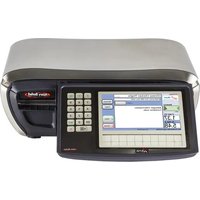
Table of contents Click a title to access it
Manual assistant
Powered by Anthropic
Waiting for your message
Product information

Brand : AVERY BERKEL

Model : FX50

Category : Scale