RV-500 - Robot vacuum Chuango - Free user manual and instructions
Find the device manual for free RV-500 Chuango in PDF.



User questions about RV-500 Chuango
0 question about this device. Answer the ones you know or ask your own.
Ask a new question about this device
Download the instructions for your Robot vacuum in PDF format for free! Find your manual RV-500 - Chuango and take your electronic device back in hand. On this page are published all the documents necessary for the use of your device. RV-500 by Chuango.
USER MANUAL RV-500 Chuango
This appliance can be used by children aged from 8 years and above and persons with reduced physical, sensory, or mental capabilities or lack of experience and knowledge if they have been given supervision or instruction concerning use of the appliance in a safe way and understand the hazards involved. Children shall not play with the appliance. Cleaning and user maintenance shall not be made by children without supervision.
The device must be used in accordance with the instructions in this document. We will not be held liable or responsible for any damages or injuries caused by improper use.
To reduce the risk of injury or damage, keep these safety precautions in mind when setting up, using, and maintaining your
device:
. Read all safety and operating instructions before operating your device.
. Retain the safety and operating instructions for future reference.
. Read all warnings on your device, battery, Charging Dock and in the user manual.
. Follow all operating and use instructions.
Use Restrictions
This device is for indoor use only. Do not use the device outdoor, commercial, or industrial environments.
Before using this device, pick up objects like clothing, loose papers, pull cords for blinds or curtains, power cords, and any fragile objects. If the device passes over a power cord and drags it, there is a chance an object (table or shelf etc.) could be pulled.
- The device is not a toy. Do not sit or stand on this device. Small children and pets should be supervised when your device is operating.
- Store and operate your device in room temperature environments only.
· Do not use this device to pick up anything that is burning or smoking.
· Do not use this device to pick up spills of bleach, paint, or other chemicals, or anything wet. - If the room to be cleaned contains a balcony, a physical barrier should be used to prevent access to the balcony and ensure safe operation.
· This device is not intended for use by persons (including children) with reduced physical, sensory or mental capabilities, or lack of experience and knowledge, unless they have been given supervision or instruction concerning use of the appliance by a person responsible for their safety.
· Children should be supervised to ensure they do not play with the device. Cleaning and maintenance shall not be performed by children without supervision.
· Do not place anything on top of your device. - Be aware that the device moves on its own. Take care when walking in the area that the device is operating in to avoid stepping on it.
· Do not operate the device in areas with exposed electrical outlets in the floor.
Battery and Charging
- Use only rechargeable battery packs with the correct specification approved by.
- Charge using a standard outlet only. Product may not be used with any type of power converter. Use of other power converters will immediately void the warranty.
- Do not use a Charging Dock with a damaged cord or plug. If the cord or plug is damaged, it must be serviced by the manufacturer or similarly qualified persons.
· Always charge and remove the battery from your device and accessories before long-term storage or transportation. - Charge indoors only.
Your device's Charging Dock may be protected with a surge protector in the event of severe electrical storms.
- Never handle the Charging Dock with wet hands.
· Always disconnect your device from the Charging Dock before cleaning or maintaining it. - Please ensure voltage rating for enclosed Charging Dock matches standard outlet voltage.
- Used battery packs should be placed in a sealed plastic bag and disposed of safely according to local environmental regulations.
- Before every use, check the battery pack for any sign of damage or leakage. Do not charge damaged or leaking battery packs.
' If the battery pack is leaking, contact Customer Service for disposal.
. The battery pack must be removed from the device before disposal. - Do not crush or dismantle battery packs. Do not heat or place the battery pack near any heat source.
- Do not incinerate the battery pack. Do not short-circuit the battery pack.
- Do not immerse the battery pack in any liquid.
EN EN
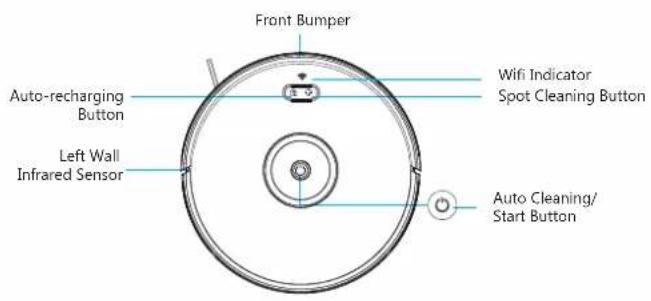
Product Overview
text_image
Front Bumper Auto-recharging Button Left Wall Infrared Sensor Wifi Indicator Spot Cleaning Button Auto Cleaning/Start Button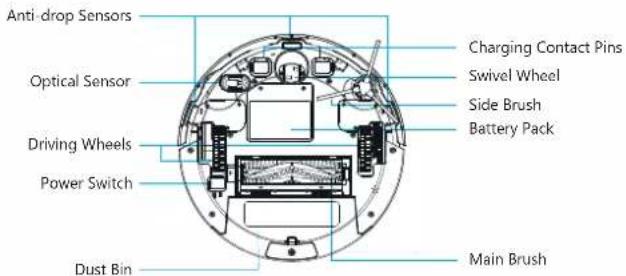
text_image
Anti-drop Sensors Optical Sensor Driving Wheels Power Switch Dust Bin Charging Contact Pins Swivel Wheel Side Brush Battery Pack Main BrushAccessories
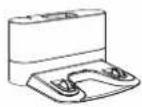
1 X Charging Dock
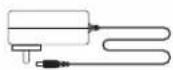
1 X Adapter
1 X Sponge Filter And High Efficiency Filter
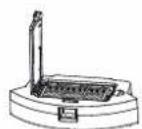
1 X Dust Bin
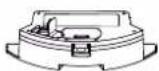
1 X Water Tank
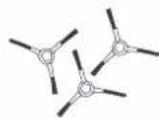
3 X Side Brushes
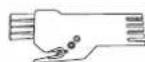
1 x Cleaning Tool
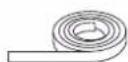
1 x Boundary Strip
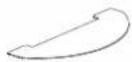
2 x Mopping Cloth
EN EN
Installation
- Plug in the charging dock and manually retract any excess charging cable to the back compartment at the bottom of the dock.
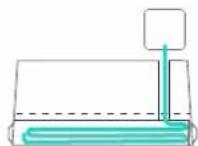
- Place the charging dock on a hard, level surface, and against the wall, and make sure the installation place is open and uncluttered leaving at least 2 meters in front of the dock, 1 meter on both sides of it.
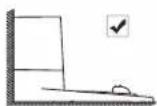
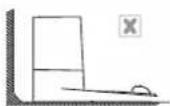
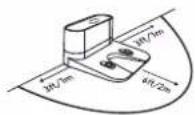
- Connect the round connector of the adapter into the power socket on the charging dock and the other end into the wall outlet.
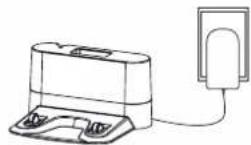
Important: please only use the provided adapter to power the device.
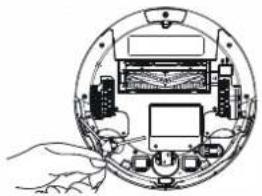
- Install the side brush: attach a side brush to the bottom of the Robot by pressing a brush into slot.
natural_image
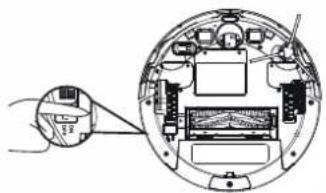
Cross-sectional diagram of a mechanical or electronic device with labeled components and hands interacting (no text or symbols present)- Turn on the power switch at the bottom.
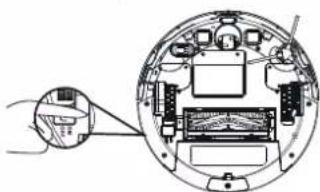
natural_image
Diagram of a circular device interior with labeled components and an external hand pointing to a screen (no text or symbols present)- Activate the Robot: place the device onto the charging dock, making sure the charging contact pins of the charging dock match up with those underneath the Robot. Once the [◎] button illuminates, the Robot is ready for use.
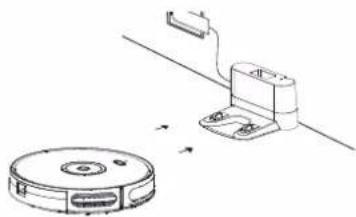
natural_image
Technical line drawing of a robotic vacuum cleaner with attached sensor and control panel (no text or symbols)Please charge the Robot for 5-6 hours before use.
EN EN
- Install the water tank
The Robot also comes with a water tank for wet floor mopping. Attach the cloth and fill the water tank with water. Remove the dustbin and put back the water tank to Robot and start cleaning.
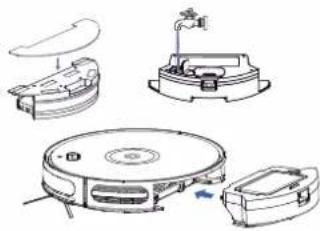
natural_image
Technical line drawings of a robotic vacuum cleaner with internal components and mounting bracket (no text or labels)- Use the boundary strip
With the boundary strip, you can keep the Robot away from any area or item you do not want it to clean. Robot will recognize the boundary strip and will not cross into the blocked-off area. If necessary, use scissors to cut it to a shorter length. Be sure to correctly measure the length before cutting. Apply adhesive tape to lay the boundary strip flat on the floor.
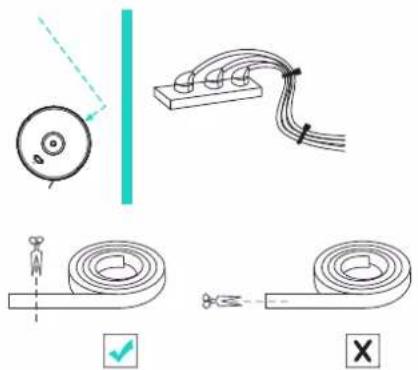
natural_image
Pure electrical circuit lines without any symbolsSetup the Network of the Device
Step 1. Download the App
Download the app from the App Store or Google Play by searching for keywords: "DreamCatcher Life"
DreamCatcher Life |

Step 2. Add the Robot to the App
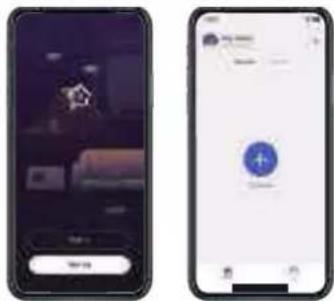
Register for an account and then log into the app to add the Robot to your account.
text_image
Two smartphone screens displaying app interfaces: one with a logo and text input, the other with a blue plus button icon.EN EN
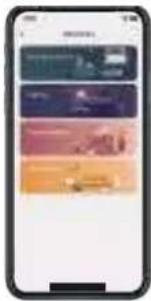
- Tap [+] on the home page. Then, select "Home Appliances" and then follow the device set-up steps to connect the Robot with your home Wi-Fi.
text_image
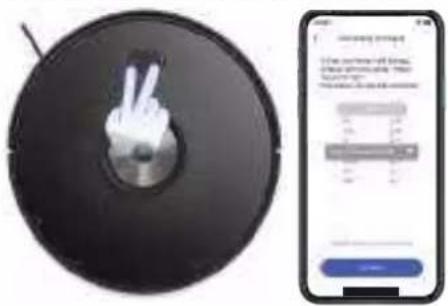
Mobile app interface screenshot showing a grid of colored UI elements on a smartphone screenLong press the Recharge and Spot Cleaning buttons simultaneously for 3 seconds until the Wi-Fi indicator flashes slowly. Tap "Confirm" on the app to fill in your home Wi-Fi SSID and password. Then connect your phone to the device's hotspot "Robot Vacuum RV-500". Wait for the device to be connected.
text_image
Image showing a circular device with a hand gesture and a smartphone displaying a score display.Step 3. App Control
- Device Name
- Battery Status
- Shortcut Buttons: Clean, Dock, Fan and Mode.
text_image
Scanned image of a smartphone screen with status bar and control buttons visibleTap Clean, the Robot will start cleaning.
Tap Dock, the Robot will go back to the charging dock to get recharged.
Tap Fan to select different suction power from the following: Quiet, Standard, Max and Max+.
Tap Mode to select the cleaning mode that suits your need best from Auto cleaning, Edge cleaning, Spot cleaning and Random cleaning.
Auto cleaning: At the start of a cleaning cycle, the Robot will map out your home and clean open areas efficiently. Once the Robot finishes its cleaning cycle, it will return to the charging dock to recharge. Or if its battery gets low before finishing a cleaning cycle, the Robot auto returns to the dock to recharge. It cleans up to 150 minutes.
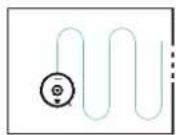
After the Robot finishes with the open areas of your floor, it uses Edge cleaning to ensure it has cleaned along walls and around furniture legs.
EN EN
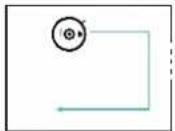
Edge cleaning: You can also tap Edge cleaning to have a quicker cleaning along the walls. It cleans up to 20 minutes.
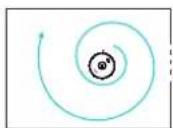
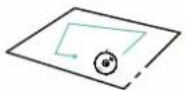
Spot cleaning: Robot intensely cleans a localized area by spiraling outward about 1 meter in diameter and then spiraling inward to where it started. It cleans up to 2 minutes.
Random cleaning: No particular cleaning pattern. It cleans up to 150 minutes.
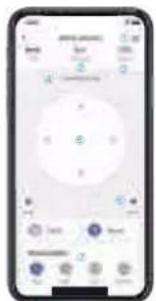
Main Page
text_image
Smartphone control interface with app icons and status bar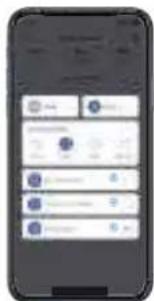
text_image
Mobile app interface screenshot showing a grid of user profiles and UI elements on a smartphone screen① Settings: Tap to change device name, check device information and cleaning records.
② Cleaning status: This shows the cleaning time and space.
③ Battery status: This shows the device battery usage status. If battery is low when cleaning, the Robot will go back to the charging dock, or you can tap dock button to recharge the device.
① Device status: This shows current status of the Robot: standby, cleaning under selected mode, charging or charging completed.
⑤ Direction control: You can direct the Robot to clean a designated area by tapping the direction buttons.
Note: Under modes other than Random mode, if you want to change the cleaning direction of the robot, you must pause the ongoing cleaning first, then adjust the directions of Robot.
⑥ Fan mode: Tap to change suction mode: Quiet, Standard, Max or Max+.
⑦ Cleaning mode: Tap to change the cleaning mode.
⑧ Find the Robot: Tap Find the Robot, the device will make a sound and the indicator will flash pink color to let you know where it is.
⑨ Cleaning schedule: Add cleaning schedule, so the Robot can start cleaning automatically at the time and date you set.
⑩ Accessories: Check the usage status of the accessories: filter, side brush and main brush.

DEEN
Specifications
Robot Vacuum Cleaner
Model No.: RV-500
Input: 19V 0.6A
Battery: DC 14.4V, Li-ion 2600mAh
Power consumption: 28W
Dust collector capacity: 0.55L
Cleaning time: max. 150mins (suction: quiet level)
Charging time: 5-6 hours
WiFi: 802.11 b/g/n 2.4G
Max. EIRP: 15.14dBm
Scan the QR code below to find more information about the device:
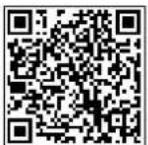
http://www.smartiotfaq.com/cleaner/RV-500
natural_image
Diagram of a circular mechanical or electrical component with internal components and connections, no visible text or symbols.natural_image
Diagram of a device interior showing internal components and a magnified view of the main body (no text or labels)natural_image
Technical line drawing of a robotic device with a circular base and connected arm (no text or symbols)natural_image
Technical line drawings of a robotic vacuum cleaner with internal components and mounting bracket (no text or symbols)natural_image
Pure electrical circuit lines without any symbolsDE DE
text_image
Smartphone screen displaying a dark image with a small logo and a 'OK' button below it.
text_image
Mobile phone screen displaying a login icon with Chinese text and a blue circular logotext_image
Mobile app interface displaying a grid of colored rectangular buttons or cards, likely for mobile payment or app download.natural_image
Circular black disc with two white hand gestures, resembling a CD or DVD (no text or symbols visible)
text_image
Mobile app screenshot showing a login interface with input fields and a login buttonDE DE
natural_image
Front view of a smartphone screen with control buttons and display (no visible text or symbols)text_image
Two smartphone screenshots showing app interface with controls, sliders, and a numeric keypadAccessories
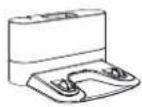
1 station de charge
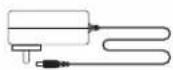
1 adaptateur
natural_image
Diagram of a mechanical device with internal components and a hand holding the base (no text or labels)natural_image
Diagram of a device interior showing internal components and a magnified view of the outer casing (no text or symbols)natural_image
Technical line drawing of a robotic vacuum cleaner with attached sensor and control panel (no text or symbols)natural_image
Line drawings of various robotic vacuum cleaner components (no text or labels)natural_image
Pure electrical circuit lines without any symbolstext_image
Smartphone screen displaying a dark image with a small logo and a button labeled 'OK OK'
text_image
Mobile app interface screenshot showing a login button with a blue circular icon and '4' symbolFR FR
text_image
Mobile app interface displaying a grid of image thumbnails with Chinese labels, likely from a presentation or editing system.text_image
Digital interface showing a CD with a peace sign and a smartphone displaying a music player interface.natural_image
Front view of a smartphone screen with control buttons and display (no visible text or symbols)text_image
Mobile phone screen displaying a control panel with numeric input fields and buttons
text_image
Smartphone screen displaying a user interface with app icons and status bar, likely for a mobile app or service.natural_image
Diagram of a circular device with internal components and a hand holding a tool (no text or symbols)natural_image
Diagram of a device interior showing internal components and a magnified view of the main body (no text or symbols present)natural_image
Technical line drawing of a robotic vacuum cleaner with attached sensor and control panel (no text or symbols)natural_image
Technical line drawings of a robotic vacuum cleaner with internal components and mounting bracket (no text or symbols)natural_image
Pure electrical circuit lines without any symbolsNL N
text_image
Smartphone screen displaying a dark image with Chinese characters and a button labeled 'OK', likely for app download or confirmation.
text_image
Mobile app interface screenshot showing a login button with a blue circular icon containing the number 4.text_image
Mobile app interface screenshot showing a list of colored rectangular buttons or filters, likely representing user interfaces or app interfaces.natural_image
Circular black disc with a white hand gesture inside, resembling a CD or DVD (no text or symbols visible)
text_image
Mobile app screenshot showing a login interface with input fields and a login buttonNL N
Stap 3. Bediening van de app
natural_image
Front view of a smartphone screen with control buttons and display (no visible text or symbols)text_image
Two smartphone screenshots showing app interface with controls, gauges, and a numeric display panel.natural_image
Diagram of a circular device with internal components and a hand holding the base (no text or symbols visible)natural_image
Diagram of a circular electronic device with internal components and a hand pointing to a screen (no text or symbols visible)natural_image
Technical line drawing of a robotic vacuum cleaner with a circular base and attached sensor device (no text or symbols)natural_image
Technical line drawings of a vacuum cleaner with internal components and mounting bracket (no text or symbols)natural_image
Pure electrical circuit lines without any symbolstext_image
Smartphone screen displaying a dark interface with a logo and a button labeled 'OK', likely for app download or confirmation.
text_image
Mobile app interface screenshot showing a login button with a blue circular icon containing the number 4.ES ES
text_image
Mobile phone screen displaying a series of five QR codes with accompanying text labels, likely for mobile payment or app interface.text_image
Digital interface showing a CD with a peace sign and a smartphone displaying a music player interface.Paso 3. Control mediante la App
text_image
Scanned image of a smartphone screen with status bar and control buttons visibletext_image
Mobile phone screen displaying a circular control interface with numeric input fields and buttons
text_image
Mobile phone screenshot showing a social media interface with user accounts and app iconsnatural_image
Diagram of a mechanical device with labeled components inside a circular frame (no text or symbols)- Ligue o interruptor de ligar/desligar na parte inferior.
natural_image
Diagram of a device interior showing internal components and a magnified view of the screen (no text or symbols)natural_image
Line drawing of a robotic vacuum cleaner with attached circuit board (no text or symbols)natural_image
Technical line drawings of a robotic vacuum cleaner with internal components and mounting bracket (no text or symbols)natural_image
Pure electrical circuit lines without any symbolsPT PT
text_image
Smartphone screen displaying a dark image with a star logo and a button labeled 'OK' in Chinese.
text_image
Mobile app interface screenshot showing a login icon with Chinese text and a blue circular logotext_image
Mobile app interface screenshot showing a list of product categories with color-coded bars and iconsnatural_image
Circular object with two white hand gestures on a dark surface, resembling a CD or DVD (no text or symbols visible)
text_image
Mobile app interface screenshot showing a login page with input fields and a login buttonPT PT
natural_image
Front view of a smartphone screen with control buttons and display (no visible text or symbols)text_image
Two smartphone screenshots showing app interface with controls, gauges, and a numeric keypad.text_image
Technical diagram showing two views of a door with a checkmark and X mark, alongside a schematic diagram illustrating dimensions and angles.natural_image
Diagram of a mechanical or electronic device with internal components and a hand interacting with it (no text or symbols visible)natural_image
Diagram of a circular device interior with internal components and a hand pointing to a component (no text or symbols visible)natural_image
Technical line drawing of a robotic vacuum cleaner with attached sensor and control panel (no text or symbols)natural_image
Technical line drawings of a robotic vacuum cleaner with internal components and mounting bracket (no text or labels)natural_image
Pure electrical circuit lines without any symbolstext_image
Two smartphone screens displaying app interfaces: one with a lock icon and the other with a blue login icon.IT IT
text_image
Mobile phone screenshot displaying a grid of image thumbnails with Chinese labels, likely from a presentation or app interface.text_image
Digital interface showing a vinyl record with a peace sign and a smartphone displaying a music player interface.natural_image
Front view of a smartphone screen with control buttons and status bar (no readable text or symbols)text_image
Mobile phone control interface with status bar, speed slider, and function buttons
text_image
Mobile app interface screenshot showing a grid of user profiles and UI elements on a smartphone screennatural_image
Illustration of a circular device with internal components and a hand holding a tool (no text or symbols)natural_image
Diagram of a device interior showing internal components and a magnified view of the main body (no text or symbols present)natural_image
Technical line drawing of a robotic device with a circular base and attached bracket (no text or symbols)natural_image
Technical line drawings of a robotic vacuum cleaner with internal components and mounting bracket (no text or symbols)natural_image
Pure electrical circuit lines without any symbolsPL PL
text_image
Smartphone screen displaying a dark image with a central logo and a button labeled 'OK' and 'Cancel'.
text_image
Mobile app interface screenshot showing a login icon with Chinese text and a blue circular logotext_image
Mobile app interface screenshot showing a list of product categories with color swatches and iconsnatural_image
Circular black disc with two white peace signs placed on its surface, resembling a CD or DVD (no text or symbols visible)
text_image
Mobile app interface screenshot showing a login form with input fields and a login buttonPL PL
natural_image
Front view of a smartphone screen showing status bar and control buttons (no readable text or symbols)text_image
Two smartphone screenshots showing app interface with controls, gauges, and a numeric keypad.http://www.chuango.com/compliance_RV-500

EN INFORMATION FOR THE USERS A, the end of its life, the device has to be separated from the other waste. Consign the device and its components together to a center of electronic and electrochemical waste recycling center, designated by your local authorities. DE INFORMATIONEN: FUR DIE BENUTZER Das Gerät am Linde seiner Lebensdauer von den anderen Abfallen getrennt werden muss. Der Betruter sollte das Great und alle seine Komponenten zusammen mit einem gelegneten zentrum des elektronischen und elektrotechnischen Abfallin recyclingzentrum, das von ihrer oftlicher Behörden kann ist, verstellen. FR INFORMATIONS: YOUR LIFE UTILIZATEURS Quien fin die vie, l'appareil coit entre sépare des autres déchets Consigner l'appare et tous ses composants dans un centro approprié de recyclage des dichos électroniques et électrotechniques, désigné par vos autorités locales. NL INI ORMA-IL VOOR D., CLUBUKLRS Ain het einde van zijn jevensbruur moet het apparat van het andere afval worden gescheiden. Verzend het apparat en alle componenten samen naar een centen voor elektronische en electrotechnische analrecycling, aangeween door aan lokale automauten. ES INFORMACION D., USUARIO Al final de su vida util e dispositivo docus separarse de los otros residuos. El usuario debe rem in el dispositivo y todos sus componentes a un centro adecuado de centro de sectiage electroTécnico, designado por las autoridades locales. PT A INI ORMA-AL DOS J. ILLIZADORLS No Fru. Ce sua vida, o dispositivo deve ser separado dos outros residuos. O usuario deve consigner o dispositivo e tocos os seus componentes em un centro apropriado dereciciagem de residuos électronicos e electrotechnicos, designado nei autoridades locales. IT INFORMAZIONE AGLE L'ENTE Símbolo de essenzetto barró o ripar uso sullappere ochnaturala indica che il prodotto alla fine della propria vita utile deve essere raccolo separatamente dagli altri rifiuti. Uomee dova, pensanto, conferire apparecchiatura integra de componenti essenzati guinta a fine vita agli denote centri di raccolta differentata del dirut electrici ed electronin, oppure reconsignarla ai revendorte al momento dell'acquisto di nuova apparecchiatura di tipo equivalente. Lo smaltimento abusivio del prodotto da parte dell'ente comporta l'applicazione delle sanganioni amanistratte di cui al Bereto Legislativa N. 49 del 14 Marcho 2014

EN 2005/66/DC and its amendment. 2013/5/EU (b Documentary directive): This product contains a battery that cannot be diseased of an unopened municipal waste in the European Union. See the product documentation for specific battery information. The battery is marked with this symbol, which may include lettering to indicate cadmium (Cd), lead (Pb), or mercury (Hg). For proper recycling, return the battery to your supplier or to a designated collection point. For more information see: www.rocyclothis.info. DE 2005/66/E9 and deren Anzorgung 2012/56/EU (Bulconichschlink). Dieser Procure enthalt eine batterie, die in der europäischen Union nicht als unsortierter Haumst. emsergrt werden kann, in der Produktkodumentation linnen Sie spezitische informationen zur Batterie. Die Batterie ist mit diesen Sympos gezeichnet, das Reschritten zur Kennzeichnung von Cadmium (Co), bei (Pb) oder Qucksilbar-1) g) coölnahalten kann. Für ein ordnungsgehmäßes Recycling system Sie die Batterie an Ihren Diefannten oder an eine cafter vorgesene Sammelstrelle zurück. Weitere informationen finden Sie unter www.rocyclothis.info. I.R 2006/66/CI et son amendement 2011/56/EU (directive sur les piles). Ce produit contient une prie qui ne peut pas être éliminée comme dâcher municipal non-trà dans l'Union et rupérieure. Reponer-vous à la documentation du produit pour obtenir des informations spécifiques sur la batterie, la batterie sont ce sympos, qui peut incure des lettres indiquant le cadmium (Cd), le obors (Pb) ou le mercure (Ig). Pour un recyclage approprié, retournez la batterie à votre fournisseur au un point de collecte désigné. Pour plus e informations, voor www.rocyclothis.info. I.L 2006/66/E9 en ce wijaging daarvan in 2012/56/EU (batterrichting). Dit product beva, een batterij die in ce Europex Euro n'eic, als ongoortoren studelijk i val kan worden eigvoed. Zo do productdocumentn siete voor specifieke informatie over de batterij! De batterie, is gemarkeed met dit symbol, dat kan becaan uit letters ter aanduiding van cadmium (Cd), lod (Pb) or kwik (Hg). Voor een corraste recycling kunt u de batterij naar juy leverander of naar een sargeweenz imzne punt brengen. Voor meer informat a ziez: www.rocyclothis.info. ES 2005/66/CE y su modificación 2013/56/EU (Directive sobre plays). Este producto contiene una batteria que no puede eliminarse como residuo municipal no fabricado en la Unión Europea. Consulte la documentación de producto para obtener información específica sobre a bateria. La bateria está marcada con este simismo, que puede incluar letras para indicar cadmium (Cd), pomo (Pb) o mercuno (Ig). Para un reciclaje adecuada, revelva la bateria a su proveedor o un punto de recogida designado. Para más información, voce: www.rocyclothis.info. PI 2006/66 / LC e sua emenda 2013/56 / Cu (diretiva de baterias). Este producto contém una bateria que não pose ser descartada como loxo municipal não classificado na Unión Europea. Consulte a documentação do produto para ober informações aspecificas sobre a bateria. A bateria está marcada com este simolo, que pode incluar letras para indicar cadmium (Cu), crumbo (Pb) ou mercurio (Ig). Para residuagem adequada, devolva a bateria ao seu transcorsoor ou a um punto de coleta designado. Para mais informações, consulte: www.rocyclothis.info. IT 2006/66/CE e relativo emendamento 2013/56/EU (direttiva sulle batterie). Questo prodotto corte ne una bateria che non pub essere smaltrita come luinto municipale non difte-ennero nel Unione Europea. Per informazioni specifiche sulla batteria, consarla la documentazione dei productos. La batteria è contrassegnata con questo simcolo, che also includere ettere che indicano racono (Cd), piombo (Pb) o mercuna (Ig). Per un corretta roclaggio, recrue la batteria a tornitore o a un punto di raccola designato. Per ulheron informazioni: www.rocyclothis.info.