RIG 500 Pro HA - Headphones Nacon - Free user manual and instructions
Find the device manual for free RIG 500 Pro HA Nacon in PDF.



| Product type | Gaming audio headset |
| Brand | Nacon |
| Model | RIG 500 Pro HA |
| Weight | Approximately 250 g |
| Dimensions (L x W x H) | Approximately 200 x 180 x 80 mm |
| Power source | Wired (3.5 mm jack) |
| Cable length | Approximately 1.2 m |
| Compatibility | PC, Xbox One, PS4, consoles with 3.5 mm jack |
| Microphone type | Adjustable and detachable boom microphone |
| Mute function | Lift the boom to mute the microphone |
| Volume control | Adjustment wheel on the cable |
| Adjustable headband | Yes, 3 positions |
| Ear cushions | Removable and replaceable |
| Material | Plastic, memory foam |
| Maintenance | Clean with a soft dry cloth |
| Spare parts | Ear cushions, microphone, cable (available separately) |
Frequently Asked Questions - RIG 500 Pro HA Nacon
User questions about RIG 500 Pro HA Nacon
0 question about this device. Answer the ones you know or ask your own.
Ask a new question about this device
Download the instructions for your Headphones in PDF format for free! Find your manual RIG 500 Pro HA - Nacon and take your electronic device back in hand. On this page are published all the documents necessary for the use of your device. RIG 500 Pro HA by Nacon.
USER MANUAL RIG 500 Pro HA Nacon
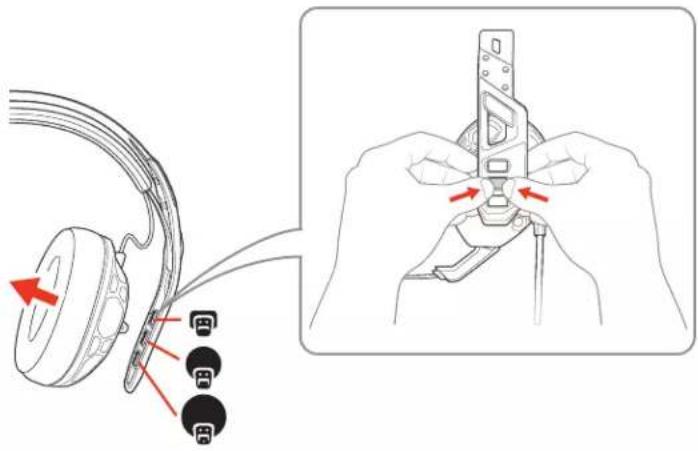
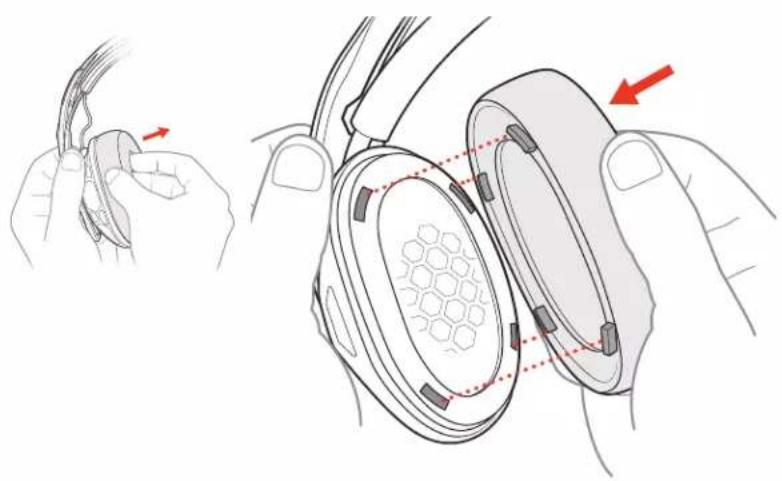
Fit 1 The headband adjusts to three sizes (small, medium, large) by moving the earcups. To remove an earcup, press the earcup to detach it from the headband.
text_image
Diagram showing cable connector insertion and disassembly process with labeled connectors2 To change your ear cushions, gently pull the ear cushion off. To replace it, align the notches.
natural_image
Illustration of a hand holding a small electronic device with a hexagonal pattern inside, showing a close-up and a red arrow indicating the process (no text or symbols present)Set up your headset
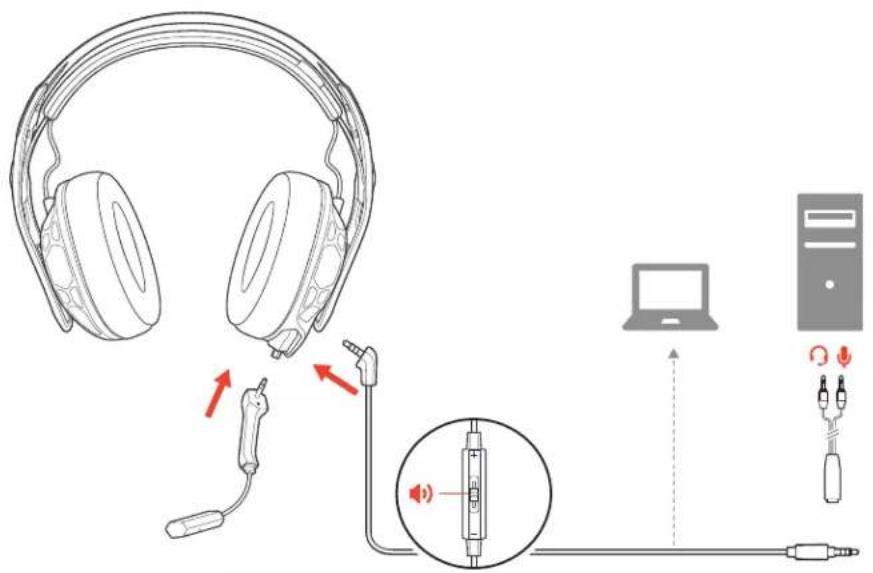
Your headset components easily snap into the headset frame to configure the best fit and sound.
Follow the diagram to put your headset together.
Connect to PC RIG 500 PRO, RIG 500 PRO ESPORTS
text_image
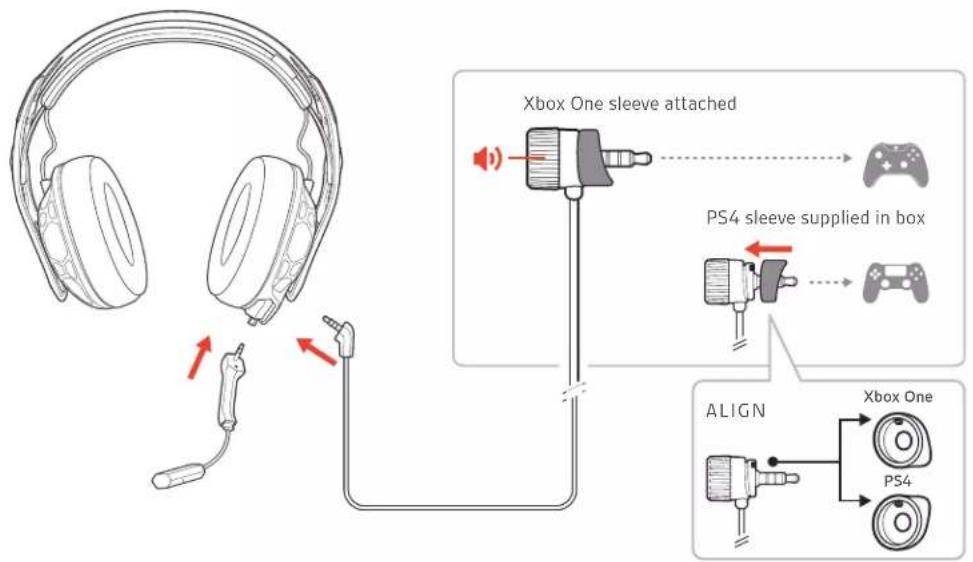
Diagram illustrating audio headset connections to a computer, showing earplifier, microphone, and audio jack with signal icons.Connect to console RIG 500 PRO ESPORTS, RIG 500 PRO HC, RIG 500 PRO HX/HX SE
Out of the box, the volume wheel has the Xbox One sleeve attached and the PS4 sleeve is supplied (the RIG 500 PRO HS/HS SE models have the PS4 sleeve attached and the Xbox One sleeve is supplied). Align notches on the appropriate sleeve and volume wheel before attaching to your controller.
text_image
Xbox One sleeve attached PS4 sleeve supplied in box ALIGN Xbox One PS4Adjust the volume
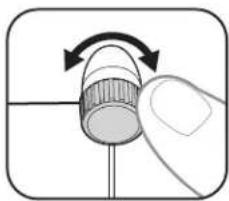
To adjust your headset volume, turn the volume wheel.
NOTE If your controller has a volume feature, you can lock the volume wheel at maximum by turning it fully to the right.
natural_image
Illustration of a hand holding a cylindrical object with an arrow indicating rotation (no text or symbols)System volume
To adjust system volume, check your console's user guide.
Mute
Lift the boom to a full stop to mute the microphone.
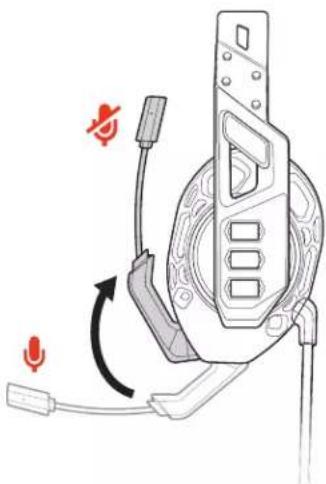
natural_image
Diagram of a device with attached cable and connector, showing no text or symbolsCAUTION Do not force the boom past its upper or lower limits.
Support
NEED MORE HELP?
www.nacongaming.com

nacon
NACONG GAMING, Inc
10400 NE 4 ^th Street, Suite 500,
Bellevue, WA 98004 USA
(+1) 800-617-0174
Headquarter
NACON
©2020 NACON. NACON and RIG are trademarks of NACON, registered in the US and other countries. «PlayStation» and «DUALSHOCK» are registered trademarks of Sony Interactive Entertainment Inc. All rights reserved. All other trademarks are the property of their respective owners.
Patents pending.
213538-06 (06.20)
RIG
Gamme RIG 500 PRO
Guide utilisateur
FR
Sommaire
text_image
Diagram showing cable connector insertion and disassembly process with labeled connectorsnatural_image
Illustration showing a hand holding a small object with a red arrow indicating direction, alongside a close-up of the interior panel (no text or symbols present)text_image
Diagram showing audio headset connections to a computer, with audio cable and audio jack placement labeled in Chinese.text_image
Xbox One sleeve attached PS4 sleeve supplied in box ALIGN Xbox One PS4Régler le volume
natural_image
Illustration of a hand holding a cylindrical object with an arrow indicating rotation (no text or symbols)Volume du système
natural_image
Diagram of a device with attached cable and connector, showing no text or symbolstext_image
Diagram showing cable connector insertion and disassembly process with labeled pins and red arrows indicating movementnatural_image
Diagram showing two views of a device with a mesh pattern inside, connected by wires and a hand holding a connector (no text or symbols present)text_image
Diagram showing audio headset connections to a computer, with audio cable and microphone components labeled in English.text_image
Xbox One sleeve attached PS4 sleeve supplied in box ALIGN Xbox One PS4natural_image
Illustration of a hand holding a cylindrical object with an arrow indicating rotation (no text or symbols)natural_image
Diagram of a device with earphones and cable, showing a rotary switch mechanism (no text or symbols)text_image
Diagram showing cable connector insertion and disassembly process with labeled pins and red arrows indicating movementnatural_image
Illustration of a hand holding a small object with a red arrow indicating direction, showing internal components and alignment (no text or symbols)text_image
Diagram showing audio headset connections to a computer, with audio cable and microphone components labeled in English.Verbinden met console RIG 500 PRO ESPORTS, RIG 500 PRO HC, RIG 500 PRO HX/HX SE
text_image
Xbox One sleeve attached PS4 sleeve supplied in box ALIGN Xbox One PS4Volume aanpassen
natural_image
Illustration of a hand holding a cylindrical object with an arrow indicating rotation (no text or symbols)Systeemvolume
natural_image
Diagram of a device with attached cable and connector, showing no text or symbolstext_image
Diagram showing cable connector insertion and disassembly process with labeled connectorsnatural_image
Illustration of a hand holding a small electronic device with a hexagonal pattern inside, showing a close-up and a red arrow indicating the process (no text or symbols present)text_image
Diagram showing audio headset connections to a computer, with audio cable and microphone components labeled in English.text_image
Xbox One sleeve attached PS4 sleeve supplied in box ALIGN Xbox One PS4Ajuste del volumen
natural_image
Illustration of a hand holding a cylindrical object with an arrow indicating rotation (no text or symbols)Volumen del sistema
natural_image
Diagram of a device with earphones and connectors, showing a rotation arrow (no text or symbols)text_image
Diagram showing cable connector insertion and disassembly process with labeled connectorsnatural_image
Illustration showing a hand holding a cable and a close-up of a device with hexagonal patterns, no text or symbols present.text_image
Diagram showing audio headset connections to a computer, with audio cable and audio jack connected via microphoneCollegamento alla console RIG 500 PRO ESPORTS, RIG 500 PRO HC, RIG 500 PRO HX/HX SE
text_image
Xbox One sleeve attached PS4 sleeve supplied in box ALIGN Xbox One PS4Regolare il volume
natural_image
Illustration of a hand holding a cylindrical object with an arrow indicating rotation (no text or symbols)Volume del sistema
natural_image
Diagram of a device with earphones and cable, showing a rotary switch mechanism (no text or symbols)text_image
Diagram showing cable connector insertion and disassembly process with labeled connectors and red arrows indicating movementnatural_image
Illustration of a hand holding a small electronic device with a grid-patterned lens, showing internal components and a red arrow indicating direction (no text or symbols present)Настройка гарнитуры
text_image
Diagram showing audio headset connections to a computer, with audio jack and audio cable detailstext_image
Xbox One sleeve attached PS4 sleeve supplied in box ALIGN Xbox One PS4natural_image
Illustration of a hand holding a cylindrical object with an arrow indicating rotation (no text or symbols)natural_image
Diagram of a device with attached cable and connector, showing no text or symbolstext_image
Diagram showing cable connector insertion and disassembly process with labeled connectorsnatural_image
Illustration showing a hand holding a small object with red arrows indicating movement, alongside a close-up of the interior panel (no text or symbols present)헤드셋 설정
text_image
Diagram showing audio headset connections to a computer, with audio cable and audio jack connected via microphone콘솔에 연결 RIG 500 PRO ESPORTS, RIG 500 PRO HC, RIG 500 PRO HX/HX SE
text_image
Xbox One sleeve attached PS4 sleeve supplied in box ALIGN Xbox One PS4볼륨 조절
natural_image
Illustration of a hand holding a cylindrical object with an arrow indicating rotation (no text or symbols)시스템 볼륨
natural_image
Diagram of a device with earphones and cable, showing a rotary switch mechanism (no text or symbols)text_image
Diagram showing cable connector insertion and disassembly process with labeled pins and red arrows indicating movementnatural_image
Illustration of a hand holding a small electronic device with a grid-patterned lens, showing internal components and a red arrow indicating direction (no text or symbols present)text_image
Diagram illustrating audio headset connections to a computer, showing audio cable, microphone, and audio jack components.text_image
Xbox One sleeve attached PS4 sleeve supplied in box ALIGN Xbox One PS4调整音量
要调整耳机音量,转动音量滚轮。
natural_image
Illustration of a hand holding a cylindrical object with an arrow indicating rotation (no text or symbols)natural_image
Diagram of a device with earphones and cable, showing a rotary switch mechanism (no text or symbols)text_image
Diagram showing cable connector insertion and disassembly process with labeled pins and red arrows indicating movementnatural_image
Illustration of a hand holding a small electronic device with a magnified view showing internal components (no text or symbols)text_image
Diagram showing audio headset connections to a computer, with audio jack and audio cable detailstext_image
Xbox One sleeve attached PS4 sleeve supplied in box ALIGN Xbox One PS4natural_image
Illustration of a hand holding a cylindrical object with an arrow indicating rotation (no text or symbols)natural_image
Diagram of a device with attached cable and connector, showing no text or symbols注意請勿強力推動吊桿超過其上限或下限。
支援
需要進一步協助嗎?
www.nacongaming.com

nacon
NACONG GAMING, Inc
10400 NE 4 ^th Street, Suite 500,
Bellevue, WA 98004 USA
(+1) 800-617-0174
Headquarter
NACON