
R10 Pro - Vacuum Cleaner DREAME - Free user manual and instructions
Find the device manual for free R10 Pro DREAME in PDF.



| Brand | Dreame |
| Model | R10 Pro |
| Product type | Cordless vacuum cleaner |
| Power supply | Rechargeable lithium-ion battery 25.2 V, 3000 mAh |
| Measured power | 425 W |
| Charging voltage | 30 V |
| Charging time | Approximately 4 hours |
| Battery capacity (rated) | 3000 mAh (typical 2800 mAh, 70.56 Wh) |
| Speed modes | Eco, Standard, Turbo |
| Cleaning modes | Intermittent and continuous (switch lock) |
| Included accessories | Multi-surface brush, soft roller brush, mini motorized brush, wide combination tool, flexible flat suction nozzle, wall mount, charger |
| Multi-surface brush model | VMB3 (40 W) |
| Soft roller brush model | ASF4 (40 W) |
| Mini motorized brush model | VMM4 (20 W) |
| Vacuum cleaner model | VTV41B |
| Charger model | YLS0251B-T300080 (input 100-240 V~, output 30 V--- 0.8 A) |
| Battery model | V2213-7S1P-BCB |
| Dust compartment maintenance | Empty after each use up to the MAX level, rinse at least once a month |
| Pre-filter maintenance | Clean at least every 3 months, rinse and dry 24 h |
| Cyclone maintenance | Clean at least every 6 months, rinse and dry 24 h |
| Filter maintenance | Clean every 4 to 6 months, rinse and dry 24 h |
| Brush maintenance | Clean the rollers, rinse if necessary, dry 24 h |
| Removable battery | Yes, via release button |
| Operating temperature | 0°C to 40°C (storage and charging) |
| Main safety instructions | Do not vacuum flammable liquids, do not use if damaged, keep out of reach of children |
Frequently Asked Questions - R10 Pro DREAME
User questions about R10 Pro DREAME
0 question about this device. Answer the ones you know or ask your own.
Ask a new question about this device
Download the instructions for your Vacuum Cleaner in PDF format for free! Find your manual R10 Pro - DREAME and take your electronic device back in hand. On this page are published all the documents necessary for the use of your device. R10 Pro by DREAME.
USER MANUAL R10 Pro DREAME
Cordless Stick Vacuum User Manual
THANK YOU
FOR PURCHASING THIS DREAME VACUUM CLEANER.
Registration Quick Start
Welcome to register a Dreame account by scanning the QR code.
You are available for the User Manual and Special Offers.

With it you are obtaining a high quality product that is engineered for optimal performance. If you have any questions on the product, please contact us: support.us@dreame.tech
EN User Manual 1
FR Manuel d'utilisation 24
ES Manual de usuario 48
Safety Information
EN
IMPORTANT SAFETY INSTRUCTIONS
When using an electrical appliance, basic precautions should always be followed, including the following:
READ ALL INSTRUCTIONS BEFORE USING (THIS APPLIANCE). Failure to follow the warnings and instructions may result in electric shock, fire and/or serious injury.
SAVE THESE INSTRUCTIONS
Household use only.
WARNING – To reduce the risk of fire, electric shock, or injury:
Do not use outdoors or on wet surfaces.
Do not allow to be used as a toy. Close attention is necessary when used by or near children, pets or plants.
Use only as described in this manual. Use only manufacturer's recommended attachments
Do not use with damaged cord or plug. If appliance is not working as it should, has been dropped, damaged, left outdoors, or dropped into water, return it to a service center.
Do not pull or carry by cord, use cord as a handle, close a door on cord, or pull cord around sharp edges or corners. Do not run appliance over cord. Keep cord away from heated surfaces.
Do not unplug by pulling on cord. To unplug, grasp the plug, not the cord.
Do not handle charger, including charger plug, and charger terminals with wet hands
Do not put any object into openings. Do not use with any opening blocked; keep free of dust, lint, hair, and anything that may reduce air flow.
Keep hair, loose clothing, fingers, and all parts of body away from openings and moving parts.
Use extra care when cleaning on stairs.
Do not use to pick up flammable or combustible liquids, such as gasoline, or use in areas where they may be present.
Do not pick up anything that is burning or smoking, such as cigarettes, matches, or hot ashes.
Do not use without dust cup and/or filters in place.
Prevent unintentional starting. Ensure the switch is in the off-position before connecting to battery pack, picking up or carrying the appliance. Carrying the appliance with your finger on the switch or energizing appliance that have the switch on invites accidents.
Disconnect the battery pack from the appliance before making any adjustments, changing accessories, or storing appliance. Such preventive safety measures reduce the risk of starting the appliance accidentally.
Recharge only with the charger specified by the manufacturer. A charger that is suitable for one type of battery pack may create a risk of fire when used with another battery pack.
Use appliances only with specifically designated battery packs. Use of any other battery packs may create a risk of injury and fire.
When battery pack is not in use, keep it away from other metal objects, like paper clips, coins, keys, nails, screws or other small metal objects, that can make a connection from one terminal to another. Shorting the battery terminals together may cause burns or a fire.
Under abusive conditions, liquid may be ejected from the battery; avoid contact. If contact accidentally occurs, flush with water. If liquid contacts eyes, additionally seek medical help. Liquid ejected from the battery may cause irritation or burns.
Do not use a battery pack or appliance that is damaged or modified. Damaged or modified batteries may exhibit unpredictable behavior resulting in fire, explosion or risk of injury.
Do not expose a battery pack or appliance to fire or excessive temperature. Exposure to fire or temperature above 130^ C may cause explosion.
Follow all charging instructions and do not charge the battery pack or appliance outside of the temperature range specified in the instructions. Charging improperly or at temperatures outside of the specified range may damage the battery and increase the risk of fire.
Have servicing performed by a qualified repair person using only identical replacement parts. This will ensure that the safety of the product is maintained.
Do not modify or attempt to repair the appliance or the battery pack except as indicated in the instructions for use and care.
Do not use and store in extremely hot or cold environments (below 0^ C/ 32^ F or above 40^ C/ 104^ F). Please charge the cordless vacuum cleaner in temperature above 0^ C/ 32^ F and below 40^ C/ 104^ F.
Caution:
This device complies with Part 15 of the FCC Rules / Innovation, Science and Economic Development Canada's licence-exempt RSS(s). Operation is subject to the following two conditions:
- this device may not cause harmful interference.
- this device must accept any interference received, including interference that may cause undesired operation.
Changes or modifications not expressly approved by the party responsible for compliance could void the user's authority to operate the equipment.
This equipment has been tested and found to comply with the limits for a Class B digital device, pursuant to part 15 of the FCC Rules.
These limits are designed to provide reasonable protection against harmful interference in a residential installation.
This equipment generates uses and can radiate radio frequency energy and, if not installed and used in accordance with the instructions, may cause harmful interference to radio communications. However, there is no guarantee that interference will not occur in a particular installation.
If this equipment does cause harmful interference to radio or television reception, which can be determined by turning the equipment off and on, the user is encouraged to try to correct the interference by one or more of the following.
| --- | Direct current |
| ~ | Alternating current |
Product Overview
Component Names
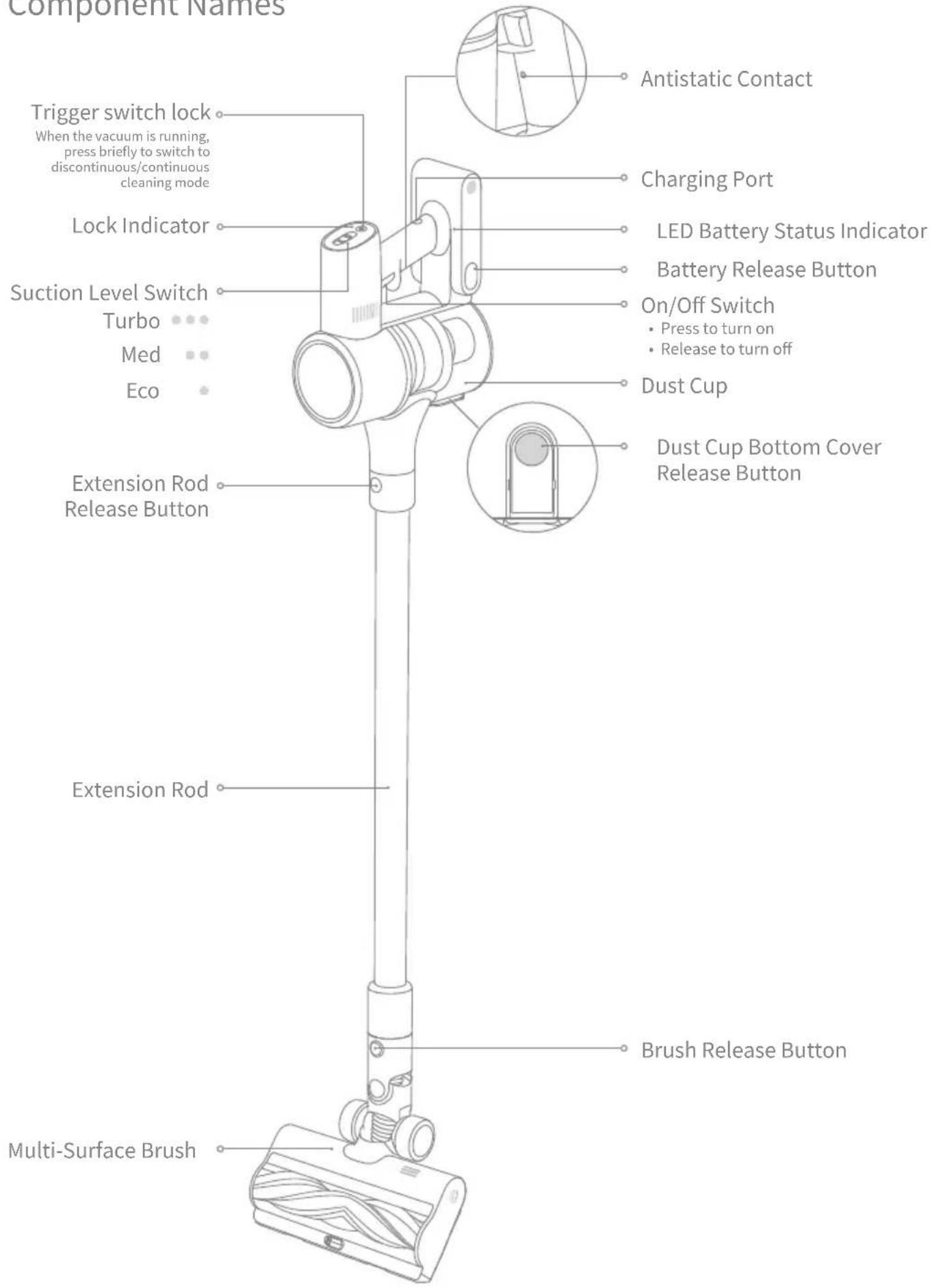
Product Overview
EN
Accessories

natural_image
Pure line drawing of a vertical cylindrical object with a small protrusion on top (no text or symbols)Extension Rod Multi-Surface Brush
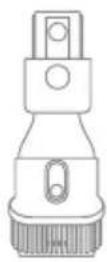
Wide Combination Tool
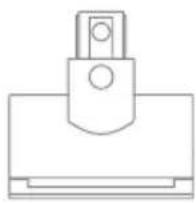
natural_image
Simple line drawing of a mechanical clamp or bracket (no text or symbols)Motorized Mini-Brush
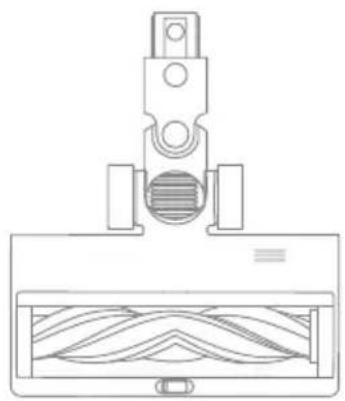
natural_image
Technical line drawing of a mechanical component with internal wavy structure (no text or symbols)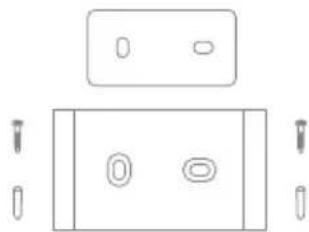
natural_image
Pure electrical circuit lines without any symbolsWall Mount (Including screw ×2, wall plug ×2, and mounting template sticker)

Flexible Combination Tool
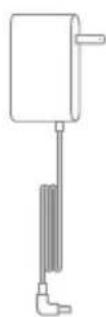
Charger Soft Roller Brush
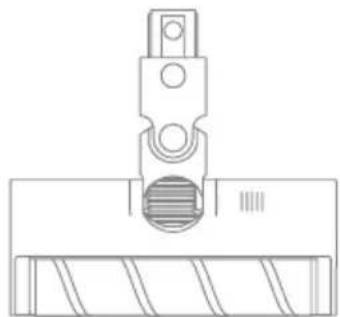
natural_image
Technical line drawing of a mechanical component with a threaded fastener and base plate (no text or symbols)Note: The images in this manual are for illustrative purposes only. The actual product may differ.
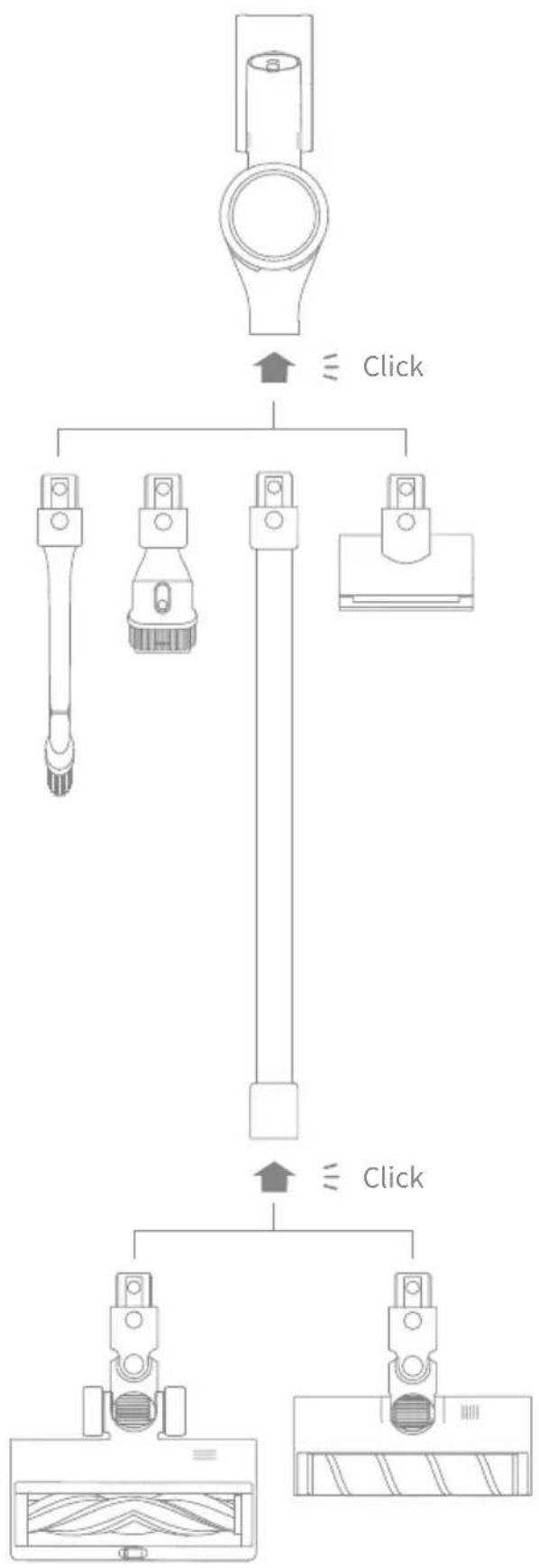
flowchart
graph TD
    A["Device"] --> B{Click}
    B --> C1["Device 1"]
    B --> C2["Device 2"]
    B --> C3["Device 3"]
    C1 --> D["Device 4"]
    C2 --> D
    C3 --> D
    D --> E["Device 5"]
    E --> F["Device 6"]
    style A fill:#f9f,stroke:#333
    style B fill:#ccf,stroke:#333
    style C1 fill:#cfc,stroke:#333
    style C2 fill:#cfc,stroke:#333
    style C3 fill:#cfc,stroke:#333
    style E fill:#fcc,stroke:#333
Installation
EN
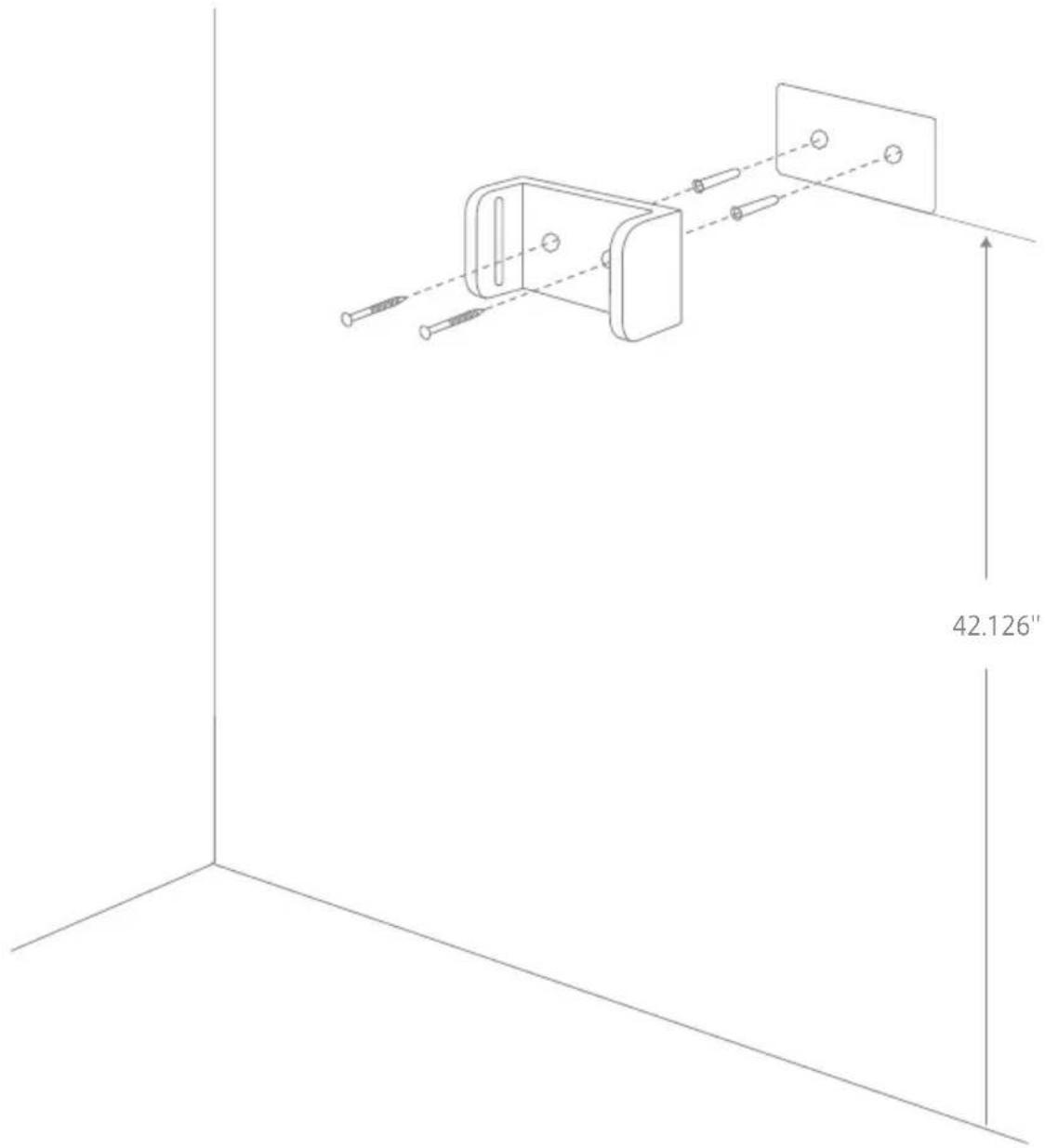
Wall Mount Installation Diagram
-
Paste the mounting template sticker on the wall. The bottom edge of the mounting template sticker should be parallel to and about 42.126" from the ground.
-
Use a power drill with an 0.315" drill bit to drill a hole into each marker on the mounting template sticker, then insert a wall plug into each hole.
-
Align the holes on the mount with the holes on the wall. Fasten it to the wall with the included screws.
Note:
• The wall mount is an optional accessory. You can install it based on your needs.
- The wall mount should be installed on a cool, dry surface with an electrical outlet nearby. Prior to installing, ensure that there are no electrical wires or pipes in the space directly behind installment position.
Charging
Fully charge the vacuum before using it for the first time.
Note:
• A full charge will take approximately 4 hours.
- Using Turbo mode for a prolonged period will cause the battery to heat up, which increases charging time. Allow the vacuum to cool down for 30 minutes before charging it.
Charging Methods
Charging the vacuum with the charger
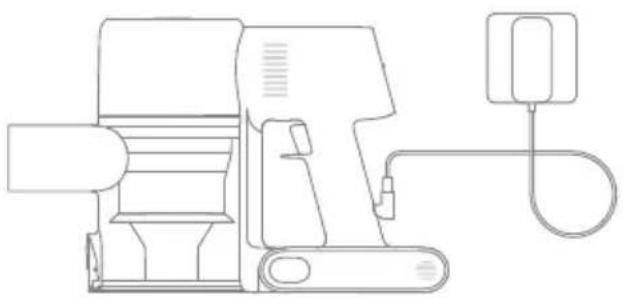
natural_image
Line drawing of a mechanical device with attached cable and connector (no text or symbols)LED Battery Status Indicator

Low battery

Half battery

Nearly full

Fully charged
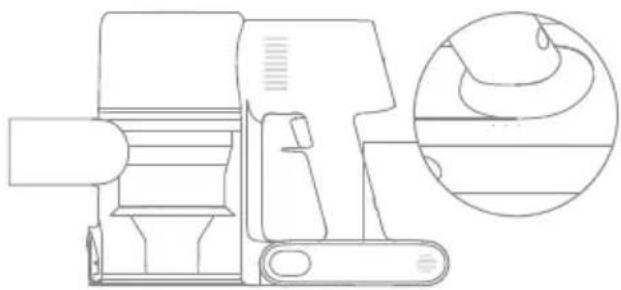
natural_image
Technical line drawing of a mechanical device with an inset circular detail showing internal components (no text or symbols)Off

Blinking
○ On
Note: Once the vacuum is fully charged, the indicator will turn off after 5 minutes, and the vacuum will enter the energy-saving mode.
How to Use
EN
Working Methods
Select from two working methods for the vacuum, based on your needs.
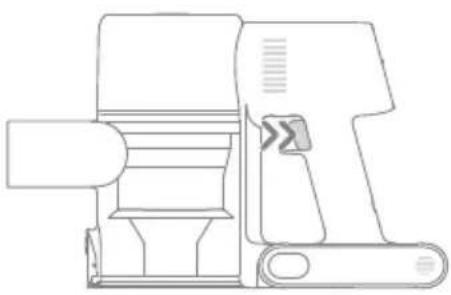
Method 1: Discontinuous Cleaning Mode
Press and hold the on/off switch to power it on, and release it to stop immediately.
natural_image
Line drawing of a mechanical device with no visible text or symbolsMethod 2: Continuous Cleaning Mode (Trigger switch lock)
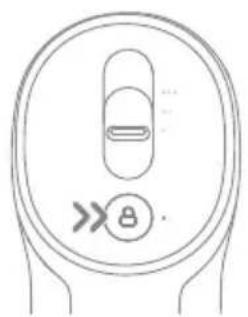
Click the trigger switch lock to switch to Continuous Cleaning Mode when the vacuum is running. Then release the on/off switch to make the vacuum in Continuous Cleaning Mode.
Use the trigger switch lock to free your fingers and avoid finger fatigue caused by holding the switch.
natural_image
Diagram of a circular device with internal components and an arrow symbol (no text or labels)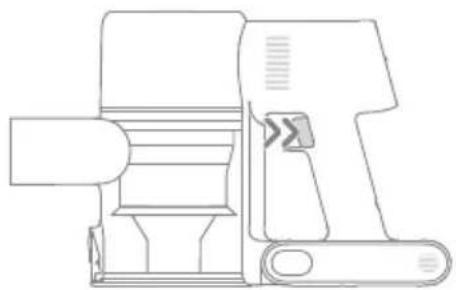
natural_image
Technical line drawing of a mechanical device with no visible text or symbolsNote:
• In this mode, the lock indicator will illuminate steadily.
- Click the trigger switch lock again to quit the Continuous Cleaning Mode.
How to Use
Using Different Accessories
natural_image
Line drawing of a vacuum cleaner on tiled floor with an inset showing a battery component (no text or symbols)Motorized Mini-Brush
For vacuuming dirt, pet hair, and other stubborn debris from sofas, bedding, and other fabric surfaces.
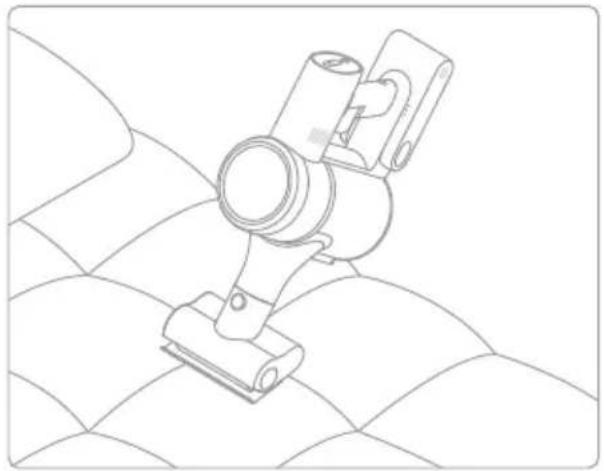
natural_image
Technical line drawing of a mechanical clamp or bracket device on a textured surface (no text or symbols)Note: It is not recommended to vacuum on fragile surfaces, such as silk.
Wide Combination Tool
For vacuuming curtains, keyboards, ceilings, sofas, vehicle interiors, coffee tables, etc.
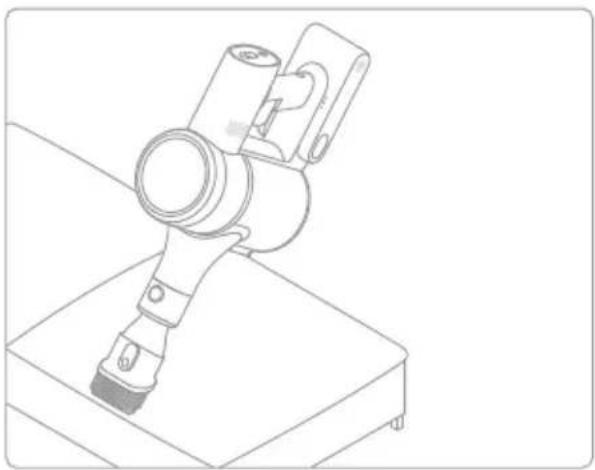
natural_image
Line drawing of a robotic arm mounted on a base (no text or symbols)Multi-Surface Brush
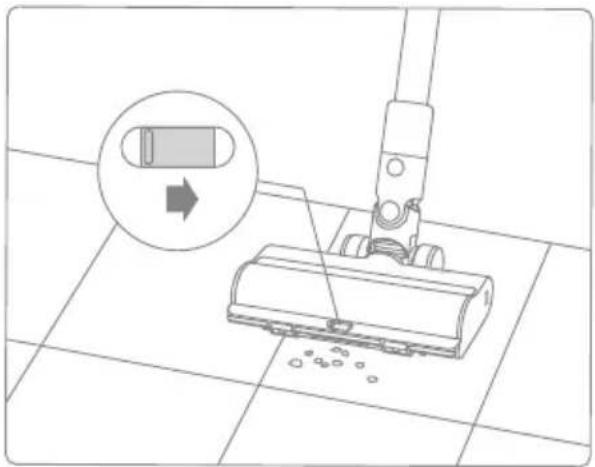
Suitable for vacuuming on the med/low pile carpets, tiles and floors.
For vacuuming large particles by turning on the switch on the brush, such as coffee beans, corn flakes and etc.
Note:
- The multi-surface brush can be attached directly to the vacuum.
- When the appliance starts, the lights in front of the brush roller will automatically turn on, which is convenient for use.
Soft Roller Brush
Suitable for cleaning hard floors such as marbles and tiles.
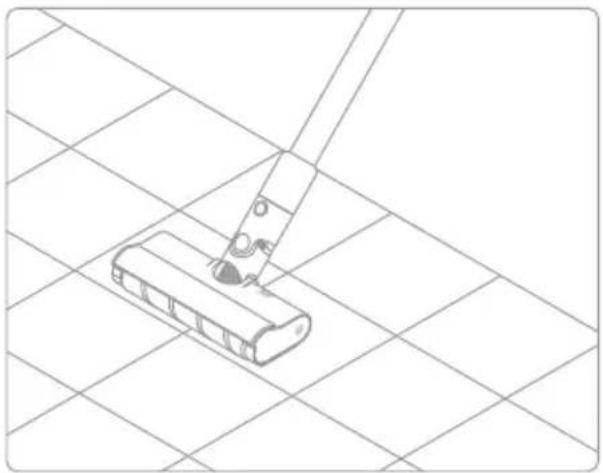
natural_image
Line drawing of a mop handle on a tiled floor (no text or symbols)Note: The soft roller brush can be attached directly to the vacuum.
Flexible Combination Tool
Bendable and retractable brush-nozzle, more flexible to vacuum in narrow gaps.
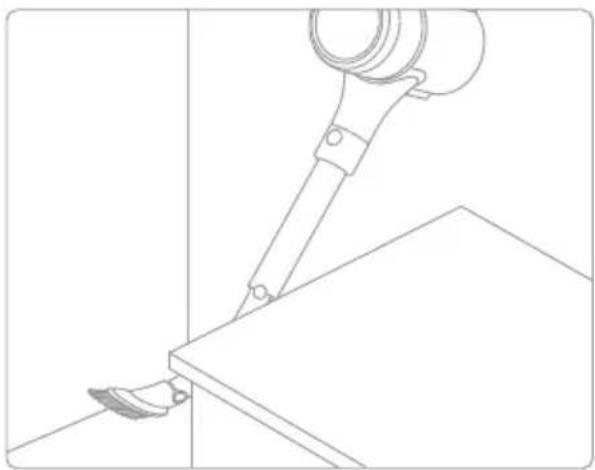
natural_image
Line drawing of a robotic arm gripping a tool on a flat surface (no text or symbols)How to Use
EN
Wall Mount
The vacuum cleaner can be placed on the wall mount when it is not in use.
Note:
- Do not put the vacuum cleaner alone on the wall mount.
- Place it on the wall mount after connecting it with the extension rod and the multi-surface brush.
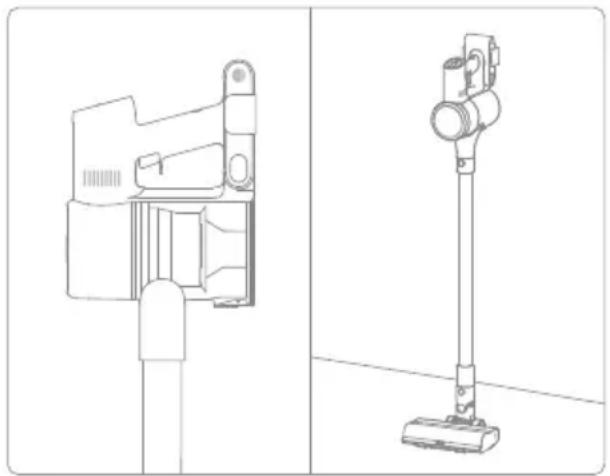
natural_image
Technical line drawing of a vacuum cleaner device (no text or symbols present)Note:
- If any rotating part becomes stuck, the vacuum may shut off automatically. Remove any trapped foreign objects, then resume use.
- When the motor becomes overheated, the vacuum will automatically shut off. Wait until the battery temperature returns to normal, then resume use.
Care & Maintenance
Tips:
- Always use genuine parts to keep your warranty from being void.
- If the filter or nozzle becomes clogged, the vacuum will stop working shortly after being turned on. Clear the tube to restore functionality.
- If the vacuum is not used for an extended period, fully charge it, unplug its charger, and store it in a cool, low-humidity environment away from direct sunlight. To avoid over-discharging the battery, recharge the vacuum at least once every three months.
Cleaning the Vacuum
Wipe the vacuum with a soft dry cloth.
Cleaning the Dust Cup, Pre-Filter, and Cyclone Assembly
The vacuum's cleaning ability will be reduced if the dust cup is filled to the "MAX" mark. To regain performance, empty the dust cup in a timely manner. Before emptying the dust cup, make sure the vacuum is disconnected from the power, and do not press its power button.
- Press the dust cup bottom cover release button, then empty the contents.
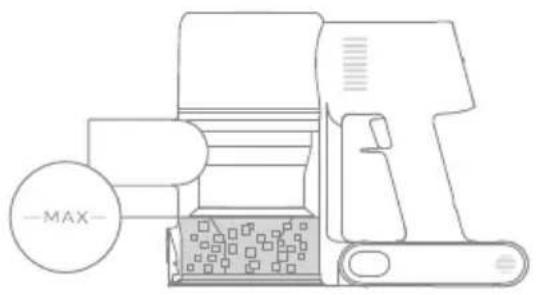
natural_image
Line drawing of a mechanical device with a circular label labeled '-MAX-' (no text or symbols on the device itself)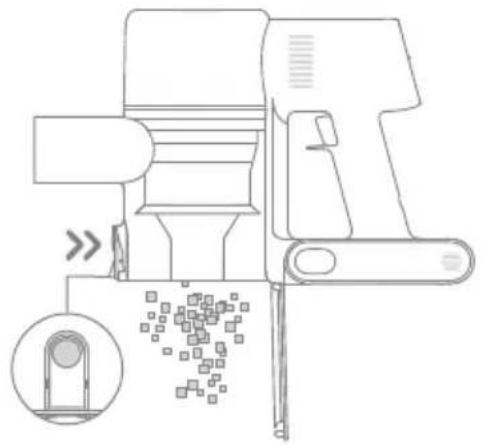
natural_image
Technical line drawing of a mechanical device with an inset showing a close-up of a component (no text or symbols present)- Push the dust cup release switch in the direction indicated by the arrow, then gently remove the dust cup from the vacuum.
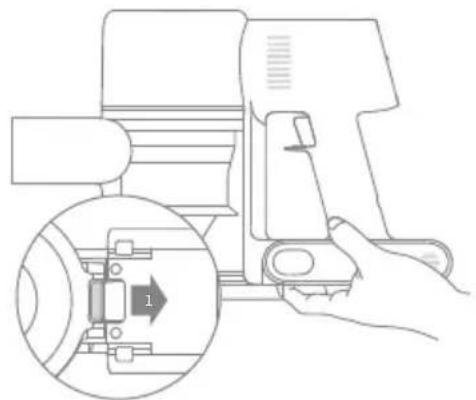
natural_image
Line drawing of a hand operating a camera with an inset showing a mechanical component (no text or symbols)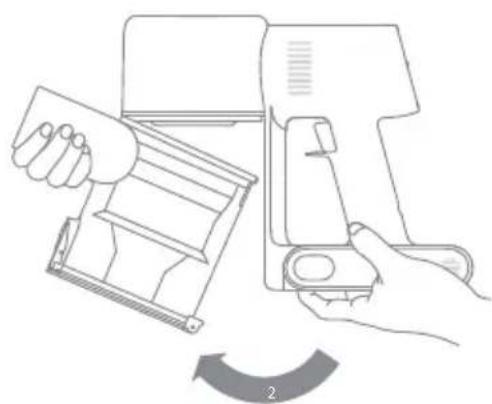
natural_image
Line drawing of a hand holding a device with a curved arrow indicating rotation (no text or symbols)Care & Maintenance
EN
- Remove the pre-filter first, then lift the handle of the cyclone assembly and turn it counterclockwise until it stops, then pull to lift out the cyclone assembly.
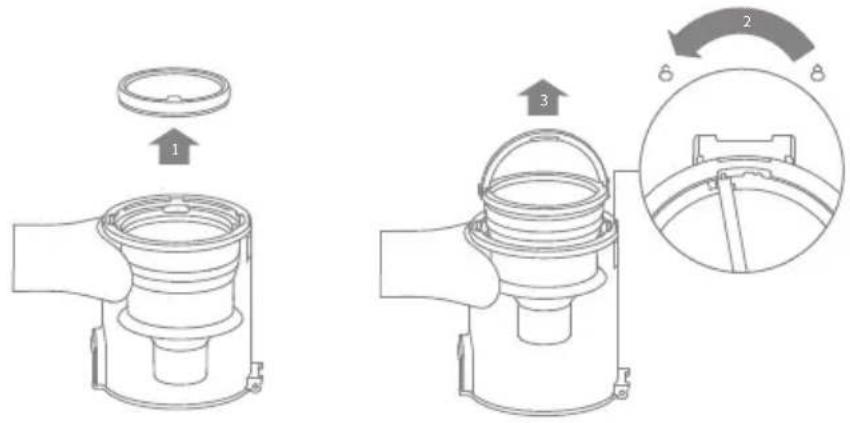
- Wipe the dust cup with a soft wet cloth. Pay attention to wringing out the cloth before using.
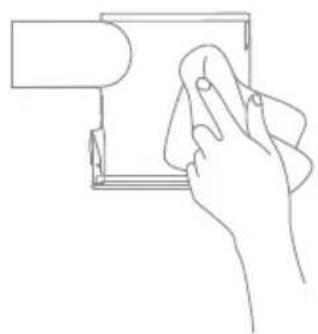
natural_image
Line drawing of a hand holding a small object over a rectangular frame (no text or symbols)
To avoid the risk of electric shock, do not rinse the dust cup with water.
- Rinse the cyclone assembly and pre-filter until they are clean. After washing, air dry for at least 24 hours.
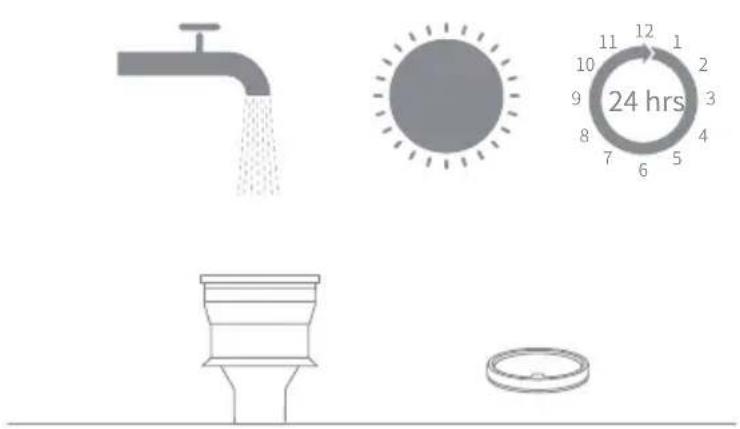
Pre-FilterCyclone Assembly
Note:
• It is recommended to clean the dust cup once every month.
- It is recommended to clean the pre-filter at least once every 3 months and the cyclone system at least once every 6 months.
Care & Maintenance
Installing the Dust Cup, Pre-Filter, and Cyclone Assembly
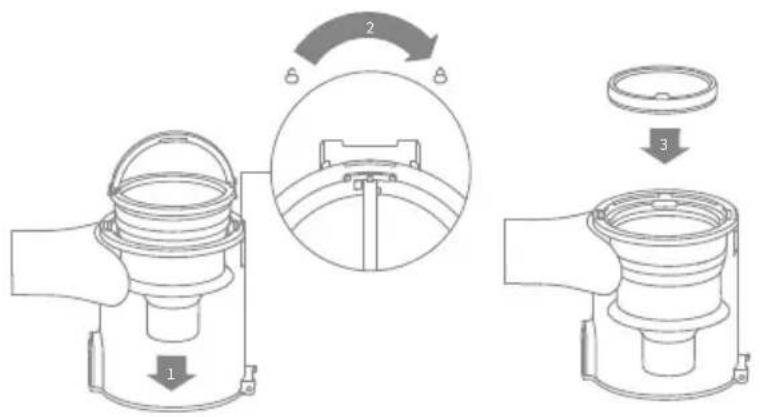
- Insert the cyclone assembly vertically into the dust cup, and make sure that the handle of the cyclone assembly line up with the slot on the left side of the dust cup. Turn the handle clockwise until it locks, then flip the handle down.
- Place the pre-filter with its front side facing up into the cyclone assembly.
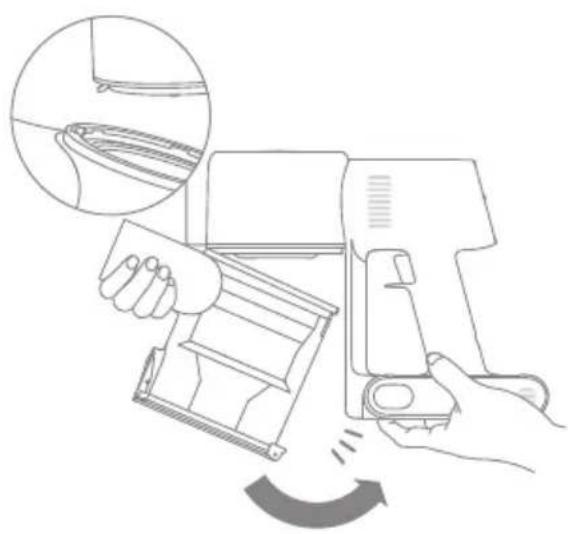
- Slightly tilt the dust cup so the slot aligns with the clip on the vacuum. Then gently push the dust cup until it clicks into place.
natural_image
Line drawing of a hand operating a cleaning machine with a magnified inset showing the blade detail (no text or symbols)Care & Maintenance
EN
Cleaning the Filter
It is recommended to clean the filter once every 4 to 6 months.
-
Remove the dust cup as shown in the figure.
-
Remove the filter from the vacuum by pulling it down in the direction shown in the figure.
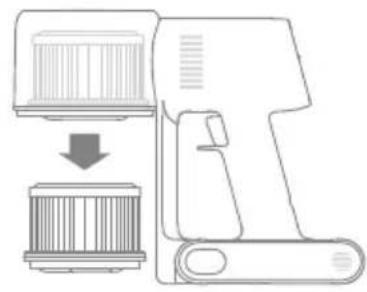
natural_image
Diagram of a device with a lid and base, showing a downward arrow indicating process (no text or symbols present)-
Clean the filter with clean water. Make sure you rotate the filter 360^ to thoroughly and remove all dust caught in the filter. Lightly tap the filter several times to remove any excess dirt.
-
Allow the filter to air dry for 24 hours.
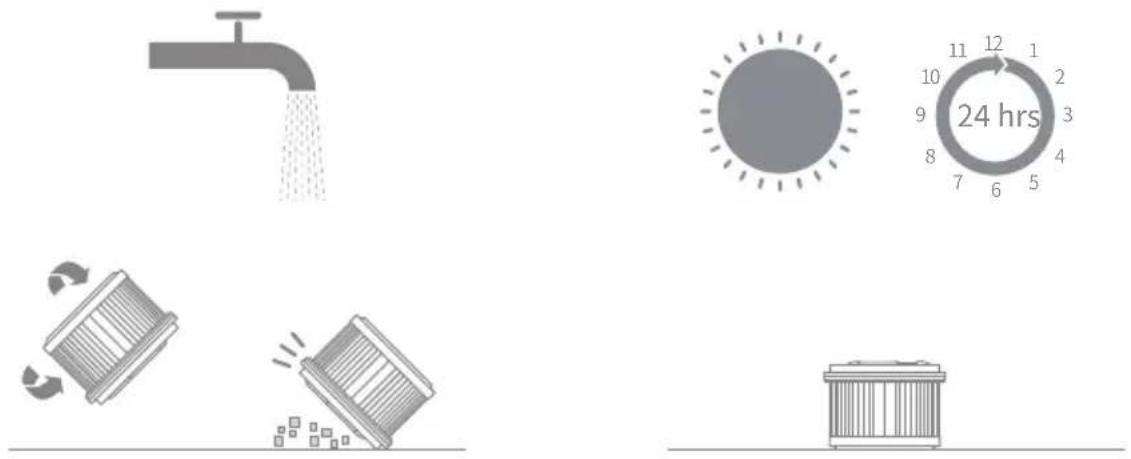
Note:
- Only use clean water to wash the filter. Do not use detergent.
- Do not attempt to clean the filter with a brush or finger.
Care & Maintenance
Installing the filter
-
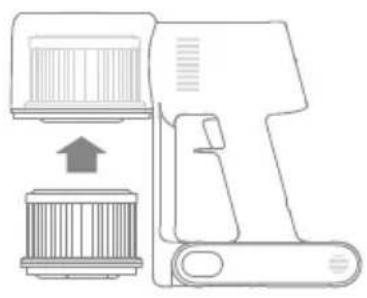
Insert the filter into the vacuum and gently press down, as illustrated.
-
Reinstall the dust cup.
natural_image
Diagram of a handheld device with a cylindrical component and an upward arrow, no text or symbols present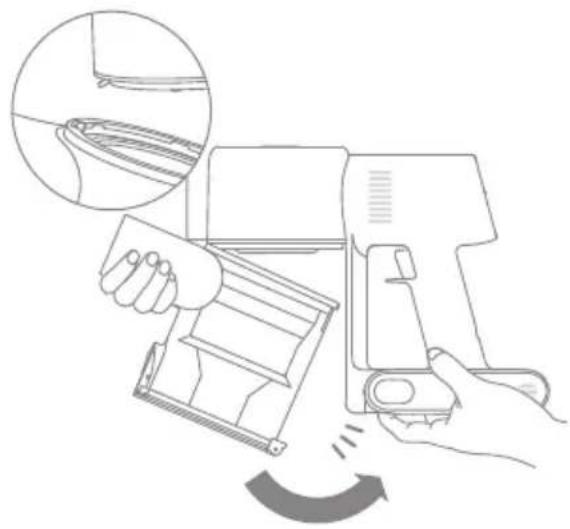
natural_image
Line drawing of a hand using a spray gun to lift a device, with an inset showing the handle and blade (no text or symbols)Care & Maintenance
EN
Cleaning the Multi-Surface Brush
-
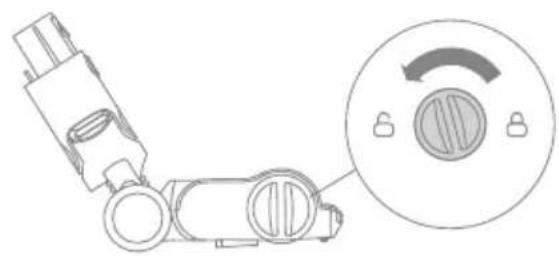
Turn the lock counterclockwise until it stops, then remove the roller from the roller brush.
-
Use scissors to cut off the hairs and fibers that get stuck on the brush roller. Wipe the dust from the notch and transparent cover with a dry cloth or paper towel. Thoroughly dry before use.
natural_image
Diagram of a robotic arm with a circular dial indicator showing rotational motion (no text or symbols)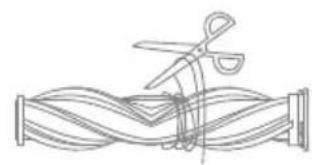
natural_image
Line drawing of scissors cutting through a twisted rope or pipe (no text or symbols)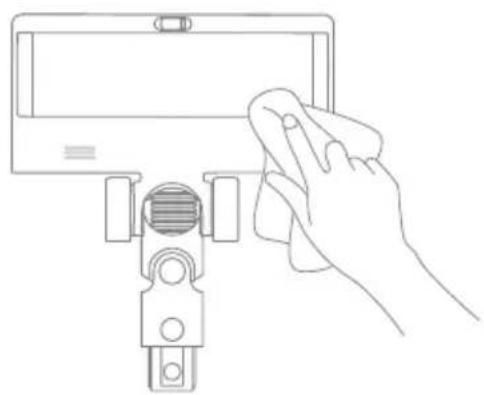
natural_image
Line drawing of a hand cleaning a small electronic device (no text or symbols)-
When it is dirty, rinse the brush roller with clean water until it is clean.
-
Stand the brush roller upright for at least 24 hours until it is fully dry.
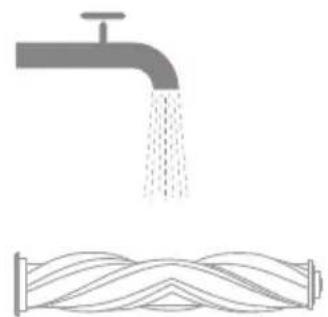
natural_image
Illustration of a faucet releasing water and a coiled pipe with wavy lines (no text or symbols)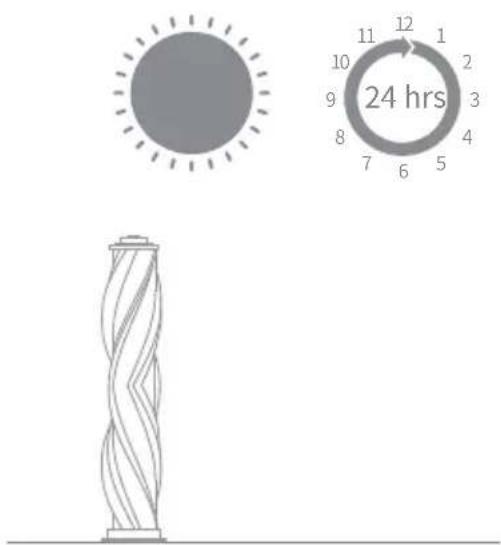
Cleaning the Soft Roller Brush
-
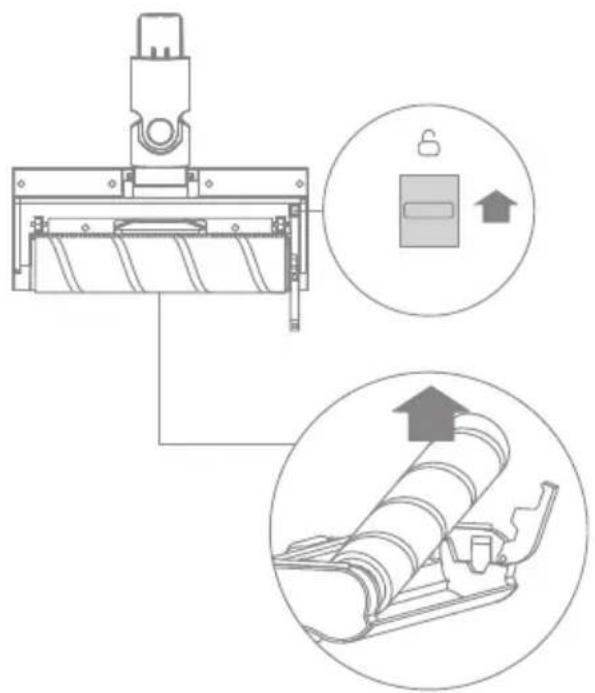
As shown in the picture, press the brush roller release button to remove the roller from the slot.
-
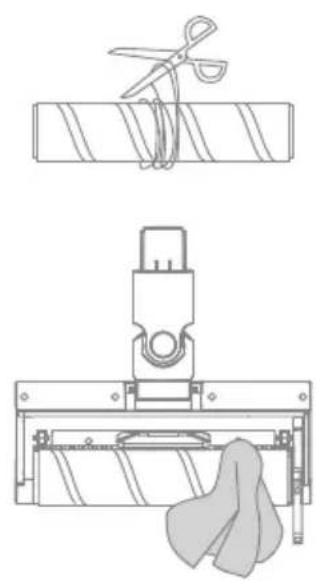
Use scissors to cut off the hairs and fibers that get stuck on the brush roller. Wipe the dust from the notch and transparent cover with a dry cloth or paper towel. Thoroughly dry before use.
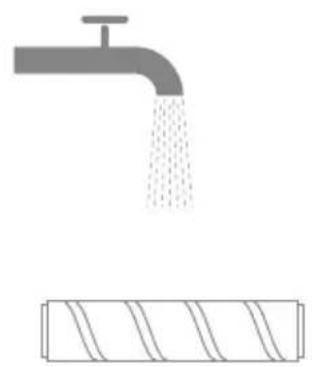
- When it is dirty, rinse the brush roller with clean water until it is clean.
natural_image
Technical line drawings of a mechanical assembly with scissors, clamped parts, and a cloth (no text or symbols)- Stand the brush roller upright for at least 24 hours until it is fully dry.
natural_image
Simple line drawing of a faucet pouring liquid into a rectangular block (no text or symbols)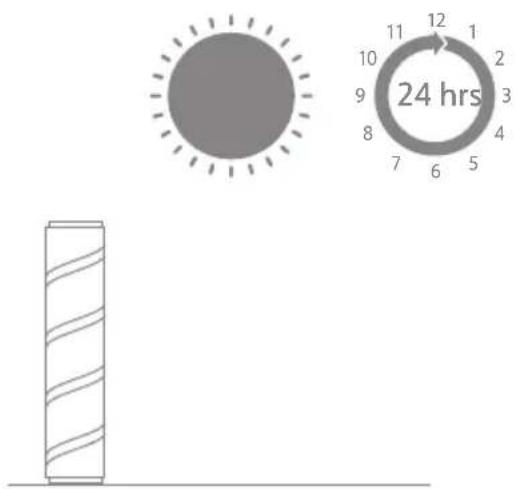
Care & Maintenance
EN
Cleaning the Motorized Mini-Brush
-
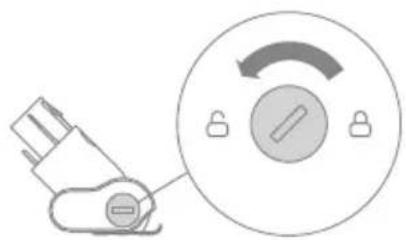
Use a coin as illustrated to rotate the lock counterclockwise until you hear a click.
-
After unlocking the motorized mini-brush, remove the brush roller, then rinse and clean it.
natural_image
Diagram showing a plug connected to a circular dial with a switch, no text or symbols present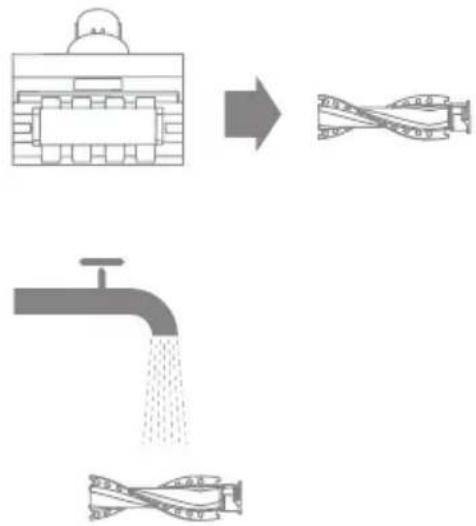
flowchart
graph TD
    A["Truck with tank"] --> B["Flow into pipe assembly"]
    B --> C["Drain with pipe assembly"]
-
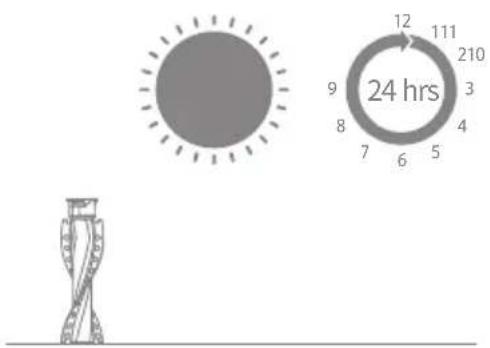
Stand the brush roller upright in a well-ventilated area for at least 24 hours until it is fully dry.
-
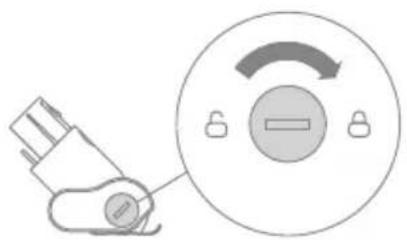
Once the brush roller is dry, reinstall it by following the disassembly steps in reverse.
natural_image
Diagram showing a plug inserted into a circular component with a switch, no text or symbols presentCare & Maintenance
Battery Pack
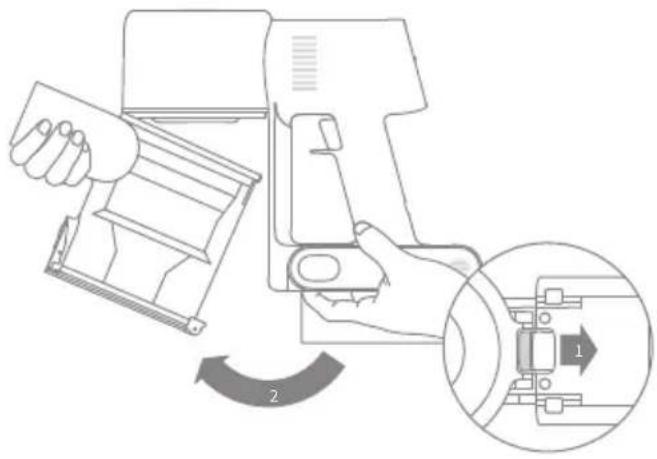
The vacuum contains a removable rechargeable lithium-ion battery pack which has a limited number of recharge cycles. After extended use, the battery pack may no longer hold a charge. If this happens, it means the battery pack has reached the end of its life cycle and needs to be replaced.
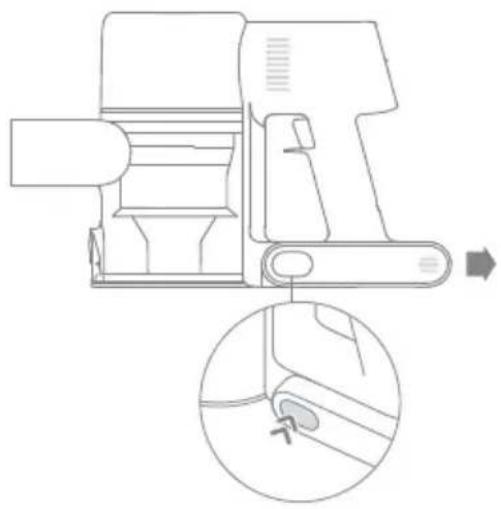
- Press down the battery pack release button and slide the battery pack to the right, as illustrated, to remove it.
- Install the new battery pack.
natural_image
Technical line drawing of a mechanical device with an inset close-up showing a component detail (no text or symbols)Specifications
EN
| Vacuum Cleaner | |||
| Model VTV41B | |||
| Charging Voltage 30 | V Rated Voltage 25.2 V | --- | |
| Rated Power 425 | W Charging Time approximately 4 hours | ||
| Motorized Mini-Brush | |||
| Model VMM4 | |||
| Rated Power 20 W | Rated Voltage 25.2 V | --- | |
| Multi-Surface Brush | |||
| Model VMB3 | |||
| Rated Power 40 W | Rated Voltage 25.2 V | --- | |
| Soft Roller Brush | |||
| Model ASF4 | |||
| Rated Power 40 W | Rated Voltage 25.2 V | --- | |
| Charger | |||
| Model YLS0251B-T300080 | |||
| Input | 100-240 V~50/60 Hz0.8 A max | Output 30 V | 0.8 A --- |
| Rechargeable Lithium-Ion Battery Pack | |||
| Model | V2213-7S1P-BCB | ||
| Nominal Voltage | 25.2 V --- | Nominal Capacity | 3000 mAh |
| Rated Capacity | 2800 mAh | Energy | 70.56 Wh |
If the vacuum is not working properly, please refer to the table below.
| Errors Possible Causes Solutions | ||
| Vacuum does not work. | Vacuum is out of battery or low on power. | Fully charge the vacuum, then resume use. |
| Overheat protection mode triggered by a blockage. | Clean the suction openings or air duct. Wait until the vacuum cools down, then reactivate it. | |
| Suction opening or air duct is blocked. | Clear any blockages from suction opening or air duct. | |
| Weak suction force. | Dust cup is full and/or filter assembly is clogged. | Empty the dust cup and clean the filter assembly. |
| Attachment is blocked. | Clear any blockages in the attachment. | |
| Motor makes a strange noise. | Main suction opening or extension rod is blocked. | Clear any blockage in the main suction opening or extension rod. |
| The first indicator is red after turning on the vacuum. | Battery pack is damaged. | Please contact after-sales service to arrange maintenance. |
| The first indicator blinks red when charging the vacuum. | The charger is incompatible. | Only use the original charger to charge the vacuum. |
| The battery indicator does not light up when charging. | The charger does not plug into the vacuum well. | Check whether the charger is properly plugged into the vacuum. |
| The battery is charged and switches to Sleep Mode automatically. | The vacuum runs normally. | |
| If the problem persists after ruling out the above two possibilities. | Please contact the after-sales department for maintenance. | |
| Charging too slow. | Battery temperature is too low or too high. | Wait until the battery's temperature returns normal, then resume use. |
| LED lights of the multi-surface brush do not work. | LED lights are damaged. | Please contact the aftersales department for maintenance. |
The lithium-ion battery pack contains substances that are hazardous to the environment. Before disposing of the vacuum, please remove the battery pack, then discard or recycle it in accordance with local laws and regulations of the country or region it is used in.
natural_image
Pure vertical line drawing of a mechanical or electrical component (no text or symbols)Tige de rallonge Brosse multi-surfaces
natural_image
Simple line drawing of a mechanical clamp or bracket (no text or symbols)natural_image
Technical line drawing of a mechanical component with no visible text or symbols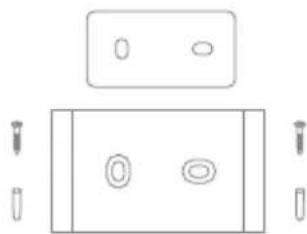
natural_image
Pure electrical circuit lines without any symbolsnatural_image
Technical line drawing of a mechanical assembly with a cylindrical component inserted into a rectangular base (no text or symbols)natural_image
Line drawing of a mechanical device with attached cable and connector (no text or symbols)natural_image
Technical line drawing of a mechanical device with an inset circular detail showing internal components (no text or symbols)natural_image
Line drawing of a mechanical device with no visible text or symbolsnatural_image
Simple line drawing of a circular device with a handle and button, no text or symbols present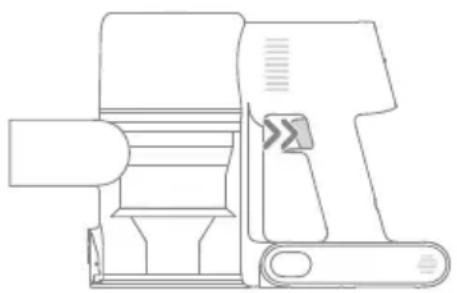
natural_image
Line drawing of a mechanical device with no visible text or symbolsRemarque :
natural_image
Technical line drawing of a mechanical clamp or bracket assembly on a patterned surface (no text or symbols)natural_image
Line drawing of a robotic arm mounted on a base platform (no text or symbols)Brosse multi-surfaces
natural_image
Line drawing of a mechanical component with a lever and base, set on a grid background (no text or symbols)natural_image
Technical line drawing of a robotic arm interacting with a flat surface (no text or symbols)Mode d'utilisation
Support mural
natural_image
Technical line drawing of a vacuum cleaner device with front and side views (no text or symbols)Remarque :
natural_image
Line drawing of a printer with a circular label labeled '-MAX-' (no other text or symbols)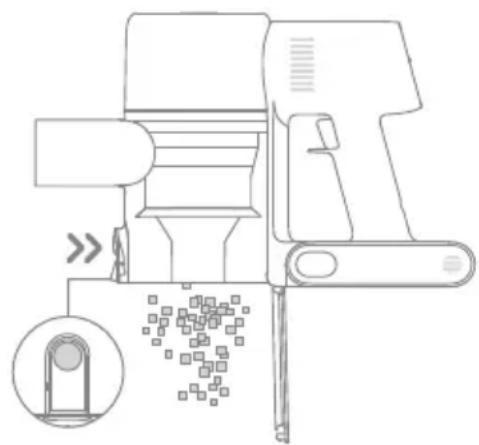
natural_image
Line drawing of a mechanical device with an inset showing a close-up of a component (no text or symbols)natural_image
Line drawing of a handheld device with an inset close-up showing internal components (no text or symbols)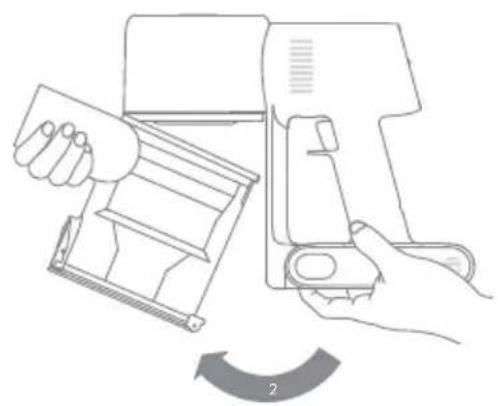
natural_image
Line drawing of a hand using a device to adjust or install a tray, with no text or symbols present.natural_image
Line drawing of a hand cleaning a rectangular object with a cloth (no text or symbols)
natural_image
Line drawing of a hand operating a cleaning machine with a magnified inset showing the blade detail (no text or symbols)natural_image
Diagram showing a device being processed into a cylindrical component (no text or symbols present)Remarque :
natural_image
Diagram of a handheld device with a cylindrical component and an upward arrow, no text or symbols present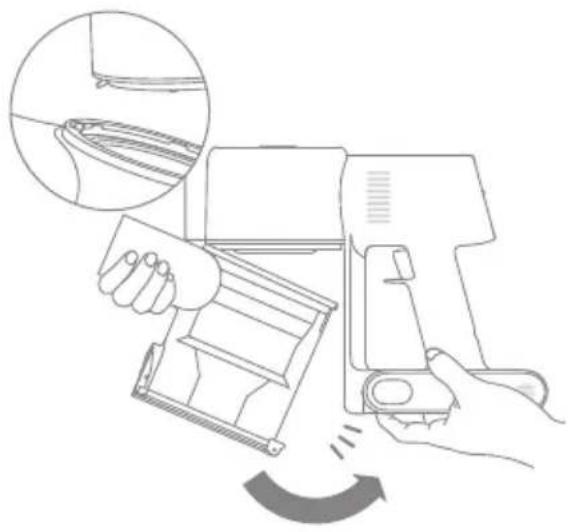
natural_image
Line drawing of a hand holding a cleaning machine with a magnified inset showing the blade detail (no text or symbols)natural_image
Diagram of a robotic arm with a circular dial indicator showing rotation (no text or symbols)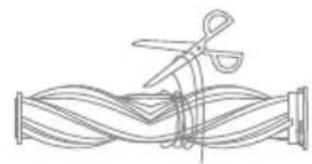
natural_image
Line drawing of scissors cutting through a coiled spring (no text or symbols)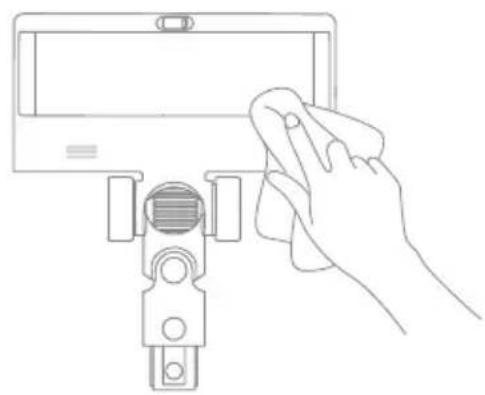
natural_image
Line drawing of a hand cleaning a device with a cloth (no text or symbols)natural_image
Illustration of a faucet releasing water into a coiled pipe (no text or symbols)


natural_image
Simple line drawing of scissors cutting a rectangular block (no text or symbols)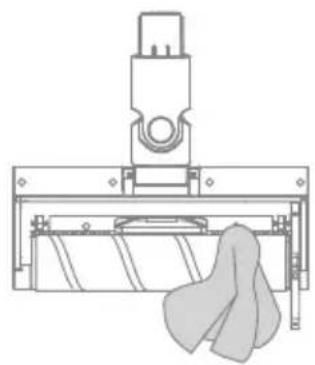
natural_image
Technical line drawing of a mechanical assembly with a cloth hanging from a base (no text or symbols)natural_image
Simple illustration of a faucet pouring liquid into a rectangular block (no text or symbols)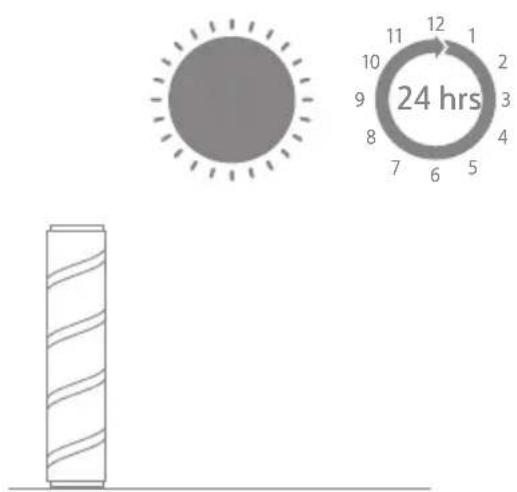
natural_image
Diagram showing a device with a lock and a circular dial indicator (no text or symbols)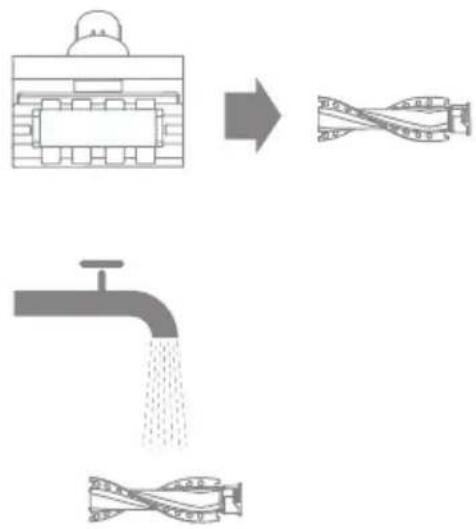
flowchart
graph TD
    A["Truck with water inlet"] --> B["Stream filtration"]
    B --> C["Tarmer filtration"]
    C --> D["Water drain"]
natural_image
Diagram showing a device connected to a circular dial with an arrow indicating rotation (no text or symbols present)natural_image
Technical line drawing of a mechanical device with an inset close-up showing a component detail (no text or symbols)Caractéristiques
FR
natural_image
Pure line drawing of a vertical cylindrical object with a small protrusion on top (no text or symbols)Varilla extensible Cepillo Multisuperficie
natural_image
Simple line drawing of a mechanical component or bracket (no text or symbols)natural_image
Technical line drawing of a mechanical component with no visible text or symbols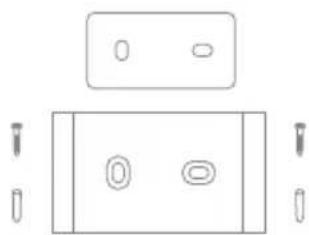
natural_image
Pure electrical circuit lines without any symbolsnatural_image
Technical line drawing of a mechanical component with a threaded fastener and mounting bracket (no text or symbols)Cepillo giratorio suave
natural_image
Line drawing of a mechanical device with attached cable and housing (no text or symbols)natural_image
Technical line drawing of a mechanical device with an inset circular detail showing internal components (no text or symbols)- Apagado - Intermitente - Encendido
natural_image
Line drawing of a mechanical device with no visible text or symbolsnatural_image
Simple line drawing of a circular device with a handle and control knob (no text or symbols)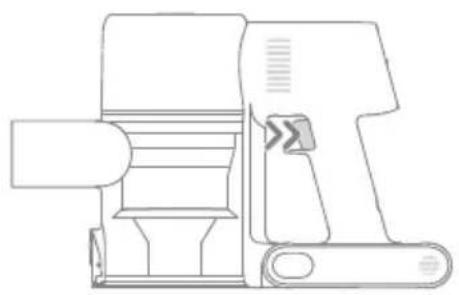
natural_image
Line drawing of a mechanical device with no visible text or symbolsNota:
natural_image
Technical line drawing of a mechanical clamp or bracket assembly on a patterned surface (no text or symbols)natural_image
Technical line drawing of a mechanical component mounted on a grid-patterned surface (no text or symbols)natural_image
Line drawing of a robotic arm mounted on a base platform (no text or symbols)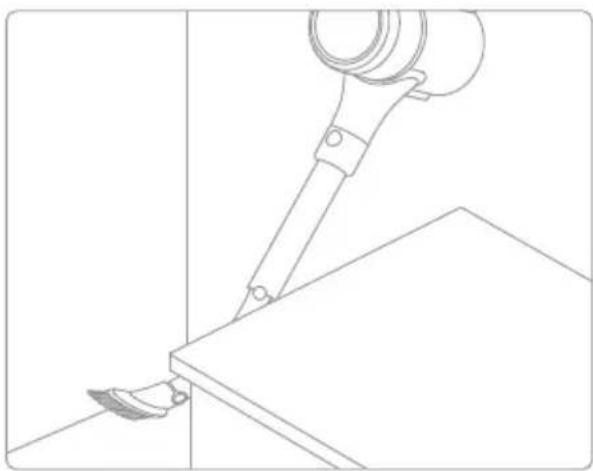
natural_image
Line drawing of a robotic arm gripping a flat surface, with no text or symbols presentModo de uso
Montaje en Pared
natural_image
Technical line drawing of a vacuum cleaner device with front and side views (no text or symbols)Nota:
natural_image
Line drawing of a printer with a circular label labeled '-MAX-' (no other text or symbols)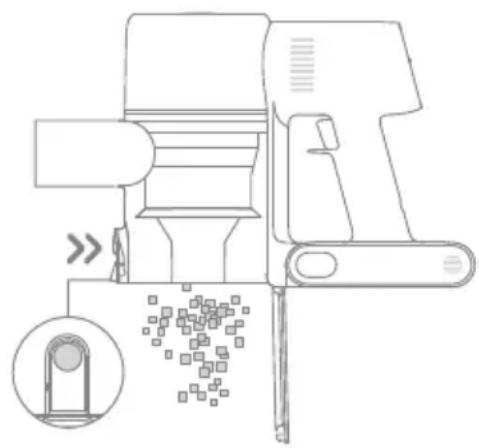
natural_image
Line drawing of a mechanical device with an inset showing a magnified view of a component (no text or symbols)ES
natural_image
Line drawing of a hand operating a handheld device with an inset showing internal components (no text or symbols)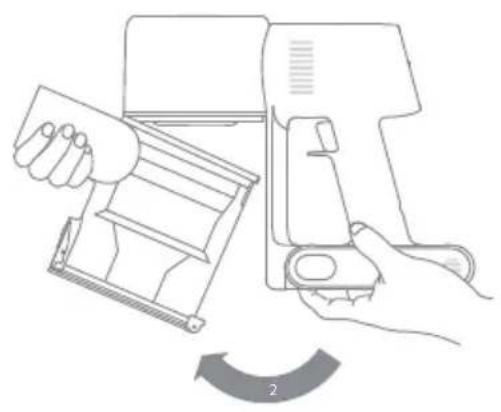
natural_image
Line drawing of a hand using a device to adjust a device's tray, with no text or symbols present.natural_image
Line drawing of a hand cleaning a rectangular object with a circular handle (no text or symbols)
natural_image
Line drawing of a hand using a cleaning or cleaning tool to clean or adjust the device (no text or symbols present)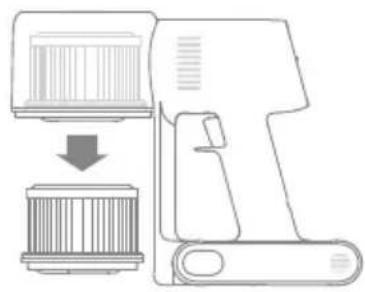
natural_image
Diagram showing a device being processed into a cylindrical component (no text or symbols present)Nota:
natural_image
Diagram of a handheld device with a cylindrical component and an upward arrow, no text or symbols presentnatural_image
Line drawing of a hand holding a cleaning machine with a magnified inset showing the blade detail (no text or symbols)natural_image
Technical line drawing of a mechanical component with a circular dial indicator (no text or symbols)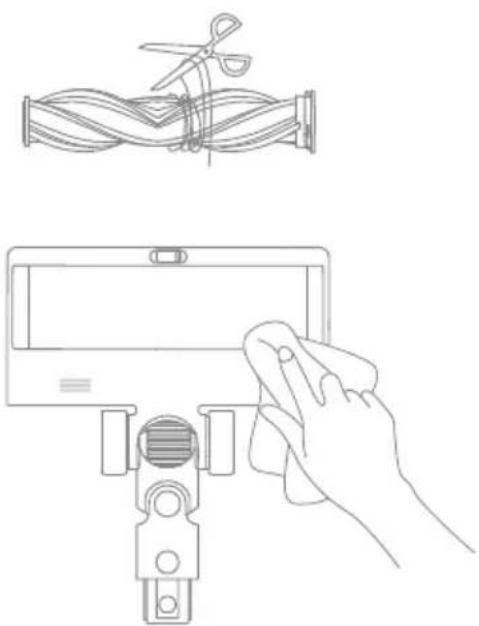
natural_image
Line drawing of a hand holding a tablet device with scissors and a cable, alongside a separate diagram showing a coiled cable being cut (no text or symbols present)natural_image
Illustration of a faucet releasing water into a pipe with flowing wavy lines below (no text or symbols)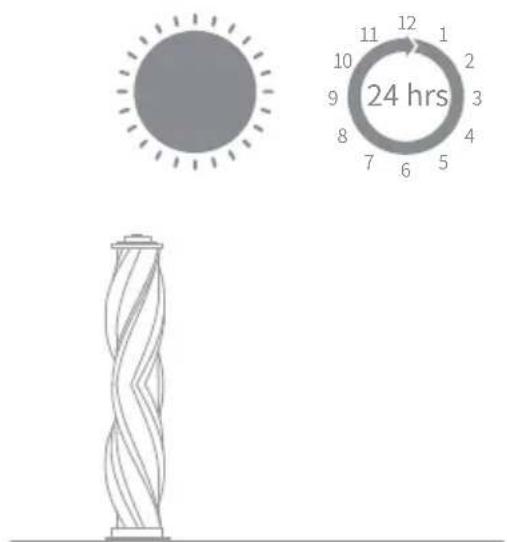
natural_image
Technical line drawings of a mechanical assembly with scissors, a clamp, and a cloth (no text or symbols)natural_image
Simple line drawing of a faucet pouring liquid into a rectangular block (no text or symbols)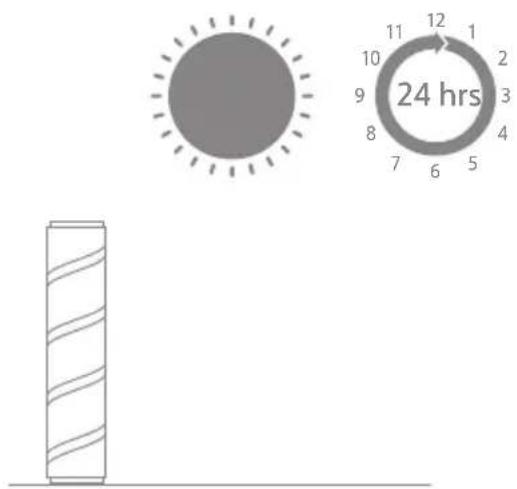
natural_image
Diagram showing a device with a lock and directional arrow, no text or symbols present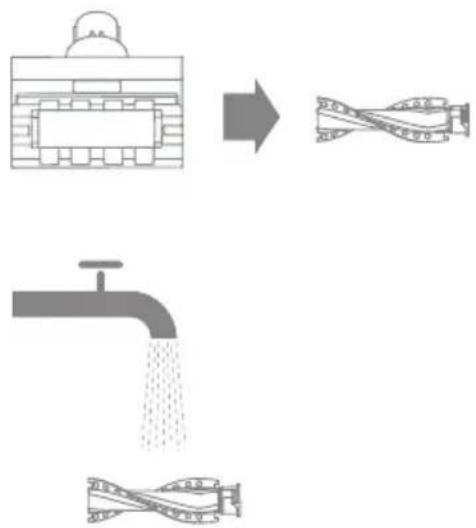
flowchart
graph TD
    A[" tank with inlet"] --> B[" filtration "]
    B --> C[" drain with filter"]
    C --> D[" filtration"]
natural_image
Diagram showing a plug inserted into a circular dial with a switch, no text or symbols presentnatural_image
Technical line drawing of a mechanical device with an inset close-up showing a component detail (no text or symbols)Especificaciones
ES

- Cordless Stick Vacuum User Manual
- THANK YOU
- FOR PURCHASING THIS DREAME VACUUM CLEANER.
- Registration Quick Start
- Safety Information
- IMPORTANT SAFETY INSTRUCTIONS
- SAVE THESE INSTRUCTIONS
- WARNING – To reduce the risk of fire, electric shock, or injury:
- Caution:
- Product Overview
- Accessories
- Installation
- Wall Mount Installation Diagram
- Note:
- Charging
- Charging Methods
- LED Battery Status Indicator
- How to Use
- Working Methods
- Using Different Accessories
- Motorized Mini-Brush
- Wide Combination Tool
- Multi-Surface Brush
- Soft Roller Brush
- Flexible Combination Tool
- Wall Mount
- Care & Maintenance
- Tips:
- Cleaning the Vacuum
- Cleaning the Dust Cup, Pre-Filter, and Cyclone Assembly
- Installing the Dust Cup, Pre-Filter, and Cyclone Assembly
- Cleaning the Filter
- Installing the filter
- Cleaning the Multi-Surface Brush
- Cleaning the Soft Roller Brush
- Cleaning the Motorized Mini-Brush
- Battery Pack
- Specifications
- Remarque :
- Brosse multi-surfaces
- Mode d'utilisation
- Support mural
- Caractéristiques
- Nota:
- Modo de uso
- Montaje en Pared
- ES
- Especificaciones
Brand : DREAME
Model : R10 Pro
Category : Vacuum Cleaner