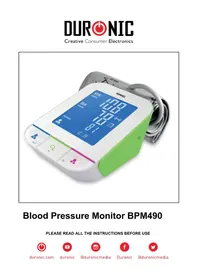
BPM490 - Blood pressure monitor Duronic - Free user manual and instructions
Find the device manual for free BPM490 Duronic in PDF.


| Product Type | Automatic wrist blood pressure monitor |
| Brand | Duronic |
| Model | BPM490 |
| Dimensions (L x W x H) | Approx. 120 x 160 x 69 mm |
| Weight | Approx. 385 g (without batteries) |
| Display type | Backlit LCD screen (92 x 78 mm) |
| Power supply | 4 AA batteries 6 V DC or AC adapter 6 V 1 A (model UE08WCP-060100SPA) |
| Pressure measurement range | 0 to 300 mmHg (0 to 40 kPa) |
| Pulse measurement range | 40 to 199 beats/min |
| Pressure accuracy | ±3 mmHg between 15 and 25 °C, ±5 mmHg outside |
| Memory | 60 measurements per user (2 users) |
| Main functions | Systolic/diastolic pressure measurement, pulse, irregular heartbeat detection, Bluetooth transmission, auto-off |
| Cuff | Type B, arm circumference 22 to 32 cm |
| Measurement mode | Oscillometric with automatic deflation |
| Care and cleaning | Clean the device with a dry cloth; do not immerse; do not wash the cuff |
| Safety | Applied part type B, CE 0123, adult use, do not use in presence of anesthetic gases |
| Operating conditions | Temperature 10 to 40 °C, humidity 15 to 80 % RH |
| Storage conditions | Temperature -20 to 60 °C, humidity ≤ 90 % RH |
| Supplied accessories | Cuff, 4 AA batteries, user manual, AC adapter |
| Warranty | 1 year |
Frequently Asked Questions - BPM490 Duronic
User questions about BPM490 Duronic
0 question about this device. Answer the ones you know or ask your own.
Ask a new question about this device
Download the instructions for your Blood pressure monitor in PDF format for free! Find your manual BPM490 - Duronic and take your electronic device back in hand. On this page are published all the documents necessary for the use of your device. BPM490 by Duronic.
USER MANUAL BPM490 Duronic
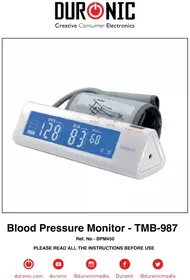
Blood Pressure Monitor BPM490
PLEASE READ ALL THE INSTRUCTIONS BEFORE USE

duronic.com

duronic

@duronicmedia

Duronic

@duronicmedia
Contents
English Manual 5
33
The Choice of Power Source
Setting Date, Time and Measurement Unit
Pair-up the Blood Pressure Monitor with Your Device
MEASUREMENT
Tie the cuff
Start a measurement
What are systolic pressure and diastolic pressure?
What is the standard blood pressure classification?
Why does my blood pressure fluctuate throughout the day?
Why do I get a different blood pressure at home compared to the hospital?
Is the result the same if measuring both arms?
TROUBLESHOOTING
SPECIFICATIONS
AUTHORIZED COMPONENT
CONTACT INFORMATION
COMPILED EUROPEAN STANDARDS LIST
EMC GUIDANCE
Thank you for selecting our arm type blood pressure monitor.
The monitor features blood pressure measurement, pulse rate measurement and auto-save the result. The design provides you with two years of reliable service. Readings taken by the blood pressure monitor are equivalent to those obtained by a trained observer using the cuff and stethoscope auscultation method. This manual contains important safety and care information, and provides step by step instruction for using the product. Read the manual thoroughly before using the product.
Safety Information
The below signs might be in the user manual, labeling or other component. they are the requirement of standard and using.
| THE OPERATION GUIDE MUST BE READ | Type BF Applied Parts | ||
| CE0123 | CE Mark: conforms to essential requirements of the Medical Device Directive 93/42/EEC. | DISPOSAL: Do not dispose this product as unsorted municipal waste. Collection of such waste separately for special treatment is necessary. | |
| Manufacturer | Direct Current | ||
| SN | Specifies Serial Number | EC REP | Authorized Representative in the European Community |
| Manufacture Date | Symbol for “Including RF transmitter” |

CAUTION
This device is intended for adult use only.
This device is intended for no-invasive measuring and monitoring of arterial blood pressure. It is not intended for use on extremities other than the arm or for functions other than obtaining a blood pressure measurement.
Do not confuse self-monitoring with self-diagnosis. This unit allows you to monitor your blood pressure. Do not begin or end medical treatment without asking a physician for treatment advice. If you are taking medication, consult your physician to determine the most appropriate time to measure your blood pressure. Never change a prescribed medication without consulting your Physician.
When the device was used to measure patients who have common arrhythmias such as atrial or ventricular premature beats or atrial fibrillation, the best result may occur with deviation. Please consult your physician about the result.
If the cuff pressure exceeds 40kPa (300 mmHg), the unit will automatically deflate. Should the cuff not deflate when pressures exceed 40kPa (300 mmHg), detach the cuff from the arm and press the corresponding user button to stop inflation.
The equipment is not AP/APG equipment and not suitable for use in the presence of a flammable anesthetic mixture with air of with oxygen or nitrous oxide.
The operator shall not touch output of batteries and the patient simultaneously.
To avoid measurement errors, please avoid the condition of strong electromagnetic field radiated interference signal or electrical fast transient/burst signal.
The user must check that the equipment functions safely and see that it is in proper working condition before being used.
This device is contraindicated for any female who may be suspected of, or is pregnant. Besides providing inaccurate readings, the affects of this device on the fetus are unknown.
Manufacturer will make available on request circuit diagrams, component parts list etc.
This unit is not suitable for continuous monitoring during medical emergencies or operations.
Otherwise, the patient's arm and fingers will become anaesthetic, swollen and even purple due to a lack of blood.
Please use the device under the environment which was provided in the user manual. Otherwise, the performance and lifetime of the device will be impacted and reduced.
During use, the patient will be in contact with the cuff. The materials of the cuff have been tested and found to comply with requirements of ISO 10993-5:2009 and ISO 10993-10:2010. It will not cause any potential sensation or irritation reaction.
Please use ACCESSORIES and detachable partes specified/ authorised by MANUFACTURE.
Otherwise, it may cause damage to the unit or danger to the user/patients.
The device doesn't need to be calibrated within two years of reliable service.
Please dispose of ACCESSORIES, detachable parts, and the ME EQUIPMENT according to the local guidelines.
If you have any problems with this device, such as setting up, maintaining or using, please contact the SERVICE PERSONNEL of SHINEMART. Don't open or repair the device by yourself.
Please report to SHINEMART if any unexpected operation or events occur.
Please use the soft cloth to clean the whole unit. Don't use any abrasive or volatile cleaners.
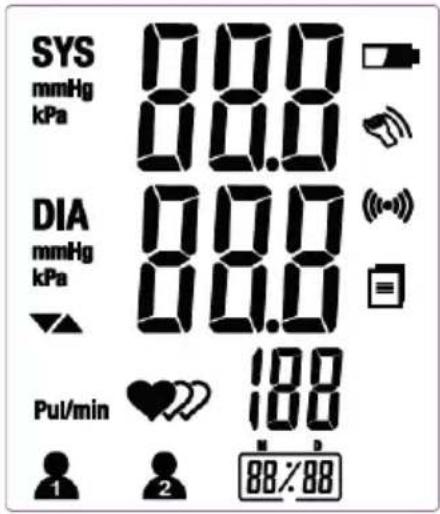
LCD display signal
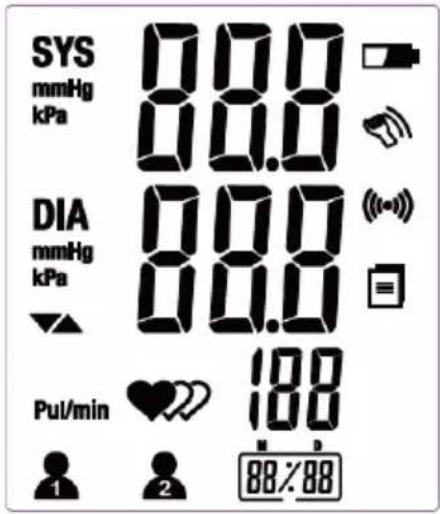
| SYMBOL | DESCRIPTION | EXPLANATION |
| SYS | Systolic Blood Pressure | High blood pressure |
| DIA | Diastolic Blood Pressure | Low blood pressure |
| Pul/min | Pulse | beat/minute |
| 8 | User 1 | Start measurement for user 1 and transmit the measuring result automatically. |
| 2 | User 2 | Start measurement for user 2 and transmit the measuring result automatically. |
| - | Data Pending to Transmit | Measurement data stored in the equipment. |
| (●) | Data Transmitting | Data Transmission succeeds. |
| Shocking reminder | Shocking will result in inaccurate | |
| Low Battery | Low battery and please replace the batteries. | |
| mmHg | Unit | Measurement unit of blood pressure |
| kPa | Unit | Measurement unit of blood pressure |
| 88/88 | Memory | Display the serial number of the measurement |
| 88/88 | Current Time | Month:Day (Hour:Minute) |
| Deflating | Exhaust the air in the cuff | |
| Irregular Heartbeat Detector | Please refer to Page 15 for more information |
Monitor Components
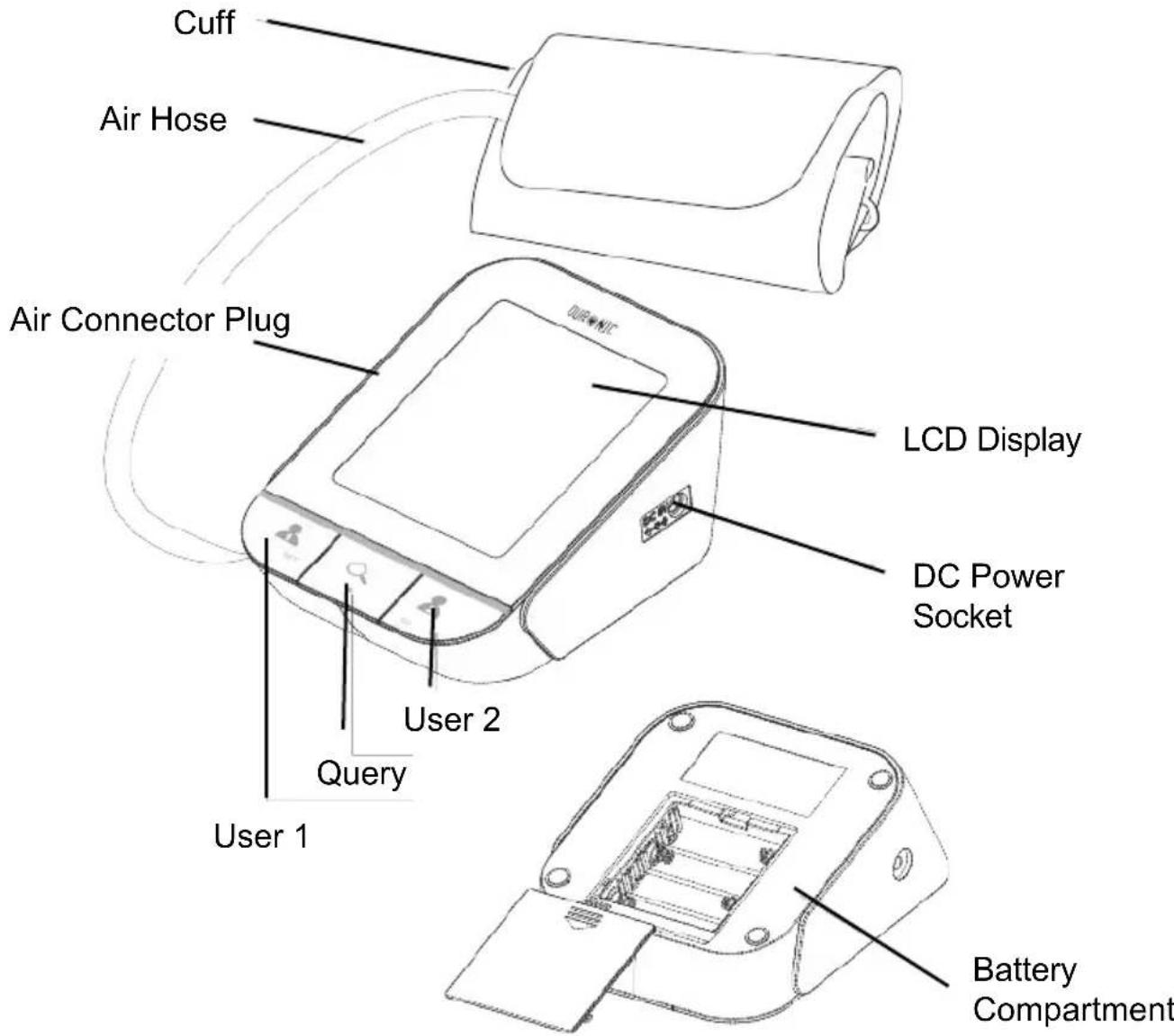
List
- Blood Pressure Monitor
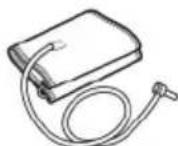
2.Cuff (Type BF applied part) (22cm - 32cm)
- User Manual
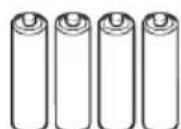
- 4*AA Batteries
The Choice of Battery
1.Battery powered mode:
6VDC 4 × AA alkaline batteries
2.AC adaptor powered mode: 6V=1A
(Can be supplied by AC adaptor model
UE08WCP-060100SPA !)(Not Included) Please
unplug the adaptor to depart from the using utility power.
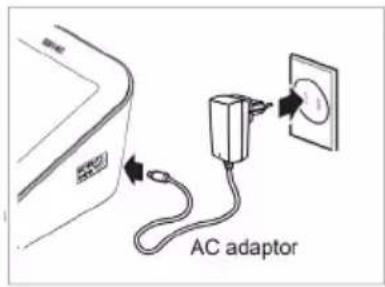
Note:
The adaptor socket is located on the right side of the monitor. Make sure the socket is not obstructed.

Caution: In order to achieve the best performance and protect your monitor, please use the authorized / specified battery and power adaptor.
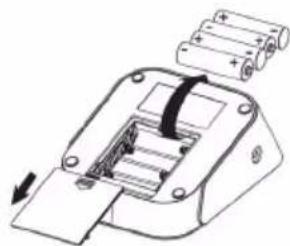
The Installment And Replacement Of Battery
- Open the battery door.
- Insert the batteries according to the polarity indications.
- Close the battery door.
Replace the batteries under following circumstances:
displays on the LCD.
The LCD display dims.
When powering on the monitor, the LCD does not light up.

Caution
Remove batteries if the device is not likely to be used for some time.
Worn batteries are harmful to the environment. Do not dispose with daily garbage. Remove the old batteries from the device following your local recycling guidelines. Do not dispose of batteries in fire. Batteries may explode or leak.
Setting the date, time and measurement unit
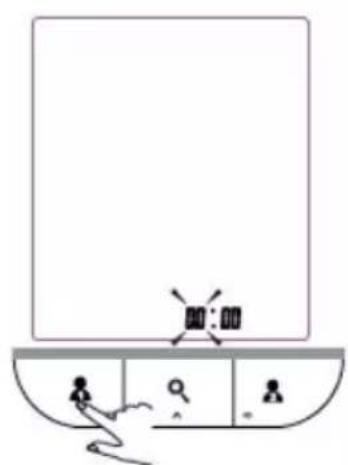
Please proceed to time setting before your initial use so as to ensure each piece of record are labled with a time stamp. (Default Value: Date: 01-Jan-2012; Time: 00:00; Measurement Unit: mm Hg)
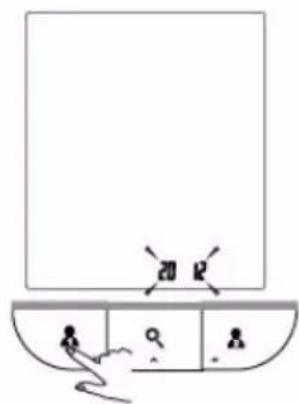
- When the monitor is OFF, press and hold "User 1" button to enter Time Setting Mode.
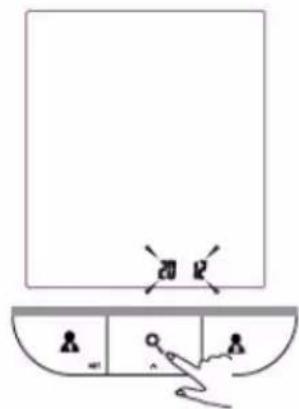
- As pictured in the right, the blinking numeral "2012" representing [YEAR]. Press "Query" button to change the numeral. Each press will increase the numeral by one in a cycling manner.
- Press "User 1" button again to confirm [YEAR]. Then the numeral representing [MONTH] blinks.
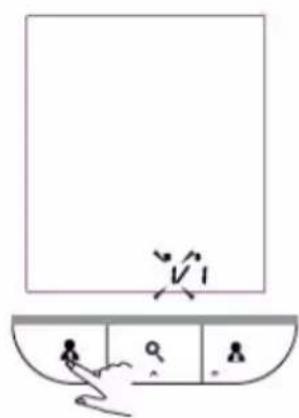
- Repeat step 2 and 3 to confirm [MONTH] and [DAY].
- Repeat step 2 and 3 to confirm
[HOUR] and [MINUTE].
Hour Format: 24-Hour
- Repeat step 2 and 3 to
confirm the measurement unit.
- After confirming the
measurement unit, the LCD will display "dONE" and the monitor will shut off automatically.

Pair-up the Blood Pressure Monitor with Your Device
- Download the free app "TransHealth" on the App Store or Google Play Store and install it on your phone or tablet.
- Turn on Bluetooth and the app. Make sure both are ON when pair-up is proceeding.
When the monitor is OFF, press and hold the button (User 2) to start pair-up. The symbol 0_0 and the symbol 0 will be shown on the LCD alternatively, indicating pair-up is proceeding.
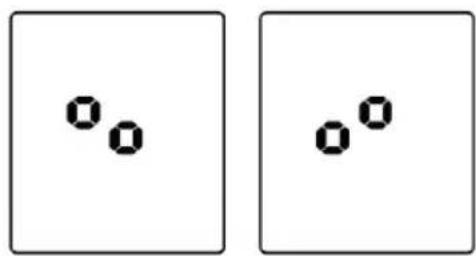
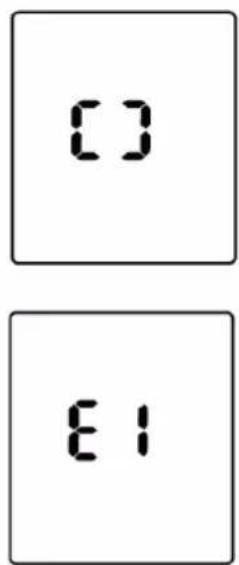
If SUCCESSFUL, symbol will be shown on the LCD.
If UNSUCCEEDFUL, symbol be shown on the LCD.
- The monitor will shut off automatically after Pair-up process is complete.
Tie The Cuff
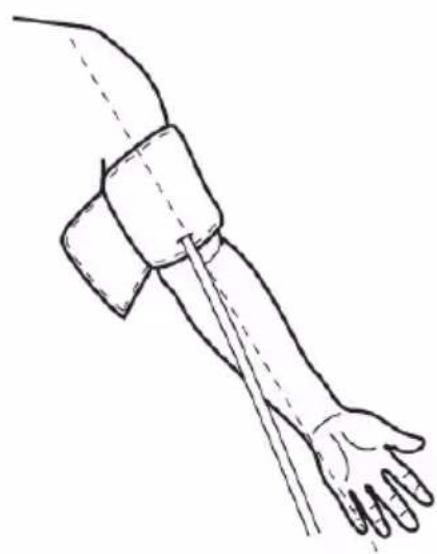
- Tie the cuff on your upper arm, then position the tube off-center toward the inner side of arm in line with the little finger.
- The cuff should be snug but not too tight. You should be able to insert one finger between the cuff and your arm.
- Sit comfortably with your left arm resting on a flat surface.

Rest for 5 minutes before measuring.
Wait at least 3 minutes between measurements. This allows your blood circulation to recover.
For a meaningful comparison, try to measure under similar conditions. For example, take daily measurements at approximately the same time, on the same arm, or as directed by a physician.

Start The Measurement
Press the (User 1) to turn on the monitor and it will finish the whole measurement automatically, and then save the measure data for User 1. The same with (User 2).
In this manual, take the measurement of user 1 as an example.
- Press the to turn on the monitor.
LCD Display
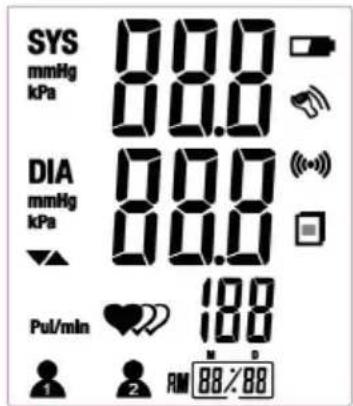
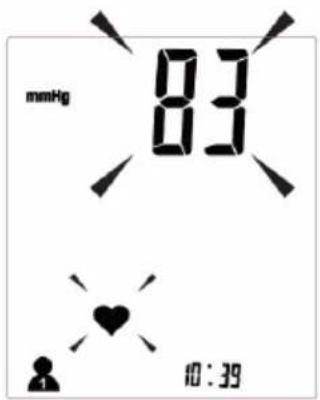
Inflating and measuring automatically.
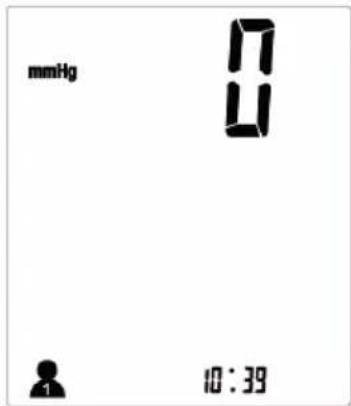
Adjust to zero automatically.
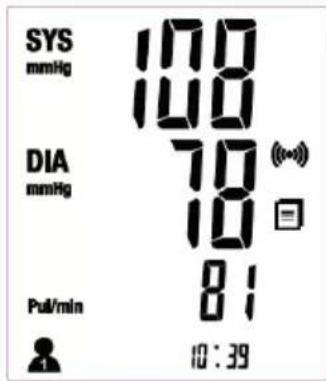
Display and save the results. The data transmission will proceed automatically.
- Press the to power off, otherwise it will turn off automatically within one minute after last operation.
TIPS
A. When the whole measurement is complete, press the other user button, the monitor will start measuring again.
B. Maximum 60 records are both for user 1 and user 2.
Recalling the records
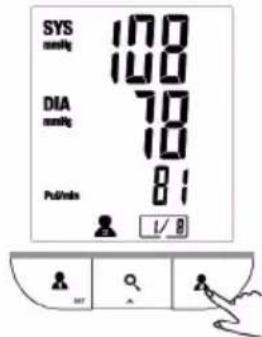
1.When the monitor is OFF, press "Q" button to access the memory.
-
The LCD will display the latest measuring result of the user ID which completes the last measurement.
-
The record number, measuring date and measuring time will be displayed alternatively.
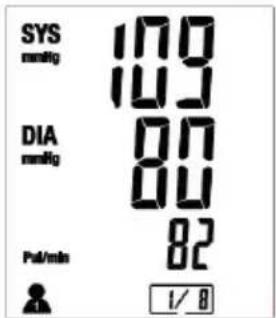
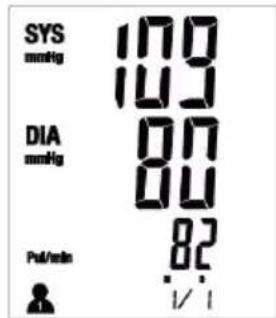
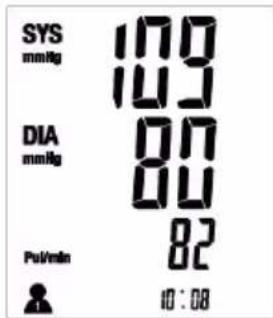
- Press " " button to rotate the history records.
- When in the memory mode, press the A (User 1) to recall the measurement history of User 1, or press the A (User 2) button to recall the measurement history.
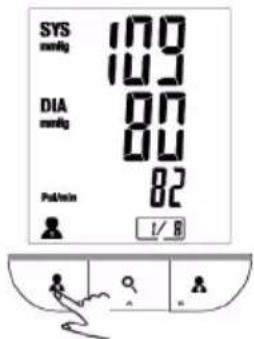
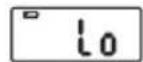
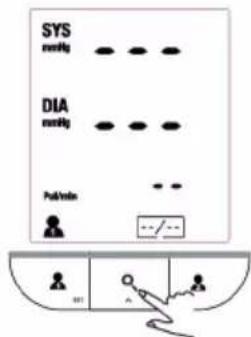
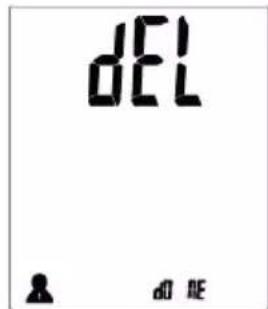
- When no history stored for the specific user in the monitor, press "O" button and the LCD will display as pictured to the right.

CAUTION
The most recent record (1) is shown first. Each new measurement is assigned to the first (1) record. All other records are pushed back one digit (e.g., 2 becomes 3, and so on), and the last record (60) is dropped from the list.
Delete the Records
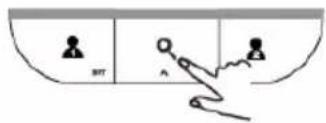
- When under the query mode, press and hold " Q " button for 3 seconds to clear the memory.
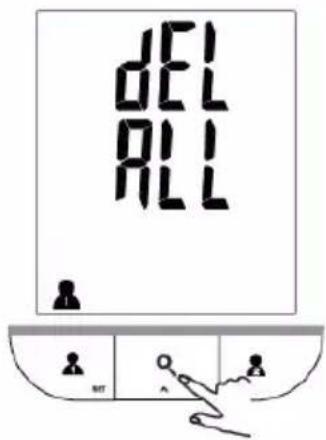
- When the LCD displays "dEL ALL", press "Q" button to confirm.
3.The LCD will display "dEL dOnE" and then shut off automatically. - If you wish to stop clearing the memory, you may press the other button, rather than " " button to turn off the monitor, or wait until the monitor shuts off automatically.
Tips For Measurement
Measurements may be inaccurate if taken in the following circumstances.

Wait at least 1 hour after dinner or drinking
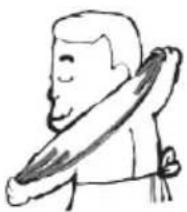
Wait at least 20 minutes after taking a bath

In a very cold environment

Immediate measurement after tea, coffee, smoking

When talking or moving your fingers

When you need the toilet
Maintenance
In order to get the best performance, please follow the below instructions.
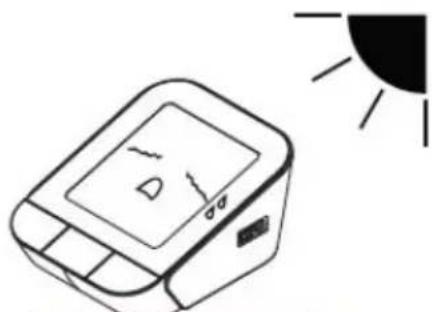
Put in a dry place and avoid the sunshine
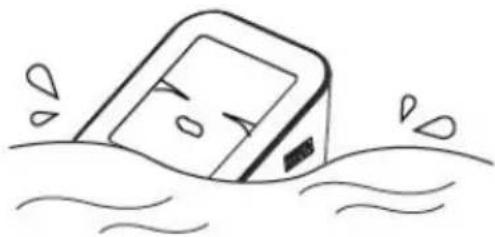
Avoid immersing it in the water. Celan it with a dry cloth in case.
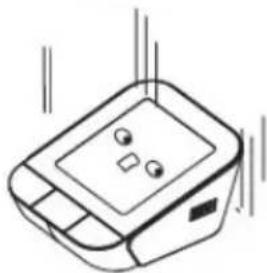
Avoid intense shaking and collisions
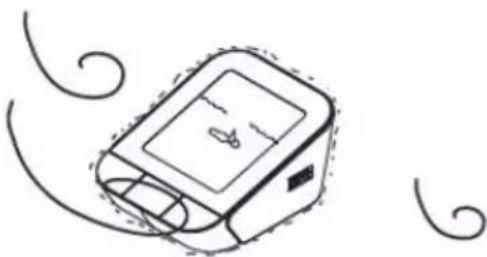
Avoid dusty environment and unstable temperature surrounding.
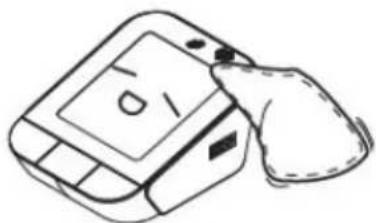
Use the slightly damp cloth to remove the dirt.

Avoid washing the cuff.
What are systolic pressure and diastolic pressure?
When ventricles contract and pump blood out of the heart, blood pressure reaches its maximum value, the highest pressure in the cycle is known as systolic pressure. When the heart relaxes between heartbeats, the lowest blood pressure is diastolic pressure.
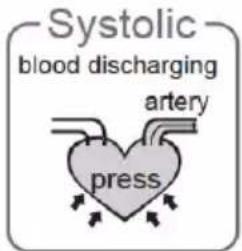

What is the standard blood pressure classification
The blood pressure classification published by World Health Organization (WHO) and International Society of Hypertension (ISH) in 1999 is as follows:
| Level Blood Pressure (mmHg) | Normal | Mild | Moderate | Severe | ||
| SYS | <120 | 120~129 | 130~139 | 140~159 | 160~179 | ≥180 |
| DIA | <80 | 80~84 | 85~89 | 90~99 | 100~109 | ≥110 |
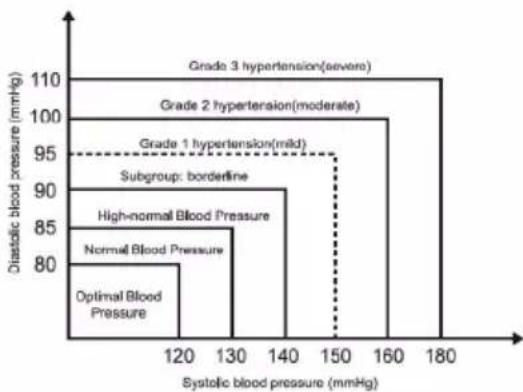

Only a physician can tell your normal BP range. Please contact a physician if your measuring result falls out of the range. Please note that only a physician can tell whether your blood pressure value has reached a dangerous point.
Irregular Heartbeat Detector
An irregular heartbeat is detected when a heartbeat rhythm varies while the unit is measuring the systolic and diastolic blood pressure. During each measurement, this equipment records the heartbeat intervals and works out the standard deviation. If the calculated value is larger than or equal to 15, the irregular heartbeat symbol appears on the symbol when the measurement results are displayed.

Caution:
The appearance of the IHB icon indicates that a pulse irregularity consistent with an irregular heartbeat was detected during measurement. Usually this is NOT a cause for concern. However, if the symbol appears often, we recommend you seek medical advice. Please note that the device does not replace a cardiac examination, but serves to detect pulse irregularities at an early stage.
Why does my blood pressure fluctuate throughout the day?
- Individual blood pressure varies multiple times everyday. It is also affected by the way you tie your cuff and your measurement position, so please take the measurement under the same conditions.
2.If the person takes medicine, the pressure will vary more.
3.Wait at least 3 minutes for another measurement.

Why do I get a different blood pressure at home compared to the hospital?
The blood pressure is different even throughout the day due to weather, emotion, exercise etc. Also, there is the "white coat" effect, which means blood pressure usually increases in clinical settings.
What you need to pay
attention to when you measure
your blood pressure at home:
If the cuff is tied properly.
If the cuff is too tight or too loose.
If the cuff is tied on the upper arm.
If you feel anxious.
Taking 2-3 deep breaths before
beginning will be better for measuring.
Advice: Relax yourself for 4-5
minutes until you calm down.
Is the result the same if measuring on the right arm?
It is ok for both arms, but there will be some different results for different people. We suggest you measure the same arm every time.

This section includes a list of error messages and frequently asked questions for problems you may encounter with your blood pressure monitor. If the products not operating as you think it should, check here before arranging for servicing.
| Problem | Symptom Check | This | Remedy |
| No power | Display is dim or will not light up. | Batteries are exhausted. | Replace with new batteries. |
| Batteries are inserted incorrectly. | Insert the batteries correctly. | ||
| Low batteries | Show on the display | Batteries are low. | Replace with new batteries |
| Error message | E1 shows | Communication error | Check if both the APP and the Bluetooth are on, operate and send the data again. |
| E3 shows | The cuff is not secure. | Re-adjust the cuff and relax for a moment and then measure again. | |
| E10 or E11 shows | The monitor detected motion while measuring. | Movement can affect the measurement. Relax for a moment and then measure again. | |
| E20 shows | The measurement process does not detect the pulse signal. | Loosen the clothing on the arm and then measure again. | |
| E21 shows | The treatment of the measurement failed. | Relax for a moment and then measure again. | |
| EExx,shows on the display. | A calibration error occurred. | Retake the measurement. If the problem persists, contact the retailer or our customer service department for further assistance. Refer to the warranty for contact information and return instructions. |
| Power supply | Battery powered mode: 6VDC 4*AA batteries AC adapter powered mode: 6V=1A (Can be supplied by AC adaptor model UE08WCP-060100SPA only!) (Not Included) |
| Display mode | Digital LCD V.A.78mm×92mm |
| Measurement mode | Oscillographic testing mode |
| Measurement range | Rated cuff pressure: 0kPa - 40kPa (0mmHg~300mmHg) Measurement pressure: 5.3kPa-30.7kPa (40mmHg-230mmHg) pulse value: (40-199) beat/minute |
| Accuracy | Pressure: 5°C-40°C within ±0.4 kPa (3 mmHg) Pulse Value: ±5% |
| Normal working condition | Temperature:5 °C-40°C Relative Humidity: ≤85%RH Atmospheric Pressure: 86kPa-106 kPa |
| Storage & transportation condition | Temperature:-20 °C-60°C Relative Humidity: 10%RH-93%RH Atmospheric Pressure: 50kPa-106 kPa |
| Measurement perimeter of the upper arm | About 22cm~42cm |
| Weight | Approx.385g(Excluding the dry cells) |
| External dimensions | Approx.120*160*69mm |
| Attachment | 4*AA batteries, user manual |
| Mode of operation | Continuous operation |
| Degree of protection | Type BF applied part |
| Protection against ingress of water | IP22 |
| Software Version | V01 |
WARNING: No modification of this equipment is allowed.
Authorized Component
- Please use the Duronic authorized adaptor. (Not Included)
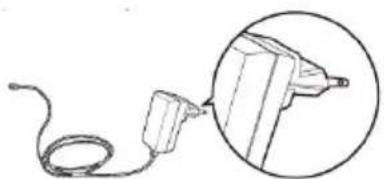
Adaptor
Type: UE08WCP-060100SPA Input: 100-240V, 50-60Hz,400mA
Output: 6V=1A
(Expected Service Life: 50,000 Hours)
Contact Information
For more information about our products, please visit
UNIT 1 SPILSBY ROAD, HAROLD HILL, ROMFORD
Manufactured by: Guangdong Transtek Medical Electronics Co., Ltd.
Company: Guangdong Transtek Medical Electronics Co., Ltd.
Address: Zone A, No.105, Dongli Road, Torch Development District, Zhongshan, 528437, Guangdong, China
Authorized European Representative:
Company: MDSS - Medical Device Safety Service GmbH
Address: Schiffgraben 41, 30175 Hannover, Germany
Complied European Standards List
| Risk Management | ISO/EN 14971:2012 |
| Labeling | ISO/EN 15223-1:2012 |
| User Manual | EN 1041:2008 |
| Generl Requirements for Safety | EN 60601-1:2006IEC/EN 60601-1-11:2010 |
| Electromagnetic Compatibility | IEC/EN 60601-1-2:2007 |
| Performance requirements | EN 1060-1:1995+A2:2009EN 1060-3:1997+A2:2009 |
| Clinical investigation | EN 1060-4:2004 |
| Usability | IEC/EN 60601-1-6: 2010IEC/EN 62366: 2007 |
| Software life-cycle processes | IEC/EN 62304:2006+AC: 2008 |
EMC Guidance
Table 1 – Guidance and MANUFACTURER'S declaration ELECTROMAGNETIC EMISSIONS – for all ME EQUIPMENT and ME SYSTEMS
| Guidance and manufacturer's declaration - electromagnetic emissions | ||
| The device is intended for use in the electromagnetic environment specified below.The customer or the user of the device should assure that it is used in such an environment. | ||
| Emissions test | Compliance | Electromagnetic environment - guidance |
| RF emissionsCISPR 11 | Group 2 | The device must emit electromagnetic energy in order to perform its intended function. Nearby electronic equipment may be affected. |
| RF emissionsCISPR 11 | Class B | |
| Harmonic emissionsIEC 61000-3-2 | Not applicable | |
| Voltage fluctuations/flicker emissionsIEC 61000-3-3 | Not applicable | |
Table 2 – Guidance and MANUFACTURER'S declaration – electromagnetic IMMUNITY – for all ME EQUIPMENT and ME SYSTEMS
| Guidance and manufacturer's declaration - electromagnetic immunity | |||
| The device is intended for use in the electromagnetic environment specified below. The customer or the user of the device should assure that it is used in such an environment. | |||
| IMMUNITY test | IEC 60601 test level | Compliance level | Electromagnetic environment - guidance |
| Electrostatic discharge (ESD)IEC 61000-4-2 | ±6 kV contact±8 kV air | ±6 kV contact±8 kV air | Floors should be wood, concrete or ceramic tile. If floors are covered with synthetic material, the relative humidity should be at least 30%. |
| Electrical fast transient/burstIEC 61000-4-4 | ±2 kV for power supply lines±1 kV for input/output lines | ±2 kV for power supply lines | Mains power quality should be that of a typical commercial or hospital environment. |
| SurgeIEC 61000-4-5 | ±1 kV line(s) to line(s)±2 kV line(s) to earth | ±1 kV line(s) to line(s) | Mains power quality should be that of a typical commercial or hospital environment. |
| Voltage dips, short interruptions and voltage variations on power supply input linesIEC 61000-4-11 | <5 % UT(>95 % dip in UT)for 0,5 cycle40 % UT(60 % dip in UT)for 5 cycles70 % UT(30 % dip in UT)for 25 cycles<5 % UT(>95 % dip in UT)for 5 s | <5 % UT(>95 % dip in UT)for 0,5 cycle40 % UT(60 % dip in UT)for 5 cycles70 % UT(30 % dip in UT)for 25 cycles<5 % UT(>95 % dip in UT)for 5 s | Mains power quality should be that of a typical commercial or hospital environment. If the user of the device requires continued operation during power mains interruptions, it is recommended that the device be powered from an uninterruptible power supply or a battery. |
| Power frequency (50/60 Hz)magnetic fieldIEC 61000-4-8 | 3 A/m | 3 A/m | Power frequency magnetic fields should be at levels characteristic of a typical location in a typical commercial or hospital environment. |
| NOTE Uτis the a.c. mains voltage prior to application of the test level. | |||
Table 4 – Guidance and MANUFACTURER'S declaration – electromagnetic IMMUNITY – for ME EQUIPMENT and ME SYSTEMS that are not LIFE-SUPPORTING
| Guidance and manufacturer's declaration - electromagnetic immunity | |||
| The device is intended for use in the electromagnetic environment specified below. The customer or the user of the device should assure that it is used in such an environment. | |||
| IMMUNITY test | IEC 60601 TEST LEVEL | Compliance level | Electromagnetic environment - guidance |
| Conducted RFIEC 61000-4-6Radiated RFIEC 61000-4-3 | 3 Vrms150 kHz to 80 MHz3 V/m80 MHz to 2,5 GHz | 3 Vrms3 V/m | Portable and mobile RF communications equipment should be used no closer to any part of the device, including cables, than the recommended separation distance calculated from the equation applicable to the frequency of the transmitter.Recommended separation distanced=1.167√Pd=1.167√P80 MHz to 800 MHzd=2.333√P800 MHz to 2,5 GHzwhere P is the maximum output power rating of the transmitter in watts (W) according to the transmitter manufacturer and d is the recommended separation distance in metres (m).Field strengths from fixed RF transmitters, as determined by an electromagnetic site survey, should be less than the compliance level in each frequency range.Interference may occur in the vicinity of equipment marked with the following symbol:NOTE 1 At 80 MHz and 800 MHz, the higher frequency range applies.NOTE 2 These guidelines may not apply in all situations. Electromagnetic propagation is affected by absorption and reflection from structures, objects and people. |
| a Field strengths from fixed transmitters, such as base stations for radio (cellular/cordless) telephones and land mobile radios, amateur radio, AM and FM radio broadcast and TV broadcast cannot be predicted theoretically with accuracy. To assess the electromagnetic environment due to fixed RF transmitters, an electromagnetic site survey should be considered. If the measured field strength in the location in which the device is used exceeds the applicable RF compliance level above, the device should be observed to verify normal operation. If abnormal performance is observed, additional measures may be necessary, such as re-orienting or relocating the device,b Over the frequency range 150 kHz to 80 MHz, field strengths should be less than 3 V/m. | |||
Table 6 – Recommended separation distances between portable and mobile RF communications equipment and the ME EQUIPMENT or ME SYSTEM – for ME EQUIPMENT and ME SYSTEMS that are not LIFE-SUPPORTING
| Recommended separation distances between portable and mobile RF communications equipment and the device | |||
| The device is intended for use in an electromagnetic environment in which radiated RF disturbances are controlled. The customer or the user of the device can help prevent electromagnetic interference by maintaining a minimum distance between portable and mobile RF communications equipment (transmitters) and the device as recommended below, according to the maximum output power of the communications equipment. | |||
| Rated maximum output power of transmitterW | Separation distance according to frequency of transmitterm | ||
| 150 kHz to 80 MHzd=1.167 √P | 80 MHz to 800 MHzd=1.167 √P | 800 MHz to 2,5 GHzd=2.333 √P | |
| 0,01 | 0.117 | 0.117 | 0.233 |
| 0,1 | 0.369 | 0.369 | 0.738 |
| 1 | 1.167 | 1.167 | 2.333 |
| 10 | 3.690 | 3.690 | 7.378 |
| 100 | 11.67 | 11.67 | 23.33 |
| For transmitters rated at a maximum output power not listed above, the recommended separation distance d in metres (m) can be estimated using the equation applicable to the frequency of the transmitter, where P is the maximum output power rating of the transmitter in watts (W) according to the transmitter manufacturer. NOTE 1 At 80 MHz and 800 MHz, the separation distance for the higher frequency range applies. NOTE 2 These guidelines may not apply in all situations. Electromagnetic propagation is affected by absorption and reflection from structures, objects and people. | |||
DURONIC
Warranty
1 Year Guarantee from Shine-Mart Ltd, Trademark owners of Duronic Products. NOTE: THESE STATEMENTS DO NOT AFFECT YOUR STATUTORY RIGHTS AS A CONSUMER
This product has been manufactured under the strictest or quality control procedures, and using the highest quality of materials, to ensure excellent performance and reliability. It will give very good and long lasting service, provided it is properly used and maintained. The product is guaranteed for 1 years from the date of original purchase. If any defect arises due to a faulty materials or poor workmanship, the faulty product must be returned to the original place of purchase. Refund or replacement is at the discretion of that company.
Duronic Products are offered with a 1 year guarantee under the following conditions:
- The product must be returned to the retailer with original proof of purchase.
- The product must be installed and used in accordance with the instructions contained in this operating manual.
- It must be used only for domestic purposes.
- It does not cover wear and tear, malicious damage, misuse, neglect, inexpert repairs or consumable parts.
- Shine-Mart Ltd has no responsibilities for accidental or consequential loss or damage.
- Shine-Mart Ltd are not liable to carry out any type of servicing work, under the guarantee
- Valid in the UK only

Imported by Shine-Mart Ltd, RM3 8SB

Information on waste Disposal for Consumers of Electrical & Electronic Equipment.
This mark on a product and/or accompanying documents indicates that when it is to be disposed of, it must be treated as Waste Electrical & Electronic Equipment, (WEEE).
Any WEEE marked products must not be mixed with general household waste, but kept separate for the treatment, recovery and recycling of the materials used. For proper treatment, recovery and recycling; please take all WEEE marked waste to your Local Authority Civic waste site, where it will be accepted free of charge.
If customers dispose of Waste Electrical & Electronic Equipment correctly, they will be helping to save valuable resources and preventing any potential negative effects upon human health and the environment, of any hazardous materials that the waste may contain.
Follow Us

duronic.com

duronic

@duronicmedia

Duronic

@duronicmedia
Distributed by: Model: LS802-B Ref. No.: BPM490
SHINEMART LTD Unit 1, Spilsby Road, Harold Hill, Romford, Essex, RM3 8SB UK

Guangdong Transtek Medical Electronics Co., Ltd.
Zone A, No.105, Dongli Road, Torch Development District, Zhongshan, 528437, Guangdong, China

MDSS - Medical Device Safety Service GmbH Schiffgraben 41,30175 Hannover, Germany
C∈0123
Type: UE08WCP-060100SPA
(Conformse au certificat UL)
Information de contact
SHINEMART LTD Unit 1, Spilsby Road, Harold Hill, Romford, Essex, RM3 8SB UK
Produit par: Guangdong Transtek Medical Electronics Co., Ltd.
Entreprise:Guangdong Transtek Medical Electronics Co., Ltd.
Adresse: Zone A, No.105, Dongli Road, Torch Development
District, Zhongshan,528437,Guangdong,China Representatif autorisé européen: Entreprise:
MDSS - Medical Device Safety Service GmbH
Distributed by: Model: LS802-B Ref. No.: BPM490
SHINEMART LTD Unit 1, Spilsby Road, Harold Hill
Romford, Essex, RM3 8SB UK

Guangdong Transtek Medical Electronics Co., Ltd.
Zone A, No.105, Dongli Road, Torch Development District,
Zhongshan,528437,Guangdong,China
MDSS - Medical Device Safety Service GmbH
Schiffgraben 41,30175 Hannover, Germany
C∈0123
Distributed by: Model: LS802-B Ref. No.: BPM490
SHINEMART LTD Unit 1, Spilsby Road, Harold Hill, Romford, Essex, RM3 8SB UK

Guangdong Transtek Medical Electronics Co., Ltd.
Zone A, No.105, Dongli Road, Torch Development District, Zhongshan, 528437, Guangdong, China
MDSS - Medical Device Safety Service GmbH
Schiffgraben 41, 30175 Hannover, Germany
C∈0123
Distributed by: Model: LS802-B Ref. No.: BPM490
SHINEMART LTD Unit 1, Spilsby Road, Harold Hill
Romford, Essex, RM3 8SB UK

Guangdong Transtek Medical Electronics Co., Ltd.
Zone A, No.105, Dongli Road, Torch Development District,
Zhongshan,528437,Guangdong,China

MDSS - Medical Device Safety Service GmbH
Schiffgraben 41,30175 Hannover, Germany
C∈0123
INDICATORI DISPLAY LCD
1.Battery powered mode:
SHINEMART LTD Unit 1, Spilsby Road, Harold Hill, Romford, Essex, RM3 8SB, UK
Produzione da: Guangdong Transtek Medical Electronics Co., Ltd.
Società: Guangdong Transtek Medical Electronics Co., Ltd.
Indirizzo: Zone A, No.105, Dongli Road, Torch Development District, Zhongshan, 528437, Guangdong, China
Distributed by: Model: LS802-B Ref. No.: BPM490
SHINEMART LTD Unit 1, Spilsby Road, Harold Hill
Romford, Essex, RM3 8SB UK


Guangdong Transtek Medical Electronics Co., Ltd.
Zone A, No.105, Dongli Road, Torch Development District
Zhongshan,528437,Guangdong,China
MDSS - Medical Device Safety Service GmbH
Schiffgraben 41,30175 Hannover, Germany
C∈0123
- Blood Pressure Monitor BPM490
- Contents
- Safety Information
- CAUTION
- LCD display signal
- Monitor Components
- List
- The Choice of Battery
- The Installment And Replacement Of Battery
- Setting the date, time and measurement unit
- Pair-up the Blood Pressure Monitor with Your Device
- Tie The Cuff
- Start The Measurement
- TIPS
- Recalling the records
- Delete the Records
- Tips For Measurement
- Maintenance
- What are systolic pressure and diastolic pressure?
- What is the standard blood pressure classification
- Irregular Heartbeat Detector
- Caution:
- Why does my blood pressure fluctuate throughout the day?
- Why do I get a different blood pressure at home compared to the hospital?
- Is the result the same if measuring on the right arm?
- Authorized Component
- Contact Information
- Complied European Standards List
- EMC Guidance
- DURONIC
- Warranty
- Follow Us
- Information de contact
- INDICATORI DISPLAY LCD
Brand : Duronic
Model : BPM490
Category : Blood pressure monitor