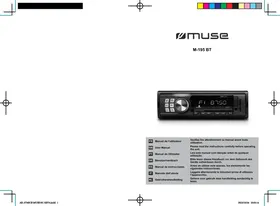
M-1028 CVB - Car stereo MUSE - Free user manual and instructions
Find the device manual for free M-1028 CVB MUSE in PDF.



User questions about M-1028 CVB MUSE
0 question about this device. Answer the ones you know or ask your own.
Ask a new question about this device
Download the instructions for your Car stereo in PDF format for free! Find your manual M-1028 CVB - MUSE and take your electronic device back in hand. On this page are published all the documents necessary for the use of your device. M-1028 CVB by MUSE.
USER MANUAL M-1028 CVB MUSE
natural_image
Color gradient bar transitioning from black to white, with no text or symbols
muse
M-1028 CVB
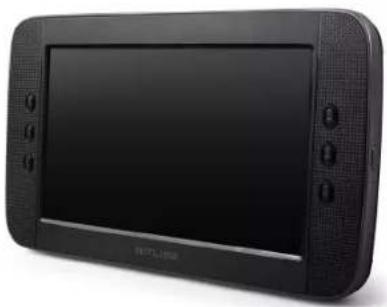
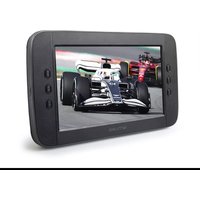
natural_image
Black rectangular electronic device with a flat screen and control buttons (no visible text or symbols)| FR | Manuel de l'utilisateur | Veuillez lire attentivement ce manuel avant toute utilisation. |
| GB | User Manual | Please read the instructions carefully before operating the unit. |
| PT | Manual do Utilizador | Leia este manual com atenção antes de qualquer utilização. |
| DE | Benutzerhandbuch | Bitte lesen dieses Handbuch vor dem Gebrauch des Geräts aufmerksam durch. |
| ES | Manual de instrucciones | Antes de utilizar este aparato, lea atentamente las siguientes instrucciones. |
| IT | Manuale dell'utente | Leggere attentamente le istruzioni prima di utilizzare l'apparecchio. |
| NL | Gebruikershandleiding | Gelieve voor gebruik deze handleiding aandachtig te lezen. |


LECTEUR DVD PORTABLEFR
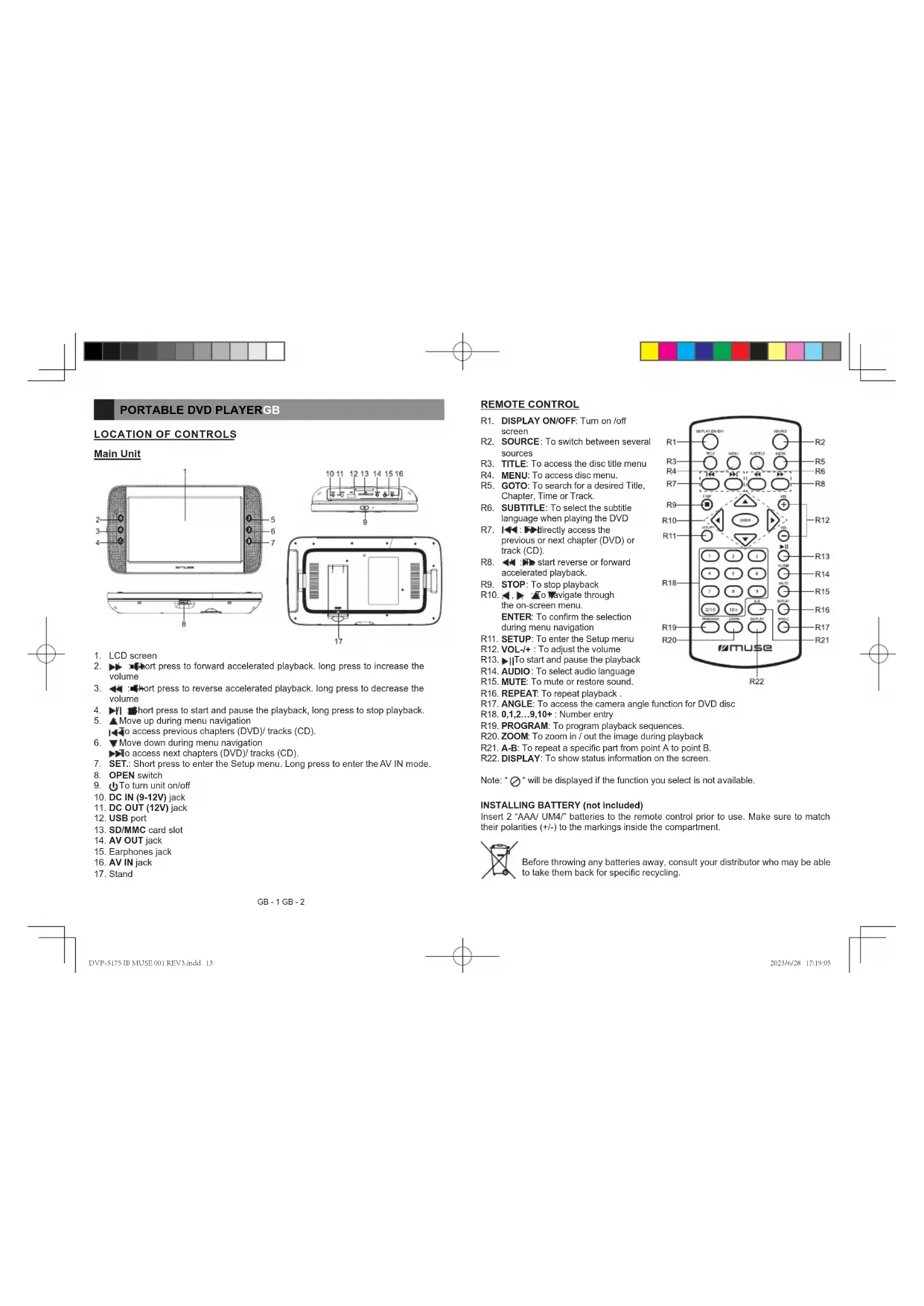
DESCRIPTION DE L'APPAREIL
Unité principale
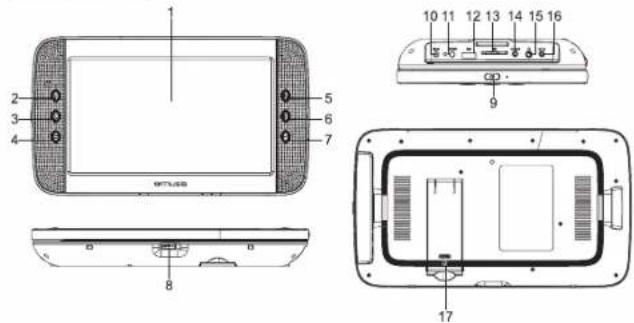
text_image
1 2 3 4 5 6 7 8 9 10 11 12 13 14 15 16 17MISE EN PLACE DES PILES (non inclus)
natural_image
Color gradient bar transitioning from black to white with no text or symbols

LECTURE DE FICHIERS MP3/XVID/IMAGES
CLASS 1 LASER PRODUCT PRODUCTO LÁSER CLASE 1 PRODUIT LASER DE CLASSE 1 LASER-PRODUKT DER KLASSE 1
IMPORTANTES CONSIGNES DE SÉCURITÉ
natural_image
Line drawing of a car interior showing dashboard, steering wheel, and camera module (no text or symbols)AVERTISSEMENT DE SÉCURITÉ!
text_image
Technical diagram of a remote control device with labeled components and internal layout- LCD screen
- ▶▶▶ Short press to forward accelerated playback. long press to increase the volume
- Short press to reverse accelerated playback. long press to decrease the volume
- ▶/1 ▶hort press to start and pause the playback, long press to stop playback.
- ▲Move up during menu navigation
To access previous chapters (DVD)/tracks (CD). - ▼Move down during menu navigation
▶▶To access next chapters (DVD)/ tracks (CD). - SET.: Short press to enter the Setup menu. Long press to enter the AV IN mode.
- OPEN switch
- ⏻ To turn unit on/off
- DC IN (9-12V) jack
- DC OUT (12V) jack
- USB port
- SD/MMC card slot
- AV OUT jack
- Earphones jack
- AV IN jack
- Stand
REMOTE CONTROL
R1. DISPLAY ON/OFF: Turn on /off screen
R2. SOURCE: To switch between several sources
R3. TITLE: To access the disc title menu R4. MENU: To access disc menu.
R5. GOTO: To search for a desired Title, Chapter, Time or Track.
R6. SUBTITLE: To select the subtitle language when playing the DVD
R7. I◄◄ : ►► directly access the previous or next chapter (DVD) or track (CD).
R8. ←:→ start reverse or forward accelerated playback.
R9. STOP: To stop playback
R10. ◀, ▶ To navigate through the on-screen menu.
ENTER: To confirm the selection during menu navigation
R11. SETUP: To enter the Setup menu
R12. VOL-/+ : To adjust the volume
R13. ▶To start and pause the playback
R14. AUDIO: To select audio language
R15. MUTE: To mute or restore sound.
R16. REPEAT: To repeat playback
R17. ANGLE: To access the camera angle function for DVD disc
R18. 0,1,2...9,10+ : Number entry
R19. PROGRAM: To program playback sequences.
R20. ZOOM: To zoom in / out the image during playback
R21. A-B: To repeat a specific part from point A to point B.
R22. DISPLAY: To show status information on the screen.
Note: "∅" will be displayed if the function you select is not available.
INSTALLING BATTERY (not included)
Insert 2 "AAA/UM4!" batteries to the remote control prior to use. Make sure to match their polarities (+/-) to the markings inside the compartment.

Before throwing any batteries away, consult your distributor who may be able to take them back for specific recycling.
natural_image
Color gradient bar transitioning from black to white with no text or symbols

NOTES:
- Never recharge the batteries, apply heat to them or take them apart.
- If the remote control is not going to be used for a long time, remove the battery to avoid damage caused by battery leakage corrosion.
- Attention should be drawn to the environmental aspects of battery disposal.
- Do not throw batteries in fire!
- Battery shall not be exposed to excessive heat such as sunshine, fire or the like.
CAUTION: Danger of explosion if battery is incorrectly replaced. Replace only with the same or equivalent type.
ACCESSORIES
AC adaptor x1
Car plug x1
AV cable x1
Mounting bracket x1
Remote control x1
POWER SUPPLY
Using the AC adaptor
The supplied AC adaptor is suitable for use on AC mains supplies of 100-240V and should only be connected to a mains supply within these parameters.
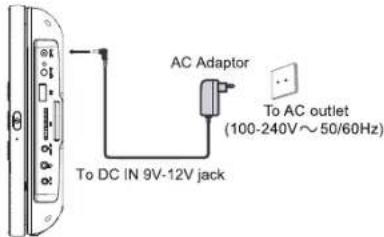
text_image
AC Adaptor To AC IN 9V-12V jack To AC outlet (100-240V~50/60Hz)Cautions:
- The AC adaptor included with this unit is for its use only. Do not use it with other equipment.
- Turn off the unit before unplugging the AC adaptor from the unit so as to avoid the unit being damaged.
- When the unit is not going to be used for long time, disconnect the AC adaptor from the AC outlet.
- Be sure to use it near the wall outlet and easily accessible. If a malfunction occurs, disconnect the plug from the wall outlet at once.
- AC adaptor is used as the disconnect device. It shall remain readily operable and should not be obstructed during intended use. To be completely disconnected the apparatus from supply mains, the AC adaptor of the apparatus shall be disconnected from the mains socket outlet completely.
- Never use an AC adaptor that is damaged, route power lead in a safe manner and make sure it is not subjected to trapping or pinching. If the power lead is damaged refer to a qualified service agent.
Using the car plug
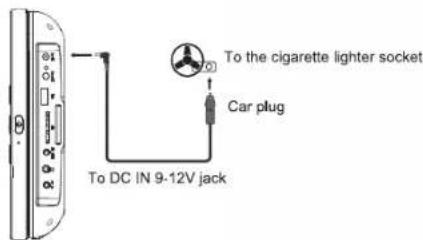
text_image
To the cigarette lighter socket Car plug To DC IN 9-12V jackWARNING: Disconnect this car power adaptor when not in use. Not for use in 24V vehicles.
GB-3 GB-4
DVP-5175 IB MUSE 00: REVA,incld 14
2023/6/28 17:19:10


Cautions
- Use only the included 12V car power adaptor. Use of any other 12V car power adaptor could damage the unit.
- The 12V car power adaptor included is for use with this unit only. Do not use it with any other equipment.
- In the interest of traffic safety, drivers should not operate the unit or view videos while driving.
- Make sure the unit is fastened correctly to prevent from falling in the vehicle in the event of an accident.
- When the inside of the cigarette lighter socket is dirty with ashes or dust, the plug section may become hot due to poor contact. Be sure to clean the cigarette lighter socket before use.
• After use, disconnect the car power adaptor from both the unit and cigarette lighter socket.
Using the Built-in battery
The unit has a built-in rechargeable battery (lithium-polymer). Charge the built-in battery before using it for the first time. For new or exhausted rechargeable battery pack, we recommend it be recharged for 3 hours. It can be recharged at any time regardless of whether it is fully or partially discharged. The charging indicator will change to red color during charging and it will change to green when the battery becomes fully charged.
Warnings:
• To charge the battery, just connect the AC adaptor.
- Recharge the built-in battery when you are ready to use it again.
- While using the built-in battery, the environmental temperature should be 5^ (41°F) to 35^ (95°F).
• To get the longest service life of the built-in battery, charge at indoor-temperature.
- The built-in battery in this device may present a risk of fire or chemical burn if mistreated. Do not disassemble, heat above 100°C (212°F), or incinerate.
- The unit should not be exposed to excessive heat such as sunshine, fire or the like.
- When discarding the unit, environmental problems must be considered and local rules or laws governing the disposal of such products must be strictly followed.
- When the built-in battery power is low, “” will blink on display.
CONNECTIONS
Disconnect all devices from the mains supply before connecting.
Connecting to TV
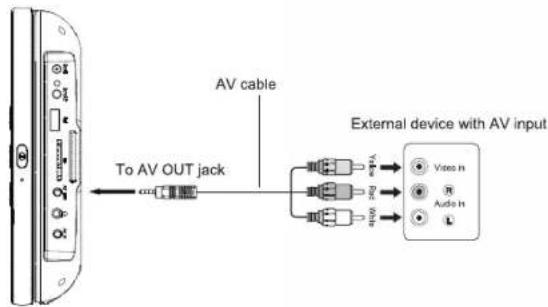
text_image
To AV OUT jack AV cable External device with AV inputNote: Make sure to use the cable with correct plug.
USING HEADPHONES / EARPHONES (NOT INCLUDED)
Maximum output voltage ≤ 150mV
HEADPHONE VOLUME WARNING
Connect earphones with the volume set low and increase it if required. Prolonged listening through some earphones at high volume settings can result in hearing damage. When headphones/earphones are connected, no sound will be emitted from the unit's speaker. Caution: Avoid listening to sound at levels which may be harmful to your ears.

To prevent possible hearing damage, do not listen at high volume levels for long periods.
GB-5 GB-6
DVP-51751B MUSE 00: REV3.incid 15
2023/6/28 17:19:11
natural_image
Color gradient bar transitioning from black to white with no text or symbols

DISC PLAYBACK
Region Management Information
Region Management Information: This unit is designed and manufactured to respond to the Region Management Information that is encoded on DVD discs. If the Region number printed on the DVD disc does not correspond to the Region number of this unit, this unit cannot play that disc.
The region number of this unit is 2.
Basic Playback
- Press ☐ to turn on the unit. The power ON indicator will light on.
- Slide OPEN switch to the arrowhead direction to open the front panel.
- Insert a disc with label facing front.
- Close the front panel. It takes a short while for your unit to load the disc. After loading, the unit will automatically bring you to the main menu of the DVD or start playing the DVD. If the unit does not automatically start playing the DVD, press the ▶||
Accelerated play
- While the disc is playing, press button to activate fast forward. Press repeatedly to multiply the playback speed by 2,4,8 16 or 32.
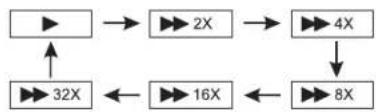
flowchart
graph TD
    A["▶"] --> B["▶ 2X"]
    B --> C["▶ 4X"]
    C --> D["▶ 8X"]
    D --> E["▶ 16X"]
    E --> F["▶ 32X"]
    F --> A
- While the disc is playing, press to activate fast reverse. Press repeatedly to multiply the playback speed by 2,4,8,16 or 32.
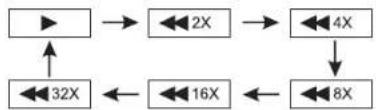
flowchart
graph TD
    A["▶"] --> B["↔ 2X"]
    B --> C["↔ 4X"]
    C --> D["↔ 8X"]
    D --> E["↔ 16X"]
    E --> F["↔ 32X"]
    F --> A
Changing chapter/ track
While the disc is playing, press ▶▶ to ▶▶ immediately to the next or previous chapter (DVD), or to the next or previous track(CD).
Repetition of playing a scene favorite (A-B)
While the disc is playing, press the "A-B" button at point A, then press again on this key at point B, the unit will automatically repeats the part between A and B. Press the "A-B" button a third time to return to normal playback.
GB-7 GB-8
Zoom (DVD, JPEG)
While a disc is playing, press ZOOM until you reach the zoom size you want. The button cycles through 2x, 3x, 4x and then zooms out to 1/2x, 1/3x and 1/4x, then returns to normal playback.
Note: Under Zoom function for JPEG files, press ZOOM button to go to Zoom 100% mode. Then Press ZOOM button a number of times to vary the Zoom steps which you want.
ADVANCED FUNCTIONS
On screen display
Press the DISPLAY button a number of times during playback to show in turn:
DVD: Title elapsed time, Title remaining time, Chapter elapsed time, Chapter remaining time, Display off.
CD: Total elapsed time, Total remaining time, Single elapsed time, Single Remaining time.
Search a desired section
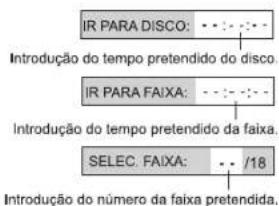
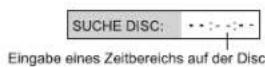
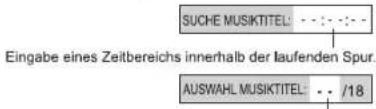
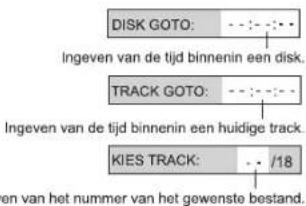
The user can access a specific location or a specific track by keying in the target time or the track number.
- Press GOTO button repeatedly to enter different search mode.
DVD:
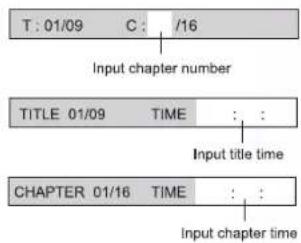
flowchart
graph TD
    A["T: 01/09"] --> B["Input chapter number"]
    B --> C["TITLE 01/09 TIME"]
    C --> D["Input title time"]
    D --> E["CHAPTER 01/16 TIME"]
    E --> F["Input chapter time"]
natural_image
Color gradient bar transitioning from black to white with no text or symbols

CD:
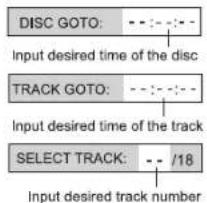
text_image
DISC GOTO: ---- Input desired time of the disc TRACK GOTO: ---- Input desired time of the track SELECT TRACK: -- /18 Input desired track number- Input the chapter number or playback time, then it will jump to the target location immediately.
PLAY MODES
Repeat playback
While the disc is playing, press the REPEAT button repeatedly to select a play mode:
DVD: Repeat Chapter, Repeat Title, Repeat All, (Repeat Off);
CD: Repeat Track, Repeat All, (Repeat Off);
MP3: Repeat one, Repeat Folder, (Repeat Off);
Note:
"REPEAT ONE": The selected track will play continuously.
"REPEAT FOLDER": All tracks in the selected folder will play continuously.
Note: Some DVD discs do not allow repeat function.
Program playback
With this option, you choose and program the playback order. You can store up to 20 tracks.
1. Insert a disc.
2. In playing or stop mode, press the PROGRAM button. The Program menu appears.
DVD CD
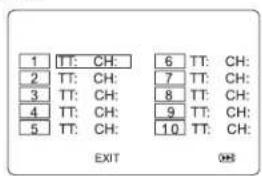
text_image
1 TT: CH: 2 TT: CH: 3 TT: CH: 4 TT: CH: 5 TT: CH: 6 TT: CH: 7 TT: CH: 8 TT: CH: 9 TT: CH: 10 TT: CH: EXIT OK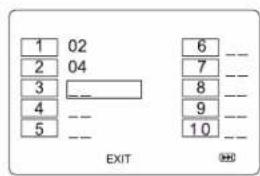
text_image
1 02 2 04 3 -- 4 -- 5 -- 6 -- 7 -- 8 -- 9 -- 10 -- EXIT- Use the number buttons to enter the title number and then the chapter number (DVD) or the track number (CD).
- Use ◀, ▶, ▲, ▼ button moving to the next input. Repeat step 3 until programming is completed.
Note: Press ▶ go to next page for programming track 11 to 20.
- Highlight the "Start" icon, press ENTER button to start the program play.
- Press the ■ button to stop the program playback and clear the program memory.
USB OR SD/MMC CARD PLAYBACK
You can connect a USB flash drive (not included) to the USB connector port or a SD/MMC card (not included) to the memory expansion card slot on the unit to play Xvid movies as well as sound & picture files.
- Press ☐ to turn on the unit. The power ON indicator will light on.
- Plug the USB flash drive into the USB port on the unit. Plug the SD card into the memory expansion card slot.
- The unit will automatically detects and start playing the USB or SD, If the unit does not automatically start playing the USB/SD, press the ▶II.
Note: The unit will automatically detects different DVD, USB, SD playback sources, press the "SOURCE" button to switch between several sources. (If the DVD, USB, SD are inserted in the unit)
For operation of playing files on the USB flash drive or SD/MMC card, please refer to the section "PLAYING MP3/XVID/PICTURE FILES".
Note:
- It is recommended USB flash drive or the SD/MMC card is plugged when the unit is in OFF mode.
- There are many USB devices in the market. We cannot guarantee to support all different models. Please try another USB device if your device is not supported.
- Some SD/MMC card may be incompatible.
GB - 9 GB - 10
DVP-51751B MUSE 00: REV3.incid 17
2023/6/28 17:19:15


PLAYING MP3/XVID/PICTURE FILES SETUP MENU
This unit can play MP3, Xvid and Picture files recorded on CD-R/CD-RW discs, USB flash drive and SD/MMC card.
- Insert a disc.
- The content of disc will be displayed on screen.
- Press ◀, ▶, ▲, ▼ button to view and select the file that you want to play, then press ENTER button to confirm the selected file and start playback.
- Press ■ button to stop playback.
Note: For playing files on USB flash drive or SD/MMC card, you should plug in the USB flash drive or SD/MMC card when the unit is in OFF mode. Turn ON the unit and press SOURCE button to select USB or SD/MMC mode.
Notes:
- Avoid long file names! It is suggested to name the file names using 11 or fewer characters.
• The total number of files on the disc should not exceed 254.
• The maximum number of directories should not exceed 32.
• The maximum depth level of directories should not exceed 4.
Supporting format:
MP3: 32 kbps - 320 kbps
JPEG: Up to 8000 x 6000 pixels and file size less than 8MB
MPEG: MPEG-1 (ISO/IEC 11172-2), MPEG-2 (ISO/IEC 13818-2), MPEG-4 ASP
AVI: Up to 720 x 576
VOB (DVD): 720 x 480i, 720 x 576i, 720 x 480p, 720 x 576p
Navigating the setup menu
- Press SETUP to display the setup main menu.
- Press ◀ ▶ select a menu icon.
- Press ▲ ▼ select one of the available options under a menu icon.
- Press to access the submenu and ▲ to select an option.
- Press ENTER to confirm your selection.
- Press ◆ to return to a previous menu.
- Press SETUP to exit from the setup menu.
General setup page
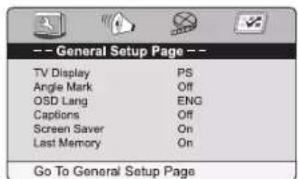
text_image
-- General Setup Page -- TV Display PS Angle Mark Off OSD Lang ENG Captions Off Screen Saver On Last Memory On Go To General Setup PageTV Display
4:3 PANSCAN
- When wide-screen video is played, this mode clips the right and left sides of the image so that it can be viewed on a conventional screen.
- Some wide-screen DVDs that do not permit Pan Scan mode playback are automatically played in letterbox mode (black bands top and bottom).
4:3 LETTERBOX
- When wide-screen video is played in this mode on a conventional screen, black bands appear at the top and bottom of the screen.
16:9 (Wide screen TV)
- This is the correct mode for playing wide-screen videos on a wide-screen TV.
Notes:
- The visible picture size is preset on the DVD disc. Therefore the playback picture of some DVD discs may not conform to the picture size you select.
- When you play DVD discs recorded in the 4:3 aspect ratio, the playback picture will always appears in the 4:3 aspect ratio regardless of the TV shape setting in the function setup menu.
natural_image
Color gradient bar transitioning from black to white with no text or symbols

Angle mark
ON: To show angle mark when a disc with multiple camera angles is playing. You can
view different camera angles of a DVD disc by pressing ANGLE button on remote control.
OFF: To hide angle mark
NOTE: This function is only available for discs encoded with multiple camera angles.
OSD language
• To select the language of unit's menus.
Captions
Some discs have closed captions.
ON: Show the closed captions.
OFF: Hide the closed captions.
Screen saver
To set screen saver ON or OFF.
Last Memory
When the disc door is opened during DVD playback, the player will memorize the last scene
of the playback, when the disc is loaded again playback will continue form the last scene.
ON: Activate the last memory fuction.
OFF: Deactivate the last memory function.
Audio setup page
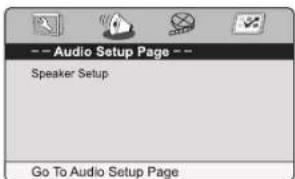
text_image
-- Audio Setup Page -- Speaker Setup Go To Audio Setup PageSpeaker Setup
DOWNMIX
LT/RT: Left and right soundtrack audio output
Stereo: Stereo audio signal output
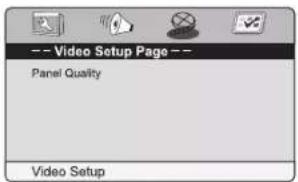
Video Setup Page
text_image
-- Video Setup Page -- Panel Quality Video SetupPanel quality
Sharpness: To adjust the sharpness of video output
Brightness: To adjust the video brightness level on a scale of -10 to +10
Contrast: To adjust the video contrast level on a scale of -10 to +10
Hue: To adjust the color hue level on a scale of -9 to +9
Saturation: To adjust the color saturation level on a scale of -9 to +9.
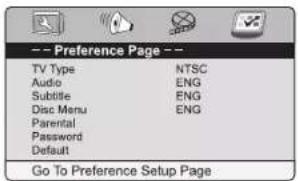
Preference Page
text_image
-- Preference Page -- TV Type NTSC Audio ENG Subtitle ENG Disc Menu ENG Parental Password Default Go To Preference Setup PageNote: The Preferences Setup menu is only available at stop mode.
TV Type
• To select your TV system among PAL, AUTO or NTSC.
Audio
• To select the dialog language.
- If the selected language is not available on the disc, the disc's language will be used instead.
• To change the dialog language during playback, press AUDIO on the remote control.


Subtitle
- To select the language of the DVD subtitles. Select "Off" to turn off the subtitles.
- If the selected language is not available on the disc, the disc's language will be used instead.
• To change the subtitle language during playback, press SUBTITLE on the remote control.
Disc Menu (menu language)
• To select the language of the DVD menus.
- If the selected language is not available on the disc, the disc's language will be used instead.
Parental
Some DVD discs are equipped with a password function and are rated according to their content. The contents allowed by parental lock level and the way a DVD disc is controlled may vary from disc to disc. For example, if the disc allows, you could lock-out violent scenes unsuitable for children or you could lock out playback of the disc altogether.
You cannot play DVD discs rated higher than the level you selected unless you cancel the parental lock function.
The parental lock levels are equivalent to the following ratings.
Level 1: Kid Safe
Level 2: G
Level 3: PG
Level 4 : PG-13
Level 5: PG-R
Level 6: R
Level 7: NC17
Level 8 : Adult
Password
This option allows you to set or change the password.
Use ▲, ▼ button to select "PASSWORD", press ▶ button to highlight "CHANGE", then press the ENTER button. Press the number buttons to input your 4-digit password until to "OK" (If the password has not been set yet after you purchase this unit, it is "1369").
Default
Pressing ENTER with this function selected resets all settings to their initial factory state, except for parental level and password.
SAFETY INSTRUCTION
ATTENTION: To reduce the risk of electric shock, do not remove the cover or back. There are no user serviceable parts inside the unit. Refer all servicing to qualified personnel.

The lightning flash with arrowhead symbol within the triangle is a warning sign alerting the user of "dangerous voltage" inside the unit.

The exclamation point within the triangle is a warning sign alerting the user of important instructions accompanying the product.
The Caution mark is located at the back of the device.
WARNING: TO PREVENT FIRE OR SHOCK HAZARD, DO NOT EXPOSE THIS APPLIANCE TO RAIN OR MOISTURE.
CAUTION: Invisible laser radiation when open and interlocks defeated. Avoid exposure to beam. Class 1 laser product.

CLASS 1 LASER PRODUCT PRODUCTO LASER CLASE 1 PRODUIT LASER DE CLASSE 1 LASER-PRODUKT DER KLASSE 1
IMPORTANT SAFETY INSTRUCTIONS
NEVER fit make shift stands or legs with woodscrews. Use only approved supports and fasteners specially designed for the equipment.
NEVER let anyone, especially children, push objects into holes, ventilation slots or any other opening; this could result in fatal electric shock!
ALWAYS disconnect the AC adaptor when you are not going to use the unit for a long period of time.
ENSURE that all electrical connections (including the mains plug, extension leads and interconnections between pieces of equipment) are properly made in accordance with the instructions given. Switch off the main supply when making or changing connections CONSULT your dealer if you are ever in doubt about the installation, operation or safety of your equipment.
DON'T continue to operate the equipment if it is damaged in any way or if it does not function normally. Disconnect the AC adaptor and consult your dealer.
DON'T leave equipment switched on when it is unattended unless it is part of it's normal function to operate in your absence, for example a video cassette recorder with timed recording facility.
LISTEN to headphones at moderate volume levels; high volume levels can permanently damage your hearing.


WARNING:
- AC adaptor is used as the disconnect device. It shall remain readily operable and should not be obstructed during intended use. To be completely disconnected the apparatus from supply mains, the AC adaptor of the apparatus shall be disconnected from the mains socket outlet completely.
- Never use an AC adaptor that is damaged, route power lead in a safe manner and make sure it is not subjected to trapping or pinching. If the power lead is damaged refer to a qualified service agent.
- Place the unit on a flat and even surface.
- Do not restrict the air flow of the unit by placing it in a place with poor air flow, by covering it with a cloth, or by placing it on carpeting.
- To avoid magnetized, do not place the unit near speaker or magnet.
- Do not use this unit in direct sunlight or leave the unit in a closed automobile (or yacht, etc) where it would be exposed to high temperatures above 40°C.
- It also should not be placed in temperatures less than 5^ or greater than 35^ .
- No naked flame sources such as lighted candles should be placed on the AC adaptor and main unit.
- Do not use the unit immediately after transportation from a cold place to a warm place, condensation problem may result.
- The ventilation should not be impeded by covering the ventilation openings with items such as newspapers, table-cloths, curtains, etc.
- No naked flame sources, such as lighted candles, should be placed on the apparatus.
• The use of apparatus in moderate climates.
• The apparatus should not be exposed to dripping or splashing.
- Ensure a minimum distance of 5cm around the apparatus for sufficient ventilation.
- Do not place objects filled with liquids, such as vases, on the apparatus.
• The marking plate is located on the back of unit.
- Attention should be drawn to the environmental aspects of battery disposal.
- Do not throw batteries in fire!
- Battery shall not be exposed to excessive heat such as sunshine, fire or the like.
- Excessive sound pressure from earphones and headphones can cause hearing loss.
- Under the influence of fast transient and / or electrostatic electric phenomenon, the product may malfunction and the user must perform a power reset of the device.
- The normal function of the product may be disturbed by strong Electro-Magnetic Interference. If so, simply reset the product to resume normal operation by following the instruction manual. In case the function could not resume, please use the product in other location.
MAINTENANCE
Cleaning
Be sure to turn the unit off and disconnect the AC adaptor before maintaining the unit.
- Use a soft, dry, clean cloth. Regularly dust the vents at the back or sides.
• Using solvents, abrasive or alcohol-based products risks damaging the appliance.
- If an object or liquid enters inside the appliance, unplug it immediately and have it checked by an authorized engineer.
Note on disc
- Do not use irregular shape CDs (example: heart-shaped, octagonal ones). It may result in malfunctions.
- Do not place more than one disc in the disc compartment.
- Do not try to open the disc compartment during playing.
- Do not touch the lens. Doing so may cause malfunction.
- If there is a scratch, dirt or fingerprints on the disc, it may cause tracking error. Before playing, clean the disc with a cleaning cloth. Wipe the disc from the center out. Don't store discs in places with high temperatures or high humidity, they can become warped. After playing, store the disc in its case.
Important Note
- Before transporting the unit, remove the disc from the disc compartment.
PLACEMENT
Mounting bracket
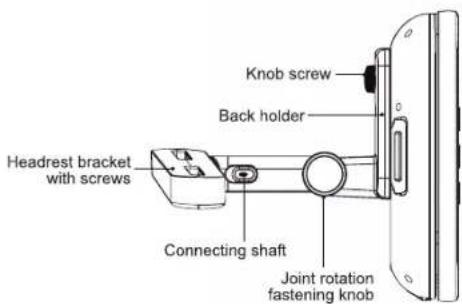
text_image
Headrest bracket with screws Connecting shaft Knob screw Back holder Joint rotation fastening knobGB - 17 GB - 18


Mounting in the Vehicle
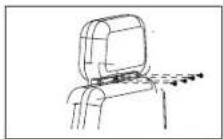
Use the supplied car mounting brackets to install units on the back of the vehicle's headrests.
- Remove the 4 screws on the headrest bracket. Fix the headrest bracket into the steel pipes of the vehicle's headrest using these screws.
- Fix the back holder and connecting shaft through the joint rotation fastening knob.
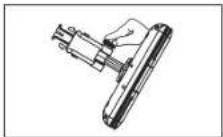
- Combine the holder into the headrest bracket.
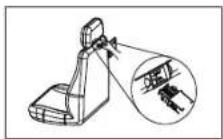
- Fix the unit to the back holder using the knob screws.
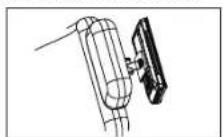
Caution!
- Make sure the screws are properly locked to avoid accidental loosening.
- Always remember to lock the holder to ensure the safety of your passengers.
-
Do not install when car travels.
-
Connect the 12V car plug as shown.
CAUTION: Using other car plugs could damage the unit.
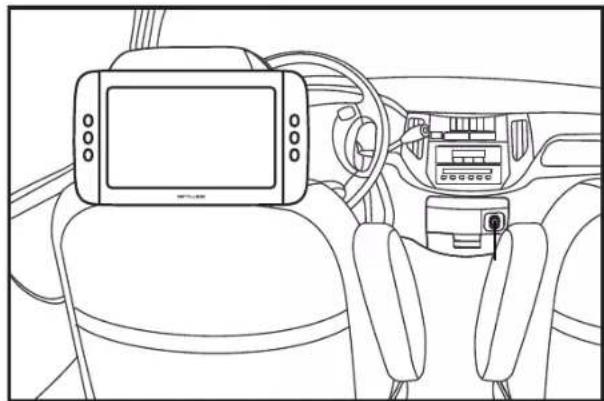
natural_image
Line drawing of a car interior showing dashboard, steering wheel, and camera module (no text or symbols)SAFETY WARNING!
- On no account should this unit be used by the driver of a moving motor vehicle, or left unsecured in the vehicle whilst driving.
- If this unit is being used by a passenger in your vehicle, be sure that it is secured or held safely, and does not obstruct any safety device (i.e. airbag, seat belt etc.) that is fitted.
- All passengers should wear seat belts when using this unit in a moving vehicle.
- If in doubt, please contact your vehicle manufacturer for further advice.
• Using other car power adaptors could damage the unit.
natural_image
Color gradient bar transitioning from black to white with no text or symbols

TROUBLE SHOOTING
No power.
- Ensure the AC adaptor is connected.
• Make sure that the unit is turned on.

If at any time in the future you should need to dispose of this product please note that Waste electrical products should not be disposed of with household waste. Please recycle where facilities exist. Check with your Local Authority or retailer for recycling advice. (Waste Electrical and Electronic Equipment Directive)
The remote control does not function.
- Make sure the infrared remote sensor is not blocked.
- Point the remote directly at the infrared remote sensor on the unit.
- Replace the battery in the remote with a new one.
Very little or no sound is coming from a DVD.
• Make sure that the unit is turned ON.
• Make sure the unit is not paused. Press ▶II
- Make sure the unit is not in fast-forward or fast-reverse mode. Press ▶II
• Make sure that the connections are correct.
• Make sure the MUTE function is not on.
The player does not start playback
- Insert the disc with the printed side facing front.
- Check that the disc can actually be played by this device.
- Check that the disc's regional code matches the player's regional code. This player's regional code is 2.
- Clean the disc.
The picture is not clear.
• The DVD is dirty. Gently clean the disc.
• The disc is scratched.
- Please adjust the LCD's brightness and contrast in SETUP MENU.
Forget Password
If you forget your own password, enter "1369" to reset.
Specifications and appearance are subject to change without notice.
NEW ONE S.A.S
10, Rue de la Mission, 25480 Ecole Valentin, France

GB - 21 GB - 22
DVP-5175 IB MUSE 00: REVA,incld 23
2023/6/28 17:19:26


text_image
Technical diagram of a device rear panel with labeled components and exploded viewsnatural_image
Color gradient bar transitioning from black to white with no text or symbols

natural_image
Color gradient bar transitioning from black to white with no text or symbols

natural_image
Color gradient bar transitioning from black to white with no text or symbols

CD:
natural_image
Color gradient bar transitioning from black to white with no text or symbols

REPRODUÇÃO DE FICHEIROS MP3/XVID/IMAGENS
natural_image
Interior view of a car dashboard and steering wheel (no text or symbols visible)AVISO DE SEGURANÇA!
natural_image
Color gradient bar transitioning from black to white, no text or symbols present

natural_image
Color gradient bar transitioning from black to white with no text or symbols

natural_image
Color gradient bar transitioning from black to white with no text or symbols

natural_image
Color gradient bar transitioning from black to white with no text or symbols

CLASS 1 LASER PRODUCT PRODUCTO LASER CLASE 1 PRODUIT LASER DE CLASSE 1 LASER-PRODUKT DER KLASSE 1
natural_image
Line drawing of a car interior showing dashboard, steering wheel, and camera module (no text or symbols)SICHERHEITSWARNUNG!
natural_image
Color gradient bar transitioning from black to white with no text or symbols

PANNENBESEITIGUNG
text_image
Technical diagram of a device rear panel with labeled components and internal layoutnatural_image
Color gradient bar transitioning from black to white with no text or symbols

natural_image
Color gradient bar transitioning from black to white, no text or symbols present

natural_image
Color gradient bar transitioning from black to white with no text or symbols

CD:


natural_image
Color gradient bar transitioning from black to white with no text or symbols

Notas:
natural_image
Color gradient bar transitioning from black to white with no text or symbols

Idioma de OSD
CLASS 1 LASER PRODUCT PRODUCTO LASER CLASE 1 PRODUIT LASER DE CLASSE 1 LASER-PRODUKT DER KLASSE 1
natural_image
Interior view of a car dashboard and steering wheel (no text or symbols visible)natural_image
Color gradient bar transitioning from black to white with no text or symbols

natural_image
Color gradient bar transitioning from black to white with no text or symbols

natural_image
Color gradient bar transitioning from black to white, no text or symbols present

natural_image
Color palette bar with grayscale gradient and color swatches (no text or symbols)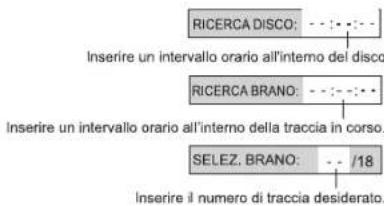
natural_image
Color gradient bar transitioning from black to white with no text or symbols

Nota:
natural_image
Color gradient bar transitioning from black to white with no text or symbols

Lingua Osd
CLASS 1 LASER PRODUCT PRODUCTO LASER CLASE 1 PRODUIT LASER DE CLASSE 1 LASER-PRODUKT DER KLASSE 1
IMPORTANTI AVVERTENZE DI SICUREZZA
natural_image
Line drawing of a car interior showing dashboard, steering wheel, and seatbelt (no text or symbols)AVVERTENZE DI SICUREZZA!
natural_image
Color gradient bar transitioning from black to white with no text or symbols

text_image
Technical diagram of an electronic device with labeled parts, showing front, side, top, and internal views.natural_image
Color gradient bar transitioning from black to white, no text or symbols present

natural_image
Color gradient bar transitioning from black to white with no text or symbols

WEERGAVE VAN DISKS
Informatie over regiocodes
natural_image
Color gradient bar transitioning from black to white with no text or symbols

CD:
natural_image
Color gradient bar transitioning from black to white with no text or symbols

AFSPELEN VAN MP3-, XVID- OF BEELDBESTANDEN
CLASS 1 LASER PRODUCT PRODUCTO LASER CLASE 1 PRODUIT LASER DE CLASSE 1 LASER-PRODUKT DER KLASSE 1
BELANGRIJKE VEILIGHEIDSINSTRUCTIES
natural_image
Interior view of a car dashboard and steering wheel (no text or symbols visible)VEILIGHEIDSWAARSCHUWING!
natural_image
Color gradient bar transitioning from black to white, no text or symbols present