
GIGASET 4015 COMFORT - Cordless phone SIEMENS - Free user manual and instructions
Find the device manual for free GIGASET 4015 COMFORT SIEMENS in PDF.


| Product type | Cordless phone with integrated answering machine |
| Brand and model | Siemens Gigaset 4015 Comfort |
| Base dimensions | 136.6 x 149 x 64.2 mm |
| Handset dimensions | 155 x 53.6 x 36.2 mm |
| Base weight | 180 g |
| Handset weight (with battery) | Less than 175 g |
| Base power supply | 220-230 V ~ 50 Hz (power supply unit SNG X-a) |
| Battery type | NiCd or NiMH rechargeable (e.g., Sanyo N-3U, Panasonic HHR-110) |
| Standby time | Up to 180 hours (with 700 mAh battery) |
| Talk time | More than 10 hours (with 700 mAh battery) |
| Range outdoors | Up to 300 m |
| Range indoors | Up to 50 m |
| Display | Graphical 5-line backlit display |
| Keypad | Backlit |
| Standards | DECT and GAP |
| Main features | Integrated answering machine, phonebook up to 200 contacts, SMS, hands-free, call log, alarm, room monitoring, walkie-talkie |
| Included accessories | Base, handset, power supply unit, telephone cord, belt clip, two batteries, user manual |
| Maintenance and cleaning | Clean with a damp cloth; do not use chemical products |
| Safety instructions | Use only the supplied power supply unit; only approved batteries; do not expose to moisture |
| Spare parts and repairability | Batteries, charger, additional handsets available; after-sales service via list of numbers (see manual) |
Frequently Asked Questions - GIGASET 4015 COMFORT SIEMENS
User questions about GIGASET 4015 COMFORT SIEMENS
0 question about this device. Answer the ones you know or ask your own.
Ask a new question about this device
Download the instructions for your Cordless phone in PDF format for free! Find your manual GIGASET 4015 COMFORT - SIEMENS and take your electronic device back in hand. On this page are published all the documents necessary for the use of your device. GIGASET 4015 COMFORT by SIEMENS.
USER MANUAL GIGASET 4015 COMFORT SIEMENS
Gigaset Communications GmbH is the legal successor to Siemens Home and Office Communication Devices GmbH & Co. KG (SHC), which in turn continued the Gigaset business of Siemens AG. Any statements made by Siemens AG or SHC that are found in the user guides should therefore be understood as statements of Gigaset Communications GmbH.
We hope you enjoy your Gigaset.
Gigaset Communications GmbH is a trademark
licensee of Siemens AG
© Gigaset Communications GmbH 2008
All rights reserved.
Subject to availability. Rights of modifications reserved.
natural_image
Black-and-white photo of a smiling couple (no text or symbols visible)Gigaset Comfort
4015
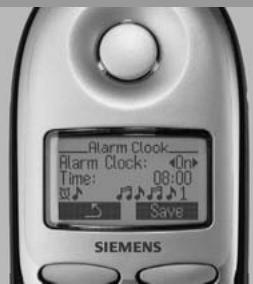
Mode d'emploi
Mini-messages (SMS) 61
natural_image
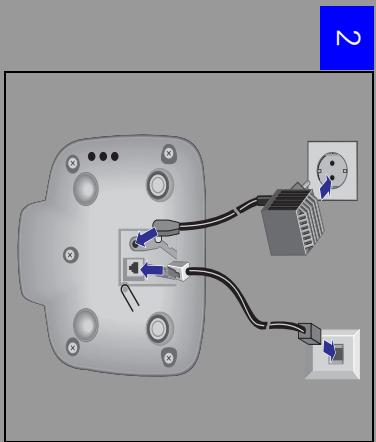
Illustration of a person performing a dynamic maneuver on a chair (no text or symbols)2
natural_image
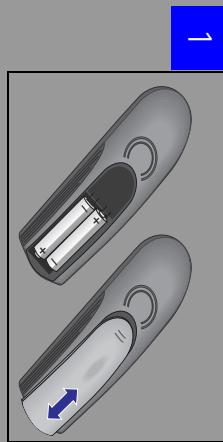
Two remote control devices with battery and indicator lights, shown from open and closed angles (no text or symbols)natural_image
Illustration of a handheld device with a blue downward arrow indicating a drop or change (no text or symbols present)natural_image
Illustration of a person presenting to a seated person with a lamp (no text or symbols)natural_image
Abstract geometric pattern with black and white shapes on a light purple background (no text or symbols)Mini-messages (SMS) ^*
natural_image
Illustration of two people in a physical confrontation or martial arts stance (no text or symbols)Interruption (pause).
natural_image
Illustration of paw prints and a close-up of a device with a red arrow pointing to a component (no text or symbols)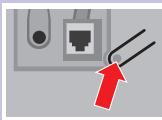
natural_image
Illustration of a network connection device with two wires and a red upward arrow (no text or symbols)natural_image
Cartoon illustration of a person sitting on the ground with a telescope and wavy lines nearby (no text or symbols)natural_image
Cartoon illustration of a man pushing a large, irregular object (no text or symbols)80 ms, 100 ms, 120 ms, 180 ms, 250 ms, 300 ms, 600 ms.

www.my-siemens.com/customercare
„We, Siemens AG, declare, that the above mentioned product is manufactured according to our Full Quality Assurance System certified by CETECOM ICT Services GmbH with the registration number „Q810820M“ in compliance with ANNEX V of the R&TTE-Directive 99/05/EC.
Senior Approvals Manager
The Declaration of Conformity (DoC) has been signed. In case of need, a copy of the original DoC can be made available via the company hotline.
natural_image
Illustration of a classic mobile phone with keypad and control buttons (no text or symbols visible)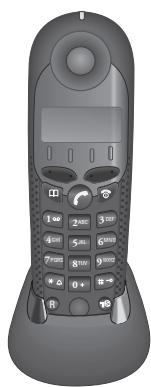
natural_image
Front view of a black handheld mobile phone with keypad and keypad (no visible text or symbols)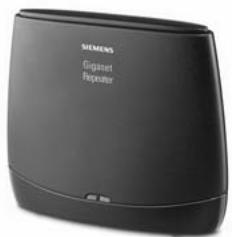
Accessoires
natural_image
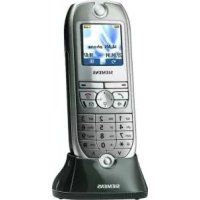
Front view of a Siemens 3D mobile phone with control buttons and a display screen (no visible text or symbols on the device body)Combiné Gigaset 4000 Micro
https://communication-market.siemens.de/serviceshop/default.asp
Activer/Désactiver 10
Activer/désactiver 10
Declaration of Conformity
We, Siemens AG
Information and Communication Mobile
Cordless Products
ICM CP
Frankenstrasse 2
46395 Bocholt
Germany
declare, that the hereinafter mentioned product is manufactured according to our Full Quality Assurance System certified by CETECOM ICT Services GmbH with the registration number "Q810820M" in compliance with
ANNEX V of the R&TTE-Directive 99/05/EC
Product: "Gigaset 4015 Comfort" France Version
Fixed Part according DECT Standard
The presumption of conformity with the essential requirements regarding
Council Directive 99/05/EC is ensured according to
Art. 3.1 a)
Safety:
EN60950
(equivalent to 73/23/EC)
Art. 3.1 a)
EMF/SAR:
99/519/EC (EU-Council Recommendation)
ES59005 (SAR Test Method)
ICNIRP Guideline
Art. 3.1 a)
Acoustic Shock:
Not applicable
Art. 3.1 b)
EMC:
ETS 300 329
(equivalent to 89/336/EC)
Art. 3.2
Radio:
TBR 6
The product is labelled with the European Approvals Marking CE and the 0682 for the notified Body.
Any unauthorized modification of the product voids this Declaration.
Senior Approvals Manager
Declaration of Conformity
We, Siemens AG
Information and Communication Mobile
Cordless Products
ICM CP
Frankenstrasse 2
46395 Bocholt
Germany
declare, that the hereinafter mentioned product is manufactured according to our Full Quality Assurance System certified by CETECOM ICT Services GmbH with the registration number "Q810820M" in compliance with
ANNEX V of the R&TTE-Directive 99/05/EC
Product: "Gigaset 4010/4015 Comfort" Swiss Version
Fixed Part according DECT Standard
The presumption of conformity with the essential requirements regarding
Council Directive 99/05/EC is ensured according to
Art. 3.1 a)
Safety:
EN60950
(equivalent to 73/23/EC)
Art. 3.1 a)
EMF/SAR:
99/519/EC (EU-Council Recommendation)
ES59005 (SAR Test Method)
ICNIRP Guideline
Art. 3.1 a)
Acoustic Shock:
Not applicable
Art. 3.1 b)
EMC:
ETS 300 329
(equivalent to 89/336/EC)
Art. 3.2
Radio:
TBR 6
The product is labelled with the European Approvals Marking CE and the 0682 for the notified Body.
Any unauthorized modification of the product voids this Declaration.
Senior Approvals Manager
natural_image
Two remote control handles with a battery inside, shown from different angles (no text or symbols)
natural_image
Abstract graphic with two gray teardrop shapes and a blue arrow pointing to the top (no text or symbols)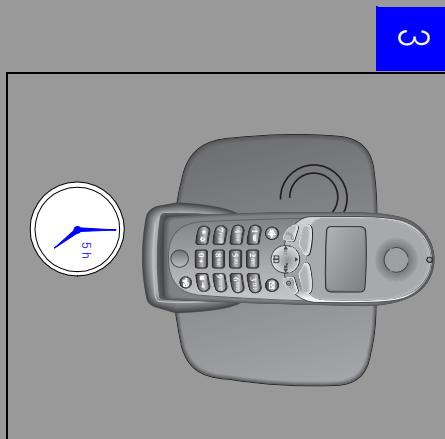
natural_image
Illustration of a remote control device with a clock and timer (no text or symbols)Information and Communication mobile
Haidenauplatz 1
D-81667 München
© Siemens AG 2002
- Gigaset Comfort
- 4015
- Mini-messages (SMS) 61
- 2
- Mini-messages (SMS) *
- www.my-siemens.com/customercare
- Accessoires
- Combiné Gigaset 4000 Micro
- Declaration of Conformity
- ANNEX V of the R&TTE-Directive 99/05/EC
- Product: "Gigaset 4015 Comfort" France Version
- Product: "Gigaset 4010/4015 Comfort" Swiss Version
Brand : SIEMENS
Model : GIGASET 4015 COMFORT
Category : Cordless phone