CP7370 - Sewing machine SOLAC - Free user manual and instructions
Find the device manual for free CP7370 SOLAC in PDF.



| Product Type | Beard Trimmer |
| Brand | Solac |
| Model | CP7370 |
| Power Supply | Rechargeable Li-ion battery, mains charger |
| Battery Type | Internal battery, non-removable |
| Charging Time | About 2 to 3 hours |
| Battery Life | Not specified |
| Comb Dimensions | Adjustable guide comb up to 10 mm |
| Speeds | 2 speeds (selector) |
| Included Accessories | Guide comb, charger, cleaning brush, lubricating oil |
| Usage | Wired (mains) or cordless (battery) |
| Cleaning | Brush provided, do not immerse |
| Safety | Do not use with damaged accessories, keep out of reach of children |
| Warranty | Legal warranty, Solac after-sales service |
| Weight | Not specified |
| Dimensions | Not specified |
Frequently Asked Questions - CP7370 SOLAC
User questions about CP7370 SOLAC
0 question about this device. Answer the ones you know or ask your own.
Ask a new question about this device
Download the instructions for your Sewing machine in PDF format for free! Find your manual CP7370 - SOLAC and take your electronic device back in hand. On this page are published all the documents necessary for the use of your device. CP7370 by SOLAC.
USER MANUAL CP7370 SOLAC
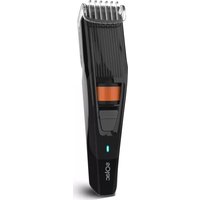
A Appliance body
B On/Off switch
C Pilot light
D Guide comb (10mm)
E Battery charger
F Cut size selector
G Cleaning brush
H Lubricating oil
- If the model of your appliance does not have the accessories described above, they can also be bought separately from the Technical Assistance Service.
USE AND CARE:
- Fully extend the appliance's power cable before each use.
- Do not use the appliance if its accessories are not properly fitted.
- Do not use the appliance if its accessories attached to it are defective. Replace them immediately.
- Do not use the appliance if on/off switch doesn't work.
- If you use the appliance in a bathroom or similar place, unplug the appliance from the mains when it is not in use, even if it is only for a short while, as proximity to water involves a risk, even if the appliance is disconnected.
- Disconnect the battery charger from the mains when not in use, before undertaking any cleaning
task make any adjustment or accessory change.
- Store this appliance out of reach of children and/or persons with physical, sensory or reduced mental or lack of experience and knowledge.
- Never rest the appliance into a surface while in use.
- Keep the appliance in good condition. Check that the moving parts are not misaligned or jammed and make sure there are no broken parts or anomalies that may prevent the appliance from operating correctly.
- Pay special attention when assembling and removing the accessories, as the blades are sharp. Be careful and avoid direct contact with the blades' cutting edges.
- Never leave the appliance connected and unattended if it is not in use. This saves energy and prolongs the life of the appliance.
- Keep children and bystanders away when using this appliance.
- Do not use the appliance with pets or animals.
- Do not open the battery/ies under any circumstances whatsoever.
- Recharge the battery/ies only with the charger supplied by the manufacturer. A charger that is suitable for one type of battery may cause explosion or fire hazard when used with other battery/ies.
EN
- Use the device only with the battery/ies for which has been specifically designed. The use of any other battery/ies can cause an explosion or fire hazard.
CHARGING THE BATTERY:
- Caution: a new battery is not fully charged and must therefore be charged before the appliance is used for the first time.
- Charge the battery at an atmospheric temperature of between 4 and 40^ .
- Connect the charger to the jack using the socket on the appliance. The socket is located at the lower/ back part of the appliance.
- Plug the charger into the mains.
- The pilot light will come on to indicate that the charger is charging the battery.
- Approximately 2 to 3 hours are needed for a complete charger of the battery. Never attempt to overcharge the battery (although it is recommended that the first charge of the battery be of 3 hours in duration).
- When the battery is charged disconnect the charger from the mains supply.
HOW TO CHECK THE BATTERY'S CHARGE LEVEL:
- The load indicator will change the colour when the appliance id completely charged.
- NB: For a long battery life, it is advisable to charge the battery, only when it has run out completely.
INSTRUCTIONS FOR USE BEFORE USE:
- Make sure that all products' packaging has been removed.
- Before using this product for the first time, it is important to make a full charge of batteries.
- Insertion of a comb guide:
- Fit the comb guide to the appliance.
- Grasp the comb guide by both ends and tighten against the blades
- To attach the comb guide, pick up by its two tips and press against the blades of the appliance until is firmly fixes.
- Hold the guide comb by the two sides, insert the head into the guides and slide downward until it is coupled
- Use the comb size selector to adjust the height of the cut.
To extract the comb guide, just pull out.
EN
- To remove the comb guide, simply push upwards from one of the sides. Do not pull the teeth upwards.
To remove the guide comb, pull upward.
USE:
- The appliance can be used directly connected to the mains or by using his batteries.
- Extend the cable completely before plugging it in.
- Connect the appliance to the mains.
- Make sure that the blades are correctly aligned.
- Turn the appliance on, by using the on/off switch.
- Select the desired cutting height using the comb height selector Press it and adjust the height according to the desired cutting length (F).
ONCE YOU HAVE FINISHED USING THE APPLIANCE:
- Turn the appliance off using the on/off switch.
- Unplug the appliance from the mains.
- Clean the appliance.
CLEANING:
- Disconnect the battery charger from the mains and allow it to cool
before undertaking any cleaning task.
- Clean the equipment with a damp cloth with a few drops of washing-up liquid and then dry.
- Do not use solvents, or products with an acid or base pH such as bleach, or abrasive products, for cleaning the appliance.
- Never submerge the appliance in water or any other liquid or place it under running water.
- During the cleaning process, take special care with the blades, as they are very sharp.
- If the appliance is not in good condition of cleanliness, its surface may degrade and inexorably affect the duration of the appliance's useful life and could become unsafe to us.
- Clean the blades and the comb guide with the cleaning brush. Remove the hairs from the blades and from inside the appliance with the brush. It is important to clean off remaining hairs after each use.
- NEVER disassemble the blades from the appliance for clean it.
HOW TO REMOVE THE BATTERIES FROM THE INTERIOR OF THE DEVICE:
- CAUTION: It is important that the batteries are fully discharged prior
EN
to its withdrawal from the apparatus.
- CAUTION: the appliance must be disconnected from the supply mains when removing the batteries.
- To remove the batteries, once the life of the appliance, proceed as follows:
- Open the top shell of the apparatus, removing previously with the help of a screwdriver fixing screws.
- Identify the battery wires and cut their (Red and Black). To avoid risks of a short circuit with a possible residual battery load, first cut the Red wire and protect it by using insulating tape, then proceed to cut the Black wire proceeding in the same way.
- Safely remove the battery from its housing.
FRANÇAIS FR
DESCRIPTION
BHMaHHe: HOBaTa 6aTePnHa He e HaIbJIHo 3apeHa; IpeDn n3NoJ3BaHeTo Ha ypeDa 3a npbB
TbT, TcJeDba Da ce 3apeNi HAnbJIHo.
3apeTe 6aTePnTa npi TempepaTpa Ha OKoHaTa cpea MeJdy 4 n 40^
BknIouTe KOHeKTopa Ha 3apAHOTo yCTpOcTBO B uenCeHa Ha ypeDa, pa3noJoxeH B 3aHaTa/ DoJIHa Yact Ha ypeDa.
- Bключete 3apянOTO yctpoiCTBO KbM 3axpaHBaaata Мржа.
-Дokato 6aTePnIa ce 3apeJda, CBETBa JAmnUka B YepBEN cBByT.ToBa yKa3Ba,Ye 3apYdHOTo 3apeJda 6aTePnIa.
CneI KaTo 6aTePnraTa ce 3apeN, CBeTINHHnT INDnKaTOP IpomHeuCBeta Cn OT YepBeH Ha cInH.
BpeMeTo Heo6xOdImo 3a eJHO IIbIHO 3apeXdaHe e npIbIINTeJIHo 2-3 Yaca. Hnkora He ce ONITBaIte Da 3apeXdaTe ypeDa 3a NO-DbIro OT npEnOpbUaHOTo BpeMe (BbIpeKn, ye e npEnOpbUHTeJIHO IbPBOTo 3apeXdaHe Da Ce N3BbpSbN B npOdbIKeHne Ha 3- Yaca).
CneiKpaHa 3apeJdaHeTo, n3KnHouTe yCTpOInCTBOTO OT eJeKtpnueckaTa Mpeka.
BG
KAKДА ПОВЕРМ CTENEHTA HA 3APEDEHOCT HA BATEPNYTA:
CBeTINHHNt INDnKaTop 3a 3apeKdaHe(G) n3racBa, KOraTo 6aTePnTa e HnBnHO 3apeDeHa
-Белека:3aДa yДьЖиTe JxNBOTaHa 6aTePnIa, npenOpbUBa ce6aTePnIa Da 6bIe 3apExkDaHa,eINHCTBeHO KOraTo e HAnbJInHO n3TOuSeHa.
HAUYH HA YNOTPEBA BENEJCKN INPEDN YNOTPEBA:
- YBepete ce, Ye n3qno cTe OTCTpaHnIOnaKOBkata Ha ypeHa.
- PpeHn ynoTpe6a 3a nbpBn nbTe BaxHo Da 3apeDnte N3cyaNo 6aTeepnnte.
YIOTPEBA:
- YpeIbT MoKe Ia ce n3NoJ3Ba BKNIOUeH KbM 3axpaHbAuaTa MpeXa IIN Ha 6aTePnN.
- Ппени уnotpe6а pa3BиTe
Наьлно 3axpaHbaцnia Ka6eJ Na
ураза.
BknIoute ypeBa B eIekTpueckaT a MpeKa. - YBepTe ce, Ye HoxYeTaTa ca nOdpaBHeHn PpaBnHNo.
BkIIOUeTe ypeDa, 3aDeiCTBaIKn IpeKbcBaHa 3a BKJIIOUcBAHe/ N3KJIIOUcBAHe.
BkIIOye Te ypea, KaTo 3aJeICTBaTe cIeKTopa Ha CKOpOCTnTe.
- I36epeTe JekHaHaTa MApka 3a
NoCTpRBaHe, KaTo N3NoJ3BaTe
ceJIeKTopa 3a pa3Mep Ha rpe6eHa.
HatncHete ro n ro harlacete
pa3Mepa Ha NoCTpRBaHe,
OTROBapuHa JekHaHaTa DbJxHHa
Ha NoCTpRBaHe (F).
CJIeI IPINKJIIOUBAHE HA PABOTATA C YPEDA:
- N3KJIIOUeTe ypeDa ot 6yToHa 3a BKNIOUBaHe/IN3KJIIOUBaHe.
- YpeT MoKe Da ce n3NoI3Ba BKnIOueH KbM 3axpaHbauaTa MpeKa.
-ИЗкючete урEDA ot eNeKtpnueckaTа Мржа. - Nounctete ypeia.
ПОЧИСТВАЕ
-ИЗкlioчete урEDAOT 3axpaHbAaTa MpeKa I ro octaBeTe Da ce oxlaIиPreDN da npICTBnITE KbM NOuNCtBaHETO My.
-Почистеу урета с влajхнakbpna, habоehа сняколкКankmneш npenapat, cpeKoeto ronoDCyweTe.
3a nouchTbaHeTo Ha ypeHa He n3noI3BaITe pa3TBOpHTeIN I npenapATN C KnceJIHEn IIN
BG
OCHOBEN pH paKTop, KaTo 6eJIHa n a6pa3nBn npOdyKTn.
He notanayte ypeDa BbB Boda nn npyra HkaKaBa TeuHocT, He ro nocTabaTe noD TeuaaBoa.
- ПО Врeme Ha NOчистванeto
Ha ypeda, 6ьдente ocobeho
BHNMaTeJIHn C HOxUeTaTa, 3aUTo
Ca N3KJIHouHTeJIHNo OCTpn.
- YpeIbT cIeIbA da ce noIbPka uNCT. B npOTnBc nUyau nOBbpxHOCTTa My MoKe Da ce NOBpeNi, I TOBa Da cbKpaTN 6e3Bb3BpATHO eKCnloaTaUNoHHMy JINBOT, a CbIoo I Da CTaHe pRnHa 3a Bb3HnKBaHe Ha ONaCHO NOLOXeHne.
-ПоунсTeTe HOxYeTaTaN BOdEuNTe rpe6eHn CbC YeTkata 3a NOUncTBaHe.C YeTuNcaTa, OTcPaHETe KOCMITEOT HOxYeTaTaN OT BbTpEshOCTTa Ha ypeDa. BaxHo e cneBcra Ka ynoTppe6a Da NOUcnCTBaTe OCTaTbUIne OT KOCMn.
B HNKAKbB CJIyAHe pa3rno6BaIte HOXeTaTa Ha ypeDa 3a HeROBOTO NOUcTBAHe.
KAKДАИЗВАДИМ BATEPиITEOT BbTPEшHOCTTA HA YPEДA:
BHHMaHHe:I3BaJdaIte 6aTeepnIteOTypea cMo,ako ca HAnbJIHo pa3peDeHN.
BHHMaHHe:Pn n3BaXdaHe Ha 6aTeepnIte anapaTbT cneDbA da e N3KJIIOUeH OT 3aXpaHBAHeTO.
Cnei n3TuHaHe Ha ekCnIooaTaUOHHN JxNBOT Ha ypeDa, 3a OTcTpaHЯBaHe Ha 6aTePnIte NoCTbNeTe No CneHnHaunH:
-Изва对接е رорно калачи на ураза,кato pa3BneTe cnomоца на OTВертka boNTa 3a Фнксрапe.
HamepeTe 6aTePnTa n npepexTe HeHnTe Ka6eN (UepBEN upeH).3a da n36erHeTe OAnCHocTTa OT KbCO CbeDInHeHne,OT Bb3MOxHNrT OCTaTBueH 3apJd Ha 6aTePnTa, PbBO npepexTe YepBeHnrt Ka6eN npedna3eTe oroneHaTa My qact c n30Jnpaua JIeHTa, cJeD Koeto npepexTe UepHnrt Ka6eN NO CbuiyT HauH.
- Be3oNaCHO n3BaJeTe 6aTepeyra OT MЯCTOTO.
ROMÁNA RO
DESCRIBE
A Corpul aparatului
B Intrerupatior ON/OFF
C Indicator luminos
D Pieptene de ghidare (10 mm)
E Incarcator baterie
F Selector de dimensionali taiate
G Perie de curatare
H Ulei de lubriciere
INTRODUCEREA UNUI GHIDAJ PENTRU PIEPTENE:
Ugblb1 Ugb1 zo wulibl
jgljllllo
/
.
JyI JyI JyI JyI JyI JyI
J 1
jIaJI UaJI
:aaLwJg
a 1
. 1
g y d aai j 1j
JyI JyI JyI JyI JyI JyI JyI
AR
jla j5 j6 3 12 141 10
JlJrnnn nn nnnnnnnnnnnnnnnnnnnnnnnnnnnnnnnnnnnnnnnnnnnnnnnnnnnnnnnnnnnnnnnnnnnnnnnnnnnnnnnnnnnnnnnnnnnnnnnnnnnnnnnnnnn
1 1
.
j_L = U
aaii 1 aii gai j5i jia jao
J5 450
aalb1 1g0yll 1s l jgljao
1e llllulwE.ugc 4aSbl
.
/1jzaiill 1s1 jis1 jgajl Jaa
.
Uds dLw lo gI plooll jlaol Joo
1 1
y
This product enjoys the recognition and protection of the legal guarantee in accordance with current legislation. To enforce your rights or interests you must go to any of our official technical assistance services. You can find the closest one by accessing the following web link: http://solac.com
You can also request related information by contacting us by phone. You can download this instruction manual and its updates at http://solac.com
DE) GARANTIE UND TECHNISCHER SERVICE
gall liljy jia jia jia jia jia jia jia jia jia jia jia jia jia jia jia jia jia jia jia jia jia jia jia jia jia jia jia
http://solac.com
Unit 25 & 26, San Croy Office Park, Die Agora Road, Croydon,
Kempton Park, 1619
Johannesburg
(+27) 0113925652
solac
www.solac.com
21/09/2021

- USE AND CARE:
- EN
- CHARGING THE BATTERY:
- HOW TO CHECK THE BATTERY'S CHARGE LEVEL:
- INSTRUCTIONS FOR USE BEFORE USE:
- USE:
- ONCE YOU HAVE FINISHED USING THE APPLIANCE:
- CLEANING:
- HOW TO REMOVE THE BATTERIES FROM THE INTERIOR OF THE DEVICE:
- FRANÇAIS FR
- DESCRIPTION
- BG
- KAKДА ПОВЕРМ CTENEHTA HA 3APEDEHOCT HA BATEPNYTA:
- HAUYH HA YNOTPEBA BENEJCKN INPEDN YNOTPEBA:
- YIOTPEBA:
- CJIeI IPINKJIIOUBAHE HA PABOTATA C YPEDA:
- ПОЧИСТВАЕ
- KAKДАИЗВАДИМ BATEPиITEOT BbTPEшHOCTTA HA YPEДA:
- ROMÁNA RO
- DESCRIBE
- INTRODUCEREA UNUI GHIDAJ PENTRU PIEPTENE:
- AR
- DE) GARANTIE UND TECHNISCHER SERVICE
- solac
Brand : SOLAC
Model : CP7370
Category : Sewing machine