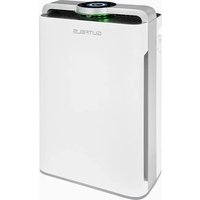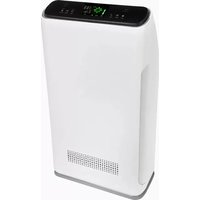
LR 67014 WE - Air purifier GUTFELS - Free user manual and instructions
Find the device manual for free LR 67014 WE GUTFELS in PDF.


| Product type | Air purifier |
| Brand | GUTFELS |
| Model | LR 67014 WE |
| Power supply | 230 V ~ 50 Hz |
| Filters | Pre-filter, cold catalyst filter/formaldehyde removal, antibacterial/HEPA filter |
| Ionizer | Yes |
| UV lamp | Yes (UV sterilization) |
| Operating modes | Auto, Sleep, Manual (3 speeds: 500/700/900 RPM) |
| Programmable timer | Up to 12h in 30 min steps |
| Child lock | Yes (key lock) |
| Remote control | Yes (with button cell) |
| Display | Screen with PM2.5 air quality indicator |
| Particle sensor | Yes (PM2.5) |
| Pre-filter maintenance | Every 15 days (vacuum or wash with water) |
| Maintenance of filters 2 and 3 | Every 2 months (vacuum, do not wash) |
| Pre-filter replacement | Every 2 years |
| Replacement of filters 2 and 3 | Every 6 months |
| Total filter lifespan | 1500 hours (change reminder) |
| Safety shut-off function | Does not turn on if front panel removed |
| Warranty | Legal warranty, extension possible via GGV Service |
Frequently Asked Questions - LR 67014 WE GUTFELS
User questions about LR 67014 WE GUTFELS
0 question about this device. Answer the ones you know or ask your own.
Ask a new question about this device
Download the instructions for your Air purifier in PDF format for free! Find your manual LR 67014 WE - GUTFELS and take your electronic device back in hand. On this page are published all the documents necessary for the use of your device. LR 67014 WE by GUTFELS.
USER MANUAL LR 67014 WE GUTFELS
- Control Panel
- Front Panel
- Air Inlet
- Front Side
- Top Side
- Air Inlet
- Control Panel
- Handle
- Air Outlet
- Side View
- Rear Side
FR
Please read these instructions carefully before using the appliance, and always follow the safety and operating instructions.
Important : This appliance can be used by children over 8 years old and people with reduced physical, sensory or mental capacities or with a lack of experience or knowledge if they have been given supervision or instructions concerning the safe use of the appliance and the risks involved. Children shall not play with the appliance. Cleaning and user maintenance shall not be made by children unless they are older than 8 years and supervised. Never leave the appliance and its cord unsupervised and within reach of children less than 8 years old or irresponsible persons when it is plugged into the wall or when it is cooling down.
Check that the mains voltage matches the voltage noted on the appliance before using the appliance.
-
Use the appliance for household purposes only as described in this manual.
-
Never leave your device unattended during use.
-
Close supervision is necessary when any appliance is used by or near children.
□ Cleaning and user maintenance should not be undertaken by children without supervision.
- Only use the supplied charging cable and power adapter to charge the appliance. Do not use the power adapter with other devices.
□ If the supply cord or appliance is damaged, stop using the appliance immediately and seek advice from the manufacturer, its service agent or a similarly qualified person (^*) .
Always unplug the AC adapter from the wall outlet by pulling on the plug itself. Never pull on the charging cable.
- Switch off at the wall socket then remove the plug from the socket when not in use or before cleaning.
- Switch off and unplug before fitting or removing tools/attachments, after use and before cleaning.
- Never immerse the appliance, the charging cable or the mains plug in water or other liquids.
- Never use the appliance and the power supply near hot surfaces.
- Never use the appliance outdoors and always store it in a dry place.
Use only original accessories recommended by the supplier
Do not place the unit on the following places:
-
Direct sunlight facing air purifier, heated place. (it may cause deformation, deterioration, discoloration and malfunction);
-
Close to televisions, radios and other similar equipment. (please let the unit more than 1 meter away).
-
Keep this appliance away from pollen, dust and other residues.
□ It is recommended to put this appliance on a flat ground in the room.
In order to make effective air circulation in the room, there should be a gap of at least 30cm all around the appliance
□ Do not place anything on the product. Do not put magnets and metal object. Otherwise, it may cause malfunction.
Do not block the air inlet and outlet.
□ Do not lift or move the appliance while it is working - Never pull the cord in order to move or store the appliance. It may cause a short circuit or damage the power cord.
- Do not damage the power cord or plug. Do not cut or twist the appliance power cord. If the power cord is damaged, it
must be replaced by the manufacturer, the maintenance department or a competent qualified electrician (^*) to avoid any danger.
□ Do not use beyond the rated power. Otherwise, the appliance could overheat and cause fire accidents.
- Do not touch the power plug with wet hands, it may provoke electric shock.
□ Do not put your fingers or metal objects into the air outlet gap. It may cause electric shock or injure yourself.
- Do not let water, flammable detergent or other liquid flow into the unit. It may cause electric shock or burn the air purifier.
- Never immerse the appliance in water or any other liquid for any reason whatsoever. Never place it into the dishwasher.
This product is not supposed to be used as daily ventilator, dust cleaner or extractor hood.
- Do not use this appliance close to gas appliances, heating devices or stoves.
- Do not use this appliance in a humid or high-temperature environment (e.g. bathroom, toilet or kitchen).
Do not allow children to use the remote control.
Do not place the appliance in similar places:
- Unstable surfaces (Products may drop, overturn, injure yourself, leak out, electrocute yourself or catch fire);
- Where the temperature or the humidity is very high. (e.g. the bathroom);
-
Kitchen and other places prone to soot emissions (chimneys).
-
Do not use air purifier as an aromatherapy appliance. Chemical residues may accumulate in the machine, then be released from the outlet and finally be harmful to your health. Consequently, when you want to use aromatherapy scents, do not forget to ventilate the room before using your air purifier.
□ If you hear abnormal sound or vibration, or if there is a burning smell, please immediately turn off the power of the
machine. If not, it may cause electric shock, cause a few sparks, or simply burn.
- Please regularly clean the power plug. Before cleaning, do not forget to pull out the power plug. Then you can clean your appliance by wiping with a dry cloth.
□ If you intend not to use your appliance for a long time, please pull out the power plug.
Before maintenance, make sure to disconnect the power plug. The appliance may suddenly start, causing electric shock and injure yourself.
Please safely insert the plug into the socket. Do not use your appliance if the power plug or socket are damaged. - Please hold the insulation parts from the plug to pull out the power plug. Do not use the power cord to pull off the plug from the socket. Otherwise, it may damage the power cord, electrocute yourself, cause short circuit or catch on fire.
□ If the switch appliance does not work, the power cord or plug abnormally heat, or you hear abnormal sound or vibration coming from your appliance, please immediately turn it off and contact a competent qualified electrician.
Only a competent qualified electrician (*) is allowed to install or uninstall the machine.
(*) Competent qualified electrician: after-sales department of the producer or importer or any person who is qualified, approved and competent to perform this kind of repairs in order to avoid all danger. In case of need you should return the appliance to this electrician.
AIR PURIFIER
The quality of the air we breathe leaves a lot to be desired. This affects our well-being and health. We spend most of our time in closed rooms. We can help you with our air purifiers which, through appropriate filters, ionization and UV-light with bactericidal effectiveness, make the air in our immediate environment more beneficial to our health and well-being.
Our purifier fulfills this task with several types of filters, ionization and a UV lamp.
Before the first use
Remove the product and remove it before first use (see FILTER INSTALLATION / REPLACEMENT) and remove the packaging we have provided to protect the filters.
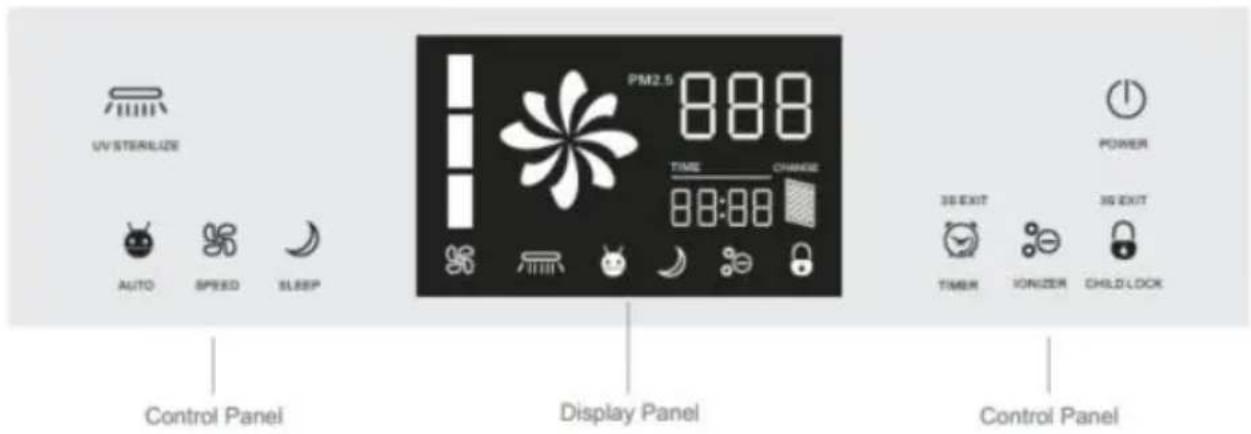
CONTROL PANEL
1. Switch on
Press the POWER button in standby mode. The appliance will switch on and will be automatically programmed on the last operating mode (except timer and sleep mode).
In normal mode, the appliance will put itself into standby mode if you press
the POWER button. It will save the current operating mode at the same time.
NOTE: This air purifier include a safety shutdown function. The appliance will not switch on if the front panel is removed or if it has dropped.
2. Select the operating mode
CHILD LOCK - When enabled, this function will disactivate all others keys. This indicator light will light up and the child mode will be enabled until it is deactivated through the lock button of your remote control. Hold this button for 3 seconds to exit this mode.
IONIZER - a function used to improve the quality of the air in a room - can be activated or deactivated by pressing this button. The indicator light will accordingly switch on or off.
TIMER - Press this button to set the working time. Every pressure adds 30 minutes, until 12 hours. The remaining time until the power is turned off is displayed (instead of the time on the data panel). After the countdown to "0", the appliance enters in Standby mode. To exit this mode, press and hold
this button for 3 seconds.
UV STERILIZATION MODE - Press the button to activate or deactivate this function. The LED lights up when the function is active.
AUTO MODE - Press this button to activate the automatic mode of the appliance. The LED lights up when the function is active. In this mode, the filtered air volume automatically adapts itself to the level of air pollution. PM2.5<60 (slow speed), 60≤PM2.5<150 (medium speed), PM2.5≥150 (high
speed}.
SLEEP MODE - The display and indicator lights switch off when the sleep mode is activated. The engine runs slowly. The timer function is available for this mode, the unit will remain in sleep mode until the end of the set time, will switch to the standby mode. Press any key to exit the sleep mode.
SPEED MODE - Press this button to exit automatic mode and manually set the engine speed: low (500rpm), medium (700rpm), high (900rpm). The engine speed is no longer controlled by the sensor in this case.
FILTER CHANGE MODE - Press the Child Lock button for 5 seconds in normal operation mode (the child lock mode will not be activated, but the total filter operation time and remaining time - up to 1500 hours will be displayed before it must be replaced). The display changes again after 3 seconds.
3. Power Off
POWER OFF - Press the POWER button while the appliance is running to change it to 'Standby' mode.
DESCRIPTION OF THE KEY FUNCTIONS
1. Remote Control
The product is equipped with a remote control powered by a button battery (if you do not use the remote control for a long time, please remove the battery).
Note: The buttons on the remote control and the corresponding buttons on the control panel work exactly the same way (you will notice the additional "unlock" button on the remote control).
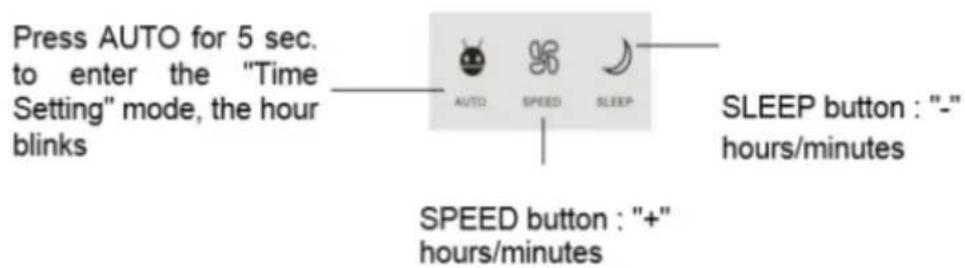
2. Time setting
Setting method: press and hold the "AUTO" button, then press the "Speed" and "Standby" buttons to set the appliance. Once the hours have been set, press the "auto" button, the minutes will blink, set them also with the "Speed" and "Standby" buttons.
Note:
The clock function of this machine is completely independent, the displayed time has no influence on the purification.
- The device has a backup battery, it is activated when the purifier is not connected to the power supply. The battery has a maximum autonomy of 10 days, beyond this time, the time is automatically reset. Please reschedule the time. (See section "Setting the time")
INSTALL/REPLACE THE FILTERS
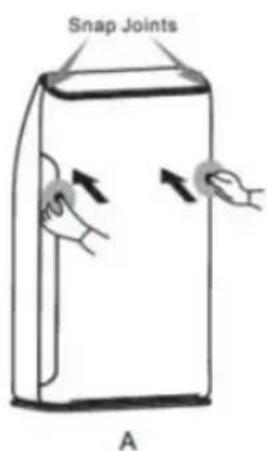
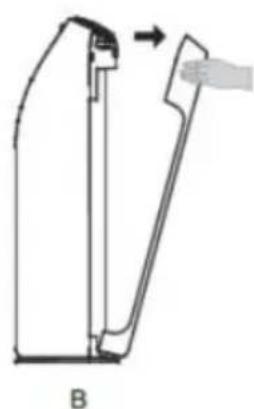
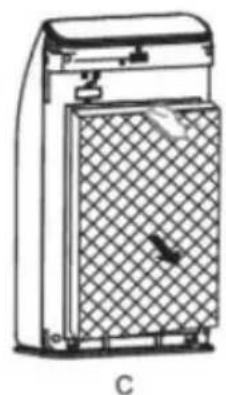
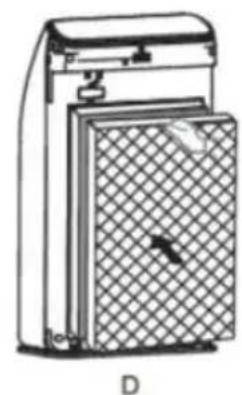
A. Press in the middle of the front panel to loosen the top part.
B. Remove the front panel.
C. Remove the filters one by one.
D. Place the new filters one by one in the correct order.
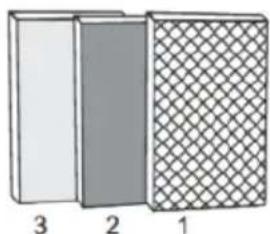
- Pre-Filter
- Cold catalyst filter/ formaldehyde removal
- Antibacterial/HEPA Filter
Note:
- Suggest to maintain filter 1 every 15 days.
- Suggest to maintain filters 2 and 3 every 60 days.
- Suggest to replace filter 1 in every 2 years.
- Suggest to replace 2 and 3 every 6 months.
Resetting the filter change reminder
The device has a filter change reminder function set at 1500 hours. Replace filters 2 and 3 when the "change" indicator lights up. Press the child lock button 5 seconds to reset this function.
CLEANING AND MAINTENANCE
1.Pre-Filter (Every 15 days)
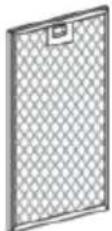
Use a vacuum cleaner to remove dust from the filter surface or wash with water, dry thoroughly.
2. Cold catalyst filter/ formaldehyde removal (Every 2 months)
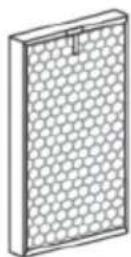
Use a vacuum cleaner to remove dust from the filter surface. Store the filter in a well-ventilated place. Do not expose it directly to the sunshine. Do not force the filter or clean the filter with water.
3. Antibacterial/HEPA Filter (Every 2 months)
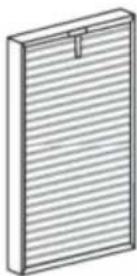
Place the filter in a well-ventilated place. Do not expose it to the sun or clean it with water.
4. Negative Ion Generator
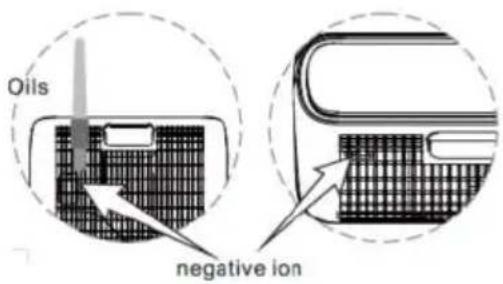
If your air purifier makes a crackling noise, use the brush to remove the dust and generator around the air outlet. Do you die regularly.
5. Particle Sensor (Every 2 months)
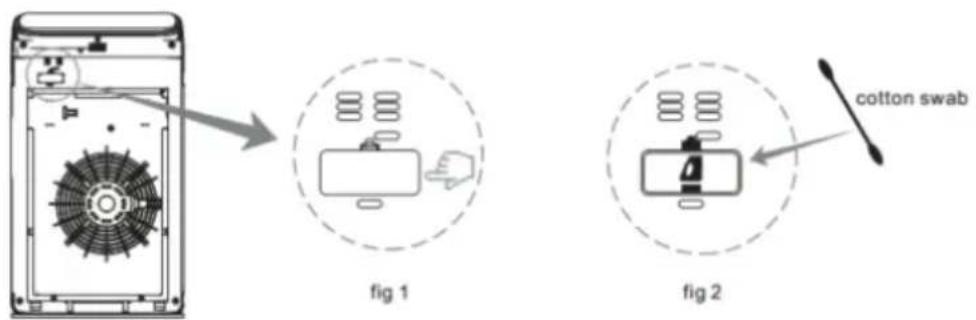
Clean regularly with a dry cotton bud to remove moisture and smoke. Remove the outer cover of the sensor (fig. 1), use the dry cotton bud to clean the lens (fig. 2). Illuminate if you can't see clearly.
Note: Please ensure to disconnect the power before cleaning. Do not hesitate to illuminate this appliance with light if you cannot see clearly.
TIPS
- Unplug the appliance before cleaning and maintenance
- Do not open the machine when the filter is removed.
- Unplug the appliance if you do not intend to use it for a long time
- Depending on the location and methods of use (an environment with many smokers or a very polluted place for example), the life span of the filters will be shortened. Please replace the filters in time.
TROUBLESHOOTING
| Problem | Solution |
| The appliance does not switch on and the keys of the control panel do not answer | 1. Is the device connected? - Connect the device 2. Is the front panel in place? - Put it in place 3. Is the device in child lock mode? - If the child lock' indicator is on, press the key for 5 seconds until the indicator goes out 4. Is the device located on a flat surface? - Place it on a flat surface |
| The air is polluted but the indicator remains green. Even after continuous use the indicator remains red. | 1. Is the appliance placed in a place where air does not circulate well? - Move it around 2. The particle sensor is dirty - Clean the sensor |
| The device is noisy. | Is the negative ion generator dusty? - Clean it up |
| The smell of the air outlet is unpleasant | 1. Is the filter dirty? - Clean the filter 2. Hasn't the filter been changed for a long time? - Replace it. |
| The device is not in mode night watch | Is the air purifier in manual mode? - Press the "standby" button, make sure it enters standby mode |
| The purifier works for a long time but the air quality does not significantly increase | 1. Have you removed the filter packaging? - Please remove the packaging when first used 2. Are the filters incorrectly installed? - Check the installation order |
| The display shows "F1" or "F2" | Unplug the appliance immediately and call the service of maintenance. |
PROTECTION OF THE ENVIRONMENT - DIRECTIVE 2012/19/EU
In order to preserve our environment and protect human health, the waste electrical and electronic equipment should be disposed of in accordance with specific rules with the

implication of both suppliers and users. For this reason, as indicated by the symbol on the rating label or on the packaging, your appliance should not be disposed of as unsorted municipal waste. The user has the right to bring it to a municipal collection point performing waste recovery by means of reuse, recycling or use for other applications in accordance with the directive.
TERMS OF GUARANTEE
For our products, the legal terms concerning claims under guarantee are valid. During the legal period, all material and manufacturing defects are covered. No claims will be accepted for broken accessories, defects resulting from inappropriate use or care, excessive wear due to intensive use, wrong use due to the non-observance of the instruction manual, or normal wear and tear. No guarantee claims will be accepted if the appliance has been modified or if attempts have been made to repair the appliance. In such case, the vendor cannot be held responsible in case of accidents.
On website www.ggv-service.de you can find a quick and easy solution to register a complaint in case of a defect within the warranty period. Just log on to the service portal (www.ggv-service.de), designate the appliance and then you will be guided through the menu, with all necessary information and advantages, to help you and solve your problem. We are at your service on the service portal during and also after the warranty period.
In case of a defective accessory, the complete appliance will not be exchanged, but only the accessory will be sent free of charge. In such case, do not return the complete appliance but only order the accessory! In case of glass damages, glass spare parts will be charged.
Pieces undergoing wear and tear as well as cleaning and maintenance or the exchange of worn out pieces are not covered by the guarantee and will thus be charged!
AFTER THE LEGAL PERIOD OF GUARANTEE
Repairs after the guarantee period can be performed at a charge by a competent qualified technician or a repair service.
The user manual is by simple request also available in electronic format from the after-sales service.