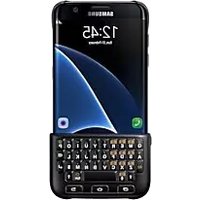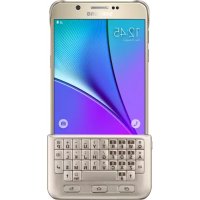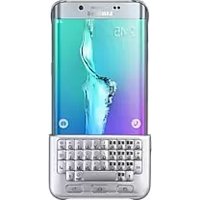
EJ-CG928 - Keyboard SAMSUNG - Free user manual and instructions
Find the device manual for free EJ-CG928 SAMSUNG in PDF.



| Product Type | Keyboard Case |
| Brand | Samsung |
| Model | EJ-CG928 (also EJ-CN920, EJ-CG930, EJ-CG935) |
| Compatibility | Samsung Galaxy S6 edge |
| Case Material | Plastic |
| Keyboard Type | Physical |
| Main Keys | Alt, Sym, Shift, Space, Back, Enter, Delete |
| Dictation Function | Yes (dedicated key) |
| Input Language Change | Yes (Shift + Space or Alt + Enter) |
| Connection | Bluetooth (according to declaration of conformity) |
| Power Source | Built-in Battery |
| Box Contents | Keyboard case, quick start guide |
| Maintenance | Clean with a soft, dry cloth |
| Safety | Do not force the keyboard removal to avoid damaging the device |
| Certifications | CE, RoHS, R&TTE compliance |
| Warranty | Covered by Samsung warranty |
Frequently Asked Questions - EJ-CG928 SAMSUNG
User questions about EJ-CG928 SAMSUNG
0 question about this device. Answer the ones you know or ask your own.
Ask a new question about this device
Download the instructions for your Keyboard in PDF format for free! Find your manual EJ-CG928 - SAMSUNG and take your electronic device back in hand. On this page are published all the documents necessary for the use of your device. EJ-CG928 by SAMSUNG.
USER MANUAL EJ-CG928 SAMSUNG
Please read this manual before using the device to ensure safe and proper use.
- Images may differ in appearance from the actual product. Content is subject to change without prior notice.
- Descriptions are based on the Galaxy S6 edge's default settings and appearance.
Instructional icons

Warning: situations that could cause injury to yourself or others

Caution: situations that could cause damage to your device or other equipment

Notice: notes, usage tips, or additional information
Getting started
Package contents
Check the product box for the following items:
- Keyboard
- Quick start guide

- The items supplied with the device and any available accessories may vary depending on the region or service provider.
- The supplied items are designed only for this device and may not be compatible with other devices.
- Appearances and specifications are subject to change without prior notice.
- You can purchase additional accessories from your local Samsung retailer. Make sure they are compatible with the device before purchase.
- Use only Samsung-approved accessories. Using unapproved accessories may cause the performance problems and malfunctions that are not covered by the warranty.
- Availability of all accessories is subject to change depending entirely on manufacturing companies. For more information about available accessories, refer to the Samsung website.
Device layout
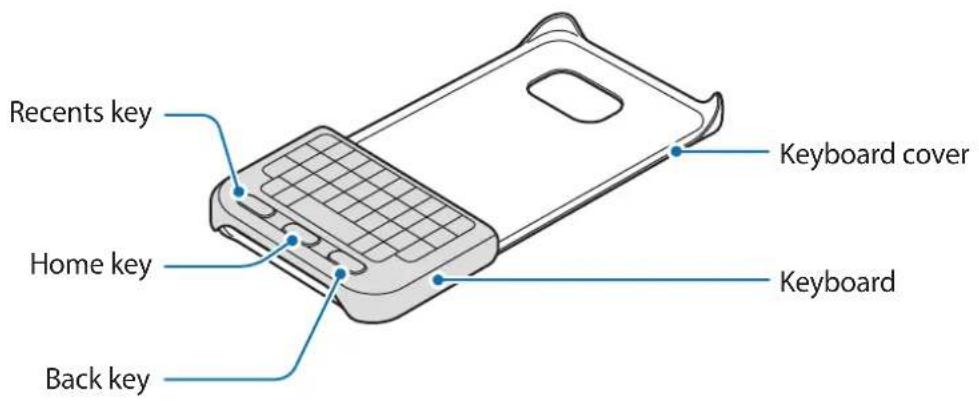
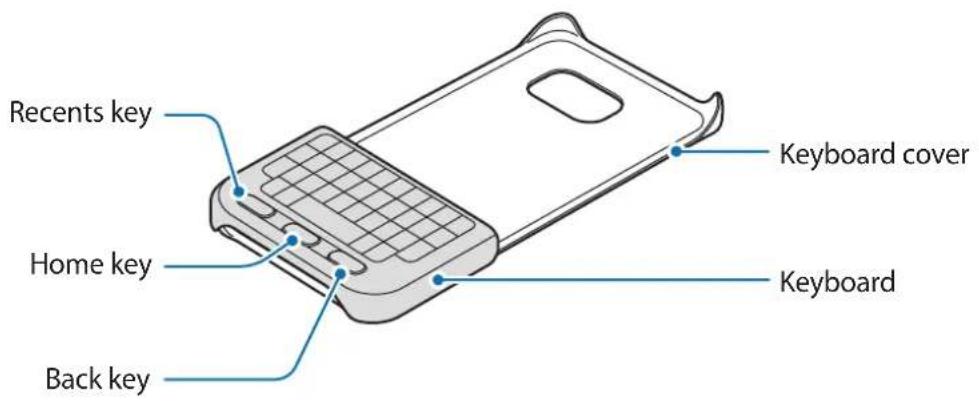
text_image
Recents key Home key Back key Keyboard cover KeyboardKeys and functions
| Name Function | |
| Recents | Press to open the list of recent apps. |
| Home | Press to turn on the screen while the screen is locked.Press to return to the Home screen.Press and hold to launch Google. |
| Back | Press to return to the previous screen. |
Using the keyboard
Attaching the keyboard
Attach the keyboard to your device and use it instead of the on-screen keyboard to enter text.
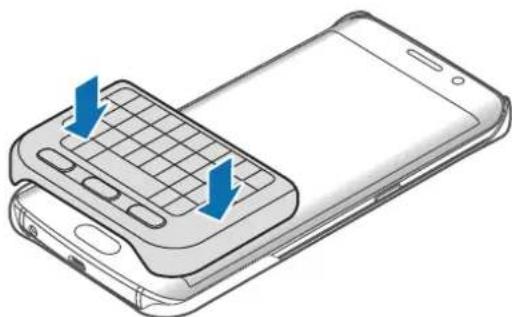
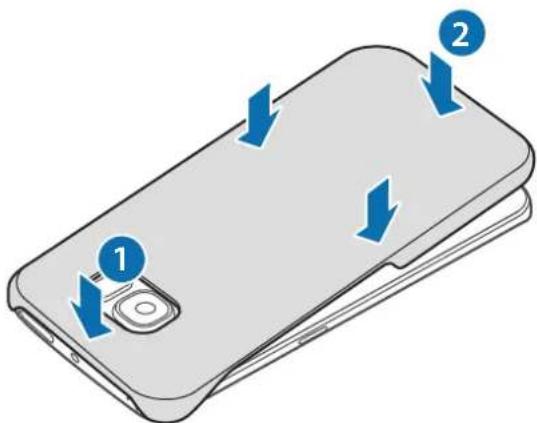
1 Secure the keyboard cover on the back of the device.
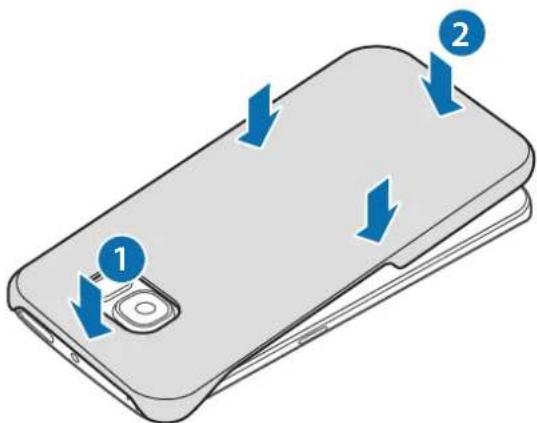
text_image
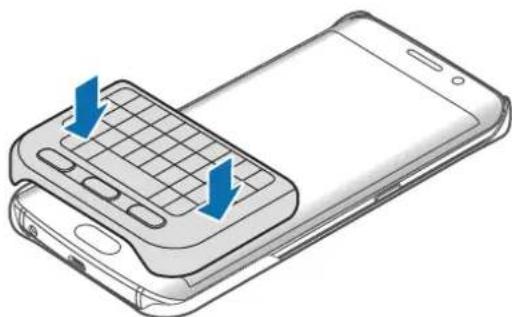
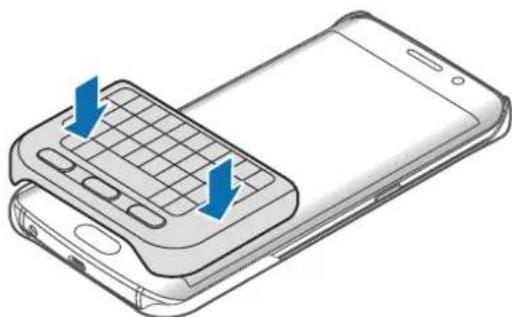
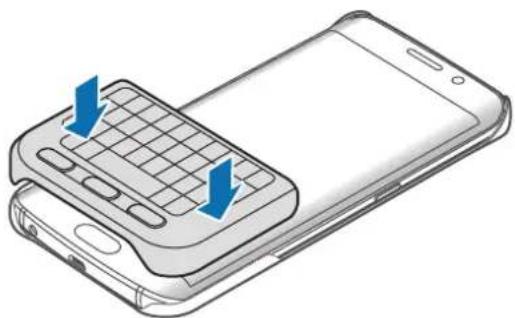
Diagram of a smartphone with labeled buttons and directional arrows indicating action or movement2 Attach the keyboard to the bottom of the device.
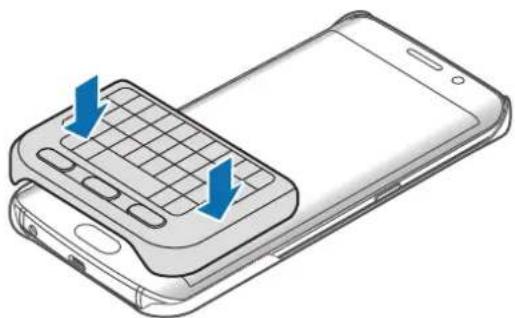
natural_image
Illustration of a smartphone with a keyboard and two blue arrows indicating the keyboard direction (no text or symbols present)Detaching the keyboard
You can attach the keyboard to the keyboard cover when you are not using it.
1 Lift one side of the keyboard and detach it from the device.
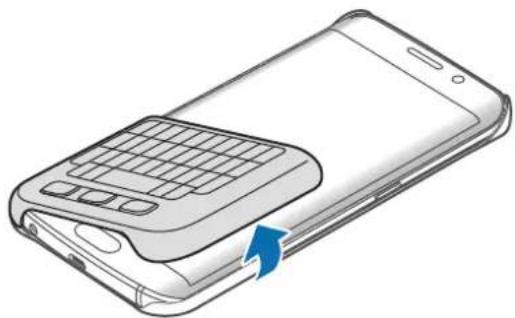
natural_image
Illustration of a smartphone with a keyboard and scroll, showing front panel and side screen (no text or symbols)
Detaching the keyboard improperly may damage the keyboard or the device.
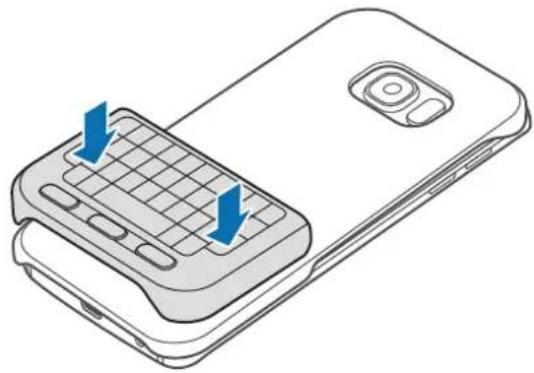
2 Attach the keyboard to the back of the device at the bottom of the keyboard cover.
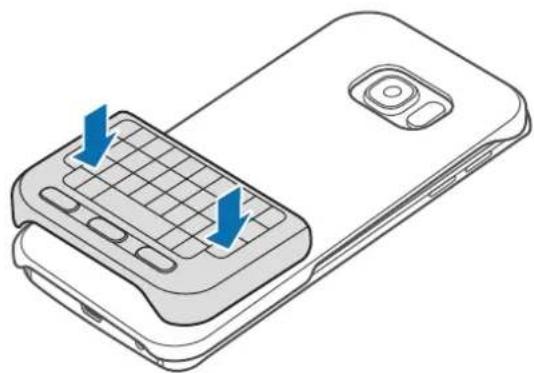
natural_image
Line drawing of a smartphone with a keyboard and two blue arrows indicating the keyboard shortcuts (no text or symbols present)Using the keyboard
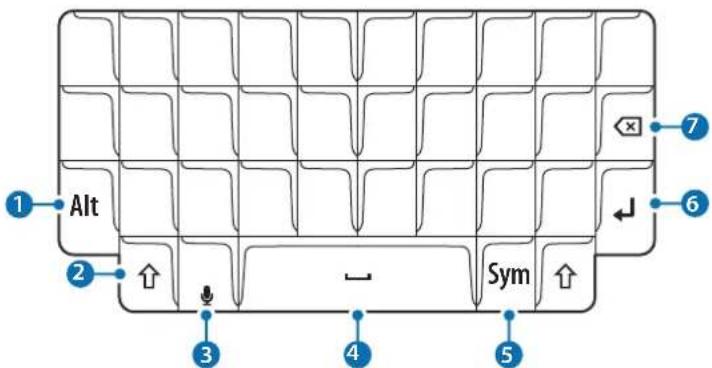
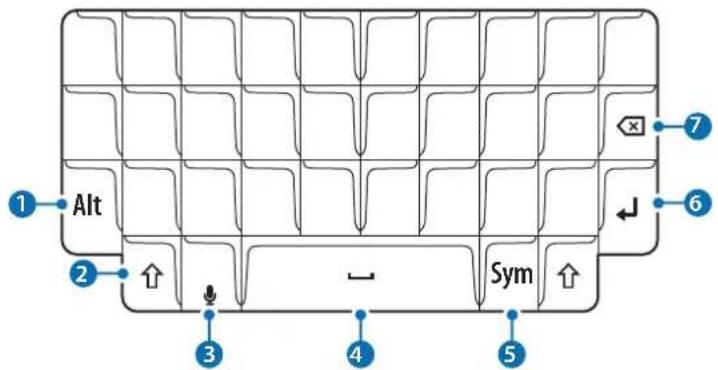
You can enter text using the attached keyboard.
text_image
Alt Sym 1 2 3 4 5 6 7| Key Function | |
| 1 | Press in combination with other keys to enter symbols or numbers. If a keypad appears on the screen, you can enter other characters without using this key.Press and hold to enter symbol and number mode. |
| 2 | Press to enter uppercase characters. Press and hold the key to enter all caps.Press to exit symbol and number mode. |
| 3 | Press to enter text by voice.Press and hold to use additional keyboard functions. |
| 4 | Press to enter a space. |
| 5 | Press to enter symbols. |
| 6 | Press to break to the next line. |
| 7 | Press to delete the text ahead of the cursor's position. |
Changing the input language
Press and hold the Shift key and then press the (Space) key. Alternatively, press and hold the Alt key and then press the Enter key.

Some key functions may not work properly depending on the software version of the connected device. For more information about updating device software, refer to each device's user manual.
Declaration of Conformity
Product details
For the following
Product : Keyboard Cover
Model(s): EJ-CG928/EJ-CN920

Declaration & Applicable standards
We hereby declare, that the product above is in compliance with the essential requirements of the R&TTE Directive (1999/5/EC) by application of:
EN 301 489-1 V1.9.2
EN 302 291-2 V1.1.1
EN 60950-1:2006+A11:2009+A1:2010+A12:2011+A2:2013
EN 301 489-3 V1.6.1
EN 62311:2008
and the Directive (2011/65/EU) on the restriction of the use of certain hazardous substances in electrical and electronic equipment by application of EN 50581:2012.
Representative in the EU
Samsung Electronics Euro QA Lab. (YEAR TO
Blackbushe Business Park BEGIN AFFIXING
Saxony Way, Yateley, Hampshire CE MARKING 2015)
GU46 6GG, UK *
Sholdough
22 June 2015 Stephen Colclough / EU Representative
(Place and date of issue) (Name and signature of authorised person)
* This is not the address of Samsung Service Centre. For the address or the phone number of Samsung Service Centre, see the warranty card or contact the retailer where you purchased your product.
Declaration of Conformity
Product details
For the following
Product : Keyboard Cover
Model(s): EJ-CG930/EJ-CG935

Declaration & Applicable standards
We hereby declare, that the product above is in compliance with the essential requirements of the R&TTE Directive (1999/5/EC) by application of:
SAFETY EN 60950-1:2006+A11:2009+A1:2010+A12:2011+A2:2013
SAR EN 62311:2008
EMC EN 301 489-1 V1.9.2 (09-2011)
EN 301 489-3 V1.6.1 (08-2013)
RADIO EN 302 291-2 V1.1.1 (07-2005)
and the Directive (2011/65/EU) on the restriction of the use of certain hazardous substances in electrical and electronic equipment by application of EN 50581:2012.
Representative in the EU
Samsung Electronics Euro QA Lab. (YEAR TO
Blackbushe Business Park BEGIN AFFIXING
Saxony Way, Yateley, Hampshire CE MARKING 2015)
GU46 6GG, UK *
Sholdough
2015.12.31 Stephen Colclough / EU Representative
(Place and date of issue) (Name and signature of authorised person)
* This is not the address of Samsung Service Centre. For the address or the phone number of Samsung Service Centre, see the warranty card or contact the retailer where you purchased your product.
Copyright
Copyright © 2016 Samsung Electronics
This manual is protected under international copyright laws.
No part of this manual may be reproduced, distributed, translated, or transmitted in any form or by any means, electronic or mechanical, including photocopying, recording, or storing in any information storage and retrieval system, without the prior written permission of Samsung Electronics.
Trademarks
• SAMSUNG and the SAMSUNG logo are registered trademarks of Samsung Electronics.
- All other trademarks and copyrights are the property of their respective owners.
natural_image
Illustration of a smartphone with blue directional arrows indicating movement or force (no text or symbols present)natural_image
Illustration of a smartphone with a keyboard and two blue arrows indicating the keyboard shortcuts (no text or symbols present)Retirer le clavier
natural_image
Illustration of a smartphone with a keyboard and scroll, showing front panel and side panel (no text or symbols)
natural_image
Line drawing of a smartphone with a grid keypad and two blue arrows indicating the keyboard (no text or symbols present)Utiliser le clavier
Blackbushe Business Park D'APPOSITION DU
Saxony Way, Yateley, Hampshire MARQUAGE CE : 2015)
GU46 6GG, UK *
Sholdough
Blackbushe Business Park D'APPOSITION DU
Saxony Way, Yateley, Hampshire MARQUAGE CE : 2015)
GU46 6GG, UK *
Sholdough
Copyright © 2016 Samsung Electronics
text_image
Diagram of a smartphone with labeled buttons and directional arrows indicating action or movementnatural_image
Illustration of a smartphone with a keyboard and two blue arrows indicating directional movement (no text or symbols)Tastatur entfernen
natural_image
Illustration of a smartphone with a keyboard and scroll, showing front panel and side panel (no text or symbols)
natural_image
Line drawing of a mobile phone with keyboard and screen, showing two blue arrows indicating left-hand placement (no text or symbols present)Tastatur verwenden
Copyright © 2016 Samsung Electronics
text_image
Diagram of a smartphone with labeled buttons and directional arrows indicating action or movementnatural_image
Illustration of a smartphone with a keyboard and two blue arrows indicating directional movement (no text or symbols)natural_image
Illustration of a smartphone showing the keyboard and display area (no text or symbols)
natural_image
Line drawing of a smartphone with a grid keypad and two blue arrows indicating the keyboard (no text or symbols present)Blackbushe Business Park INIZIARE AD APPORRE
Saxony Way, Yateley, Hampshire LA MARCATURA CE 2015)
GU46 6GG, UK *
Sholdough
Blackbushe Business Park INIZIARE AD APPORRE
Saxony Way, Yateley, Hampshire LA MARCATURA CE 2015)
GU46 6GG, UK *
Sholdough
2015.12.31 Stephen Colclough / Rappresentante UE
Copyright © 2016 Samsung Electronics
text_image
Diagram of a smartphone with labeled buttons and directional arrows indicating action or movementnatural_image
Illustration of a smartphone with a keyboard and two blue arrows indicating the keyboard shortcuts (no text or symbols present)natural_image
Illustration of a smartphone with a keyboard inserted, showing the blade and handle (no text or symbols)
natural_image
Line drawing of a smartphone showing the keyboard and screen with blue arrows indicating move or change (no text or symbols present)Modelo(s): EJ-CG928/EJ-CN920

Modelo(s): EJ-CG930/EJ-CG935

Copyright © 2016 Samsung Electronics
text_image
Diagram of a smartphone with labeled buttons and directional arrows indicating action or movementnatural_image
Illustration of a smartphone with a keyboard and two blue arrows indicating directional movement (no text or symbols)natural_image
Illustration of a smartphone showing the keyboard and display area (no text or symbols)
natural_image
Line drawing of a smartphone with a keyboard and two blue arrows indicating the keyboard shortcuts (no text or symbols present)Copyright © 2016 Samsung Electronics
text_image
Diagram of a smartphone with labeled buttons and directional arrows indicating action or movementnatural_image
Illustration of a smartphone showing the keyboard and mouse, with blue arrows indicating move direction (no text or symbols present)natural_image
Illustration of a smartphone showing the keyboard and display area (no text or symbols)
natural_image
Line drawing of a smartphone with a keyboard and two blue arrows indicating the keyboard shortcuts (no text or symbols present)Model(e): EJ-CG930/EJ-CG935

Copyright © 2016 Samsung Electronics
natural_image
Illustration of a smartphone with blue directional arrows indicating movement or force (no text or symbols present)natural_image
Illustration of a smartphone with a keyboard and two blue arrows indicating the keyboard shortcuts (no text or symbols present)Detaşarea tastaturii
natural_image
Illustration of a smartphone showing the keyboard and display area (no text or symbols)
natural_image
Line drawing of a smartphone with a keyboard and two blue arrows indicating the keyboard shortcuts (no text or symbols present)Blackbushe Business Park APLICARE MARCĂ
Saxony Way, Yateley, Hampshire CE 2015)
GU46 6GG, UK *
SH coldough
Blackbushe Business Park APLICARE MARCĂ
Saxony Way, Yateley, Hampshire CE 2015)
GU46 6GG, UK *
Sholdough
2015.12.31 Stephen Colclough / Representant UE
text_image
Diagram of a smartphone with labeled buttons and directional arrows indicating action or movementnatural_image
Illustration of a smartphone with a keyboard and two blue arrows indicating the keyboard direction (no text or symbols present)natural_image
Illustration of a smartphone with a keyboard and scroll, showing front panel and side panel (no text or symbols)
natural_image
Line drawing of a mobile phone with a keyboard and two blue arrows indicating the keyboard shortcuts (no text or symbols present)Copyright © 2016 Samsung Electronics
text_image
Diagram of a smartphone with labeled buttons and directional arrows indicating action or movement2 Pričvrstite tipkovnicu na donji dio uređaja.
natural_image
Illustration of a smartphone with a keyboard and two blue arrows indicating the keyboard direction (no text or symbols present)natural_image
Illustration of a smartphone with a keyboard and scroll, showing front panel and side panel (no text or symbols)
Nepropisno odvajanje tipkovnice može uzrokovati oštećenje tipkovnice ili uređaja.
natural_image
Line drawing of a mobile phone with a keyboard and two blue arrows indicating the keyboard shortcuts (no text or symbols present)Uporaba tipkovnice
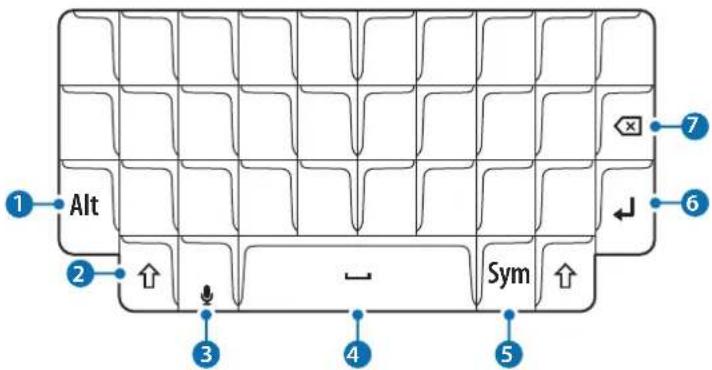
Tekst možete unijeti upotrebom pričvršćene tipkovnice.
text_image
Alt Sym 1 2 3 4 5 6 7| Tipka Funkcija | |
| 1 | Pritisnite u kombinaciji s drugim tipkama kako biste unijeli simbole ili brojeve. Ako se na zaslonu pojavi tipkovnica, možete unijeti druge znakove bez korištenje ove tipke.Pritisnite i držite za unos načina simbola i brojeva. |
| 2 | Pritisnite za unos znakova napisanih velikim slovima. Pritisnite i držite tipku za unos svih velikih slova.Pritisnite za izlaz iz načina simbola i brojeva. |
| 3 | Pritisnite za unos teksta glasovnim putem.Pritisnite i držite za korištenje dodatnih funkcija tipkovnice. |
| 4 | Pritisnite za unos razmaka. |
| 5 | Pritisnite za unos simbola. |
| 6 | Pritisnite za prijelom u sljedeći red. |
| 7 | Pritisnite za brisanje teksta koji se nalazi ispred trenutačnog položaja strelice. |
Blackbushe Business Park STAVLJANJA
Saxony Way, Yateley, Hampshire CE OZNAKA 2015.)
GU46 6GG, UK *
Sholdough
Blackbushe Business Park STAVLJANJA
Saxony Way, Yateley, Hampshire CE OZNAKA 2015.)
GU46 6GG, UK *
Sholdough
2015.12.31 Stephen Colclough / Predstavnik EU
Copyright © 2016 Samsung Electronics
natural_image
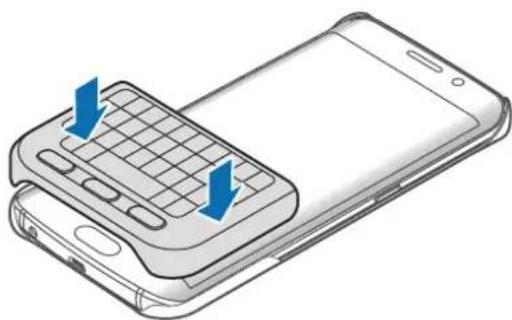
Illustration of a smartphone with blue directional arrows indicating movement or change (no text or symbols present)2 Priključite tastaturu na dno uređaja.
natural_image
Illustration of a smartphone with a keyboard and two blue arrows indicating directional movement (no text or symbols)Odvajanje tastature
natural_image
Illustration of a foldable smartphone with a keyboard and scroll, showing front panel and side panel (no text or symbols)
Nepravilno odvajanje tastature može da ošteti tastaturu ili uređaj.
2 Spojite tastaturu na poleđinu uređaja u dnu poklopca tastature.
natural_image
Line drawing of a smartphone showing the keyboard and screen with blue arrows indicating move or change (no text or symbols present)Korišćenje tastature
Možete da unosite tekst pomoću priključene tastature.
text_image
Alt Sym 1 2 3 4 5 6 7| Taster Funkcija | |
| 1 | Pritisnite u kombinaciji sa drugim tasterima da biste upisali simbole ili brojeve. Ako se na ekranu pojavi tastatura, možete da upišite druge karaktere bez korišćenja ovog tastera.Pritisnite i držite biste pristupili režimu simbola i brojeva. |
| 2 | Pritisnite da biste pristupili velikim slovima. Pritisnite i zadržite taster da biste upisali sva velika slova.Pritisnite da biste izašli iz režima simbola i brojeva. |
| 3 | Pritisnite da biste uneli tekst govorom.Pritisnite i zadržite da biste koristili dodatne funkcije tastature. |
| 4 | Pritisnite da biste uneli razmak. |
| 5 | Pritisnite da biste uneli simbole. |
| 6 | Pritisnite da biste prešli u sledeći red. |
| 7 | Pritisnite da biste obrisali tekst ispred položaja pokazivača. |
Menjanje jezika unosa
Pritisnite i zadržite taster (Shift) a zatim pritisnite taster (Space). Možete i da pritisnete i zadržite taster Alt a zatim pritisnite taster (Enter).

Neke ključne funkcije možda neće raditi ispravno u zavisnosti od verzije softvera povezanog uređaja. Za više informacija o ažuriranju softvera uređaja, pogledajte uputstvo za upotrebu tog uređaja.
Copyright © 2016 Samsung Electronics
Ovaj priručnik je zaštićen međunarodnim zakonima o autorskim pravima.
Nijedan deo ovog priručnika se ne sme reprodukovati, distribuirati, prevoditi niti prenositi ni u jednom obliku niti bilo kojim putem, elektronskim niti mehaničkim, što podrazumeva fotokopiranje, snimanje i skladištenje u okviru bilo kog skladišta informacija i sistema za preuzimanje, bez prethodne dozvole kompanije Samsung Electronics u pisanom obliku.
Trgovačke marke
• SAMSUNG i SAMSUNG logotip su registrovane trgovačke marke kompanije Samsung Electronics.
• Sve ostale trgovačke marke i autorska prava su vlasništvo njihovih vlasnika.
Leia primeiro
natural_image
Illustration of a smartphone with blue directional arrows indicating movement or force (no text or symbols present)natural_image
Illustration of a smartphone with a keyboard and mouse, showing two blue arrows indicating the keyboard's left side (no text or symbols present)Retirar o teclado
natural_image
Illustration of a smartphone with a keyboard and scroll, showing front panel and side panel (no text or symbols)
natural_image
Line drawing of a mobile phone with a keyboard and two blue arrows indicating the keyboard shortcuts (no text or symbols present)Utilizar o teclado
Modelo(s): EJ-CG928/EJ-CN920

Modelo(s): EJ-CG930/EJ-CG935

Copyright © 2016 Samsung Electronics
Este manual está protegido pelas leis internacionais de copyright.
natural_image
Illustration of a smartphone with blue directional arrows indicating movement or force (no text or symbols present)natural_image
Illustration of a smartphone with a keyboard and mouse, showing two blue arrows indicating the keyboard's left side (no text or symbols present)natural_image
Illustration of a smartphone with a keyboard and scroll, showing front panel and side panel (no text or symbols)
natural_image
Line drawing of a mobile phone with a keyboard and two blue arrows indicating the keyboard shortcuts (no text or symbols present)text_image
Diagram of a smartphone with labeled buttons and directional arrows indicating action or movementnatural_image
Illustration of a smartphone with a keyboard and two blue arrows indicating directional movement (no text or symbols)natural_image
Illustration of a smartphone with a keyboard and scroll, showing front panel and side panel (no text or symbols)
natural_image
Line drawing of a mobile phone with a keyboard and two blue arrows indicating the keyboard shortcuts (no text or symbols present)text_image
Diagram of a smartphone showing two labeled buttons (1 and 2) with blue arrows indicating direction or movement on the screen.natural_image
Illustration of a smartphone with a keyboard and two blue arrows indicating the keyboard shortcuts (no text or symbols present)natural_image
Illustration of a smartphone with a keyboard and scroll, showing front panel and side panel (no text or symbols)
natural_image
Line drawing of a mobile phone with a keyboard and two blue arrows indicating the keyboard shortcuts (no text or symbols present)Blackbushe Business Park AFIKS
Saxony Way, Yateley, Hampshire CE-MÄRGISTUS 2015)
GU46 6GG, UK *
Sholdough
- juuni 2015. a Stephen Colclough / EL-i volinik
Blackbushe Business Park AFIKS
Saxony Way, Yateley, Hampshire CE-MÄRGISTUS 2015)
GU46 6GG, UK *
Sholdough
2015.12.31 Stephen Colclough / EL-i volinik
Copyright © 2016 Samsung Electronics
text_image
Diagram of a smartphone with labeled buttons and directional arrows indicating action or movementnatural_image
Illustration of a smartphone with a keyboard and two blue arrows indicating the keyboard shortcuts (no text or symbols present)natural_image
Illustration of a smartphone showing the keyboard and display area (no text or symbols)
natural_image
Line drawing of a smartphone with a keyboard and two blue arrows indicating the keyboard shortcuts (no text or symbols present)Blackbushe Business Park CE-MARKERING 2015
Saxony Way, Yateley, Hampshire MOET WORDEN TOEGEVOEGD)
GU46 6GG, UK *
Blackbushe Business Park CE-MARKERING 2015
Saxony Way, Yateley, Hampshire MOET WORDEN TOEGEVOEGD)
GU46 6GG, UK *
Sfd coldough
2015.12.31 Stephen Colclough / EU-vertegenwoordiger
Copyright © 2016 Samsung Electronics
text_image
Diagram of a smartphone with labeled buttons and directional arrows indicating action or movement2 Sätt fast tangentbordet på enhetens nedre del.
natural_image
Illustration of a smartphone with a keyboard and two blue arrows indicating directional movement (no text or symbols)natural_image
Illustration of a smartphone with a keyboard and blue arrow indicating rotation (no text or symbols)
natural_image
Line drawing of a smartphone with a keyboard and two blue arrows indicating the keyboard shortcuts (no text or symbols present)Copyright © 2016 Samsung Electronics
text_image
Diagram of a smartphone showing two labeled buttons (1 and 2) with blue directional arrows indicating movement or change.natural_image
Illustration of a smartphone showing the keyboard and mouse, with blue arrows indicating the keyboard shortcuts (no text or symbols present)Løsne tastaturet
natural_image
Illustration of a foldable smartphone with a keyboard and scroll, showing front panel and side panel (no text or symbols)
Hvis du løsner tastaturet feil kan det skade tastaturet eller enheten.
natural_image
Line drawing of a smartphone with a keyboard and two blue arrows indicating the keyboard shortcuts (no text or symbols present)Bruke tastaturet
Blackbushe Business Park DET TILF∅YES
Saxony Way, Yateley, Hampshire CE-MERKING 2015)
GU46 6GG, UK *
Sholdough
- juni 2015 Stephen Colclough / EU-representant
Blackbushe Business Park DET TILF∅YES
Saxony Way, Yateley, Hampshire CE-MERKING 2015)
GU46 6GG, UK *
Sholdough
2015.12.31 Stephen Colclough / EU-representant
Copyright © 2016 Samsung Electronics
text_image
Diagram of a smartphone with labeled buttons and directional arrows indicating action or movementnatural_image
Illustration of a smartphone with a keyboard and two blue arrows indicating directional movement (no text or symbols)natural_image
Illustration of a smartphone with a keyboard and scroll, showing front panel and side panel (no text or symbols)
natural_image
Illustration of a smartphone with a keyboard and two blue arrows indicating the keyboard shortcuts (no text or symbols present)Blackbushe Business Park LIITTÄMISEN
Saxony Way, Yateley, Hampshire ALKAMISVUOSI 2015)
GU46 6GG, UK *
Sholdough
Blackbushe Business Park LIITTÄMISEN
Saxony Way, Yateley, Hampshire ALKAMISVUOSI 2015)
GU46 6GG, UK *
SH coldough
Copyright © 2016 Samsung Electronics
natural_image
Illustration of a smartphone with blue directional arrows indicating movement or change (no text or symbols present)natural_image
Illustration of a smartphone with a keyboard and mouse, showing two blue arrows indicating the keyboard's left side (no text or symbols present)natural_image
Illustration of a smartphone with a keyboard and scroll, showing front panel and side panel (no text or symbols)
natural_image
Line drawing of a mobile phone with a keyboard and two blue arrows indicating the keyboard shortcuts (no text or symbols present)Brug af tastaturet
Blackbushe Business Park PÅBEGYNDELSE
Saxony Way, Yateley, Hampshire AF CE-MAERKNING 2015)
GU46 6GG, UK *
SHoldough
Blackbushe Business Park PÅBEGYNDELSE
Saxony Way, Yateley, Hampshire AF CE-MAERKNING 2015)
GU46 6GG, UK *
SHoldough
text_image
Diagram of a smartphone with labeled buttons and directional arrows indicating action or movementnatural_image
Illustration of a smartphone with a keyboard and two blue arrows indicating directional movement (no text or symbols)natural_image
Illustration of a smartphone showing the keyboard and display area (no text or symbols)
natural_image
Line drawing of a smartphone showing the keyboard and screen with blue arrows indicating move or change (no text or symbols present)natural_image
Illustration of a smartphone with blue directional arrows indicating movement or force (no text or symbols present)2 Pritrdite tipkovnico na dno naprave.
natural_image
Illustration of a smartphone with a keyboard and two blue arrows indicating directional movement (no text or symbols)natural_image
Illustration of a smartphone with a keyboard and scroll, showing front panel and side panel (no text or symbols)
natural_image
Line drawing of a mobile phone with a keyboard and two blue arrows indicating the keyboard shortcuts (no text or symbols present)Uporaba tipkovnice
Blackbushe Business Park 2015 SE JE ZAČELO
Saxony Way, Yateley, Hampshire OZNAČEVANJE Z OZNAKO CE)
GU46 6GG, UK *
Sholdough
Model(e): EJ-CG930/EJ-CG935

Deklaracija in veljavni standardi
Blackbushe Business Park 2015 SE JE ZAČELO
Saxony Way, Yateley, Hampshire OZNAČEVANJE Z OZNAKO CE)
GU46 6GG, UK *
Sholdough
text_image
Diagram of a smartphone with labeled buttons and directional arrows indicating action or movementnatural_image
Illustration of a smartphone with a keyboard and two blue arrows indicating the keyboard shortcuts (no text or symbols present)Odpojení klávesnice
natural_image
Illustration of a smartphone showing the keyboard and display area (no text or symbols)
natural_image
Line drawing of a smartphone with a keyboard and two blue arrows indicating the keyboard shortcuts (no text or symbols present)Blackbushe Business Park NALEPOVÁNÍ
Saxony Way, Yateley, Hampshire OZNAČENÍ CE 2015)
GU46 6GG, UK *
Sholdough
Blackbushe Business Park NALEPOVÁNÍ
Saxony Way, Yateley, Hampshire OZNAČENÍ CE 2015)
GU46 6GG, UK *
Sholdough
2015.12.31 Stephen Colclough / Zástupce pro EU
Copyright © 2016 Samsung Electronics
text_image
Diagram of a smartphone with labeled parts and directional arrows indicating movement or change.natural_image
Illustration of a smartphone with a keyboard and mouse, showing two blue arrows indicating the keyboard shortcuts (no text or symbols present)natural_image
Illustration of a smartphone with a keyboard and scroll, showing front panel and side panel (no text or symbols)
natural_image
Illustration of a smartphone with a keyboard and two blue arrows indicating the keyboard shortcuts (no text or symbols present)Klavyeyi kullanma
Telif hakkı © 2016 Samsung Electronics
natural_image
Illustration of a smartphone with blue directional arrows indicating movement or force (no text or symbols)natural_image
Illustration of a smartphone showing the keyboard and screen with blue arrows indicating input or operation (no text or symbols present)فصل لوحة المفاتيح
natural_image
Illustration of a smartphone with a keyboard and scroll, showing front panel and side screen (no text or symbols)natural_image
Line drawing of a smartphone showing the keyboard and screen with blue arrows indicating move or change (no text or symbols present)natural_image
Illustration of a smartphone with blue directional arrows indicating movement or force (no text or symbols)natural_image
Illustration of a smartphone with a keyboard and two blue arrows indicating the keyboard direction (no text or symbols present)جدا کردن صفحه کلید
natural_image
Illustration of a smartphone with a keyboard and scroll, showing front panel and side screen (no text or symbols)natural_image
Line drawing of a smartphone showing the keyboard and screen with blue arrows indicating move or change (no text or symbols present)Copyright © 2016 Samsung Electronics
text_image
Diagram of a smartphone with labeled buttons and directional arrows indicating action or movementnatural_image
Illustration of a smartphone with a keyboard and two blue arrows indicating directional movement (no text or symbols)Снятие клавиатуры
natural_image
Illustration of a smartphone showing the keyboard and display area (no text or symbols)
natural_image
Illustration of a smartphone with a keyboard and two blue arrows indicating the keyboard shortcuts (no text or symbols present)© Samsung Electronics, 2016.
text_image
Diagram of a smartphone with labeled buttons and directional arrows indicating action or movementnatural_image
Illustration of a smartphone with a keyboard and two blue arrows indicating directional movement (no text or symbols)Зняття клавіатури
natural_image
Illustration of a smartphone with a keyboard and scroll, showing front panel and side screen (no text or symbols)
natural_image
Line drawing of a mobile phone with keyboard and screen, showing two blue arrows indicating left-hand moves (no text or symbols present)© Samsung Electronics, 2016
text_image
Diagram of a smartphone with labeled buttons and directional arrows indicating action or movementnatural_image
Illustration of a smartphone showing the keyboard and screen with blue arrows indicating input or operation (no text or symbols present)Пернетактаны ажырату
natural_image
Illustration of a smartphone showing the keyboard and display area (no text or symbols)
natural_image
Line drawing of a smartphone showing the keyboard and screen with blue arrows indicating move or change (no text or symbols present)Copyright © 2016 Samsung Electronics
Please read this manual before using the device to ensure safe and proper use.
- Images may differ in appearance from the actual product. Content is subject to change without prior notice.
- Descriptions are based on the Galaxy S6 edge's default settings and appearance.
Instructional icons

Warning: situations that could cause injury to yourself or others

Caution: situations that could cause damage to your device or other equipment

Notice: notes, usage tips, or additional information
Getting started
Package contents
Check the product box for the following items:
- Keyboard
- Quick start guide

- The items supplied with the device and any available accessories may vary depending on the region or service provider.
- The supplied items are designed only for this device and may not be compatible with other devices.
- Appearances and specifications are subject to change without prior notice.
- You can purchase additional accessories from your local Samsung retailer. Make sure they are compatible with the device before purchase.
- Use only Samsung-approved accessories. Using unapproved accessories may cause the performance problems and malfunctions that are not covered by the warranty.
- Availability of all accessories is subject to change depending entirely on manufacturing companies. For more information about available accessories, refer to the Samsung website.
Device layout
text_image
Recents key Home key Back key Keyboard cover KeyboardKeys and functions
| Name Function | |
| Recents | Press to open the list of recent apps. |
| Home | Press to turn on the screen while the screen is locked.Press to return to the Home screen.Press and hold to launch Google. |
| Back | Press to return to the previous screen. |
Using the keyboard
Attaching the keyboard
Attach the keyboard to your device and use it instead of the on-screen keyboard to enter text.
1 Secure the keyboard cover on the back of the device.
text_image
Diagram of a smartphone with labeled buttons and directional arrows indicating action or movement2 Attach the keyboard to the bottom of the device.
natural_image
Illustration of a smartphone with a keyboard and two blue arrows indicating the keyboard shortcuts (no text or symbols present)Detaching the keyboard
You can attach the keyboard to the keyboard cover when you are not using it.
1 Lift one side of the keyboard and detach it from the device.
Detaching the keyboard improperly may damage the keyboard or the device.
2 Attach the keyboard to the back of the device at the bottom of the keyboard cover.
Using the keyboard
You can enter text using the attached keyboard.
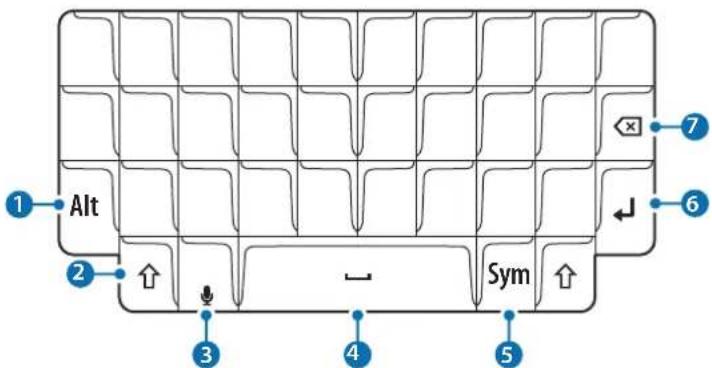
text_image
Alt Sym 1 2 3 4 5 6 7| Key Function | |
| 1 | Press in combination with other keys to enter symbols or numbers. If a keypad appears on the screen, you can enter other characters without using this key.Press and hold to enter symbol and number mode. |
| 2 | Press to enter uppercase characters. Press and hold the key to enter all caps.Press to exit symbol and number mode. |
| 3 | Press to enter text by voice.Press and hold to use additional keyboard functions. |
| 4 | Press to enter a space. |
| 5 | Press to enter symbols. |
| 6 | Press to break to the next line. |
| 7 | Press to delete the text ahead of the cursor's position. |
Changing the input language
Press and hold the Shift key and then press the (Space) key. Alternatively, press and hold the Alt key and then press the Enter key.

Some key functions may not work properly depending on the software version of the connected device. For more information about updating device software, refer to each device's user manual.
Copyright
Copyright © 2016 Samsung Electronics
This manual is protected under international copyright laws.
No part of this manual may be reproduced, distributed, translated, or transmitted in any form or by any means, electronic or mechanical, including photocopying, recording, or storing in any information storage and retrieval system, without the prior written permission of Samsung Electronics.
Trademarks
• SAMSUNG and the SAMSUNG logo are registered trademarks of Samsung Electronics.
- All other trademarks and copyrights are the property of their respective owners.
natural_image
Illustration of a smartphone with blue directional arrows indicating movement or change (no text or symbols present)natural_image
Illustration of a smartphone with a keyboard and two blue arrows indicating the keyboard shortcuts (no text or symbols present)Retirar el teclado
natural_image
Illustration of a smartphone showing the keyboard and display area (no text or symbols)
natural_image
Line drawing of a mobile phone showing the keyboard and screen (no text or symbols)Uso del teclado
Copyright © 2016 Samsung Electronics
natural_image
Illustration of a smartphone with blue directional arrows indicating movement or force (no text or symbols present)natural_image
Illustration of a smartphone showing the keyboard and mouse, with blue arrows indicating directional movement (no text or symbols present)Retrait du clavier
natural_image
Illustration of a smartphone showing the keyboard and display area (no text or symbols)
natural_image
Line drawing of a smartphone with a keyboard and two blue arrows indicating the keyboard shortcuts (no text or symbols present)© Samsung Electronics, 2016.
text_image
Diagram of a smartphone showing two labeled buttons (1 and 2) with blue arrows indicating direction or movement on the screen.natural_image
Illustration of a smartphone with a keyboard and mouse, showing two blue arrows indicating the keyboard shortcuts (no text or symbols present)Retirando o teclado
natural_image
Illustration of a smartphone with a keyboard and scroll, showing front panel and side panel (no text or symbols)
natural_image
Line drawing of a mobile phone with a keyboard and two blue arrows indicating the keyboard shortcuts (no text or symbols present)Usando o teclado
text_image
Diagram of a smartphone with labeled buttons and directional arrows indicating action or movementnatural_image
Illustration of a smartphone with keyboard and mouse, showing two blue arrows indicating the keyboard shortcuts (no text or symbols present)제품 분리 방법
natural_image
Illustration of a smartphone with a keyboard and blue arrow indicating rotation (no text or symbols)