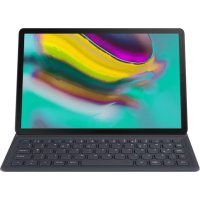
EJFT720 - Keyboard SAMSUNG - Free user manual and instructions
Find the device manual for free EJFT720 SAMSUNG in PDF.



| Product Type | Keyboard with case and tablet stand |
| Brand | Samsung |
| Model | EJFT720 |
| Compatibility | Samsung Galaxy Tab S5e (only) |
| Dimensions (approx.) | 250 x 180 x 15 mm |
| Weight (approx.) | 400 g |
| Power | Powered by the tablet via connectors |
| Main functions | Text input, screen protection, tablet stand |
| Material | Plastic and fabric |
| Box contents | Keyboard with case, user manual |
| Connectors | Dedicated connectors on the case |
| Operating temperature | 0 °C to 35 °C |
| Storage temperature | -20 °C to 50 °C |
| Precautions | Contains magnets, keep away from medical devices (15 cm) |
| Cleaning | Wipe with a soft, dry cloth |
| Maintenance | Avoid contact with liquids or conductive materials |
| Repairability | Do not disassemble, modify, or repair yourself |
| Warranty | Subject to local legislation |
| Environmental information | Recyclable product, do not dispose of with household waste |
| Website | www.samsung.com |
Frequently Asked Questions - EJFT720 SAMSUNG
User questions about EJFT720 SAMSUNG
0 question about this device. Answer the ones you know or ask your own.
Ask a new question about this device
Download the instructions for your Keyboard in PDF format for free! Find your manual EJFT720 - SAMSUNG and take your electronic device back in hand. On this page are published all the documents necessary for the use of your device. EJFT720 by SAMSUNG.
USER MANUAL EJFT720 SAMSUNG
natural_image
Illustration of a laptop with a grid-patterned keyboard and an arrow pointing to the screen (no text or symbols)B
natural_image
Line drawing of a laptop with a grid-patterned keyboard and a black arrow pointing to the screen (no text or symbols)Copyright © 2019 Samsung Electronics
- Please read this guide before using the device to ensure safe and proper use.
- Images may differ in appearance from the actual product. Content is subject to change without prior notice. Visit www.samsung.com to view device information, the latest guide, and more.
- The keyboard is optimised to connect with the SAMSUNG Galaxy Tab S5e and may not be compatible with other devices. Before connecting the keyboard with devices other than the SAMSUNG Galaxy Tab S5e, make sure they are compatible with the keyboard.
- Your consumer rights are governed by the law of the country in which you purchased the product. Please contact your service provider for more information.
- This product includes certain free/open source software. To see the instructions for viewing the open source licence, go to the Samsung website ( opensource.samsung.com).
Package contents
Keyboard, User manual
Device layout
| a | Stand Dock ports | d | |
| b | Rear camera hole Keyboard | e | |
| c | Connection hole |
Connecting the keyboard
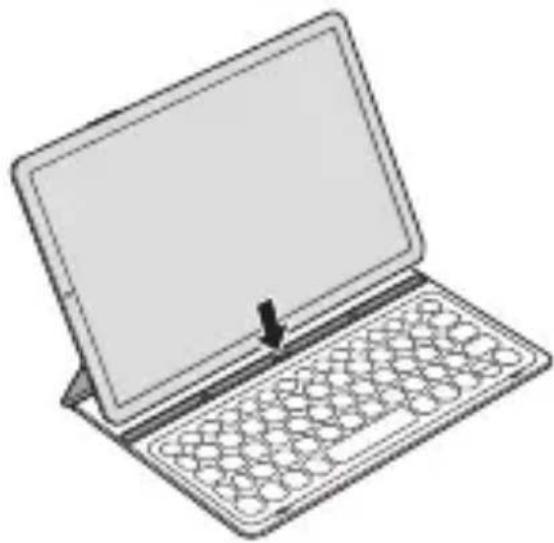
When you connect the keyboard to a tablet, you can enter characters without pressing the tablet's screen. You can also use the keyboard as a cradle for the tablet by using its stand.
- Position the tablet's rear camera to insert it into the rear camera hole and attach the tablet to the stand. (A)
- Insert the tablet into the connection hole to meet the tablet's connectors and the dock ports. (B)

Make sure not to disconnect the tablet and the keyboard accidentally or drop them while moving.
Safety information
Read all safety information before using the device to ensure safe and proper use. To view the full safety information, refer to the Samsung website.
The device and some accessories (sold separately) contain magnets. The American Heart Association (US) and the Medicines and Healthcare Products Regulatory Agency (UK) both warn that magnets can affect the operation of implanted pacemakers, cardioverters, defibrillators, insulin pumps or other electro medical devices (collectively, “Medical Device”) within the range of 15 cm (6 inches). If you are a user of any of these Medical Devices, DO NOT USE THIS DEVICE AND SOME ACCESSORIES (SOLD SEPARATELY) UNLESS YOU HAVE CONSULTED WITH YOUR PHYSICIAN
Use manufacturer-approved accessories and supplies
Do not touch the device with wet hands
Do not drop or cause an impact to the device
The device can be used in locations with an ambient temperature of 0 °C to 35 °C. You can store the device at an ambient temperature of -20 °C to 50 °C. Using or storing the device outside of the recommended temperature ranges may damage the device
Prevent the dock ports from contact with conductive materials, such as liquids, dust, metal powders, and pencil leads
Do not allow children or animals to chew or suck the device Do not disassemble, modify, or repair your device
Correct disposal
natural_image
Symbol of a trash bin crossed with a diagonal line and a horizontal bar below (no text or numbers present)This marking on the product, accessories or literature indicates that the product and its electronic accessories (e.g. charger, headset, USB cable) should not be disposed of with other household waste.
This product is RoHS compliant.
For information on Samsung's environmental commitments and product regulatory obligations, e.g. REACH, WEEE or Batteries, visit our sustainability page available via www.samsung.com.
Samsung Electronics Service Dept PO Box 12987, Blackrock, Co. Dublin, Ireland
CE
natural_image
Symbol of a waste bin with crossed lines indicating no waste, and a solid black rectangle below (no text or labels)natural_image
Symbol of a trash bin with crossed lines indicating no waste or restriction (no text or labels)natural_image
Symbol of a trash bin crossed with a diagonal line, no text or numbers presentnatural_image
Symbol of a trash bin crossed with a diagonal line, no text or numbers presentnatural_image
Symbol of a waste bin with crossed lines indicating no waste, and a solid black rectangle below (no text or labels)natural_image
Symbol of a waste bin with crossed lines indicating no waste, and a solid black rectangle below (no text or labels)Ova oznaka na proizvodu, dodatnoj opremi ili u literaturi pokazuje da se proizvod i njegov elektronički pribor (npr. punjač, slušalice, USB kabel) ne smiju odlagati s ostalim kućanskim otpadom.
Za informacije o ekološkim obvezama Samsunga i zakonskim obvezama koje se odnose na proizvod kao što su uredba REACH, direktiva WEEE ili Baterije, posjetite našu stranicu održivosti na www.samsung.com.
- Pre nego što počnete da koristite uređaj pročitajte ovaj vodič kako biste bili sigurni da ga koristite na bezbedan i ispravan način.
- Slike mogu odstupati od stvarnog proizvoda. Sadržaj je podložan promenama bez prethodnog obaveštenja. Idite na veb-sajt www.samsung.com da biste videli informacije o uređaju, najnoviji vodič i drugo.
- Tastatura je optimizovana za povezivanje sa „SAMSUNG Galaxy Tab S5e“ i možda neće biti kompatibilna sa drugim uređajima. Pre povezivanja tastature sa uređajima koji nisu „SAMSUNG Galaxy Tab S5e“, uverite se da su kompatibilni sa ovom tastaturom.
- Vaša prava kao potrošača su zaštićena zakonom zemlje u kojoj ste kupili proizvod. Obratite se svom pružaocu usluga za više informacija.
- Ovaj proizvod uključuje određeni besplatni / softver otvorenog izvora. Da biste videli uputstva za gledanje licence otvorenog izvora, idite na veb stranicu kompanije Samsung ( opensource.samsung.com).
Sadržaj pakovanja
Tastatura, Kratko uputstvo za upotrebu
Raspored uređaja
 | Stalak Priključci bazne stanice | ||
 | Rupica kamere sa zadnje strane | Tastatura | |
 | Priključna rupica |
natural_image
Symbol of a trash bin crossed with a diagonal line, no text or numbers presentnatural_image
Symbol of a trash bin crossed out by two diagonal lines (no text or numbers present)natural_image
Symbol of a trash bin crossed out by two diagonal lines (no text or numbers present)natural_image
Symbol of a trash bin crossed with a diagonal line, no text or numbers presentnatural_image
Symbol of a trash bin crossed with a diagonal line, no text or numbers presentnatural_image
Symbol of a trash bin crossed with a diagonal line, no text or numbers presentnatural_image
Symbol of a waste bin with crossed lines indicating no waste, and a solid black rectangle below (no text or labels)natural_image
Symbol of a trash bin crossed with a diagonal line, no text or numbers presentnatural_image
Symbol of a trash bin crossed out by a diagonal line, with no text or numbers present.natural_image
Symbol of a trash bin crossed with a diagonal line, no text or numbers present
Brand : SAMSUNG
Model : EJFT720
Category : Keyboard