Pick your language and provide your email: we'll send you a specifically translated version.
This manual is not available in your language
Product Type
Soundbar
Brand
Energy
Model
Power Bar One
Subwoofer
Built-in (dual subwoofers)
3D Surround Sound
Yes
Audio Inputs
Digital Optical, Analog RCA (L/R), 3.5mm jack
Audio Outputs
None (built-in sound)
Remote Control
Yes, with TV remote programming capability
Auto Standby
Yes (after 10 minutes without audio signal)
Wall Mountable
Yes, with included template
Included Accessories
Power supply, digital optical cable (1.8 m), 3.5mm to RCA cable (1.6 m), remote control, two rubber feet, wall mounting template, connection guide
Power Supply
Mains via adapter (100-240 V AC)
Power Consumption
Not specified
Compliance
FCC Class B, CE, WEEE, RoHS
Care and Cleaning
Dust with a soft cloth; do not use water, abrasive cleaners, or solvents
Safety
Do not open the device; use only recommended accessories; unplug during storms
Replacement Parts and Repairability
No user-serviceable parts; contact a professional repair technician
General Information
User manual available in multiple languages; Energy customer service (USA): 1-866-441-8208
Frequently Asked Questions - Power Bar One Energy
How do I connect the soundbar to my TV?
Three methods are possible: 1. Use a 3.5mm to RCA cable (included) by plugging the 3.5mm jack into the TV's headphone output and the RCA plugs into the L/R inputs of the soundbar. 2. Use a male-to-male RCA cable (not included) to connect the TV's analog audio outputs to the soundbar's RCA inputs. 3. Use the digital optical cable (included) to connect the TV's optical output to the soundbar's optical input. After connection, turn on the main power switch on the back of the soundbar.
Why is there no sound?
First check that the soundbar is powered on (status light is green or orange). Make sure all cables are securely connected and that the TV/set-top box is on and its volume is audible. Verify that the soundbar is set to the correct source (press the SOURCE button). If using the optical input, set the TV audio format to PCM (not Dolby Digital). Finally, if the soundbar is in standby (red light), press any button once to wake it.
How do I program the TV remote to control the soundbar?
Ensure the soundbar is on (green light). Simultaneously press and hold the SOURCE and MUTE buttons on the front of the soundbar for about 3 seconds until the light flashes orange. Press MUTE once (to program mute) or VOLUME UP/DOWN for volume. Then, point your TV remote at the soundbar (max 30 cm) and slowly press the desired function four times. If programming succeeds, the light flashes green then stays solid.
What does the red light on the soundbar mean?
A solid red light indicates the soundbar is in standby mode (sleep). If it flashes red, it means a remote learning failure during programming.
How do I put the soundbar into standby mode?
The soundbar automatically goes into standby after approximately 10 minutes without receiving an audio signal from the TV or set-top box. You can also turn off the TV; the soundbar will enter standby automatically. There is no power button on the front; the main power switch is on the back.
Can I mount the soundbar on the wall?
Yes, the soundbar is designed for wall mounting. Use the included template to mark the holes. Drill into wall studs or use anchors capable of supporting at least 4.5 kg. Hang the soundbar using the keyhole slots on the back.
What if the remote control doesn't work?
Check that the remote batteries are good and correctly installed (respect polarity). Point the remote directly at the soundbar, without obstacles. If it still doesn't work, you can program your TV remote to control the soundbar (see programming).
How do I clean the soundbar?
Use a soft, dry cloth to dust the cabinet. Never use water, abrasive cleaners, solvents, or detergents. For the grille, you can use a vacuum cleaner with a soft brush attachment.
What to do in case of battery leakage?
Do not handle leaking batteries. Wear gloves and clean the compartment with a dry cloth. Dispose of used batteries according to local regulations. Do not incinerate them. If the battery is lithium, be especially careful.
Can I use the soundbar with a Blu-ray player or game console?
Yes, if these devices are connected to your TV. Connect the soundbar to the TV (via optical, RCA, or 3.5mm) and the sound from all devices connected to the TV will be played through the soundbar.
User questions about Power Bar One Energy
0 question about this device. Answer the ones you know or ask your own.
Ask a new question about this device
No questions yet. Be the first to ask one.
Download the instructions for your Soundbar in PDF format for free! Find your manual Power Bar One -
Energy and take your electronic device back in hand. On this page are published all the documents necessary for the use of your device. Power Bar One by Energy.
USER MANUAL Power Bar One Energy
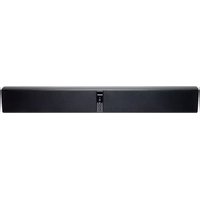
natural_image
Black rectangular electronic device with a control panel and indicator lights, shown against a white background (no text or symbols visible)
Energy Power™ Bar One
Owner's Manual
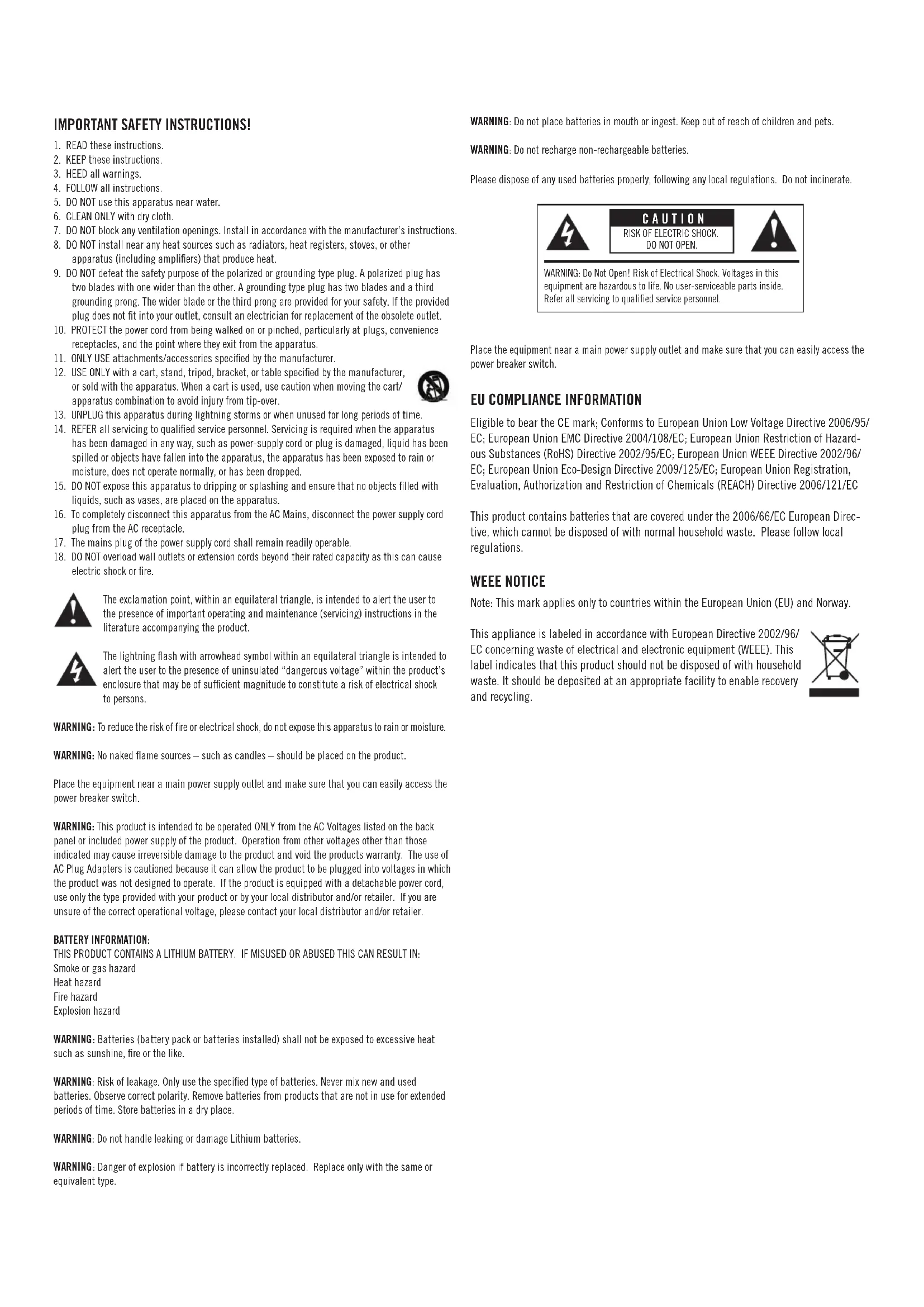
IMPORTANT SAFETY INSTRUCTIONS!
READ these instructions.
KEEP these instructions.
HEED all warnings
FOLLOW all instructions.
DO NOT use this apparatus near water.
CLEAN ONLY with dry cloth.
DO NOT block any ventilation openings. Install in accordance with the manufacturer's instructions.
DO NOT install near any heat sources such as radiators, heat registers, stoves, or other apparatus (including amplifiers) that produce heat.
DO NOT defeat the safety purpose of the polarized or grounding type plug. A polarized plug has two blades with one wider than the other. A grounding type plug has two blades and a third grounding prong. The wider blade or the third prong are provided for your safety. If the provided plug does not fit into your outlet, consult an electrician for replacement of the obsolete outlet.
PROTECT the power cord from being walked on or pinched, particularly at plugs, convenience receptacles, and the point where they exit from the apparatus.
ONLY USE attachments/accessories specified by the manufacturer.
USE ONLY with a cart, stand, tripod, bracket, or table specified by the manufacturer, or sold with the apparatus. When a cart is used, use caution when moving the cart/ apparatus combination to avoid injury from tip-over.
UNPLUG this apparatus during lightning storms or when unused for long periods of time.
REFER all servicing to qualified service personnel. Servicing is required when the apparatus has been damaged in any way, such as power-supply cord or plug is damaged, liquid has been spilled or objects have fallen into the apparatus, the apparatus has been exposed to rain or moisture, does not operate normally, or has been dropped.
DO NOT expose this apparatus to dripping or splashing and ensure that no objects filled with liquids, such as vases, are placed on the apparatus.
To completely disconnect this apparatus from the AC Mains, disconnect the power supply cord plug from the AC receptacle.
The mains plug of the power supply cord shall remain readily operable.
DO NOT overload wall outlets or extension cords beyond their rated capacity as this can cause electric shock or fire.
The exclamation point, within an equilateral triangle, is intended to alert the user to the presence of important operating and maintenance (servicing) instructions in the literature accompanying the product.
The lightning flash with arrowhead symbol within an equilateral triangle is intended to alert the user to the presence of uninsulated “dangerous voltage” within the product’s enclosure that may be of sufficient magnitude to constitute a risk of electrical shock to persons.
WARNING: To reduce the risk of fire or electrical shock, do not expose this apparatus to rain or moisture.
WARNING: No naked flame sources — such as candles — should be placed on the product.
Place the equipment near a main power supply outlet and make sure that you can easily access the power breaker switch.
WARNING: This product is intended to be operated ONLY from the AC Voltages listed on the back panel or included power supply of the product. Operation from other voltages other than those indicated may cause irreversible damage to the product and void the products warranty. The use of AC Plug Adapters is cautioned because it can allow the product to be plugged into voltages in which the product was not designed to operate. If the product is equipped with a detachable power cord, use only the type provided with your product or by your local distributor and/or retailer. If you are unsure of the correct operational voltage, please contact your local distributor and/or retailer.
BATTERY INFORMATION:
THIS PRODUCT CONTAINS A LITHIUM BATTERY. IF MISUSED OR ABUSED THIS CAN RESULT IN:
Smoke or gas hazard
Heat hazard
Fire hazard
Explosion hazard
WARNING: Batteries (battery pack or batteries installed) shall not be exposed to excessive heat such as sunshine, fire or the like.
WARNING: Risk of leakage. Only use the specified type of batteries. Never mix new and used batteries. Observe correct polarity. Remove batteries from products that are not in use for extended periods of time. Store batteries in a dry place.
WARNING: Do not handle leaking or damage Lithium batteries.
WARNING: Danger of explosion if battery is incorrectly replaced. Replace only with the same or equivalent type.
WARNING: Do not place batteries in mouth or ingest. Keep out of reach of children and pets.
WARNING: Do not recharge non-rechargeable batteries.
Please dispose of any used batteries properly, following any local regulations. Do not incinerate.
CAUTION
RISK OF ELECTRIC SHOCK.
DO NOT OPEN.
WARNING: Do Not Open! Risk of Electrical Shock. Voltages in this equipment are hazardous to life. No user-serviceable parts inside. Refer all servicing to qualified service personnel.
Place the equipment near a main power supply outlet and make sure that you can easily access the power breaker switch.
EU COMPLIANCE INFORMATION
Eligible to bear the CE mark; Conforms to European Union Low Voltage Directive 2006/95/EC; European Union EMC Directive 2004/108/EC; European Union Restriction of Hazardous Substances (RoHS) Directive 2002/95/EC; European Union WEEE Directive 2002/96/EC; European Union Eco-Design Directive 2009/125/EC; European Union Registration, Evaluation, Authorization and Restriction of Chemicals (REACH) Directive 2006/121/EC
This product contains batteries that are covered under the 2006/66/EC European Directive, which cannot be disposed of with normal household waste. Please follow local regulations.
WEEE NOTICE
Note: This mark applies only to countries within the European Union (EU) and Norway.
This appliance is labeled in accordance with European Directive 2002/96/EC concerning waste of electrical and electronic equipment (WEEE). This label indicates that this product should not be disposed of with household waste. It should be deposited at an appropriate facility to enable recovery and recycling.
FCC AND CANADA EMC COMPLIANCE INFORMATION:
This device complies with part 15 of the FCC Rules. Operation is subject to the following two conditions:
(1) This device may not cause harmful interference, and (2) this device must accept any interference received, including interference that may cause undesired operation. NOTE: This equipment has been tested and found to comply with the limits for a Class B digital device, pursuant to part 15 of the FCC Rules. These limits are designed to provide reasonable protection against harmful interference in a residential installation. This equipment generates, uses and can radiate radio frequency energy and, if not installed and used in accordance with the instructions, may cause harmful interference to radio communications. However, there is no guarantee that interference will not occur in a particular installation. If this equipment does cause harmful interference to radio or television reception, which can be determined by turning the equipment off and on, the user is encouraged to try to correct the interference by one or more of the following measures:
Reorient or relocate the receiving antenna.
Increase the separation between the equipment and receiver.
Connect the equipment into an outlet on a circuit different from that to which the receiver is connected.
Consult the dealer or an experienced radio/TV technician for help.
Approved under the verification provision of FCC Part 15 as a Class B Digital Device.
Caution: Changes or modifications not expressly approved by the manufacturer could void the user's authority to operate this device.
Caution: To comply with the limits of the Class B digital device, pursuant to Part 15 of the FCC Rules, this device is to comply with Class B limits. All peripherals must be shielded and grounded. Operation with non-certified peripherals or non-shielded cables my result in interference to radio or reception.
This Class B digital apparatus complies with Canadian ICES-003.
Thank you for your purchase of the Energy Power™ Bar One! Energy has been a leader in audio research and development as well as in the engineering and manufacturing of high-quality speakers since 1973. Your new Energy Power Bar One is a compact, stylish, easy to connect and use enhancement for TV, movie and even personal audio sound. Its compact design puts a separately powered, dual bass driver subwoofer inside of the soundbar that compliments the dual full-range drivers for dynamic sound without the need of a separate subwoofer “box” taking up additional space in your room. Just “plug n’ play” to almost any TV in just minutes, then sit back and let your favorite TV shows and movies come to life.
PACKING LIST
SOUNDBAR
SOUNDBAR POWER SUPPLY/POWER CORD
ONE 5.3 FT. (1.6M) 3.5MM TO DUAL RCA CABLE
ONE 5.9 FOOT (1.8M) DIGITAL OPTICAL CABLE
TWO RUBBER FEET
ONE REMOTE CONTROL
CONNECTION GUIDE AND PROGRAMMING GUIDE
SOUNDBAR WALL-MOUNT TEMPLATE
THIS OWNER'S MANUAL
SOUNDBAR FRONT
flowchart
graph TD
    A["ENERGY"] --> B["STATUS LIGHT"]
    A --> C["SOURCE"]
    A --> D["MUTE"]
    A --> E["VOLUME UP"]
    A --> F["VOLUME DOWN"]
SOUNDBAR STATUS LIGHT
RED: In STANDBY ("Sleep") Mode
GREEN: On Digital Optical Cable Input
ORANGE: On Analog RCA L/R Input
ORANGE (Flashing): RCA Input muted
GREEN (Flashing): Digital Input muted
RED (Flashing): Failure to learn a remote control command
RED, GREEN OR ORANGE FLASHES ONCE:
A remote control signal has been received
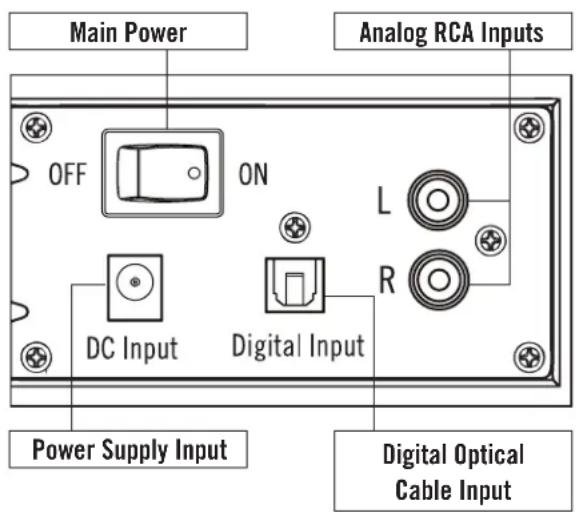
SOUNDBAR REAR
text_image
Main Power
Analog RCA Inputs
OFF
ON
L
R
DC Input
Digital Input
Power Supply Input
Digital Optical Cable Input
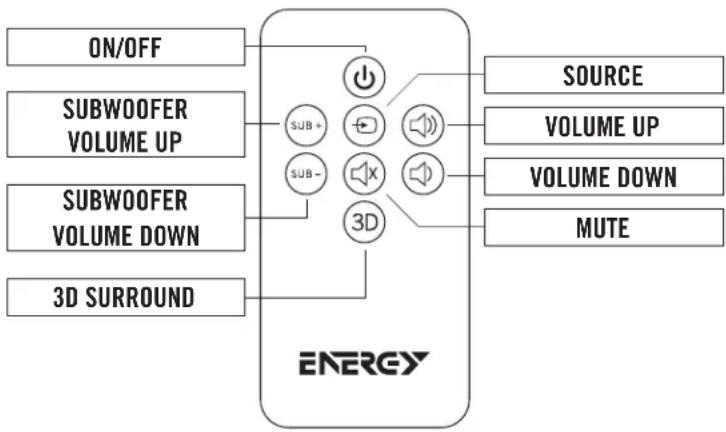
REMOTE CONTROL
flowchart
graph LR
    A["ON/OFF"] --> B["ENERGY"]
    C["SUBWOOFER VOLUME UP"] --> B
    D["SUBWOOFER VOLUME DOWN"] --> B
    E["3D SURROUND"] --> B
    B --> F["SOURCE"]
    B --> G["VOLUME UP"]
    B --> H["VOLUME DOWN"]
    B --> I["MUTE"]
    B --> J["3D"]
    B --> K["SUB+"]
    B --> L["SUB-"]
REMOTE FUNCTION STATUS LIGHT
ON/OFF
RED: StandbyGREEN/ORANGE: ON
SOURCE
GREEN: On Digital Optical Cable InputORANGE: On RCA Input
MUTE
ORANGE (FLASHING): RCA Input mutedGREEN (FLASHING): Digital Input muted
3D
RED (ONE FLASH): Surround OffGREEN (ONE FLASH): Surround On
VOLUME UP
GREEN OR ORANGE (FLICKERS): A remote control signal has been received
VOLUME DOWN
GREEN OR ORANGE (FLICKERS): A remote control signal has been received
SUBWOOFER VOLUME UP
GREEN OR ORANGE (FLICKERS): A remote control signal has been received
SUBWOOFER VOLUME DOWN
GREEN OR ORANGE (FLICKERS): A remote control signal has been received
PLACEMENT/INSTALLATION
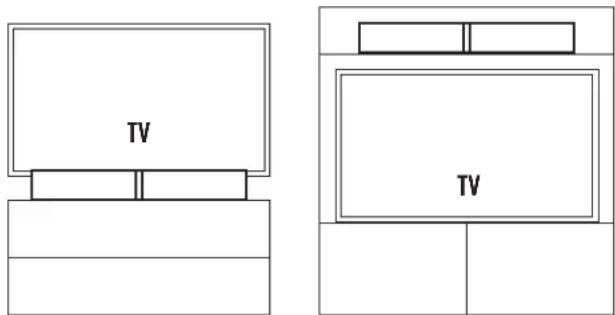
Placing/wall-mounting the soundbar: The soundbar is designed to be placed on a flat surface directly in front of your TV on its two supplied feet, on a shelf directly above or below your TV in a piece of furniture with feet or wall-mounted (via keyholes on the rear of the soundbar) under a TV that is also wall-mounted. If wall-mounting, connect supplied cable (or other cable) to TV first, then use supplied wall-mount template to mount soundbar. If the two mounting holes drill into wall studs, screw two wood screws in those holes to hang the soundbar on. If there are no wall studs where the holes are drilled, use wall anchors that support at least 10 pounds to hang the soundbar on. Connect cable from TV (see Connection section) to soundbar and hang soundbar on wall.
text_image
TV
TV
CONNECTION
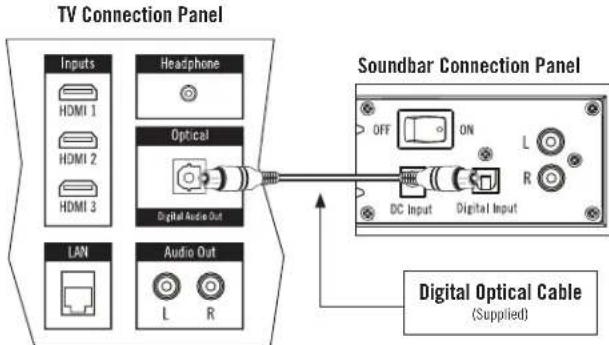
Connecting the soundbar to your TV: The Energy Power Bar One needs to be connected to your TV, Cable Box or Satellite Receiver. If you have other devices connected to your TV, such as a DVD/BluRay player, gaming system, etc., connect the Energy Power Bar One to the TV so that you can listen to all those and your TV through the Energy Power Bar One. If there are no other devices connected to your TV other than a cable or satellite box and you receive all of your television programs from that box, you can connect the Energy Power Bar One to either that box (with the supplied digital optical cable) or your TV. There are three different ways to connect the Energy Power Bar One to your TV, Satellite or Cable box.
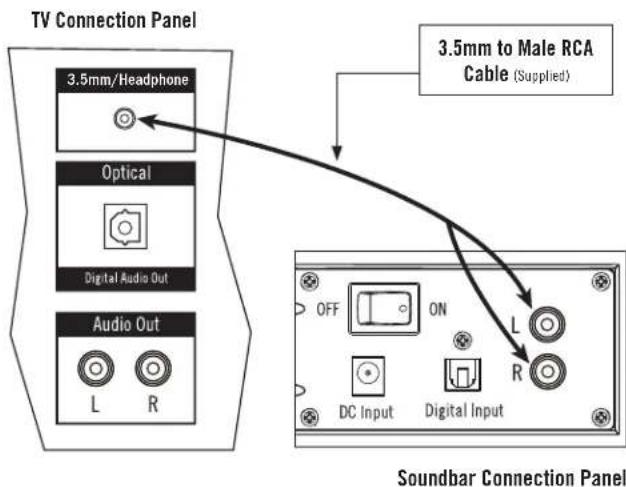
A. 3.5mm/Headphone Output
Once you have placed the Energy Power Bar One where you want it, connect one end of the supplied 3.5mm to dual RCA cable to your TV's 3.5mm/headphone audio output jack and connect the other end of the cable into the L/R RCA input jacks on the rear of the soundbar.
text_image
TV Connection Panel
3.5mm/Headphone
Optical
Digital Audio Out
Audio Out
L R
3.5mm to Male RCA Cable (Supplied)
OFF ON L
DC Input Digital Input
R
Soundbar Connection Panel
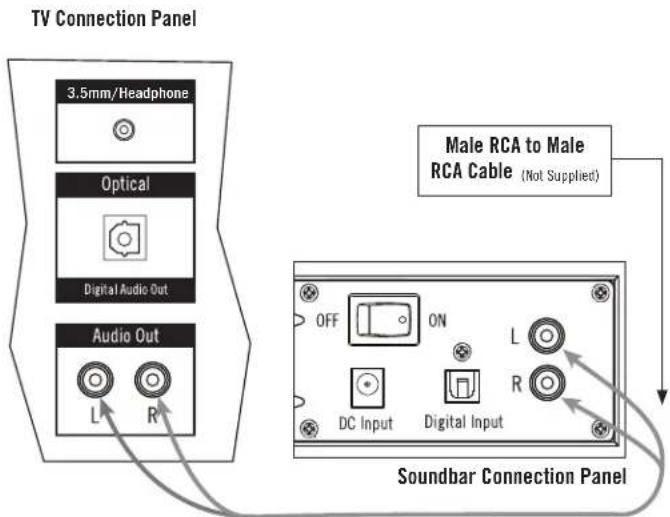
B. RCA Cable
You can use analog left and right audio outputs on your device and connect them to the analog left and right inputs on the Energy Power Bar One back panel. (cable NOT supplied).
text_image
TV Connection Panel
3.5mm/Headphone
Optical
Digital Audio Out
Audio Out
L R
Male RCA to Male
RCA Cable (Not Supplied)
OFF ON L
DC Input Digital Input
Soundbar Connection Panel
C. Digital Optical Cable
Since most High Definition TV's, Satellite and Cable boxes have a digital optical audio output, we have included that cable. Remove the plastic caps on the end of the cable. Simply connect one end of the cable into the corresponding output of your TV, Satellite or Cable box and connect the other end of the cable into the digital optical input on the back panel of the Energy Power Bar One.
NOTE: If you receive any or all of your channels using a separate antenna connected to your TVs Coax/Antenna input, there may be no sound received from those channels using the digital optical cable connection.
flowchart
graph TD
    A["TV Connection Panel"] --> B["Inputs"]
    A --> C["Headphone"]
    A --> D["Optical"]
    A --> E["Digital Audio Out"]
    F["Soundbar Connection Panel"] --> G["OFF ON L R DC Input Digital Input"]
    F --> H["Digital Optical Cable (Supplied)"]
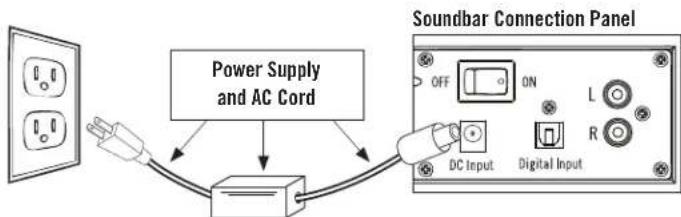
Plug the AC power cord into the soundbar power supply, then connect the power supply into the DC Input on the rear of the soundbar. Plug the AC power supply into a "live" electrical outlet and turn the soundbar's Main Power switch on the rear of the soundbar to "On". On the front of the soundbar, make sure the status light is either solid green or orange (press any button once if light is steady red).
flowchart
graph TD
    A["Power Supply and AC Cord"] --> B["Switch"]
    B --> C["Soundbar Connection Panel"]
    C --> D["DC Input"]
    C --> E["Digital Input"]
    C --> F["L"]
    C --> G["R"]
    C --> H["ON"]
    C --> I["OFF"]
PROGRAMMING YOUR TV REMOTE TO OPERATE THE SOUNDBAR
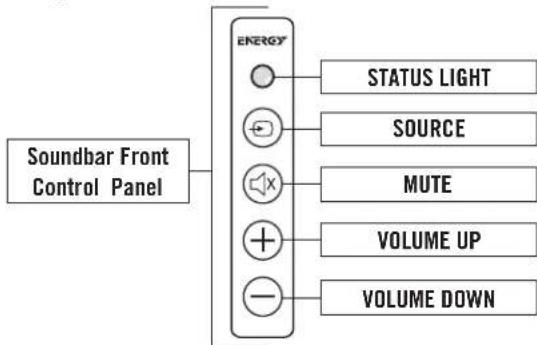
The following 3 steps should be used to program each function of your TV or cable box remote control buttons (MUTE, VOLUME UP, & VOLUME DOWN). IF THE SOUNDBAR IS IN STANDBY MODE (solid red status light), push the button on the soundbar until the status light is solid GREEN.
flowchart
graph LR
    A["Soundbar Front Control Panel"] --> B["ENERGY"]
    B --> C["STATUS LIGHT"]
    B --> D["SOURCE"]
    B --> E["MUTE"]
    B --> F["VOLUME UP"]
    B --> G["VOLUME DOWN"]
Place the unit in learning mode: With the status light showing solid GREEN, press and hold down both the and buttons on the front of the soundbar at the same time (approximately 3 seconds) until the status light flashes ORANGE.
Select the function to learn: Press the button once on the soundbar (the status light changes to solid ORANGE). (Substitute the VOLUME UP & VOLUME DOWN in place of when programming the other buttons during this step)
Learn the function: Hold your TV or cable remote control within one foot and pointed at the front of the soundbar. Slowly press the button on your remote control four times. On the first three presses, the status indicator light will flicker ORANGE with each press. If the unit has successfully learned the function, on the fourth press of the button, the light will flash GREEN several times and then turn to solid GREEN. (Remember to use the VOLUME UP & VOLUME DOWN in place of when programming the other buttons during this step)
To program the remaining functions, simply repeat all steps, substituting with the new function and button presses (VOLUME UP, and VOLUME DOWN) on steps TWO and THREE
IMPORTANT NOTE: There is not a power on/off button on the front of the soundbar (there is a "Main Power" switch on the soundbar's rear panel). You DO NOT need to turn off the soundbar when finished watching TV. When finished, turn off your TV (or Satellite or Cable box if the soundbar is connected to that). The soundbar will automatically go into a Standby or "sleep" mode if it does not receive an audio signal from your TV, Satellite or Cable Box for approximately 10 minutes. Standby "On" mode is indicated by a solid red status light on the soundbar front panel. When your TV, Satellite or Cable box is turned back on and a signal is again received the soundbar will automatically come out of Standby mode and turn on.
Once your soundbar is connected and operating, you will want to complete a few basic steps to get the most enjoyment out of your system. First, you will want to turn off the speakers on your TV and let your soundbar be your new sound source. Some TV's will automatically turn off their speakers when you connect the soundbar, while others you must manually turn their speakers off. Each TV is different, but to manually turn off TV speakers you usually must bring up a menu of some type, and go into that menu's "audio" or "sound" portion where you find a selection to turn TV speakers off. If you cannot turn your TV speakers off, the soundbar will still give you an excellent enhancement to the sound coming from your TV, and you can easily adjust your TV sound to blend with the soundbar's sound. To make this adjustment, first program your TV remote to operate the soundbar, then manually turn your TV volume down all the way down from the controls on the TV itself. Next, press the VOLUME UP (+) control on the front of the soundbar until you have a comfortable TV listening volume level coming from the soundbar.
TROUBLESHOOTING
Soundbar does not power on
• Is the power supply plugged into a "live" outlet?
• Is the soundbar "Main Power" rear switch on?
No sound from soundbar
• Is it plugged into a "live" outlet and "Main Power" rear switch on?
- Are all connections from TV/Cable or Satellite box pushed in tightly?
• Is TV/Cable or satellite box turned on and the volume turned up?
• Is the soundbar volume turned up?
• Is the soundbar "STANDBY" off? (LED green or orange solid)
• Is the soundbar on the correct source input?
- If using digital optical hookup, make sure TV/Satellite or Cable box is outputting PCM sound, NOT Dolby® Digital
• Turn power off then back on
TV/Cable Box/Satellite Box Remote Will Not Program
• Carefully follow all programming instructions
- Program your original TV remote to the soundbar, then try using your universal remote without programming it.
- You may need to repeat the programming of a function in some cases
- There may be some cases where the soundbar will not be able to learn all remote control codes
For Questions, contact Energy Customer Service:
In the United States: 1-866-441-8208
CARE AND CLEANING
Occasional dusting or wiping of the cabinets with a soft cloth is all that is required. Never use water, abrasive or solvent type cleaners or detergents. Never spray polishes or cleaners on the drive units (woofer, midrange or tweeter) or on any controls or connection points. A vacuum cleaner with a soft brush attachment may be used to clean the grille fabric.
Energy and the Energy logo are trademarks of Audio Products International Corp., registered in the U.S. and other countries.
Audio Products International Corp., a wholly owned subsidiary of Klipsch Group, Inc., is a wholly owned subsidiary of Vox International Corporation.
FRENCH - CONSIGNES DE SÉCURITÉ IMPORTANTES!
RISQUE D'ÉLECTROCUTION
NE PAS OUVRIR
INFORMATIONS DE CONFORMITÉ UE
INFORMATIONS DE CONFORMITÉ FCC ET CEM CANADA:
ESTE PRODUCTO CONTIENE UNA PILA DE LITIO
SI SE USA MAL O INDEBIDAMENTE, PUEDE CONSTITUIR UN PELIGRO DE:
Humo y gas
Sobrecalentamiento
Incendio
Explosión
Other manuals Energy
Discover other manuals and user guides for the brand Energy
💬 Hi! I'm your manual assistant.I know your Energy Power Bar One.
How can I help you? (use, settings, error codes, maintenance, explaining a step from the manual, etc.)💡 Examples :
• How do I use it ?
• Error code E3 ?
• How do I clean it ?