TC70020IT - Lawn mower Earthwise - Free user manual and instructions
Find the device manual for free TC70020IT Earthwise in PDF.



| Product Type | Battery-powered Tiller/Cultivator |
| Brand | Earthwise |
| Model | TC70020IT |
| Input Voltage | 20 V DC |
| Battery Type | Lithium-ion 20 V 2.0 Ah (Model BL82120) |
| Tine Speed | 170 rpm |
| Weight | 4.6 kg (10 lb) |
| Working Width | 190 mm (7.5 in) |
| Max Working Depth | 155 mm (6 in) |
| Working Time per Charge | 30 minutes |
| Charging Time | 60 minutes (first charge) |
| Charger | Model CHL82000, Input 120 V 60 Hz |
| Number of Tines | 2 types (JY2201-1 and JY2201-2) |
| Tine Material | Steel |
| Auxiliary Handle | Yes, height-adjustable |
| Safety | Safety Lock Button |
| Recommended Use | Breaking up sod, preparing seed beds, cultivating gardens and flower beds |
| Maintenance | Clean after each use, oil tines to prevent rust |
| Warranty | 2 years on equipment, 1 year on battery and charger |
| Customer Service | 1-800-633-1501, www.americanlawnmower.com |
Frequently Asked Questions - TC70020IT Earthwise
User questions about TC70020IT Earthwise
0 question about this device. Answer the ones you know or ask your own.
Ask a new question about this device
Download the instructions for your Lawn mower in PDF format for free! Find your manual TC70020IT - Earthwise and take your electronic device back in hand. On this page are published all the documents necessary for the use of your device. TC70020IT by Earthwise.
USER MANUAL TC70020IT Earthwise
Copyright. All Rights Reserved.
Model TC70020
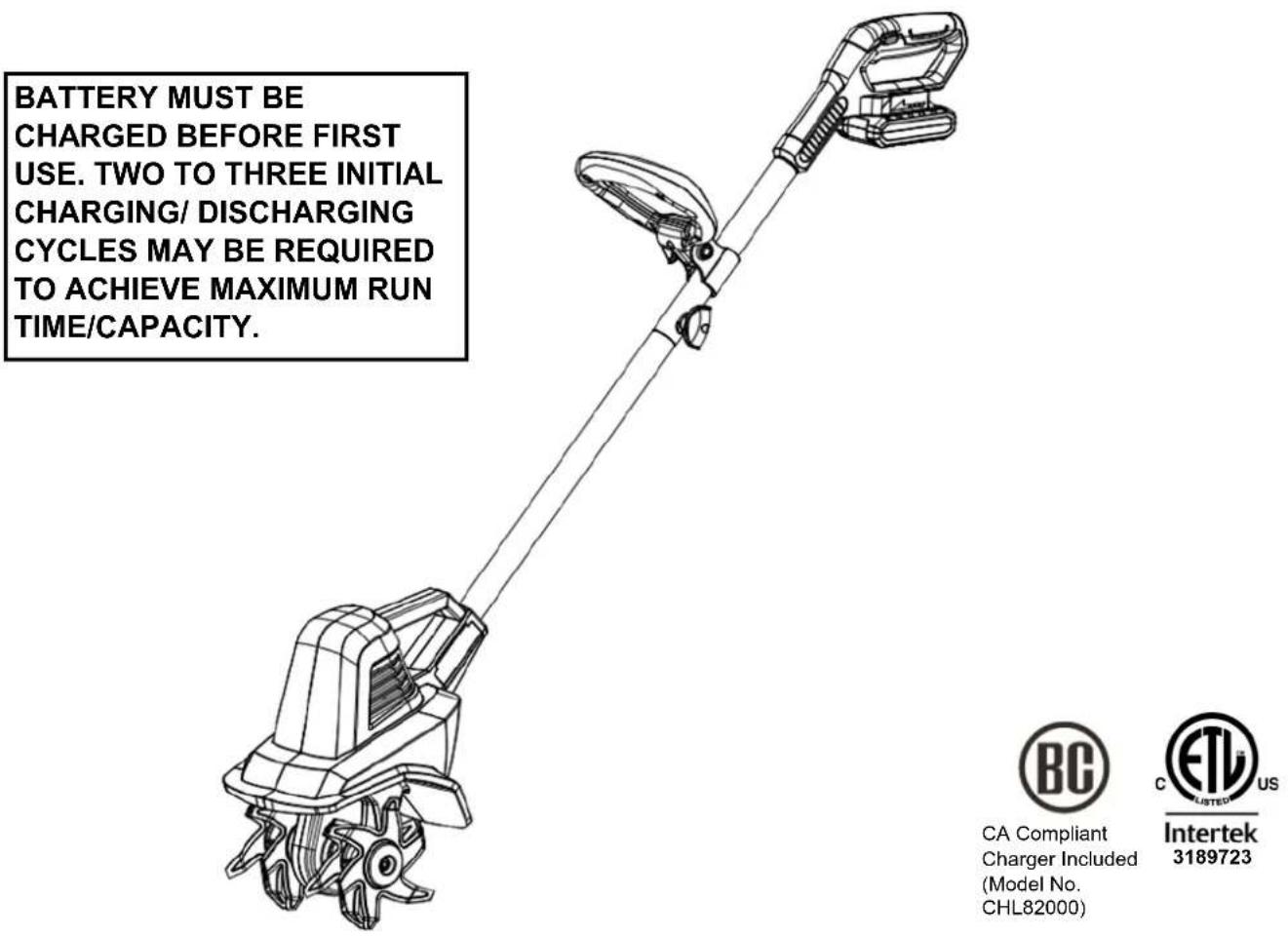
Your cordless tiller has been engineered and manufactured to our high standard for dependability, ease of operation, and operator safety. Properly cared for, it will give you years of rugged, trouble-free performance.

WARNING: To reduce the risk of injury, the user must read and understand the owner's manual before using this product.
Thank you for your purchase.
DO NOT RETURN THIS PRODUCT TO THE STORE. OPERATING, ASSEMBLY, PARTS, SERVICE QUESTIONS? GO TO WWW.AMERICANLAWNMOWER.COM OR CALL 1-800-633-1501 BETWEEN 8:00 AM—5:00 PM EST FOR ASSISTANCE.
TO REDUCE RISK OF INJURY:
Before any use, be sure everyone using this tool reads and understands all safety instructions and other information contained in this manual.
CAUTION: Wear appropriate personal hearing protection during use. Under some conditions and duration of use, noise from this product may contribute to hearing loss.
Save these instructions and review frequently prior to use and in instructing others.
WARNING: When using electric gardening appliances, basic safety precautions should always be followed to reduce risk of fire, electric shock, and personal injury, including the following:
READ ALL INSTRUCTIONS
GENERAL SAFETY
CHECK FOR DAMAGED PARTS - Before further use of the product, any part that is damaged should be carefully checked to determine that it will operate properly and perform its intended function. Check for alignment of moving parts, binding of moving parts, breakage of parts, mounting and any other condition that may affect its operation. Any part that is damaged should be properly repaired or replaced. For assistance call our customer service help line at 1-800-633-1501.
AVOID DANGEROUS ENVIRONMENTS - Don't use this product in rainy, stormy, damp or wet locations. Do not operate in gaseous or explosive atmospheres. Motors in these products normally spark, and the sparks might Ignite fumes.
KEEP CHILDREN AWAY - All visitors, children and pets should stay at a safe distance from the work area.
DRESS PROPERLY- Don't wear loose clothing or jewelry and wear protective hair covering to contain long hair. They can be caught in moving parts. Use of rubber gloves and substantial footwear is recommended when working outdoors.
USE SAFETY GLASSES - Wear safety glasses with side shields or goggles that are marked to comply with ANSI Z87.1 standard when operating this product. Use face or dust mask if environment is dusty.
REPLACEMENT PARTS - When servicing use only identical replacement parts.
Don't Force Appliance - It will do the job better and with less likelihood of a risk of injury at the rate for which it was designed.
REMOVE THE BATTERY from the tiller/cultivator when not in use or when servicing or cleaning. Do not leave unattended.
USE RIGHT APPLIANCE - Do not use this product for any job except that for which it is intended.
DON'T OVERREACH - Guide the tiller/cultivator at a walking pace only. Keep proper footing and balance at all times.
LIGHTING - Only operate your tiller/cultivator in daylight or good artificial light.
STORE IDLE UNIT INDOORS - When not in use, the tiller/cultivator should be stored indoors in a dry area out of children's reach.
MAINTAIN UNIT WITH CARE - Keep clean for best performance and to reduce the risk of injury. Inspect extension cord periodically and replace if damaged. Keep handles dry, clean and free from oil.
Do not operate the tiller/cultivator on a slope that is too steep for safe operation. When on slopes, slow down and make sure you have good footing.
Before starting the tiller/cultivator make sure the times are not touching any object and are free to move.
Grip the tiller/cultivator firmly with both hands. Never operate the tiller/cultivator with one hand.
CAUTION: The tiller/cultivator may bounce upward and/or jump forward if the tines strike extremely hard packed soil, frozen ground, or buried obstacles such as large stones, roots or stumps.
STAY ALERT - Watch what you are doing. Use common sense. Do not operate the tiller/cultivator when you are tired or under the influence of drugs, alcohol or medication.
WARNING: Do not operate the tiller/cultivator near underground electrical cables, telephone lines, pipes or hoses.
If the tiller/cultivator strikes a foreign body, turn it off immediately, wait for the tines to stop and check for damage. If necessary, repair before restarting.
If the tiller/cultivator starts to vibrate abnormally, turn it off immediately and check for the cause. Vibration is generally a warning of trouble.
DANGER: RISK OF CUT - Wear gloves and use caution when cleaning or performing maintenance on the tiller/cultivator.
Always turn off the tiller/cultivator, remove the battery and wait until the tines come to a complete stop before carrying out any maintenance or repairs.
CAUTION: Tines do not stop immediately after the tiller/cultivator is turned off.
CAUTION: Risk of injury. Do not put hands, feet or any body part or clothing near the rotating tines.
WARNING: California Proposition 65:
This product contains chemicals known to the State of California to cause cancer, birth defects or other reproductive harm.
WARNING: Some dust and debris created by the use of this tool could contain chemicals known to the State of California to cause cancer and birth defects or other reproductive harm.
Some examples of these chemicals are:
- chemicals in fertilizers
- compounds in insecticides, herbicides, and pesticides
- arsenic and chromium from chemically treated lumber
Your risk from exposure to these chemicals varies, depending on how often you do this type of work. To reduce your exposure, work in a well-ventilated area and with approved safety equipment such as dust masks that are specially designed to filter out microscopic particles.
WARNING: Cancer and Reproductive Harm - www.P65Warnings.ca.gov.
WARNING: Do not operate the equipment while barefoot or when wearing sandals or similar lightweight footwear. Wear protective footwear that will protect your feet and improve your footing on slippery surfaces.
DANGER: Don't use tool if switch trigger does not turn on or off. Call Customer Service at 1-800-633-1501 for assistance.
DANGER: Do not dispose of the batteries in a fire. The cell may explode. Check with local codes for possible special disposal instructions.
DANGER: Do not open or mutilate the batteries. Released electrolyte is corrosive and may cause damage to the eyes or skin. It may be toxic if swallowed.
CAUTION: Exercise care in handling batteries in order not to short the battery with conducting materials such as rings, brackets, and keys. The battery or conductor may overheat and cause burns.
CAUTION: Use only the following type and size battery(ies): BL82120.
FEATURES
PRODUCT SPECIFICATIONS
Model: TC70020
Input. 20V, DC Only
Battery. 20V 2.0 Ah Lithium-ion
Tine Speed 170 RPM
Weight 10 lbs. (4.6 kg)
Working width. 7.5 in
Working depth max.. 6 in
Working time. 30 mins per charge
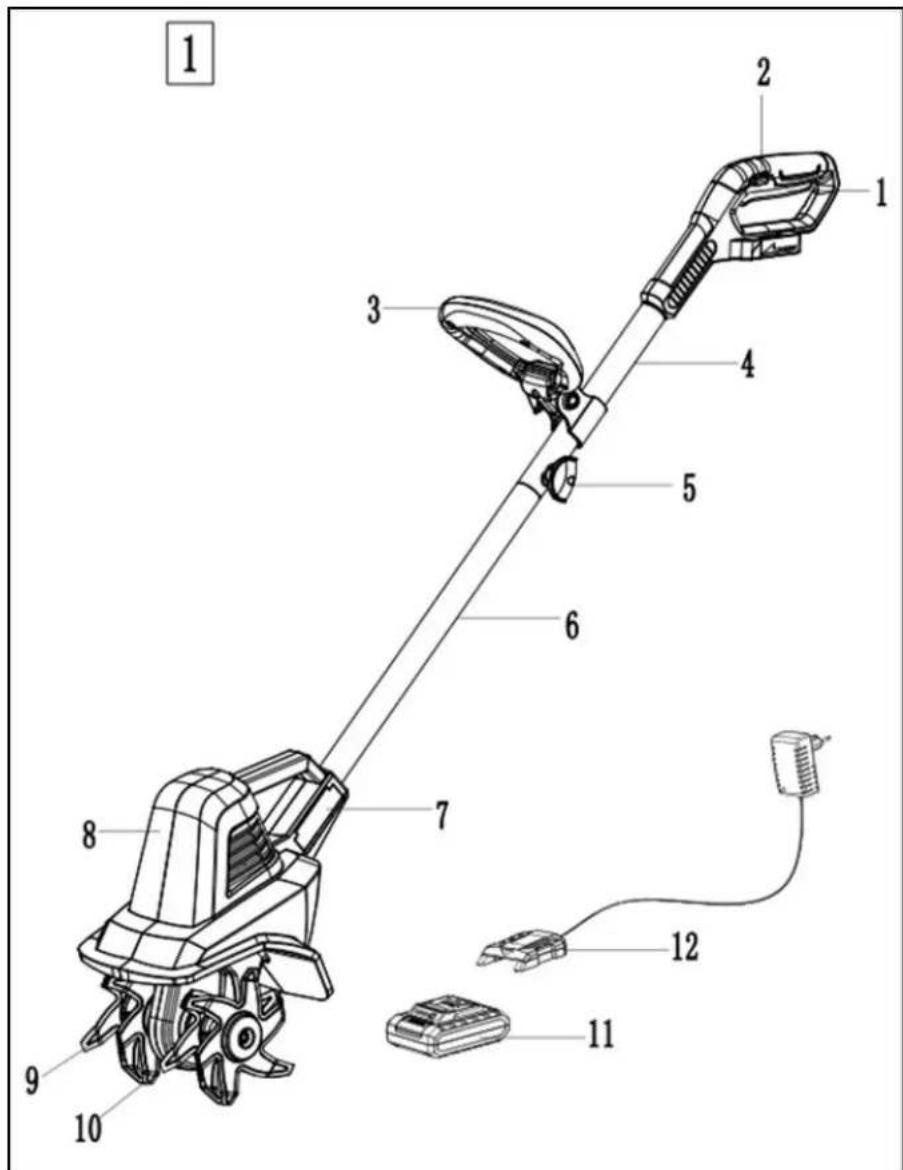
| No. | Description | No. | Description |
| 1 | On/Off Switch | 7 Side Cover | |
| 2 | Safety Button | 8 Tillng Head | |
| 3 | Auxiliary Handle | 9 Time 1 (JY2201-1) | |
| 4 | Upper Handle | 10 Time 2 (JY2201-2) | |
| 5 | Wing Nut | 11 Battery Pack | |
| 6 | Lower Handle | 12 Charger | |
ASSEMBLY
UNPACKING
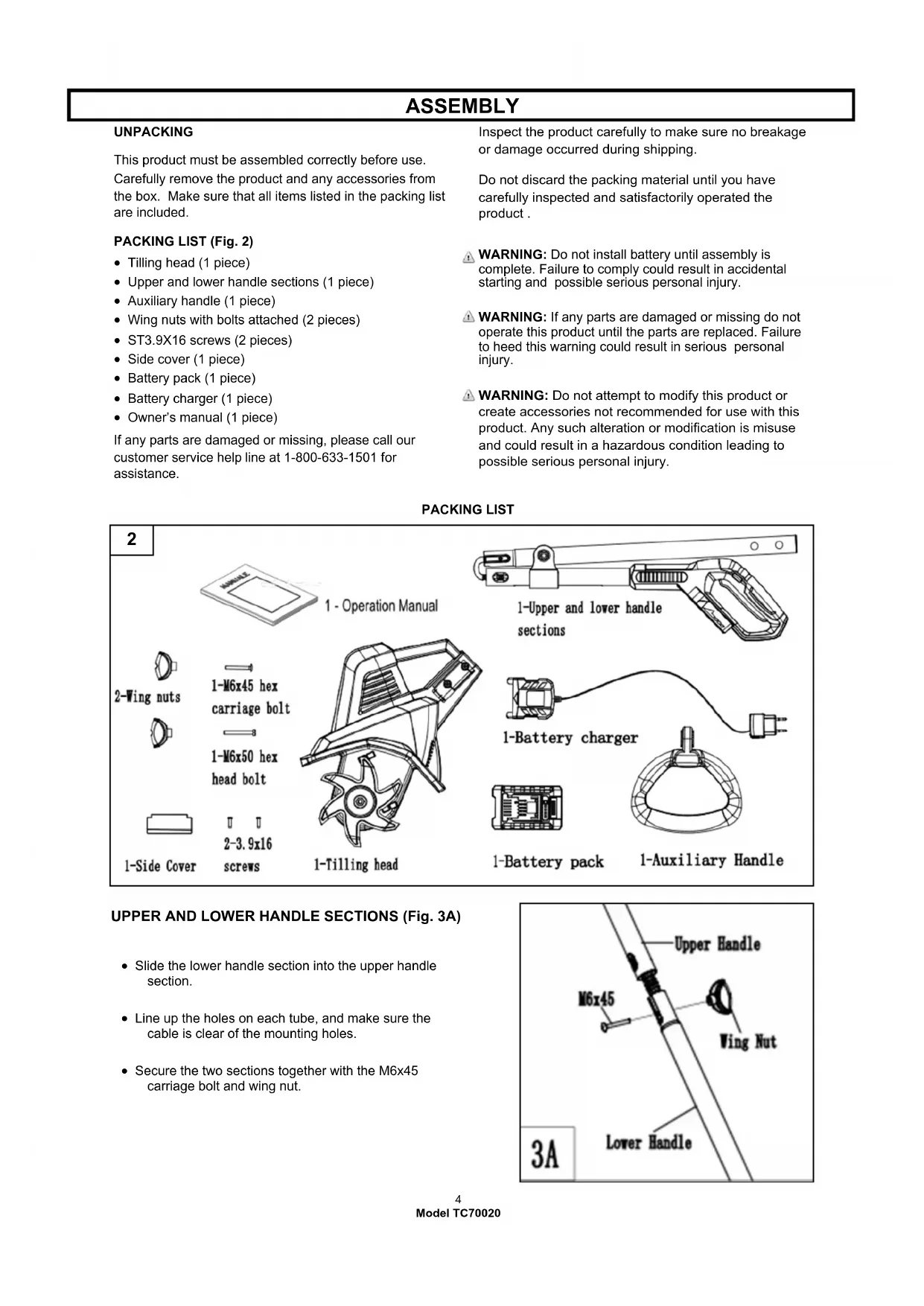
This product must be assembled correctly before use. Carefully remove the product and any accessories from the box. Make sure that all items listed in the packing list are included.
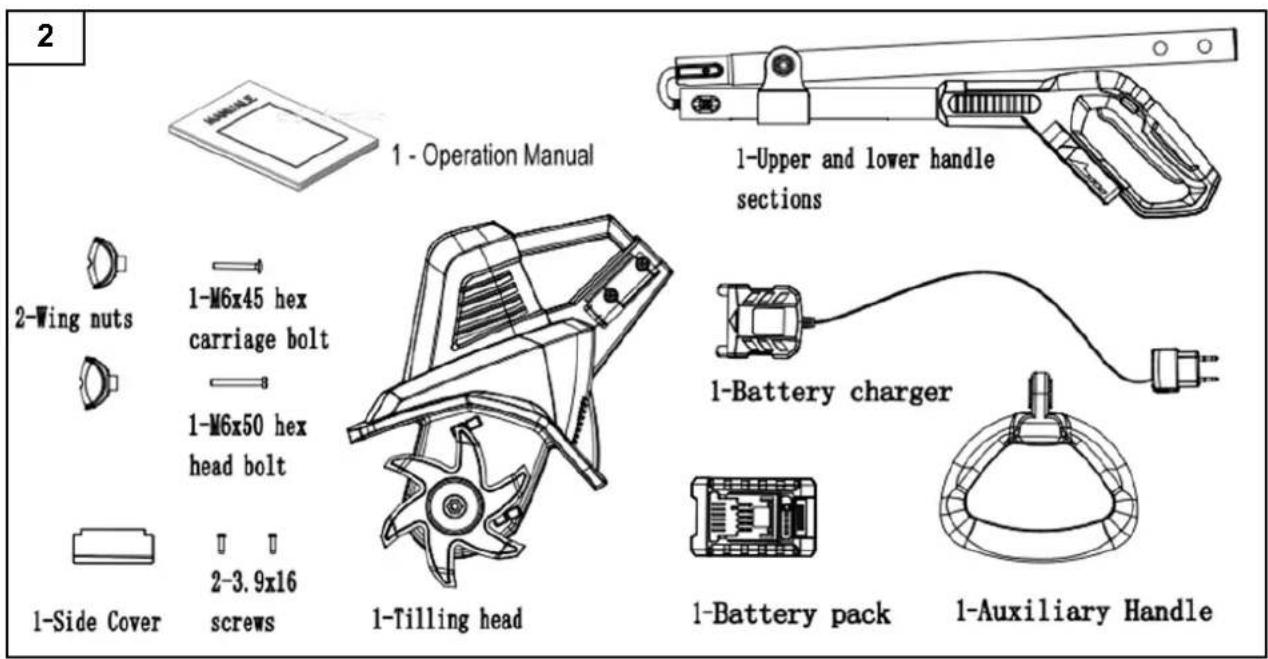
PACKING LIST (Fig. 2)
- Tilling head (1 piece)
- Upper and lower handle sections (1 piece)
- Auxiliary handle (1 piece)
- Wing nuts with bolts attached (2 pieces)
- ST3.9X16 screws (2 pieces)
- Side cover (1 piece)
- Battery pack (1 piece)
- Battery charger (1 piece)
- Owner's manual (1 piece)
If any parts are damaged or missing, please call our customer service help line at 1-800-633-1501 for assistance.
Inspect the product carefully to make sure no breakage or damage occurred during shipping.
Do not discard the packing material until you have carefully inspected and satisfactorily operated the product.
WARNING: Do not install battery until assembly is complete. Failure to comply could result in accidental starting and possible serious personal injury.
WARNING: If any parts are damaged or missing do not operate this product until the parts are replaced. Failure to heed this warning could result in serious personal injury.
WARNING: Do not attempt to modify this product or create accessories not recommended for use with this product. Any such alteration or modification is misuse and could result in a hazardous condition leading to possible serious personal injury.
PACKING LIST
UPPER AND LOWER HANDLE SECTIONS (Fig. 3A)
- Slide the lower handle section into the upper handle section.
- Line up the holes on each tube, and make sure the cable is clear of the mounting holes.
- Secure the two sections together with the M6x45 carriage bolt and wing nut.

ASSEMBLY
LOWER HANDLE WITH TILLING HEAD (Fig. 3B)
- Align the notch on the lower handle with the rib on the tilling head.
- Push the lower handle into the tilling head.
- Align the side cover with the holes on the lower handle shaft and push the cover into place.
- Secure with the two ST3.9x16 screws.

WARNING: When connecting the tilling head and lower handle using the two self-tapping screws supplied, make sure the screws are securely tightened. Screw heads should be recessed below the surface. DO NOT START THE UNIT UNTIL TILLING HEAD AND LOWER HANDLE ARE SECURELY CONNECTED.
Once the tilling head and lower handle are securely connected, do not remove the self-tapping screws or attempt to disassemble for any purpose. The self-tapping screws will lose their effectiveness of securing the assembly if removed and re-installed.
AUXILIARY HANDLE (Fig. 3C)
- Position the auxiliary handle so that the holes are in alignment with the holes in the handle support bracket.
- Insert the M6X50 hex head bolt into the hex shaped bolt hole of the bracket.
- Secure by tightening the wing nut onto the bolt.
- Loosen the wing nut and adjust the angle and height of the handle to a safe and comfortable position. Secure into place by tightening the wing nut onto the bolt.

BATTERY INSTALLATION AND REMOVAL
Hold the tool and the battery firmly when installing or removing battery.
Failure to hold the tool and the battery firmly may cause them to slip from your hands and may result in damage to the tool and/or battery and a personal injury.
To remove:
- Depress release button (A) on the back of battery cartridge (B) to release the battery.
- Pull the battery out of tool.
To install:
- Align the battery with the cavity in the handle.
- Insert the battery into the handle until the battery release button locks into place. You should hear a "click" once the ba
Note: The battery can only be installed one way.


OPERATING
STARTING:
WARNING: The tines start rotating immediately after the tiller/ cultivator is switched on. Keep hands and feet away from the tines.
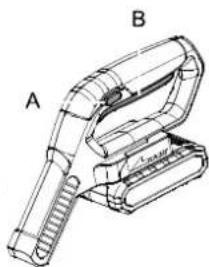
To switch ON, hold the tiller/cultivator firmly with two hands, make sure the tines are not touching any surface. Press the safety button (A) while squeezing the On/Off trigger switch (B).
Once the tiller/cultivator is started, you can release the safety button.
To switch OFF, simply release the trigger.
Use the tiller/cultivator for breaking sod, preparing seed beds, and for cultivating gardens and flower beds. The tiller/cultivator can also dig small holes for planting saplings or potted plants.
For breaking sod or deep tilling, allow the tines to pull the tiller/ cultivator forward to the end of your arm's reach, then firmly pull it back toward yourself. You will achieve the best results by repeatedly allowing it to move forward and pulling it back.
By pulling the tiller/cultivator back towards yourself, the tines will dig deeper and more aggressively.
CAUTION: To prevent tripping, take extra precautions when moving backwards and when pulling the tiller/cultivator back toward yourself.
OPERATING
If the tiller/cultivator digs deep enough to stay in one spot, gently rock it side to side until it starts moving forward again.
When working on inclines always stand diagonally to the incline to retain a firm, safe footing. Do not work on extremely steep slopes.
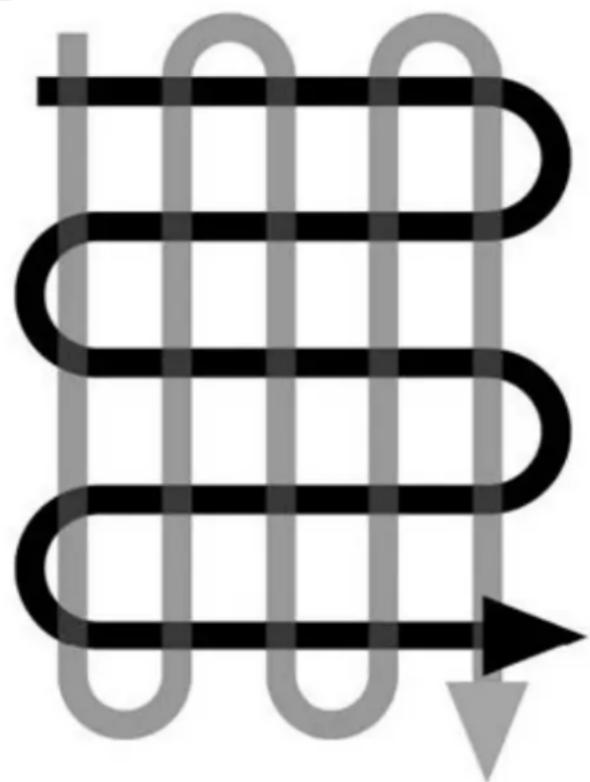
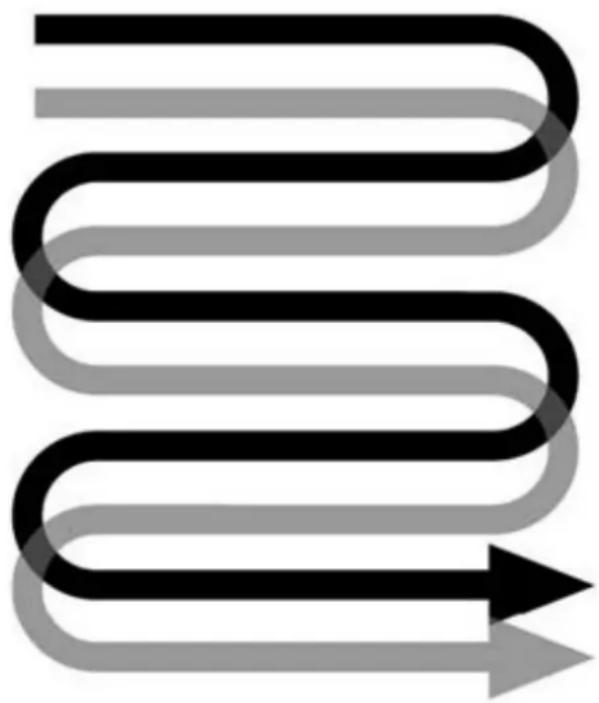
For preparing seed beds, we recommend using one of these tilling patterns (Fig. 4)
Tilling Pattern A- Make two passes over area to be tilled, the second at a right angle to the first.
Tilling Pattern B- Make two passes over area to be tilled, the second overlapping the first.
Before use, remove any visible stones or other foreign bodies from the area.
CAUTION: Before moving the tiller/cultivator from one area to another switch off the motor and wait for the tines to come to a complete stop. Be careful not to let the tines touch the ground while moving the tiller/ cultivator. The tines as well as the unit itself may be damaged even if the motor is switched off.
Clearing foreign objects:
During operation a stone or root could become lodged in the tines, or tall grass or weeds may become wrapped around the tine shaft. To clear the tines or tine shaft release the trigger lever, wait for the tines to come to a complete stop and unplug the tiller/cultivator.
Dislodge or remove the foreign matter from the tines or tine shaft.
4
A
B
CHARGING THE BATTERY PACK
Charge the battery pack only with the charger provided.
Allow at least 60 minutes of charge time before initial use of the tiller/cultivator.
Make sure the power supply is normal household voltage, 120volts, 60Hz AC only.
The battery charger should be operated in temperatures between 39 and 104 degrees F.
The battery should be charged in a cool, dry place.
2 to 3 initial charging/discharging cycles may be required to achieve maximum run time/capacity.
DO NOT attempt to open the charger or the unit. There are no customer serviceable parts inside. Call customer service helpline at 1-800-633-1501 for assistance.
DO NOT incinerate battery packs even if they are severely damaged or completely worn out. They can explode in a fire causing injury.
DO NOT charge appliance in rain, or in wet locations.
Use the battery charger indoors only.
Disconnect charger from the power supply when not in use to prevent damage to the charger during a power surge.
When fully charged, the battery can be safely stored in temperatures down to -4 degrees F for a period of up to four weeks, before requiring charging. Fully charge battery pack every 90 days.
If over a period of time the battery pack quickly runs down after a full 60 minutes charging period, a replacement battery pack is needed.
To prevent permanent damage to the battery, never store in a discharged condition.
WINTER STORAGE - Fully recharge before storage and then again every 90 days.
Since the battery will not develop a memory, it does not have to be fully discharged before recharging.
A small leakage of liquid from the battery cells may occur under extreme usage, charging or temperature conditions. This does not indicate a failure. However, if the outer seal is broken and this leakage gets on your skin.
a. Wash quickly with soap and water.
b. Neutralize with a mild acid such as lemon juice or vinegar.
c. If the battery liquid gets in your eyes, flush them with clean water for a minimum of 10 minutes and seek immediate medical attention.
TO CHARGE - SEE CHARGER MANUAL FOR COMPLETE INSTRUCTIONS
Battery Capacity
Press the button LED displays to show the battery capacity.

| LED lights Battery | status |
| All LED are on | Full charged (75-100%) |
| LED 1, 2, 3 are on | Battery is 50%-75% charged |
| LED 1, 2 are on Battery | Battery is 25%-50% charged |
| LED 1 is on | Battery is depleted (0%-25%). Charge the battery. |
BATTERY DISPOSAL
Remove the battery pack from the tool, cover the terminals with heavy duty adhesive tape. Do not attempt to destroy or disassemble battery pack or remove any components. This product contains lithium-ion batteries which must be recycled or disposed of properly. Local, state or federal laws may prohibit disposal of these batteries in the municipal solid waste or rural trash pick up systems.
Connecting battery charger
Connect battery charger to the voltage and frequency specified in this manual and on the rating plate. Put the electric plug in an earthed socket-outlet. The LED on the battery charger lights up green.
Connecting battery to charger

The battery must be charged before using it the first time.
- Install charger on the top of battery and push till the charger contacts firmly with the battery.
The red charging light on the charger is lit when the battery is connected to the battery charger.
- When LED on the charger turns to green the battery is fully charged.
- Disconnect the power plug. Never pull the power cable of the charger to disconnect it from the wall socket.
- Remove battery from battery charger.
Note: Lithium-ion batteries can be charged at any charging level. The charging process can be started or cancelled regardless of the battery's charge level is.

The RBRC seal on the Li-Ion battery pack indicates that the cost to recycle the battery pack at the end of its useful life has already been paid by The Great States Corporation/American Lawn Mower Company. It is illegal to place spent Li-Ion batteries in the local municipal solid waste or in the trash. RBRC in cooperation with The Great States Corporation/American Lawn Mower Company has provided an environmentally friendly and easy way to recycle spent Li-Ion batteries. Just contact your local recycling center or call 1.800.8.BATTERY for information on where to drop off the spent battery.
MAINTENANCE

WARNING: Before carrying out maintenance operations, remove the battery from tool.
Before each use, check the condition of the tines and ensure that all threaded connections are securely tightened. If the tines become dull or blunt, sharpen or replace them. Call our customer service help line at 1-800-633-1501 for assistance.
At the end of the season, check the tiller/cultivator for damage prior to storing. Repair or replace damaged or broken parts.

CAUTION: Always clean the tiller/cultivator after each use. Failure to carry out proper cleaning can result in damage to the tiller/cultivator or result in poor performance.
Clean the tines with a scrub brush, and a soft cloth dampened with a mild soap and water mixture.
Never use a water hose to clean the tiller! To remove soil and debris from the tines, use a stiff brush or a dampened cloth. Clean the vents on the motor housing and remove any remaining grass or dirt. Once cleaned, wipe the tines dry and apply a light coat of oil to prevent rust.

WARNING: Injury can occur while working on the tines. Wear protective gloves.
Tines maintenance: Worn tines invite poor performance and overload of the motor. Check tines before each use. Sharpen or replace the tine assemblies with new ones when necessary. Call 1-800-633-1501 for assistance.
Tine Replacement
Tines are identified with part number JY2201-1 or JY2201-2 stamped on the tine blade.
Replace only the tines with the identical part number.
Tine Removal (Fig. 5)
- Remove the M8 hex locknut with a hex head wrench, and then remove the M8x170 bolt.
- Remove the end caps.
- Remove the tines and hubs at either end of the shaft.
Tine Installation (Fig. 5)
- Install the new tine by pressing it onto the hub. The side with stamped part number must face outward. Be sure to install tines in the same sequence as shown in Fig 5. Position the hub so that the larger diameter whole is facing outward. Make sure the two tines on the same hub are installed symmetrically with the end of the tine blades facing downward (Fig. 6).

- Install the tines with hub onto the shaft. Ensure the larger diameter whole of the hub is facing outward. The left and right tine assemblies must be installed symmetrically (Fig. 6)
- Install the end caps.
- Install the M8x170 bolt. Secure the assembly by tightening the M8 hex locknut with a hex head wrench.
Replace worn or damaged parts with original replacement parts only. Parts from another tiller/cultivator may not fit properly causing an unsafe situation.
Make sure all protective devices are secure and in good condition. Repair or replace if necessary.

STORAGE
Store the Tiller/Cultivator in a dry, clean area out of reach of children.
During extended periods of storage, ensure that the tiller/ cultivator is protected against corrosion and rust.
At the end of the season, or if the tiller/cultivator is not being used for longer than a month, wipe over all metal surfaces with an oil impregnated cloth to protect them from corrosion or spray with a fine coat of oil.
Do not expose to rain. Store indoors.
TROUBLESHOOTING
| Problem Possible Cause Possible Solution | ||
| -Unit does not Run | -Battery not making contact-Trigger switch not operational-Battery not installed properly-Battery not charged | -Check battery is fully inserted-Check that lock off button is fully depressed prior to moving trigger-Check battery installation-Check battery charging requirements |
| Abnormal noises | -Tine is jammed.-Bolts, nuts or other components are loose. | -Switch off. Wait till tines comes to a complete stop. Remove jammed objects.-Tighten all components. Arrange for repair if noises continue. |
| Abnormal vibrations | -Tines damaged or worn-Working depth too large | -Replace damaged or worn tines.-Adjust working depth. |
| -Battery will not charge-Check current at recep-Check to see if receptacle is connected to a light switch which turns-Surrounding air temperature too hot or too cold | -Battery not inserted into charger-Charger not plugged in-Plug charger into a working outlet-power off when you turn out the lights-Move charger and tool to a surrounding air temperature of about 39 degree F (4 degree C) or below 104 degree F (+40 degree c) | |
| Poor results | Working depth too smallWorn tines | Adjust working depth.Replace damaged or worn tines. |
For parts or service, please call 1-800-633-1501 or visit us online at www.americanlawnmower.com. Be sure to provide all relevant information when you call or visit.
REPAIR PARTS (KITS/ ITEMS)
The model number of this tool is found on a plate or label attached to the housing. Please record the serial number in the space provided below.
MODEL NUMBER TC70020
SERIAL NUMBER
Always mention the model number when ordering kits/items for this tool.
| No. | Kit/ Item Number | Description | QTY |
| 1 | RTC70020/25-FHK | Front Handle Kit | 1 |
| 2 | RTC70020/25-TK-1 | Tine Kit | 1 |
| 3 | BL82120 | Battery Pack | 1 |
| 4 | CHL82000 | Charger | 1 |
CALL US FIRST !!
Call us first with questions about operating or maintaining your product at 1-800-633-1501 between 8:00 a.m. - 5:00 p.m. Eastern Standard Time, or get assistance on www.americanlawnmower.com.
OWNER'S MANUAL
CORDLESS 20 VOLT CULTIVATOR LITHIUM-ION BATTERY PACK
Copyright. All Rights Reserved.
Model TC70020
WARRANTY POLICY
Two (2) year limited warranty on Earthwise 20 volt outdoor power equipment and one (1) year limited warranty on Earthwise 20 volt battery packs and chargers.
Earthwise warrants to the original owner that each new product and service part is free from defects in materials and workmanship and agrees to repair or replace any defective product or part for the warranty period as stated above from the original date of purchase except for the conditions and circumstances listed below:
This warranty applies only to the original purchaser at retail and may not be transferred.
Warranty applies if the product is used for personal, household or family use. Warranty is void if product is used for commercial, industrial or rental purposes.
Warranty does not include repairs necessary due to operator's abuse or negligence (including overloading the product beyond capacity or immersion in water), or the failure to assemble, operate, maintain or store the product according to the instructions in the owner's manual.
This warranty is not transferable and only applies to product sold directly from an authorized retailer. This warranty does not apply to any product, new or used, purchased through unauthorized third-party channels.
ANY INCIDENTAL, INDIRECT OR CONSEQUENTIAL LOSS, DAMAGE, OR EXPENSE THAT MAY RESULT FROM ANY DEFECT, FAILURE OR MALFUNCTION OF THE PRODUCT IS NOT COVERED BY THE WARRANTY. Some states do not allow the exclusion or limitation on how long an implied warranty lasts, so the above limitation may not apply to you.
Products sold damaged or incomplete, sold "as is", or sold as reconditioned are not covered under the warranty.
Damage or liability caused by shipping, improper handling, improper assembly, incorrect voltage, improper wiring, improper maintenance, improper modification or the use of accessories and/or attachments not specifically recommended is not covered by this warranty.
Expendable items that become worn during normal use are not covered by the warranty.
Warranty does not cover damage caused by cold, heat, rain, excessive humidity, corrosive environments and materials, or other contaminants.
Warranty does not include installation, assembly or normal adjustments explained in the operator's manual.
The expense of delivering the product to the vendor and the expense of returning the product or replacement parts to the owner is not covered by the warranty.
The warranty does not cover normal deterioration of the exterior finish, including but not limited to scratches, dents, paint chips or any corrosion or discoloration caused by heat, abrasive and chemical cleaners.
Proof of purchase, original dated sales receipt, must accompany all warranty claims.
EARTHWISE
American Lawn Mower Company
The Great States Corporation
7444 Shadeland Station Way
Indianapolis, IN 46256 USA
Phone 1-800-633-1501
www.americanlawnmower.com
In a continued commitment to improve quality, the Manufacturer reserves the right to make component changes or design changes when necessary.
MANUAL DEL PROPIETARIO
American Lawn Mower Company
The Great States Corporation
7444 Shadeland Station Way
Indianapolis, IN 46256
Estados Unidos
Telefono 1-800-633-1501
www.americanlawnmower.com
American Lawn Mower Company
The Great States Corporation
7444 Shadeland Station Way