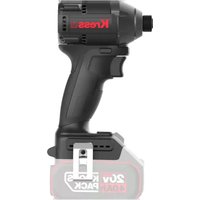
KUB61.91 - Screwdriver KRESS - Free user manual and instructions
Find the device manual for free KUB61.91 KRESS in PDF.



| Brand | Kress |
| Model | KUB61.91 |
| Product type | Cordless Impact Driver |
| Rated voltage | 20 V max (18 V nominal) |
| Battery type | Li-Ion (model KAB21) |
| Charger | Model KAC21 |
| No-load speed (4 speeds) | 0-1200 / 0-2100 / 0-2800 / 0-3600 rpm |
| Rated impact rate | 0-1500 / 0-2800 / 0-3400 / 0-4200 bpm |
| Chuck capacity | 1/4" Hex (6.35 mm) |
| Weight | 1 kg |
| Sound pressure level (LpA) | 80.4 dB(A) |
| Sound power level (LwA) | 91.4 dB(A) |
| Vibration (total value) | 4.337 m/s² (uncertainty 1.5 m/s²) |
| Application modes | Wood, Thin metal, Thick metal, Auto stop |
| Functions | LED light, forward/reverse, 4 speeds, electronic variable speed |
| Power source | Rechargeable battery 20 V |
| Included accessories | Bit holder, hook, 50 mm screwdriver bit |
| Maintenance | Clean with a dry cloth; do not use water or chemicals. Keep ventilation slots clean. |
| Safety | Hearing protection, eye protection, and dust mask recommended. |
| Operating temperature | 0 °C to 45 °C (tool and battery) |
Frequently Asked Questions - KUB61.91 KRESS
User questions about KUB61.91 KRESS
0 question about this device. Answer the ones you know or ask your own.
Ask a new question about this device
Download the instructions for your Screwdriver in PDF format for free! Find your manual KUB61.91 - KRESS and take your electronic device back in hand. On this page are published all the documents necessary for the use of your device. KUB61.91 by KRESS.
USER MANUAL KUB61.91 KRESS
natural_image
Diagram of a camera module with a cable and adjustment knob, labeled A1 (no text or symbols on the device itself)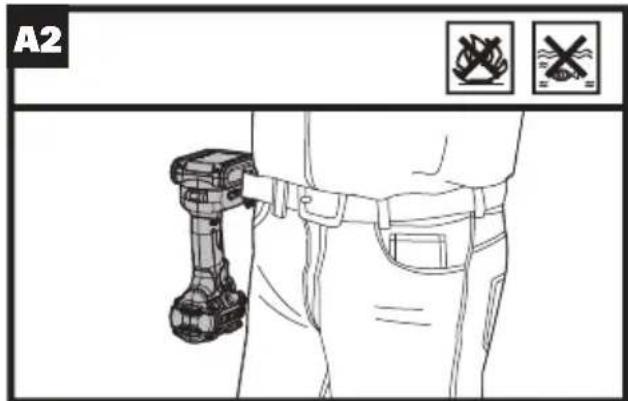
natural_image
Technical line drawing of a mechanical device with no visible text or symbols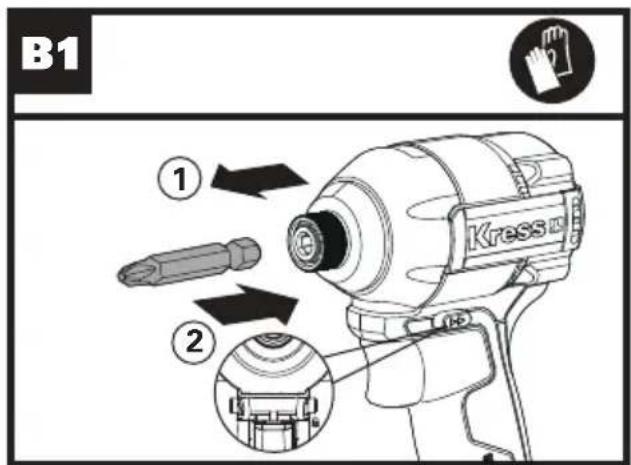
natural_image
Technical line drawing of a mechanical component with a lock and circular symbol (no text or labels)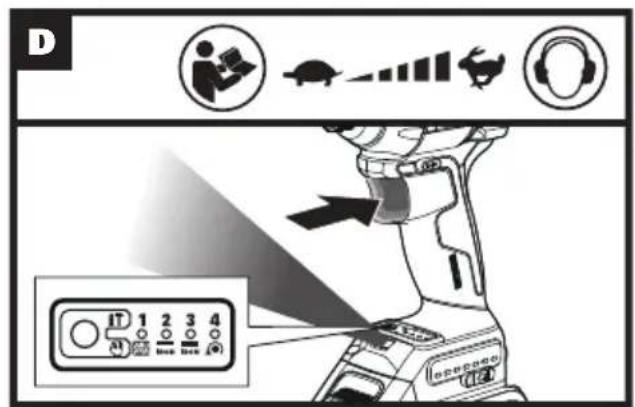
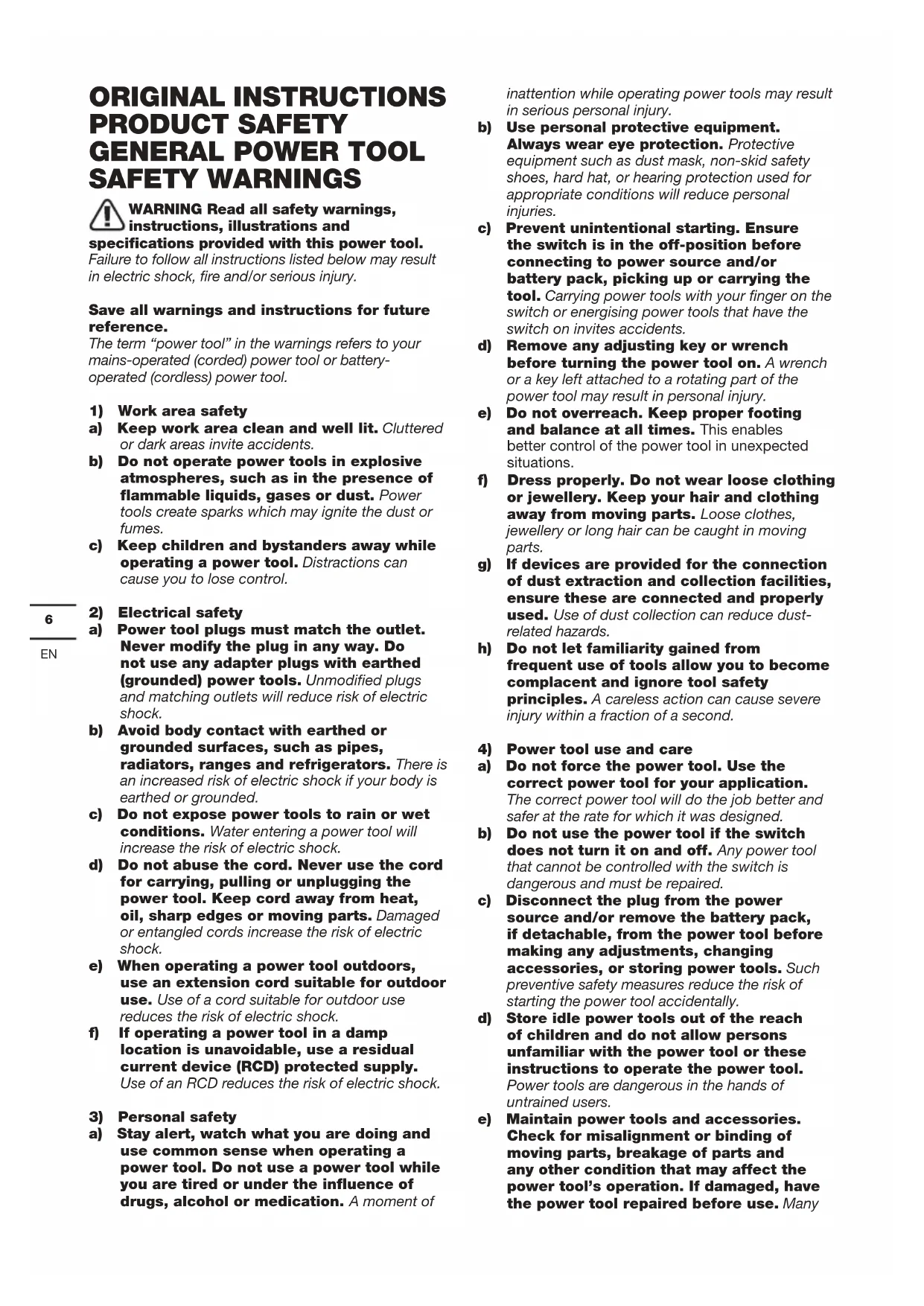
ORIGINAL INSTRUCTIONS PRODUCT SAFETY GENERAL POWER TOOL SAFETY WARNINGS
WARNING Read all safety warnings, instructions, illustrations and specifications provided with this power tool.
Failure to follow all instructions listed below may result in electric shock, fire and/or serious injury.
Save all warnings and instructions for future reference.
The term “power tool” in the warnings refers to your mains-operated (corded) power tool or battery-operated (cordless) power tool.
1) Work area safety
a) Keep work area clean and well lit. Cluttered or dark areas invite accidents.
b) Do not operate power tools in explosive atmospheres, such as in the presence of flammable liquids, gases or dust. Power tools create sparks which may ignite the dust or fumes.
c) Keep children and bystanders away while operating a power tool. Distractions can cause you to lose control.
2) Electrical safety
a) Power tool plugs must match the outlet. Never modify the plug in any way. Do not use any adapter plugs with earthed (grounded) power tools. Unmodified plugs and matching outlets will reduce risk of electric shock.
b) Avoid body contact with earthed or grounded surfaces, such as pipes, radiators, ranges and refrigerators. There is an increased risk of electric shock if your body is earthed or grounded.
c) Do not expose power tools to rain or wet conditions. Water entering a power tool will increase the risk of electric shock.
d) Do not abuse the cord. Never use the cord for carrying, pulling or unplugging the power tool. Keep cord away from heat, oil, sharp edges or moving parts. Damaged or entangled cords increase the risk of electric shock.
e) When operating a power tool outdoors, use an extension cord suitable for outdoor use. Use of a cord suitable for outdoor use reduces the risk of electric shock.
f) If operating a power tool in a damp location is unavoidable, use a residual current device (RCD) protected supply. Use of an RCD reduces the risk of electric shock.
3) Personal safety
a) Stay alert, watch what you are doing and use common sense when operating a power tool. Do not use a power tool while you are tired or under the influence of drugs, alcohol or medication. A moment of
inattention while operating power tools may result in serious personal injury.
b) Use personal protective equipment. Always wear eye protection. Protective equipment such as dust mask, non-skid safety shoes, hard hat, or hearing protection used for appropriate conditions will reduce personal injuries.
c) Prevent unintentional starting. Ensure the switch is in the off-position before connecting to power source and/or battery pack, picking up or carrying the tool. Carrying power tools with your finger on the switch or energising power tools that have the switch on invites accidents.
d) Remove any adjusting key or wrench before turning the power tool on. A wrench or a key left attached to a rotating part of the power tool may result in personal injury.
e) Do not overreach. Keep proper footing and balance at all times. This enables better control of the power tool in unexpected situations.
f) Dress properly. Do not wear loose clothing or jewellery. Keep your hair and clothing away from moving parts. Loose clothes, jewellery or long hair can be caught in moving parts.
g) If devices are provided for the connection of dust extraction and collection facilities, ensure these are connected and properly used. Use of dust collection can reduce dust-related hazards.
h) Do not let familiarity gained from frequent use of tools allow you to become complacent and ignore tool safety principles. A careless action can cause severe injury within a fraction of a second.
4) Power tool use and care
a) Do not force the power tool. Use the correct power tool for your application.
The correct power tool will do the job better and safer at the rate for which it was designed.
b) Do not use the power tool if the switch does not turn it on and off. Any power tool that cannot be controlled with the switch is dangerous and must be repaired.
c) Disconnect the plug from the power source and/or remove the battery pack, if detachable, from the power tool before making any adjustments, changing accessories, or storing power tools. Such preventive safety measures reduce the risk of starting the power tool accidentally.
d) Store idle power tools out of the reach of children and do not allow persons unfamiliar with the power tool or these instructions to operate the power tool. Power tools are dangerous in the hands of untrained users.
e) Maintain power tools and accessories. Check for misalignment or binding of moving parts, breakage of parts and any other condition that may affect the power tool's operation. If damaged, have the power tool repaired before use. Many
accidents are caused by poorly maintained power tools.
f) Keep cutting tools sharp and clean.
Properly maintained cutting tools with sharp cutting edges are less likely to bind and are easier to control.
g) Use the power tool, accessories and
tool bits etc. in accordance with these
instructions, taking into account the
working conditions and the work to be
performed. Use of the power tool for operations
different from those intended could result in a hazardous situation.
h) Keep handles and grasping surfaces
dry, clean and free from oil and grease.
Slippery handles and grasping surfaces do not
allow for safe handling and control of the tool in
unexpected situations.
5) Battery tool use and care
a) Recharge only with the charger specified
by the manufacturer. A charger that is suitable
for one type of battery pack may create a risk of
fire when used with another battery pack.
b) Use power tools only with specifically
designated battery packs. Use of any other
battery packs may create a risk of injury and fire.
c) When battery pack is not in use, keep it
away from other metal objects, like paper
clips, coins, keys, nails, screws or other
small metal objects, that can make a
connection from one terminal to another.
Shorting the battery terminals together may cause
burns or a fire.
d) Under abusive conditions, liquid may be
ejected from the battery; avoid contact.
If contact accidentally occurs, flush with
water. If liquid contacts eyes, additionally
seek medical help. Liquid ejected from the
battery may cause irritation or burns.
e) Do not use a battery pack or tool that is
damaged or modified. Damaged or modified
batteries may exhibit unpredictable behaviour
resulting in fire, explosion or risk of injury.
f) Do not expose a battery pack or tool to fire
or excessive temperature. Exposure to fire or
temperature above 130 °C may cause explosion.
g) Follow all charging instructions and
do not charge the battery pack or tool
outside the temperature range specified
in the instructions. Charging improperly or
at temperatures outside the specified range may
damage the battery and increase the risk of fire.
6) Service
a) Have your power tool serviced by a
qualified repair person using only identical
replacement parts. This will ensure that the
safety of the power tool is maintained.
b) Never service damaged battery packs.
Service of battery packs should only be performed
by the manufacturer or authorized service
providers.
SCREWDRIVER SAFETY WARNING
a) Hold the power tool by insulated gripping
surfaces, when performing an operation
where the fastener may contact hidden
wiring.Fasteners contacting a "live" wire may make
exposedmetal parts of the power tool "live" and could
givethe operator an electric shock.
SAFETY WARNINGS FOR BATTERY PACK
a) Do not dismantle, open or shred cells or battery pack.
b) Do not short-circuit a battery pack. Do not store battery packs haphazardly in a box or drawer where they may short-circuit each other or be short-circuited by conductive materials. When battery pack is not in use, keep it away from other metal objects, like paper clips, coins, keys, nails, screws or other small metal objects, that can make a connection from one terminal to another. Shorting the battery terminals together may cause burns or a fire.
c) Do not expose battery pack to heat or fire. Avoid storage in direct sunlight.
d) Do not subject battery pack to mechanical shock.
e) In the event of battery leaking, do not allow the liquid to come into contact with the skin or eyes. If contact has been made, wash the affected area with copious amounts of water and seek medical advice.
f) Keep battery pack clean and dry.
g) Wipe the battery pack terminals with a clean dry cloth if they become dirty.
h) Battery pack needs to be charged before use.
Always refer to this instruction and use the
correct charging procedure.
i) Do not maintain battery pack on charge when not in use.
j) After extended periods of storage, it may be necessary to charge and discharge the battery pack several times to obtain maximum performance.
k) Recharge only with the charger specified by Worx. Do not use any charger other than that specifically provided for use with the equipment.
I) Do not use any battery pack which is not designed for use with the equipment.
m) Keep battery pack out of the reach of children.
n) Retain the original product literature for future reference.
o) Remove the battery from the equipment when not in use.
p) Dispose of properly.
q) Do not mix cells of different manufacture, capacity, size or type within a device.
r) Keep the battery away from microwaves and high pressure.
SYMBOL
 | To reduce the risk of injury, user must read instruction manual |
 | Wear ear protection |
 | Wear eye protection |
 | Wear dust mask |
 | Do not burn |
 | Batteries may enter water cycle if disposed improperly, which can be hazardous for ecosystem. Do not dispose of waste batteries as unsorted municipal waste. |
 | Warning |
 | Wear protective gloves |
 | High speed |
 | Low speed |
 | Lock |
 | Li-lon battery. This product has been marked with a symbol relating to 'separate collection' for all battery packs and battery pack. It will then be recycled or dismantled in order to reduce the impact on the environment. Battery packs can be hazardous for the environment and for human health since they contain hazardous substances. |
 | |
 | Waste electrical products must not be disposed of with house-hold waste. Please recycle where facilities |
COMPONENT LIST
| 1. | FORWARD/REVERSE ROTATION CONTROL |
| 2. | SOFT GRIP HANDLE |
| 3. | HOOK* |
| 4. | BATTERY PACK RELEASE BUTTON |
| 5. | BATTERY PACK* |
| 6. | ON/OFF SWITCH |
| 7. | SPEED ADJUSTMENT BUTTON |
| 8. | LED LIGHT |
| 9. | BATTERY CAPACITY INDICATOR |
| 10. | COLLET LOCKING SLEEVE |
| 11. | BIT CLIP* |
* Not all the accessories illustrated or described are included in standard delivery.
TECHNICAL DATA
Type KUB61 KUB61.91 (B61-designation of machinery, representative of screwdriver)
| KUB61 KUB61.91 | ||
| Voltage | 20V-Max** | |
| No-load speed | I: 0-1200/minII: 0-2100/minIII: 0-2800/minIV: 0-3600/min | |
| Impact rate | I: 0-1500bpmII: 0-2800bpmIII: 0-3400bpmIV: 0-4200bpm | |
| Chuck size 1/4 | "Hex (6.35mm) | |
| Machine Weight | 1.6Kg 1Kg | |
**Voltage measured without workload. Initial battery voltage reaches maximum of 20 volts. Nominal voltage is 18 volts.
NOISE INFORMATION
| A weighted sound pressure L | pA = 80.4 dB(A) |
| KpA | 3 dB(A) |
| A weighted sound power L | wA = 91.4 dB(A) |
| KwA | 3 dB(A) |
Wear ear protection.
VIBRATION INFORMATION
Vibration total values (triax vector sum) determined according to EN 62841:
| Vibration emission value: | ah = 4.337 m/s2 |
| Uncertainty K = 1.5 m/s 2 |
The declared vibration total value and the declared noise emission value have been measured in accordance with a standard test method and may be used for comparing one tool with another.
The declared vibration total value and the declared noise emission value may also be used in a preliminary assessment of exposure.

WARNING: The vibration and noise emissions during actual use of the power tool can differ
from the declared value depending on the ways in which the tool is used especially what kind of workpiece is processed dependant on the following examples and other variations on how the tool is used: How the tool is used and the materials being cut or drilled.
The tool being in good condition and well maintained. The use of the correct accessory for the tool and ensuring it is sharp and in good condition.
The tightness of the grip on the handles and if any anti vibration and noise accessories are used.
And the tool is being used as intended by its design and these instructions.
This tool may cause hand-arm vibration syndrome if its use is not adequately managed.

WARNING: To be accurate, an estimation of exposure level in the actual conditions of use
should also take account of all parts of the operating cycle such as the times when the tool is switched off and when it is running idle but not actually doing the job. This may significantly reduce the exposure level over the total working period.
Helping to minimise your vibration and noise exposure risk.
Always use sharp chisels, drills and blades.
Maintain this tool in accordance with these instructions and keep well lubricated (where appropriate).
If the tool is to be used regularly then invest in anti vibration and noise accessories.
Plan your work schedule to spread any high vibration tool use across a number of days.
ACCESSORIES
| KUB61 KUB61.91 | |
| Battery pack (KAB21) 2 / | |
| Charger (KAC21) 1 / | |
| Bit Clip 1 1 | |
| Hook 1 1 | |
| 50mm screwdriver bit 1 |
We recommend that you purchase your accessories listed in the above list from the same store that sold you the tool. Refer to the accessory packaging for further details. Store personnel can assist you and offer advice.
OPERATING INSTRUCTIONS

NOTE: Before using the tool, read the instruction book carefully.
Intended Use
This tool is intended for the fastening and loosening of bolts, nuts and various threaded fasteners.
Assembly and Operation
| ACTION FIGURE | |
| ASSEMBLY AND ADJUSTMENT | |
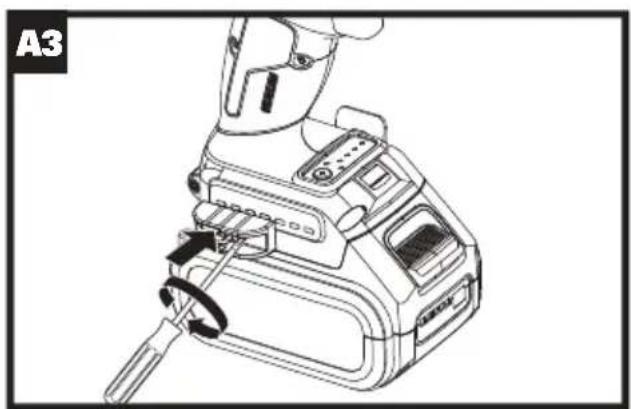
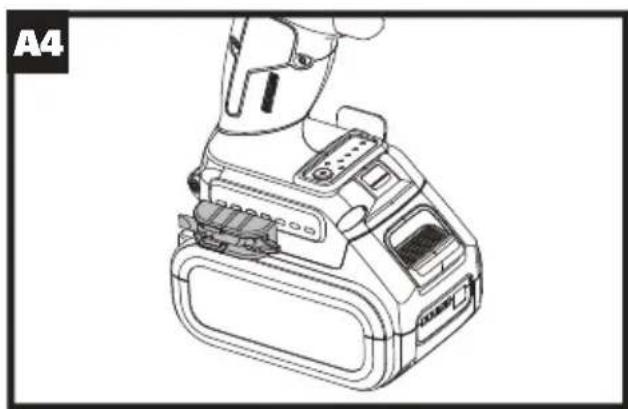
| Assembling the Hook and Bit Clip | See Fig.A1,A2,A3,A4 |
| Inserting the bits See Fig. B1 | |
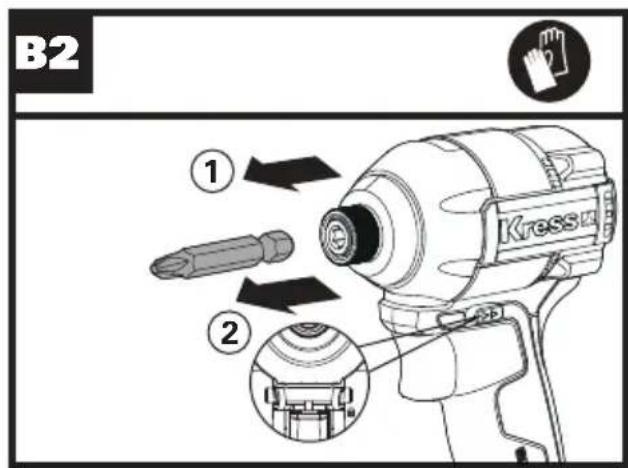
| Removing the bits See Fig. B2 | |
| OPERATION | |
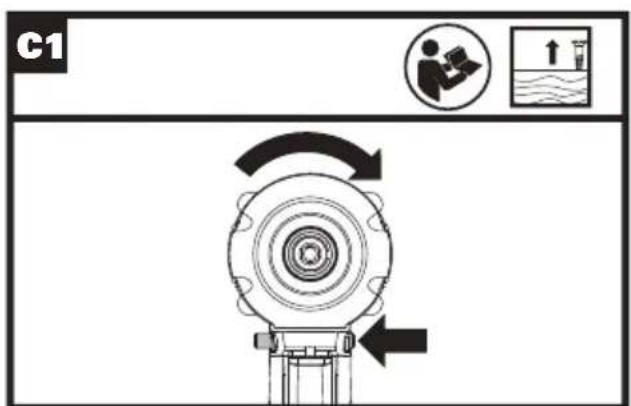
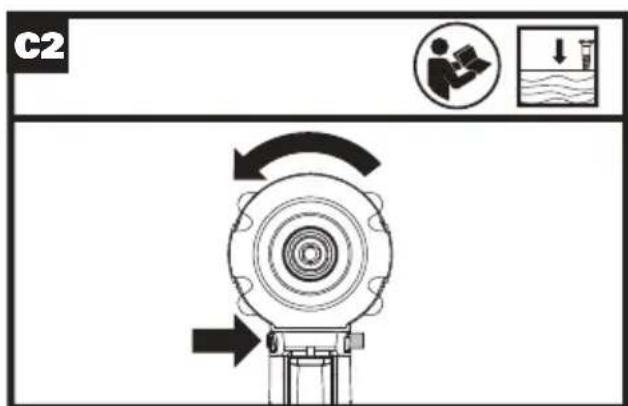
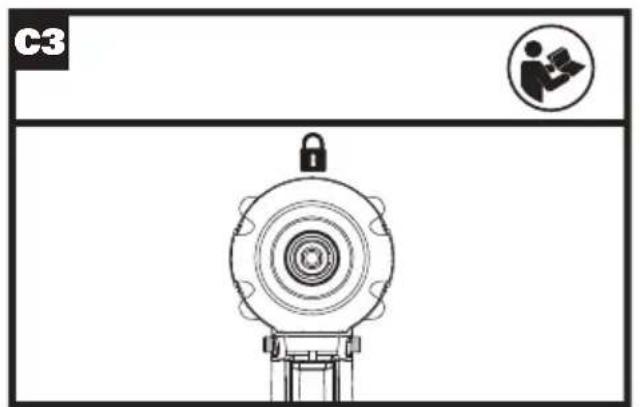
| Forward/reverse rotation controlWarning:The rotation direction of machine cannot be change until it is completely stationary. | See Fig.C1,C2,C3 |
LED indication
Before operation, the LED light will be activated when the On/Off switch is slightly depressed, and will automatically turn off 20 seconds after the On/Off switch is released. Both the impact starter and the battery are equipped with protection systems. When the LED flashes (about once every second, it will stop flashing when you release the switch), the system will automatically cut off the power of the tool to prolong the battery life. If the machine and battery pack are placed in the following locations, the machine may automatically power off during operation:
- Overload: If the tool is overloaded, the abnormally high current may be released; in this case, release the switch on the tool to stop the overloading operation; and then restart.
• Overheat: When the above situations occur, if the tool fails to start by pressing the switch, the tool and battery will overheat. In this case, cool the tool and battery pack before starting the switch again. - Low voltage: The tool does not work when the remaining capacity is too low. In this case, remove and replace the battery pack.

WARNING: To turn on the light, press the On/Off switch and make sure the Forward/Reverse Rotation Control is on right/left position.
See Fig. D
Mode Selection
This tool comes with the adjustment functions by using four gear speeds and four auxiliary modes, which is convenient for the operator to better operate the machine for work.
You can switch between 1st/2nd/3rd/4th speed gears by quick and short press; you can switch between four auxiliary modes of wood/thin iron/thick iron/auto-stop by long press (for 1-3s).
Note: The switching of gear position/mode cannot be performed while the tool is running.
| Application Mode (the auxiliary type is displayed on the panel) | Max. Impact Rate | Function Application | |
| Wood mode | 4200bpm | This mode helps to avoid the screw from falling out when you start drilling. The tool first turns the screw at a low speed. Then it efficiently turn the screw in at a full speed after the screw is drilled to a certain depth. | Tighten the long screws. |
| Thin iron mode | The tool stops as soon as the impact starts. | This mode helps to avoid over-tightening the screws. It also increases the speed and improves the quality. The tool drives screw to rotate at high speed and stops as soon as the impact starts. | Securely tighten the self-drilling screw into the thin metal plate with good finish |
| Thick iron mode | 3400bpm | This mode helps to avoid screw damage or scratches. It also increases the speed and improves the quality. The tool drives screw to rotate at high speed and reduces the speed as soon as the impact starts.Note: Release the switch trigger immediately after tightening to avoid over-tightening. | Securely tighten the self-drilling screw into the thick metal plate with good finish. |
| Auto-stop mode | 4200bpm | This mode helps to avoid the screw from falling out. When the bolt is loosened by reverse rotation, the tool will automatically stop when the bolt/nut is loose enough. | Loosen the bolt. |
Note: The automatic speed control function only works when the switch trigger is fully pushed.
Note: The reverse auto stop function only works when the tool rotates counterclockwise for driving.
Note: Push the switch trigger and then press the button when all indicators are OFF on the panel.
Note: All lights are OFF on the switch panel when the tool is turned off to save battery power. The types of application mode can be checked by continuously pushing the switch trigger until the tool stops.
TROUBLE SHOOTING
1. I CAN NOT FIT THE BATTERY INTO THE BATTERY CHARGER. WHY?
The battery can be inserted into the charger only in one direction. Turn the battery around until it can be inserted into the slot.
2. REASONS FOR DIFFERENT BATTERY PACK WORKING TIMES
Charging time problems, as above, and having not used a battery pack for a prolonged time will reduce the battery pack working time. This can be corrected after several charge and discharge operations by charging & working with your drill. Heavy working conditions such as large screws into hard wood will use up the battery pack energy faster than lighter working conditions. Do not re-charge your battery pack below 0°C (32°F) and above 40°C (104°F) as this will affect performance.
MAINTENANCE
Remove the battery pack from the tool before carrying out any adjustment, servicing or maintenance.
Your power tool requires no additional lubrication or maintenance. Never use water or chemical cleaners to clean your power tool. Wipe clean with a dry cloth. Always store your power tool in a dry place. Keep the motor ventilation slots clean. Keep all working controls free of dust.
FOR BATTERY TOOLS
The ambient temperature range for tool and battery use and storage is 0irc C -45°C.
The recommended ambient temperature range for the charging system during charging is 0irc C -40°C.
ENVIRONMENTAL PROTECTION

Waste electrical products must not be disposed of with household waste. Please recycle where facilities exist. Check with your local authorities or for recycling advice.
DECLARATION OF CONFORMITY
We,
Positec Germany GmbH
Postfach 32 02 16, 50796 Cologne, Germany
Declare that the product
Description Lithium-Ion brushless impact driver Type KUB61 KUB61.91 (B61-designation of machinery, representative of screwdriver)
Function Tightening and loosening screws, nuts
Complies with the following Directives:
2006/42/EC
2011/65/EU&(EU)2015/863
2014/30/EU
Standards conform to
EN 55014-1
EN 55014-2
EN 62841-1
EN 62841-2-2
The person authorized to compile the technical file, Name Marcel Filz
Address Positec Germany GmbH
Postfach 32 02 16, 50796 Cologne, Germany

2022/10/08
Allen Ding
Deputy Chief Engineer, Testing & Certification
Positec Technology (China) Co., Ltd
18, Dongwang Road, Suzhou Industrial
Park, Jiangsu 215123, P. R. China
Positec Germany GmbH
Postfach 32 02 16, 50796 Cologne, Germany
18, Dongwang Road, Suzhou Industrial
Park, Jiangsu 215123, P. R. China
NOTICE ORIGINALE SÉCURITÉ DU PRODUIT AVERTISSEMENTS DE SÉCURITÉ GÉNÉRAUX POUR L'OUTIL

INFORMATIONS RELATIVES AU BRUIT
INFORMATIONS RELATIVE AUX VIBRATIONS
DÉCLARATION DE CONFORMITÉ
Nous,
POSITEC Germany GmbH
Postfach 32 02 16, 50796 Cologne, Germany
18, Dongwang Road, Suzhou Industrial
Park, Jiangsu 215123, P. R. China
ISTRUZIONI ORIGINALI SICUREZZA DEL PRODOTTO AVVISI GENERALI PER LA SICUREZZA DEGLI UTENSILI A MOTORE
18, Dongwang Road, Suzhou Industrial
Park, Jiangsu 215123, P. R. China
18, Dongwang Road, Suzhou Industrial
Park, Jiangsu 215123, P. R. China
INSTRUÇÕES ORIGINAIS SEGURANÇA DO PRODUTO AVISOS GERAIS DE SEGURANÇA DE FERRAMENTAS ELÉCTRICAS

18, Dongwang Road, Suzhou Industrial
Park, Jiangsu 215123, P. R. China
ORIGINELE INSTRUCTIES PRODUCTVEILIGHEID ALGEMENE VEILIGHEIDSWAARSCHUWINGEN VOOR VERMOGENSMACHINE

VEILIGHEIDSWAARSCHUWING VOOR SCHROEVENDRAAIERS
7. SNELHEID AANPASSING KNOP
8. LED-LAMP
9. BATTERIJ INDICATOR
10. SLUITBUS VOOR SPANKOP
11. SCHROEFBITHOUDER\*
18, Dongwang Road, Suzhou Industrial
Park, Jiangsu 215123, P. R. China
18, Dongwang Road, Suzhou Industrial
Park, Jiangsu 215123, P. R. China
Kress

- ORIGINAL INSTRUCTIONS PRODUCT SAFETY GENERAL POWER TOOL SAFETY WARNINGS
- SCREWDRIVER SAFETY WARNING
- SAFETY WARNINGS FOR BATTERY PACK
- NOISE INFORMATION
- VIBRATION INFORMATION
- This tool may cause hand-arm vibration syndrome if its use is not adequately managed.
- ACCESSORIES
- OPERATING INSTRUCTIONS
- Intended Use
- LED indication
- Mode Selection
- TROUBLE SHOOTING
- I CAN NOT FIT THE BATTERY INTO THE BATTERY CHARGER. WHY?
- REASONS FOR DIFFERENT BATTERY PACK WORKING TIMES
- MAINTENANCE
- Remove the battery pack from the tool before carrying out any adjustment, servicing or maintenance.
- FOR BATTERY TOOLS
- ENVIRONMENTAL PROTECTION
- DECLARATION OF CONFORMITY
- NOTICE ORIGINALE SÉCURITÉ DU PRODUIT AVERTISSEMENTS DE SÉCURITÉ GÉNÉRAUX POUR L'OUTIL
- INFORMATIONS RELATIVES AU BRUIT
- INFORMATIONS RELATIVE AUX VIBRATIONS
- DÉCLARATION DE CONFORMITÉ
- ISTRUZIONI ORIGINALI SICUREZZA DEL PRODOTTO AVVISI GENERALI PER LA SICUREZZA DEGLI UTENSILI A MOTORE
- INSTRUÇÕES ORIGINAIS SEGURANÇA DO PRODUTO AVISOS GERAIS DE SEGURANÇA DE FERRAMENTAS ELÉCTRICAS
- ORIGINELE INSTRUCTIES PRODUCTVEILIGHEID ALGEMENE VEILIGHEIDSWAARSCHUWINGEN VOOR VERMOGENSMACHINE
- VEILIGHEIDSWAARSCHUWING VOOR SCHROEVENDRAAIERS
- SNELHEID AANPASSING KNOP
- LED-LAMP
- BATTERIJ INDICATOR
- SLUITBUS VOOR SPANKOP
- SCHROEFBITHOUDER\*
- Kress
Brand : KRESS
Model : KUB61.91
Category : Screwdriver