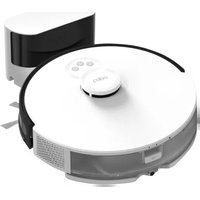
Tapo RV10 Plus - Vacuum Cleaner TP-LINK - Free user manual and instructions
Find the device manual for free Tapo RV10 Plus TP-LINK in PDF.



User questions about Tapo RV10 Plus TP-LINK
0 question about this device. Answer the ones you know or ask your own.
Ask a new question about this device
Download the instructions for your Vacuum Cleaner in PDF format for free! Find your manual Tapo RV10 Plus - TP-LINK and take your electronic device back in hand. On this page are published all the documents necessary for the use of your device. Tapo RV10 Plus by TP-LINK.
USER MANUAL Tapo RV10 Plus TP-LINK
Scan QR code or visit
https://www.tp-link.com/support/setup-video/#robot-vacuum
©2023 TP-Link 7106510770 REV1.2.0 *Images may differ from actual products.
CONTENTS
1 / English
7 / Deutsch
13 / Español
19 / Ελληνικά
25 / Français
31 / Italiano
37 / Português
43 / Suomi
49 / Nederlands
55 / Svenska
61 / Norsk
67 / Dansk
73 / Bahasa Indonesia
79 / ไทย
85 / 繁體中文
92 / Tiếng Việt
98 / Türkçe
109 / العربية
*Images may differ from actual products.
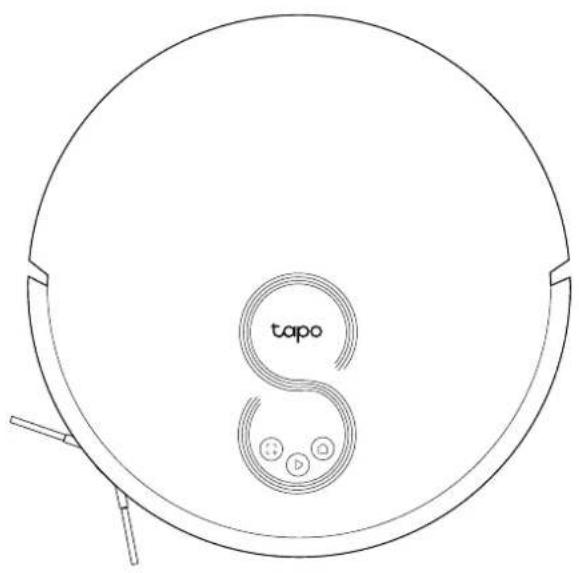
Overview
text_image
tapo SPower/Clean
- Press once: Start/pause cleaning.
- Press and hold for 5 seconds: Turn on/off the robot vacuum.
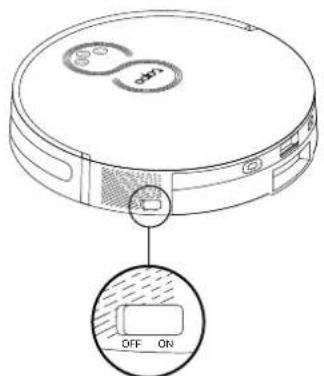
*For the first use, slide the power switch from OFF to ON to turn on.
Dock
- Return to the dock to charge.
• Empty the bin when docked.
Spot Cleaning/Child Lock
- Press once: Start spot cleaning.
- Press and hold for 5 seconds: Turn on/off the child lock.
Combination Button
- Press and hold simultaneously for 5 seconds: Enter setup mode to configure network.
- Press and hold simultaneously for 10 seconds: Restore to factory default settings.
LED
• Red: Battery level < 20%; Error
• Orange: Battery level between 20% and 80%
• Green: Battery level > 80%
English
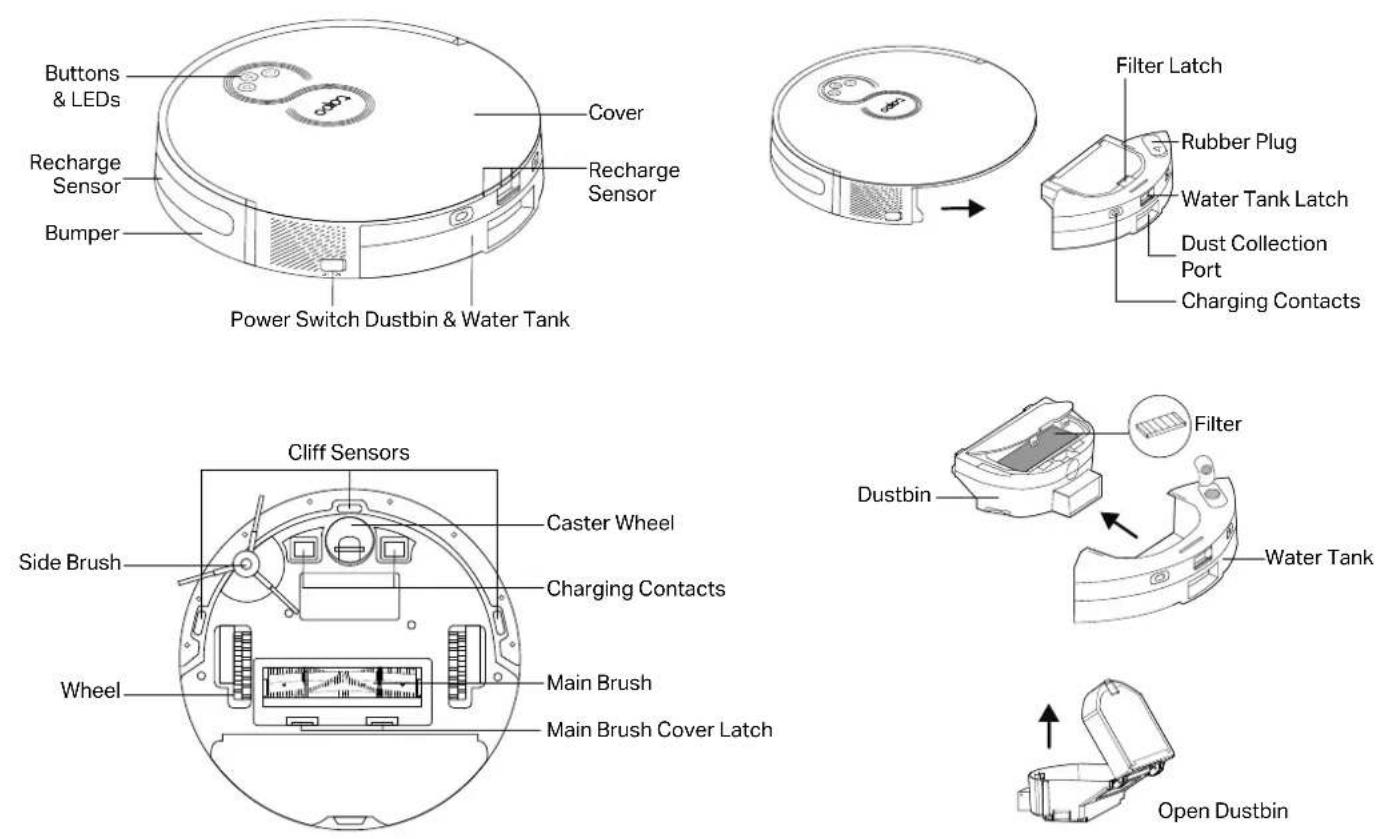
Tapo RV30C Plus
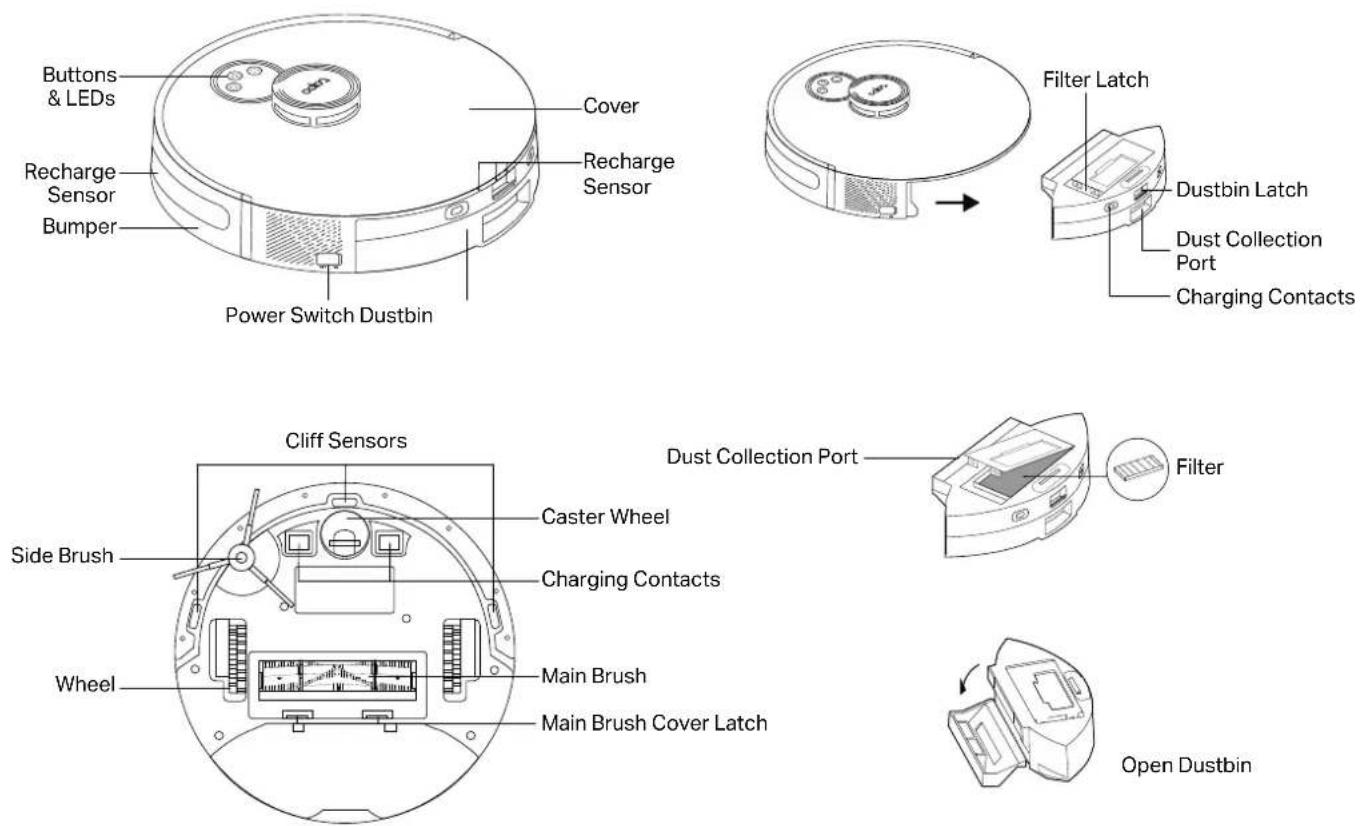
English
English
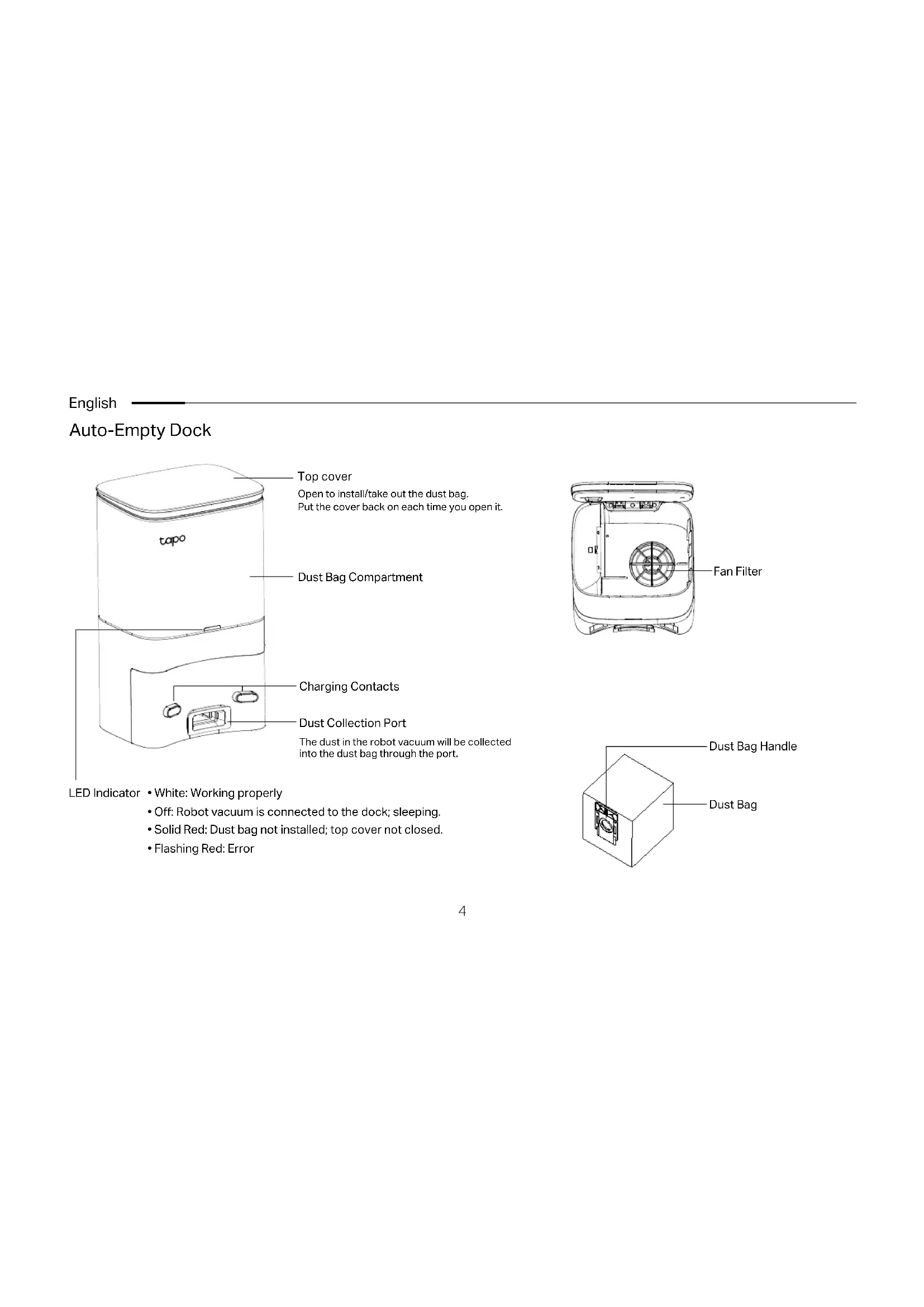
Auto-Empty Dock
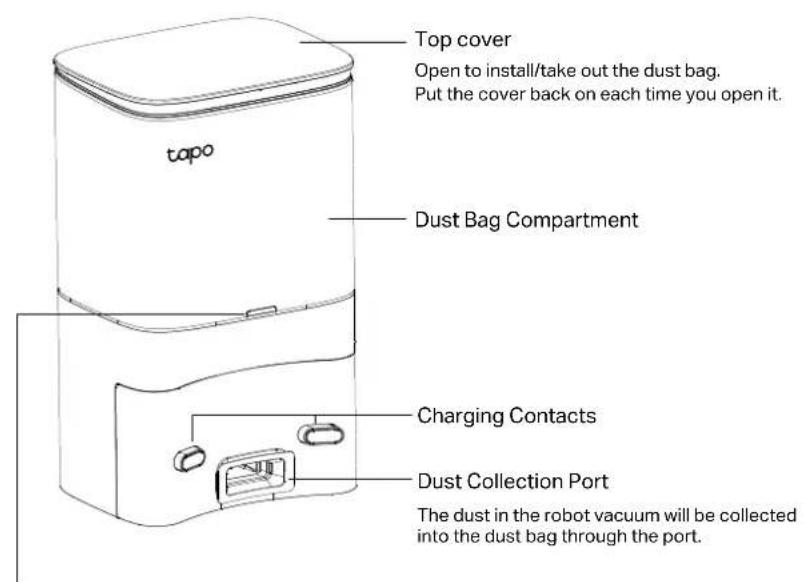
text_image
Top cover Open to install/take out the dust bag. Put the cover back on each time you open it. topo Dust Bag Compartment Charging Contacts Dust Collection Port The dust in the robot vacuum will be collected into the dust bag through the port.LED Indicator • White: Working properly
- Off: Robot vacuum is connected to the dock; sleeping.
- Solid Red: Dust bag not installed; top cover not closed.
- Flashing Red: Error
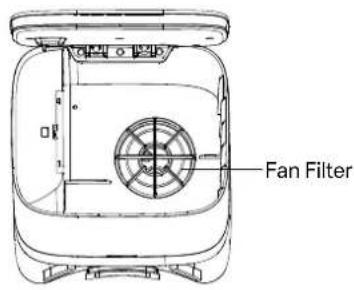
text_image
Fan Filter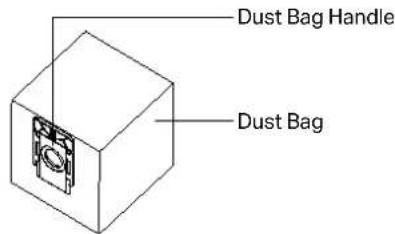
text_image
Dust Bag Handle Dust Bag1 Postion the Dock
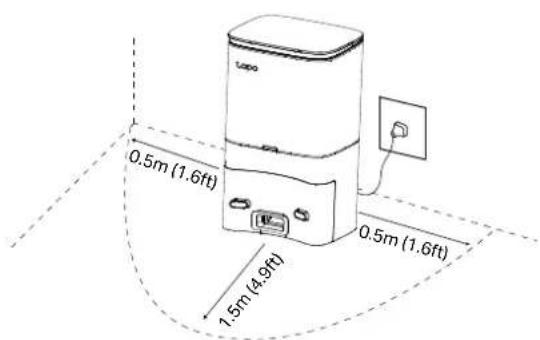
Place the dock on a level surface, flat against a wall, without obstacles within 1.5m (4.9ft) in front and 0.5m (1.6ft) on left and right.
text_image
0.5m (1.6ft) 1.5m (4.9ft) 0.5m (1.6ft)Notes
• To ensure a better user experience, make sure the area is with good Wi-Fi signal.
- Do not place it in direct sunlight. Ensure the area around the dock is free of clutter to improve docking performance.
- To prevent the risk of your robot vacuum falling downstairs, ensure that the dock is placed at least 1.2m (4 ft) away from stairs.
• Always keep the dock powered on, otherwise the robot vacuum will not automatically return. And do not move the dock frequently.
- Place a waterproof pad to prevent the mop from wetting the floor when the robot vacuum is being charged.
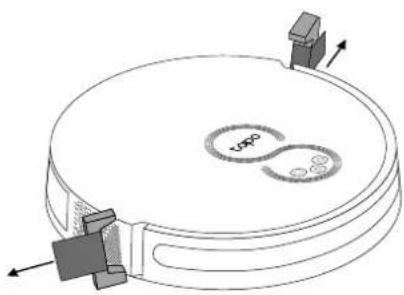
2 Remove Protective Strip
Remove the protective strips on both sides of the front bumper.
natural_image
Diagram of a circular mechanical component with internal components and directional arrows, no text or symbols present.3 Remove Protective Film
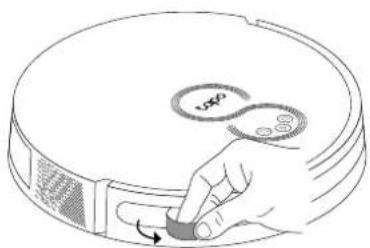
Remove the protective film on the front bumper.
natural_image
Hand placing a button labeled 'vsp' on a circular device (no text or symbols beyond the label)English
4 Power On and Charge
- Slide the power switch from OFF to ON to turn on your robot vacuum.
text_image
Diagram of a robotic vacuum cleaner with labeled control buttons and a highlighted ON/OFF state indicator.- Place the robot vacuum on the charging dock or tap Ⓞ to send it back to the dock to charge. It will return to the dock at the end of a cleaning job and whenever it needs to recharge.
Notes
- When the LED of the charging dock flashes 3 times and then goes out, the charging will begin.
• We recommend that you charge the robot vacuum fully for about 4 hours prior to starting the first cleaning job.
- If the robot vacuum is paused for 10 minutes, it will automatically enter sleep mode and the cleaning job will be canceled.
5 Download the Tapo App and Connect to Wi-Fi
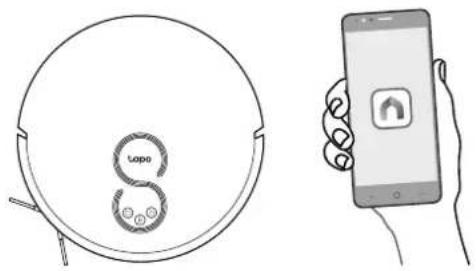
- Download the Tapo app from the App Store or Google Play, then log in.

text_image
Download on the App Store GETTON Google Play- Open the Tapo app, tap + icon, and select your model. Follow the step-by-step instructions to easily set up your robot vacuum.
natural_image
Line drawing of a circular device with 'Toppo' logo and hand holding smartphone (no text or symbols on device)Troubleshooting & Voice Prompts for Issues: https://www.tp-link.com/support/faq/3525/
natural_image
Diagram of a circular device with internal components and directional arrows, no text or symbols presentnatural_image
Hand pressing a button on a circular device with a scroll icon (no text or symbols)Deutsch
text_image
Download on the App Store GOFFON Google Playnatural_image
Line drawing of a circular device with two circular components and an arrow indicating direction (no text or symbols)
natural_image
Diagram of a circular mechanical component with internal components and directional arrows (no text or symbols)natural_image
Hand placing a button labeled 'v50' on a circular device (no text or symbols beyond the label)Español
4 Encendido y carga
text_image
Diagram of a robotic vacuum cleaner with labeled control buttons and a highlighted 'OFF ON' buttonnatural_image
Hand holding a smartphone displaying a simple icon (no text or symbols present)
natural_image
Diagram of a circular device with internal components and directional arrows, no text or symbols presentnatural_image
Hand holding a small knob with a circular button labeled 'S' and a scroll icon, no text or symbols present.Ελληνικά
text_image
Diagram of a robotic vacuum cleaner with labeled control buttons and a highlighted ON/OFF state indicator.natural_image
Illustration showing a circular device with 'Loppo' and a smartphone displaying a home screen (no text or symbols on the devices themselves)Alimentation/Nettoyage
natural_image
Diagram of a circular device with internal components and directional arrows, no text or symbols presentnatural_image
Hand pressing a button on a circular device with a 'v50' label (no text or symbols beyond the label)Français
text_image
Diagram of a robotic vacuum cleaner with labeled control buttons and a highlighted ON/OFF state indicator.natural_image
Line drawing of a robot with 'Loppo' logo and a smartphone displaying a home icon (no text or symbols on the robot or device)natural_image
Diagram of a circular mechanical component with internal components and directional arrows, no text or symbols present.natural_image
Line drawing of a hand pressing a button on a circular device (no text or symbols)Italiano
natural_image
Line drawing of a circular device with two circular components and an arrow indicating rotation (no text or symbols)
natural_image
Diagram of a circular mechanical component with internal components and directional arrows, no text or symbols present.natural_image
Line drawing of a hand pressing a button on a circular device (no text or symbols)Português
4 Ligar e Carregar
natural_image
Diagram of a circular device with two circular components and an arrow indicating rotation (no text or symbols)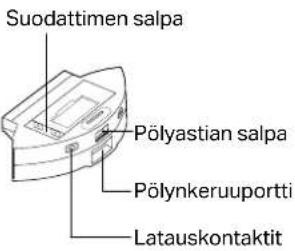
text_image
Suodattimen salpa Pölyastian salpa Pölynkeruportti Latauskontaktit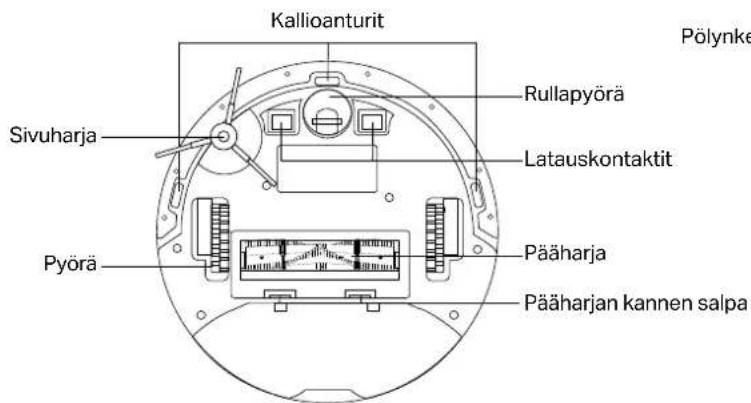
natural_image
Diagram of a circular mechanical component with internal components and directional arrows (no text or symbols)3 Irrota suojakalvo
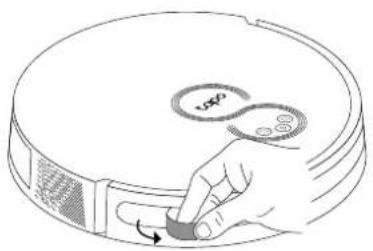
Irrota etupuskurin suojakalvo.
natural_image
Hand pressing a button on a circular device with a 'v50' label (no text or symbols beyond the label)Suomi
natural_image
Hand holding a smartphone displaying a simple location pin icon (no text or symbols on the device screen)natural_image
Diagram of a circular device with internal components and directional arrows, no text or symbols presentnatural_image
Line drawing of a hand pressing a button on a circular device (no text or symbols)Nederlands
4 Inschakelen en opladen
text_image
Diagram of a robotic vacuum cleaner with labeled control buttons and a highlighted ON/OFF state indicator.natural_image
Line drawing of a circular device with 'Loppo' logo and a smartphone displaying an Android app icon (no text or symbols on device)? storingen: https://www.tp-link.com/support/faq/3525/
natural_image
Diagram of a circular device with internal components and directional arrows, no text or symbols presentnatural_image
Hand holding a small knob with a 'USO' button, no text or symbols presentSvenska
text_image
Diagram of a robotic vacuum cleaner with labeled control buttons and a highlighted 'OFF ON' buttonnatural_image
Simple line drawing of a circular device with 'tapo' and 'S' labels, no additional text or symbols present.
natural_image
Hand holding a smartphone displaying a location pin icon (no text or symbols on the device screen)Felsökning & Röstmeddelanden vid problem: https://www.tp-link.com/support/faq/3525/
text_image
Vifte filter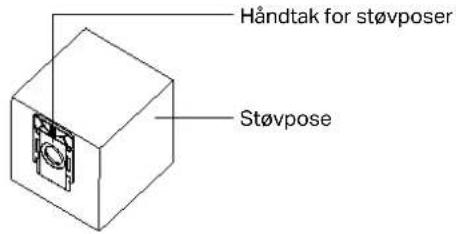
text_image
Håndtak for støvposer Støvposenatural_image
Technical line drawing of a circular mechanical component with internal features and directional arrows (no text or symbols)natural_image
Hand placing a button labeled 'v50' on a circular device (no text or symbols beyond label)Norsk
4 Slå PÅ og lad
natural_image
Hand holding a smartphone displaying a simple icon with an up/down arrow (no text or symbols on the device screen)Feilsøking & Talemeldinger for problemer: https://www.tp-link.com/support/faq/3525/
natural_image
Line drawing of a circular device with a 'tapo' logo and internal circular elements (no text or symbols beyond branding)Dansk
Strøm/rengør
text_image
Ventilator filter
natural_image
Diagram of a circular mechanical component with internal components and directional arrows (no text or symbols)natural_image
Hand placing a button labeled 'v50' on a circular device (no text or symbols beyond label)Dansk
4 Tænd og oplad
natural_image
Line drawing of a circular device with 'Toppo' and circular components, next to a smartphone displaying a home icon (no text or symbols on the device itself)Fejlfinding & Stemmemeddelelser for problemer: https://www.tp-link.com/support/faq/3525/
natural_image
Line drawing of a circular device with a 'tapo' logo and internal circuit-like elements (no text or symbols beyond branding)Daya/Bersih
- Tekan sekali: Mulai/jeda pembersihan.
natural_image
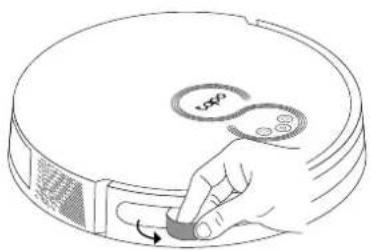
Diagram of a circular mechanical component with internal components and directional arrows (no text or symbols)3 Lepaskan Film Pelindung
Lepaskan film pelindung di bumper depan.
natural_image
Line drawing of a hand pressing a button on a circular device (no text or symbols)Bahasa Indonesia
text_image
Diagram of a robotic vacuum cleaner with labeled control buttons and a highlighted ON/OFF state indicator.text_image
Tapo preparation requirement preparation requirements preparation requirements preparation requirements preparation requirements preparation requirements preparation requirements preparation requirements preparation requirements preparation requirements preparation requirements preparation requirements preparation requirements preparation requirements preparation requirements preparation requirements preparation requirements preparation requirements preparation requirements preparation requirements preparation requirements preparation requirements preparation requirements preparation requirements preparation requirements preparation requirements preparation requirements preparation requirements preparation requirements preparation requirements preparation requirements preparation requirements preparation requirements preparation requirements preparation requirements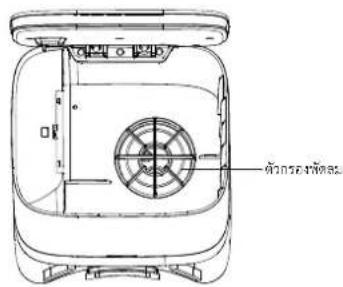
text_image
Technical diagram of a portable appliance with Chinese annotation indicating part name and component description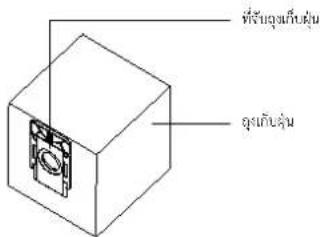
natural_image
Technical line drawing of a circular mechanical component with mounting brackets and internal features (no text or symbols)3 ลอกฟิล์มกันรอย
natural_image
Hand placing a button labeled '100' on a circular device (no text or symbols beyond the label)ไทย
text_image
Diagram of a robotic vacuum cleaner with labeled control buttons and a highlighted ON/OFF state indicator.text_image
Download on the App Store GETITON Google Playnatural_image
Line drawing of a circular device with a 'tapo' logo and internal circuit-like components (no text or symbols beyond branding)▶ 電源 / 清掃
natural_image
Diagram of a circular device with internal components and directional arrows, no text or symbols present3 拆除保護膜
拆除產品外的保護膜。
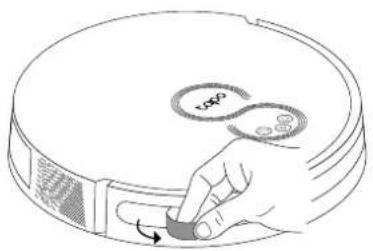
natural_image
Line drawing of a hand pressing a button on a circular device (no text or symbols)繁體中文
4 開機並充電
text_image
Diagram of a robotic vacuum cleaner with labeled control buttons and a highlighted ON/OFF state indicatornatural_image
Line drawing of a robot with 'tapo' logo and smartphone showing home connection (no text or symbols on main elements)故障排除 & 語音警示: https://www.tp-link.com/support/faq/3525/
繁體中文
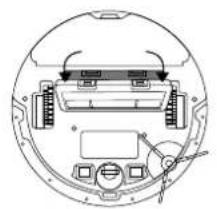
natural_image
Diagram of a circular device interior with labeled components and directional arrows (no text or symbols)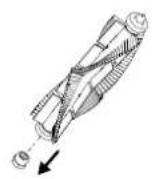
natural_image
Top-down schematic of a circular device with internal components and wiring (no text or symbols)清潔萬向輪清潔主刷
text_image
Technical diagram of a device rear panel with labeled components and an inset showing a mechanical component.清潔邊刷
natural_image
Technical diagram of a circular device with internal components and a small fan-like component (no text or symbols)Tiếng Việt
natural_image
Line drawing of a circular device with a 'tapo' logo and internal circuit-like elements (no text or symbols beyond branding)Nguồn/Lau dọn
natural_image
Technical line drawing of a circular mechanical component with internal components and directional arrows (no text or symbols)natural_image
Hand placing a button on a circular device with 'v50' label, no text or symbols present4 Bật nguồn và sạc
text_image
Download on the App Store GETITON Google Playnatural_image
Line drawing of a circular device with 'topo' logo and hand holding smartphone (no text or symbols)
natural_image
Diagram of a circular mechanical component with internal components and directional arrows (no text or symbols)natural_image
Hand placing a button labeled 'vsp' on a circular device (no text or symbols beyond the label)text_image
Download on the App Store GET ON Google Playnatural_image
Line drawing of a circular device with 'Loppo' label and smartphone showing home screen (no text or symbols on device)natural_image
Hand holding a smartphone displaying a simple icon with an up/down arrow (no text or symbols on the device)natural_image
Diagram of a circular mechanical component with internal components and directional arrows, no text or symbols present.natural_image
Hand placing a button on a circular device with '100' and '88' labels (no text or symbols beyond labels)text_image
youth youth youth youth youth youth youth youth youth youth youth youth youth youth youth youth youth youth youth youth youth youth youth youth youth youth youth youth youth youth youth youth youth youth youth youth youth youth youth youth youth youth youth youth youth youth youth youth youth youth youth
English: Safety Information
- Keep the device away from water, fire, humidity or hot environments.
- Do not attempt to disassemble, repair, or modify the device. If you need service, please contact us.
- If the supply cord is damaged, it must be replaced by the manufacturer, its service agent or similarly qualified persons in order to avoid a hazard.
Warning
Avoid replacement of a battery with an incorrect type that can defeat a safeguard. Avoid disposal of a battery into fire or a hot oven, or mechanically crushing or cutting of a battery, that can result in an explosion. Do not leave a battery in an extremely high temperature surrounding environment that can result in an explosion or the leakage of flammable liquid or gas; Do not leave a battery subjected to extremely low air pressure that may result in an explosion or the leakage of flammable liquid or gas.
The instructions shall state the substance of the following:
This appliance is not intended for use by persons (including children) with reduced physical, sensory or mental capabilities, or lack of experience and knowledge, unless they have been given supervision or instruction concerning use of the appliance by a person responsible for their safety.
Children should be supervised to ensure that they do not play with the appliance.
The appliance is only to be used with the power supply unit provided with the appliance.
WARNING: For the purposes of recharging the battery, only use the detachable supply unit provided with this appliance.
(For RV30 Series) The appliance contains a 5000mAh lithium-ion battery. (For RV10 Series) The appliance contains a 2600mAh lithium-ion battery. (For RV30C Series) The appliance contains a 3200mAh
lithium-ion battery
This appliance can be used by children aged from 8 years and above and persons with reduced physical, sensory or mental capabilities or lack of experience and knowledge if they have been given
supervision or instruction concerning use of the appliance in a safe way and understand the hazards involved. Children shall not play with the appliance. Cleaning and user maintenance shall not be made by children without supervision.
TP-Link hereby declares that the device is in compliance with the essential requirements and other relevant provisions of directives 2014/53/EU, 2009/125/EC, 2011/65/EU and (EU)2015/863.
The original EU Declaration of Conformity may be found at https://www.lapo.com/support/ce/.
TP-Link hereby declares that the device is in compliance with the essential requirements and other relevant provisions of the Radio Equipment Regulations 2017.
The original UK Declaration of Conformity may be found at https://www.tapo.com/support/ukca/
For Auto-Empty Dock / Battery:
TP-Link hereby declares that the device is in compliance with the essential requirements and other relevant provisions of directives 2014/30/EU. 2014/35/EU. 2009/125/EC. 2011/65/EU and
(EU)2015/863. The original EU declaration of conformity may be found at https://www.tapo.com/en/support/ce/
TP-Link hemiv declares that the device is in compliance with the essential requirements and other relevant provisions of the Electromagnetic Compatibility Regulations 2016 and Electrical Equipment
(Safety) Regulations 2016. The original UK declaration of conformity may be found at https://www.lapo.com/support/ukca/
Deutsch
Für Saugroboter:
For TP-Link Branded Products Only. For more information about warranty, please visit https://www.tapo.com/support
THIS WARRANTY GIVES YOU SPECIFIC LEGAL RIGHTS. AND YOU MAY HAVE OTHER RIGHTS THAT VARY FROM STATE TO STATE (OR BY COUNTRY OR PROVINCE).
TO THE EXTENT ALLOWED BY LOCAL LAW, THIS WARRANTY AND THE REMEDIES SET FORTH ARE EXCLUSIVE AND IN LIEU OF ALL OTHER WARRANTIES, REMEDIES AND CONDITIONS.
TP-Link warrants the TP-Link branded hardware product contained in the original packaging against defects in materials and workmanship when used normally in according with TP-Link's guidelines for some period which depends on the local service from the date of original retail purchase by the end-user purchaser.
Dansk
https://www.tapo.com/support
DENNE GARANTI GIVER DIG SPECIFIKKE JURIDISKE RETTIGHEDER OG DU KAN HAVE ANDRE RETTIGHEDER SOM VARIERER FRA STAT TIL STAT (ELLER FRA LAND ELLER PROVINSI. INDENFOR LOVENS RAMMER ER GARANTIEN OG RETSMIDLERNE DER FREMGAR EKSKLUSIVE OG I STEDET FOR ALLE ANDRE RETTIGHEDER, RETSMIDLER OG BETINGELSER.
No restrictions exist in the use of radio frequencies or frequency bands in all EU member states, EFTA countries, Northern Ireland and Great Britain.
for technical support, user guides, FAQs, warranty & more