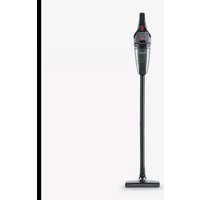
HV 7147 - Vacuum Cleaner SEVERIN - Free user manual and instructions
Find the device manual for free HV 7147 SEVERIN in PDF.


| Product Type | Cordless Hand Vacuum |
| Brand | Severin |
| Model | HV 7147 |
| Power Supply | Lithium-ion battery 18.5 V / 2200 mAh, charges via power adapter 22.5 V DC / 500 mA |
| Battery Life | Approximately 30 min (Power mode) / 55 min (Eco mode) |
| Charging Time | Approximately 5 hours |
| Power | 120 W |
| Suction Power | 5 kPa |
| Dust Container Capacity | 600 ml |
| Liquid Container Capacity | 150 ml |
| Included Accessories | Turbo brush, flat nozzle, rubber nozzle, long nozzle, furniture brush, 2-piece flexible hose, suction hose, adapter, wall mount, power adapter, storage bag |
| Main Functions | Dry and liquid vacuuming, two modes (Eco/Power), LED working area light |
| Maintenance | Regular emptying of the container, cleaning of the filter and brush roll |
| Safety | Use only with the provided adapter, do not use on people/animals, do not vacuum hot or sharp objects |
| Available Spare Parts | Filter, turbo brush, power adapter, nozzle, hose, flexible hose, tips, wall mount (references in manual) |
Frequently Asked Questions - HV 7147 SEVERIN
User questions about HV 7147 SEVERIN
0 question about this device. Answer the ones you know or ask your own.
Ask a new question about this device
Download the instructions for your Vacuum Cleaner in PDF format for free! Find your manual HV 7147 - SEVERIN and take your electronic device back in hand. On this page are published all the documents necessary for the use of your device. HV 7147 by SEVERIN.
USER MANUAL HV 7147 SEVERIN
natural_image
Technical line drawing of a vacuum cleaner device with visible internal components and control buttons (no text or symbols)HV 7147
DE Handsauger mit Kombi-Zubehör – Gebrauchsanleitung .....2
GB Hand-held vacuum cleaner with combi accessories – Instruction Manual .....16
FR Aspirateur à main avec accessoires combinés – Mode d'emploi ....30
NL Handzuiger met combi-accessoires – Bedieningshandleiding 44
ES Aspirador de mano con accesorios combinados— Manual de instrucciones ..... 58
IT Aspirapolvere a mano con accessori combinabili – Istruzioni per l'uso....72
DK Händstøvsuger med kombi-tilbehør – Brugsanvisning....86
SE Handdammsugare med kombitillbehör – Bruksanvisning 100
FI Käsipölynimuri lisävarusteilla – Käyttöohje....114
PT Aspirador manual com acessórios combinados – Manual de instruções .....128
PL Odkurzacz ręczny z akcesoriami kombi – Instrukcja obsługi 142
GR Σκουπάκι χειρός με συνδυασμό εξαρτημάτων – Οδηγίες χρήσης......156
DE
Vielen Dank
natural_image
Diagram of a mechanical device with two inserted pins and arrows indicating assembly or connection (no text or symbols)natural_image
Illustration of a hand using a tool to cut a device component, showing part outline and measurement arrows (no text or symbols)We hope you will enjoy your high-quality SEVERIN product and thank you for placing your trust in us.
About this instruction manual
This instruction manual includes important tips for your safety and the use of the appliance. Failure to observe the instruction manual can result in personal injuries or damage to the appliance. Keep the instruction manual in a safe place. When passing the appliance on to a third party, also include the instruction manual. Read the instruction manual completely before initial use of the appliance.
Illustrated Quick Start Guide included
This instruction manual comes with an Quick Start Guide that provides you with additional tips for the use and care of the appliance.
If needed, this instruction manual and the Quick Start Guide can be downloaded online free of charge at www.severin.de.
Contents
1 Technical data....18
2 Safety instructions....19
3 Installing and charging the appliance....24
4 Cleaning and maintaining the appliance 26
5 Spare parts/accessories....28
6 Troubleshooting by yourself....28
7 Disposal 29
1 Technical data
| Item number: HV 7147 |
| Lithium-ion battery: 18.5 V / 2,200 mAh |
| Mains adapter: 22.5 V DC / 500 mA |
| Power: 120 W |
| Dust capacity: 600 ml |
| Liquid capacity: 150 ml |
| Suction power: 5 kPa |
| Runtime: approx. 30 min (Power mode) / approx. 55 min (Eco mode) |
Marking on the appliance:

The appliance complies with all EU directives that are binding for CE certification.
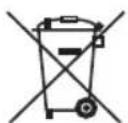
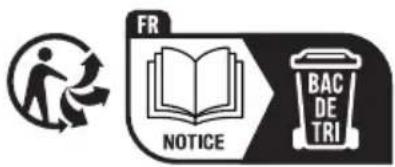
The appliance and its rechargeable battery must be disposed of separately from household waste at a proper disposal site.
Scope of delivery
■ Hand-held vacuum cleaner
Mains adapter
■ Wall mount including fastening material
■ Turbo brush with rotating brush roller
Floor nozzle
■ Suction tube, two-piece
- Flexible crevice tool
Rubber nozzle
- Crevice nozzle
■ Furniture brush to be attached to the crevice nozzle
Long crevice tool
■ Adapter for attaching the suction tube and/or the floor nozzle
Carrying bag
2 Safety instructions
Certain groups of persons
This appliance may only be operated by children over the age of 8 and by persons with reduced physical, sensory or mental capacities or a lack of experience and/or knowledge if they are supervised or have been instructed about the safe use of the appliance and are aware of the dangers associated with its use.
Children are not allowed to play with the appliance or stand or sit on it. Cleaning and user maintenance may not be performed by children without supervision.
Children under the age of 8 must be kept away from the appliance and the mains adapter.
The packaging material must not be used for play purposes. There is a risk of suffocation.
Connecting the appliance safely
The appliance is charged with electrical current. Thus, there is a risk of electric shock.
Therefore:
Check the appliance and mains adapter for possible damage before use.
Never operate a defective appliance or an appliance with a defective mains adapter.
- Only connect the mains adapter to sockets which match the specifications on the mains adapter type plate.
SAFETY INSTRUCTIONS
- Never attempt to repair the appliance or its mains adapter yourself. To prevent hazards, repairs to the appliance and the mains adapter may only be made by our customer service. Arrange repair of a defective appliance with a specialist dealer or contact SEVERIN customer service (see contact information in appendix to this instruction manual or at www.severin.de).
Do not immerse the appliance or mains adapter in water or other liquids, or treat with liquids. Keep the appliance and the mains adapter away from rain and wet conditions. Do not operate the appliance and mains adapter outdoors or in rooms with high humidity.
Do not handle the appliance or mains adapter with wet hands. When unplugging the mains adapter from the socket, always pull directly on the plug.
■ Make sure that the cable of the mains adapter is not kinked, pinched or run over and that it does not come in contact with sources of heat, humidity and sharp edges. Make sure that the cable of the mains adapter does not become a trip hazard. - Do not charge the appliance or turn the suction opening upwards when there is still water in the dust container.
Before cleaning or servicing the appliance and before changing accessories, switch off the appliance and make sure that the mains adapter is not connected.
Safety when handling rechargeable batteries
If rechargeable batteries are handled improperly, there is a risk of injury and explosion.
- Never replace the rechargeable battery with other rechargeable batteries or other non-rechargeable batteries. Never short-circuit rechargeable batteries, i.e. never touch both poles at the same time, especially not with objects that conduct electricity. Store rechargeable batteries so that they cannot be short-circuited by other rechargeable batteries or metal objects during storage.
To charge the rechargeable battery, only use the mains adapter included in the delivery. Never charge the rechargeable battery with another mains adapter. Only use the mains adapter included in the delivery to charge the rechargeable battery of this appliance.
At the end of its useful life, take the rechargeable battery to an appropriate collection point nearby without delay, thus ensuring safe and environmentally-appropriate disposal. Never dispose of the rechargeable battery in household waste. - Never take the rechargeable battery apart, expose it to high temperatures or throw it onto fires.
In case of improper handling, liquid can escape from the rechargeable battery. Do not use the rechargeable battery if it is damaged or if it is leaking liquid.
If liquid has escaped, avoid contact with the liquid.
In case of contact with the liquid, rinse it off immediately with copious amounts of water. In case of after effects (irrespective of type), consult a doctor.
SAFETY INSTRUCTIONS
Rotating brush roller
The appliance contains a powered brush roller. This can cause injuries. Therefore, note the following:
Before cleaning or maintaining the appliance, make sure that the appliance is switched off and is not on charge.
■ Ensure that parts of your body can never get under the brush roller.
Do not vacuum near cables, wires and long fringes. On the one hand, there is a danger that the cable's insulation will be damaged. On the other hand, these objects can get caught in the brush roller and thereby damage the appliance.
LED lighting
LEDs are installed in the appliance. These illuminate the work area in front of the appliance.
Do not look into the LEDs during operation.
It is not possible to exchange the LEDs.
Intended use
The appliance is intended solely for use in the private sphere.
The appliance may only be used for cleaning normally soiled surfaces, short pile carpets, or upholstery that can withstand exposure to the rotating brush without damage and for vacuuming liquids.
Any other use is deemed improper and is forbidden.
In order to prevent injuries, fires and damage, the appliance must not be used to vacuum:
■ People, animals and plants. Always keep appliance away from all body parts, hair and clothing. Do not vacuum near the head.
■ Glowing, burning or smouldering particles (such as ash, coal, charcoal, cigarettes, matches).
■ Explosive or highly flammable substances or toners.
- Sharp objects, such as glass splinters, nails or construction waste.
The following is also forbidden:
■ Independent alteration or repair of the appliance or its mains adapter.
- Inserting objects into the appliance's openings. The specially provided accessories are the exception to this rule.
Use, storage or charging outdoors.
If the appliance is defective
- Have a defective appliance repaired by a specialist dealer or customer service (see contact information in the appendix to this instruction manual or at www.severin.de).
3 Installing and charging the appliance
For additional installation tips, see ▷ Quick Start Guide ▷ Installation.
Installing the wall mount
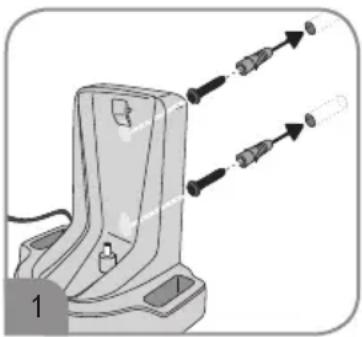
natural_image
Mechanical assembly diagram showing a bracket with two tool tips and directional arrows indicating motion (no text or symbols)- Select an attachment location within drilling range of a socket.
- Hold the wall mount to the wall, aligned in a vertical position.
- Mark the drilled holes with a pencil.
- Drill the holes (approximately 6 mm ∅).
- Insert the dowels included in the delivery into the holes.
- Fasten the wall mount using the screws included in the delivery.
Charging the rechargeable battery with wall mount
The rechargeable battery has to be charged using the wall mount before first use. It is best to charge the rechargeable battery
before each use, especially if the appliance has not been used for a while. This increases the useful life of the rechargeable battery and ensures the longest possible cleaning cycles.
- Make sure that the appliance is switched off (On/Off switch in the "0" position).
- Connect the mains adapter included in the delivery to a socket.
- Insert the appliance into the wall mount.
The LED on the handle flashes red. The charging process starts.
The LEDs light up green continuously if the rechargeable battery is fully charged. The charging process takes around 5 hours when the rechargeable battery is empty.
TIP: The appliance can remain in the charging station so that it is ready for use at all times. For further information, see also ▷ illustrated Quick Start Guide.
Vacuum cleaning
For further tips, see ▷ Quick Start Guide ▷ Operation.
Select one of the following attachments from the scope of delivery for different applications:
| Attachment Application | |
| Turbo brush with rotating brush roller Cleaning of hard floors, short-pile carpets or upholstery | |
| Long crevice toolShort crevice tool/furniture brush | Cleaning of hard-to-reach places.Cleaning of furniture with the attachable furniture brush. |
| Flexible crevice tool Cleaning of hard-to-reach places, e.g. under car seats | |
| Suction tube and floor nozzle with adapter | Cleaning of hard floors and short pile carpets |
| Rubber nozzle Absorption of liquids | |
| Without | The appliance can also be used without an additional nozzle or brush. It is not possible to absorb liquids without an additional nozzle. |
TIP: Always adhere to the cleaning and maintenance instructions of the floor covering, carpet or furniture manufacturer. Only use undamaged nozzles. Damaged nozzles can scratch surfaces.
Vacuuming in Eco mode
Vacuuming is carried out with reduced power in Eco mode. The appliance consumes less energy and the operating time of the rechargeable battery is extended. The brush roller also rotates if the floor nozzle is attached.
- Attach an additional attachment to the appliance if necessary.
- Push the On/Off switch to the "I" position to switch on the appliance.
The appliance vacuums in Eco mode.
The LED on the handle lights up orange.
The LEDs on the top of the appliance illuminate the work area.
- Vacuum the surface.
- Push the On/Off switch to the "0" position to switch off the appliance.
- Empty and clean the dust container („Cleaning the dust container and filter“ auf Seite 26).
TIP: The LED on the handle starts flashing when the battery charge is running low.
The appliance switches off automatically when the battery charge is too low. Charge the rechargeable battery („3 Installing and charging the appliance“ auf Seite 24).
Vacuuming in Power mode
The appliance vacuums at full power in Power mode. The brush roller rotates when the turbo brush is attached.
- Attach an additional attachment to the appliance if necessary.
- Push the On/Off switch to the "I" position to switch on the appliance.
The appliance vacuums in Eco mode.
The LED on the handle lights up orange.
The LEDs on the top of the appliance illuminate the work area.
- Push the On/Off switch to the "II" position to switch the appliance to Power mode.
The appliance vacuums in Power mode.
The LED lights up green..
TIP: Push the On/off switch back to the "I" position to return to Eco mode.
- Vacuum the surface.
- Push the On/Off switch to the "0" position to switch off the appliance.
- Empty and clean the dust container („Cleaning the dust container and filter“ auf Seite 26).
TIP: The LED on the handle starts flashing when the battery charge is running low. The appliance switches off automatically when the battery charge is too low. Charge the rechargeable battery („3 Installing and charging the appliance“ auf Seite 24).
4 Cleaning and maintaining the appliance
For additional information on cleaning, see ▷ illustrated Quick Start Guide.
Emptying the dust container
The dust container can only store limited quantities of dirt/water. For this reason, empty the dust container after each cleaning procedure or if the dust or liquid reach the MAX mark.

natural_image
Illustration of a hand holding a device with a magnified inset showing internal components (no text or symbols)- Make sure that the appliance is switched off and is not on charge.
- Hold the appliance with the suction opening facing down.
- Press the release catch to disconnect the dust container from the motor unit.
- Remove the dust container.
- Remove the filter and filter holder.
- Empty the dust container into a waste bin or a drain.
Cleaning the dust container and filter
The filter should be cleaned if the suction power decreases when the rechargeable battery is fully charged. Empty the dust container and, if necessary, leave it to dry before or after each time it is used to absorb water.
- Make sure that the appliance is switched off and is not on charge.
- Unlatch, remove and empty the dust container („Emptying the dust container“ auf Seite 26).
- Remove the filter holder, together with the filter, from the dust container.
- Rinse out the dust container with clear water.
- Turn the filter anti-clockwise to release it from the filter holder.
- Knock out the filter and filter holder over a waste bin and remove any dirt with a soft brush as necessary.
- If necessary, wash out the filter in soap solution and then allow it to dry completely.
- Insert the filter in the filter holder and secure it by turning it clockwise.
- Insert the filter holder in the dust container.
- Secure the dust container on the appliance again.
Cleaning the brush roller
Soiling may prevent the brush roller from rotating freely. Clean the brush roller regularly. For additional information, see ▷ illustrated Quick Start Guide ▷ Cleaning.
- Make sure that the appliance is switched off and is not on charge.
- Remove the floor nozzle from the appliance, if it is attached.
- Unfasten the stop catch for the brush.
- Remove the brush.
- Remove any hairs and dirt from the brush; if necessary, use tweezers or scissors and do so carefully.
- Re-insert the brush and secure it with the stop catch.
Cleaning the appliance
- Make sure that the appliance is switched off and is not on charge.
- Wipe the housing with a slightly damp cloth and then rub it dry.
TIP: Do not use any sharp, abrasive cleaning agents or hard brushes for cleaning.
Storing the appliance
■ Store the appliance and accessories in a cool, dry place out of the reach of children.
Some of the additional attachments can be stored on the wall mount.
5 Spare parts/accessories
For spare parts and accessories, please contact our customer service department. Contact details can be found in the appendix to this instruction manual and on our homepage.
| Order number Accessories/spare part | |
| 9814-048 Filter | |
| 9825-048 Turbo brush with rotating brush roller | |
| 2361-048 Mains adapter | |
| 9019-048 Floor nozzle | |
| 9020-048 Suction tube, two-piece with adapter | |
| 9021-048 Flexible crevice tool | |
| 9022-048 Long crevice tool | |
| 9812-048 Crevice tool | |
| 6734-048 Rubber nozzle | |
| 9023-048 Carrying bag | |
| 9002-048 Wall mount | |
6 Troubleshooting by yourself
To ensure that you do not encounter any problems, it is important to empty the dust container regularly and take this opportunity to check the filters and clean them if they are dirty. However, if you do encounter any problems with the appliance, use the following table to determine whether you can solve the problem yourself.
Before troubleshooting, switch off the appliance and disconnect the power plug from the socket.
| Problem Possible cause/solution | |
| Appliance cannot be switched on. | The rechargeable battery is completely empty; the LEDs on the handle are no longer illuminated. Switch off the appliance and charge the rechargeable battery („3 Installing and charging the appliance“ auf Seite 24). |
| The appliance cannot be charged (LED does not light up). | The mains adapter or appliance is not correctly inserted: Check whether the appliance is properly in place in the wall mount. Check whether the mains adapter is seated correctly in the socket („Charging the rechargeable battery with wall mount“ auf Seite 24). |
| The rechargeable battery is fully charged but the appliance is hardly picking up any dirt. | The dust container needs to be emptied or the filter needs to be cleaned („Emptying the dust container“ auf Seite 26, „Cleaning the dust container and filter“ auf Seite 26). |
Problem Possible cause/solution
| Operating duration is becoming ever shorter. | The brush roller is soiled and needs to be cleaned („Cleaning the brush roller“ auf Seite 27). The filter needs to be cleaned („Cleaching the dust container and filter“ auf Seite 26). |
| The brush roller rotates slowly or irregularly. | The brush roller is soiled and needs to be cleaned („Cleaning the brush roller“ auf Seite 27). |
If this table does not help, please contact our customer service. The contact information can be found in the appendix to this instruction manual or at www.severin.de.
7 Disposal
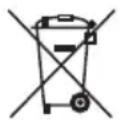
Appliances and rechargeable batteries that are marked with this symbol must be disposed of separately from household waste. These appliances and rechargeable batteries contain valuable raw materials that can be recycled. Proper disposal protects the environment and the health of your fellow human beings. Return the appliance and the rechargeable battery separately, after removing the rechargeable battery, to the appropriate collection points for disposal. Your local authorities or dealer can provide information about proper disposal.
FR
Remerciements
Chère cliente, cher client,
natural_image
Mechanical component diagram showing a base with two inserted pins and arrows indicating assembly or movement (no text or symbols)natural_image
Illustration of a hand using a tool to cut a mechanical component, showing part movement and alignment (no text or symbols)APPARAAT MONTEREN EN OPLADEN
3 Apparaat monteren en opladen
natural_image
Diagram of a mechanical device with two inserted pins and arrows indicating assembly or connection (no text or symbols)natural_image
Illustration of a hand using a tool to cut a device component, showing a circular opening and textured surface (no text or symbols)natural_image
Mechanical component diagram showing a base with two inserted pins and arrows indicating assembly or alignment (no text or symbols)natural_image
Illustration of a hand using a handheld device to remove or clean material (no text or symbols visible)natural_image
Mechanical component diagram showing a base with two inserted pins and arrows indicating assembly or alignment (no text or symbols)natural_image
Illustration of a hand holding a device with a textured grip and an arrow pointing to a component (no text or symbols present)natural_image
Mechanical component diagram showing a base with two inserted pins and arrows indicating assembly or alignment (no text or symbols)natural_image
Illustration of a hand holding a device with a magnified inset showing internal components (no text or symbols)natural_image
Mechanical component diagram showing a base with two inserted pins and arrows indicating assembly or alignment (no text or symbols)natural_image
Illustration of a hand using a tool to cut a device into a component, showing a mesh pattern and an arrow indicating the process (no text or symbols present)natural_image
Diagram of a mechanical device with two inserted pins and arrows indicating assembly or connection (no text or symbols)natural_image
Illustration of a hand using a handheld device to cut a device into a container (no text or symbols visible)natural_image
Mechanical component diagram showing a base with two inserted pins and arrows indicating assembly or alignment (no text or symbols)natural_image
Illustration of a hand using a handheld device to lift a component (no text or symbols visible)natural_image
Diagram of a mechanical component with two inserted pins and arrows indicating assembly (no text or symbols)natural_image
Illustration of a hand using a handheld device to cut a device (no text or symbols visible)natural_image
Diagram of a mechanical component with two tool tips and directional arrows indicating movement (no text or symbols)natural_image
Illustration of a hand holding a device with a mesh component and an arrow indicating motion (no text or symbols)26 Oaktree Business Park
Trim Co., Meath
Tel.: 046 94 83100
Fax: 046 94 83663
Web: www.bluestone.ie
Italia
ASSISTENZA POST-VENDITA
NUMERO VERDE 800224155
E-Mail: assistenza@severin.com
Indonesia
PT. Setai Modern Elektronik
Email: info@severin.co.id
Web: www.severin.co.id
Jakarta
Komp. Glodok Plaza Blok F No. 9, Jl. Pinangsia
Raya, Jakarta Barat
021 65911888 / 021 6592889
Medan
Dr.Waleed Maraqa commercial center, Level 1
Khalda, Amman Zip code: 11953
Tel.: +962 6 5346429
Fax : +962 6 5341706
Mob Jordan: +962 797426108
Kuwait
Mohammed Abdulrahman Al Bahar
Al Bahar Building P.O. Box 148
Safat 13002 Kuwait
Tel.: +965 4810855
Latvia
SIA GTCL BALTIC
Piedrujas iela 7
LV - Riga 1073
Tel.: +371 29119989
Fax: +371 67297769
Lebanon
Khoury Home
7th Floor, Cité Dora 3 Building, Dora
P.O.Box 70611
Antelias, Lebanon
Tel.: +961 1 244200
Fax: +966 1 253535
E-Mail: info@khouryhome.com
Internet: www.khouryhome.com
Lithuania
UAB Topo Grupe
Savanoriu PR. 206A,
50193 Kaunas, Lithuania
Tel.: +370 660 00200
Web: www.severinshop.hu
Malta
Crosscraft Co Ltd
119 Valletta Road
Paola. PLA1511
Malta
Tel: +356 21805805
+356 79498432
E-Mail: clyde@crosscraft.com.mt
Maroc
BS Cast
19, Allee des Villas Ain Sebaa
20250 Casablanca
Fax: +212 5 22 24 40 34
TEL Port: +212 6 61 28 60 88
Nederland
A.A.K & Partners L.L.C.
P.O Box:-1650, Muttrah
Postal Code - 114
Sultanate of Oman
Tel.: +968 24834470
Fax: +968 24835186
E-Mail: aakpllc@gmail.com
Peru
SEVERIN PERU / Comercial Rebeca S.R.L
Mezzanine 1, South Center Tower
2206 Venture Street, Madrigal Business Park
Alabang, Muntinlupa City
Tel.: 809 34 41
E-Mail: severinconsumercare@colombophils.com.ph
Polska
Severin Polska Sp.z o.o.
6 Tagore Drive, #03-04
Singapore 787623
Tel.: +65 6455 0005
Fax: +65 6455 4010
Web: www.beste.com.sg
Slovenia
Ježek servis in trgovina d.o.o.
Cesta 24 junija 2
3rd Floor, Grove Exchange
Grove Avenue
Claremont
South Africa
7708
Tel: +27 21 674 0294
Fax: +27 21 674 0295
Web: http://www.alcdashley.co.za
Mail: service@alcdashley.co.za
Svenska
EI & Digital Service AB
Folkungagatan 144
11630 Stockholm
Tel.: +46 8 845180
www.eldigital.se
E-Mail: info@eldigital.se
Switzerland
SPC Electronics AG
Mövenstrasse 12
9015 St. Gallen
Tel.: +41 71 227 99 89
E-Mail: service@spc.ch
www.spcshop.ch
Thailand
Verasu Ltd. part.
83/7 Wireless Rd., Lumpini,
Patumwan, Bangkok 10330
Tel.: +662 254 81 008
E-Mail: askverasu@verasu.com
Tunisie
GEI
54, rue du Mercure
Zone Industrielle 2013-BEN AROUS
TUNISIE
Ukrayina
Service for Modern Electronics LLC
Sim'i Khokhlovykh Str.8
4119 Kiev
Tel.: +38 044 247 67 34
E-Mail: i nfo1@photoservice.com.ua
United Kingdom
Homespares Centres Limited
Peel House
2 Chorley Old Road
BL1 3AA
Tel.: 01204 558160
Fax: 01204 558169
E-Mail: office@homespares.co.uk
Web: www.homespares.co.uk
Vietnam
CTY TNHH DOI TAC NHAN HIEU
FLOOR 11, KHANH NGUYEN BUILDING,
87A HAM NGHI
NGUYEN THAI BINH WARD, DISTRICT 1
HO CHI MINH CITY, VIETNAM
Tel.: +84-28-62 899 648
E-Mail: kenny.clark@brandpartner.vn
trang.hau@brandpartner.vn
T

natural_image
Two black-and-white icons: a recycling symbol and a trash bin, both without any text or symbols.
- HV 7147
- DE
- Vielen Dank
- About this instruction manual
- Illustrated Quick Start Guide included
- Contents
- Technical data
- Scope of delivery
- Safety instructions
- Certain groups of persons
- Connecting the appliance safely
- SAFETY INSTRUCTIONS
- Safety when handling rechargeable batteries
- Rotating brush roller
- LED lighting
- Intended use
- In order to prevent injuries, fires and damage, the appliance must not be used to vacuum:
- The following is also forbidden:
- If the appliance is defective
- Installing and charging the appliance
- Installing the wall mount
- Charging the rechargeable battery with wall mount
- Vacuum cleaning
- Vacuuming in Eco mode
- Vacuuming in Power mode
- Cleaning and maintaining the appliance
- Emptying the dust container
- Cleaning the dust container and filter
- Cleaning the brush roller
- Cleaning the appliance
- Storing the appliance
- Spare parts/accessories
- Troubleshooting by yourself
- Disposal
- FR
- Remerciements
- APPARAAT MONTEREN EN OPLADEN
- Apparaat monteren en opladen
- Italia
- Indonesia
- Jakarta
- Medan
- Kuwait
- Latvia
- Lebanon
- Lithuania
- Malta
- Maroc
- Nederland
- Peru
- Polska
- Slovenia
- Svenska
- Switzerland
- Thailand
- Tunisie
- Ukrayina
- United Kingdom
- Vietnam
Brand : SEVERIN
Model : HV 7147
Category : Vacuum Cleaner