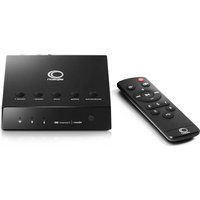
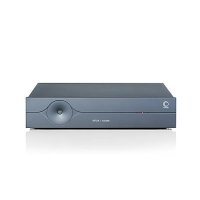
USER MANUAL Connect 250 ELIPSON
natural_image
Abstract black and white concentric circle design (no text or symbols)
elipson®
elipson® | Connect 250
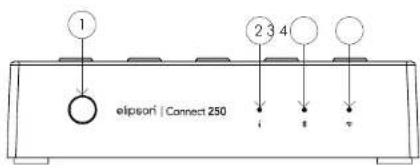
FACE AVANT
Scan QR Code:
IOS Android

VI. EN CAS DE PANNES

N'UTILISEZ PAS DE SOLUTION OU DE NETTOYANT SUR CES UNITÉS.
SI, POUR UNE RAISON QUELCONQUE, L'AMPLIFICATEUR DOIT ÊTRE RÉPARÉ, VEUILLEZ NOUS CONTACTER IMMÉDIatement. NOUS VOUS DÉLIVRERONS UN NUMÉRO D'AUTORISATION DE RETOUR. CET APPAREIL NE DOIT PAS ÊTRE RENVOYÉ À ELIPSON SANS LE NUMÉRO D'AUTORISATION DE RETOUR.
N'ESSAYEZ PAS D'OUVRIR OU DE DÉMONTER CET AMPLIFICATEUR.
CELA ANNULERA LA GARANTIE !
PANNES
Thank you for choosing Elipson amplifier Connect 250.
Take time to read this manual carefully before installing your amplifier.
It contains all the safety and operating instructions that should be followed to optimize the performances of your amplifier. We highly recommend you to retain both packaging and user's manual for future use.
SUMMARY
II. Specifications 18
| III. General Informations | 19 |
In the box 19
Superior panel 20
| Rear panel | 21 | |
| Remonte control | 22 |
| Application | 23 |
IV. Use of the amplifier 24
Wi-Fi connection 24
Stand by mode 25
Connecting multiple amplifiers 26
| V. In case of breakdown | 27 |

WARNING
MAKE SURE TO READ THIS INSTRUCTION MANUAL BEFORE TURNING THE POWER ON OR HOOKING UP THIS POWER AMPLIFIER.
I. DESCRIPTION
The Connect 250 amplifier with Wi-Fi and Bluetooth inputs, is a perfect solution for integration systems with a pair of ceiling speakers in a kitchen, studio or bedroom. It also works great in combination with a pair of bookshelf speakers in a little room.
Designed to provide a high quality audio streaming solution that is easy to install and configure, its advanced integration features allow it to amplify the audio signal from a TV screen to broadcast to local speakers.
Wireless connection modes (Wi-Fi and Bluetooth) provide instant access to millions of high-definition music titles. But it will also allow you to amplify analogue sources, which simply connect in wired mode.
When you add another Elipson system to your network, you can establish a connection between the different devices in Wi-Fi. You can play your music in all the rooms simultaneously or a different music in each room, as you wish.
II. SPECIFICATIONS
| Number of output channels | 2 |
| Power (W / channel) | 4 ohms | 1 kHz | 50 W @ 1% THD+N |
| Power (W / channel) | 8 ohms | 1 kHz | 30 W @ 1% THD+N |
| Input Sensitivity | ~650 mV - full power |
| Maximum input voltage (RMS) | 1 V |
| Signal to noise ratio (SNR) at THD+N < 1%, f = 1 kHz, Gain = 20 dB | 90 dB |
| Total Harmonic Distortion THD + N@1 KHz | < 0.1% |
| Amplifier size (H x D x W) | 120 x 120 x 30 mm |
| Power supply size (H x D x W) | 40 x 170 x 65 mm |
| Supply voltage | 24V/5A DC |
| Power consumption in standby mode | < 3 W |
| Weight - without power supply and bindings | 0.24 kg |
| Resolution | 44.1kHz/24bit |
| Bluetooth version | 5.0 |
| Bluetooth Audio codec | SBC |
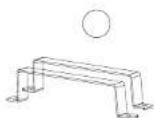
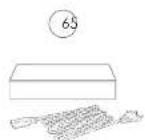
IN THE BOX :
1- The Connect 250 Amplifier
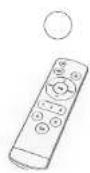
2- An infrared remote control - Lithium battery CR2025 included
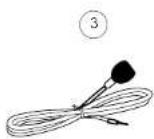
3- A remote infrared sensor
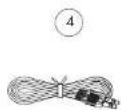
4- A stereo mini-jack 3.5 cable
5- Two wall mounting brackets
6- The power supply
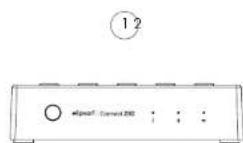
FRONT PANEL
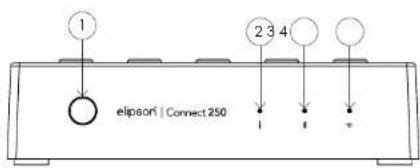
1-Infrared Sensor
2- Red LED associated with Aux mode
3- Blue LED associated with Bluetooth mode
4- Green Led associated to the Wifi mode
SUPERIOR PANEL
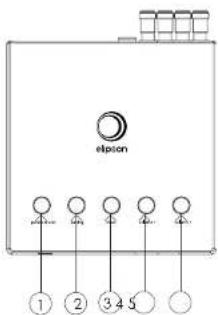
1- Power on/off and source selection
2- Activating Bluetooth pairing
3- Mute/Unmute the sound
4- Lower the volume
5- Increase the volume
REAR PANEL
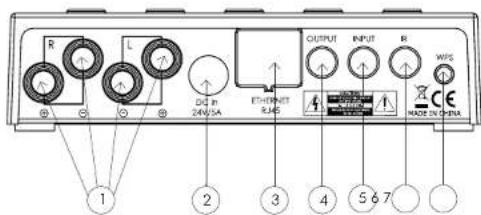
1- Connection of 4/8 Ohms speakers
2- Power supply
3- RJ45 ethernet cable input
4- Auxiliary output to recover the signal from the source (3.5 mm jack)
5- Auxiliary source input (3.5 mm jack)
6- Input for remote sensor Infrared
7- WPS push button designed to facilitate the process of connecting to a secure wireless network from a phone or other device //Reset of the device when pressed for a long time
REMOTE CONTROL
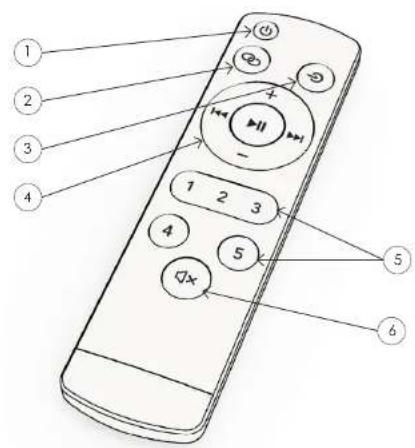
1- Switching the amplifier on/off
2- Activating Bluetooth pairing
3- Source selection
4- Track control.
5- Radio presets.
6- Mute/unmute
Important: Remember to remove the protective film inside the lithium battery compartment before use.
THE ELIPSON APP
The Elipson App allows you to connect your product to the network thanks to your smartphone or tablet and to use several devices of our brand simultaneously. The App is compatible with an iOS and android phone and can be downloaded for free from the google Play Store and the Mac App Store.


Scan QR Code:

IOS Android

The application will allow you to :
- Connect to over 15,000 digital radios
- Play music from a streamer (deezer, spotify, tidal...)
- Select a source on your product
- Manage multi-room mode
- Knowing what music you're playing
- Manage the sound volume
- Simultaneously add and control other Elipson products
IV. USE OF THE AMPLIFIER
After connecting the power to the amplifier and to your loudspeakers, press the "Power" button and select your source by pressing the same button.
BLUETOOTH MODE :
On the front panel of the amplifier, make sure that the blue LED for bluetooth mode is lit.
If it does not flash, press the pairing button on the amplifier or remote control. When the LED flashes, go to the bluetooth settings of the device you want to connect and select "Connect 250".
When the LED turns solid blue, you are connected to the device.
WI-FI MODE :
- Switch your Connect 250 on by pressing the Power button on the amplifier or remote control. Select the Wi-Fi input by pressing the source button on your amplifier or remote control. (The mode is activated when the LED above the symbol lights up and the amplifier will respond by saying: Wi-Fi mode).
- When this LED flashes slowly, the unit is ready for connection.
- Therefore, open your Elipson application and follow the on-screen instructions with the WPS protocol. To function properly, your system must be connected to a 2.4 GHz network.
- To activate the WPS mode of your amplifier, briefly press the "WPS" button on the back of the device. You should then hear the confirmation message "Searching for Wi-Fi connection".
RADIO PRESET :
In the main menu of the Elipson application, click on TuneIn and find the radio station you want to save as a preset.
Next to all the radio stations, you will see a loudspeaker icon on the right side of the screen.
Click on the speaker icon to open the preset content.
Then click on one of the presets 1 to 5 to save a radio station as a preset. The amplifier will respond by saying: "Preset saved".
It is also possible to make this preset by pressing and holding down a number on your remote control while your radio is playing. You should then hear the sound message: "Preset saved" which will tell you that the number on your remote control is associated to this radio.
Press the corresponding preset button on your remote control to recall the radio.
STAND-BY MODE :
When you are not using the device, it automatically go into standby/low power mode after 30 minutes. This mode will result in a flashing.
To "wake up" the amplifier, simply play music through the application or press the "ON" button on the remote control.
RESET THE AMPLIFIER :
Press and hold the "WPS" button on the back of the amplifier until you hear the message "restore to factory settings".
The three leds on the amplifier will then flash simultaneously for 30s. When the flashing stops, your product is reset to factory settings.
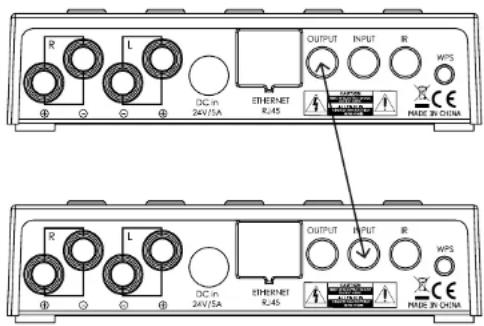
CONNECTING MULTIPLE AMPLIFIERS :
If you wish to connect several amplifiers, we recommend using the Multiroom system of our application when your Elipson products are connected to the same network. However, you can also use a wired method using the 3.5mm mini-jack cable. To do so, connect the output of the "masler" amplifier to the input of the "slave" amplifier. Do not forget to activate the Aux mode on the "slave" amplifier. This wired configuration will require the two amplifiers to be at a close distance, i.e. the length of the cable.
VI. IN CASE OF BREAKDOWN

DO NOT USE ANY KIND OF CLEANING SOLUTION OR CLEANSER ON THESE UNITS. IF FOR SOME REASON THE AMPLIFIER NEEDS TO BE REPAIRED, PLEASE CONTACT US IMMEDIATELY. WE WILL ISSUE A RETURN AUTHORIZATION NUMBER. THIS UNIT SHOULD NOT BE SHIPPED BACK TO ELIPSON WITHOUT THE RA#.
DO NOT ATTEMPT TO OPEN OR DISMANTLE THIS AMPLIFIER.
THIS WILL VOID THE WARRANTY!
POSSIBLE BREAKDOWNS
Very little or no sound on some or all channels :
- Volume is at minimum level
- You have activated the wrong source
- The 3.5mm jack plug is not connected perfectly
Product dropping in and out of Wi-Fi:
- Check that the speed of your wifi network is good.
- The product is too far from the router
Bluetooth connection is not stable
- The source is too far from the device
Bad Bluetooth signal from the source
Cannot connect to router
- Make sure to use the 2.4Ghz band of your router and not the 5Ghz band/.
No sound on a channel
- Check the loudspeaker connection at the back of the amplifier.
Output distortion
- The voltage of the source you are using exceeds 1.5V.
- Source level is too high
The sound image is blurred
- Make sure that you have respected the polarity of your speakers when connecting them.
WARNING
TO PREVENT FIRE OR SHOCK HAZARD. DO NOT EXPOSE THIS APPLIANCE TO RAIN OR MOISTURE. THIS APPLIANCE SHALL NOT BE EXPOSED TO DRIPPING OR SPLASHING WATER AND THAT NO OBJECT FILLIED WITH LIQUIDS SUCH AS VASES SHALL BE PLACED ON APPARATUS.
Precautions for proper use
This product was designed according to rigorous norms and complies with safety standards. It should only be used under normal conditions as described below. Verify the electrical voltage before connecting it to a power source. This device was designed to work in numerous countries. We advise you to hook it up completely before connecting it to the AC power source. Take care when unplugging the power cord. When you unplug the power cord from the power source, do so by pulling on the head of the plug rather than on the cable. If you do not expect to use this device for a prolonged period of time, you are advised
to unplug it from the power source. Do not open the case. This device contains no parts that can be exchanged by the user. Accessing the inside of this device's case can lead to electric shock. Any modification to the product will notify the guarantee. If a foreign object or liquid falls into the case, contact your retailer to arrange for a technician to remove it from the device safely.
IMPORTANT SAFETY INSTRUCTION
Electricity is used to perform many useful functions, but it can also cause personal injuries and property damage? Improperly handed. This product has been engineered and manufactured with the highest priority on safety. However, Improper use can result in electric shock and / or fire. In order to prevent potential danger, please observe the following instructions when installing, operating and cleaning the product. To ensure your safety and prolong the service life of your Sound bar, please read the following precautions carefully before using the product.
- Read these instructions. 2. Keep these instructions. 3. Hold all warnings. 4. Follow all instructions. 5. Do not use this apparatus near water. 6. Clean only with dry cloth, 7. Do not book any ventilation openings, install in accordance with the manufacturer's instructions. 8. Do not install near any heat sources such as radiators, heat registers, stoves, other apparatus (including amplifiers) that produce heat. 9. The battery shall not be exposed to excessive heat such as sunshine, fire or the ice. 10. Do not detect the safety purpose of the polarized or grounding-type plug. Polarized plug has two blades with one wider than the other. A grounding type plug has two blades and a third grounding prong. The wide blade and the third prong are provided for your safety. If the provided plug does not fill into your outlet, consult an electrician for replacement of the obsolete outlet. 11. Protect the power cord from being walked on or pinched particularly at the plugs, convenience receptacles, and the point where they exit from the apparatus. 12. Only use ochrochments/accosarios specified by the manufacturer. 13. Use only with the cart, stand, tripod, bracket, or table specified by the manufacturer, or sold with the apparatus. When a cart is used, use caution when moving the cart/apoaratus combination to avoid injury from it-over. 14. Unplug this apparatus during lightning storms or when unused for long periods of time. 15. Refer all servicing to qualified service personnel. Servicing is required when the apparatus has been damaged in any way, such as power-supply cord or plug is damaged, it should be salted or objects have taken into the apparatus, the apparatus has been exposed to rain or moisture, does not operate normally, or has been dropped. 16. The main plug or an appliance coupler is used as a disconnect device. The disconnect device shall remain ready operable.
WARRANTY
Amplifiers have a limited 2 year warranty. This warranty includes 2 year parts and repair labor on all components.
The warranty extends only to the original purchaser of the product and not to any subsequent owner. Eljson's obligation under these warranties is limited to repairing or replacing any component found defective in material or workmanship under normal conditions of use with an equal and/or current product.
These warranties shall not apply to products which have been abused, modified, or disassembled.
Products to be repaired or returned under this warranty must be returned to the factory through an authorized Elipson dealer with all transportation and insurance charges prepaid.
To claim repair under warranty
To claim repair or service under warranty you simply have to contact your local Elipson dealer, from whom your equipment has been purchased. To ensure that you will be able to ship your damaged product in correct manner, always retain the original packaging of your Elipson equipment. If you cannot contact your original dealer, or if you are using your Elipson product outside the purchase country, you should contact Elipson national distributor in the residence country, who will advise where the equipment can be serviced.
You can also visit our web site to check our contact information: www.elipson.com
To validate your warranty, you need to produce, as a proof of purchase, your original purchase invoice specifying the date of purchase and stamped by your dealer.
©Bipson 2020 - Bipson is a registered trademark of AV Industry.
ELIPSON'S POLICY IS TO CONTINUOUSLY INCORPORATE IMPROVEMENTS INTO OUR PRODUCTS.
ALL SPECIFICATIONS ARE SUBJECT TO CHANGE WITHOUT NOTICE.
TO FIND OUT MORE ABOUT THE ADVANCED OPTIONS OF THIS PRODUCT OR IF YOU HAVE ANY QUESTIONS, PLEASE VISIT OUR WEBSITE :
WWW.ELIPSON.COM
OR CONTACT US :
CONTACT@ELIPSON.COM
elipson®
Connect 250