Music Center Mini - Receiver ELIPSON - Free user manual and instructions
Find the device manual for free Music Center Mini ELIPSON in PDF.


Pick your language and provide your email: we'll send you a specifically translated version.
| Product type | Compact stereo receiver |
| Brand | Elipson |
| Model | Music Center Mini |
| Dimensions (W x H x D) | 250 x 100 x 200 mm |
| Weight | 2 kg |
| Power supply | Mains 230V / 50Hz |
| Output power | 2 x 30 W RMS |
| Main functions | FM radio, Bluetooth playback, USB, auxiliary input |
| Inputs | Bluetooth, USB-A, 3.5 mm jack |
| Outputs | Speakers (binding posts), headphones (3.5 mm jack) |
| Radio | FM with 30 presets |
| Bluetooth | Version 5.0, range 10 m |
| USB playback | MP3, WAV, up to 32 GB |
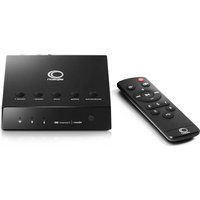
| Controls | Front panel buttons, remote control included |
| Display | Backlit LCD screen |
| Maintenance and cleaning | Dust with a soft, dry cloth. Do not use chemical products. |
| Safety | Do not expose to moisture or heat sources. Disconnect before cleaning. |
| Spare parts and repairability | Contact Elipson customer service for parts. Repairability index not communicated. |
| General information | Manual available as PDF on notice-facile.com |
Frequently Asked Questions - Music Center Mini ELIPSON
How to connect my phone via Bluetooth?
Set the receiver to Bluetooth mode (press the Source button until BLUETOOTH is displayed). Enable Bluetooth on your phone and select Music Center Mini from the device list.
How to adjust treble and bass?
Use the BASS and TREBLE buttons on the front panel or remote control. Turn clockwise to increase, counterclockwise to decrease.
Can I plug in a USB stick?
Yes, insert a USB stick formatted in FAT32 into the front USB port. The receiver plays MP3 and WAV files.
How to reset the device?
Press and hold the Power button for 5 seconds until the screen flashes. The device will restart with factory settings.
What to do if the sound is low or distorted?
Check the volume, tone settings, and speaker connection. Try another source. If the problem persists, reset the device.
How to use the remote control?
Insert two AAA batteries into the remote control. Point it at the receiver from less than 6 meters. The buttons allow you to change source, volume, etc.
The screen does not turn on, what to do?
Check that the device is plugged in and the mains switch is ON. If the screen remains off, contact customer service.
How to connect speakers?
Use stripped speaker cables. Connect the red wire to the + terminal and black to the – terminal. Observe the minimum impedance of 4 ohms.
Can I listen to the radio without an antenna?
The FM antenna is provided. Unfold it and secure it for better reception. Without antenna, reception will be very limited.
Where to find the complete manual?
Download the free PDF manual on notice-facile.com by selecting your language.
User questions about Music Center Mini ELIPSON
0 question about this device. Answer the ones you know or ask your own.
Ask a new question about this device
No questions yet. Be the first to ask one.
Download the instructions for your Receiver in PDF format for free! Find your manual Music Center Mini - ELIPSON and take your electronic device back in hand. On this page are published all the documents necessary for the use of your device. Music Center Mini by ELIPSON.
USER MANUAL Music Center Mini ELIPSON
Manual assistant
Powered by Anthropic
Waiting for your message
Product information
Brand : ELIPSON
Model : Music Center Mini
Category : Receiver