P1 - Receiver ELIPSON - Free user manual and instructions
Find the device manual for free P1 ELIPSON in PDF.


Pick your language and provide your email: we'll send you a specifically translated version.
| Product type | Stereo audio receiver |
| Brand | Elipson |
| Model | P1 |
| Dimensions (W x H x D) | 430 x 140 x 340 mm |
| Weight | 8 kg |
| Power supply | 230 V ~ 50 Hz |
| Output power | 2 x 100 W into 8 ohms |
| Audio inputs | 5 line inputs (RCA), 1 phono input (MM), 1 optical input, 1 coaxial input |
| Outputs | Speaker terminals A and B, preamp output, headphone output (6.35 mm) |
| Tuner | FM / AM with 40 presets |
| Main features | Stereo amplification, source selection, remote control, auto standby |
| Maintenance and cleaning | Soft dry cloth; do not use solvents |
| Safety | Unplug before cleaning; do not expose to moisture |
| Spare parts and repairability | Contact Elipson after-sales service |
| General information | User manual available for free download |
Frequently Asked Questions - P1 ELIPSON
How to connect passive speakers to the P1?
Use output terminals A or B at the rear. Strip the wires 10 mm and insert them into the terminals respecting polarity (+/-). Tighten the knobs.
How to select an audio source?
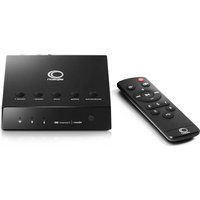
Press the Source button on the front panel or on the remote to cycle through inputs (CD, Tuner, Phono, Aux, etc.).
The tuner picks up no FM stations, what to do?
Check that the supplied FM antenna is properly connected and extended. Perform an automatic search using the Auto Tune button.
Can I connect headphones?
Yes, plug your headphones into the jack on the front panel (6.35 mm). The speaker output is then automatically muted.
How to use the phono input?
Connect your turntable to the Phono input (RCA). Make sure your cartridge is MM type (moving magnet). The P1 includes a suitable phono preamp.
The receiver does not turn on, what to check?
Check the power cord and mains socket. Ensure the fuse is not blown (located near the power socket). If the problem persists, contact customer service.
How to clean the P1?
Unplug the unit. Use a soft slightly damp cloth (clean water) to wipe surfaces. Never use chemical or abrasive products.
The remote control does not work, what to do?
Replace the batteries (two AAA batteries). Aim directly at the infrared sensor on the front panel. Remove any obstacles between the remote and the receiver.
Can I connect a digital source (TV, computer)?
Yes, use the Optical or Coaxial inputs at the rear. The device converts the digital signal to analog.
Where to find the complete manual for the P1?
The manual is available for free download on notice-facile.com. You can also request it by email via the product page.
User questions about P1 ELIPSON
0 question about this device. Answer the ones you know or ask your own.
Ask a new question about this device
No questions yet. Be the first to ask one.
Download the instructions for your Receiver in PDF format for free! Find your manual P1 - ELIPSON and take your electronic device back in hand. On this page are published all the documents necessary for the use of your device. P1 by ELIPSON.
USER MANUAL P1 ELIPSON
Manual assistant
Powered by Anthropic
Waiting for your message
Product information
Brand : ELIPSON
Model : P1
Category : Receiver