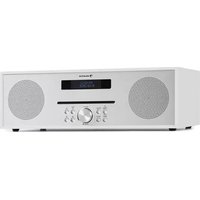
Silver Star CD-FM - Radio Auna - Free user manual and instructions
Find the device manual for free Silver Star CD-FM Auna in PDF.



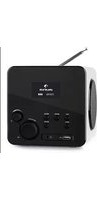
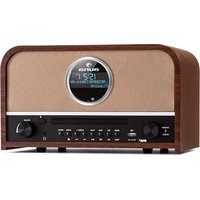
| Product type | Alarm clock radio with CD player, FM, Bluetooth, USB, AUX |
| Brand and model | Auna Silver Star CD-FM |
| Power supply | DC 12 V / 2 A power adapter, AC 100-240 V input |
| Output power | 2 x 10 W |
| FM frequency range | 87.5 - 108 MHz |
| Bluetooth | Yes, 2402-2480 MHz band, max RF power 17 dBm |
| CD player | Yes, with track programming |
| USB port | Yes, audio file playback (no charging) |
| AUX input | Yes, 3.5 mm jack |
| Display | LCD with adjustable backlight |
| Alarm | Dual alarm with snooze, possible source: buzzer or FM |
| Sleep timer | Yes, from 15 to 90 minutes |
| Equalizer | Presets: Normal, Classic, Jazz, Pop, Rock, Speech |
| FM station memory | Up to 10 stations |
| Interface languages | English, French, Italian, Spanish |
| Antenna | Telescopic antenna |
| Care and cleaning | Clean with a dry, soft cloth. Avoid moisture and solvents. |
| Safety | Use only the supplied adapter. Do not open the device. Keep away from water. |
| Spare parts and repairability | No information available. Contact the manufacturer Chal-Tec GmbH. |
| General information | Manufactured by Chal-Tec GmbH, Wallstraße 16, 10179 Berlin, Germany. CE certified. |
Frequently Asked Questions - Silver Star CD-FM Auna
User questions about Silver Star CD-FM Auna
0 question about this device. Answer the ones you know or ask your own.
Ask a new question about this device
Download the instructions for your Radio in PDF format for free! Find your manual Silver Star CD-FM - Auna and take your electronic device back in hand. On this page are published all the documents necessary for the use of your device. Silver Star CD-FM by Auna.
USER MANUAL Silver Star CD-FM Auna
Member of Berlin Brands Group
Handwerkerstr. 11
15366 Dahlwitz-Hoppegarten
Deutschland
Congratulations on purchasing this equipment. Please read this manual carefully and take care of the following hints to avoid damages. Any failure caused by ignoring the items and cautions mentioned in the instruction manual are not covered by our warranty and any liability. Scan the QR code to get access to the latest user manual and other information about the product.

CONTENTS
Technical Data 17
Product Description 18
Initial use 20
Using the radio-FM MODE 22
FM Display Modes 22
USB 23
CD Player 23
Disposal Considerations 26
Declaration of Conformity 26
TECHNICAL DATA
| Item number: 10033125, 10033126 | |
| Power adaptor: Output: DC 12 V 2 A | Input: AC 100-240 V |
| Output power: 2 x 10 W | |
| Frequency range: FM 87.5-108 MHz | |
| BT specifications Frequency band Maximum radio-frequency power | 2402-2480 MHz 17 dBm |
| CD player: |
PRODUCT DESCRIPTION


Main keys
| 1 LCD display 9 ➔ - Next button | |
| 2 Info/Menu button 10 Eject button | |
| 3 Power/Mode button 11 Telescopic Antenna | |
| 4 Alarm button 12 DC in socket | |
| 5 Preset button 13 Headphone jack | |
| 6 Vol- / Vol+ / Enter/ ■ Stop knob (hold to stop CD playback) | 14 Aux in jack |
| 7 ➔ - Previous button 15 USB port | |
| 8 Scan/Play/Pause button | |
Remote control

| 1 Standby/on 12 Mute button | |
| 2 Ejection- press for CD ejection 13 Sleep button | |
| 3 Up button 14 Alarm button | |
| 4 Left button 15 Dimmer button | |
| 5 Down button 16 - Backward button | |
| 6 Right button 17 Play/pause button | |
| 7 OK button/ CD Stop button (hold to stop CD playback) | 18 - Forward button |
| 8 Vol + 19 Number buttons | |
| 9 Vol - 20 EQ button | |
| 10 Mode button 21 Preset button | |
| 11 Menu button |
INITIAL USE
Before operation
- Before operation, please make sure that VOLTAGE mentioned on the power supply is same as the voltage of your local area.
- Use the supplied mains adaptor to connect the device to a household mains socket.
Basic operation-getting started
- Connect the mains adaptor to the DC jack, fully extend the telescopic antenna, plug in and switch on at the mains.
- The display backlight will illuminate for a few seconds, a welcome message "Welcome" will appear in the display briefly and the clock (00:00:00) will flash in the display.
- To switch your radio between FM, BT, CD, USB and Aux in mode, press Mode button repeatedly.
- Press and hold the Power/Mode button will go into 'Standby' mode.
Set Time/Date:
- Press Enter button, the hour digit will flash, rotate knob to choose correct hour and press Enter to confirm.
- Minute digit will flash, rotate knob to choose correct minute and press Enter to confirm.
- Date digit will flash, rotate knob to choose correct date and press Enter to confirm.
- Month digit will flash, rotate knob to choose correct month and press Enter to confirm.
- Year digit will flash, rotate knob to choose correct year and press Enter to confirm. Now time and date was saved.
Using the radio- Programmed Station Function
- This function allows up to 10 stations to be programmed into the memory and stored in the FM modes.
Auto update
- Choose update from any-update from FM-No update
Set 12/24 hour
Rotate knob to choose set 24 hour or set 12 hour.
Set date format
Rotate knob to choose DD-MM-YYYY or MM-DD-YYYY.
Backlight
Timeout: on-10 sec-20 sec-30 sec-45 sec-60 sec-90 sec-120 sec-180 sec
On level: High-Medium-Low
Dim level: High-Medium-Low
Language
English, French, German, Italian, Spanish
Factory reset
- Press Enter and choose 'Yes' to start factory reset.
SW version
- Press Enter to view system version.
USING THE RADIO-FM MODE
- Turn the radio on, press Mode/Power button repeatedly and select the FM mode. The display will show 'FM' and the radio will automatically tune to the nearest station and then display will show the station name, or frequency if RDS not available.
- To search manually, press the Previous or Next buttons each press will increment the frequency by 0.05 MHz
- To achieve auto search, press and hold Previous or Next buttons or press scan button, and the radio starts to scan down or up the frequency band, the display will show "Scanning...", and it will stop automatically once station has been found.
FM DISPLAY MODES
This function allows information relating to the current station to be shown in the display, press the Info/Menu button repeatedly to scroll through the following:
- RDS (scrolling text): The broadcaster may include a scrolling message about the current program.
- Program type: This describes the style of the program being broadcast.
- Station name: such as BBC RD
Audio Mode: the display will show if the station being received is stereo or mono - Time/date: the time and date will be automatically updated by the radio time signal (if RDS is available).
FM mode-Audio setting
- Press Previous or Next button to choose 'Forced mono' or 'Stereo allowed'
- If signal is weak, please choose Forced mono to get better sound quality.
FM mode-System
- Sleep: Use knob to rotate to choose Sleep off-15 minutes-30 minutes-45 mintues-60 minutes-90 minutes
- Equalizer: Use knob to rotate to choose My EQ-Normal-Classic-Jazz-Pop-Rock-Speech
- Time-Use knob to rotate to choose Set Time/Date-Auto update-Set 12/24 hour-Set date format.
BT
- Press Mode until the display shows BT.
- Search the pairing name 'Silver Star CD-FM' in your phone and click it to pair.
- It will have reminding sound after paired successfully. You now can play music via BT;
- You can adjust volume from the radio or your phone.
AUX (Line input)
Aux in mode plays audio from an external source such as an MP3 player. To play audio with Aux in mode:
- Turn the volume low on both the Radio and if adjustable, the audio source device.
- Connect the external audio source to the AUX IN 3.5 mm stereo socket.
- Press MODE until the display shows Aux In.
- Adjust the volume of the Radio (and, if necessary, the audio source device) as required.
USB
- Press Mode until the display shows USB.
- Plug the USB sticks into USB port and it will play first track automatically.
- Use Previous or Next button to switch to next track.
- The display shows file name.
Note: The USB port does not support charging or data transfer with computer.
CD PLAYER
- Press Mode until the display shows CD.
- The display screen for the CD function will now show "Reading..." followed by "No Disc".
- Select the Open/Close CD function on the radio or the remote. Insert your CD slightly and drive will take CD into the system to play.
- The first song on the CD will now begin to play
CD Functions
- To skip between songs, use the '▶' or '▶' buttons on the radio or the remote. Pause/Play using the button on the radio or remote.
-
To skip rewind/forward through a song playing, hold down the '▶' or '▶' buttons on remote control and release when you wish to stop skipping.
-
To eject the CD, press the Open/Close CD function on the radio or on the remote, as per the guidance to enter the CD.
- Press and hold 'Enter' knob on main unit or 'OK' button on remote control button to stop the album. This will also display how many songs are on the album and total playing time. Press 'Play/Pause' to begin listening again.
Arrange a CD song program
- When the CD is put into 'Stop', you can program the CD player to play songs in a particular order.
- Simply follow by pressing the "Preset" button on the main unit or remote to step into the state of programming.
- Once in program settings, the display will show T01 to display the first song on the CD as P01. You can now choose what song you would like as program number P01 by using the 串 and 串 buttons to scroll through to the song you would like to choose. Once on the chosen song for P01, press the 'Enter' knob to select, and be taken to choose your next programmed song.
- For the next song, the display will show P02 to show the program 2. Now use the 心 and buttons to scroll through to the song you would like to choose. Once on the chosen for program 2, press the Enter' knob to select, and be taken to choose your next programmed song.
- After you have finished program song selection, press the 'Play/Pause' button to play the songs which have been programmed. The display shows 'Program playing'.
- When the program playback is activated, press "Eject" button, then it will exit the program playback mode
Alarm Setting
Note: Check that the radio has the correct time and date before you set an alarm.
In FM, BT, CD, USB or Aux in mode:
- Press the 'Alarm' button on the front of the radio, 'Alarm 1 Setup' is displayed. Press Enter.
Note: Press the 'Alarm' button twice to enter the Alarm 2 setup. - Alarm 1 Wizard' is displayed and the hour digits for the alarm will flash.
- Use Previous or Next button to scroll to the hour for the alarm. Press Enter to confirm.
- Use Previous or Next button to scroll minute for the alarm. Press Enter to confirm.
- Use Previous or Next button to scroll to the duration for the alarm. You can choose from 15, 30, 45, 60, 90 and 120 minutes. Press Enter to confirm.
- Use Previous or Next button to scroll to the sound source for the Alarm. You can choose from Buzzer or FM. Press Enter to confirm. For FM mode you can choose between your preset or "Last listened" radio stations
using Previous or Next button and Enter to confirm.
- Use Previous or Next button to scroll to the frequency for the Alarm. You can choose from Daily, Once, Weekends or Weekdays. Press Enter to confirm.
- Use Previous or Next buttons to set the volume for your alarm. Press Enter to confirm.
- Use the Previous or Next button to turn the alarm On or Off. Press the Enter to save your alarm.
- Alarm 2 Setting please repeat 2-9 steps.
Note: The alarm volume will increase progressively until it reaches the alarm volume you have set.
Turn off the Alarm
In working mode:
Briefly press the 'Alarm' button and rotate knob to choose "off" and press Enter to confirm'.
Snoopze Function
When the alarm sounds, you can press any button (except power button) to go to snooze. The default time for this function is 9 minutes. Note: You can press the 'Power/Mode' button to stop the Snooze function.
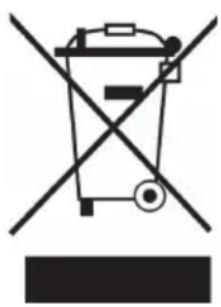
If there is a legal regulation for the disposal of electrical and electronic devices in your country, this symbol on the product or on the packaging indicates that this product must not be disposed of with household waste. Instead, it must be taken to a collection point for the recycling of electrical and electronic equipment. By disposing of it in accordance with the rules, you are protecting the environment and the health of your fellow human beings from negative consequences. For information about the recycling and disposal of this product, please contact your local authority or your household waste disposal service.
This product contains batteries. If there is a legal regulation for the disposal of batteries in your country, the batteries must not be disposed of with household waste. Find out about local regulations for disposing of batteries. By disposing of them in accordance with the rules, you are protecting the environment and the health of your fellow human beings from negative consequences.
DECLARATION OF CONFORMITY

Manufacturer:
Chal-Tec GmbH, Wallstrasse 16, 10179 Berlin, Germany.
Importer for Great Britain:
Berlin Brands Group UK Ltd
PO Box 1145
Oxford, OX1 9UW
United Kingdom
Hereby, Chal-Tec GmbH declares that the radio equipment type Silver Star is in compliance with Directive 2014/53/EU. The full text of the EU declaration of conformity is available at the following internet address: use.berlin/10033125
For Great Britain: Hereby, Chal-Tec GmbH declares that the radio equipment type Silver Star is in compliance with the relevant statutory requirements. The full text of the declaration of conformity is available at the following internet address: use.berlin/10033125
Chere cliente, cher client,
Berlin Brands Group UK Ltd
PO Box 1145
Oxford, OX1 9UW
United Kingdom
Timeout: on - 10 sec - 20 sec - 30 sec - 45 sec - 60 sec - 90 sec - 120 sec - 180 sec
On: High - Medium - Low
Dimmerata: High - Medium - Low
Lingue disponibili
Berlin Brands Group UK Ltd
PO Box 1145
Oxford, OX1 9UW
United Kingdom
Berlin Brands Group UK Ltd
PO Box 1145
Oxford, OX1 9UW
United Kingdom


- CONTENTS
- TECHNICAL DATA
- PRODUCT DESCRIPTION
- Remote control
- INITIAL USE
- Before operation
- Basic operation-getting started
- Set Time/Date:
- Using the radio- Programmed Station Function
- Auto update
- Set 12/24 hour
- Set date format
- Backlight
- Language
- Factory reset
- SW version
- USING THE RADIO-FM MODE
- FM DISPLAY MODES
- FM mode-Audio setting
- FM mode-System
- BT
- AUX (Line input)
- USB
- CD PLAYER
- CD Functions
- Arrange a CD song program
- Alarm Setting
- Turn off the Alarm
- Snoopze Function
- DECLARATION OF CONFORMITY
- Manufacturer:
- Importer for Great Britain:
- Chere cliente, cher client,
- On: High - Medium - Low
- Lingue disponibili
Brand : Auna
Model : Silver Star CD-FM
Category : Radio