DR-130 - Radio Auna - Free user manual and instructions
Find the device manual for free DR-130 Auna in PDF.


| Product Type | Portable Radio |
| Brand | Auna |
| Model | DR-130 |
| Dimensions (approx.) | 200 x 130 x 80 mm |
| Weight (approx.) | 0.5 kg |
| Power Supply | AC 230V, 50Hz or DC 6V (4 x AA batteries) |
| Battery Type | AA (not included) |
| Radio Bands | FM / AM |
| Tuner Type | Analog |
| Speaker | Built-in mono speaker |
| Headphone Jack | 3.5mm |
| Antenna | Telescopic rod antenna for FM, built-in ferrite for AM |
| Controls | On/Off, Volume, Tuning |
| Display | Analog frequency dial |
| Housing Material | Plastic |
| Color | Black / Silver |
| Cleaning Instructions | Wipe with a soft, dry cloth. Do not use solvents. |
| Safety Warnings | Do not expose to moisture or water. Keep away from heat sources. |
| Spare Parts Availability | Contact Auna customer service or authorized dealers. |
| Repairability | For qualified technicians only. Do not open the device. |
| Environmental Information | Dispose of in accordance with local regulations for electronic waste. |
Frequently Asked Questions - DR-130 Auna
User questions about DR-130 Auna
0 question about this device. Answer the ones you know or ask your own.
Ask a new question about this device
Download the instructions for your Radio in PDF format for free! Find your manual DR-130 - Auna and take your electronic device back in hand. On this page are published all the documents necessary for the use of your device. DR-130 by Auna.
USER MANUAL DR-130 Auna
natural_image
Symbol of a trash bin crossed with a diagonal line, no text or labels presentElektroaltgeräte
Congratulations on purchasing this product. Please read and follow these instructions, in order to avoid damaging the item. We do not cover any damages that may arise from improper use of the item or the disregard of the safety instructions.
Important Safety Advice
- Read all instructions before using.
- To protect against a fire, electric shock or personal injury, do not immerse cord, electric plugs or device in water or other liquids.
- Do not expose the appliance to extreme temperatures. The appliance shall be used in moderate climates.
- The use of attachments that are not recommended by the appliance manufacturer may result in fire, electric shock or personal injury.
- Do not open the unit by removing any cover parts. Do not attempt to repair the unit. Any repairs or servicing should be done by qualified personell only.
- Only qualified persons may perform technical work on the product. The product may not be opened or changed. The components cannot be serviced by the user. The manufacturer is not responsible for any radio or TV interference caused by unauthorized modifications.
- The appliance is not a toy. Do not let children play with it. Never let children insert foreign objects into the appliance.
- Never clean the surface of the device with solvents, paint thinners, cleansers or other chemical products. Instead, use a soft, dry cloth or soft brush.
- This appliance is to be used with 12V car power supply.
- Save these instructions.
Small objects
Keep small objects (i.e. screws, mounting material, memory cards etc.) and packaging out of the range of children. Do not let Children play with foil. Choking hazard!
Transporting the device
Please keep the original packaging. To gain sufficient protection of the device while shipment or transportation, make sure to put it back in its original packaging.
Cleaning the surface
Do not use any volatile liquids, detergents or the like. Use a clean dry cloth.
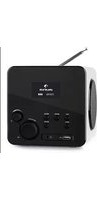
Overview / Controls
Front:
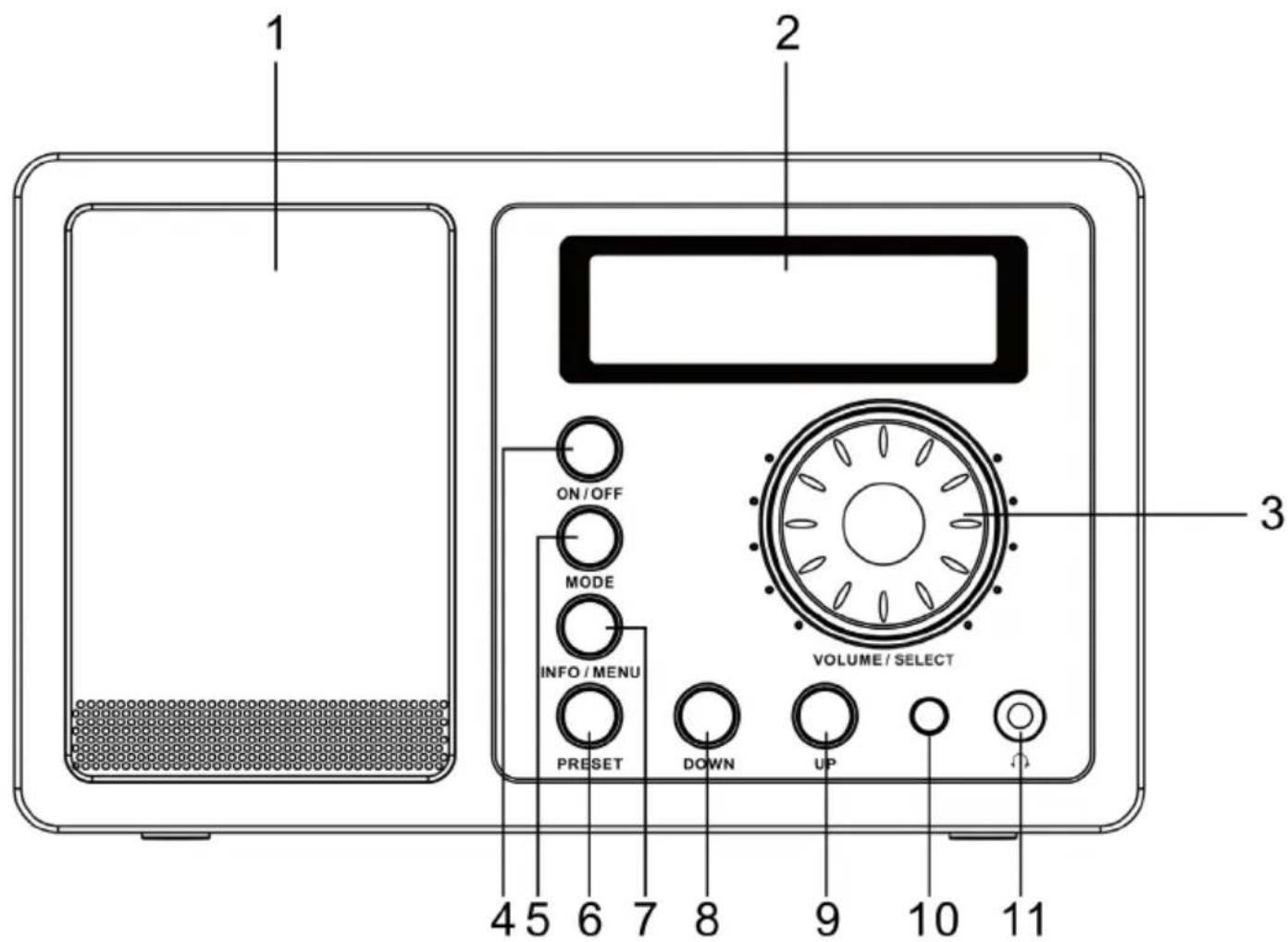
| Speaker 1 7 INFO / MENU | |
| Display 2 8 DOWN | |
| VOLUME / SELECT 3 9 UP | |
| ON / OFF 4 10 IR Sensor | |
| MODE (Select FM / BT / DAB) 5 11 Headphone jack | |
| PRESET 6 |
Rear:

Antenna 12 14 Power adapter jack (DC 5V) Line Out 13
Remote Control:

| Power On / Standby | |
| Mute | |
| Mode Select | DAB/FM/BT |
| Scan Auto Scan | |
| Info Display additional station information (DAB only) | |
| 1 - 10 Hold to save current station to preset #.Press shortly to recall preset. | |
| Alarm 1 / 2 Alarm settings | |
| Menu | |
| ▲ / ▼ | UP/DOWN |
| ◀◀ / Previous/Next | |
| Select | |
| CLK Set Set clock | |
| Dimmer Set display backlight | |
| Sleep Set sleep timer | |
Initial Use
- Connect the mains adaptor to the DC power socket of the radio to the wall socket.
- Extend the telescopic aerial as far as it can go. Always make sure that the aerial is extended to ensure the maximum signal strength and the best possible sound quality.
- Press the ON/OFF to turn the radio on from standby. The LCD backlight will light up during the operation of the radio, and begin to scan for the stations. Once the scan has finished; the radio will select the first alphanumerically found station.
- When the radio is powered on for the first time, it will start „Full Scan“ for available Digital Radio stations. When the scan is completed, the first station (alphabetically) will begin to play.
- To explore the stations that have been found, you can press DOWN or UP button to skip to the next found station. When you find a station that you would like to listen to, and then press the "VOLUME/ SELECT" button, or after 5 seconds, the radio will shows "TUNING" on the display then auto select the current station which showed on the LCD.
- Press the ON/OFF button again; the radio will go to standby mode. The display will show the clock. Do not forget to pull the mains connection out when you're up to leave the house for a longer time.
Operation
Main Menu
Long press the INFO/MENU to enter the main menu, and then press DOWN or UP to see the menu list. Press SELECT to edit. In every menu, change parameters pressing UP/DOWN and save changes with SELECT.
Menu list Options / Functions
| Info | Model and software version info („DB220 V1.21“) |
| PI-# ( in FM mode only) | Display of PI number |
| Set time and date | |
| High Level / Mid Level / Low Level | |
| Set Sleep Timers | |
| Set 2 separate alarms (Options: Beep / FM / DAB) |
General Operation
Press MODE to select Source (FM / DAB / BT). Turn VOLUME/SELECT to change the volume. Use ON/OFF to turn the device on/off.
Radio Operation
FM mode:
- Auto Scan: Press and hold DOWN/UP to have the device scan in the respective direction automatically. When the next station is found, the radio will stop scanning and tune in the station.
• Manually: Press UP/DOWN to tune up/down in the radio band by steps of 0.05Mhz.
DAB mode:
- When the device is powered on for the first time, it performs an automatic scan. You can now choose any station by using UP/DOWN.
- When no station seems available, use UP/DOWN to tune manually or use the factory reset function.
Store/Recall
- Press and hold any number on the num pad (remote control) to store the currently playing station to the respective preset.
- Recall by pressing the respective number.
Alternatively, press PRESET on the device and choose the desired preset with UP/DOWN. Confirm pressing SELECT.
Alarm
When the alarm goes off, turn it off with ON/OFF. Please note: The alarm will not sound if DAB is set as source but no DAB station can be tuned in.
Reset
Press and hold MODE, then press SELECT to perform a factory reset. All changes will be lost. A scan for DAB stations will be performed afterwards automatically.
BT
Press MODE repeatedly to select BT mode. Pair your BT device (tablet, smartphone etc.) with „DR-130“. Listen to audio files from your external device.
Environment Concerns
natural_image
Symbol of a trash bin crossed with a diagonal line, no text or numbers presentAccording to the European waste regulation 2002/96/EG this symbol on the product or on its packaging indicates that this product may not be treated as household waste. Instead it should be taken to the appropriate collection point for the recycling of electrical and electronic equipment. By ensuring this product is disposed of correctly, you will hep prevent potential negative consequences for the environment and human health, which could otherwise be caused by inappropriate waste handling of this product. For more detailed information about recycling of this product, please contact your local council or your household waste disposal service.
Declaration of Conformity
Producer: CHAL-TEC GmbH, Wallstraße 16, 10179 Berlin, Germany.
This product is conform to the following European directives:
1999/05/EC (RTTE)
2011/65/EU (RoHS)
CE

Brand : Auna
Model : DR-130
Category : Radio