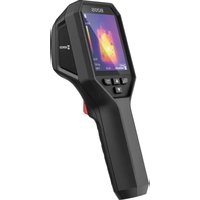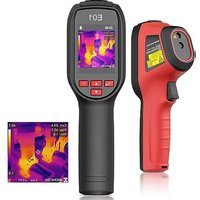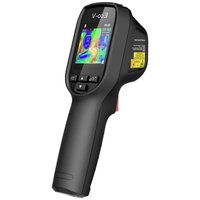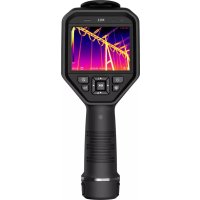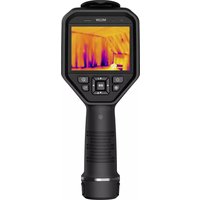
M11W - Measuring equipment Hikmicro - Free user manual and instructions
Find the device manual for free M11W Hikmicro in PDF.


| Product type | Portable thermal imaging camera |
| Brand | Hikmicro |
| Model | M11W |
| Temperature measurement range | -20 °C to 550 °C |
| Measurement accuracy | ±2 °C or ±2% (at 15-35 °C ambient, object >0 °C) |
| Battery type | Rechargeable lithium-ion, 3.7 V, 5000 mAh, model E97-13-1S1P26650 |
| Battery life | Not specified |
| External power supply | 5 V DC, 2 A (power adapter included) |
| Main features | Thermal imaging, temperature measurement, snapshot capture, video recording, digital zoom, LED light, indicator laser |
| Connectivity | Wi-Fi 2.4/5 GHz, Bluetooth 2.4 GHz |
| Mobile app | HIKMICRO Viewer (iOS and Android) |
| PC software | HIKMICRO Analyzer (Windows) |
| Display | Touchscreen |
| Thermal lens | Lens with focus ring |
| Storage | SD memory card (slot) and USB cable for transfer |
| Laser | Class 1, 650 nm, <1 mW, IEC 60825-1:2014 compliant |
| Operating temperature | -10 °C to 50 °C |
| Operating humidity | ≤90% |
| Maximum altitude | 2000 m |
| Maintenance and cleaning | Clean with a clean cloth dampened with ethanol if necessary; annual calibration recommended |
| Spare parts and repairability | Removable battery, removable SD card; factory repair for laser; contact dealer for any issues |
| General information | Manufacturer: Hangzhou Microimage Software Co., Ltd., China. Certifications CE, RoHS, WEEE. |
Frequently Asked Questions - M11W Hikmicro
User questions about M11W Hikmicro
0 question about this device. Answer the ones you know or ask your own.
Ask a new question about this device
Download the instructions for your Measuring equipment in PDF format for free! Find your manual M11W - Hikmicro and take your electronic device back in hand. On this page are published all the documents necessary for the use of your device. M11W by Hikmicro.
USER MANUAL M11W Hikmicro
Handheld Thermography Camera
HIKMICRO M Series
Quick Start Guide
| Handheld Thermography Camera Quick Start Guide | English | 2 |
| Kurzanleitung für tragbare Wärmebildkamera | Deutsch | 6 |
| Guide de démarrage rapide de la caméra thermographique portable | Français | 10 |
| Guía de inicio rápido de la cámara portátil de análisis termográfico | Español | 14 |
| Câmara termográfica portátil Guia de início rápido | Português | 17 |
| Guida rapida all'uso della termocamera portatile | Italiano | 21 |
| Ruční termokamera Stručná příručka | Čeština | 25 |
| Ručná termografická kamera – stručná úvodná príručka | Slovenčina | 29 |
| Ręczna kamera termowizyjna Skrócony podręcznik użytkownika | Polski | 33 |
| Kézi hőkamera rövid útmutatója | Magyar | 37 |
| Ghid de inițiere rapidă a camerei termografice portabile | Română | 40 |
| Snelstartgids voor thermografische handcamera's | Nederlands | 44 |
| Håndholdt termografisk kamera Startvejledning | Dansk | 48 |
| Hurtigstartguide for håndholdt termografisk kamera | Norsk | 52 |
| Kannettavan lämpökameran pika-aloitusopas | Suomi | 55 |
| Snabbstartsguide för bärbar värmekamera | Svenska | 59 |
| Портативная термографическая камера Краткое руководство | Русский | 62 |
| El Tipi Termografi Kamerası Hızlı Başlangıç Kılavuzu | Türkçe | 66 |
| ハンドヘルドサーモグラフィカメラクイックスタートガイド | 日本語 | 70 |
| 휴대용 열화상 카메라 빼른 시작 가이드 | 한국어 | 74 |
| 手持式熱成像攝影機快速入門指南 | 繁體中文 | 77 |
English
1. Brief Description
The Handheld Thermography Camera is a camera with both optical images and thermal images. The built-in high-sensitivity IR detector and high-performance sensor detects the temperature change and measure the real-time temperature. The temperature measurement range is -20 °C to 550 °C (-4 °F to 1022 °F) with the accuracy of ± 2 °C (± 3.6 °F) or ± 2% when the ambient temperature is 15 °C to 35 °C (59 °F to 95 °F) and the object temperature is above 0 °C (32 °F). You can view live view, capture snapshots, record videos via HIKMICRO Viewer App on your phone. You can also analyze pictures offline, generate and share a report via the app. Scan the QR codes on the cover to download the App.
And you can download HIKMICRO Analyzer (www.hikmicrotech.com) to analyze pictures offline professionally, and generate a custom format report on your PC.
HIKMICRO Viewer Android
HIKMICRO Viewer iOS
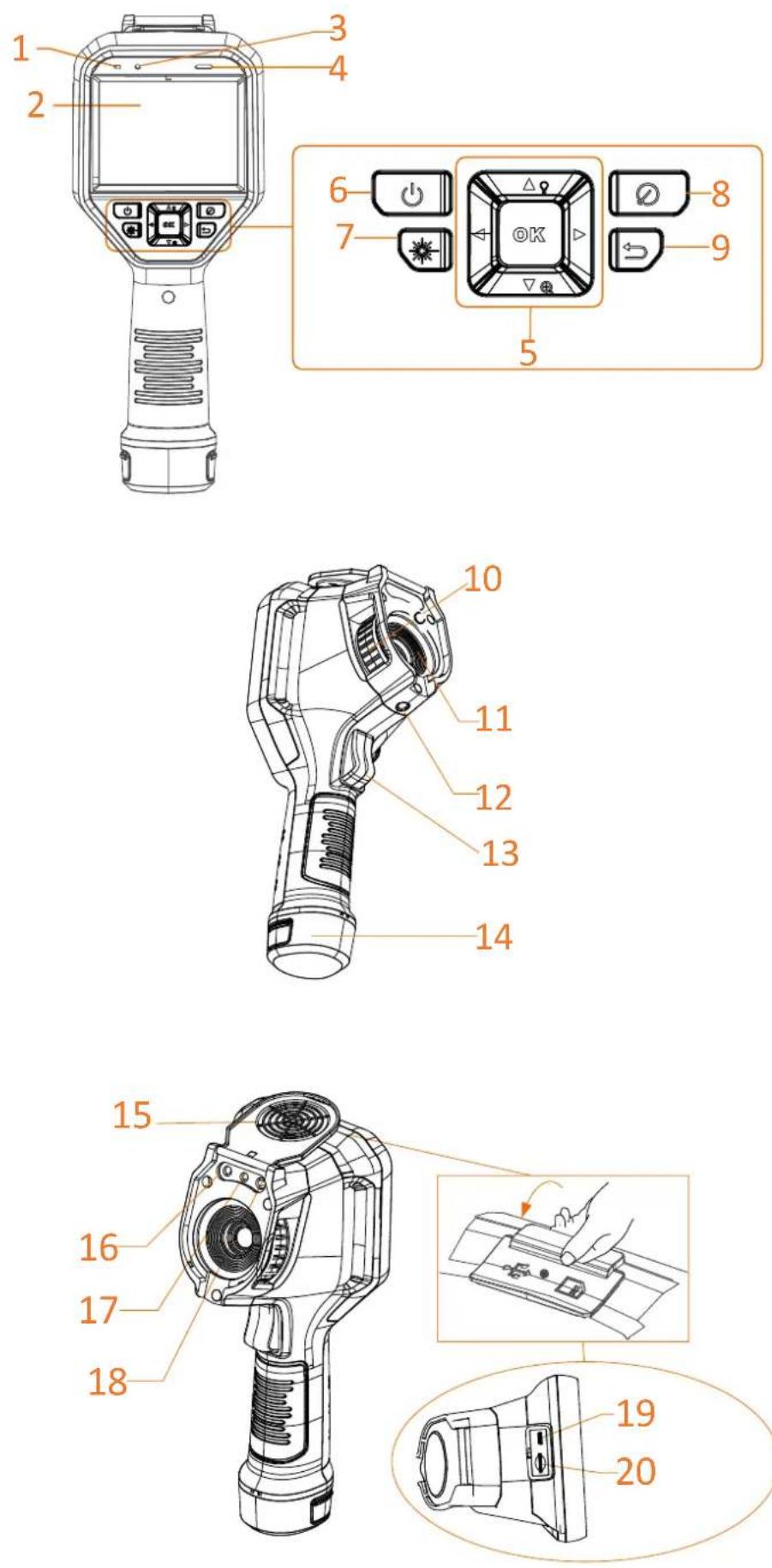
- Component & Interface (Page 1)
| No. | Component | Function |
| 1 | Charging Indicator | ● Red: Charging● Green: Fully charged |
| 2 | Touch Screen | ● Show the live view interface.● Touch-screen operation. |
| 3 | Microphone | Input audio information |
| 4 | Loud Speaker | Play voice note, voice alarm and video voice. |
| 5 | Navigation Button | Menu Mode:● Press ∇, △, ▷, and ◀ to select parameters.● Press OK to confirm. |
| Non-Menu Mode:● Press △ to turn on/off the LED light supplement.● Press ∇ to start digital zoom. | ||
| 6 | Power Button | Hold: Power on/off |
| 7 | Laser Button | Hold the button to turn on laser, and release the button to turn off laser. |
| 8 | Shutter Button | Cover the lens to perform the correction. |
| 9 | Back Button | Exit the menu or return to previous menu. |
| 10 | Focus Ring | Adjust lens to make the image clear. |
| 11 | Thermal Lens | View the thermal image. |
| 12 | Tripod Interface | Insert the tripod. |
| 13 | Trigger | ● Menu Mode: pull the trigger to return to the live view interface. ● Non-Menu Mode: Pull the trigger to capture. Hold the trigger to record videos. |
| 14 | Battery | Provide power for the device. |
| 15 | Lens Cover | Cover the lens. |
| 16 | LED Light | Increase ambient brightness in dark environment. |
| 17 | Laser Transmitter | Indicate the direction. |
| 18 | Optical Lens | View the optical image. |
| 19 | Cable Interface | Charge the device or export files with supplied cable. |
| 20 | SD Card Slot | Insert the SD card. |
Note: The warning sign is inside the lens cover.
3. Charge Device
After the device starts up, the OSD (on-screen display) shows the battery status. When the battery is low, please charge the device as soon as possible. For the first charge, charge the device for more than 8 hours and do not shut down the device during the first charge. The device clock may roll back to the default time, if the device is not fully charged.
Note:
- The built-in cell battery that powers the real time clock (RTC) of the device may drain during longtime transportation or storage. It is recommended to recharge the RTC battery for the wellfunctioning of the device clock.
● To fully charge the RTC battery, the following requirements should be met:
a) The rechargeable lithium batteries should be installed on the device.
b) The device should keep working for more than 8 hours before shutting down.
3.1 Charge Device via Cable Interface
Steps
- Lift the cover of interface.
- Plug in the cable, and charge the device.
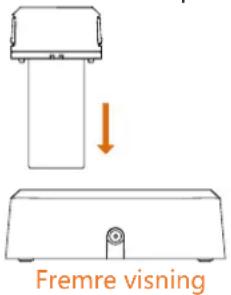
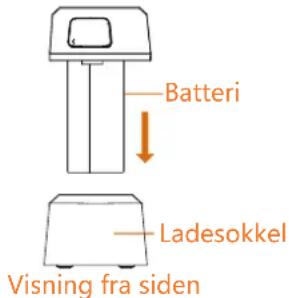
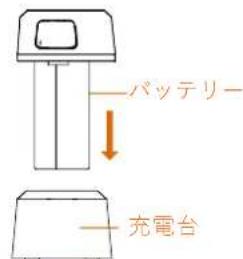
3.2 Charge Device via Charging Base
Steps:
- Hold the device, and press both battery lock catches of the device.
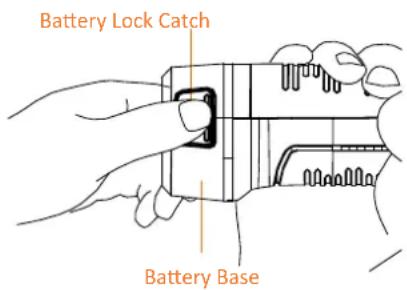
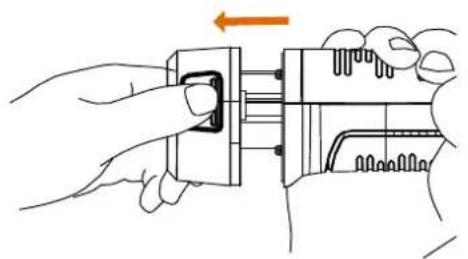
- Hold the lock catches, and draw the battery base to take out the battery.
natural_image
Illustration of hands using a tool to adjust or install a mechanical component, with an orange arrow indicating rotation (no text or symbols present)- Insert the battery into the charging base. You can see the charging status via the indicator on the charging base.
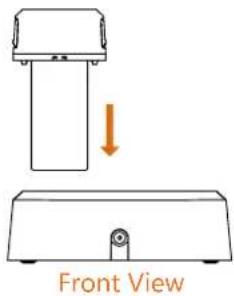
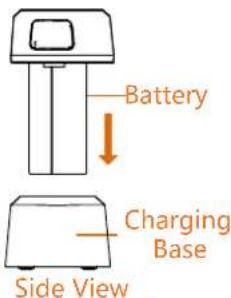
-
When the battery is fully charged, draw the battery from the charging base.
-
Align the ribbed piece on battery with the notch of the device, and insert battery into the device.
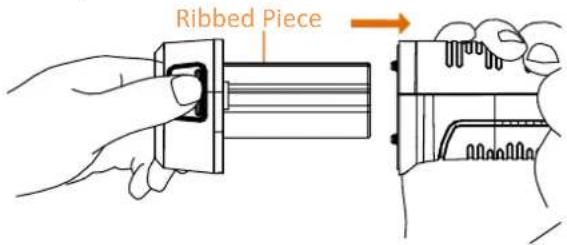
User Manual
Legal Information
© 2022 Hangzhou Microimage Software Co., Ltd. All rights reserved.
About this Manual
The Manual includes instructions for using and managing the Product. Pictures, charts, images and all other information hereinafter are for description and explanation only. The information contained in the Manual is subject to change, without notice, due to firmware updates or other reasons. Please find the latest version of this Manual at the HIKMICRO website (www.hikmicrotech.com/).
Please use this Manual with the guidance and assistance of professionals trained in supporting the Product.
Trademarks Acknowledgement
HIKMICRO and other HIKMICRO's trademarks and logos are the properties of HIKMICRO in various jurisdictions. Other trademarks and logos mentioned are the properties of their respective owners.
LEGAL DISCLAIMER
TO THE MAXIMUM EXTENT PERMITTED BY APPLICABLE LAW, THIS MANUAL AND THE PRODUCT DESCRIBED, WITH
ITS HARDWARE, SOFTWARE AND FIRMWARE, ARE PROVIDED "AS IS" AND "WITH ALL FAULTS AND ERRORS". HIKMICRO MAKES NO WARRANTIES, EXPRESS OR IMPLIED, INCLUDING WITHOUT LIMITATION, MERCHANTABILITY, SATISFACTORY QUALITY, OR FITNESS FOR A PARTICULAR PURPOSE. THE USE OF THE PRODUCT BY YOU IS AT YOUR OWN RISK. IN NO EVENT WILL HIKMICRO BE LIABLE TO YOU FOR ANY SPECIAL, CONSEQUENTIAL, INCIDENTAL, OR INDIRECT DAMAGES, INCLUDING, AMONG OTHERS, DAMAGES FOR LOSS OF BUSINESS PROFITS, BUSINESS INTERRUPTION, OR LOSS OF DATA, CORRUPTION OF SYSTEMS, OR LOSS OF DOCUMENTATION, WHETHER BASED ON BREACH OF CONTRACT, TORT (INCLUDING NEGLIGENCE), PRODUCT LIABILITY, OR OTHERWISE, IN CONNECTION WITH THE USE OF THE PRODUCT, EVEN IF HIKMICRO HAS BEEN ADVISED OF THE POSSIBILITY OF SUCH DAMAGES OR LOSS.
YOU ACKNOWLEDGE THAT THE NATURE OF THE INTERNET PROVIDES FOR INHERENT SECURITY RISKS, AND HIKMICRO SHALL NOT TAKE ANY RESPONSIBILITIES FOR ABNORMAL OPERATION, PRIVACY LEAKAGE OR OTHER DAMAGES RESULTING FROM CYBER-ATTACK, HACKER ATTACK, VIRUS INFECTION, OR OTHER INTERNET SECURITY RISKS; HOWEVER, HIKMICRO WILL PROVIDE TIMELY TECHNICAL SUPPORT IF REQUIRED.
YOU AGREE TO USE THIS PRODUCT IN COMPLIANCE WITH ALL APPLICABLE LAWS, AND YOU ARE SOLELY RESPONSIBLE FOR ENSURING THAT YOUR USE CONFORMS TO THE APPLICABLE LAW. ESPECIALLY, YOU ARE RESPONSIBLE, FOR USING THIS PRODUCT IN A MANNER THAT DOES NOT INFRINGE ON THE RIGHTS OF THIRD PARTIES, INCLUDING WITHOUT LIMITATION, RIGHTS OF PUBLICITY, INTELLECTUAL PROPERTY RIGHTS, OR DATA PROTECTION AND OTHER PRIVACY RIGHTS. YOU SHALL NOT USE THIS PRODUCT FOR ANY PROHIBITED END-USES, INCLUDING THE DEVELOPMENT OR PRODUCTION OF WEAPONS OF MASS DESTRUCTION, THE DEVELOPMENT OR PRODUCTION OF CHEMICAL OR BIOLOGICAL WEAPONS, ANY ACTIVITIES IN THE CONTEXT RELATED TO ANY NUCLEAR EXPLOSIVE OR UNSAFE NUCLEAR FUEL-CYCLE, OR IN SUPPORT OF HUMAN RIGHTS ABUSES.
IN THE EVENT OF ANY CONFLICTS BETWEEN THIS MANUAL AND THE APPLICABLE LAW, THE LATTER PREVAILS.
Regulatory Information
FCC Information
Note: This product has been tested and found to comply with the limits for a Class B digital device, pursuant to Part 15 of the FCC Rules. These limits are designed to provide reasonable protection against harmful interference in a residential installation. This product generates, uses, and can radiate radio frequency energy and, if not installed and used in accordance with the instructions, may cause harmful interference to radio communications. However, there is no guarantee that interference will not occur in a particular installation. If this product does cause harmful interference to radio or television reception, which can be determined by turning the equipment off and on, the user is encouraged to try to correct the interference by one or more of the following measures:
—Reorient or relocate the receiving antenna.
—Increase the separation between the equipment and receiver.
—Connect the equipment into an outlet on a circuit different from that to which the receiver is connected.
—Consult the dealer or an experienced radio/TV technician for help.
Please take attention that changes or modification not expressly approved by the party responsible for compliance could void the user's authority to operate the equipment.
This device complies with Part 15 of the FCC Rules.
Operation is subject to the following two conditions: (1) This device may not cause harmful interference, and (2) This device must accept any interference received, including interference that may cause undesired operation.
Note: Due to the device size limit, the above statement may not be disclaimed on the device.
This equipment complies with FCC radiation exposure limits set forth for an uncontrolled environment.
EU Conformity Statement
CE This product and - if applicable - the supplied accessories too are marked with "CE" and comply therefore with the applicable harmonized European standards listed under the Directive 2014/53/EU(RED), Directive 2014/30/EU(EMCD), Directive 2014/35/EU(LVD), Directive 2011/65/EU(RoHS).

This product and - if applicable - the supplied accessories too are marked with "UKCA" and comply therefore with the following directives: Radio Equipment Regulations 2017,
Electromagnetic Compatibility Regulations 2016, Electrical Equipment (Safety) Regulations 2016, the Restriction of the Use of Certain Hazardous Substances in Electrical and Electronic Equipment Regulations 2012.
Restrictions in the 5 GHz band:
According to Article 10 (10) of Directive 2014/53/EU, when operating in the 5150 to 5350 MHz frequency range, this device is restricted to indoor use in: Austria (AT), Belgium (BE), Bulgaria (BG), Croatia (HR), Cyprus (CY), the Czech Republic (CZ), Denmark (DK), Estonia (EE), Finland (FI), France (FR), Germany (DE), Greece (EL), Hungary (HU), Iceland (IS), Ireland (IE), Italy (IT), Latvia (LV), Liechtenstein (LI), Lithuania (LT), Luxembourg (LU), Malta (MT), Netherlands (NL), Northern Ireland (UK(NI)), Norway (NO), Poland (PL), Portugal (PT), Romania (RO), Slovakia (SK), Slovenia (SI), Spain (ES), Sweden (SE), Switzerland (CH), and Turkey (TR).
Frequency Bands and Power (for CE/UKCA)
The frequency bands and transmitting power (radiated and/or conducted) nominal limits applicable to the following radio equipment are as follows:
| Equipment Model | Frequency Bands and Power |
| M10 | Wi-Fi 2.4 GHz (2.4 GHz to 2.4835 GHz): 20 dBm |
| M20 | |
| M30 | Bluetooth 2.4 GHz (2.4 GHz to 2.4835 GHz): 20 dBm |
| M20 | Wi-Fi 5 GHz (5.15 GHz to 5.25 GHz): 23 dBm |
| M30 | Wi-Fi 5 GHz (5.25 GHz to 5.35 GHz): 23 dBm |
| Wi-Fi 5 GHz (5.47 GHz to 5.725GHz): 23 dBm | |
| Wi-Fi 5 GHz (5.725 GHz to 5.85 GHz): 14 dBm |
Use the power adapter provided by a qualified manufacturer. Refer to the product specification for detailed power requirements. Use the battery provided by a qualified manufacturer. Refer to the product specification for detailed battery requirements.

Directive 2012/19/EU (WEEE Directive): Products marked with this symbol cannot be disposed of as unsorted municipal waste in the European Union. For proper recycling, return this product to your
local supplier upon the purchase of equivalent new equipment, or dispose of it at designated collection points. For more information see: www.recyclethis.info.
According to the Waste Electrical and Electronic Equipment Regulations 2013: Products marked with this symbol cannot be disposed of as unsorted municipal waste in the United Kingdom. For proper recycling, return this product to your local supplier upon the purchase of equivalent new equipment, or dispose of it at designated collection points. For more information see: www.recyclethis.info.

Directive 2006/66/EC and its amendment 2013/56/EU (Battery Directive): This product contains a battery that cannot be disposed of as unsorted municipal waste in the European Union. See the product documentation for specific battery information. The battery is marked with this symbol, which may include lettering to indicate cadmium (Cd), lead (Pb), or mercury (Hg). For proper recycling, return the battery to your supplier or to a designated collection point. For more information see: www.recyclethis.info.
According to the Batteries and Accumulators (Placing on the Market) Regulations 2008 and the Waste Batteries and Accumulators Regulations 2009: This product contains a battery that cannot be disposed of as unsorted municipal waste in the United Kingdom. See the product documentation for specific battery information. The battery is marked with this symbol, which may include lettering to indicate cadmium (Cd), lead (Pb), or mercury (Hg). For proper recycling, return the battery to your supplier or to a designated collection point. For more information see: www.recyclethis.info.
Industry Canada ICES-003 Compliance
This device meets the CAN ICES-003 (B)/NMB-003(B) standards requirements.
This device complies with Industry Canada licence-exempt RSS standard(s). Operation is subject to the following two conditions:
(1) this device may not cause interference, and (2) this device must accept any interference, including interference that may cause undesired operation of the device.
This equipment complies with IC RSS-102 radiation exposure limits set forth for an uncontrolled environment.
(i) The device for operation in the band 5150-5250 MHz is only for indoor use to reduce the potential for harmful interference to co-channel mobile satellite systems; (ii) The maximum antenna gain permitted for devices in the bands 5250-5350 MHz and 5470-5725 MHz shall comply with the e.i.r.p. limit; and (iii) The maximum antenna gain permitted for devices in the band 5725-5825 MHz shall comply with the e.i.r.p. limits specified for point-to-point and non point-to-point operation as appropriate.
Users should also be advised that high-power radars are allocated as primary users (i.e. priority users) of the bands 5250-5350 MHz and 5650-5850 MHz and that these radars could cause interference and/or damage to LE-LAN devices.
These instructions are intended to ensure that user can use the product correctly to avoid danger or property loss.
Laws and Regulations
- Use of the product must be in strict compliance with the local electrical safety regulations.
Transportation
- Keep the device in original or similar packaging while transporting it.
- Keep all wrappers after unpacking them for future use. In case of any failure occurred, you need to return the device to the factory with the original wrapper. Transportation without the original wrapper may result in damage on the device and the company shall not take any responsibilities.
- Do not drop the product or subject it to physical shock. Keep the device away from magnetic interference.
Power Supply
- The input voltage should meet the limited energy circuit (5 VDC, 2 A) according to the IEC61010-1 standard. Please refer to technical specifications for detailed information.
- Make sure the plug is properly connected to the power socket.
- DO NOT connect multiple devices to one power adapter, to avoid over-heating or fire hazards caused by overload.
- Use the power adapter provided by qualified manufacturer. Refer to the product specification for detailed power requirements.
Battery
- Improper use or replacement of the battery may result in explosion hazard. Replace with the same or equivalent type only. The battery type is E97-13-1S1P26650. Dispose of used batteries in conformance with the instructions provided by the battery manufacturer.
- Do not charge other battery types with the supplied charger. Confirm there is no flammable material within 2 m of the charger during charging.
- For long-term storage of the battery, make sure it is fully charged every half year to ensure the battery quality. Otherwise, damage may occur.
- DO NOT place the battery near heating or fire source. Avoid direct sunlight.
-
DO NOT swallow the battery to avoid chemical burns.
-
DO NOT place the battery in the reach of children.
- CAUTION: Risk of explosion if the battery is replaced by an incorrect type.
- Do not dispose of the battery into fire or a hot oven, or mechanically crush or cut the battery, which may result in an explosion.
- Do not subject the battery to extremely low air pressure, which may result in an explosion or the leakage of flammable liquid or gas.
- When the device is powered off and the RTC battery is full, the time settings can be kept for 2 months.
- In the first use, power on the device and charge the RTC battery with the lithium battery for more than 8 hours.
- The battery voltage is 3.7 V, and the battery capacity is 5000 mAh.
- The battery is certified by UL2054.
Maintenance
- If the product does not work properly, please contact your dealer or the nearest service center. We shall not assume any responsibility for problems caused by unauthorized repair or maintenance.
- Wipe the device gently with a clean cloth and a small quantity of ethanol, if necessary.
- If the device is used in a manner not specified by the manufacturer, the protection provided by the device may be impaired.
- Please notice that the current limit of USB 3.0 PowerShare port may vary with the PC brand, which is likely to result in incompatibility issue. Therefore, it's advised to use regular USB 3.0 or USB 2.0 port if the USB device fails to be recognized by PC via USB 3.0 PowerShare port.
- We recommend you send the device back for calibration once a year, and please contact the local dealer for the information on maintenance points.
- Your camera will periodically perform a self-calibration to optimize image quality and measurement accuracy. In this process the image will pause briefly and you will hear a "click" as a shutter moves in front of the detector. The self-calibration will be more frequent during the startup or in very cold or hot environments. This is a normal part of operation to ensure optimum performance for your camera.
Using Environment
- DO NOT expose the device to extremely hot, cold, dusty, corrosive, saline-alkali, or damp environments. Make sure the running environment meets the requirement of the device. The operating temperature shall be -10 °C to 50 °C (14 °F to 122 °F), and the operating humidity shall be 90% or less.
- This device can only be safely used in the region below 2000 meters above the sea level.
- Place the device in a dry and well-ventilated environment.
- DO NOT expose the device to high electromagnetic radiation or dusty environments.
- DO NOT aim the lens at the sun or any other bright light.
- When any laser equipment is in use, make sure that the device lens is not exposed to the laser beam, or it may burn out.
● The device is suitable for indoor conditions.
• The pollution degree is 2. - Overvoltage category: 0 for Handheld Thermography Camera.
- Overvoltage category: II for power adapter.
Technical Support
- The https://www.hikmicrotech.com portal will help you as a HIKMICRO customer to get the most out of your HIKMICRO products. The portal gives you access to our support team, software and documentation, service contacts, etc.
Emergency
- If smoke, odor, or noise arises from the device, immediately turn off the power, unplug the power cable, and contact the service center.
Laser
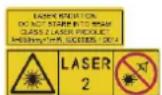
Warning: The laser radiation emitted from the device can cause eye injuries, burning of skin or inflammable substances. Prevent eyes from direct laser. Before
enabling the Light Supplement function, make sure no human or inflammable substances are in front of the laser lens. The wave length is 650 nm, and the power is less than 1 mW. The laser meets the IEC60825-1:2014 standard.
Laser maintenance: It is not necessary to maintain the laser regularly. If the laser does not work, the laser assembly needs to be replaced in the factory under warranty. Keep the device power off when replacing laser assembly. Caution-Use of controls or adjustments or performance of procedures other than those specified herein may result in hazardous radiation exposure.
Manufacture Address
Room 313, Unit B, Building 2, 399 Danfeng Road, Xixing Subdistrict, Binjiang District, Hangzhou, Zhejiang 310052, China
Hangzhou Microimage Software Co., Ltd.
COMPLIANCE NOTICE: The thermal series products might be subject to export controls in various countries or regions, including without limitation, the United States, European Union, United Kingdom and/or other member countries of the Wassenaar Arrangement. Please consult your professional legal or compliance expert or local government authorities for any necessary export license requirements if you intend to transfer, export, re-export the thermal series products between different countries.
Deutsch
natural_image
Illustration of hands using a tool to adjust a component, showing a step with an arrow indicating direction (no text or symbols present)natural_image
Line drawing of hands using a handheld device to adjust or install a component (no text or symbols visible)Base de la batterie
natural_image
Illustration of hands using a tool to adjust or install a mechanical component (no text or symbols visible)Assistance technique
HIKMICRO Viewer iOS
natural_image
Illustration of hands using a tool to adjust or install a mechanical component (no text or symbols visible)HIKMICRO Viewer iOS
natural_image
Illustration of hands using a tool to adjust or install a mechanical component (no text or symbols visible)natural_image
Illustration of hands using a tool to adjust or install a mechanical component, with no visible text or symbols.natural_image
Illustration of hands using a tool to adjust or install a mechanical component (no text or symbols visible)natural_image
Illustration of hands using a tool to adjust a component, showing a step with an arrow indicating direction (no text or symbols present)(www.hikmicrotech.com/).
HIKMICRO Viewer (iOS)
natural_image
Illustration of hands using a tool to adjust or install a component, showing a step with an orange arrow (no text or symbols present)natural_image
Illustration of hands using a mechanical tool to adjust a component (no text or symbols visible)natural_image
Illustration of hands using a tool to adjust or install a mechanical component (no text or symbols visible)natural_image
Illustration of hands using a tool to adjust or install a mechanical component (no text or symbols visible)Kamer 313, Unit B, Gebouw 2, 399 Danfeng Road, subdistrict Xixing, district Binjiang, Hangzhou, Zhejiang 310052, China
Hangzhou Microimage Software Co., Ltd.
natural_image
Illustration of hands using a mechanical tool to adjust a component (no text or symbols visible)Brugervejledning
HIKMICRO Viewer for iOS
- Komponent og grensesnitt (side 1)
natural_image
Illustration of hands using a tool to adjust or install a mechanical component, with no visible text or symbols.- Sett batteriet inn i ladesokkelen. Du kan se ladestatus via indikatoren på ladebasen.
natural_image
Illustration of hands using a tool to adjust or install a mechanical component (no text or symbols visible)natural_image
Illustration of hands using a mechanical device to adjust a component (no text or symbols visible)natural_image
Illustration of hands using a tool to adjust or install a mechanical component (no text or symbols visible)HIKMICRO Viewer iOS
natural_image
Illustration of hands using a tool to adjust or install a mechanical component (no text or symbols visible)natural_image
Illustration of hands using a tool to adjust or install a mechanical component (no text or symbols visible)natural_image
Simple line drawing of a mechanical component with an arrow indicating downward motion (no text or symbols)前面图
HIKMICRO Viewer iOS
natural_image
Illustration of hands using a tool to adjust or install a mechanical component, with no visible text or symbols.natural_image
Illustration of hands fastening a mechanical component with a belt, showing a step and rotation arrow (no text or symbols)See the World in a New Way