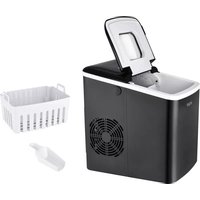
EM 6002 sw - Ice machine Exquisit - Free user manual and instructions
Find the device manual for free EM 6002 sw Exquisit in PDF.



| Product type | Ice maker |
| Brand | Exquisit |
| Model | EM 6002 sw |
| Power supply | 220-240 V ~ 50 Hz |
| Refrigerant | R600a (isobutane) |
| Production cycle | 7 to 15 minutes |
| Ice basket capacity | Approx. 1.5 kg (ICE FULL indicator) |
| Water tank | With MAX mark, drain via plug |
| Functions | Ice cube size selection (S/L), automatic stop, automatic cleaning (CLEAN) |
| Indicator lights | POWER, ADD WATER, ICE FULL |
| Recommended ambient temperature | 15 °C to 38 °C |
| Recommended water temperature | 7 °C to 35 °C |
| Cleaning | Integrated CLEAN cycle, manual surface cleaning |
| Safety | Electric shock protection, child safety, automatic stop when basket full |
| Use | Household use only |
| Included accessories | Ice scoop, ice basket |
| Manufacturer warranty | 2 years |
| After-sales service | www.ggv-service.de |
Frequently Asked Questions - EM 6002 sw Exquisit
User questions about EM 6002 sw Exquisit
0 question about this device. Answer the ones you know or ask your own.
Ask a new question about this device
Download the instructions for your Ice machine in PDF format for free! Find your manual EM 6002 sw - Exquisit and take your electronic device back in hand. On this page are published all the documents necessary for the use of your device. EM 6002 sw by Exquisit.
USER MANUAL EM 6002 sw Exquisit
natural_image
Line drawing of a small industrial water heater with a fan and control panel (no text or symbols)Bedienblende
At the time of its introduction on the market the product fulfills the requirements, which were specified in the directive for the standardization of the laws of the Member States concerning the electromagnetic compatibility (2014/30/EU) of electrical equipment within certain voltage limits (2014/35/EU). This product is identified by the CE marking and delivered with a declaration of conformity for inspection by the market monitoring authority.
Marquage CE
7.1 Improper use....13
7.2 Residual risks....13
8 Putting into operation 14
9 Cleaning and maintenance....15
10 TROUBLESHOOTING 16
11 Disposal of old appliances....17
12 Warranty terms....18
13 Sécurité ....20
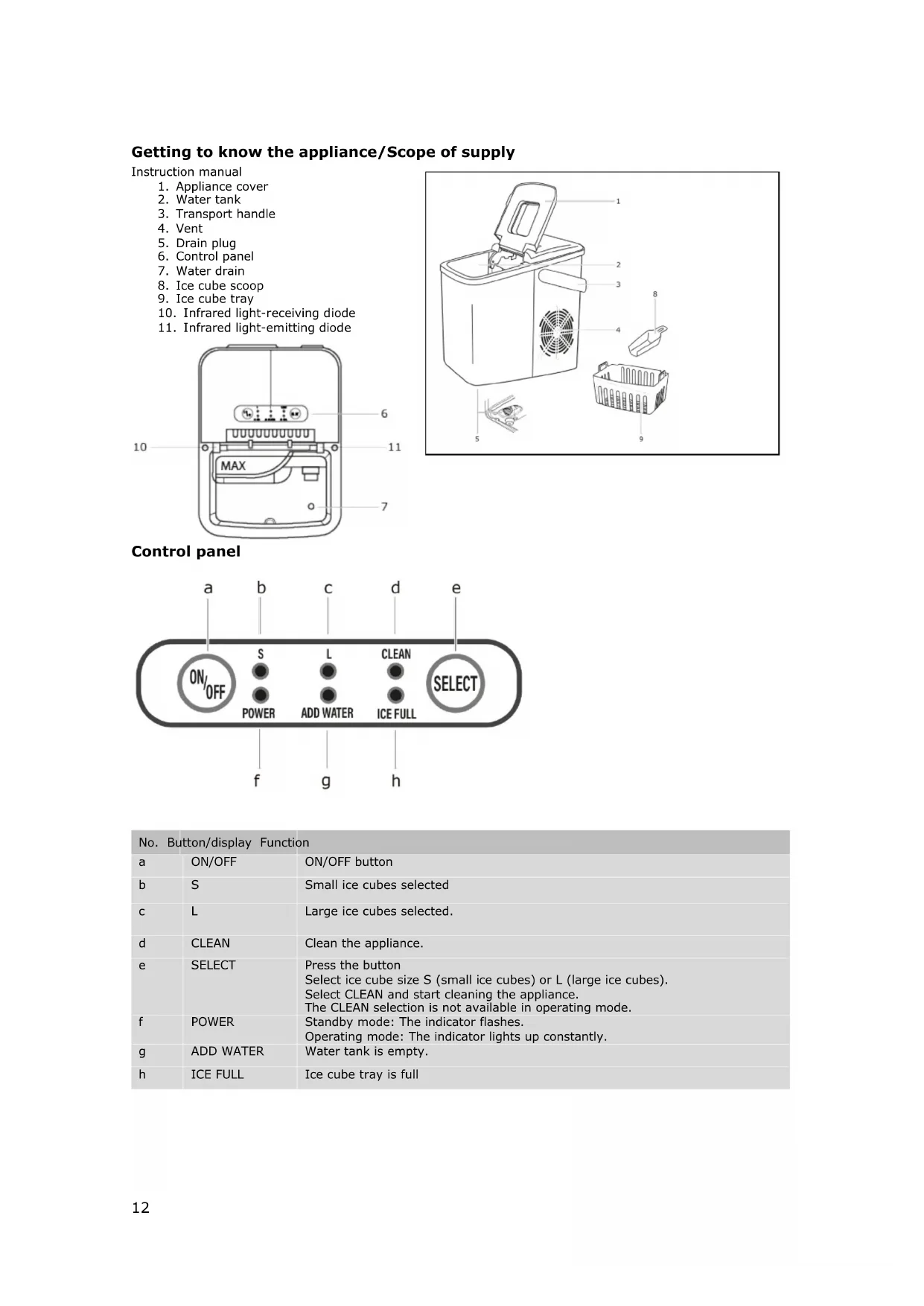
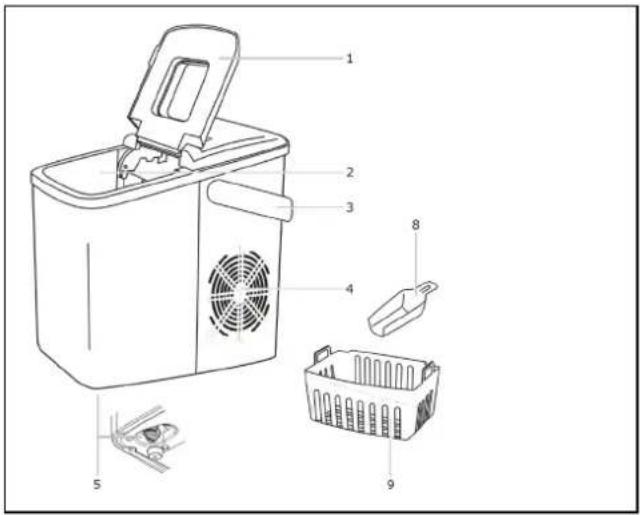
Getting to know the appliance/Scope of supply
Instruction manual
- Appliance cover
- Water tank
- Transport handle
- Vent
- Drain plug
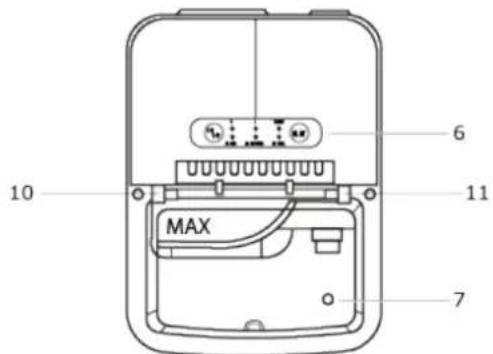
- Control panel
- Water drain
- Ice cube scoop
- Ice cube tray
- Infrared light-receiving diode
- Infrared light-emitting diode
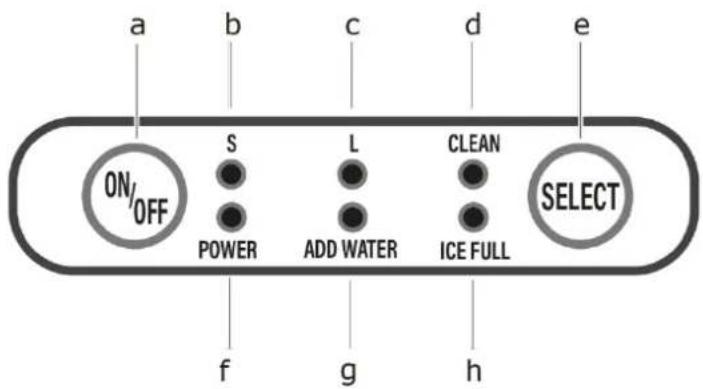
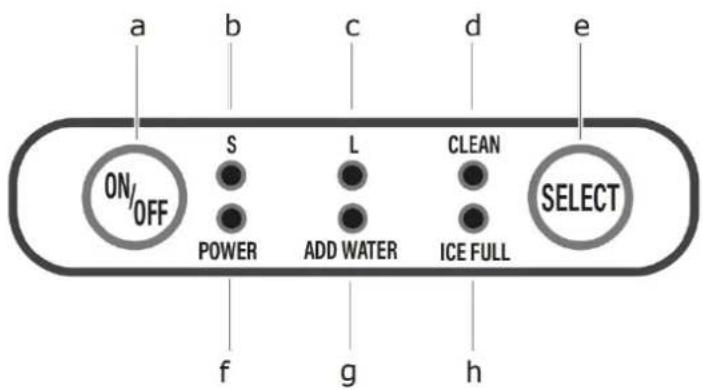
Control panel

| No. | Button/display Function | |
| a | ON/OFF | ON/OFF button |
| b | S | Small ice cubes selected |
| c | L | Large ice cubes selected. |
| d | CLEAN | Clean the appliance. |
| e | SELECT | Press the buttonSelect ice cube size S (small ice cubes) or L (large ice cubes).Select CLEAN and start cleaning the appliance.The CLEAN selection is not available in operating mode. |
| f | POWER | Standby mode: The indicator flashes.Operating mode: The indicator lights up constantly. |
| g | ADD WATER | Water tank is empty. |
| h | ICE FULL | Ice cube tray is full |
7 Safety
Explanation of the safety instructions

DANGER
Indicates a hazardous situation which, if not avoided, will lead to very serious injuries or even death!

WARNING
Indicates a hazardous situation which, if not avoided, can lead to very serious injuries or even death!

CAUTION
Indicates a hazardous situation which, if not avoided, can lead to minor injuries or even death!
ATTENTION
Indicates a situation which, if not avoided, will lead to material damage.
Intended use
The appliance is intended exclusively for making ice cubes.
- It is intended exclusively for use in private households and is not suitable for commercial use.
- Do not operate the appliance other than as described in this instruction manual otherwise as this would lead to the voiding of warranty claims in the event of faults.
- The intended use also implies compliance with the operating and maintenance conditions prescribed by the manufacturer.
- For safety reasons, modifications or alterations to the appliance are not permitted.
- Any use outside these areas of application is not in accordance with the intended use and is therefore considered improper use.
7.1 Improper use
Do not connect the appliance if it has visible damage or if the mains power cable is defective.
Immediately disconnect the mains plug from the socket if the appliance emits strange noises, smells or smoke.
- Do not set up the appliance outdoors.
- Do not route the mains power cable under voltage.
- Do not kink the mains power cable.
- Do not connect the appliance to the mains power supply using multiple socket strips.
- Set up the appliance so that the mains plug is accessible at all times.
- Do not pull the mains plug out of the plug socket at the mains power cable.
Safety for specific groups of people
The appliance may be operated by children over 8 years of age and persons whose physical, sensory or mental aptitude are impaired or who lack experience and/or knowledge. However, they must be supervised or instructed in the safe use of the appliance and understand the possible risks.
• Children may only clean and service the appliance under adult supervision.
- Supervise children to ensure that they do not play with the appliance.

DANGER
RISK OF STRANGULATION DUE TO MAINS POWER CABLE!
Keep children under 8 years of age away from the mains power cable of the appliance.

DANGER
RISK OF SUFFOCATION DUE TO PACKAGING MATERIAL!
Keep children away from the packaging materials.
7.2 Residual risks
- Connect the appliance only in accordance with the description in the instruction manual.
- Never touch the mains plug on the mains cable with wet or damp hands when plugging it in or unplugging it.
- In an emergency, pull the mains plug out of the plug socket immediately.
- Always unplug the mains plug from the plug socket before cleaning.
- If the mains power cable or mains plug is damaged, do not use the appliance any more.
- Do not tamper with the appliance except for the cleaning activities described in this instruction manual.
Hazards due to refrigerant

WARNING
HEALTH HAZARD!
If the refrigeration circuit is damaged, R600a isobutane refrigerant will escape. The refrigerant poses a health hazard on contact with the eyes and if inhaled.
Flammable gas!
Explosion and fire risk!
The refrigeration circuit of the appliance contains the refrigerant isobutane (R600a), a natural gas with high environmental compatibility; it is flammable.
- Only authorised specialists are allowed to work on the refrigerant system.
- Do not damage the refrigeration circuit, e.g. by puncturing the refrigerant channels with sharp objects, kinking the pipework, etc.
- Do not damage any parts of the refrigeration circuit when transporting, setting up, servicing or disposing of the appliance.
- In order that an explosive gas/air mixture cannot form in the event of a leak in the refrigeration circuit, the room in which the appliance is installed must have a minimum size according to standard EN 378 of 1m^3 per 8g of refrigerant. The quantity of refrigerant in the appliance can be found on the type plate.
What to do if the refrigeration circuit is damaged:
√ Avoid naked flames and ignition sources.
√ Ventilate the room in which the appliance is installed thoroughly.
√ Contact After Sales Service.
Setting up the appliance
√ Open the packaging carefully.
√ Remove the appliance from the packaging.
√ Check the delivery for completeness and transport damage.
ATTENTION
APPLIANCE DAMAGE!
Open the packaging carefully without sharp knives or other pointed objects to avoid damaging the appliance.
8 Putting into operation
Clean the appliance and the interior parts thoroughly before putting into operation (see chapter "cleaning and maintenance"). Reference source could not be found.").

WARNING
HEALTH HAZARD
Only fill the appliance with drinking water.
ATTENTION
APPLIANCE DAMAGE!
Do not fill the water tank with hot water as this may damage the appliance.
ATTENTION
APPLIANCE DAMAGE!
Do not cover the vent on the appliance.
Setting up the appliance
Set up the appliance in such a way that good air circulation is ensured. Keep a distance of at least 8 cm from all sides.
- Keep the appliance away from hot surfaces.
- Place the appliance on a flat, stable, clean, fireproof and dry surface.
Place the appliance
- in a well-ventilated and dry room with an ambient temperature equivalent to +5°C - 38°C.
- Do not operate in a cold environment below +5^ C.
Electrical connection

WARNING
ELECTRIC SHOCK HAZARD!
A faulty electrical installation or excessively high mains voltages can result in electric shocks!
Only connect the appliance to a properly installed socket.
Starting ice cube preparation
- Make sure that the drain plug on the bottom of the appliance is fully closed.
- Plug the mains plug into the plug socket.
→ The "POWER" indicator flashes. - Open the appliance cover and remove the ice cube tray.
- Fill the water tank with lukewarm or cold drinking water up to the MAX water level indicator.
- Put the ice cube tray back into the appliance.
- Close the cover.
- Press the ON/OFF button.
→ The POWER indicator lights up constantly.
→ Ice cube preparation starts and takes approx. 7 to 15 minutes depending on the ambient and water temperature.
Selecting the ice cube size
- Press the SELECT button until the desired size lights up according to the control light. "S": small or "L": large.
- Press the ON/OFF button and start the ice cube preparation.
If the ambient temperature is below 15^ C, we recommend selecting the smaller size of ice cubes.
If the ambient temperature is higher than 30^ C, we recommend selecting the large size.
For optimal performance, the temperature of the water should be between 7°C and 35°C and the ambient temperature between 15°C and 38°C.
It takes longer to prepare larger ice cubes.
ICE FULL
Indicator lights up when the ice cube tray is full. Ice cube preparation stops automatically.
- Remove the ice cubes from the ice cube tray with the ice cube scoop.
- After 7.5 seconds, the ice cube preparation restarts automatically.
9 Cleaning and maintenance
Regular cleaning and maintenance of the appliance not only protects the environment and saves energy, but also increases its service life. The following description provides valuable tips.

WARNING
ELECTRIC SHOCK HAZARD!
Disconnect the appliance from the mains power supply.
Never immerse the appliance in water for cleaning. Do not use a steam cleaner for cleaning.
ATTENTION
DAMAGE TO PROPERTY
- Improper cleaning of the appliance may cause damage.
- Do not use
- Aggressive cleaning agents
• Brushes with metal or nylon bristles - Sharp, metallic objects such as knives, hard spatulas and the like. These can damage the surfaces.
- Do not put appliance parts in the dishwasher.
ADD WATER
The indicator lights up when the water tank is empty. Ice cube preparation stops automatically.
- Remove the ice cube tray.
-
Fill the water tank with lukewarm or cold drinking water up to the MAX water level indicator.
-
Press the ON/OFF button and restart the ice cube making cycle.
→ The appliance automatically starts making ice cubes after about 20 minutes if the user does not manually restart the ice cube preparation after refilling the water.
Stop ice cube making
- As soon as the desired amount of ice cubes has collected in the ice cube tray, simply stop making ice cubes.
- Press the ON/OFF button.
- Remove the mains plug from the plug socket.
- Open the appliance cover and place the ice cubes in a freezer.
- Do not store the appliance in a dry place until it has reached room temperature.
If the appliance is not used for a long period of time, first empty the water tank via the drain plug (5).
For reasons of hygiene and safety, we recommend that you always use the appliance with fresh water.
Cleaning the appliance
It is important to wash and dry the appliance and all components carefully after use to prevent bacterial growth and the development of unpleasant odours.
- Wipe the surface of the appliance with a soft, slightly damp cloth.
- Clean the vents with a brush.
- Rinse the ice cube tray and ice scoop in warm soapy water and dry carefully.
CLEAN - Cleaning the ice mechanism
- Position the appliance so that it protrudes 60 mm above the worktop/table. Ideally, slide it over the sink.
- Unscrew the drain plug to allow residual water to run out. Have a drip tray ready.
- Screw the drain plug back in.
- Fill the water tank with lukewarm or cold drinking water up to the MAX water level indicator.
- Press the ON/OFF button.
- Press the SELECT button to select the CLEAN function.
→ The appliance starts the internal cleaning cycle by pumping water.
→ The cleaning cycle takes about four minutes.
- Empty and dry the water tank if the ice cube machine will not be used for a long time.
10 TROUBLESHOOTING
| Error | Possible cause | Remedy |
| "ADD WATER" indicator lights up | Water tank is emptyWater strainer at the bottom of the water tank is blockedPump malfunction. | Press the ON/OFF button; fill the water tank; wait three minutes and press the ON/OFF buttonCleaning the applianceContact After Sales Service www.ggy-service.de * |
| "ICE FULL" indicator lights up | Ice cube tray is full.Infrared light-emitting diode and light-receiving diode do not work | Empty the ice cube tray.Clean the Infrared light-emitting diode 11and light-receiving diode10, Restart the ice cube machine.If the infrared light-emitting diode 11and the light-receiving diode 10 do not work, contact After Sales Service.* |
| Control lights are off. | The appliance is not connected to the power supply. | Switch on the appliance. |
| The ice is badly formedThe ice cubes are too big and stick together. | It takes too long to make the ice cubes.The water temperature in the water tank or the environment is too low. | Switch off the machine. Empty the water tank and fill it with fresh water (avoid cold water) between 8^ - 25^ .Restart the appliance. |
| The conditions for the ice making cycle are correct, but no ice is made. | The ambient temperature or water temperature is too highB) The refrigerant leaksC) The sealed system is clogged | Start making ice cubes in an environment with an ambient temperature of less than 32^ .B) Contact serviceC) Contact service |
| Poor results for making ice cubes | A) Poor heat dissipation.B) The water temperature is too high.C) The ambient temperature is too high. | A) Leave a space of 15 cm on all sides of the ice machine to ensure sufficient ventilation.B) Fill the water tank with water at temperature between 8^ and 28^ .C) Operate the ice machine in an environment with an ambient temperature between 10^ and 32^ . |
Disposal of packaging materials
Sort packaging materials before disposal. Paper and cardboard with the waste paper and plastic film in the recycled materials bin.
Disposing of old appliances (EN)
Old appliances must not be disposed of with household waste
The symbol of the crossed-out wheeled bin on the product or its packaging means that the appliance must not be disposed of with household waste but requires separate disposal. You can return the old appliance free of charge to a suitable municipal collection point for old electrical and electronic equipment, e.g. a recycling centre.
You can obtain the addresses from your city administration or local government.
Alternatively, you can return old electrical appliances with an edge length of up to 25 cm free of charge to retailers with a sales area for electrical and electronic equipment of at least 400 m ^2 or food retailers with a total sales area of at least 800 m ^2 who offer electrical and electronic equipment at least several times a year.
Larger old appliances can be returned free of charge to an appropriate retailer when purchasing a new appliance of the same type that performs essentially the same functions as the new appliance. Please contact your dealer regarding the modalities of returning an old appliance when delivering the new appliance.
Before disposing of the product, please remove - if possible - all batteries and rechargeable batteries as well as all lamps that can be removed without destroying them.
Please note that you are responsible for deleting personal data from the appliance to be disposed of.
Children can often not recognise the hazards associated with household appliances. Ensure the necessary supervision and do not let children play with the appliance.
Disposing of old appliances (AT)
The symbol of the crossed-out wheeled bin on the product or its packaging means that the appliance must not be disposed of with household waste but requires separate disposal. You can return the old appliance free of charge to a suitable municipal collection point for old electrical and electronic equipment, e.g. a recycling centre. You can obtain the addresses from your city administration or local government. Alternatively, you can return old electrical appliances free of charge when you buy a new appliance of the same type and with the same function from an offline retailer. Please contact your dealer regarding the modalities of returning an old appliance when delivering the new appliance.
Before disposing of the product, please remove - if possible - all batteries and rechargeable batteries as well as all lamps that can be removed without destroying them.
Please note that you are responsible for deleting personal data from the appliance to be disposed of. The appliance may contain substances that can endanger the environment and human health if disposed of incorrectly. Material recycling helps to reduce waste and conserve resources. By collecting old appliances separately and recycling them, you help prevent negative impacts on the environment and human health.
12 Warranty terms
The following terms describing the preconditions for and scope of our warranty, do not infringe the warranty rights of the ultimate buyer.
Our warranty for this appliance is granted under the following terms:
As the purchaser of an Exquisit appliance, you have a manufacturer's warranty (2 years from date of purchase).
During this warranty period, you can make your warranty claims directly on the manufacturer's Service platform at www.ggv-service.de.
If an additional warranty is concluded between you and your dealer, all claims against the manufacturer will become void after the end of the 24-month manufacturer's warranty. In this case, please contact your dealer directly.
Warranty period
The warranty period is 24 months from the date of purchase (proof of purchase must be presented). During the first 6 months, After Sales Service will fix defects in the appliance free of charge, on condition that the appliance is accessible for repairs without any great effort. During the following 18 months, the buyer is obliged to prove that the defect already existed at the time of delivery.
In the case of commercial use (e.g. in hotels, canteens) or joint use by several households, the warranty period is 12 months from the date of purchase (proof of purchase must be presented). During the first 6 months, After Sales Service will fix defects in the appliance free of charge, on condition that the appliance is accessible for repairs without any great effort. During the following 6 months, the buyer is obliged to prove that the defect already existed at the time of delivery.
The claim under warranty does not prolong the warranty period for either the appliance or for newly installed parts.
Scope of the defect remedy
Within the periods indicated, we will remedy all defects in the appliance that are demonstrably attributable to poor workmanship or material flaws. Replaced parts become our property.
The warranty does not cover:
Normal wear and tear, intentional or negligent damage, damage caused by non-compliance with the operating instructions, improper set-up or installation or by connection to incorrect mains voltage, damage due to chemical or electrothermal effects or due to other abnormal environmental conditions, glass, paint or enamel damage and possible colour differences as well as defective bulbs.
Defects in the appliance resulting from transport damage are also not covered. We shall also not provide any services if - without our special written approval - work has been carried out on the appliance by unauthorised persons or parts of foreign origin have been used. This limitation shall not apply to faultless work carried out by a qualified person using our original parts to adapt the appliance to the technical safety regulations of another EU member state.
Scope
Our warranty applies to appliances purchased and in operation in the Federal Republic of Germany or Austria.
In the case of complaints about defective appliances, the sender's and recipient's addresses must be in the Federal Republic of Germany or Austria.
For appliances purchased and operated in other European countries, the warranty conditions of the seller apply.
Panneau de commande

RISQUE POUR LA SANTÉ
Bedieningspaneel
VERPAKKINGSMATERIAAL!
Painel de controlo

Panel de control

GGV HANDELSGES. MBH & CO. KG
AUGUST-THYSSEN-STR.8
D-41564 KAARST
ALEMANIA
em6002_e1-0_2022-01b_muliti.docx
- Marquage CE
- Getting to know the appliance/Scope of supply
- Instruction manual
- Control panel
- Safety
- Explanation of the safety instructions
- DANGER
- WARNING
- CAUTION
- ATTENTION
- Intended use
- Improper use
- Safety for specific groups of people
- Residual risks
- Hazards due to refrigerant
- What to do if the refrigeration circuit is damaged:
- Setting up the appliance
- Putting into operation
- Electrical connection
- Starting ice cube preparation
- Selecting the ice cube size
- ICE FULL
- Cleaning and maintenance
- ELECTRIC SHOCK HAZARD!
- DAMAGE TO PROPERTY
- ADD WATER
- Stop ice cube making
- Cleaning the appliance
- CLEAN - Cleaning the ice mechanism
- Disposal of packaging materials
- Disposing of old appliances (EN)
- Disposing of old appliances (AT)
- Warranty terms
- Warranty period
- Scope of the defect remedy
- Scope
- Bedieningspaneel
Brand : Exquisit
Model : EM 6002 sw
Category : Ice machine