KCA-RCDV340 - Remote control KENWOOD - Free user manual and instructions
Find the device manual for free KCA-RCDV340 KENWOOD in PDF.



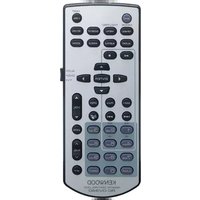
| Product type | Infrared remote control |
| Brand | Kenwood |
| Model | KCA-RCDV340 |
| Power supply | 2 AAA/R03 batteries (1.5 V) |
| Operating modes | AUD, DVD, TV |
| Main functions | Control of radio, CD/DVD, TV sources; numeric keys; direct search; volume control; zoom; subtitles; angle; menu navigation |
| Range | Approximately 5 m (estimated) |
| Approximate dimensions | 150 × 50 × 20 mm |
| Approximate weight | 100 g (with batteries) |
| Safety | Do not expose to excessive heat; replace batteries with identical ones; avoid dropping under pedals |
| Maintenance and cleaning | Wipe with a dry, soft cloth; replace batteries if range decreases |
| Spare parts available | AAA batteries (not included) |
| General information | Manufactured by JVCKENWOOD Corporation; compliant with EMC Directive 2014/30/EU and RoHS Directive 2011/65/EU |
Frequently Asked Questions - KCA-RCDV340 KENWOOD
User questions about KCA-RCDV340 KENWOOD
0 question about this device. Answer the ones you know or ask your own.
Ask a new question about this device
Download the instructions for your Remote control in PDF format for free! Find your manual KCA-RCDV340 - KENWOOD and take your electronic device back in hand. On this page are published all the documents necessary for the use of your device. KCA-RCDV340 by KENWOOD.
USER MANUAL KCA-RCDV340 KENWOOD
MANUAL DE INSTRUÇÕES
JVCKENWOOD Corporation
This unit cannot control the function that isn't included in the car receiver.
Precautions
CAUTION
- Put the remote control in a place where it will not move during braking or other operations. A dangerous situation could result, if the remote control falls down and gets wedged under the pedals while driving.
- Risk of fire or explosion if the battery is replaced by an incorrect type. Ensure to replace only with the same type.
- Risk of fire, explosion or the leakage of flammable liquid or gas if the battery is left in an extremely high temperature surrounding environment and/or subjected extremely low air pressure. The battery pack or batteries shall not be exposed to excessive heat such as sunshine, fire or the like.
- Risk of fire, explosion or the leakage of flammable liquid or gas if the battery is disposed into fire or a hot oven, recharged, shorted, mechanically crushed or cut of the battery.
- If spilled fluid comes in contact with your eyes or on clothing, immediately rinse with water and consult a physician.
Battery installation
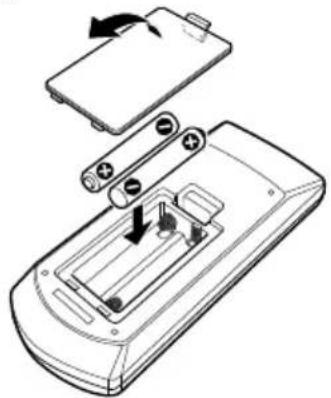
If the remote control operates only over shorter distances or does not operate at all, it is possible that the batteries are depleted.
In such instances, replace the both batteries with new ones.
1 Insert two "AAA"/"R03"-size batteries with the ⊕ and ⊖ poles aligned properly, following the illustration inside the case.
natural_image
Technical line drawing of a battery pack with internal components and battery casing (no text or symbols)Switch the operation mode
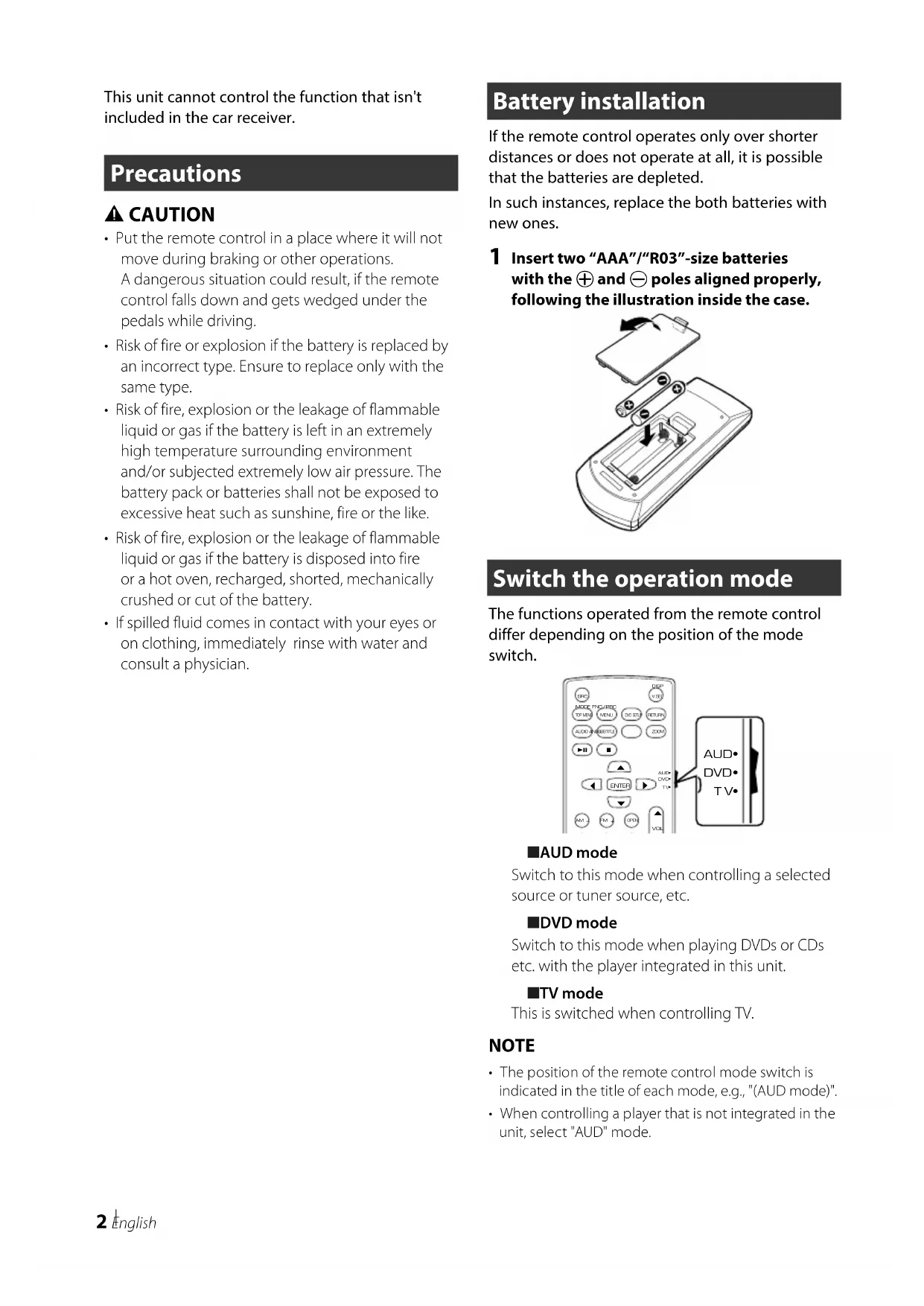
The functions operated from the remote control differ depending on the position of the mode switch.

text_image
AUDIO VCC MOSI RPG TOMS MEL DOS FETLN AUDIO RUBS LPG LPG LPG AUDIO DVD TV VCC VCC AUDIO DVD TV■AUD mode
Switch to this mode when controlling a selected source or tuner source, etc.
DVD mode
Switch to this mode when playing DVDs or CDs etc. with the player integrated in this unit.
TV mode
This is switched when controlling TV.
NOTE
- The position of the remote control mode switch is indicated in the title of each mode, e.g., "(AUD mode)".
- When controlling a player that is not integrated in the unit, select "AUD" mode.
Basic Operation
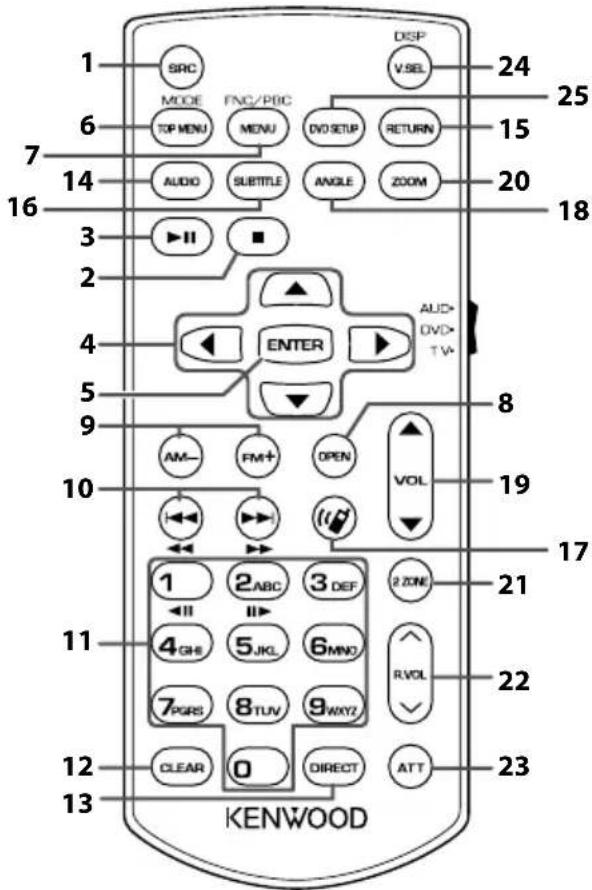
| Key Name | Mode switch | Function | |
| 1 | SRC – Switches to the source to be played. | ||
| 2 | ■ | DVD Stops playing and memorizes the last point where the disc stopped. The last point is deleted by pressing twice. | |
| 3 | ▶II | – Pauses the track or file, and resumes playing by pressing twice. | |
| AUD For the Radio, HD Radio and Digital Radio sources, switches the seek mode. | |||
| 4 | ▲/▼/◀/▶ | DVD Moves the cursor in the DVD menu. | |
| 5 | ENTER – Performs the selected function. | ||
| 6 | TOP MENU AUD Screen mode changes each time you press this key during video playback. | ||
| 7 | MENU AUD Displays the control screen of current source. (USB, iPod, DISC) | ||
| 8 | OPEN – Switches the monitor (front panel) angle each time it is pressed. | ||
| 9 | AM-/FM+ AUD Selects the folder to be played. | ||
| 10 | |◀◀/▶▶| | AUD Selects the track or file to be played. | |
| DVD For the DVD source, selects the title to be played. | |||
| 11 | Numeric Keypad | AUD Allows you to enter the number to search in the direct search mode.For details on the direct search mode, seeDirect search mode.For the Radio, HD Radio, Digital Radio and SiriusXM sources, allows you to enter the preset number.If the preset number is one digit, press the number.If the preset numbers is two digits, press continuously the numbers within 3 seconds.Pressing [◀] [▶] within 3 seconds allows you to determine the preset number of one digit. | |
| DVD Press [1] [2] to fast forward/backward. Press [4] [5] to slow forward/backward.Switches the slow playback speed each time you press this key.* (*DVD only) | |||
| 12 | CLEAR DVD | Clears the number. | |
| 13 | DIRECT – Switches to the direct search mode. | ||
| 14 | AUDIO DVD | Switches the voice language each time you press this key. | |
| 15 | RETURN DVD | Displays previous screen. | |
| 16 | SUBTITLE DVD | Switches the subtitle language. | |
| 17 | ◀◀ | – When a call comes in, answers the call. | |
| 18 | ANGLE DVD | Switches the picture angle each time you press this key. | |
| 19 | VOL ▲▼ | – Adjusts the volume. | |
| 20 | ZOOM DVD | Switches the zoom ratio (2, 3, 4, Off) each time you press this key. | |
| 21 | 2 ZONE – Switches the Dual Zone function on and off. | ||
| 22 | R.VOL ∧∨ | – Adjusts volume at rear when the Dual Zone function is on. | |
| 23 | ATT – Lowers the volume by pressing the key once.Restores the previous volume by pressing the key twice. | ||
| 24 | V.SEL | – Displays the APP (Apple CarPlay/Android Auto/Wireless Mirroring) screen. | |
| 25 | DVD SETUP | – Not used. | |
Direct search mode
Using the remote control, you can jump directly to the desired file, track chapter, etc. by entering the number corresponding to the content.
NOTE
- This operation cannot be performed for the USB device and iPod.
1 Press the [DIRECT] button several times until the desired content appears.
The available contents are different depending on the source type.
DVD
Title number/Chapter number
■ VCD 1.X and 2.X (PBC OFF)
Track number
■ VCD 2.X (PBC ON)
Scene number/Track number
Music CD
Track number
Radio
Frequency value
HD Radio tuner
Frequency value/Channel number
SiriusXM
Channel number
2 Enter the number of the content you want to play using the numeric keypad.
3 For DVD or VCD, music CD, press the [ENTER] button.
For radio, press the [◀◀] or [▶▶] button.
The content corresponding to the number you entered is played.
natural_image
Diagram of a handheld device with battery, switch, and internal components (no text or symbols)natural_image
Diagram of a mobile phone casing with battery pack and internal components (no text or symbols)natural_image
Diagram of a handheld device with battery casing and internal components, showing no text or symbolsnatural_image
Technical line drawing of a remote control device with battery pack and internal components (no text or symbols)natural_image
Diagram of a battery internal structure with arrows indicating components (no text or symbols)natural_image
Diagram of a mobile phone casing with battery pack and internal components (no text or symbols)Changes or modifications not expressly approved by the party responsible for compliance could void the user's authority to operate the equipment.
FCC NOTE
- This equipment has been tested and found to comply with the limits for a Class B digital device, pursuant to part 15 of the FCC Rules. These limits are designed to provide reasonable protection against harmful interference in a residential installation.
- This equipment generates, uses and can radiate radio frequency energy and, if not installed and used in accordance with the instructions, may cause harmful interference to radio communications. However, there is no guarantee that interference will not occur in a particular installation. If this equipment does cause harmful interference to radio or television reception, which can be determined by turning the equipment off and on, the user is encouraged to try to correct the interference by one or more of the following measures:
– Reorient or relocate the receiving antenna.
– Increase the separation between the equipment and receiver.
- Connect the equipment into an outlet on a circuit different from that to which the receiver is connected.
- Consult the dealer or an experienced radio/TV technician for help.
Supplier's Declaration of Conformity
Trade Name: KENWOOD
Products: REMOTE CONTROL UNIT
Model Name: KCA-RCDV340
Responsible Party: JVCKENWOOD USA CORPORATION
2201 East Dominguez Street,
Long Beach, CA 90810, U.S.A.
PHONE: 310 639-9000
THIS DEVICE COMPLIES WITH PART 15 OF THE FCC RULES. OPERATION IS SUBJECT TO THE FOLLOWING TWO CONDITIONS:
(1) THIS DEVICE MAY NOT CAUSE HARMFUL INTERFERENCE, AND
(2) THIS DEVICE MUST ACCEPT ANY INTERFERENCE RECEIVED, INCLUDING INTERFERENCE THAT MAY CAUSE UNDESIRED OPERATION.
For Latin America
natural_image
Two identical diagrams of a trash bin with cross-bracing, no text or symbols present■Information on Disposal of Old Electrical and Electronic Equipment and Batteries (applicable for EU countries that have adopted separate waste collection systems)
Products and batteries with the symbol (crossed-out wheeled bin) cannot be disposed as household waste. Old electrical and electronic equipment and batteries should be recycled at a facility capable of handling these items and their waste byproducts. Contact your local authority for details in locating a recycle facility nearest to you. Proper recycling and waste disposal will help conserve resources whilst preventing detrimental effects on our health and the environment.
Declaration of Conformity with regard to the EMC Directive 2014/30/EU
Declaration of Conformity with regard to the RoHS Directive 2011/65/EU
Manufacturer:
JVCKENWOOD Corporation
3-12, Moriyacho, Kanagawa-ku, Yokohama-shi, Kanagawa 221-0022, JAPAN
EU Representative:
JVCKENWOOD Europe B.V.
Amsterdamseweg 37, 1422 AC UITHOORN, THE
NETHERLANDS
Declaration of Conformity with regard to the Electromagnetic Compatibility Regulations 2016 (S.I. 2016/1091)
Declaration of Conformity with regard to the Restriction of the Use of Certain Hazardous Substances in Electrical and Electronic Equipment Regulations 2012 (S.I. 2012/3032)
Manufacturer:
JVCKENWOOD Corporation
3-12, Moriya-cho, Kanagawa-ku, Yokohama-shi,
Kanagawa, 221-0022, JAPAN
UK Importer:
JVCKENWOOD U.K. Limited
First Floor, Gleneagles, the Belfry, Colonial Way, Watford, Hertfordshire WD24 4WH, UNITED KINGDOM
Importeur
JVCKENWOOD Europe B.V.
Amsterdamseweg 37, 1422 AC Uithoorn, THE NETHERLANDS
Importador
JVCKENWOOD EUROPE B.V. Sucursal en España