H10 - Chair Keyton - Free user manual and instructions
Find the device manual for free H10 Keyton in PDF.


| Product Type | Keyton H10 Electric Massage Chair |
| Brand | Keyton |
| Model | H10 |
| Maximum User Weight | 120 kg |
| Power Supply | Alternating current (check the voltage on the device) |
| Automatic Massage Programs | Anti-Stress, Sport, Relax, Restore, Neck & Shoulders, Auto Play, Back & Lumbar, Cellulite |
| Manual Massage Types | Kneading, Tapping, Rolling, 3D Leg Massage, Floating Massage (legs and thighs) |
| Smart Adapt Function | Automatic intensity adjustment according to preferences |
| Test Function (Back Scan) | Memorizes up to 128 points to customize the massage |
| Available Settings | Massage height, amplitude, up/down targeting, backrest and footrest tilt |
| Session Duration | 15 minutes automatic, can be stopped with the STOP button |
| Remote Control | Wireless, compatible with the chair, requires 2 AAA alkaline batteries |
| Upholstery Materials | Leather or microfiber depending on version |
| Leather Care | Use a specific KEYTON care product, do not use traditional cleaners |
| Microfiber Care | Clean with a slightly damp cloth and mild soap, disconnect the device before cleaning |
| Safety | Emergency stop (STOP), automatic shutdown after 15 min, do not use on irritated areas |
| Included Accessories | Remote control, removable comfort kit, user manual |
| Spare Parts and Repairability | Repair by a professional, spare batteries (AAA) |
Frequently Asked Questions - H10 Keyton
User questions about H10 Keyton
0 question about this device. Answer the ones you know or ask your own.
Ask a new question about this device
Download the instructions for your Chair in PDF format for free! Find your manual H10 - Keyton and take your electronic device back in hand. On this page are published all the documents necessary for the use of your device. H10 by Keyton.
USER MANUAL H10 Keyton
1 Before connecting, operating and adjusting this massage chair, please read these instructions thoroughly.
2 Please keep this manual for your reference. This massage chair conforms with the EMC directive and low-voltage directive.
WICHTIG
Advice and safety warnings
Before using the massage chair: Read instruction manual! In this one you can find important information and advice, concerning your safety and the proper handling and care of the massage chair.
The manufacturer is not responsible for any damage that may occur in the event of non-compliance with the advice and security warnings in these instructions by the user. Keep the manual for further queries or a subsequent owner.
Do not let children play with the packaging of the massage chair or parts thereof. Danger of suffocation through folding cartons and plastic film!
Tips for disposal of the packaging and the scrapping of old equipment. The packaging protects your massage chair from damage during transport. All packaging materials that are used are environmentally friendly and can be recycled or reused. Contribute actively to environmental protection by using environmentally friendly methods of disposal and recovery of packaging materials. Your local authority will inform you about the eco-friendly disposal of such materials.
1 This chair was intended for people who enjoy good health and wish to stay fit.
2 Follow the instructions in this manual when using this chair.
3 Check that the voltage corresponds to the one indicated on the chair (only alternating current).
4 Do not use any extension lead and/or other equipment that have not been recommended by the manufacturer.
5 Always unplug this appliance from the electrical outlet immediately after using it and before cleaning it.
6 This massage chair should never be left unattended when plugged in. Unplug from outlet when not in use.
7 Never operate this appliance if it has a damaged cord or plug, if it is not working properly, if it has been dropped or damaged, or dropped into water. In this case return the appliance to an authorized service center for examination and repair.
8 Do not carry this appliance pulling the supply cord or use cord as a handle.
9 Keep the cord away from heated surfaces.
10 Do not damage, alter, forcibly bent, pull, twist or knot the power cord, and do not place the cord under heavy objects or the chair legs.
11 The maximum weight permitted is 120 Kg (264 pounds). People over 120 Kg should not use the chair, otherwise there can be an accident or the chair can be damaged.
12 To turn the chair off, push the ON/OFF button and unplug it from the electrical outlet.
13 Do not use by children or near them. Keep children away from the massage chair. To avoid possible injury to children or pets, always return the chair to an upright position and fold down the footrest carefully after using it. Make sure that nothing can be caught in the footrest mechanism. Please ensure the control panel is not accessible to children.
14 Close supervision is necessary when this appliance is used by/on handicapped or disabled people.
15 Do not use outdoor. Keep the chair out of places exposed to high humidity (saunas, swimming-pools) and do not splash any liquid (water, any drink, etc) onto any part of the chair.
16 Do not operate where aerosol (spray) products are being used or where oxygen is being administered.
17 If your health condition could affect your normal well-being, please consult with your doctor before using the massage chair.
18 Consult with your physician before using the massage chair if any of the following circumstances applies to you: malignant growths, pregnancy or any other health condition that might affect your normal well-being. Do not use on any area that has received medical treatment without consulting a physician prior to use.
19 Do not use for massaging your head, abdomen, elbows or knees.
20 While using the massage, if you start feeling sick or if the massage seems painful, stop it immediately. Do not tap your head with the massage rollers. While using the massage, if the
pressure seems too strong, the movement of the massage rollers can be stopped by pressing the stop key.
21 The massage systems should not be used over swollen areas or skin eruptions. Do not use if you have any kind of pain. In that case, consult a physician.
22 In the event of veins or painful legs, customers are advised to ask their doctor before using the calf massage accessory.
23 The footrest massage available with this chair can only be used to have a calf massage.
24 Do not stand up or sit on the chair when footrest is upwards. Use only while seated.
25 Do not lean or sit on the footrest when it is in its upward position.
26 Do not use without clothing. Thin clothing increases the effectiveness of the massage, but exposing the skin directly to the massager can irritate the skin. Use the chair only when wearing dry clothes.
27 Do not stretch the back muscles for more than 15 minutes at one time. Use only at gentle setting on first using the chair, and do not use for more than 5 minutes. You can gradually increase duration and intensity as you get used to the massage chair.
28 Do not massage any one point for longer than 2 minutes.
29 If when you first use the chair you feel the massage on your back is too strong, you can use a towel, a blanket or a small pillow to soften it.
30 Do not try to modify the chair by adding any device.
31 Never drop or insert any object into any operating part.
32 Due to the structure of the massage chair, you may hear some noise coming from it during operation.
33 Before reclining the backrest or the footrest make sure that there is nobody near the backrest or footrest.
34 Do not use the chair if its upholstery is damaged.
35 Never put any part of the body between the massage heads. The squeezing action of the heads may injure it. Never put any part of the body between the footrest recliner and the armrest, or between the armrest and the backrest.
36 When the backrest is in a reclined position, do not sit on it or sit with your legs resting on the headrest. Do not sit on the footrest, the chair may fall over.
37 This chair is suitable only for normal household use.
38 Do not sit on the controller, or drop it.
39 Please remove the batteries from the remote control when not in use for a long period of time. Batteries may leak corrosive liquids, thus irreparably damaging parts of the remote control.
40 Leakage, heating or explosion of the batteries may cause fire or personal injury. It is recommended to use the right batteries for the remote control. Please do not short-circuit, do not expose the batteries to heat and do not place them in fire. Please do not reverse the polarity of the batteries.
41 Do not treat the covering roughly: exposure to direct sunlight can cause fading or a color change of the covering.
42 Do not attempt to repair the massage chair by yourself.
43 To prevent excessive massaging, the massage chair comes with automatic 15-minute programmes. After that time, the massage heads will return to their initial position and stop.
44 The remote control should be supervised by the user once seated in the chair, and should never be utilised by anyone not seated in it.
45 In case there are two or more chairs with remote control, you must never perform simultaneously the process of ACTIVATING A NEW REMOTE CONTROL. You must finish the process with one chair and then start with the next one. Otherwise the remote control could activate more than one chair.
46 Leather care and maintenance: To preserve, clean and nourish the leather, it should be treated with a specific leather product. DO NOT USE TRADITIONAL HOME CLEANING PRODUCTS. We recommend the use of KEYTON cleaning product.
47 Care and maintenance of microfibre: This microfibre is provided with stain protection. If you want to clean it manually, you should only do this with a slightly moist cloth and mild soap. Be sure to unplug the power cord before cleaning and dry the cleaned areas before reconnecting.
48 "Comfort Kit" is designed to increase comfort when massages are not used. It may not be used during the massage.
Before any massage you have to check that the "Comfort Kit" has been previously removed. Receiving a back massage with the "Comfort Kit" placed implicates a restriction of the effectiveness of massage and a damage of the heads of the S-curve massage robot and the materials of the upholstered backrest.
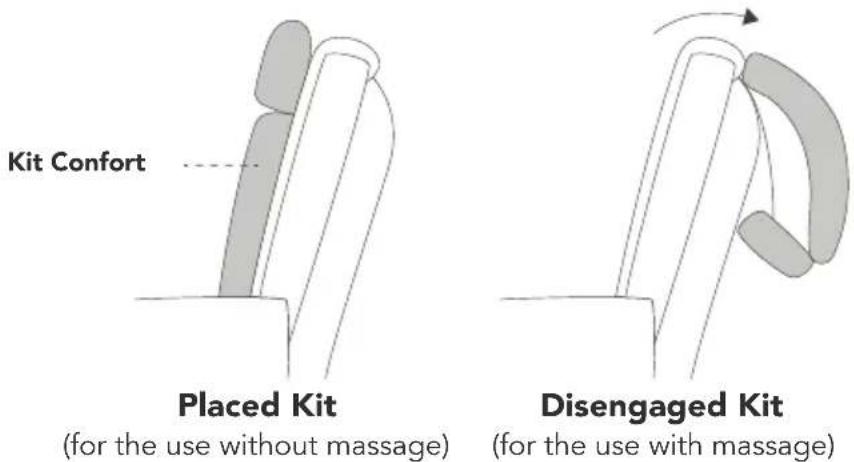
(for the use without massage)
(for the use with massage)
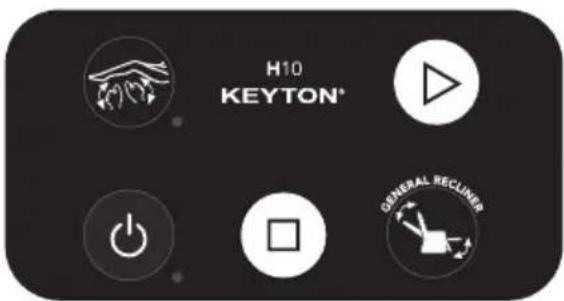
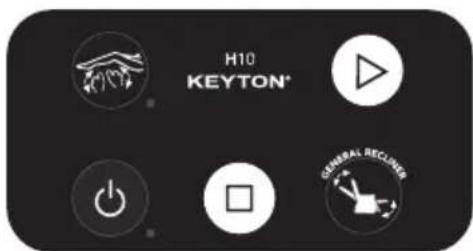
MAIN CONTROL PANEL
Stop the massage and the recliners (3)
General reclining both manual and automatic
Reclining movement and 15 - minute automatic programme (2)
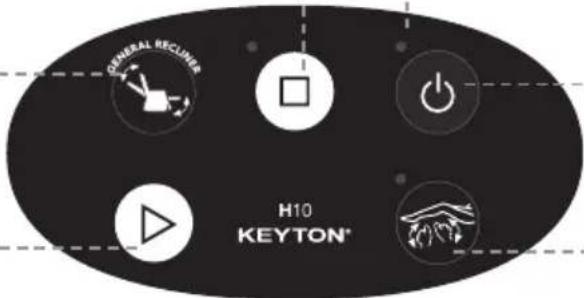
The led light blinks when it receives information from the remote control.
ON/OFF (1)
3-D two-directional leg multi-massage (4)
Operating the chair
ON/OFF (1)
This switch turns the chair on and off. If the chair is on, when you press this switch, the automatic switch-off function will raise the backrest and lower the footrest, stop all the massage systems and finally turn the chair off. This process can be interrupted at any time by pressing the STOP button on the control panel.

Reclining movement and 15 - minute automatic programme (2)
Press this key to automatically initiate the massage chair programme.
Stop the massage and the recliners (3)
Press this key to stop all massage functions and to bring the mechanism to the resting position. This button also allows you to stop the backrest and footrest recline system, and to stop the massage system as part of the switch-off process of the ON/OFF button on the main control panel or the remote control.
3-D two-directional leg multi-massage (4)
This 3-Dimensional system works on all calf muscles. Symmetrical movements and automatic speed adjustment quickly achieve deep relaxation in the muscle area. By pressing again this button the movement direction of the massage robot changes to give an asymmetric calf massage.
REMOTE CONTROL
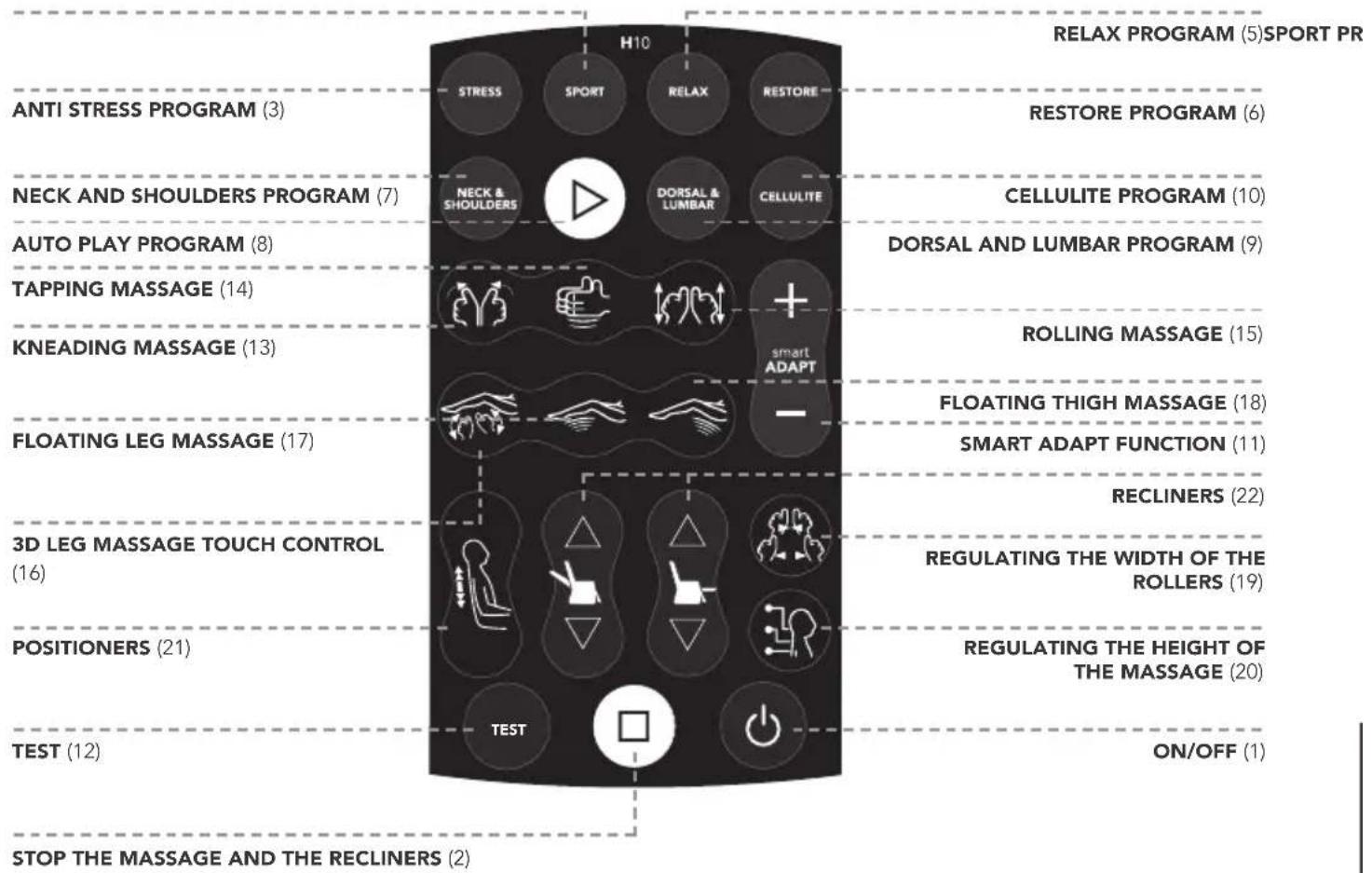
bar
| Program | Count | | :--- | :--- | | RELAX PROGRAM (5) | 5 | | SPORT PR | 6 | | RESTORE PROGRAM | 10 | | CELLULITE PROGRAM | 9 | | DORSAL AND LUMBAR PROGRAM | 15 | | ROLLING MASSAGE | 18 | | FLOATING THIGH MASSAGE | 22 | | SMART ADAPT FUNCTION | 22 | | RECLINERS | 19 | | REGULATING THE WIDTH OF THE ROLLERS | 20 | | REGULATING THE HEIGHT OF THE MASSAGE | 1 | | ON/OFF | 1 | | TEST | 12 | | TEST | 12 | | POSITIONERS | 21 | | POSITIONERS TOUCH CONTROL | 16 | | 3D LEG MASSAGE TOUCH CONTROL | 16 | | FLOATING LEG MASSAGE | 17 | | KNEADING MASSAGE | 13 | | TAPPING MASSAGE | 14 | | AUTO PLAY PROGRAM | 8 | | NECK AND SHOULDERS PROGRAM | 7 | | STRESS | 3 | STOP THE MASSAGE AND THE RECLINERS | 2 |Operating the chair
Activating a new remote control
Before using a new remote control or a different one:
A Unplug the chair for 2 minutes.
B Plug the chair and press ON/OFF on the main control panel of the chair.
C Once the led of the key ON/OFF of the main control panel is on, press the key ON/OFF of the remote control. On the screen you will see a drawing of a person as long as there is a connection between the remote control and the chair.
If there are two or more chairs with remote control, you must never perform simultaneously the process of ACTIVATING A NEW REMOTE CONTROL. You must finish the process with one chair and then start with the next one.
On and off functions of the remote control
Press the key ON/OFF of the remote control to turn it on or off.
If the main control panel is not turned off, the remote control will switch off 15 minutes after the last time you pressed a key.
If the remote control does not work
Check the state of the batteries. ATTENTION: USE ONLY ALKALINE BATTERIES (SIZE "AAA"/LR03).
The remote control has been designed to work within the armrest area. You should not use it out of this area.

ON/OFF (1)
This switch turns the chair on and off. If the chair is on, when you press this switch, the automatic switch-off function will raise the backrest and lower the footrest, stop all the massage systems and finally turn the chair off. This process can be interrupted at any time by pressing the STOP (3) button on the control panel.
Stop the massage and the recliners (2)
Press this key to stop all massage functions and to bring the mechanism to the resting position.
Low batteries
If this led blinks, change the batteries in the rear part of the remote control.
Back massage programmes
Anti Stress program with function "Smart Adapt" (3)
With this program, we get a massage which exerts increasing pressure and covers all points of the back and legs, in order to slow the effects of daily stress. Combines the massages of the back and legs.
To restore or to ensure that the massage program matches with the factory settings, hold down the button for 2 seconds. The chair gives an acoustic signal when the settings have been reset.

Sport program with function "Smart Adapt" (4)
It is the ideal program for those who are accustomed to receive massage sessions. It uses a high intensity of massage pressure, perfect for those who usually do sport or who have a strong muscle building. On preventive level, especially the use before sport is recommended because it delays fatigue in the back muscles and after exercise because it reduces the muscle tension at least 42%. In addition it also facilitates the relaxation and muscle recovery. Combines the massages of the back and legs.
To restore or to ensure that the massage program matches with the factory settings, hold down the button for 2 seconds. The chair gives an acoustic signal when the settings have been reset.
Relax program with function "Smart Adapt" (5)
This program is ideal in preparation for the night's rest. It stimulates the necessary points to remove the feeling of fatigue and to achieve complete relaxation. The use before the night's rest, makes a restful sleep and helps you to feel better the next day. Combines the massages of the back and legs.
To restore or to ensure that the massage program matches with the factory settings, hold down the button for 2 seconds. The chair gives an acoustic signal when the settings have been reset.
Restore program with function "Smart Adapt" (6)
This program achieves to relax, renew and revitalize. It stimulates the necessary points to remove the feeling of fatigue and to achieve complete relaxation. Combines the massages of the back and legs.
To restore or to ensure that the massage program matches with the factory settings, hold down the button for 2 seconds. The chair gives an acoustic signal when the settings have been reset.

Neck and shoulders program with function "Smart Adapt" (7)
This program is focused on the area of the neck and shoulders to reduce muscle strain and remove the accumulated tensions in this area. The program focuses on the back, so it is not combined with the leg massage.
To restore or to ensure that the massage program matches with the factory settings, hold down the button for 2 seconds. The chair gives an acoustic signal when the settings have been reset.
Auto play program with function "Smart Adapt" (8)
For added convenience it stores the back massage or software recently used. Thus in the following sessions, just press the Play function, reproducing your favorite massage.
To restore or to ensure that the massage program matches with the factory settings, hold down the button for 2 seconds. The chair gives an acoustic signal when the settings have been reset.

Dorsal and lumbar program with function "Smart Adapt" (9)
This program is specially designed for deep relaxation of the lower back area. It is especially recommended for people who spend long hours sitting.
To restore or to ensure that the massage program matches with the factory settings, hold down the button for 2 seconds. The chair gives an acoustic signal when the settings have been reset.

Cellulite program with function "Smart Adapt" (10)
Designed to improve blood circulation in the thighs and calves. The result is a feeling of lightness in the legs, which helps to reduce the circulatory disorders of the lower limbs, facilitating rest. For added convenience, the chair puts the backrest upright and the footrest slightly horizontal at election of this program.
To restore or to ensure that the massage program matches with the factory settings, hold down the button for 2 seconds. The chair gives an acoustic signal when the settings have been reset.
Function Smart Adapt (11)
If during any massage program a sequence exists, which does not meet the level of intensity of your expectations, you can increase or decrease by the adjustment keys (+ and -) intensity of use. The program will adapt the massage intensity to all who are active in
this sequence, memorizing the changes for future sessions. Thus each massage program has the ability to adapt to the preferences of an infinite number of users for subsequent sessions.
Increases the intensity (+)
Reduces the intensity (-)
This function adjusts simultaneously the intensity of the kneading and tapping massages. You can increase or decrease the intensity by clicking on the buttons (+ or-). The changes in kneading and tapping functions are not stored.
Back massages

Test (12)
Pressing the first time the Test function, the massage heads S-curve become touch sensors, performing a scan on the back. It can store up to a total of 128 points in the maximum size of massages. Subsequently the intensity is applied on the basis of the information stored in each point. At the end of the test, you can choose and realize massages and / or individual massage programs (except for the rolling massage).
If the test-scanning finished and the user does not choose any massage function or massage programs, a custom program called "Complete" will start automatically. On the whole this program works with medium intensity, the intensities are merely rescheduled depending on the result obtained in the test data. NOTE: If the height is reduced through the system for regulating the height of massage (20), also the number of points is reduced.
Information on the screen
BLINKING SCAN: gathering information.
FIXED SCAN: information gathered.
FIXED SCAN WITH BLINKING CIRCLES: using the collected data.
IMPORTANT
If you press any key before the end of the analysis of the back, the chair will NOT collect the data for the customised massage. If you want the system to gather the necessary information, you have to press the Scan key again.
Kneading massage (13)
With the Kneading massage, the back massage heads accurately are simulating the hands of a professional masseuse and are activating blood circulation. Repeatedly pressing this key, accesses various intensities.

Tapping massage (14)
With the Tapping massage, your back will receive a stimulating treatment thanks to the action of the movements generated by massage heads. Repeatedly pressing this key, accesses various intensities.
Rolling massage (15)
This technique is the essence of Shiatsu, and is excellent preparation for a massage session. Personalise the massage with the height and width selectors and the massage heads will move over the muscles of your back creating an excellent relaxing effect.
NOTE: Kneading and Tapping Massages are independent of each other. The first time you select the massage begins at medium intensity, pressing again switches to high intensity, then to sensitive intensity, to low intensity, medium, and so on. If you activate both functions simultaneously you can get a combination of these massages. This combination maximizes relaxation results by Kneading massage and activates blood circulation more, produced by a effect of Tapping massage.
It is also possible to adjust simultaneously the intensity of the kneading and tapping massages, by pressing the (+ and -) button of the Smart Adapt function.
Leg massages

3D Leg Massage Touch Control (16)
Performs massage movements with random variations, controlled by an internal microcomputer. The first time you select the massage begins at medium intensity, p again switches to high intensity, then to sensitive intensity, to low intensity, medium, and so on.
FAVOURITE FUNCTION: If you want to get a certain massage movement permanently and maintaining during a session, simply hold down the button for two seconds. If you press the button again, the massage with random variations resets, controlled by the internal microcomputer reset.

Floating leg massage (17)
Massage System Floating which acts on the legs. If you press this button repeatedly, different intensities access.

Floating thigh massage (18)
Floating massage system which acts on the thighs. If you press this button repeatedly, different intensities access.
DURATION OF THE MASSAGE
The massage and massage programs have an automatic duration of 15 minutes (approximately). For a shorter running time, press the STOP button at any time. After the massage session, you can start any session again.
Adjustments
Regulating the width of the rollers (19)
Applicable to Tapping and Rolling massages. Press repeatedly this key to adjust the width of the massage rolls.
Regulating the height of the massage (20)
Press this key repeatedly to vertically adjust the massage to your own height
NOTE: With Kneading massage programme, the system will perform a horizontal massage in all points shown in figure 1.
Positioners / local massage
Massage Up (21)
Press this key to locate the massage on an upper area. Release this key and the vertical massage movement will locate on the desired point. Every two minutes a massage is performed on the whole back. You can initiate the localized massage with a short press (less than one second). In order to activate again the complete vertical movement, press any massage key.
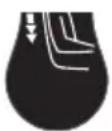
Massage Down (21)
Press this key to locate the massage on a lower area. Release this key and the vertical
massage movement will locate on the desired point. Every two minutes a massage is performed on the whole back. You can initiate the localized massage with a short press (less than one second). In order to activate again the complete vertical movement, press any massage key.
NOTE: You should activate any manual massage (Tapping, Rolling or Kneading), otherwise the localized Rolling massage will start by default.
Recliners
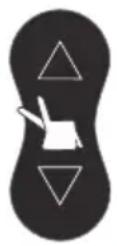
Back Recliner. Manual control. (22)
To operate the back recliner independently, keep these keys pressed until the recliner has reached the desired position. Once the key is released, the recliner will automatically stop.
General Recliner. Automatic control. (22)
To recline the back and the footrest simultaneously press these keys for a short time (less than one second). Once pressed, the chair will recline to its maximum. To stop the reclining movement at any specific position, press any of these keys again.
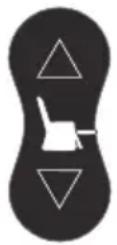
Footrest Recliner. Manual control. (22)
For the independent operation of the decline of the footrest, hold one of these keys until the footrest is brought into the desired position. When you stop pressing the button, the recliner stops automatically.
Footrest Recliner. Automatic control. (22)
To recline the footrest independently, press one of these keys for a short time (less than one second). Once pressed, the footrest will recline to its maximum. To stop the reclining movement at any specific position, press any of these keys again.
IMPORTANT
When you run any of the recliners, the massages and massage programs are stopped for safety reasons for a moment, to continue thereafter.
deutsch
natural_image
Pure diagram of two vertical cylindrical objects with rounded ends, no text or symbols present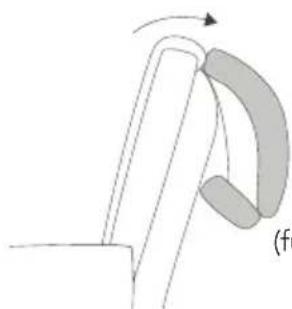
natural_image
Diagram of a mechanical component with curved and straight sections, no visible text or symbolsAbgelegtes Kit
Multi-beenmassage 3-D Bidirectioneel (4)
Werking