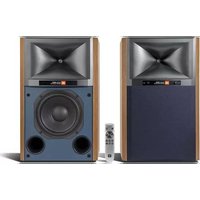
4329P - Loudspeaker JBL - Free user manual and instructions
Find the device manual for free 4329P JBL in PDF.



| Product Type | Active studio monitor with built-in amplification, DSP, and wireless connectivity |
| Model | JBL 4329P |
| Dimensions (H x W x D) with grille | 515.5 x 320 x 322.4 mm |
| Net weight per speaker | Primary: 15.7 kg / Secondary: 15.6 kg |
| Amplifier power | Class D, 600 W RMS total (300 W per speaker: 250 W for woofer + 50 W for tweeter) |
| Maximum audio resolution | Up to 24 bits / 192 kHz (wired link between speakers); 24 bits / 96 kHz (wireless link) |
| Frequency response | 28 Hz - 25 kHz (-6 dB) |
| Drivers | 200 mm (8") black paper cone woofer, 25 mm (1") compression tweeter with Teonex® diaphragm |
| Audio inputs | Analog: XLR/¼" balanced, 3.5 mm stereo; Digital: USB-B, Toslink/optical; Streaming: Wi-Fi, Bluetooth 5.3 |
| Subwoofer output | Yes, with automatic 80 Hz high-pass filter |
| Network connectivity | Wi-Fi 802.11 a/b/g/n/ac (2.4 and 5 GHz), Ethernet, Google Chromecast, Apple AirPlay 2, Bluetooth |
| Supported sampling rates | 32 kHz to 192 kHz (2-channel PCM) |
| Supported audio formats | AAC, AIFF, ALAC, DSD64 (converted to PCM), FLAC, MP3, MP4, MQA, OGG, WAV, WMA |
| Network standby power consumption | < 2.0 W |
| Remote control | Bluetooth BTLE, range up to 12 m |
| Finish | Satin walnut veneer or black; acoustically transparent fabric grille (dark blue or black) |
| Power supply | 100-240 V AC, 50/60 Hz (universal) |
| Operating temperature | Max. 45 °C |
| Package contents | 2 speakers (primary and secondary), Bluetooth remote, 3 m CAT5e cable, 2 regional power cords |
| Care and cleaning | Use a dry, soft cloth. Do not use abrasive products or liquids. Unplug before cleaning. |
| Safety instructions | Do not expose to water, moisture, or extreme temperatures. Use only the provided power supply. Recycle according to local regulations. |
| Repairability / Spare parts | Contains no user-serviceable parts. Contact authorized service for repairs. |
| Warranty | Refer to the warranty terms provided with the product or the manufacturer's website. |
Frequently Asked Questions - 4329P JBL
User questions about 4329P JBL
0 question about this device. Answer the ones you know or ask your own.
Ask a new question about this device
Download the instructions for your Loudspeaker in PDF format for free! Find your manual 4329P - JBL and take your electronic device back in hand. On this page are published all the documents necessary for the use of your device. 4329P by JBL.
USER MANUAL 4329P JBL
Thank you for choosing JBL
For more than 75 years, JBL has been providing audio equipment for concert halls, recording studios, and movie theaters around the world and has become the trusted choice of leading recording artists and sound engineers. The 4329P system is a new powered bookshelf/monitor joining the JBL Studio Monitor family designed for home use. To get the best performance from your new system, please read these instructions thoroughly.
1. Verify Box Contents
• 1x 4329P Powered Studio Monitor (Primary)
• 1x 4329P Powered Studio Monitor (Secondary)
- 1x Bluetooth Remote
• 1x 10' (3m) CAT5e Cable
• 2x Region Specific Power Cords
2. Front Panel Overview
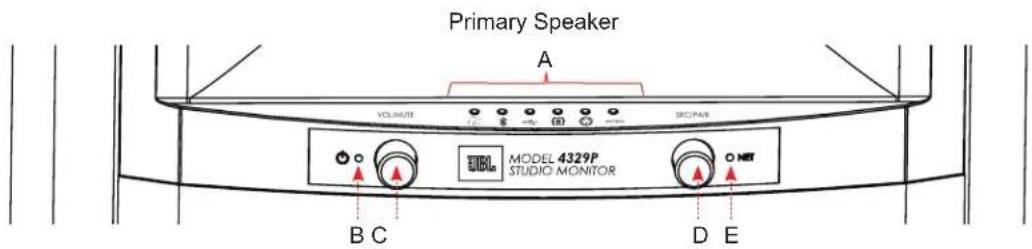
| A | Source LED Indicators & Source Icons(Left to Right: Streaming, Bluetooth, USB Audio, Toslink/Optical, Balanced, Analog) | D | Source Select + Bluetooth Pairing(Rotary Encoder + Push Switch) |
| B Power Indicator E NET Status LED | |||
| C | Volume Control / Mute(Rotary encoder + Push Switch) | ||
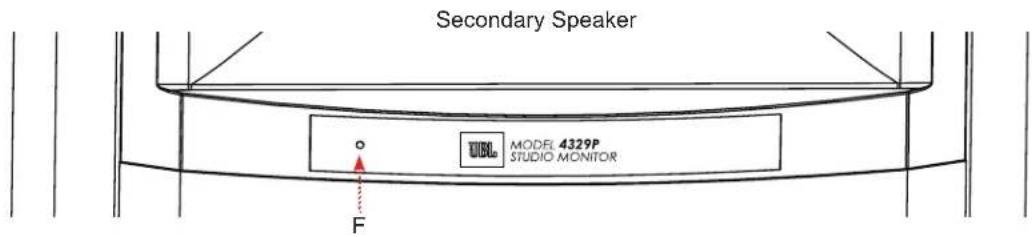
| F Power and Status LED |
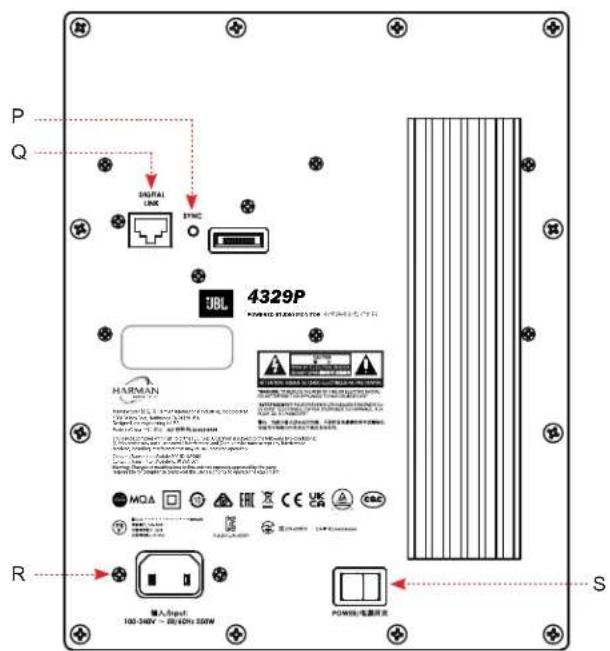
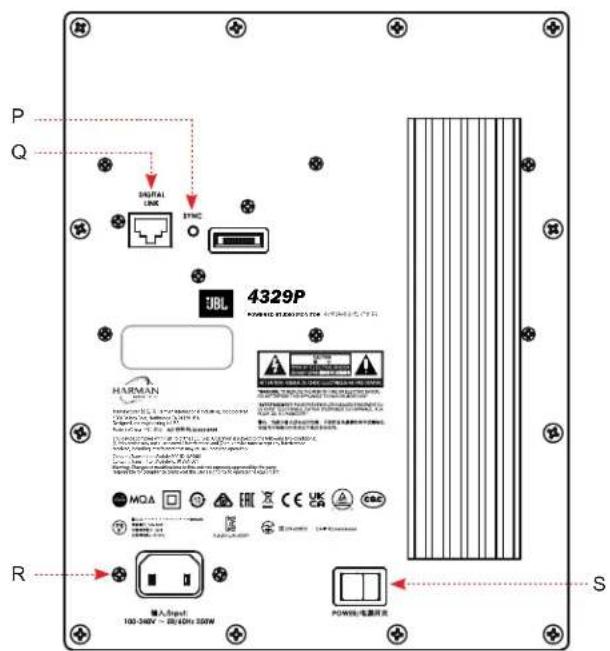
3. Back Panel Overview
Primary Secondary

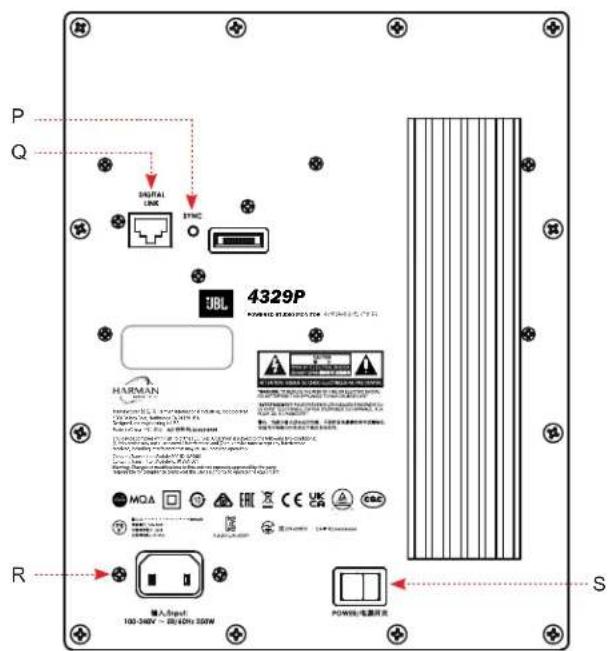
| A | XLR / 1⁄4" Balanced Input Sensitivity Selection – Select either; -10dB (High sensitivity mode) or +4dB (Low sensitivity / protects input front-end from overload) | K | Bass Contour switch:For boundary compensation adjustment – 0dB or -3dB selectable |
| B Left & Right XLR / 1⁄4" Balanced Inputs L | Sub-Woofer Output: When utilized, an 80Hz high-pass filter is activated for system | ||
| C | Ethernet: Connect to available port on router for wired streaming | M | Primary Speaker Digital Link: To create wired connection between Primary and Secondary speaker via CAT5e or higher cable (Max length 20' / 6m) |
| D | USB-A + Service button: For service / firmware updates ONLY (Not for Audio or USB Charging) | N | L/R Assign Selector: Select L or R depending on the intended listening position for the Primary speaker |
| E | Reset: Factory Reset – press and hold until lights on the front panel begin to flash | O Primary Speaker Main Power switch: I = On / O = Off | |
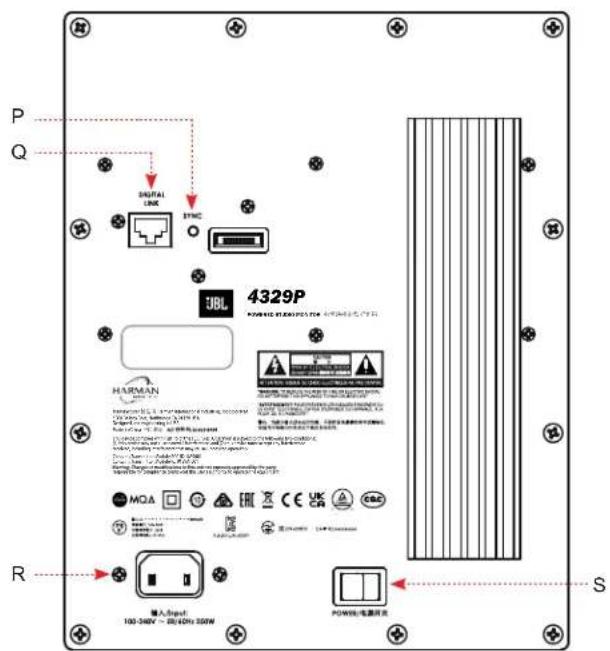
| F | Primary Speaker Sync Button: Use to connect wirelessly to Secondary speaker | P | Secondary Speaker Sync Button: Use to connect wirelessly to Primary speaker |
| G | Primary Speaker IEC Power connection – a universal power supply is incorporated allowing these to be used domestically and internationally. | Q | Secondary Speaker Digital Link: To create wired connection between Primary and Secondary speaker via CAT5e or higher cable (Max length 6m) |
| H 3.5mm analog stereo input R | Secondary Speaker IEC Power connection - a universal power supply is incorporated allowing these to be used domestically and internationally. | ||
| I Toslink / Optical digital input S Secondary Speaker Main Power switch: I = On / O = Off | |||
| J USB-B Digital Direct PCM input | |||
4. General Placement / Set-up
Room Placement
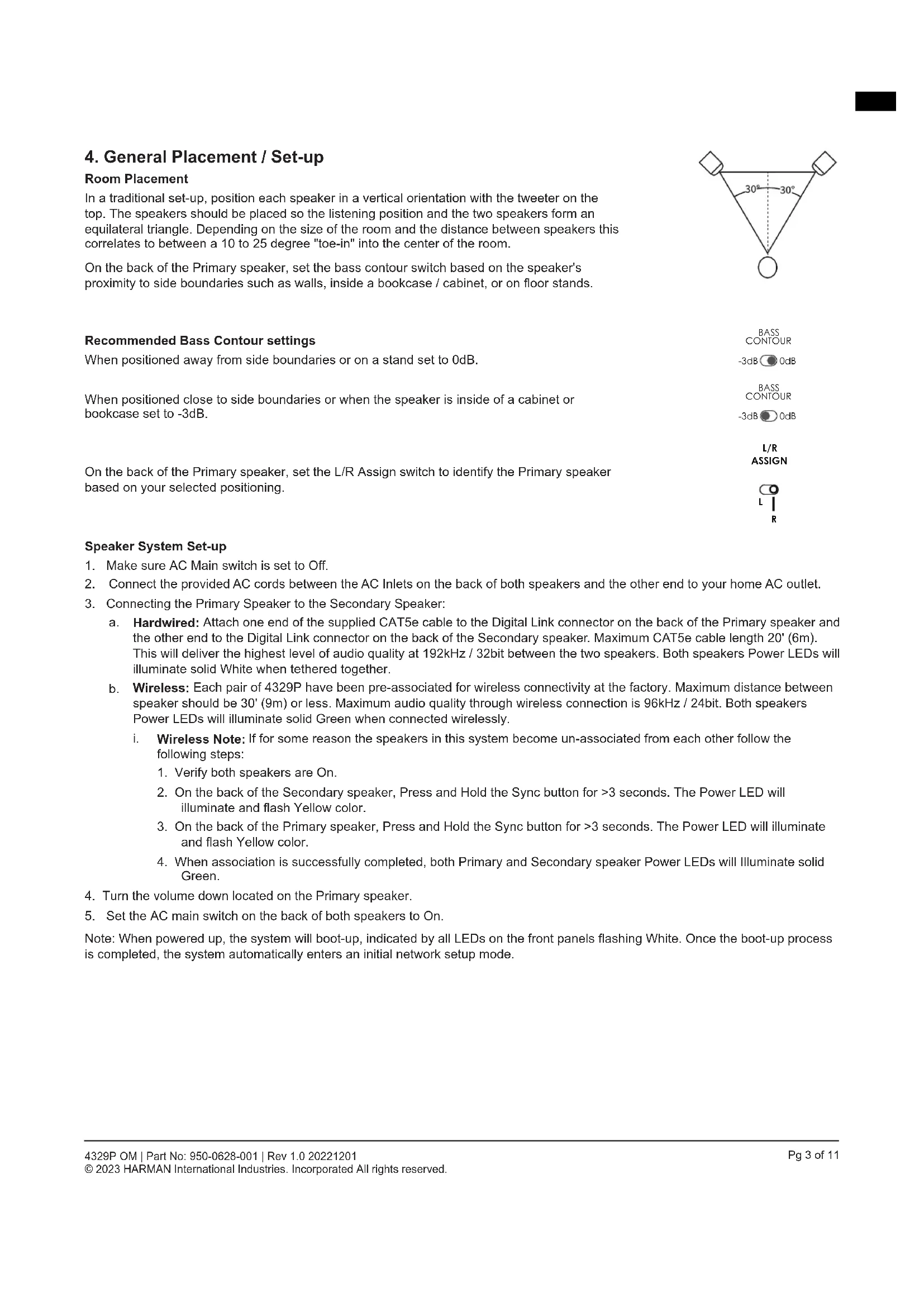
In a traditional set-up, position each speaker in a vertical orientation with the tweeter on the top. The speakers should be placed so the listening position and the two speakers form an equilateral triangle. Depending on the size of the room and the distance between speakers this correlates to between a 10 to 25 degree "toe-in" into the center of the room.
On the back of the Primary speaker, set the bass contour switch based on the speaker's proximity to side boundaries such as walls, inside a bookcase / cabinet, or on floor stands.

Recommended Bass Contour settings
When positioned away from side boundaries or on a stand set to 0dB.
When positioned close to side boundaries or when the speaker is inside of a cabinet or bookcase set to -3dB.
On the back of the Primary speaker, set the L/R Assign switch to identify the Primary speaker based on your selected positioning.


Speaker System Set-up
- Make sure AC Main switch is set to Off.
- Connect the provided AC cords between the AC Inlets on the back of both speakers and the other end to your home AC outlet.
- Connecting the Primary Speaker to the Secondary Speaker:
a. Hardwired: Attach one end of the supplied CAT5e cable to the Digital Link connector on the back of the Primary speaker and the other end to the Digital Link connector on the back of the Secondary speaker. Maximum CAT5e cable length 20' (6m). This will deliver the highest level of audio quality at 192kHz / 32bit between the two speakers. Both speakers Power LEDs will illuminate solid White when tethered together.
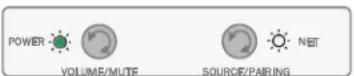
b. Wireless: Each pair of 4329P have been pre-associated for wireless connectivity at the factory. Maximum distance between speaker should be 30' (9m) or less. Maximum audio quality through wireless connection is 96kHz / 24bit. Both speakers Power LEDs will illuminate solid Green when connected wirelessly.
i. Wireless Note: If for some reason the speakers in this system become un-associated from each other follow the following steps:
- Verify both speakers are On.
- On the back of the Secondary speaker, Press and Hold the Sync button for >3 seconds. The Power LED will illuminate and flash Yellow color.
- On the back of the Primary speaker, Press and Hold the Sync button for >3 seconds. The Power LED will illuminate and flash Yellow color.
-
When association is successfully completed, both Primary and Secondary speaker Power LEDs will Illuminate solid Green.
-
Turn the volume down located on the Primary speaker.
-
Set the AC main switch on the back of both speakers to On.
Note: When powered up, the system will boot-up, indicated by all LEDs on the front panels flashing White. Once the boot-up process is completed, the system automatically enters an initial network setup mode.
5. Connecting to a Network
For a Wired Connection
Connect the Ethernet port on the rear panel of the Primary speaker to the port on your router using a CAT5e or higher cable. If wired network connection is detected, the Streaming LED will turn solid Amber color for a few seconds and the Net LED turns solid White color.
Once the connection is established, the Streaming LED and Net LED will both illumininate solid White.
For a Wireless Connection
After the initial boot-up process and with no wired ethernet connection to the speaker, the Streaming LED will turn solid Red color and the Net LED will flash White color until connected to Google Home or AirPlay.
Connecting to Google Home
- On your mobile device, download and open the Google Home App.
- Follow Google Home instructions to add devices.
- Follow the prompts for adding devices.
- Once added, your 4329P system is ready for use.
NOTE: We recommend giving the speaker a common name so that it can be easily found for streaming later. If a name other than JBL4329P is selected during this step, write it down as it will be what is used to connect to the unit when streaming or using Bluetooth.
Connecting Wirelessly via AirPlay
- Select the wireless network settings on your iOS device.
- Go to Wi-Fi settings on your mobile device and navigate to "Setup New Airplay Speaker".
- Select the speaker called "4329P-XXXXXX (XXXXXX corresponds to a MAC address)".
- Select the network you want the 4329P to connect and press "Next".
- Follow the on-screen instructions to complete the 4329P setup as an AirPlay speaker system.

Disabling & Enabling Network / Bluetooth Connectivity
Network / Bluetooth functionality can be turned Off should it be required.
Disabling Network / BT Connectivity - On the front of the Primary Speaker, Press and Hold the Volume and Source buttons on the front panel for >3 seconds. The NET LED will turn RED.
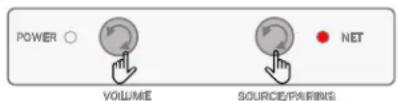
Enabling Network / BT Connectivity - Press and Hold the Volume and Source buttons on front panel for >3 seconds. The NET LED will turn WHITE.
Note: When Network / Bluetooth is Off the following conditions exist:
- Speaker cannot be used for Network or Bluetooth streaming when in or out of standby.
- Remote control is inactive in operation and during standby.
- When waking up from Standby mode in NET Off mode, allow @ 1 minute to restore functionality.
6. Audio Source Connections
Streaming Media Sources
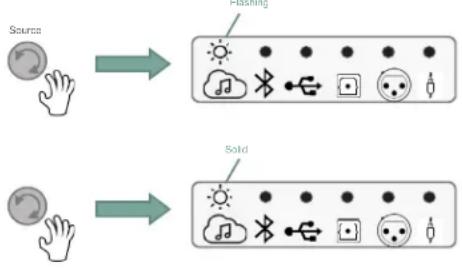
To select Streaming as a source, rotate source control on Primary speaker or from remote control and the Streaming icon will illuminate White.
Flashing White indicates connected to a network not playing or it is in pause.
Solid White indicates connected to a network and playing.
flowchart
graph TD
    A["Source"] --> B["Flashing"]
    C["Source"] --> D["Sold"]
    B --> E["Weather Icon: Sun, Bluetooth, Potato Icon: 🍾"]
    D --> F["Sound Icon: Wind, Bluetooth, Potato Icon: 🍾"]
Chromecast
- Launch the streaming service app you wish to listen to on phone or tablet
- Press the Cast icon in that app (usually in upper right-hand corner of content app)
- Select the 4329P (Or name that you chose for the system)
- Start your streaming content

Apple Airplay
- To listen to audio via AirPlay on the system, ensure your Apple device is connected to the same network as the speaker system and select the Speaker as the AirPlay audio playback device.
- Select your streaming content and start playing

Spotify Note
Your phone or tablet may be used as a remote control. Visit spotify.com/connect to for details.
Bluetooth Source
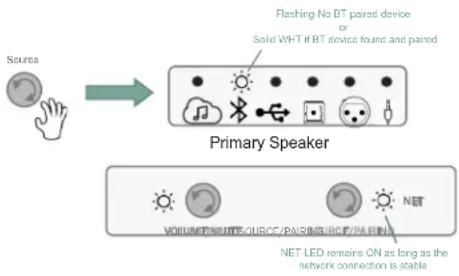
To select Bluetooth as a source, rotate the Source control until the Bluetooth icon is illuminated in White.
- If the device has not been paired before, the Bluetooth icon will flash White.
- If previously paired, system will connect, and Bluetooth icon will illuminate solid White.
flowchart
graph TD
    A["Source"] --> B["Primary Speaker"]
    B --> C["Flashing No DT paired device or Solid WHT if RT device found and paired"]
    B --> D["VOLUME/WUNT/SUB/PAIRING/SUB/PAIRING"]
    B --> E["NET LED remains ON as long as the network connection is stable"]
Pairing / Connecting a Bluetooth Device
With Bluetooth source selected,
- Press and Hold the Source control for >3 seconds.
- Bluetooth LED will start flashing – Speaker system will emit a sound prompt twice.
- Select 4329P under your device's Bluetooth settings, starting the pairing process.
- When connected, the Bluetooth icon will illuminate solid White color and speakers will emit sound prompt.
- Start your device content and streaming will begin.
USB-Audio Digital Direct
- Connect a USB-B cable to the Primary speaker's USB-B Audio Input and the USB-A end of the cable to your source device.
- Rotate the Source control to the USB Audio input, the USB Audio LED will illuminate solid White.
- Select "4329P" speaker from your source's device settings Sound options.
- Start your content.

Toslink / Optical Digital-in
- Connect optical cable between source component and the Toslink / Optical Input on the back of the Primary Speaker.
- Rotate the Source control to the Optical Audio input, the Optical Audio LED will illuminate solid White.
- Start your content.

flowchart
graph TD
    A["Source"] --> B["Primary Speaker"]
    B --> C["VOLUME/Multipurpose/Pair/bridge/Pairing"]
    B --> D["NET LED remains On using the network connection is stable"]
Balanced XLR / 1/4" Connection
- Connect Balanced Left & Right XLR or 14 " cables between source component and the Balanced Left & Right Inputs on the back of the Primary Speaker.
- Rotate the Source control to the Balanced Audio input, the Balanced Audio LED will illuminate solid White.
- Start your content.

flowchart
graph TD
    A["Source"] --> B["Primary Speaker"]
    B --> C["Weather Icon: Cloud, Bluetooth, Solar, Snow"]
    B --> D["Light Bulb icon: Wind Turbine"]
    B --> E["Light Bulb icon: Radio"]
    B --> F["Light Bulb icon: LED"]
    B --> G["Light Bulb icon: Net"]
    B --> H["Net LED status: ON or as long as the network connection is static"]
NOTE: Select appropriate Sensitivity level in support of content / source input – (-10dB / High sensitivity mode or +4dB / Low sensitivity mode).
Analog Auxiliary (3.5mm Aux-in) Connection
- Connect analog Stereo cable between source component and the analog 3.5mm Stereo Auxiliary Input on the back of the Primary Speaker.
- Rotate the Source control to the Auxiliary input, the Auxiliary Audio LED will illuminate solid White.
- Start your content.

flowchart
graph TD
    A["Source"] --> B["Primary Speaker"]
    B --> C["WOLOW/MUTSOURCE/PABING/CPAPING"]
    B --> D["NET LED remains ON as long as the network connection is stable"]
7. System Control
Volume Up / Down / Mute
The volume control on the Primary speaker will raise or lower the volume level for both speakers simultaneously.
- From the default volume level, turning the Volume control Clockwise will increase the volume in 1dB increments.
• LEDs will flash White when maximum volume has been reached. - Turning the Volume control Counter-Clockwise will decrease the volume in 1dB increments.

- Press the Volume Control to initiate Mute function. Selected Source LED will illuminate and flash Red while Mute function initiated. (Optical input is being exemplified in the graphic to the right)
- Press the Volume Control again will un-Mute, restoring volume to last setting.
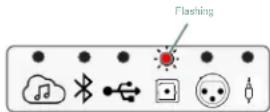
Primary Speaker
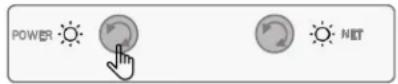
VOLUME/MUTE
SOURCE/FAIRING
Stand-by Mode
The 4329P system will enter low power standby mode automatically when no signal activity is detected at the active / selected source for >10 minutes.
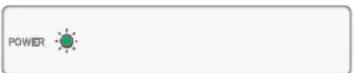
While the system is in stand-by, the Power LED on both the Primary speaker and Secondary speaker will illuminate solid Red color.
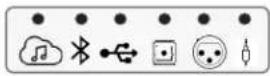
Primary Speaker
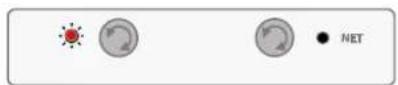
VOLUME SOURCE/PAIRING SOURCE/PAIRING
Waking the system from Stand-by mode and restoring it to normal operation can be achieved by:
• A short press of any button on the Primary speaker.
- An Audio signal is detected through the last source selected (except USB or Optical), this includes Streaming and Bluetooth Streaming as long as Network is On
Remote Control
Included with the 4329P system is a Bluetooth hand-held remote control allowing for easy control of the primary operations of the system from up to 40' (12m).
- Power
- Mute
- Transport Skip back
- Transport Pause/Play
- Transport Skip forward
• Volume Up
• Volume Dn - Streaming
- BT Source
- USB Audion
- Digital (Optical in)
• Balanced input - Aux-in (3.5mm)
• LED (Feedback purposes) located adjacent to Power On/Off button

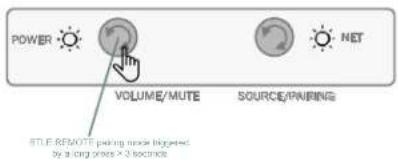
Pairing the Bluetooth Remote
- On the 4329P Primary speaker, Press and hold the Volume/Mute button for >3 seconds.
- On the Remote control, Press the Streaming & Play/Pause/OK button simultaneously.

8. Other Modes
Protection Mode
The 4329P system is provided with different levels of protection, in the rare event that the system detects and internal malfunction, it will be represented by the selected Source icon to illuminate solid Red color. The system will remain in that state for as long as the protection event is present.
(The example to the right, an issue has resulted while the Optical input was selected.)
Software Upgrades
- Software upgrades are automatic, as long as the system is connected to an active network.
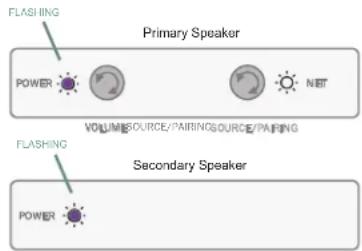
- If a valid update is available, the unit will automatically start the update process which will be indicated by the Power LEDs to illuminate and flash Purple in color.
- When completed, the Power LEDs will return to previous status and normal operation will resume.
Speaker Detection
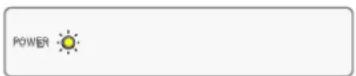
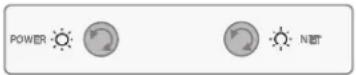
When powered, if the 4329P system does not detect wireless or wired connectivity between the Primary and Secondary speakers, Both Power LEDs will illuminate solid Yellow color.
Check your connections as outline in the Speaker System Set-up in Section 4.
(The example to the right shows no associated speaker detected and primary speaker connected to a network.)
Tethered High Resolution Audio Mode - 192kHz / 24bit Connection
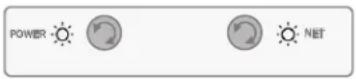
When a wired / tether connection via the Digital Link / Cat5e cable is detected between the Primary and Secondary speaker, Both Power LEDs will illuminate in solid White color.
Wireless Audio Mode - 96kHz / 24bit Connection
When the Primary and Secondary speaker are connected wirelessly, Both Power LEDs will illuminate in solid Green color.

Primary Speaker
VOLUME/WOLIPE/TEUME
SOURCE/PAIRING
Primary Speaker

VOLUMESOURCE/PAIRINGSOURCE/PAIRING
Secondary Speaker
Primary Speaker
VOLUMESOURCE/PAIRINGSOURCE/PAIRING
Secondary Speaker

Secondary Speaker
MQA Content
The 4329P system supports MQA (Master Quality Authenticated) technology, as such has the ability to playback MQA audio streams.
When Streaming source has been selected and an MQA file has been detected in playback, the Streaming source LED will indicate the type of MQA file being played back by the following color changes:
- Streaming Source LED illuminated in solid Green = Genuine MQA file
• Streaming Source LED illuminated in solid Blue = MQA Studio - Streaming Source LED illuminated in solid Magenta = MQB and is only rendering.

MQA
- Specifications
| Type: | Bass-reflex Loudspeaker System with Built-in Amplification, DSP, and Wireless Connectivity |
| Low Frequency Drivers: | JW200P-4, 8-inch (200mm) Pure-pulp Black Paper Cone Woofers with Cast-frames |
| High Frequency Drivers: | 2409H, 1-inch (25mm) Annular Ring, Teonex® Diaphragm Compression Drivers with Advanced HDITM Geometry Horns |
| Amplifier Power: | 600W Class D System Power300W RMS per Speaker(50W per HF Compression Driver + 250W per LF Woofer) |
| Audio Resolution: | Up to 24-bit, 192 kHz (Digital Link connection between spks)Up to 24-bit, 96 kHz (Wireless connection between spks) |
| Frequency Response: | 28 Hz - 25 kHz (-6 dB) |
| Crossover Frequency | 1,675 Hz |
| Dispersion | 90° Horizontal x 60° Vertical (2kHz to 15kHz) |
| Sound Controls: | Front Panel: Volume +/- and Source SelectionBluetooth RemoteBoundary Compensation (Flat / -3dB) |
| Wireless Inputs: | WiFi streaming, Bluetooth 5.3 |
| Wired Inputs: | Analog: XLR/1⁄4" Combo and 3.5mm stereoDigital: Asynchronous USB-B and Toslink/Optical |
| Supported Digital Audio Sample Rates (PCM 2CH) | Streaming & Local Media:32kHz/44.1kHz/48kHz/88.2kHz/96kHz/176.4kHz/192kHzSPDIF: Up to 192kHzUSB-B: PCM 2-channel, up to 192kHzBluetooth: Up to 48kHz, aptX Adaptive up to 96kHz |
| Music Formats Supported (Local Media) | AAC / AIFF / ALAC / DSD64 (to PCM) / FLAC / MP3 / MP4 / MQA / OGG / WAV / WMA |
| Subwoofer Output: | Autosensing w/ Auto-engage of 80Hz High Pass Filter |
| Remote Control Type: | BTLE Wireless |
| Bluetooth Audio | Version 5.3Profiles:SPP (Serial Port Profile)A2DP (Advanced Audio Distribution Profile)AVRCP (Audio/Vido Remote Control Profile) |
| Enclosure: | Bass-reflex Design with Dual Front-facing Ports3⁄4" MDF Finished in Satin Walnut or Black Walnut Furniture-Grade Wood Veneer |
| Grille: | Dark Blue (with Walnut Cabinet) or Black (with Black Cabinet) Acoustically Transparent Cloth Grille |
| Net Speaker Dimensions with grille: | 20.3" H x12.6" W x 12.7" D (515.5mm x 320mm x 322.4mm) |
| Net Speaker Weight: | Primary: 34.5 lbs (15.7kg)Secondary: 34.3 lbs (15.6kg) |
| Shipping Units of Measure: | System Pairs |
| Gross Shipping Dimensions: | 25.59" H x 30.31" W x 16.46" D (650mm x770mm x 418mm) |
| Gross Shipping Weight: | 79.4 lbs (36.1 kg) |
| AC Input Voltage: | 100 - 240 VAC (+/-10%), 50/60Hz |
10. Trademarks and Licenses
 | Apple®, AirPlay® and the AirPlay LogoTM, iPod®, iPhone® and iPad® are trademarks of Apple Inc., registered in the U.S. and other countries. App Store is a service mark of Apple Inc.AirPlay 2 works with iPhone®, iPad®, and iPod touch® with iOS 11.4 or later, Mac with OS X® Mountain Lion or later, and PC with iTunes® 10.2.2 or later. |
 | The Spotify software is subject to third party licenses that can be found here:https://developer.spotify.com/legal/third-party-licenses/ |
 | The Wi-Fi CERTIFIEDTM logo is a registered trademark of Wi-Fi Alliance®. |
 | Google, Google Play, Chromecast, and other related marks are trademarks of Google LLC. The Google Assistant requires an internet connection and is not available in certain countries and languages. Availability and react of certain features and services are device, service, and network-dependent and may not be available in all areas. Controlling certain devices in your home requires compatible smart devices. Subscriptions for services and applications may be required and additional terms, conditions and/or charges may apply. |
 | MQA and the Sound Wave Device are registered trademarks of MQA Limited. © 2016MQA (Master Quality Authenticated).MQA is an award-winning British technology that delivers the sound of the original master recording. The master MQA file is fully authenticated and is small enough to stream or download.Visit mqa.co.uk for more information.The JBL 4329P includes MQA technology, which enables you to play back MQA audio files and streams, delivering the sound of the original master recording.MQA or MQA Studio indicates that the product is decoding and playing an MQA stream or file and denotes provenance to ensure that the sound is identical to that of the source material.MQA Studio indicates it is playing an MQA Studio file, which has either been approved in the studio by the artist/producer or has been verified by the copyright owner. |
| MP3 | MPEG Layer-3 audio decoding technology licensed from Fraunhofer IIS and Thomson multimedia. |
| Flac | FLAC Decoder Copyright © 2000, 2001, 2002, 2003, 2004, 2005, 2006, 2007, 2008 Josh Coalson Redistribution and use in source and binary forms, with or without modification, are permitted provided that the following conditions are met:Redistributions of source code must retain the above copyright notice, this list of conditions and the following disclaimer.Redistributions in binary form must reproduce the above copyright notice, this list of conditions and the following disclaimer in the documentation and/or other materials provided with the distribution.Neither the name of the Xiph.org Foundation nor the names of its contributors may be used to endorse or promote products derived from this software without specific prior written permission.THIS SOFTWARE IS PROVIDED BY THE COPYRIGHT HOLDERS AND CONTRIBUTORS 'AS IS' AND ANY EXPRESS OR IMPLIED WARRANTIES, INCLUDING, BUT NOT LIMITED TO, THE IMPLIED WARRANTIES OF MERCHANTABILITY AND FITNESS FOR A PARTICULAR PURPOSE ARE DISCLAIMED. IN NO EVENT SHALL THE FOUNDATION OR CONTRIBUTORS BE LIABLE FOR ANY DIRECT, INDIRECT, INCIDENTAL, SPECIAL, EXEMPLARY, OR CONSEQUENTIAL DAMAGES (INCLUDING, BUT NOT LIMITED TO, PROCUREMENT OF SUBSTITUTE GOODS OR SERVICES; LOSS OF USE, DATA, OR PROFITS; OR BUSINESS INTERRUPTION) HOWEVER CAUSED AND ON ANY THEORY OF LIABILITY, WHETHER IN CONTRACT, STRICT LIABILITY, OR TORT (INCLUDING NEGLIGENCE OR OTHERWISE) ARISING IN ANY WAY OUT OF THE USE OF THIS SOFTWARE, EVEN IF ADVISED OF THE POSSIBILITY OF SUCH DAMAGE. |
11. Wireless specification:
Bluetooth
Bluetooth version: 5.3
Bluetooth transmitter frequency range: 2400 - 2483.5MHz
Bluetooth transmitter power: <11dBm
Bluetooth transmitter modulation: GFSK, π/4 DQPSK, 8DPSK
Wi-Fi network: 802.11a/b/g/n/ac (2.4GHz/5GHz)
2.4G Wi-Fi transmitter frequency range: 2412 – 2472MHz (2.4GHz ISM Band, USA 11 Channels, Europe and others 13 Channels)
2.4G Wi-Fi transmitter power: <20dBm
2.4G Wi-Fi modulation: DBPSK, DQPSK, CCK, QPSK, BPSK, 16QAM, 64QAM
5G Wi-Fi transmitter power: <20dBm
WIFI
5G Wi-Fi modulation: QPSK, BPSK, 16QAM, 64QAM, 256QAM
5G Wi-Fi transmitter frequency range: 5.15 - 5.35GHz, 5.470 - 5.725GHz, 5.725 - 5.825GHz
5G WISA transmitter power: <14 dBm
5G WISA modulation: OFDM, BPSK, QPSK, 16QAM
5G WISA transmitter frequency range: 5.15 - 5.35GHz, 5.470 - 5.725GHz, 5.725 - 5.825GHz
MAX Operating temperature: 45°C
The device is restricted to indoor use when operation in the 5150-5350Mhz frequency range in following countries:
This equipment is restricted in:
 | BE | BG | CZ | DK | DE | EE | IE | EL | ES | FR | HR | IT | CY | LV |  |
| LT | LU | HU | MT | NL | AT | PL | PT | RO | SI | SK | FI | SE | UK (NI) | UK |
Belgium (BE), Greece (EL), Lithuania (LT), Portugal (PT), Bulgaria (BG), Spain (ES), Luxembourg (LU), Romania (RO), Czech Republic (CZ), France (FR), Hungary (HU), Slovenia (SI), Denmark (DK), Croatia (HR), Malta (MT), Slovakia Hungary (HU), Slovenia (SI), Denmark (DK), Croatia (HR), Malta (MT), Slovakia (SK), Germany (DE), Italy (IT), Netherlands (NL), Finland (FI), Estonia (EE), Cyprus (CY), Austria (AT), Sweden (SE), Ireland (IE), Latvia (LV), Poland (PL), Iceland (IS), Norway (NO), Switzerland (CH), Liechtenstein (LI) and Northern Ireland (UK).
Information on power consumption:
This equipment complies with European Commission Regulation (EC) No1275/2008 and (EU) No 801/2013.
• Networked standby (WIFI/BT/ETHERNET) : < 2.0 W
Manufacturer: Harman International Industries, Incorporated
Address: 8500 Balboa Blvd, Northridge, CA 91329, UNITED STATES
European Representative:
EMEA Liaison Office, Danzigerkade 16G, 1013 AP Amsterdam, The Netherlands UK Business Address:
Ground Floor, Westside 2, London Road, Apsley, Hemel Hempstead,
Hertfordshire, HP3 9TD, United Kingdom
© 2023 HARMAN International Industries, Incorporated. All rights reserved.
JBL is a trademark of HARMAN International Industries, Incorporated, registered in the United States and/or other countries.
Features, specifications and appearance are subject to change without notice.


flowchart
graph TD
    A["Source"] --> B["Cighstone"]
    C["Source"] --> D["Fire"]
    style A fill:#f9f,stroke:#333
    style C fill:#f9f,stroke:#333

VOLUME/MUTE
SOURCE/POLIBING
Veille
natural_image
Front view of a white remote control with buttons and a 'JBL' button (no text or symbols on the device itself)
Belgium (BE), Greece (EL), Lithuania (LT), Portugal (PT), Bulgaria (BG), Spain (ES), Luxembourg (LU), Romania (RO), Czech Republic (CZ), France (FR), Hungary (HU), Slovenia (SI), Denmark (DK), Croatia (HR), Malta (MT), Slovakia Hungary (HU), Slovenia (SI), Denmark (DK), Croatia (HR), Malta (MT), Slovakia (SK), Germany (DE), Italy (IT), Netherlands (NL), Finland (FI), Estonia (EE), Cyprus (CY), Austria (AT), Sweden (SE), Ireland (IE), Latvia (LV), Poland (PL), Iceland (IS), Norway (NO), Switzerland (CH), Liechtenstein (LI) and Northern Ireland (UK).
Fabricant : Harman International Industries, Incorporated
Adresse : 8500 Balboa Blvd, Northridge, CA 91329, UNITED STATES
Ground Floor, Westside 2, London Road, Apsley, Hemel Hempstead,
Hertfordshire, HP3 9TD, United Kingdom
© 2023 HARMAN International Industries, Incorporated. Tous droits réservés.

natural_image
Front view of a remote control with buttons and a 'JBL' button (no text or symbols on the device itself)Belgium (BE), Greece (EL), Lithuania (LT), Portugal (PT), Bulgaria (BG), Spain (ES), Luxembourg (LU), Romania (RO), Czech Republic (CZ), France (FR), Hungary (HU), Slovenia (SI), Denmark (DK), Croatia (HR), Malta (MT), Slovakia Hungary (HU), Slovenia (SI), Denmark (DK), Croatia (HR), Malta (MT), Slovakia (SK), Germany (DE), Italy (IT), Netherlands (NL), Finland (FI), Estonia (EE), Cyprus (CY), Austria (AT), Sweden (SE), Ireland (IE), Latvia (LV), Poland (PL), Iceland (IS), Norway (NO), Switzerland (CH), Liechtenstein (LI) and Northern Ireland (UK).
Ground Floor, Westside 2, London Road, Apsley, Hemel Hempstead,
Hertfordshire, HP3 9TD, United Kingdom
natural_image
Front view of a remote control with buttons and a 'JBL' button (no text or symbols on the device itself)Belgium (BE), Greece (EL), Lithuania (LT), Portugal (PT), Bulgaria (BG), Spain (ES), Luxembourg (LU), Romania (RO), Czech Republic (CZ), France (FR), Hungary (HU), Slovenia (SI), Denmark (DK), Croatia (HR), Malta (MT), Slovakia Hungary (HU), Slovenia (SI), Denmark (DK), Croatia (HR), Malta (MT), Slovakia (SK), Germany (DE), Italy (IT), Netherlands (NL), Finland (FI), Estonia (EE), Cyprus (CY), Austria (AT), Sweden (SE), Ireland (IE), Latvia (LV), Poland (PL), Iceland (IS), Norway (NO), Switzerland (CH), Liechtenstein (LI) and Northern Ireland (UK).
Ground Floor, Westside 2, London Road, Apsley, Hemel Hempstead,
Hertfordshire, HP3 9TD, United Kingdom
© 2023 HARMAN International Industries, Incorporated. Todos los derechos reservados.
natural_image
Front view of a remote control with buttons and a 'JBL' button (no text or symbols on the device itself)Emparelhando o controle remoto Bluetooth
Belgium (BE), Greece (EL), Lithuania (LT), Portugal (PT), Bulgaria (BG), Spain (ES), Luxembourg (LU), Romania (RO), Czech Republic (CZ), France (FR), Hungary (HU), Slovenia (SI), Denmark (DK), Croatia (HR), Malta (MT), Slovakia Hungary (HU), Slovenia (SI), Denmark (DK), Croatia (HR), Malta (MT), Slovakia (SK), Germany (DE), Italy (IT), Netherlands (NL), Finland (FI), Estonia (EE), Cyprus (CY), Austria (AT), Sweden (SE), Ireland (IE), Latvia (LV), Poland (PL), Iceland (IS), Norway (NO), Switzerland (CH), Liechtenstein (LI) and Northern Ireland (UK).
Ground Floor, Westside 2, London Road, Apsley, Hemel Hempstead,
Hertfordshire, HP3 9TD, United Kingdom
Belgium (BE), Greece (EL), Lithuania (LT), Portugal (PT), Bulgaria (BG), Spain (ES), Luxembourg (LU), Romania (RO), Czech Republic (CZ), France (FR), Hungary (HU), Slovenia (SI), Denmark (DK), Croatia (HR), Malta (MT), Slovakia Hungary (HU), Slovenia (SI), Denmark (DK), Croatia (HR), Malta (MT), Slovakia (SK), Germany (DE), Italy (IT), Netherlands (NL), Finland (FI), Estonia (EE), Cyprus (CY), Austria (AT), Sweden (SE), Ireland (IE), Latvia (LV), Poland (PL), Iceland (IS), Norway (NO), Switzerland (CH), Liechtenstein (LI) and Northern Ireland (UK).
EMEA Liaison Office, Danzigerkade 16G, 1013 AP Amsterdam, The Netherlands
Ground Floor, Westside 2, London Road, Apsley, Hemel Hempstead, Hertfordshire,
HP3 9TD, United Kingdom
© 2023 HARMAN International Industries, Incorporated. Все права защищены.
副

natural_image
Front view of a white remote control with buttons and a 'JBL' button (no text or symbols on the device itself)与蓝牙遥控器配对
Belgium (BE), Greece (EL), Lithuania (LT), Portugal (PT), Bulgaria (BG), Spain (ES), Luxembourg (LU), Romania (RO), Czech Republic (CZ), France (FR), Hungary (HU), Slovenia (SI), Denmark (DK), Croatia (HR), Malta (MT), Slovakia Hungary (HU), Slovenia (SI), Denmark (DK), Croatia (HR), Malta (MT), Slovakia (SK), Germany (DE), Italy (IT), Netherlands (NL), Finland (FI), Estonia (EE), Cyprus (CY), Austria (AT), Sweden (SE), Ireland (IE), Latvia (LV), Poland (PL), Iceland (IS), Norway (NO), Switzerland (CH), Liechtenstein (LI) and Northern Ireland (UK).
功耗信息:
Ground Floor, Westside 2, London Road, Apsley, Hemel Hempstead,
Hertfordshire, HP3 9TD, United Kingdom
© 2023 HARMAN International Industries, Incorporated. 保留所有权利。
natural_image
Front view of a white remote control with buttons and a 'JBL' button (no text or symbols on the device itself)Bluetoothリモコンのペアリング
Belgium (BE), Greece (EL), Lithuania (LT), Portugal (PT), Bulgaria (BG), Spain (ES), Luxembourg (LU), Romania (RO), Czech Republic (CZ), France (FR), Hungary (HU), Slovenia (SI), Denmark (DK), Croatia (HR), Malta (MT), Slovakia Hungary (HU), Slovenia (SI), Denmark (DK), Croatia (HR), Malta (MT), Slovakia (SK), Germany (DE), Italy (IT), Netherlands (NL), Finland (FI), Estonia (EE), Cyprus (CY), Austria (AT), Sweden (SE), Ireland (IE), Latvia (LV), Poland (PL), Iceland (IS), Norway (NO), Switzerland (CH), Liechtenstein (LI) and Northern Ireland (UK).
電力消費量の情報:
Ground Floor, Westside 2, London Road, Apsley, Hemel Hempstead,
Hertfordshire, HP3 9TD, United Kingdom
6.오디오 소스 연결
스트리밍 미디어 소스
flowchart
graph TD
    A["Sun Hand Icon"] --> B["Grid Icon"]
    C["Circle Hand Icon"] --> D["Grid Icon"]
Chromecast
natural_image
Front view of a white remote control with buttons and a 'JBL' button (no text or symbols on the device itself)Bluetooth 리모컨 페어링
5G WISA 변조: OFDM, BPSK, QPSK, 16QAM
Belgium (BE), Greece (EL), Lithuania (LT), Portugal (PT), Bulgaria (BG), Spain (ES), Luxembourg (LU), Romania (RO), Czech Republic (CZ), France (FR), Hungary (HU), Slovenia (SI), Denmark (DK), Croatia (HR), Malta (MT), Slovakia Hungary (HU), Slovenia (SI), Denmark (DK), Croatia (HR), Malta (MT), Slovakia (SK), Germany (DE), Italy (IT), Netherlands (NL), Finland (FI), Estonia (EE), Cyprus (CY), Austria (AT), Sweden (SE), Ireland (IE), Latvia (LV), Poland (PL), Iceland (IS), Norway (NO), Switzerland (CH), Liechtenstein (LI) and Northern Ireland (UK).
소비 전력 정보:
제조업체: Harman International Industries, Incorporated
주소: 8500 Balboa Blvd, Northridge, CA 91329, UNITED STATES
유럽 담당자:
EMEA Liaison Office, Danzigerkade 16G, 1013 AP Amsterdam, The Netherlands 영국 비즈니스 주소:
Ground Floor, Westside 2, London Road, Apsley, Hemel Hempstead,
Hertfordshire, HP3 9TD, United Kingdom
- Thank you for choosing JBL
- Verify Box Contents
- Front Panel Overview
- Back Panel Overview
- General Placement / Set-up
- Room Placement
- Recommended Bass Contour settings
- Speaker System Set-up
- Connecting to a Network
- For a Wired Connection
- For a Wireless Connection
- Connecting to Google Home
- Connecting Wirelessly via AirPlay
- Disabling & Enabling Network / Bluetooth Connectivity
- Audio Source Connections
- Streaming Media Sources
- Chromecast
- Apple Airplay
- Spotify Note
- Bluetooth Source
- Pairing / Connecting a Bluetooth Device
- USB-Audio Digital Direct
- Toslink / Optical Digital-in
- Balanced XLR / 1/4" Connection
- Analog Auxiliary (3.5mm Aux-in) Connection
- System Control
- Volume Up / Down / Mute
- Stand-by Mode
- Remote Control
- Pairing the Bluetooth Remote
- Other Modes
- Protection Mode
- Software Upgrades
- Speaker Detection
- Tethered High Resolution Audio Mode - 192kHz / 24bit Connection
- Wireless Audio Mode - 96kHz / 24bit Connection
- MQA Content
- Trademarks and Licenses
- Wireless specification:
- Bluetooth
- WIFI
- Veille
- Emparelhando o controle remoto Bluetooth
- 与蓝牙遥控器配对
- Bluetoothリモコンのペアリング
- 6.오디오 소스 연결
- 스트리밍 미디어 소스
- Bluetooth 리모컨 페어링
Brand : JBL
Model : 4329P
Category : Loudspeaker