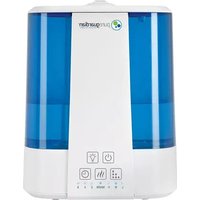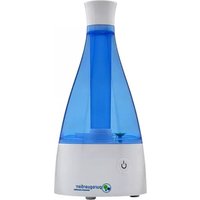
H5450BCA - Humidifier PureGuardian - Free user manual and instructions
Find the device manual for free H5450BCA PureGuardian in PDF.


| Product Type | Ultrasonic humidifier |
| Brand | PureGuardian |
| Model | H5450BCA |
| Tank capacity | 7.6 L (2.0 gal) |
| Humidification mode | Cool/Warm mist |
| UV-C bulb wattage | 3.5 W |
| Functions | UV-C, heating, timer (4/6/12 h), night light, mist output adjustment |
| Nozzle type | Bidirectional adjustable mist nozzle |
| Fill indicator | LED indicator with auto shutoff |
| UV-C replacement indicator | LED indicator |
| Auto shutoff | Yes, when tank is empty or after timer |
| Essential oils | Compatible (dedicated tray and pad, do not add to water) |
| Maintenance | Regular cleaning of ultrasonic disc, descaling with white vinegar |
| Replacement parts | UV-C bulb model LB1000, cleaning brush, essential oil pads |
| Warranty | 3-year limited (parts and labor) |
Frequently Asked Questions - H5450BCA PureGuardian
User questions about H5450BCA PureGuardian
0 question about this device. Answer the ones you know or ask your own.
Ask a new question about this device
Download the instructions for your Humidifier in PDF format for free! Find your manual H5450BCA - PureGuardian and take your electronic device back in hand. On this page are published all the documents necessary for the use of your device. H5450BCA by PureGuardian.
USER MANUAL H5450BCA PureGuardian
To the consumer, Guardian Technologies LLC warrants this product to be free of defects in materials or workmanship commencing upon the date of the original purchase. In order to be eligible for this Limited Warranty, an original sales receipt or comparable substitute proof of purchase bearing the date of original purchase is required. Refer to the original product carton or specific product/model page on the Guardian Technologies website for warranty length for your particular model. This warranty applies only to the original purchaser of this product from the original date of purchase. This warranty covers product purchased from authorized distributors only.
This warranty applies to repair or replacement of product found to be defective in materials or workmanship. This warranty does not apply to damage resulting from unusual wear, commercial, abusive, unreasonable use or supplemental damage. This warranty does not cover damage from unauthorized repairs or from any use not in accordance with the instruction manual. Defects that are the result of normal wear and tear will not be considered manufacturing defects under this warranty.
If this product should become defective within the warranty period, we will repair or replace any defective parts free of charge. All warranty repairs must be completed by Guardian Technologies LLC. This warranty gives you specific legal rights and you may also have other rights (other rights may vary from state to state in the U.S.A.)
To submit product under warranty the complete machine must be delivered pre-paid to Guardian Technologies LLC. Please include complete information including: the problem, the model number of the product, the day of purchase, and a copy of the original sales receipt along with your name, address, and telephone (email optional). Address returns to the attention of: Customer Service, at the address below. Additional questions or comments can be made toll free to the number listed below.
USA and Canada
Guardian Technologies LLC
26251 Bluestone Blvd.
Euclid, Ohio 44132
1.866.603.5900
www.guardiantechnologies.com
Please go to www.guardiantechnologies.com to register your product. We consider the registration process important to ensuring superior service to our customers, however submitting the warranty registration is optional and does not affect your rights to utilize this warranty according to the conditions stated above.
Additional copies of the instruction manual can be obtained by accessing and printing directly from our website or calling customer service.

guardian
technologies™
Guardian Technologies LLC
26251 Bluestone Blvd. • Euclid, OH 44132
1.866.603.5900 • www.guardiantechnologies.com
©2016 Guardian Technologies LLC

guardian
technologies™
USE & CARE INSTRUCTIONS
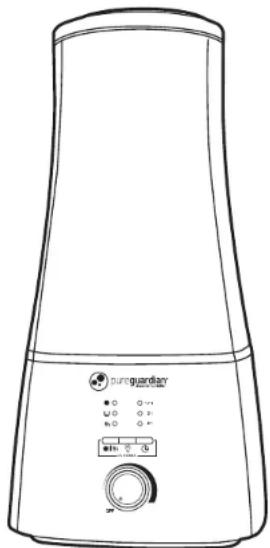
natural_image
Line drawing of a portable air purifier with control panel and buttons (no text or symbols)UV-C Ultrasonic Humidifier
Model No. H5450
3-Year Limited Warranty
Customer Service
1.866.603.5900
www.guardiantechnologies.com
Date Purchased month ____ year ____
English E - 1 French F - 1 Spanish S - 1
Use GENUINE Guardian Technologies replacement parts only.
REV0718
READ AND SAVE THESE INSTRUCTIONS WARNINGS
Failure to comply with the warnings listed below may result in electric shock or serious injury.

This product should be used only in accordance with the specifications outlined in this manual. Usage other than what has been specified here may result in serious injury.
- CAUTION: To reduce the risk of severe bums, keep this product out of the reach of children and pets.
- Disassembly, repair or remodeling by an unauthorized person may result in serious harm and will void the manufactures warranty.
- Always place this humidifier on a firm, flat & level surface. This humidifier may not work properly on an uneven surface.
- Do not place this product on cloth, carpet or an absorbent surface. This may block air inlet.
- This product releases mist. Do not place this humidifier directly on wood furniture, flooring or any surfaces that could be damaged by water. Manufacturer does not accept any liability for damage in the case of the unit being placed incorrectly.
- Do not use if the plug is damaged or loose.
- Before filling or cleaning the unit, make sure it is unplugged.
- Once the humidifier has been plugged in, do not tilt or move the unit.
- Do not handle the plug with wet hands.
- Do not excessively bend, twist, pull or damage the power cord.
- Avoid placing this product where the humidity spout is pointed directly at an object or person.
- Do not inhale the mist/vapor expelled from the product or drink water from the tank.
- Do not fill the water tank with hot or boiling water.
- Do not use this product in direct sunlight or near a heat source such as a stove, heater or radiator.
- If the water tank becomes cracked or damaged, do not use.
- Do not keep this product running for an extended period of time.
- Unplug the cord when unit is not in use for an extended period of time and/or when no one is home.
- Do not keep water in the tank when not in use for an extended period of time.
- Do not clean the unit, water tank or water reservoir with detergents or chemicals of any kind.
- The use of water additives in the tank including ethereal/essential oils, fragrances, eucalyptus, water conditioners, etc. will damage the appliance materials and as a consequence the whole unit. Any use of such additives in the tank will void the manufactures warranty.
- Do not use this product near any other electronic device.
-
Do not cover the spray spout at any time during use. Do not put anything on or in the tank.
-
IMPORTANT: Neither humans nor animals can hear the high frequency vibrations.
- When unplugging from outlet hold humidifier securely.
- Do not place cord over objects.
- Do not get water in or on the power cord or where it connects to the product.
- Do not use near a sink.
- Do not touch the water tank during operation.
- Do not submerse the unit in water or pour water on the unit or in the humidity spout.
- When emptying water from water tank, pour on drain side.
- Do not cover the spout with cloth or hand and do not use without the spout.
- Use clean or distilled water in tank. Hard water areas will require more frequent cleaning.
Stop using your humidifier and contact your physician if you have respiratory symptoms which you believe are associated with periods of use of your home humidifier, even if you are following maintenance directions.

WARNING: This product can expose you to chemicals including lead or lead compounds, which are known to the State of California to cause cancer or birth defects or other reproductive harm.
For more information go to www.P65Wamings.ca.gov.

This equipment has been tested and found to comply with the limits for a Consumer ISM equipment, pursuant to Part 18 of the FCC Rules. Although tested, it may affect these devices. If the humidifier is found to interfere, separate the device and/or the humidifier. Conduct only the user maintenance found in this manual. Other maintenance and servicing can cause harmful interference and can void the required FCC compliance.

LAMP CONTAINS MERCURY

Manage in accordance with Spills, Disposal and Site Cleanup Requirements. In case of breakage, follow clean-up procedures provided by contacts below.
www.epa.gov/cflcleanup 1-866-284-4010
SPECIFICATIONS
HUMIDIFYING MODE: Ultrasonic Cool and Warm Mist
TANK CAPACITY: 2 gallons
PARTS
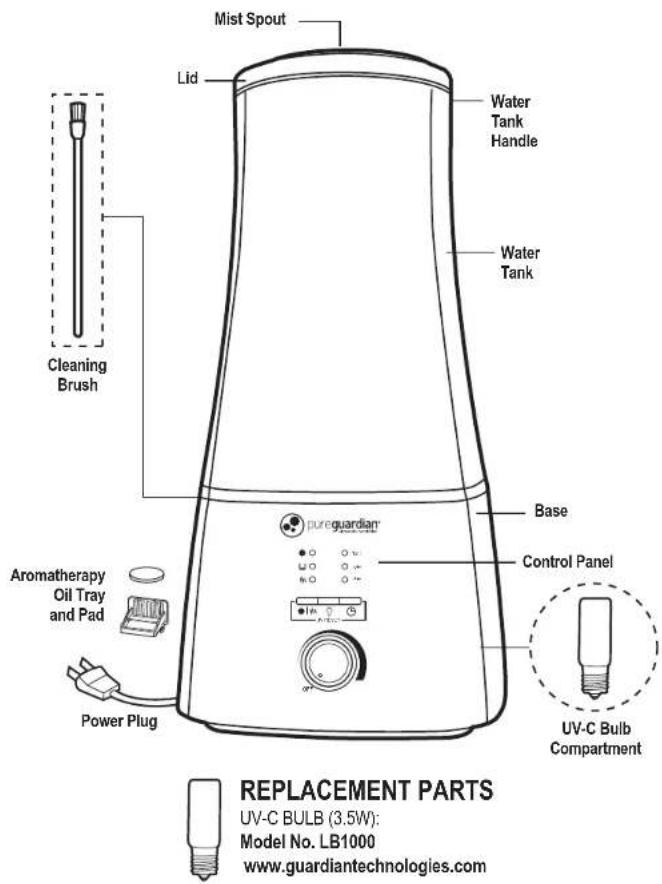
IMPORTANT: To maintain the performance of the air cleaner, use Guardian Technologies GENUINE Replacement Parts only. To Purchase Contact Customer Service.
DIRECTIONS FOR USE
SET UP
Select a firm, level, flat location - at least six inches (15 cm) from any wall or object for proper air flow. Place the humidifier on a water-resistant surface, as water can damage furniture and some flooring. Do not place unit directly on carpet, towels, blankets or other absorbent surfaces.
Guardian Technologies will not accept responsibility for damage caused by water spillage. FILLING - Make sure unit is unplugged.
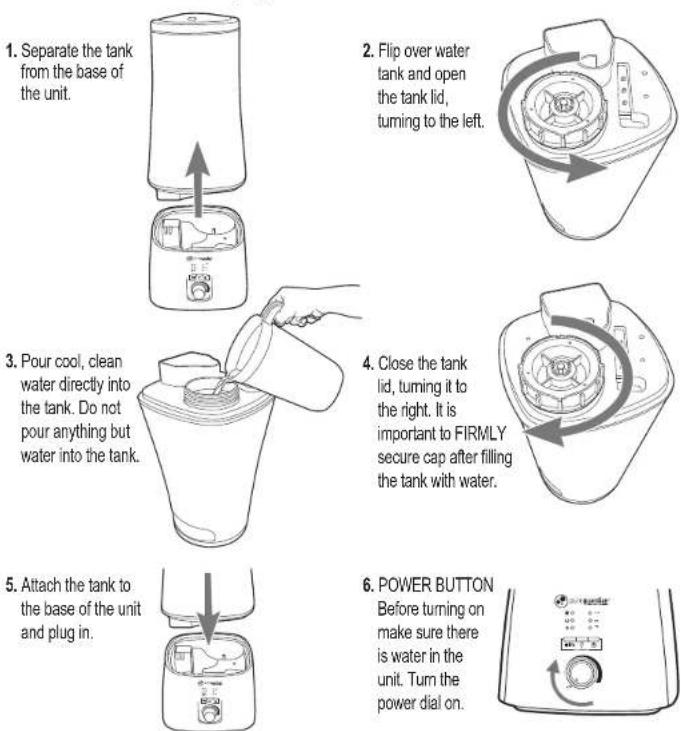
1. Separate the tank from the base of the unit.
2. Flip over water tank and open the tank lid, turning to the left.
3. Pour cool, clean water directly into the tank. Do not pour anything but water into the tank.
4. Close the tank lid, turning it to the right. It is important to FIRMLY secure cap after filling the tank with water.
5. Attach the tank to the base of the unit and plug in.
6. POWER BUTTON
Before turning on
make sure there
is water in the
unit. Turn the
power dial on.
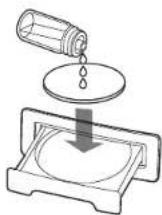
7. Add a few drops of your favorite essential oil to the pad in the tray (Oil not included).
WARNING: DO NOT add oils or other additives directly into the water tank. Add only to the pad in the tray. Oils added to the tank will damage the tank and the whole unit. Any use of such additives in the tank will void the manufacturers warranty.
Pureguardian essential oils and replacement pads sold separately at www.guardiantechnologies.com
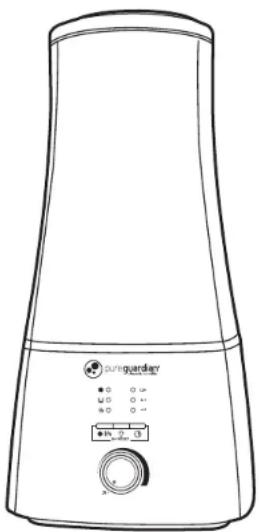
CONTROL PANEL FUNCTIONS

pureguardian®
ultrasonic humidifier
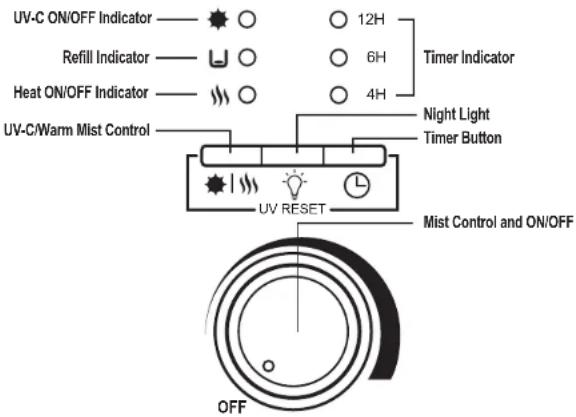
1. Night Light
Press the Night Light button to turn night light on/off.
2. Timer
Press the Timer button to select either 4, 6 or 12 hours. The unit will turn off in that time.
3. Mist Control
Turn the power/mist control dial to select mist level.
4. UV-C and Warm Mist Control
UV-C and Warm Mist ON/OFF Button Function: 1st Press: UV-C ON 2nd Press: UV-C & Warm Mist ON 3rd Press: Warm Mist ON 4th Press: Both OFF
5. Water Refill Indicator
When the unit is low on water the Refill LED on the front panel will light up, and the unit will shut off. Simply add more water to continue use. Unit will automatically resume running when water tank has been refilled.
6. UV-C Light Replacement Indicator
The UV-C light will flash when it's time to replace the bulb. See instructions on page E8 for replacing the UV-C light and resetting the indicator.
7. Humidity Spout Dual Direction
Broaden mist in two different directions throughout the room by rotating top section.
CLEANING
- Always unplug the unit before servicing in any way.
- The water temperature of the water in the unit after use may be high, allow time for it to cool.
GENERAL CLEANING
- Inside the base of the unit. Pour excess water out of the unit. Wash out the unit with fresh water using the cleaning brush and a soft cloth as needed. Do not submerse the base of the unit into water, or allow water to enter inside the dry air exhaust port of the unit.
- Water tank. Empty water tank. Remove humidity spout and clean the mist tube with fresh water.
- Outer surface of the unit. Wipe the lid and surface of the unit with a soft, damp cloth if needed. If you notice an accumulation of water during usage, reduce humidity and dry outer surface with a cloth.
DESCALING
- Depending on usage and water type, cleaning to remove scale may be required weekly or every other week to optimize unit performance.
- If you live in a hard water area, we recommend the use of distilled water for your humidifier. This will help reduce the precipitation of minerals or 'white dust'.
- Do not clean the unit or water tank with detergents or cleaning chemicals of any kind.
ULTRASONIC DISK
- Unplug unit.
- Remove the tank and empty all water from unit base and tank.
- Locate the ultrasonic disk on the inside center of the base unit.
- Use ONLY the enclosed cleaning brush to gently clean disk and remove build up and deposits.
Do not scrub or scrape the ultrasonic disk.
Are minerals in your water producing white dust?
Try Decalcification Cartridge FLTDC.
Ultrasonic Disk
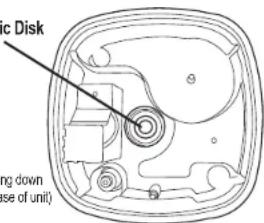
(Looking down into base of unit)
Look for cartridge 1 at your local retailer or visit www.guardiantechnologies.com
If scale becomes difficult to remove with brush:
- Fill the Base with: mixture of 1 tsp. white vinegar and 1 tsp. water.
- Let solution stand for 5 minutes.
- With the vinegar in the tank, clean all interior surfaces with a soft cloth or brush to help remove scale.
- Also check mist nozzle and mist tube in water tank. Clean as needed.
- Rinse the tank thoroughly with water to remove scale and vinegar solution.
END OF SEASON STORAGE
- Follow the Cleaning and Descaling instructions when the humidifier will be stored at the end of the season.
- Dry the humidifier completely before storing. DO NOT store with water inside the Base or Water Tank.
- Pack the unit in its original carton and store in a cool, dry location.
NOTE: IF YOU EXPERIENCE A PROBLEM DO NOT ATTEMPT TO OPEN THE MOTOR HOUSING YOURSELF. DOING SO MAY VOID YOUR WARRANTY AND CAUSE DAMAGE TO THE HUMIDIFIER OR PERSONAL INJURY.
REPLACING THE UV-C BULB
- Unplug the unit.
- Remove the tank and empty all water from the unit base and tank.
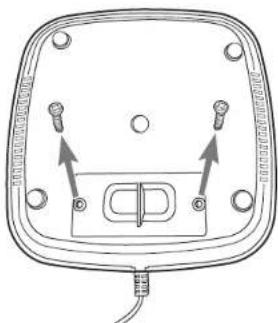
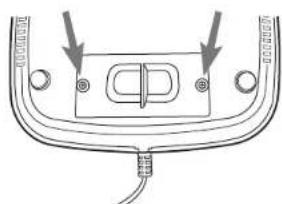
- Flip the base over and locate the UV-C Bulb Compartment.
natural_image
Diagram of a device with labeled components and arrows indicating connections (no text or symbols present)- Remove the two screws using a philips screw driver.
natural_image
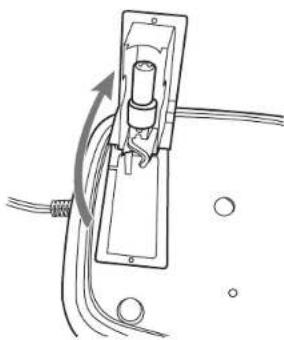
Pure electrical circuit lines without any symbols- Remove the lid with connected UV-C Bulb.
natural_image
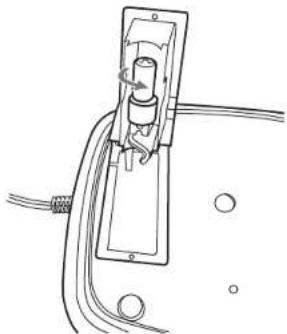
Pure electrical circuit lines without any symbols- Twist the light bulb to the left until you can remove it.
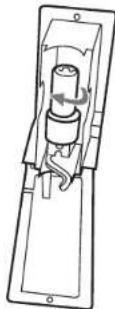
- Replace with new bulb, insert and turn to the right to secure into place.
natural_image
Diagram of a cable or cable connector with mounting holes and a central connector (no text or symbols)- Replace the lid and secure with two screws.
- Hold down the Timer Button and UV/Warm mist button simultaneously for 5 seconds to reset indicator.
TROUBLE SHOOTING GUIDE
| PROBLEM | SOLUTION |
| Water vapor and humidity are not produced. | Power Plug: Unplug and then try again.Power Failure: When the power is returned, try again.Tank Installation: Make sure the tank is correctly attached.The surface of the ultrasonic disk is dirty: Clean ultrasonic disk. (see pg. E-7) |
| Air blows but water vapor is not produced. | Excessive Water. Remove a certain amount of water from the tank.Increase mist setting.Detergent residue and/or oil ingredients from cosmetics may be in tank; wash out tank and try again.The surface of the ultrasonic disk is dirty: Clean ultrasonic disk.(see pg. E-7) If you use hard water, replace with softer water. |
| Humidity level is low. | The surface of the ultrasonic disk is dirty: Clean ultrasonic disk. (see pg. E-7)The water in the unit is too cold: Replace with cool, but not cold water.Damage on the ultrasonic disk: Contact Customer Service |
| Warm humidity is not produced. | It may take 10-15 minutes before warm humidity is created. The mist may not feel warm due to the fact it is so fine and is cooled rather quickly from the air in your home. Test by either feeling the base of the unit which should be warm to the touch or by allowing the unit to run for approximately 30 minutes on warm setting in a closed 200 sq. foot room or smaller. The room should feel moderately warmer if the unit is working properly. |
| The humidity has a bad smell. | Poor maintenance or dirty water: Clean the product thoroughly, and fill it with fresh water. |
| White dust is forming on nearby furniture. | Hard water may deposit a certain amount of dust. Dust in the air also settles because of added humidity in the room. Use distilled water if this becomes a nuisance.* Decalcification Filter (FLTDC) available at www.guardiantechnologies.com or through Customer Service 1.866.603.5900. |
| Unit has stopped working. | No or low water. Unplug unit and refill tank. Check timer has not been set. |
| Unit shuts off unexpectedly or does not operate. | Check that the safety device triggered. To restart, unplug for 5 secreplug then press the power button. Call Customer Service. |
| Water is accumulating outside of unit or area surrounding unit. | Saturation of humidity. Lower mist control setting.Unit not level and water is accumulating. Unplug and place on level surface. Point spray away from objects. Raise unit on a water-resistant level surface 2-3 feet off of floor. |
| Water dripping when refilling. | Water remaining on bottom of tank. Wipe tank or tilt to drain before transporting. Make sure tank cap is secured tightly. |
| Increased noise level. | Unit must be placed on a flat, level, hard surface.Make sure it is NOT placed on a soft or absorbent surface. |
| Cannot smell aroma scent. | Add a few more drops of oil to the aroma pad.Replace aroma pad with a new one. |
GARANTIE LIMITÉE
Guardian Technologies LLC
26251 Bluestone Blvd.
Euclid, Ohio 44132
1 866 603-5900
www.guardiantechnologies.com
Guardian Technologies LLC
26251 Bluestone Blvd. • Euclid, OH 44132
1.866.603.5900 • www.guardiantechnologies.com
©2016 Guardian Technologies LLC

guardian
technologies™
UTILISATION ET INSTRUCTIONS D'ENTRETIEN
natural_image
Line drawing of a portable air purifier with control panel and buttons (no text or symbols)natural_image
Line drawing showing a blender being inserted into a container with a hand pouring liquid (no text or symbols)natural_image
Diagram of a mechanical component with a circular component and directional arrow (no text or symbols)natural_image
Line drawing of a hand pouring liquid into a blender (no text or symbols)natural_image
Diagram of a mechanical component with a circular component and curved arrow indicating rotation (no text or symbols)REEMPLACEMENT DE L'AMPOULE UV-C
natural_image
Diagram of a device with four pins and an internal connector, no text or symbols presentnatural_image
Pure electrical circuit lines without any symbolsnatural_image
Pure electrical circuit lines without any symbolsnatural_image
Diagram of a cable connector with mounting holes and a central switch (no text or symbols)Guardian Technologies LLC
26251 Bluestone Blvd.
Euclid, Ohio 44132
1.866.603.5900
www.guardiantechnologies.com
Guardian Technologies LLC
26251 Bluestone Blvd. • Euclid, OH 44132
1.866.603.5900 • www.guardiantechnologies.com
©2016 Guardian Technologies LLC

guardian
technologies™