Charge Manager 2020 - Battery charger VOLTCRAFT - Free user manual and instructions
Find the device manual for free Charge Manager 2020 VOLTCRAFT in PDF.



User questions about Charge Manager 2020 VOLTCRAFT
0 question about this device. Answer the ones you know or ask your own.
Ask a new question about this device
Download the instructions for your Battery charger in PDF format for free! Find your manual Charge Manager 2020 - VOLTCRAFT and take your electronic device back in hand. On this page are published all the documents necessary for the use of your device. Charge Manager 2020 by VOLTCRAFT.
USER MANUAL Charge Manager 2020 VOLTCRAFT
© Copyright 2008 by Voltcraft®
GB Legal Notice
These operating instructions are a publication by Vollcraft®. Lindenweg 15, D-92242 Hrschau/Germany.
Phone +49 180586 582 7 (www.voltcraft.de)
All rights including translation reserved. Reproduction by any method, e.g. photocopy, microfilming, or the capture in electronic data processing systems require the prior written approval by the editor. Reprinting, also in part, is prohibited.
These operating instructions represent the technical status at the time of printing. Changes in technology and equipment
reserved.
© Copyright 2008 by Voltcraft®
© Copyright 2008 by Voltcraft®
01 1008 01
CHARGE MANAGER 2020
Table of Contents 19
Safety Notices: 19
Handling 21
Maintenance 21
General 22
Properties 23
Commissioning 25
Troubleshooting 30
Overview 31
Technical Data 31
Ambient Conditions 32
Disposal of the Accumulator....32
Disposal of Batteries / Accumulators 32
Safety Notices

Damages caused by non-compliance with this operating manual lead to the expiration of the warranty! We will not assume any liability for subsequent damages!
We will not assume any liability for damages to items or persons caused by Improper handling or non-compliance with the safety notices! Any warranty claim will be null and void in such cases.
For reasons of safety and licensing (CE) it is not allowed to alter respectively modify the charger.
This charger is constructed in Protective Class II. You may only connect the charger to a proper mains outlet of the public supply net (100-240 Volt AC, 50 to 60 Hz).
Ensure the correct commissioning of the charger. Observe the operating manual!
Qualified personnel has to commission the charger in order to guarantee its safe operation.
Make sure that the power cable does not get squashed or damaged by sharp edges when installing the product.
Never place the charger close to flammable respectively easily inflammable materials, e.g. curtains.
Do not expose the charger to high temperatures, strong vibrations or high degrees of humidity.
Appliances that are operated on supply voltage do not belong in the hands of children. Therefore, be especially careful when children are present.
Power pack:
Input: 100-240 V AC, 50 to 60 Hz
max. 75 W
Output:
Slot 1 to 8: 3V DC / max. 4A
Slot A and B: 15V DC / max. 21mA
Protective class: 2
Type of protection: IP20
Fuses: * 3 A slow
Charging current
Total charging current max. 16A
Charge current slot 1-4 max. 4 A
Charge current slot 5-8 max. 2 A
Round cells without POWER mode 300mA to max. 2A
Round cells with POWER mode 600mA to max. 4A
9V block accumulator 21mA
Discharge current:
Round cells max. 850 mA
9V block accumulator 16mA
max. voltage on the
contacts: 3 V respectively 15 VDC (direct current)
Ambient conditions
Operating temperature range (min/max) 0°C to +40°C
Rel. air humidity max. 85%
Disposal of the Charger
Dispose of the obsolete charger according to the valid legal directives.
Disposal of Batteries / Accumulators
You are required by law (Battery Ordinance) to return all spent batteries/accumulators. Disposing of spent batteries/accumulators in the household waste is prohibited!
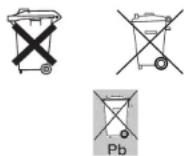
Batteries / accumulators that contain hazardous substances are marked with the symbols on the side. These symbols indicate that it is prohibited to dispose of these batteries in the household waste.
The abbreviations for the respective heavy metal are: Cd = cadmium, Hg = mercury, Pb = lead.
You can return spent batteries respectively accumulator that can no longer be charged free of charge to the collection points in your community, our outlets or everywhere else where batteries or accumulators are sold.
You thus fulfil the legal requirements and contribute to the protection of our environment!
Avoid operation in immediate proximity to strong magnetic fields (loudspeakers, magnets), electromagnetic fields (transformers, engines, reels, relays, protectors, electromagnets), electrostatic fields (discharges, charges), broadcast antennas or HF generators. This may have an adverse influence on the operation of the charger.
If the device no longer reacts after the impact of magnetic fields, turn the device off with the mains switch and on again.
Also refer to the chapter "Troubleshooting".
Handling
Never turn the charger on right away when you bring it from a cold into a warm room. The condensation may destroy the device under adverse circumstances.
Leave the charger turned off until it has reached room temperature.
Ensure sufficient ventilation during operation. The ventilation slots on the front and the back of the casing may never be covered!
Place the device on a hard, non-inflammable surface. Never place the device on a tablecloth or carpet! The charger is cooled with the installed fan that is always on. In operation, the device must have a sufficiently large distance to a wall or other obstacles in order not to impair the air circulation.
The charger may not be used on humans or animals.
Never operate the charger and the inserted accumulators unsupervised!
Do not wear any metal or conductive materials like jewellery for example (chains, rings, bracelets, etc.) when working with the charger.
The laying of metal cables and contacts is prohibited.
Maintenance
Check the technical safety of this charger at regular intervals, e.g. for damages on the power cable or the housing.
If safe operation can no longer be assured, put the device out of operation and protect it from being used again accidentally! Pull the power plug out of the socket.
Safe operation can no longer be assumed if
- the appliance shows visible damage,
- the appliance no longer works and
- after long storage under adverse conditions or
- after heavy transport strain.
Make sure you observe the following safety notices prior to cleaning or servicing the product:
When opening the covers or removing parts of the casing, you may expose live parts.
Therefore you have to disconnect the device from all voltage sources prior to performing maintenance or repair work.
Troubleshooting
With this charger, you have purchased a product that reflects the latest state of technology and is safe to operate.
Still there might be problems or malfunctions. At this point, we want to tell you how to easily remedy possible malfunctions yourself.
| Problem Solution: | |
| No function or - Is the contrast properly adjusted?display - Is the device turned on?- Is the power plug in the outlet?- Check the outlet with another electric device. | |
| The fan does not run - Turn the device off immediately and have it repaired!(regardless of whether an accumulator is charged or not) | |
| The device no longer - If the charger detects a defect fan, all programs are cancelled, an reacts to any input. error message is issued (FAN ERROR) and the charger no longer reacts. | |
| No accumulator - Did you observe the proper polarity of the accumulator?detected - Are the contacts dirty (those of the charger and/or accumulator)? | |
| Wrong or unlikely - You changed the accumulators while the device was turned off.values on the display This leads to wrong charge capacities (C) respectively discharge capacities (D) and may also damage the accumulators! | |
| ERROR display with - MONO or BABY accumulators were inserted in slots 5 to 8 for inserted accumulator charging with activated POWER mode: Insert these accumulator types into slots 1 to 4.- Accumulator voltage is too high (poss. battery inserted)- The accumulator voltage is too low (defect accumulator)- Deep-discharge accumulator discharged with DISCHARGE or CHECK- Hardware detection error of the device: load a functioning accumulator in the same slot. If the error occurs again, send the device in for repair. | |
| Immediate READY - deep discharge accumulator: abandon charging to protect the display with the program DISCHARGE or immediate start of charging with the program CHECK. | |
| Low charge capacity (C) although the accumulator was discharged | - Treat the accumulator with the ALIVE program. If the charge capacity C is still too low then, the accumulator is defect. |
| EMV Impulses,electrostatic discharge = ESD, surge impulse or line-conducted disturbance resistance | - No display or display does not react:Turn the device off and on again on the mains switch- Error display: the hardware detection for the protection of the accumulator kicked in: Take out the accumulator, reinsert it and enter the program |
| Housing heats up considerably | - The high capacity output of the device leads to the heating of the housing top and bottom. There is no defect. Ensure good ventilation (see chapter "Safety notices") |
Properties
This is a fast charger for nickel/cadmium and nickel/metal hydride accumulators.
The microcomputer-controlled fast charge charges the accumulators to 100%. 100% means up to 115% of the stated capacity with new accumulators and less than 100% of the stated capacity with older accumulators.
With accumulators with a capacity of less than 500 mAh, the discharge capacity (D) may not reach 100%. However, this discharge value must be larger than 80%, otherwise the accumulator is defect (best test it with the ALIVE program).
With this charger, it is not necessary to discharge the accumulators prior to recharging. The accumulator is charged from its current charge state to its presently possible 100%.
The charging and discharging cycle is controlled independently of the charge state of the accumulator.
The charge and discharge current is microcomputer-controlled.
The discharge current of the charger is practice-conform (16 mA to 850 mA).
The charger has an automatic sustain charge.
The charger has an automatic fan control. The fan, which only runs slowly in standby-operation, automatically accelerates to maximum speed when charging or discharging an accumulator. If the charger detects a defect fan, all programs are cancelled, an error message is issued (FAN ERROR) and the charger no longer reacts.
The charger has an automatic accumulator monitoring (charge voltage and charge quantity). The automatic accumulator detection notices when an accumulator is inserted or removed from the charger.
There is no memory effect (charge and discharge current are clocked). This reduces the high interior resistance of the accumulator and its power capacity increases.
The accumulator's degree of effectiveness increases (relation of the required charge quantity to the usable capacity).
The charger has a memory backup. In case of power failure, the accumulator's data and the current functions are saved for up to two days. Once the charger is reconnected with the mains, the program is continued. To do so, the charger must have been connected with the mains for at least two hours beforehand and turned on.
The LCD (alphanumerical) serves to display
- the program (CHA, DIS, CHK, CYC, ALV)
- the type of accumulator (BABY/MONO, MIGNON, MICRO, 9V block)
- the accumulator's charge status (battery symbol)
- the current accumulator voltage(U)
- the current charge respectively discharge current (I)
- the current respectively saved charge data (C) and discharge data (D) in mAh or Ah
- the required time in hours and minutes (TIME hh:mm)
There are three function keys for entering the programs and the settings.
All available accumulator data can be displayed. You can display the accumulator data of all accumulators inserted in the slots with the two SELECT buttons (UP and DOWN).
If all data of the slots in which accumulators are located was displayed, the overview appears again at the next push of the button.
With the display of the individual accumulator data, the overview is displayed again when pressing the OK button. In the general overview, the OK button serves to adjust the display contrast.
Overview Display:
| 1:CHA? | CM2020 | 2:--- |
| 3:--- | A:CHA? | 4:TRT? |
| 5:DIS? | A:CHA? | 6:ALV? |
| 7:CHA? | B:DIS? | 8:CHK? |
Here you see the overview of all inserted accumulators with the corresponding program and the charge status (battery symbol). If the charge status of the accumulator was not determined yet, a question mark appears (??). When the accumulator is treated, the battery symbol or an arrow alternate. When a charge is currently taking place, the arrow points upwards, if the accumulator is currently discharged, the arrow points downwards.
If the POWER mode was turned on, "PM" blinks in the center of the second row.
Display of Accumulator Data
| 1:CHARGE > | C=123.1mAh |
| PM OFF ? | D= 0.0mAh |
| MICRO | U= 1.210V |
| TIME 0:11 | I= 0.659A |
The charge program (e.g. CHARGE) and the charge capacity (C) is displayed in the first row.
The status of the POWER mode appears in the second row, the accumulator symbol (?) shows the approximate charge status of the accumulator and the discharge capacity (D) is displayed.
When charging is currently taking place, an arrow blinks in front of "C" and if a discharge is currently taking place, an arrow blinks in front of "D".
The third row displays the accumulator type and the measured accumulator voltage.
The fourth and last row displays the already passed processing time (TIME) in the format 'hh:mm'. The charge respectively discharge current is also displayed.
ATTENTION!
Remove the accumulator again immediately if the accumulator type (MONO/BABY, MIGNON or MICRO) is displayed wrong. Observe the correct fit when inserting the accumulator.
If no voltage was determined yet,

appears.
A running program can only be cancelled by taking out the accumulator. If the accumulator is removed during charging or discharging, ERR for ERROR or RDY for READY may appear briefly, as the device notices that current no longer flows respectively that the discharge voltage was undercut.
If a program was performed successfully, RDY respectively READY appears and the display stops blinking.
Charge Types
There are two different charge types: fast charge and POWER mode. With fast charging, the charge current is approx. 350 up to 2000 mA. In the POWER mode, the charge current doubles with round cells. For the two 9V block accumulators, the POWER mode has no significance (the charge current remains the same).
ATTENTION!

When the POWER mode is on, please note that NiCd and NiMH accumulators may be charged with maximum 1C. Therefore, the inserted micro accumulators have to have a minimum nominal capacity of 700 mAh, MIGNON min. 2000 mAh and BABY accumulators at least 4000 mAh!
The total charge current of this charger is 16 ampere. As soon as these 16 ampere total charge current are reached, another inserted accumulator is set to BREAK and only treated when the total charge current is reduced (when another accumulator is finished).
Mono and baby accumulators may only be charged in the slots 1 to 4 in POWER mode (only slot 1 to 4 can charge with 4000 mA). If these accumulators are inserted in slots 5 to 8, ERROR appears.
Charge current with POWER mode (approx.) without POWER mode (approx.)
MONO/BABY: 4000 mA (slot 1-4) 2000 mA
MIGNON: 2000 mA 1000 mA
MICRO: 700 mA 350 mA
9V: 21 mA 21 mA
Charge and Discharge Data
The capacity charged in the accumulator (C) and the discharged capacity (D) is stated in milliampere hours (mAh) or ampere-hours (Ah). With the programs CYCLE and ALIVE, the old data is deleted with renewed charging respectively discharging. The capacity during trickle charge is not calculated, not displayed and also not added.
Commissioning
Remove all possibly inserted accumulators, plug the charger in and turn it on with the POWER switch on the back of the device. You will see the following displayed on the display for approx. 2 seconds;
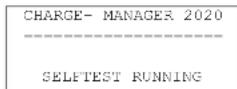
In this time, the charger performs a self-test and also checks for possibly inserted accumulators. This is necessary for the preserving the memory of all data in case of a power failure (memory backup).
Now leave the charger switched on for at least 2 hours so that the integrated gold cap can charge to maximum. This gold cap serves to store all data for at least 48 hours when the charger is turned off or in case of power failure. Of course, the device is completely operational during this time.
GB These Operating Instructions are part of the product. They contain important information on commissioning and installation. Please follow them, including when passing this product on to third parties.
Please keep the Operating Instructions for future reference!
The contents page on page 19 lists the contents of these instructions together with the relevant page number.
- CYC CYCLE (CYCLE) = Charger/ Décharger/ Charger
- ALV ACTIVER (ALIVE) = Charger/ Décharger/ Charger/ Décharger/ Charger
Thank you for purchasing this charger.
With this charger, you have purchased a product that reflects the latest state of technology.
The structure corresponds to Protection Class 2. This product fulfils the requirements of the valid European and national guidelines. The conformity was proven and the corresponding declarations were deposited with the manufacturer.
In order to maintain this condition and ensure safe operation, you as the user have to observe this operating manual.
Intended Use
This charger serves exclusively for charging up to eight nickel/cadmium respectively nickel/metal hydride round cell accumulators size mono, baby, mignon and micro simultaneously.
Additionally, you can charge two 9V block accumulators made of nickel/cadmium respectively nickel/metal hydride in the intended slots. These block accumulators may consist of 6, 7 or 8 cells.
There is no restriction regarding the maximum nominal capacity (stated in mAh or Ah) of the accumulator to be charged.
This charger serves exclusively for charging the stated accumulators. You may not charge other types of accumulators!
You may neither charge nor discharge lithium-ion accumulators, rechargeable alkaline and dry batteries (primary cells) with this charger. Non-rechargeable batteries may not be charged!
This charger is constructed in Protective Class II. The charger may be connected to alternate current nets from 100 V\~ up to 240 V\~. The net frequency must be 50 or 60 Hz.
Use is only permitted in closed rooms, meaning not out in the open. The contact with moisture, e.g. in bathrooms and similar rooms has to be avoided at all cost.
Another use than the one described above leads to damages to the product and is also associated with dangers like short circuit, fire, electric shock, etc. The entire product may not be altered respectively modified and the casing may not be opened.
The safety notices have to be observed under all circumstances!
In commercial institutions, make sure you observe the accident prevention regulations of the commercial trade organisation for electric installations.
In schools, training facilities, hobby and self-help workshops, qualified personnel needs to supervise the operation of chargers.
ATTENTION!

Chargers and batteries/accumulators do not belong in the hands of children.
Observe the right polarity when inserting the accumulators.
Do not leave batteries and accumulators lying around. Pets or small children might swallow them. If swallowed, contact a doctor immediately.
Leaking or damaged batteries/accumulators may lead to injuries of the skin when touched. Therefore, use suitable protective gloves.
Make sure that you do not short-circuit the batteries/accumulators. Do not throw into fire. Do not recharge the batteries. Danger of explosion!
This charger serves for charging up to eight nickel/cadmium respectively nickel/metal hydride round cell accumulators size mono, baby, mignon and micro simultaneously.
Additionally, you can charge two 9V block accumulators made of nickel/cadmium respectively nickel/metal hydride in the intended slots. These block accumulators may consist of 6, 7 or 8 cells.
There is no restriction regarding the maximum nominal capacity (stated in mAh or Ah) of the accumulator to be charged.
You may neither charge nor discharge lithium-ion accumulators with this charger!
You may not charge dry batteries (primary cells) with this charger.
You may not charge rechargeable alkaline batteries with this charger.
You may not recharge non-rechargeable batteries with this charger.
Observe the VDE instructions, especially DIN VDE 0700, part 29.
The connection contacts of the charger carry a maximum 15 V DC
The device is short-circuit-proof.
The device may only be operated at ambient temperatures from 0 to +40 degrees Celsius.
The fan always runs when the device is turned on. As soon as any inserted accumulator is charged or discharged (detectable on the flowing charging respectively discharging current "I" on the display), the fan has to switch to maximum capacity. This faster run is clearly audible (becomes much louder).
If the charger does not run at all or faster in operation, you must turn the device off immediately and secure it against accidental activation.
During the charging process, leading accumulator manufacturers recommend an ambient temperature of 20^ C. Also avoid direct sunlight here.
This charger uses a new charging technology that is supposed to prevent the memory effect and guarantee the 100% charge of the accumulator.
Please note that the inserted micro accumulators have to have a minimum nominal capacity of 700 mAh, MIGNON min. 2000 mAh and BABY accumulators at least 4000 mAh in POWER MODE!
F Introduction
Cher client,
Condensers in the appliance may still be charged, even if the appliance was disconnected from all voltage sources.
Repairs may only be conducted by experts who are familiar with the associated risks respectively the pertinent regulations.
If you need to change a fuse, make sure that you only use fuses of the stated type and with the stated nominal amperage for replacement.
Repairing fuses or bridging the fuse holder is not permitted!
When working on live appliances, only use tools expressively permitted for such work.
Only a trained expert may replace a damaged power connection cable.
General
Accumulators consist of two electrodes that are placed in an electrolyte; this makes an accumulator a chemical element. Chemical processes take place on the inside of this element. As these processes are reversible, accumulators can be recharged.
Charging the accumulator requires the so-called charging voltage, which must be higher than the cell voltage. In addition, more energy must be provided during charging (mAh) than what can be used again later on. This relation between supplied and used energy is called degree of effectiveness.
The usable capacity, which strongly depends on the discharge current is decisive for the state of the accumulator. The supplied charge cannot be used as rate, as a part of it is lost (e.g. transformed into heat).
The capacity details stated by the manufacturer are the maximum theoretical charge quantity the accumulator can give off. That means that an accumulator with 2000 mAh can theoretically provide a current of 1000 mA (= 1 ampere) for a period of two hours. This value strongly depends on many factors (condition of the accumulator, discharge current, temperature, etc.).
The term "C rate" is very common with chargers. The C rate is the current value that is normally stated for charging and discharging. Here this current value in ampere corresponds to the nominal capacity in ampere-hours, meaning with an accumulator with 2000mAh , 1C = 2.0A .
Please note that the usable capacity of an accumulator strongly depends on the discharge current. The lower the discharge current, the higher the usable capacity.
With this charger, a discharge current of 850mA can flow at the beginning of a discharge process: for an accumulator with 850mAh , 850mA are already 1C, while this is only C/2 for an accumulator with 1700mAh . Therefore, the 1700mAh accumulator is going to reach its 1700mAh easier than the 850mAh accumulator its 850mAh .
Meanwhile, renowned manufacturers state the capacity of an accumulator with C/3, meaning that e.g. a 2500 mAh accumulator reaches these 2500 mAh with a discharge current of 850 mA (= approx. C/3). However, if a manufacturer states a discharge current of C/10 for a 2500 mAh accumulator (= 250 mA), one can assume that this accumulator cannot give off 2500 mAh with a discharge current of 850 mA. This makes the C/10 accumulator the inferior one.
Accumulators also discharge over time. This characteristic is called spontaneous discharge.
ATTENTION!
Other repairs than the ones described above may only be performed by an authorised expert.
Overview
Contrast
The reading angle of the display depends on the location of the charger. Depending on the angle of view, you can adjust the good readability of the writing with the menu "DISPLAY CONTRAST" with a high or low position of the charger.
POWER MODE
If no accumulator is inserted, you can activate the POWER mode: this doubles the charge current for the eight round cells.
The inserted micro accumulators have to have a minimum nominal capacity of 700 mAh, MIGNON min. 2000 mAh and BABY accumulators at least 4000 mAh for the POWER mode!
You can only charge MONO and BABY accumulators in slot 1 to 4 while the device is in POWER mode.
Procedure
Insert the accumulator. If the accumulator is not detected automatically, check the polarity.
Then set the program with the two SELECT buttons and conform with OK.
In case of a wrong program, take out the accumulator, reinsert it and enter the program anew!
You can select the charge types CHA, DIS, CHK, CYC and ALV.
At the start of the program, the fan (which is only running slowly) switches to maximum capacity and becomes perceivably louder.
READY (RDY) appears in the display when the charging of the accumulator is done. Now you can take out the accumulator.
The three buttons serve to display the individual slots during the processing of a program and to adjust the display contrast.
In case of power failure or when the device is unplugged or switched off, the data and settings are preserved as long as the accumulator is not taken out.
ERROR (ERR)
This appears if a MONO or BABY accumulator was inserted in slots 5 to 8 in POWER mode, if a (non-rechargeable) battery was inserted or if another error has occurred.
BREAK (BRK)
The total charge current of 16 A was exceeded. The accumulator is charged automatically as soon as another accumulator is finished.
Technical Data
This charger serves exclusively for charging up to eight nickel/cadmium respectively nickel/metal hydride round cell accumulators size mono, baby, mignon and micro simultaneously.
Additionally, you can charge two 9V block accumulators made of nickel/cadmium respectively nickel/metal hydride. These accumulators may consist of 6, 7 or 8 cells.
Main Menu
If no accumulator is inserted, you can turn on the POWER mode. The display contrast can be changed at any time (also during charging).
Charge Programs
- CHARGE = charge respectively recharge once only.
CHAR (CHARGE) means that the inserted accumulator is charged.
- DISCHARGE = discharge only once
DISCHARGE means that the inserted accumulator is discharged only.
- CHK (CHECK) = discharge once and recharge
- CHECK means that the inserted accumulator is discharged and charged again.
- CYC (CYCLE) = charge / discharge / charge
CYCLE means that the inserted accumulator is first charged, then discharged and finally charged again.
- ALV (ALIVE) = charge / discharge / charge / discharge / charge
The ALIVE program serves to revive new accumulators stored over a longer period of time.
If an accumulator is already treated in slot 1, the selection starts with the same program as this accumulator (SAME AS SLOT 1): otherwise the selection starts with CHARGE.
Please note that new and possibly improperly treated accumulators may at first only take up 30% of their capacity. This bad degree of effectiveness is indicated by a high charge capacity (C) and a very low discharge capacity (D). Charge these accumulators with the ALIVE program. After some cycles, the usable capacity (D) increases.
NiCd and NiMH accumulators should be charged with C/3 up to 1C.
Accumulator Voltage
The accumulator voltage is stated in the deactivated state (and can therefore not be measured during operation). If no voltage U is displayed, the charger hasn't determined it yet.
Accumulator Status
In order to obtain a fast overview of the status of the accumulator to be charged respectively discharged, this device displays a battery symbol. This symbol merely serves to be able to tell at a quick glance how far the charge respectively discharge process has already advanced. Here, the battery symbol is filled from the bottom to the top during charging, while it is emptied from the top to the bottom when discharging. This does not allow any conclusions about the time remaining until the end of the program. When the charge status of the accumulator was not determined yet, a question mark appears in place of the battery symbol (in this manual, the battery symbol is generally portrayed with a “?”).
Charge and Discharge Current
The current I flowing through the accumulator during charging and discharging is displayed. If no current was determined at the start of a program or if there is no current running after the end of the program (READY/ERROR), I = 0.000 A appears.
Times
The complete time in which the accumulator was charged and discharged is displayed in hours and minutes (TIME hh:mm). The time during trickle charge (TRICKLE) and during breaks (BREAK) is not added.
If an accumulator exceeds approx. 80% of its maximum capacity during charging, a part of the charge current is converted to heat. This may cause the accumulator to heat up.
Now you can take out the accumulator.
If you leave the accumulator in the charger and if required for the accumulator, the trickle charge program TRICKLE (TRI) is started automatically. This means that the accumulator is recharged (this naturally does not apply if the accumulator was merely discharged with the program DISCHARGE). The capacity (C) of the trickle charge and the time required for this (hh:mm) is not displayed or added. Only the voltage and the current are constantly updated. Therefore, the charge capacity, the discharge capacity and time only always refers to the processed program.
| 1:TRICKLE> | C= | 1328mAh |
| PM OFF ? | D= | 0.0mAh |
| MIGNON | U= | 1.341V |
| TIME 1:19 | I= | 1.007A |
When the charge was not successful, an error message ERR respectively ERROR appears and the charger no longer handles this accumulator.
| 1:ERROR | C= | 32.5mAh |
| PM OFF? | D= | 0.0mAh |
| MONO/BABY | U- | 1.317V |
| TIME 0:01 | I= | 0.000A |
If the 16 A total charge current were already reached, each additional accumulator is set to BREAK. These accumulators are charged automatically as soon as another accumulator is finished.
| 1:BREAK | C= | 0.0mAh |
| PM ON ? | D= | 0.0mAh |
| MONO/BABY | U= | 1.209V |
| TIME 0:00 | I= | 0.000A |
This charger has a memory backup, meaning that the program and the added capacity values of the accumulator are saved in case of a power failure. Therefore never change the accumulator when the charger is off, as it otherwise takes over the no longer valid values and would thus determine wrong values for the new accumulator!
If the charger is turned off during program selection, selection starts anew.
The programs can only be continued if the integrated gold cap was previously charged (this requires that the charger was turned on for at least two hours).
ATTENTION!
All inserted round cell accumulators must be fast-charge capable in POWER mode.
Please note that the inserted micro accumulators have to have a minimum nominal capacity of 700 mAh, MIGNON min. 2000 mAh and BABY accumulators at least 4000 mAh in POWER MODE!
Without inserted accumulators, the standby display appears:
The lines "---" mean that there is no accumulator inserted in these slots.
The numbers 1 to 8 stand for the 8 slots in which you can insert the mono, baby, mignon or micro accumulators. The arrangement on the display corresponds to the arrangement of the slots.
The letter 'A' corresponds to the left 9 Volt slot, the letter "B" corresponds to the right 9 Volt slot.
If no accumulator is inserted, you can turn the POWER mode on and off with the two SELECT buttons (UP and DOWN) and adjust the display contrast in three stages.
| CHARGE- MANAGER 2020 | |
| = | |
| POWER- MODE | <> |
| OK | |
POWER MODE means that all eight round cells are charged with twice the current.
ATTENTION!

All inserted round cell accumulators must be fast-charge capable in POWER mode.
Please note that the inserted micro accumulators have to have a minimum nominal capacity of 700 mAh, MIGNON min. 2000 mAh and BABY accumulators at least 4000 mAh in POWER MODE!
You can select the POWER mode with the two SELECT buttons (UP and DOWN) and confirm them with the OK button.
After pressing the OK button, you can adjust the display contrast.
During charging, you cannot change the POWER mode. When pressing OK, you go straight to the menu with the display contrast.
| CHARGE- MANAGER 2020 |
| ---- |
| DTSPLAY CONTRAST <> MID |
You can set the contrast to "LOW", "MID" and "HIGH" with the two SELECT buttons (UP and DOWN) and confirm the entry with the OK button.
Now insert an accumulator size MONO, BABY, MIGNON or MICRO into one of the 8 slots. Observe the correct polarity: the positive pole of the accumulator always has to point inwards towards the charger and the negative pole outwards.
The charger detects this accumulator and starts querying the program settings.
| CHARGE- MANAGER 2020 |
| SET PROGRAM SLOT 1<> |
| - ADJ CHARGE CHA |
Now you merely need to select the charge program with the two SELECT buttons (UP and DOWN). Five different programs are available.
| - ADJ | CHARGE | CHA |
| - ADJ | DISCHARGE | DIS |
| - ADJ | CHECK | CHK |
| - ADJ | CYCLE | CYC |
| - ADJ | ALIVE | ALV |
These programs have the following functions:
CHA (CHARGE) means that the inserted accumulator is fast-charged.
DIS (DISCHARGE) means that the inserted accumulator is discharged only.
CHK (CHECK) means that the inserted accumulator is discharged and charged again.
CYC (CYCLE) means that the inserted accumulator is first charged, then discharged and finally charged again.
ALV (ALIVE) means that the accumulator is charged / discharged / charged / discharged and charged again. The ALIVE program serves to revive new accumulators and accumulators stored over a longer period of time.
| CHA = Charge once only |
| DISCHARGE - discharge only once |
| CHK = Discharge / charge |
| CYC (CYCLE) = charge / discharge / charge |
| ALV = Charge - discharge - charge - discharge - charge |
You now have five seconds to select the program. After each press of the button for changing the charge program, you have once again 5 seconds. After these 5 seconds, the setting is taken over and the program activates.
You can also press "OK" for confirmation.
Without an entry, the program CHARGE starts.
If a program was already started in slot 1,
"- ADJ SAME AS SLOT 1" appears.
This means that this accumulator is charged with the same program as the one in slot 1.
So if you want to charge several accumulators with the same program, first insert an accumulator in slot 1 and select the desired program. Then insert the remaining accumulators; these are then charged with the same program without the push of any button.
The built-in fan runs with maximum power when starting the device. With the programs CHA, CYC and ALV, the device starts charging, with the programs DIS and CHK, it starts discharging.