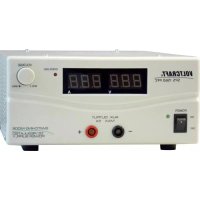
SPS 1560 PFC - Computer and peripheral cables VOLTCRAFT - Free user manual and instructions
Find the device manual for free SPS 1560 PFC VOLTCRAFT in PDF.




| Product Type | Adjustable switching power supply with power factor correction (PFC) |
| Brand | Voltcraft |
| Model | SPS 1560 PFC |
| Dimensions (W x H x D) | 220 x 110 x 360 mm |
| Weight | Approx. 5.8 kg |
| Mains power supply | 230 V~ / 50 Hz, protection class I |
| Max. power consumption | 1058 VA |
| Output voltage | 1 to 15 V DC adjustable |
| Max. output current | 5 A on front sockets, 60 A on rear terminals |
| Ripple | ≤ 40 mVp-p (max. 10 mVrms) |
| Voltage regulation | 0.05% + 3 mV (load variation 0-100%) |
| Displays | Output voltage (green LED), output current (3-position LED), overload (red LED) |
| Special functions | Power factor correction (PFC), remote control via external voltage or potentiometer, SENSE function for voltage drop compensation, DC output switch (on/off via remote control) |
| Cooling | Thermally controlled fan |
| Protection | Automatic current limiting, mains fuse (not user-accessible on this model) |
| Operating temperature | 0 °C to +40 °C |
| Max. relative humidity | 85% non-condensing |
| Maintenance and cleaning | Clean with a dry, antistatic, lint-free cloth without chemicals. No special maintenance required. |
| Safety instructions | Use only in dry indoor rooms. Disconnect before any intervention. Do not open. Follow the instructions in the manual. |
| Spare parts and repairability | Repairs must be carried out only by a qualified technician. No spare parts are provided. |
| General information | CE certified product. Warranty void if instructions are not followed. |
Frequently Asked Questions - SPS 1560 PFC VOLTCRAFT
User questions about SPS 1560 PFC VOLTCRAFT
0 question about this device. Answer the ones you know or ask your own.
Ask a new question about this device
Download the instructions for your Computer and peripheral cables in PDF format for free! Find your manual SPS 1560 PFC - VOLTCRAFT and take your electronic device back in hand. On this page are published all the documents necessary for the use of your device. SPS 1560 PFC by VOLTCRAFT.
USER MANUAL SPS 1560 PFC VOLTCRAFT
Variable Switched-ModeMains Power Supply with PFC
GB OPERATING INSTRUCTIONS Page 17 - 29
Copyright 2009 by Voltcraft
GB Impressum/legal notice in our operating instructions
These operating instructions are a publication by Voltcraft, Lindenweg 15, D-92242 Hirschau/Germany, Phone +49 180/586 582 7 (www.voltcraft.de).
All rights including translation reserved. Reproduction by any method, e.g. photocopy, microfilming, or the capture in electronic data processing systems require the prior written approval by the editor. Reprinting, also in part, is prohibited.
These operating instructions represent the technical status at the time of printing. Changes in technology and equipment reserved.
Copyright 2009 by Voltcraft
Copyright 2009 by Voltcraft
Copyright 2009 by Voltcraff
01_0409_04/HK

These Operating Instructions are part of the product. They contain important information on commissioning and installation. Please follow them, including when passing this product on to third parties.
Please keep the Operating Instructions for future reference!
The contents page on page 18 lists the contents of these instructions together with the relevant page number.

In purchasing this product, you have made a very good decision for which we should like to thank you.
You have acquired an above-average quality product from a brand family which has distinguished itself in the field of measuring, charging and network technology by particular competence and permanent innovation.
With Voltcraft®, you will be equal to difficult tasks as an ambitious hobbyist just as much as a professional user. Voltcraft® offers you reliable technology at an extraordinarily favourable cost-performance ratio.
We are certain: your start with Voltcraft will be at the same time the commencement of a long and profitable co-operation.
We wish you much enjoyment with your new Voltcraft® product!
Table of Contents
Introduction 17
Table of contents 18
Intended use 18
Commissioning 19
General 21
Connection of mains cable. 22
Adjustment of desired output voltage 22
Adjustment of fixed voltage of 13.8V (only SPS 1525/1540 PFC) 22
Connection of a consumer 23
"SENSE" function (only SPS 1560 PFC). 23
REMOTE control (only SPS 1560 PFC) 24
Servicing and cleaning. 26
Elimination of disturbances. 27
Technical data. 29
Intended Use
-
Connection and operation of extra-low voltage consumers with an operating voltage of 3V - 15VDC for model SPS 1525/1540 PFC or 1V - 15V for model SPS 1560 PFC to the connecting jacks
-
The power consumption of a connected consumer may not exceed 25 A for the SPS1540 model, 40A for the model SPS1540 and 60 A for the 1560 model.
-
The switched-mode mains power supply is designed in compliance with protection class 1. It is only approved for connection to shockproof sockets with protective grounding and an alternating current of 230V /50Hz commonly used in households.
-
Operation is impermissible under unfavourable ambient conditions. The following are unfavourable ambient conditions:
-
Moisture or excessive humidity
-
Dust and combustible gases, vapours or solvents
-
Thunder and lightning or similar conditions such as strong electrostatic fields etc.
Use other than that described above will damage the product and may involve other risks, such as short circuit, fire and electric shock etc. Do not change or modify any part of the product. The safety instructions must always be heeded!
Controls
(fold-out page)
(1) Power switch for taking the device into operation (ON / OFF)
(2) Power indicator, lights up in green
(3) Connecting jack "minus pole" (for 1560 PFC only up to a maximum of 5A)
(4) Connecting jack "plus pole" (for 1560 PFC only up to a maximum of 5A)
(5) Fixed voltage switch for 13.8V on the underside of the device (only for the 1525 PFC and 1540 PFC)
(6) Adjustment control for the output voltage
(7) Overload indicator, lights up in red
(8) 3 digit LED display for output current
(9) 3 digit LED display for output voltage
(10) Fan opening for cooling the device
(11) Fuse holder for the mains fuse
(12) Shockproof cold device connector
(13) "SENSE" connection for automatic voltage correction on the high-current output (16 and 17)
(14) Remote control input for voltage control ("VOLTAGE REMOTE")
(15) Function switch for remote control
(16) Screw terminal jack high-current output "minus pole" up to 60A
(17) Screw terminal jack high-current output "plus pole" up to 60A
Safety Instructions and HazardWarnings

Damage due to non-compliance with these operating instructions leads to expiry of the warranty. We do not accept liability for damage to property or injury to persons caused by mishandling or non-compliance with the safety instructions.
- This device left the factory in perfect condition in terms of safety engineering. To maintain this status and ensure safe operation, the user must comply with the safety instructions and warnings ("Caution!" and "Note!") laid down in the present operating instructions. The following symbols must be observed:

= Note! Read the operating instructions!
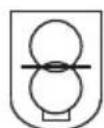
= Fuse disconnector,short-circuit proof to a limited extent

= Only for use in dry interior environments

= This equipment has been CE tested and complies with the EMC directive 89/336/EEC and the low voltage directive 73/23/EEC.
Electric appliances and accessories should be kept out of the reach of children!
- On commercial premises, the accident prevention regulations for electrical facilities and equipment of the relevant professional association must be complied with.
- In schools and training centres as well as at hobby and DIY workshops, the use of power packs must be supervised by adequately trained personnel in a responsible manner.
- Please make sure by all means that your hands, your shoes, your clothing, the floor and the power pack are dry.
- Live components may be exposed when covers are opened or components are removed, except if this can be done by hand.
- Before opening it, disconnect the device from all voltage sources.
- Capacitors in the device may still be charged, even if the device has been disconnected from all voltage sources.
- Do not switch the switched-mode mains power supply on immediately after it has been taken from a cold to a warm environment. Under adverse conditions, the resulting condensation could destroy the device. Allow the device to reach room temperature before switching it on.
- The switched-mode mains power supply generates heat during operation. Make sure it is adequately ventilated. Do not cover the ventilation apertures of the device!
- Do not leave mains power supplies and the connected consumers in operation unattended.
- Exclusively use fuses of the type and rated current specified. It is absolutely impermissible to use repaired fuses.
- Avoid the use of uninsulated metallic cables.
- It is impermissible to connect multiple switched-mode mains power supply units in series or in parallel.
- Power supply units are not designed for application to human beings or animals.
-
If you have reasons to assume that safe operation is no longer possible, immediately take the device out of operation and secure it against inadvertent operation. Reasons to assume that safe operation is no longer possible include:
-
there is visible evidence that the device has been damaged
- the device does not work any longer
- the device has been stored for long periods of time under unfavourable conditions or
-
it was subject to considerable stress during transport.
-
You should also heed the additional safety instructions in each chapter of these operating instructions as well as in the operating instructions of the connected devices.
Functional Description
The SPS 1525 PFC and SPS 1540 PFC mains power supply units use switching network technology with the advantages of weight and size reductions. Switched-mode mains power supply units use chopped mains voltages and return a broad spectrum of harmonic waves to the mains line, which may cause interference in other devices. To suppress these harmonic waves, a PFC (Power Factor Correction) has been integrated in the two device models.
The dc output is dc-isolated and features a fuse disconnector to the mains voltage.
The output voltage can be adjusted by means of the adjustment control (6) from 3 V to 15 V DC or for the SPS 1560 from 1V - 15Vm; current limitation is not possible.
A special feature of the models SPS 1525 PFC und SPS 1540 PFC is a fixed voltage switch on the underside of the device to fix the output voltage to 13.8 VDC.
The secondary DC connection is effected through two coloured connection jacks.
For the switched-mode power supply SPS 1560 PFC up to 5A can be collected at the front side and up to 60A at the rear.
The mains power supply is cooled via a temperature-controlled fan. For this reason, make sure there is an adequate air circulation and lateral distance to obstacles.
The mains power supply is equipped with an overload protection circuit. This circuit is activated when the maximum permissible current is exceeded due to an overload or short circuit. The red indicator is the overload indicator. If it lights up, the consumer must be disconnected from the mains power supply to avoid damage to the switched-mode mains power supply.
Taking the Device into Operation
General Notes
The two switched-mode mains power supply units are not chargers. To charge batteries, use suitable chargers with a charging current cut-off.
Connecting the Power Cable
-
Connect the provided shockproof power cable to the power connector (12, female) of the mains power supply. Make sure it is plugged properly.
-
Connect the power cable to a shockproof mains socket with protective grounding.
Setting the Desired Output Voltage
-
Make sure that there are no consumers connected to the mains power supply.
-
Switch on the mains power supply at the power switch (1). The power indicator (2) should light up.
-
Now use the DC control (6) to set the desired output voltage. The setting can be checked on the display (9).
Setting the Fixed Voltage of 13.8 V (only SPS 1525/1540 PFC)
-
Make sure that there are no consumers connected to the mains power supply.
-
Switch on the mains power supply at the power switch (1).
-
Now set the wiper switch (5) underneath the device to the "FIXED 13.8 V position.
- The output voltage has now been fixed to this values and cannot be changed via the control on the front of the device. The voltage is shown on the display (9).
- To deactivate the fixed voltage, slide the wiper switch to the opposite direction.
CAUTION! Only change the setting when no consumers are connected! Verify the operating voltages of the consumers first!
Connecting a Consumer
- Make sure the consumer is switched off.
- Verify that the correct output voltage has been set.
- Connect the plus pole (+) of the consumer to the red terminal screw connector "+" (4) and
- the minus pole (-) of the consumer to the black terminal screw connector "-" (3).
- 4-mm standard connectors can be used for connection but should take place via 20 A by means of screw terminals (the jack heads can be screwed on to the front only for the SPS 1525/1540 PFC!).
- For the switch power unit SPS 1560 PFC up to 5A can be connected at the front safety-jack consumer (automatic current limit) and up to 60A at the rear through high-current terminal jacks.
- The power consumption of the connected consumers is shown on the current display (8).

Make sure that the consumers are switched off when connected to the switched-mode mains power supply. Sparks may be generated when a consumer which has been switched on is connected to the jacks. This may damage the terminal screw connectors as well as the connected cables.
"SENSE" function (only SPS 1560 PFC)
The switched-mode power supply possesses an automatic voltage control for the high-current output. For this, two separate measuring cables are connected parallel to the connecting cables. The potential drop which occurs on the connecting cables is measured on these two measuring cables. The switched-mode power supply compensates this potential drop automatically so that the actually set voltage is pending on the consumer.
Proceed as follows for connection:
- Always connect the supply cables from the power unit to the consumer. Pay attention to correct polarity.
- Press the orange-coloured terminal on the SENSE connection inwards with a small screwdriver and insert the cables into the green terminal openings. Check that they are plugged firmly.
- Now connect the two "SENSE" cables to the consumer observing the correct polarity. The conductor cross-section for the "SENSE" cables must be at least 22AWG ( = 0,34mm^2 ).
- Always slacken the connection in the reverse order (first of all the "SENSE" cables and then the connecting cables).

Make sure that you contact the SENSE cables as close as possible to the connecting point of the consumer.
Never short the "SENSE" cables.

REMOTE control (only SPS 1560 PFC)
Through the built-in "REMOTE" control connection, the voltage setting can take place with an external voltage source or through an externally adjustable resistance (short "poti") and it's possible to switch the DC output on/off.
The REMOTE connection takes place on the rear REMOTE built-in plug (14).
Preparation of the remote control connection.
Turn the central screw of the supplied slide-in jack and remove the front, black contact jack by means of a small turning movement.
Draw the five connecting cables with a conductor cross-section of at least 22AWG (=0,34mm2) through the metal sleeve from the rear. Solder these five cables firmly and carefully to the soldering lugs no.1,2,3,7 and 8 of the black contact jacks.
Mark the loose ends of the cables with the corresponding contact numbers (1-3) to rule out any confusion.
Insert the black contact jack in the reverse order into the metal sleeve and screw these firmly.
Control through external voltage source
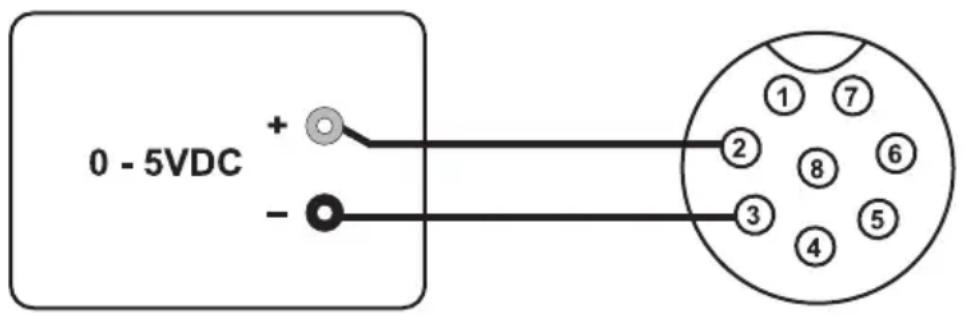
The power unit can be remote-controlled by means of an external voltage source of 0 to 5VDC over the complete output voltage range.
Proceed as follows for connection:
Connect the connecting cable of the REMOTE plug as illustrated.
Connection 2 to the plus pole (+) of the voltage supply and
connection 3 to the minus pole (+) of the voltage supply.
Connection 1 is not required.

Caution!
The voltage on the remote control connection may not exceed 5V.
The connections may not be shorted.
Switch off the switched-mode power supply and then connect the REMOTE plug to the rear remote connection. Screw down the external fastening ring.
Turn the voltage of the external voltage source to zero.
Slide the rear VOLTAGE REMOTE
switch to the "ON" position.

Switch the switched-mode power supply on. The desired output voltage can now be set through the external voltage source. Control the complete adjustment area for correct function.
If this remote control function is no longer required, the switch to the "OFF" position.
Control through a controllable resistance (poti)
The power unit can be remote-controlled by means of an external poti of 5 KOhm over the complete output voltage range.
Proceed as follows for connection:
Connect the connecting cable of the REMOTE plug as illustrated.
Connection 1 at one end of the resistance.
Connection 2 at the centre sliding contact of the resistance.
Connection 3 at the second end of the resistance.
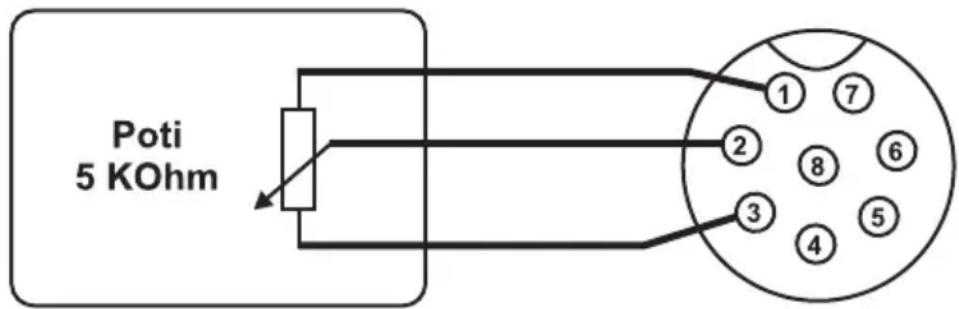
Switch off the switched-mode power supply and then connect the REMOTE plug to the rear remote connection. Screw the external fastening ring.
Slide the rear VOLTAGE REMOTE
switch to the "ON" position.

Switch the switched-mode power supply on. The desired output voltage can now be set through the external poti. Control the complete adjustment area for correct function.
If this remote control function is no longer desired, move the switch to the "OFF" position.
Enable and disable the output
You can use Port 7 and 8 to remote control the output on/off.
Open Port 7 and 8 if you want to enable the output (default).
Short Port 7 and 8 if you want to disable the output.
Maintenance and Cleaning
The switched-mode mains power supply units are maintenance-free, apart from the need to replace fuses and cleaning them once in a while. Use a clean, lint-free, anti-static and dry cloth to clean the device. Do not use any abrasive or chemical detergents or detergents containing solvents.
Replacing the Fuse (only for SPS 1525/1540 PFC)
If it is no longer possible to switch on the mains power supply, the mains fuse has probably tripped.
Proceed as follows to replace the mains fuse:
- Switch off the mains power supply and remove all the connection and power cables.
- Use a suitable screwdriver for slotted screws to prise out the fuse holder on the rear of the device.
-
Replace the defective fuse with a new fine-wire fuse (5 × 20 ~mm) of the same type and rated current, which are as follows:
-
SPS 1525 PFC: F 3.15 A / 250 V (fast blowing)
-
SPS 1540 PFC: F 5 A / 250 V (fast blowing)
-
Press the fuse-link back into the fuse holder until it snaps in properly.

Troubleshooting
By purchasing the switched-mode mains power supply you have acquired a product that is reliable and operationally safe.
However, problems and malfunctions may occur.
For this reason we want to describe how to troubleshoot potential malfunctions:

Always heed the safety instructions!
| Malfunction Possible cause | |
| The mains power supply Is the does not work power supply lit? | green power indicator (2) of the mainsCheck the mains voltage (you may also want to check the mains fuse in the device or the line circuit breaker). |
| Connected consumers Correct do not work Correct polarity? | voltage set?Overload of the mains power supply (display 7)?Check the technical data of the consumers. |
| The output voltage of The main 13.8 V cannot be changed the fix | s power supply has been switched to fixed voltage mode.Change the position of the fixed voltage switch underneath the device. |
Periodically check the technical safety of the device, e.g. check for damage to the housing etc.

Any other repair work must always be carried out by qualified experts familiar with the hazards involved and with the relevant regulations. Unauthorized modifications and repairs of or inside the device lead to expiry of the warranty.
Technical Data
SPS 1525 PFC SPS 1540 PFC SPS 1560 PFC
Operating 230V /50Hz
voltage
Power max. 460 VA max. 782 VA max. 1058 VA
consumption
Output3-15 V DC (variable) or fixed voltage of 13.8 V 1-15 VDC
voltage controllable
Output 25 A 40 A 5 A front
current 60 A rear
Residual ripple 10mV rms (rms effective) max. 40mVp - p
Control response
at Change of
mains supply
+/- 10%: 80mV0.05% +3mV
Change of load
0~100%
230mV
0.1% + 5mV
Mains fuse
3.15 A/250V
5A/250V
(fast blowing)
(fast blowing)
Dimensions
220× 110× 240
220× 110× 310
220× 110× 360
(WxHxD)
(mm)
(mm)
(mm)
Weight
approx. 2.6kg
approx. 3.5kg
approx. 5.8kg
Operating
+0°C to +40°C
temperature
Rel. humidity
max. 85 (non-condensing)
F Introduction
Cher client,
"SENSE"-Function (uniquement SPS 1560 PFC) 37
REMOTE- Telecommande (uniquement SPS 1560 PFC) 37