7004020GYE000 - Measuring equipment BRESSER - Free user manual and instructions
Find the device manual for free 7004020GYE000 BRESSER in PDF.


| Product Type | Indoor air quality monitor with CO2 sensor |
| Brand | Bresser |
| Model | 7004020GYE000 |
| Power supply | Power adapter (included) |
| CO2 sensor type | Long-life NDIR sensor 400-5000 ppm |
| CO2 measurement range | 400 to 5000 ppm |
| CO2 accuracy | ±50 ppm + 5% of reading |
| Temperature range | 0°C to +50°C |
| Temperature resolution | 0.1°C |
| Temperature accuracy | ±1°C |
| Humidity range | 20% to 95% RH |
| Humidity resolution | 1% |
| Alarm functions | Adjustable audible alarm for CO2, temperature and humidity |
| Display | Screen with adjustable backlight (3 levels) |
| Memory | Recording of MIN, MAX and average values (15 min, 8h) |
| Calibration | Automatic (every 24h) and manual |
| Operating temperature | 0°C to +50°C |
| Delivery contents | Monitor, power adapter, instruction manual |
| Maintenance | Disconnect before cleaning, use a dry cloth |
| Safety | Do not expose to high temperatures, do not short-circuit, do not disassemble |
| Recycling | Compliant with WEEE directive, do not dispose of with household waste |
| Warranty | 5 years (conditions at www.bresser.de/warranty_terms) |
| Repairability | In case of defect, contact the specialized dealer |
Frequently Asked Questions - 7004020GYE000 BRESSER
User questions about 7004020GYE000 BRESSER
0 question about this device. Answer the ones you know or ask your own.
Ask a new question about this device
Download the instructions for your Measuring equipment in PDF format for free! Find your manual 7004020GYE000 - BRESSER and take your electronic device back in hand. On this page are published all the documents necessary for the use of your device. 7004020GYE000 by BRESSER.
USER MANUAL 7004020GYE000 BRESSER

BRESSER

BRESSER
CO₂-Wert Anzeige:
Keep packaging material, like plastic bags and rubber bands, out of the reach of children, as these materials pose a choking hazard.

RISK of ELECTRIC
SHOCK!
This device contains electronic components that operate via a power source (ac adaptor). Only use the device as described in the manual; otherwise, you run the risk of an electric shock.

RISK of FIRE/
EXPLOSION!
Do not expose the device to high temperatures. Excessive heat or improper handling could trigger a short-circuit, a fire or an explosion.

RISK of property damage!
Do not disassemble the device. In the event of a defect, please contact your dealer. The dealer will contact the Service Centre and can send the device in to be repaired, if necessary.

BRESSER
EC DECLARATION OF CONFORMITY
CE Bresser GmbH has issued a "Declaration of Conformity" in accordance with applicable guidelines and corresponding standards. The full text of the EU declaration of conformity is available at the following internet address:
www.bresser.de/download/7004020000000/CE/7004020000000_CE.pdf
SCOPE OF DELIVERY
- CO_2 Air Quality Monitor Smile
- AC adaptor
- Instruction Manual
UKCA Declaration of Conformity

Bresser UK Ltd. has issued a „Declaration of Conformity“ in accordance with applicable guidelines and corresponding standards. The full text of the UKCA declaration of
conformity is available at the following internet address: www.bresser.de/download/7004020/UKCA/7004020_UKCA.pdf
Bresser UK Ltd. • Suite 3G, Eden House, Enterprise Way, Edenbridge, Kent TN8 6Hf, Great Britain

BRESSER
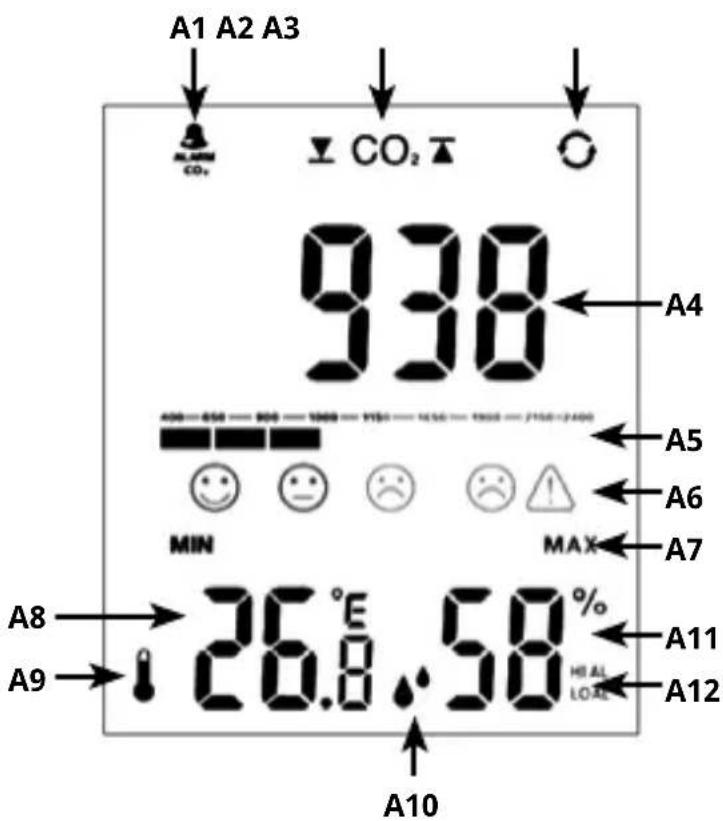
DISPLAY
A1: CO _2 Alarm Sound: ON
A2: Set upper and lower alert of CO_2 level (default at 800 PPM).
flashes when current CO _2 is >800 PPM.
A3: Auto scrolling of alternate displays of MAX => MIN => Current reading of CO₂ + Temp + RH%
A4: PPM Value. PPM stands for "parts per million" and shows the concentration of carbon dioxide in the ambient air.
A5: Graphical display of current CO level.
A6: Symbols for CO 2 levels. appears and flashes when current CO 2 is over 2000 PPM.

BRESSER
A7: Symbol for MIN/MAX value
A8: Temperature
A9: Symbol for Temperature
A10: Symbol for Humidity
A11: Humidity
A12: Hi-/Low alarm for temperature/humidity
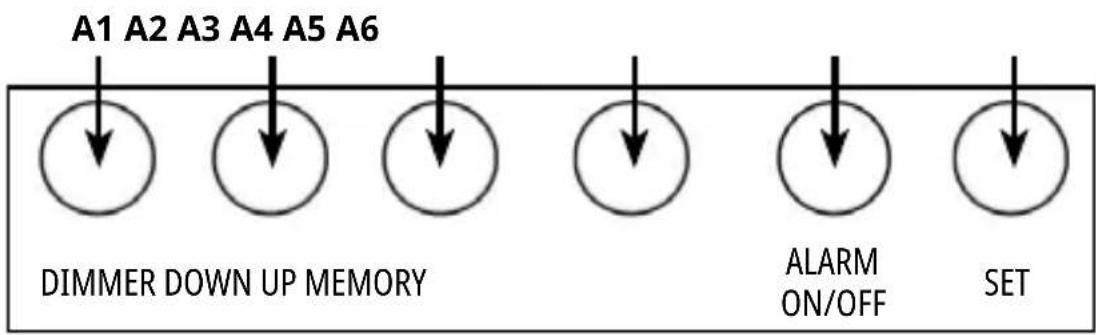
BUTTONS
A1: Dimmer (Backlight)
A2: Down
A3: Up
A4: Memory
A5: Alert on/off
A6: Set

BRESSER
CO _2 level display:
| Icon CO | 2 level Status Description | ||
 | 400 – 600ppm Outside Normal outdoor air level. | ||
 | 601–1000ppm Well ventilated, Ideal | Typical level indoors with good ventilation. 1000 ppm = Recommended maximum level in a closed room. Considered maximum comfort level in many countries. | |
 | 1001–1500ppm Under ventilated Poor air quality - requires ventilation.General drowsiness, discomfort and odors. | ||
 | 1501–2000ppm Very poorly ventilated | Danger! You may experience severe headaches, vomiting/nausea, and dizziness within 20 minutes. | |
 | above 2000ppm Totally unacceptable | Danger! Headache and dizziness in 5 to 10 minutes. Increased risk for health damage by prolonged exposure. | |

BRESSER
TECHNICAL DATA
| Power consumption | AC adaptor |
| Specification | |
| Sensor Type | Long Life NDIR Sensor 400-5000ppm |
| Response Time | Within 15 seconds of any change in CO2 |
| Operating Temp | 0° to +50°C); (32° to 122°F) |
| Temperature measuring range | 0° to +50°C); (32° to 122°F) |
| Temperature resolution | 0.1°C |
| Temperature accuracy | ±1°C |
| Humidity measuring range | 20 to 95% RH |
| Humidity resolution 1% | |
| CO2measuring accuracy | ± 50ppm+5% reading value(Example: If reading value is 1000ppm, then tolerance is 50+1000*0.05=100ppm, so it is 1000±100ppm) |
| Default setting | |
| CO2alert Low - 400, High – 2000 | |
| RH% alert Low – 35%, High – 60% | |
| Average value 15 minutes | |
| CO2voice alarm Off | |
| Display of outside measuring range | |
| CO2– 400ppm (lower than 400 PPM) | HI (over 5000 PPM) |
| Temperature - LO(lower 0°C / 32°F) | HI (over 50°C/ 122°F) |
| RH% - 20% (lower than 20%) | 95% (over 95%) |

BRESSER
BUTTONS
| Operating mode [SET] [UP] | [ DOWN / C/F ] | [ ALARM / ON/OFF ] | MEM MEMORY | DIMMER | |||
| Normal | press --- °C / °F | Celsius or Fahrenheit change | CO2 ALERT ON or OFF selection | CO2 MAX, MIN, loop mode selection | LIGHT brightness dimmer. Turn on or turn off. | ||
| hold | Enter CO2 and humidity Exceed standard setting mode. | Enter manual calibration mode. This process takes 20 minutes. | --- --- --- | --- | |||
| Alert setting | press --- | --- --- --- --- | |||||
| hold --- | --- --- --- --- | ||||||

BRESSER
START THE DEVICE
Connect the ac adaptor to the unit. After switching on, a beep sounds and the room temperature and humidity are shown on the display. During the first 150 seconds, the CO₂ display (value and progress bar) starts preheating and will show ----.
CO _2 UPPER LIMIT AND LOWER LIMIT EXCEED STANDARD SETTING
ALARM Single press [ALARM ON/OFF] to set the Alarm sound on or off.
CO2+RH1 SET Press and hold the SET button:
CO2 CO2 RH% RH%
Single press to view MAX => MIN => Current (CO₂+TEMP+RH%)
- Long press SET button about 2 seconds, CO₂/PPM/ shown on, value 400 flashes, press UP or DOWN button to set CO₂ lower limit exceed standard value. (lower limit Max value can not be bigger than the upper limit Min value. The Min value is 400, setting unit is 10ppm/set).
- Long press SET button about 2 seconds, CO₂PPM/ shown on, value 2000 flashes, press UP and DOWN button to set CO₂upper limit exceed standard value. (upper limit Min value can not be smaller than the lower limit Max value. The Max value is 5000, setting unit is 10ppm/set).

BRESSER
HUMIDITY UPPER LIMIT AND LOWER LIMIT EXCEED STANDARD SETTING
- Press SET button, humidity and shown on, humidity value flashes, press UP or DOWN button to adjust lower limit humidity range (lower limit Max value can not be bigger than upper limit Min value, the Min value can be set to 25%, setting unit is 1%/set.
- Press SET button, humidity and shown on, humidity value flashes, press UP or DOWN button to adjust upper limit humidity range (upper limit Min value can not be smaller than lower limit Max value. The Max value can be set to 90%,
setting unit is 1%/set)
REMARKS
- Long press of the UP or DOWN button makes the value run faster.
- Lower limit of humidity set as 30%, when humidity lower than 29%, only ▼flashes.
• Upper limit of humidity set as 80%, when humidity higher than 81%, only ★ flashes.
• After setting all values, press SET button to save desired value or wait for about 10 seconds.
CO _2 ALARM ON/OFF
- Default setting is OFF (symbol is not visible).

BRESSER
- Press ALARM ON/OFF button to activate CO_2 ALARM function, symbol appears.
- When CO_2 value goes up to desired upper limit value, alert rings and flashes.
ALERT MODE:
• Lower than 200 ppm, rings every 3 seconds
• Lower than 500 ppm, rings every 1 second
• Over 800 ppm, rings twice every 1 second
- Press ALARM ON/OFF button to quit alerts, alert period is 2 minutes.
- Press ALARM ON/OFF button, turn off CO₂ ALARM function, ALARM disappears.
- When CO_2 value goes up to the desired lower limit value, only flashes, no alert rings.
AUTO CALIBRATION
The automatic calibration function means that the sensor will intelligently judge the zero point based on the environmental concentration and calibrate itself after a period of continuous operation (7 days). Calibration takes place automatically every 24 hours after the unit has been switched on. The zero point of automatic calibration is 400ppm.
MANUAL CALIBRATION
- Find an area with fresh air, CO_2 value lower than 400ppm.
- Press and hold UP button to enter manual calibration mode. CAL letter flashes. This process takes 20 minutes, after 20 minu-

BRESSER
tes, CAL letter stop to flash and manual calibration is finished.
°C / °F
Default setting is Celsius degree, press DOWN button to change to Fahrenheit.
BACKLIGHT
The default setting is high backlight. Press the DIMMER touch button to dim the display to a darker backlight. Press the DIMMER touch button again to turn off the backlight.
CO₂ MIN/MAX/ CYCLE DISPLAY FUNCTION
- Press MEM/ button, Max value of CO temperature, humidity for the last 24
hours is displayed.
- Press MEM/ ○ button again, MIN value of CO₂, temperature, humidity for the last 24 hours is displayed.
- Press MEM/ again, the average value for the past 15 minutes of CO_2 , temperature, humidity is displayed.
- Press MEM/ again, the average value for the past 8 hours of CO_2 , temperature, humidity is displayed.
- Press MEM/ button, with 1 short beep sound to exit.
HISTORY CLEANING
- Press MEM/ button once to enter any mode, then long press MEM/ to clean all values.

BRESSER
CLEANING AND MAINTENANCE
Before cleaning the device, disconnect it from the power supply (disconnect ac adaptor)! Only use a dry cloth to clean the exterior of the device. To avoid damaging the electronics, do not use any cleaning fluid.
DISPOSAL

Dispose of the packaging materials properly, according to their type, such as paper or cardboard. Contact your local waste-disposal service or environmental authority for information on the proper disposal.

Do not dispose of electronic devices in the household garbage!
As per Directive 2002/96/EC of the European Parliament on waste elec-
trical and electronic equipment and its adaptation into German law, used electronic devices must be collected separately and recycled in an environmentally friendly manner.
WARRANTY & SERVICE
The regular guarantee period is 5 years and begins on the day of purchase. You can consult the full guarantee terms as well as information on extending the guarantee period and details of our services at www.bresser.de/warranty_terms.

BRESSER
AVERTISSEMENTS - GÉNÉRA- LITÉS

RISQUE D'ÉTOUFFEMENT !
DÉCLARATION DE CONFORMITÉ CE


BRESSER
ALGEMENE WAARSCHUWINGEN


BRESSER