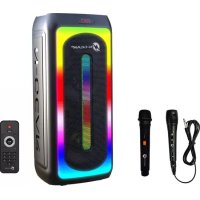
LGP JUKE808 - Loudspeaker N-Gear - Free user manual and instructions
Find the device manual for free LGP JUKE808 N-Gear in PDF.



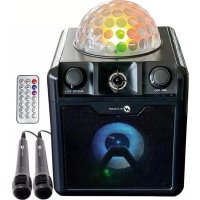
| Product type | Portable speaker with karaoke |
| Brand | N-Gear |
| Model | LGP JUKE808 |
| Output power | 40 W |
| Speaker unit | 8" x 2 |
| Sensitivity | 87 dB ± 3 dB |
| Frequency response | 90 Hz - 20 kHz |
| Power supply | 100 V - 240 V via adapter; rechargeable battery 4 V / 4400 mAh |
| Supported audio formats (USB/SD) | MP3, WAV |
| Connectivity | Bluetooth, USB, Micro SD, AUX, FM, wired and wireless microphones, guitar input |
| Special features | TWS (pairing two speakers), karaoke, echo, equalizer, remote control |
| Inputs | USB, Micro SD/TF, AUX, MIC1, MIC2, GUITAR |
| Outputs | Headphone jack (unspecified) - built-in speaker |
| Included accessories | 1 USB charging cable, 1 user manual, 1 wired microphone, 1 remote control, 1 wireless microphone |
| Cleaning | With a dry cloth only |
| Safety instructions | Do not expose to rain or moisture; do not open; unplug during thunderstorms; use only the supplied adapter |
| Remote control batteries | Not specified (estimated: 2 AAA batteries) |
| Customer service | www.n-gear.eu |
Frequently Asked Questions - LGP JUKE808 N-Gear
User questions about LGP JUKE808 N-Gear
0 question about this device. Answer the ones you know or ask your own.
Ask a new question about this device
Download the instructions for your Loudspeaker in PDF format for free! Find your manual LGP JUKE808 - N-Gear and take your electronic device back in hand. On this page are published all the documents necessary for the use of your device. LGP JUKE808 by N-Gear.
USER MANUAL LGP JUKE808 N-Gear
USER MANUAL - MANUEL D'UTILSATION BENUTZERHANDBUCH - MANUAL DE USARIO HANDLEIDING - MANUALE UTENTE

N-GEAR®
LGP JUKE-808

EN
FR
DU
ES
NL
IT
Please read the operation manual carefully to operate this unit correctly and keep this manual handy for further reference.
- USB Input
- Micro SD/TF Input
- TWS (Multiple speakers)
- Previous Button
- Play/Pause Button
- Next Button
-
Input Mode
-
AUX Input
- MIC1 Input
- MIC2 Input
- GUITAR Input
- Tablet/phone holder
- System ON/OFF Switch
-
MIC Priority
-
Repeat
- Main Volume
- LED ON/OFF Switch
- Equalizer
- Menu
REMOTE CONTROL FUNCTION

- Power
- Mode
- Stop
- Mute
- Previous
- Play/pause
- VOL +
- Next
- VOL-
- Repeat
- Equalizer
12.0-9
WARNING
WARNING: TO REDUCE THE RISK OF FIRE OR SHOCK, DO NOT EXPOSE THIS PRODUCT TO RAIN OR MOISTURE

CAUTION
RISK OF ELECTRIC SHOCK DO NOT OPEN

CAUTION: TO REDUSE THE RISK OF FIRE OR SHOCK, DO NOT REMOVE COVER OR BACK. NO USER-SERVICEABLE PARTS INSIDE. REFER SERVICING TO QUALIFIED PERSONNEL
IMPORTANT SAFETY INSTRUCTIONS
- Read these instructions.
- Keep these instructions. Pay attention to all warnings.
- Follow all instructions.
- Do not use this devise near water.
- Clean only with dry cloth.
- Do not block any ventilation openings.
- Install in accordance with the manufacturer's instructions.
- Do not install near any heat sources such as radiators, heat registers, stoves, or other devise (including amplifiers) that produce heat.
- Do not defeat the safety of the polarized or grounding-type plug. A polarized plug has two blades with one wider than the other. A grounding type plug has two blades and a third grounding prong. The wide blade or the third prong are provided for your safety. If the provided plug does not fit into your outlet, consult an electrician for replacement of the obsolete outlet.
- Protect the power cord from being walked on or pinched particularly at plugs, convenience receptacles, and the point where they exit from the devise.
- Only use attachments/accessories specified by the manufacturer.
- When the device has wheels, use caution when moving the device on wheels to avoid injury from tip-over.
- Unplug this devise during lightning storms or when unused for long periods of time.
- Refer all servicing to qualified service personnel. Servicing is required when the devise has been damaged in any way such as power supply cord or plug is damaged, liquid has been spilled or objects have fallen into the devise, the devise has been exposed to rain or moisture does not operate normally, or has been dropped.
- The devise shall not be exposed to dripping or splashing and no objects filled with liquids, such as vases, shall be placed on the devise.
- The battery shall not be exposed to excessive heat such as sunshine, fire or the like.
- When using the mains plug or appliance plug to disconnect the appliance, do so in a safe manner.
- DO NOT overload wall outlets or extension cords beyond their rating as this may cause electric shock or fire.
■ Reorient or relocate the receiving antenna.
■ Increase the separation between the equipment and the receiver.
■ Connect the equipment into an outlet on a circuit different from that to which the receiver is connected.
■ Consult the dealer or an experienced radio/TV technician for assistance.

The lightning flash with arrowhead symbol inside an equilateral triangle is intended to alert User of the presence of un-insulated "hazardous voltage" within the product's enclosure, which may be of sufficient magnitude to induce a risk of electric shock to persons.

The exclamation mark inside an equilateral triangle is intended to alert user of the presence of het important operating and maintenance (servicing) instructions in the literature accompanying the product.
NOTES:
Please do not attempt to open the back cover or power adapter as opening or removing the covers may expose you to dangerous voltage or other hazards, and it will also cause the restricted servicing to be disabled: There are no user servicing components inside.
NOTES:
This digital devise does not exceed the Class B limits for radio noise emissions from digital devise as set out in the Radio Interference Regulations of Industry Canada. These limits are designed to provide reasonable protection against harmful interference in a residential installation.
NOTES:

FUNCTION DESCRIPTION
BLUETOOTH FUNCTION
● Turn on the volume power of the speaker; the speaker is on Bluetooth mode.
- When on other mode: Press MODE on the speaker to switch to Bluetooth mode.
- Turn on your mobile device and search for "LGP JUKE-808". Select it to pair.
● You will get a voice prompt when your device is connected.
AUX FUNCTION
● Press MODE on the speaker to switch to AUX mode.
● Press PLAY/PAUSE to play or pause the music.
- Press NEXT button to go to next song.
- Press PREVIOUS button to restart song or return to previous song.
WIRED MICROPHONE
- Connect the supplied wired microphone to the MIC input jack located on the front panel of the speaker.
● Control the volume of the MIC by rotating the Mic knob.
● Control the echo effect by rotating the Echo knob.
WIRELESS MICROPHONE
● Turn on the wireless microphone.
● Control the volume of the MIC by rotating the Mic knob.
● Control the echo effect by rotating the Echo knob.
● Plug the included AC into any AC Charging Cable Charger and into the AC charging port.
● The charge LED light will turn to red indicating the battery is being charged.
- When using the speaker, it can be used on battery power or being plugged into the AC Charger.
USB FUNCTION
- Insert a USB flash drive. USB mode will start automatically.
- In order for the speaker to recognize the song these should be MP3 or WAV format.
- Press PLAY/PAUSE button to play or pause the music.
- Press NEXT button to go to next song.
- Press PREVIOUS button to restart song or return to previous song.
MICRO SD FUNCTION
- Insert a Micro SD, SD mode will start automatically.
- In order for the speaker to recognize the song these should be MP3 or WAV format.
- Press PLAY/PAUSE button to play or pause the music.
- Press NEXT button to go to next song.
- Press PREVIOUS button to restart song or return to previous song.
FM RADIO FUNCTION
- Press MODE on the speaker to switch to FM mode.
- Press PLAY/PAUSE to enter into automatic FM channel searching.
- Press NEXT button to go to the next frequency.
● Press PREVIOUS to go back to previous frequency.
SAFETY INSTRUCTION
- Please read these instructions carefully before operating this device.
- Only use the power supply that came with the product, if not included, use the power supply is indicated in this manual, Using an unauthorized power supply will invalidate your guarantee and may irrecoverably damage the product. Disconnect your karaoke speaker from the power supply during thunderstorms. Always check that you have completely switched off your karaoke speaker before you change or disconnect the power supply.
- Do not leave it in low temperatures as moisture can form inside the product, which may damage the circuit board. Keep away from heat sources and flames. Do not leave it in high temperatures as electronic devices and plastic parts warp in heat.
- To avoid possible hearing damage, do not listen to this karaoke speaker at high volume levels for long time. Always keep the volume within reasonable limits.
SPECIFICATIONS
8"*2 Speaker Unit
87dB+3dB Sensitivity
40W Output Power
100V-240V Voltage Output
90HZ-20KHZ Frequency Response
7.4V/4400mAh Battery
PACKAGE INCLUSIONS
1x Portable Speaker
1x USB Charging Cable
1x User Manual
1x Wired microphone
1x Remote Control
1x Wireless microphone
For questions or service please contact N-Gear
www.n-gear.eu
FONCTION PANNEAU

INCLUS DANS LE FORFAIT
7.4 V/ 44 00 mAh Akku
PAKETINSCHLÜSSE
N-GEAR
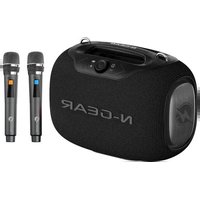
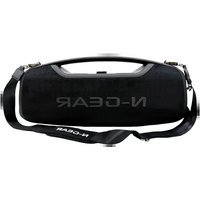
- USER MANUAL - MANUEL D'UTILSATION BENUTZERHANDBUCH - MANUAL DE USARIO HANDLEIDING - MANUALE UTENTE
- REMOTE CONTROL FUNCTION
- WARNING
- CAUTION
- IMPORTANT SAFETY INSTRUCTIONS
- NOTES
- FUNCTION DESCRIPTION
- BLUETOOTH FUNCTION
- AUX FUNCTION
- WIRED MICROPHONE
- WIRELESS MICROPHONE
- USB FUNCTION
- MICRO SD FUNCTION
- FM RADIO FUNCTION
- SAFETY INSTRUCTION
- SPECIFICATIONS
- PACKAGE INCLUSIONS
- FONCTION PANNEAU
- INCLUS DANS LE FORFAIT
- PAKETINSCHLÜSSE
- N-GEAR
Brand : N-Gear
Model : LGP JUKE808
Category : Loudspeaker