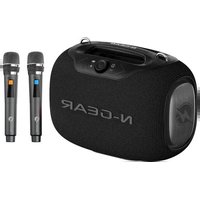
NRG 600 - Loudspeaker N-Gear - Free user manual and instructions
Find the device manual for free NRG 600 N-Gear in PDF.


| Product Type | Portable wireless speaker |
| Brand | N-Gear |
| Model | NRG 600 |
| Output Power | 120 W |
| Battery Type | Lithium-ion 18650, 22000 mAh |
| Battery Life | 6 to 8 hours |
| Frequency Response | 40 Hz - 20 kHz |
| Speakers | 1 x 145 mm (80 W) + 2 x 93 mm (20 W each), impedance 4 Ω |
| Waterproof Rating | IPX5 |
| Wireless Connectivity | Bluetooth, TWS (connect two speakers) |
| Audio Input | AUX 3.5 mm, USB (USB drive up to 32 GB), TF card (up to 32 GB) |
| Supported Audio Formats | MP3 |
| Microphone | 2 built-in wireless microphones |
| Additional Features | Resume playback from stop point, EQ modes (bass, normal, karaoke), LED lighting, 20W fast charging |
| Power Supply | 9 V ⎓ 2 A (charging via USB Type-C) |
| Maximum Consumption | 2 A |
| Cleaning | Dry cloth, avoid excessive moisture |
| Repairability | Internal components not user-accessible, consult a professional |
| Safety | Overcharge protection, auto-off after 15 minutes of inactivity |
Frequently Asked Questions - NRG 600 N-Gear
User questions about NRG 600 N-Gear
0 question about this device. Answer the ones you know or ask your own.
Ask a new question about this device
Download the instructions for your Loudspeaker in PDF format for free! Find your manual NRG 600 - N-Gear and take your electronic device back in hand. On this page are published all the documents necessary for the use of your device. NRG 600 by N-Gear.
USER MANUAL NRG 600 N-Gear
WARNING: TO REDUCE THE RISK OF FIRE OR SHOCK, DO NOT EXPOSE THIS PRODUCT TO RAIN OR MOISTURE

CAUTION
RISK OF ELECTRIC SHOCK DO NOT OPEN

CAUTION: TO REDUSE THE RISK OF FIRE OR SHOCK, DO NOT REMOVE COVER OR BACK. NO USER-SERVICEABLE PARTS INSIDE. REFER SERVICING TO QUALIFIED PERSONNEL
IMPORTANT SAFETY INSTRUCTIONS
- Read these instructions.
- Keep these instructions. Heed all warnings.
- Follow all instructions.
- Do not use this apparatus near water.
- Clean only with dry cloth.
- Do not block any ventilation openings.
- Install in accordance with the manufacturer's instructions.
- Do not install near any heat sources such as radiators, heat registers, stoves, or other apparatus (including amplifiers) that produce heat.
- Do not defeat the safety of the polarized of the polarized or grounding-type plug. A polarized plug has two blades with one wider than the other. A grounding type plug has two blades and a third grounding prong. The wide blade or the third prong are provided for your safety. If the provided plug does not fit into your outlet, consult an electrician for replacement of the obsolete outlet.
- Protect the power cord from being walked on or pinched particularly at plugs, convenience receptacles, and the point where they exit from the apparatus.
- Only use attachments/accessories specified by the manufacturer.
- Use only with the cart, stand, tripod, bracket, or table specified by the manufacture, or sold with the apparatus. When a cart is used, use caution when moving the cart/apparatus combination to avoid injury from tip-over. Portable Cart Warning
- Unplug this apparatus during lightning storms or when unused for long periods of time.
- Refer all servicing to qualified service personnel. Servicing is required when the apparatus has been damaged in any way such as powersupply cord or plug is damaged, liquid has been spilled or objects have fallen into the apparatus, the apparatus has been exposed to rain or moisture does not operate normally, or has been dropped.
- The apparatus shall not be exposed to dripping or splashing and no objects filled with liquids, such as vases, shall be placed on the apparatus.
- The battery shall not be exposed to excessive heat such as sunshine, fire or the like.
- The MAINS plugs used as the disconnect device, which shall remain readily operable
Reorient or relocate the receiving antenna.
■Increase the separation between the equipment and the receiver.
Connect the equipment into an outlet on a circuit different from that to which the receiver is connected.
Consult the dealer or an experienced radio/TV technician for assistance.

The lightning flash with arrowhead symbol inside an equilateral triangle is intended to alert User of the presence of un-insulated "hazardous voltage" within the product's enclosure, which may be of sufficient magnitude to induce a risk of electric shock to persons.

The exclamation mark inside an equilateral triangle is intended to alert user of the presence of hot important operating and maintenance (servicing) instructions in the literature accompanying the product.
NOTES:
Please do not attempt to open the back cover or power adapter as opening or removing the covers may expose you to dangerous voltage or other hazards, and it will also cause the restricted servicing to be disabled: There are no user servicing components inside.
NOTES:
This digital apparatus does not exceed the Class B limits for radio noise emissions from digital apparatus as set out in the Radio Interference Regulations of Industry Canada. These limits are designed to provide reasonable protection against harmful interference in a residential installation.
NOTES:
Technical Specifications:
Wireless standard: 5.3
Transmission distance: 10 meters
Output power: 120W
Playing time: 6-8hours
Frequency effect : 40Hz-20KHz
Speaker unit size: 4Ω 145mm 80W, 4Ω 93mm 20W*2
Input power: 9V----2A
Maximum current consumption: 2A
Battery type: 18650 lithium ion battery 22000mAh
Audio signal input interface: standard 3.5mm headphone jack (stereo)
Features:
- Wireless connection
- Memory function, support resume playing from break point
- Support U disk/TF card / AUX playback mode
- Rechargeable built-in lithium ion battery
- Support MP3 music format decoding
- Using high-fidelity speakers, the sound is more natural and delicate
- Level 5 waterproof
- TWS function support two speakers connection
- With two wireless microphone
- Support 20W fast charger

Button instruction
-
button
Single click: to enter into next song
- TWS button
Single click : to enter into /exit TWS function
1) Prepare two speaker, single click this button for either of them, will hear a voice prompt. (PS:Please make sure the speaker is disconnected with any wireless device before using TWS function.)
2)Then wait for a few seconds, will hear a voice prompt after the two speaker connected with each other successfully. Search for the bluetooth ID to connect with bluetooth device.
3)After connected with bluetooth device, operate either speaker, the other one will be synced.
4)Single click TWS button of either of them will exit TWS mode.
Long Press:To switch the music playing mode
The default playing mode of the device is bluetooth mode when turned on the device.
When TF card, U-disk, AUX all was inserted at the same time, long press this button each time, the playing mode will be from TF card-U disk-AUX input, then back to bluetooth mode. There will be voice prompt when switch each mode. (Note: This operation should be under TF card, U-disk, AUX all insert on the speaker in advance)
3.Light button
Single click : to switch the light mode
Long press : to turn on /off the light
Double click: to enter into /exit bluetooth connection
- Knob (Control the volume)
Rotate left to reduce the volume, rotate right to enlarge the volume
Single press : to pause /play the music
- EQ button
Single click :Switch EQ mode ,three EQ mode :Bass mode /Normal mode /Karaoke mode. There will be a voice prompt when switch the EQ mode
- Power on /Power off button
Long press 3s :power on /power off
- < button
Single click: go back last song
- Type-c jack
Insert the type-c charging cable to charge the speaker
9.TF jack
When insert a TF card, the default playing is TF card playing mode
TF card support 32GB maximum
10.USB jack
When insert a U-disk, the default playing is U-disk playing mode
U-disk support 32GB maximum
11.AUX jack
Standard 3.5mm headphone jack
Direction for us:
- Wireless pairing
1.1.When the device is turned on, wireless mode is the default.
1.2. Turn on the wireless device, search for HOPESTAR- Party Box to connect and pair by bluetooth
2. Suitable for various mobile phone accessories wireless technology, wireless adapter, wireless player.
3.Voice prompt
There is a voice prompt when turning on/off;
When the volume is up to maximum, there will be a voice prompt; the minimum volume, there is no voice prompt.
There will be voice prompt about three times "di-di-di"after detecting the device is low power, then turn off.
- Mode switching
4.1 It default wireless mode playing when turn on the speaker
Mode switching: When the TF card, U-disk, AUX mode all insert on speaker at the same time, long press TWS button to switch the playing mode.
Note: The playing sequence will be from wireless mode - TF card mode - U disk mode - AUX mode .
4.2 The device will select the mode preferentially which you insert last for the TF card, U-disk ,AUX mode.
5. TWS operation instruction
Open any two speaker at the same time, click either tws button, when you hear the"beep" to enter the TWS searching; when the TWS connection is successful, when hear the voice prompt, the host indicator flash and the other one will light up.
- Play indicator :
White light flashes quickly, about 0.5 seconds/time under bluetooth searching status;
The white light is always on when bluetooth connected successfully with the bluetooth device ; the white light flashes slowly about 1 second/time under playing status.
- Charging indicator
The three white lights is flashing orderly from left to right while charging .
When battery is charged 35% , the first lights is always on. The other lights are flashing
When is charged 70% , the first and second lights are always on . The rest lights are flashing. When is full charged, all the lights will be on.
The indicator will display the battery capacity under normal working status.
8.Charging and using:
This machine has a built-in overcharge protection circuit, which can be connected to a computer or charger for a long time, about four hours Charging is complete.
The play time of each battery will vary depending on the volume used rather different.
9.Volume
The default volume is at 70% when the speaker turn on.
10.If there is without any operation, device will shut down automatically after 15 minutes.
Troubleshooting:
- Automatic shutdown: When the battery power is low, the battery protection will be turned on automatically, please charge it for 4 hours before use.
2.Unable to play music: The music file storage path cannot be recognized by the player. Please store the music file in the root directory of the removable device.
3.There is no sound when connected to the computer: the computer interface is connected incorrectly, please select the correct audio output port
- There is no response to the keys or the function is disordered: try again after shutting down.
5.If the device is abnormal, please use a slender pole to press the reset button in the AUX hole to reboot the speaker.
AVENTISSEMENT
AVERTISSEMENT:POUR RÉDUIRE LE RISQUE D'INCENDIE OUD'éLECTROCUTION,N'EXPOSEZ PAS CE PRODUIT À LA PLUIE OU À L'HUMIDITE

MISE EN GARDE
RISQUE DE CHOC ELECTRIQUE NE PAS OUVRIR

ATTENTION: POUR RÉDUIRE LE RISQUE D'INCENDIE OU D'ÉLECTROCUTION, NE RETIREZ PAS LE COUVERCLE OU LE DOS. AUCUNE PIECE REPARABLE PAR L'UTILISATEUR À L'INTÉRIEUR. RÉFÉRZ L'ENTRETIEN À DU PERSONNEL QUALIFIÉ
CONSIGNES DE SECURITE IMPORTANTES
Specifications techniques:
Normesansfil:5.3
Distance de transmission : 10 metres
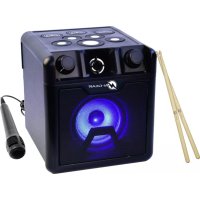
Brand : N-Gear
Model : NRG 600
Category : Loudspeaker