AVPA1HDCI(A) - AV receiver DENON - Free user manual and instructions

Find the device manual for free AVPA1HDCI(A) DENON in PDF.

📄 112 pages English EN 💬 AI Question
Notice DENON AVPA1HDCI(A) - page 4
View the manual : Français FR English EN

User questions about AVPA1HDCI(A) DENON

0 question about this device. Answer the ones you know or ask your own.

Ask a new question about this device

L'email reste privé : il sert seulement à vous prévenir si quelqu'un répond à votre question.

No questions yet. Be the first to ask one.

Download the instructions for your AV receiver in PDF format for free! Find your manual AVPA1HDCI(A) - DENON and take your electronic device back in hand. On this page are published all the documents necessary for the use of your device. AVPA1HDCI(A) by DENON.

USER MANUAL AVPA1HDCI(A) DENON

CAUTION: TO REDUCE THE RISK OF ELECTRIC SHOCK, DO NOT REMOVE COVER (OR BACK). NO USER-SERVICEABLE PARTS INSIDE. REFER SERVICING TO QUALIFIED SERVICE PERSONNEL.The lightning flash with arrowhead symbol, within an equilateral triangle, is intended to alert the user to the presence of uninsulated “dangerous voltage” within the product’s enclosure that may be of sufficient magnitude to constitute a risk of electric shock to persons.The exclamation point within an equilateral triangle is intended to alert the user to the presence of important operating and maintenance (servicing) instructions in the literature accompanying the appliance.

TO REDUCE THE RISK OF FIRE OR ELECTRIC SHOCK, DO NOT EXPOSE THIS APPLIANCE TO RAIN OR MOISTURE. SAFETY INSTRUCTIONS

1. Read Instructions – All the safety and operating instructions should be read before the product is operated.

2. Retain Instructions – The safety and operating instructions should be

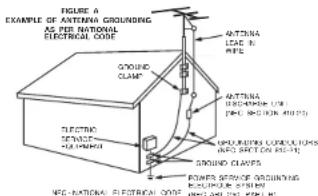
retained for future reference.3. Heed Warnings – All warnings on the product and in the operating instructions should be adhered to.4. Follow Instructions – All operating and use instructions should be followed.5. Cleaning – Unplug this product from the wall outlet before cleaning. Do not use liquid cleaners or aerosol cleaners.6. Attachments – Do not use attachments not recommended by the product manufacturer as they may cause hazards.7. Water and Moisture – Do not use this product near water – for example, near a bath tub, wash bowl, kitchen sink, or laundry tub; in a wet basement; or near a swimming pool; and the like.8. Accessories – Do not place this product on an unstable cart, stand, tripod, bracket, or table. The product may fall, causing serious injury to a child or adult, and serious damage to the product. Use only with a cart, stand, tripod, bracket, or table recommended by the manufacturer, or sold with the product. Any mounting of the product should follow the manufacturer’s instructions, and should use a mounting accessory recommended by the manufacturer.9. A product and cart combination should be moved with care. Quick stops, excessive force, and uneven surfaces may cause the product and cart combination to overturn.10. Ventilation – Slots and openings in the cabinet are provided for ventilation and to ensure reliable operation of the product and to protect it from overheating, and these openings must not be blocked or covered. The openings should never be blocked by placing the product on a bed, sofa, rug, or other similar surface. This product should not be placed in a built-in installation such as a bookcase or rack unless proper ventilation is provided or the manufacturer’s instructions have been adhered to.11. Power Sources – This product should be operated only from the type of power source indicated on the marking label. If you are not sure of the type of power supply to your home, consult your product dealer or local power company. For products intended to operate from battery power, or other sources, refer to the operating instructions.12. Grounding or Polarization – This product may be equipped with a polarized alternating-current line plug (a plug having one blade wider than the other). This plug will fit into the power outlet only one way. This is a safety feature. If you are unable to insert the plug fully into the outlet, try reversing the plug. If the plug should still fail to fit, contact your electrician to replace your obsolete outlet. Do not defeat the safety purpose of the polarized plug.13. Power-Cord Protection – Power-supply cords should be routed so that they are not likely to be walked on or pinched by items placed upon or against them, paying particular attention to cords at plugs, convenience receptacles, and the point where they exit from the product.15. Outdoor Antenna Grounding – If an outside antenna or cable system is connected to the product, be sure the antenna or cable system is grounded so as to provide some protection against voltage surges and built-up static charges. Article 810 of the National Electrical Code, ANSI/NFPA 70, provides information with regard to proper grounding of the mast and supporting structure, grounding of the lead-in wire to an antenna discharge unit, size of grounding conductors, location of antenna-discharge unit, connection to grounding electrodes, and requirements for the grounding electrode. See Figure A.16. Lightning – For added protection for this product during a lightning storm, or when it is left unattended and unused for long periods of time, unplug it from the wall outlet and disconnect the antenna or cable system. This will prevent damage to the product due to lightning and power-line surges.17. Power Lines – An outside antenna system should not be located in the vicinity of overhead power lines or other electric light or power circuits, or where it can fall into such power lines or circuits. When installing an outside antenna system, extreme care should be taken to keep from touching such power lines or circuits as contact with them might be fatal.18. Overloading – Do not overload wall outlets, extension cords, or integral convenience receptacles as this can result in a risk of fire or electric shock.19. Object and Liquid Entry – Never push objects of any kind into this product through openings as they may touch dangerous voltage points or short-out parts that could result in a fire or electric shock. Never spill liquid of any kind on the product.20. Servicing – Do not attempt to service this product yourself as opening or removing covers may expose you to dangerous voltage or other hazards. Refer all servicing to qualified service personnel.

21. Damage Requiring Service – Unplug this product from the wall outlet

and refer servicing to qualified service personnel under the following conditions: a) When the power-supply cord or plug is damaged, b) If liquid has been spilled, or objects have fallen into the product, c) If the product has been exposed to rain or water, d) If the product does not operate normally by following the operating instructions. Adjust only those controls that are covered by the operating instructions as an improper adjustment of other controls may result in damage and will often require extensive work by a qualified technician to restore the product to its normal operation, e) If the product has been dropped or damaged in any way, and f) When the product exhibits a distinct change in performance – this indicates a need for service.22. Replacement Parts – When replacement parts are required, be sure the service technician has used replacement parts specified by the manufacturer or have the same characteristics as the original part. Unauthorized substitutions may result in fire, electric shock, or other hazards.23. Safety Check – Upon completion of any service or repairs to this product, ask the service technician to perform safety checks to determine that the product is in proper operating condition.24. Wall or Ceiling Mounting – The product should be mounted to a wall or ceiling only as recommended by the manufacturer.25. Heat – The product should be situated away from heat sources such as radiators, heat registers, stoves, or other products (including amplifiers) that produce heat. FIGURE AEXAMPLE OF ANTENNA GROUNDINGAS PER NATIONALELECTRICAL CODE "/5&//"

  • Avoid high temperatures. Allow for sufficient heat dispersion when installed in a rack.
  • Eviter des températures élevées. Tenir compte d’une dispersion de chaleur suffisante lors de l’installation sur une étagère.
  • Handle the power cord carefully. Hold the plug when unplugging the cord.
  • Manipuler le cordon d’alimentation avec précaution. Tenir la prise lors du débranchement du cordon.
  • Keep the unit free from moisture, water, and dust.
  • Protéger l’appareil contre l’humidité, l’eau et la poussière.
  • Unplug the power cord when not using the unit for long periods of time.
  • Do not obstruct the ventilation holes.
  • Ne pas obstruer les trous d’aération.
  • Do not let foreign objects into the unit.
  • Ne pas laisser des objets étrangers dans l’appareil.
  • Do not let insecticides, benzene, and thinner come in contact with the unit.
  • Ne pas mettre en contact des insecticides, du benzène et un diluant avec l’appareil.
  • Never disassemble or modify the unit in any way.

Product Name: AV Surround Pre-Amplifier Model Number: AVP-A1HDCI This product contains FCC ID: BV2- MPGBR052. This product complies with Part 15 of the FCC Rules. Operation is subject to the following two conditions: (1) this product may not cause harmful interference, and (2) this product must accept any interference received, including interference that may cause undesired operation. Denon Electronics (USA), LLC 100 Corporate Drive, Mahwah, NJ 07430-2041 Tel. 201-762-6500 (Main)

2. IMPORTANT NOTICE: DO NOT MODIFY THIS PRODUCT

This product, when installed as indicated in the instructions contained in this manual, meets FCC requirements. Modification not expressly approved by DENON may void your authority, granted by the FCC, to use the product.

  • To comply with FCC RF exposure compliance requirement, separation distance of at least 20 cm must be maintained between the antenna of this product and all persons.
  • This product and its antenna must not be co-located or operating in conjunction with any other antenna or transmitter.

This product has been tested and found to comply with the limits for a Class B digital device, pursuant to Part 15 of the FCC Rules. These limits are designed to provide reasonable protection against harmful interference in a residential installation. This product generates, uses and can radiate radio frequency energy and, if not installed and used in accordance with the instructions, may cause harmful interference to radio communications. However, there is no guarantee that interference will not occur in a particular installation. If this product does cause harmful interference to radio or television reception, which can be determined by turning the product OFF and ON, the user is encouraged to try to correct the interference by one or more of the following measures:

  • Reorient or relocate the receiving antenna.
  • Increase the separation between the equipment and receiver.
  • Connect the product into an outlet on a circuit different from that to which the receiver is connected.
  • Consult the local retailer authorized to distribute this type of product or an experienced radio/TV technician for help. IC Information (For Canadian customers)

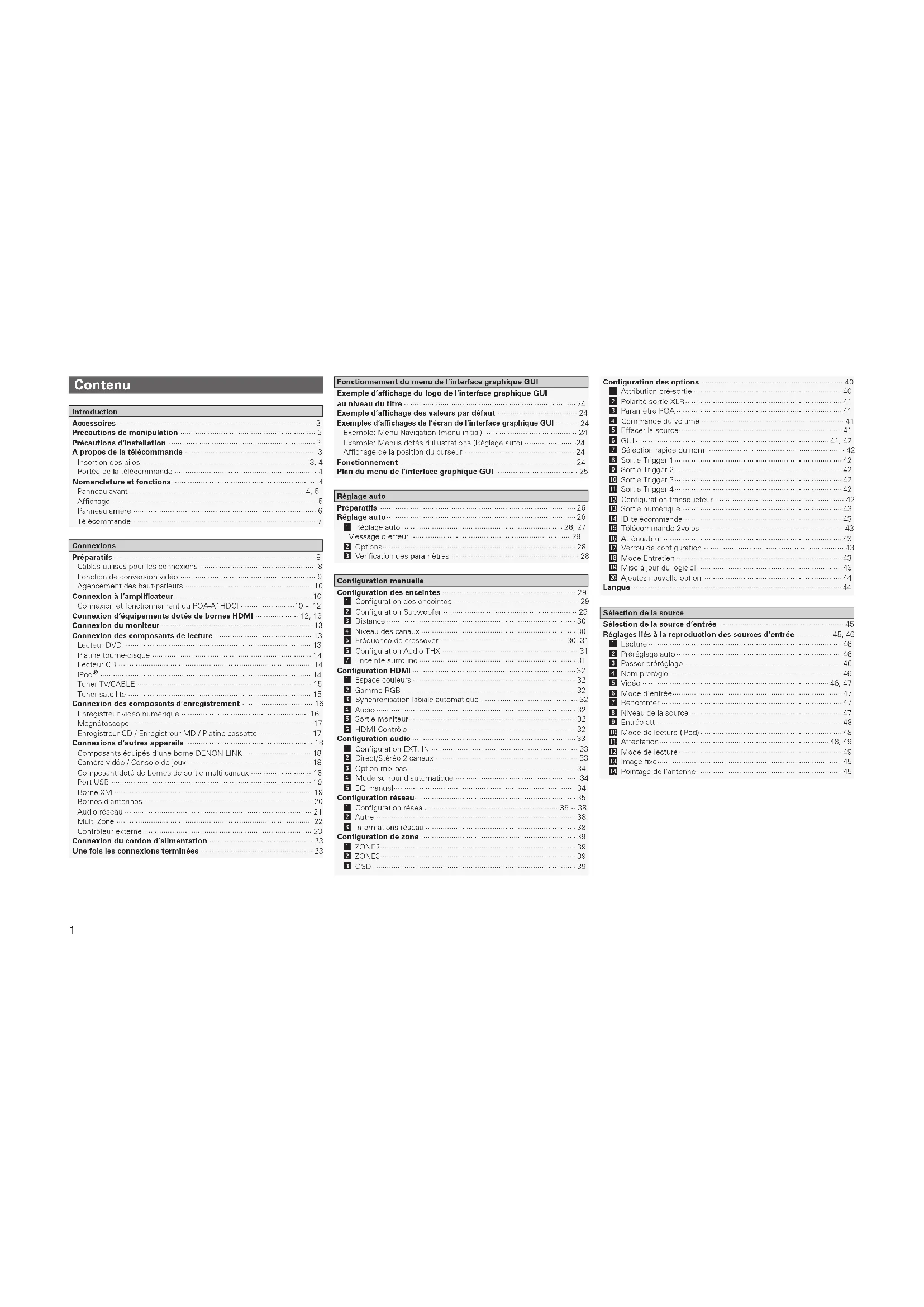
To reduce potential radio interference to other users, the antenna type and its gain should be so chosen that the equivalent isotropically radiated power (e.i.r.p.) is not more than that permitted for successful communication. ATTENTION Afin de réduire le risque d’interférence aux autres utilisateurs, il faut choisir le type d’antenne et son gain de façon à ce que la puissance isotrope rayonnée équivalente (p.i.r.e.) ne soit pas supérieure au niveau requis pour l’obtention d’une communication satisfaisante. Accessoires ···························································································· 3 Précautions de manipulation ······························································· 3 Précautions d’installation ····································································· 3 A propos de la télécommande ····························································· 3 Insertion des piles ············································································· 3, 4 Portée de la télécommande ·································································· 4 Nomenclature et fonctions ··································································· 4 Panneau avant ··················································································4, 5 Affichage ······························································································· 5 Panneau arrière ····················································································· 6 Télécommande ····················································································· 7 Introduction Préparatifs ······························································································ 8 Câbles utilisés pour les connexions ······················································ 8 Fonction de conversion vidéo ······························································· 9 Agencement des haut-parleurs ··························································· 10 Connexion à l’amplificateur ································································10 Connexion et fonctionnement du POA-A1HDCI ·························10 ~ 12 Connexion d’équipements dotés de bornes HDMI ···················· 12, 13 Connexion du moniteur ······································································ 13 Connexion des composants de lecture ············································· 13 Lecteur DVD ······················································································· 13 Platine tourne-disque ·········································································· 14 Lecteur CD ·························································································· 14 iPod

  • ·································································································· 14 Tuner TV/CABLE ················································································· 15 Tuner satellite ····················································································· 15 Connexion des composants d’enregistrement ································· 16 Enregistreur vidéo numérique ····························································16 Magnétoscope ···················································································· 17 Enregistreur CD / Enregistreur MD / Platine cassette ························ 17 Connexions d’autres appareils ··························································· 18 Composants équipés d’une borne DENON LINK ······························· 18 Caméra vidéo / Console de jeux ························································· 18 Composant doté de bornes de sortie multi-canaux ···························· 18 Port USB ····························································································· 19 Borne XM ···························································································· 19 Bornes d’antennes ·············································································· 20 Audio réseau ······················································································· 21 Multi Zone ··························································································· 22 Contrôleur externe ·············································································· 23 Connexion du cordon d’alimentation ················································ 23 Une fois les connexions terminées ···················································· 23 Connexions Sélection de la source d’entrée ·························································· 45 Réglages liés à la reproduction des sources d’entrée ················ 45, 46 a Lecture ·························································································· 46 s Préréglage auto ············································································· 46 d Passer préréglage ·········································································· 46 f Nom préréglé ················································································ 46 g Vidéo ······················································································· 46, 47 h Mode d’entrée ··············································································· 47 j Renommer ···················································································· 47 k Niveau de la source ······································································· 47 l Entrée att. ······················································································ 48 A0 Mode de lecture (iPod) ·································································· 48 A1 Affectation ··············································································· 48, 49 A2 Mode de lecture ············································································ 49 A3 Image fixe ······················································································ 49 A4 Pointage de l’antenne ···································································· 49 Configuration des options ·································································· 40 a Attribution pré-sortie ····································································· 40 s Polarité sortie XLR ········································································· 41 d Paramètre POA ············································································· 41 f Commande du volume ·································································· 41 g Effacer la source ············································································ 41 h GUI ·························································································· 41, 42 j Sélection rapide du nom ································································ 42 k Sortie Trigger 1 ·············································································· 42 l Sortie Trigger 2 ·············································································· 42 A0 Sortie Trigger 3 ·············································································· 42 A1 Sortie Trigger 4 ·············································································· 42 A2 Configuration transducteur ···························································· 42 A3 Sortie numérique ··········································································· 43 A4 ID télécommande ·········································································· 43 A5 Télécommande 2voies ·································································· 43 A6 Atténuateur ··················································································· 43 A7 Verrou de configuration ································································· 43 A8 Mode Entretien ············································································· 43 A9 Mise à jour du logiciel ···································································· 43 S0 Ajoutez nouvelle option ································································· 44 Langue ·································································································· 44 Contenu Préparatifs ···························································································· 26 Réglage auto ························································································ 26 a Réglage auto ··········································································· 26, 27 Message d’erreur ·········································································· 28 s Options ·························································································· 28 d Vérification des paramètres ··························································· 28 Réglage auto Configuration des enceintes ·······························································29 a Configuration des enceintes ·························································· 29 s Configuration Subwoofer ······························································ 29 d Distance ························································································ 30 f Niveau des canaux ········································································ 30 g Fréquence de crossover ·························································· 30, 31 h Configuration Audio THX ······························································· 31 j Enceinte surround ········································································· 31 Configuration HDMI ············································································ 32 a Espace couleurs ············································································ 32 s Gamme RGB ················································································· 32 d Synchronisation labiale automatique ············································· 32 f Audio ····························································································· 32 g Sortie moniteur ·············································································· 32 h HDMI Contrôle ·············································································· 32 Configuration audio ············································································ 33 a Configuration EXT. IN ···································································· 33 s Direct/Stéréo 2 canaux ·································································· 33 d Option mix bas ·············································································· 34 f Mode surround automatique ························································· 34 g EQ manuel ····················································································· 34 Configuration réseau ···········································································35 a Configuration réseau ·····························································35 ~ 38 s Autre ······························································································ 38 d Informations réseau ······································································ 38 Configuration de zone ·········································································39 a ZONE2 ··························································································· 39 s ZONE3 ··························································································· 39 d OSD ······························································································· 39 Configuration manuelle Exemple d’affichage du logo de l’interface graphique GUI au niveau du titre ················································································ 24 Exemple d’affichage des valeurs par défaut ····································· 24 Exemples d’affichages de l’écran de l’interface graphique GUI
  • ········· 24 Exemple: Menu Navigation (menu initial) ··········································· 24 Exemple: Menus dotés d’illustrations (Réglage auto) ························24 Affichage de la position du curseur ····················································24 Fonctionnement ·················································································· 24 Plan du menu de l’interface graphique GUI ······································ 25 Fonctionnement du menu de l’interface graphique GUI Sélection de la source Etat ········································································································ 56 a MAIN ZONE ·················································································· 56 s ZONE2/3/4 ····················································································· 56 Signal audio d’entrée ·········································································· 57 Infos HDMI ···························································································· 57 a Informations signal ········································································ 57 s Moniteur1 ······················································································ 57 d Moniteur2 ······················································································ 57 Mode surround automatique ·····························································

Sélection rapide ··················································································

Station préréglée ·················································································

Informations Fonctionnement de la télécommande Fonctionnements et connexions multi-zones Autres opérations et fonctions Dépistage des pannes ···························································· 103 ~ 107 Spécifications ···················································································· 108 Autres informations ································································· 88 ~ 102 Liste des codes préréglage ···············Fin du manuel de l’utilisateur en anglais Paramètre Audio ···································································································· 52 a Paramètres surround ·····························································52 ~ 54 s Tonalité ···················································································· 54, 55 d Egalisateur de la pièce ··································································· 55 f Dynamic EQ ·················································································· 55 g RESTORER ···················································································· 55 h Mode de nuit ················································································· 55 j Délai audio ····················································································· 56 Réglage d’image ·················································································· 56 a Contraste ······················································································· 56 s Luminance ····················································································· 56 d Niveau chromatique ······································································ 56 f Teinte ···························································································· 56 g DNR ······························································································· 56 h Amplificateur ················································································· 56 j Définition ······················································································· 56 Autres opérations ················································································ 72 Lecture des Super Audio CD ······························································ 72 Enregistrement sur un dispositif externe (mode REC OUT) ··············· 73 Fonctions pratiques ············································································· 74 Fonction de contrôle HDMI ································································74 Niveau des canaux ·············································································· 75 Fonction Fader ···················································································· 75 Fonction de sélection rapide ······························································· 75 Fonction mémoire personnelle plus ···················································75 Fonction dernière mémoire ································································76 Mémoire de sauvegarde ····································································· 76 Réinitialisation du microprocesseur ···················································· 76 Télécommande principale ·································································· 77 Fonctionnement des composants audio DENON ······························· 77 Préréglage ··························································································· 77 Fonctionnement des composants préréglés ······························77 ~ 79 Réglage de l’ID de télécommande ·····················································80 Fonction d’apprentissage ···································································· 80 Fonction d’appel système ··································································· 81 Fonction de transfert d’informations ··················································81 Réglage de la durée d’éclairage du rétro-éclairage ····························· 82 Réglage de la luminosité du rétro-éclairage ········································ 82 Réinitialisation de la télécommande principale ··································· 82 Fonctionnement de la télécommande secondaire ····················· 83, 84 Changement de zone ·········································································· 85 Réglage de la zone pour laquelle la télécommande secondaire est activée (mode ZONE SELECT LOCK) ··········································· 85 Paramétrage de l’ID de télécommande ·············································· 85 Réinitialisation des réglages ·······························································85 Connexions Multi-Zone ······································································· 86 Fonctionnement multi-zone ······························································· 87 Mise en marche et extinction ····························································· 87 Sélection de la source d’entrée ·························································· 87 Réglage du volume ············································································· 87 Coupure temporaire du son ································································ 87 Lecture Préparatifs ···························································································· 58 Mise en marche ·················································································· 58 Opérations pendant la lecture ····························································· 58 Lecture des équipements audio et vidéo ·········································· 58 Fonctionnement élémentaire ······························································ 58 Ecoute d’émissions FM/AM ······························································· 59 Fonctionnement élémentaire ······························································ 59 Préréglage des stations radio (Mémoire préréglée) ···························· 59 Ecoute des stations préréglées ···················································· 59, 60 RDS (Système de Données Radio) ····················································· 60 Recherche RDS ··················································································60 Recherche PTY ··················································································· 60 Recherche TP ·····················································································61 RT (Texte Radio) ·················································································61 Ecoute des programmes XM™ Satellite Radio ································ 61 Fonctionnement élémentaire ······························································ 62 Vérification de la puissance du signal et de l’ID radio XM ·················· 62 Catégories de recherche ····································································· 62 Accès direct aux canaux de radio XM ················································ 62 Ecoute des stations HD Radio™ ························································ 63 Fonctionnement élémentaire ······························································ 63 Sélection des programmes audio ······················································· 64 Vérification des informations de réception HD Radio ························· 64 Lecture d’un iPod

  • ·············································································

Fonctionnement élémentaire ······························································ 64 Ecoute de la musique ········································································· 65 Regarder des images ou des vidéos sur un iPod ································ 65 Lecture audio réseau de dispositifs mémoire USB ou Rhapsody ························································································ 66 Fonctionnement élémentaire ······························································ 67 Ecoute de radio Internet ····································································· 68 Lecture des fichiers contenus sur un ordinateur ································ 69 Lecture des fichiers d’un dispositif mémoire USB ······················· 69, 70 Écouter la Rhapsody ··········································································· 70 Fonctionnement de l’AVP-A1HDCI à l’aide d’un navigateur (contrôle Internet) ········································································· 71, 72 Mode surround

HOME THX CINEMA ············································································ 50

Reproduction surround des sources 2 canaux ···································· 50 Lecture de sources multi-canaux (Dolby Digital, DTS, etc.) ················ 50 Lecture standard ·················································································· 50 Reproduction surround des sources 2 canaux ···································· 50 Lecture de sources multi-canaux (Dolby Digital, DTS, etc.) ················ 51 Casque Dolby ······················································································ 51 Reproduction avec simulation DSP ··················································· 51 Lecture stéréo ······················································································ 51 Lecture directe ····················································································· 52 Lecture en mode PURE DIRECT ························································52 Connexions Configuration Lecture Télécommande Multi-zone Informations Dépistage des pannes Spécifications Outre l’AVP-A1HDCI, la télécommande principale fournie (RC-1067) peut également faire fonctionner les équipements ci-après. q Composants de système DENON w Composants de système autres que DENON

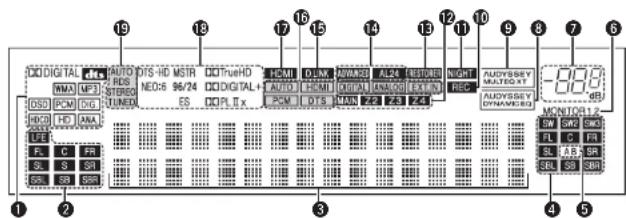
Nous vous remercions d’avoir acquis cet appareil DENON. Afin d’assurer son bon fonctionnement, veuillez lire attentivement ce manuel de l’utilisateur avant d’utiliser l’appareil. Après l’avoir lu, conservez-le afin de pouvoir vous y reporter ultérieurement. Introduction Accessoires Introduction Connexions Configuration Lecture Télécommande Multi-zone Informations Dépistage des pannesSpécificationsPour les touches qui ne sont pas décrites ici, lire la page indiquée entre parenthèses ( ). q Touche d’alimentation (ON/STANDBY) ······································· (58) w Témoin d’alimentation ·································································· (58) e Interrupteur principal (hON jOFF)············································ (58) r Porte ·································································································· (5) t Touches / témoins QUICK SELECT ·············································· (75) y Molette de contrôle MASTER VOLUME ······································ (58) u Témoin de volume principal Nomenclature et fonctions Panneau avant i Affichage ··························································································· (5) o Capteur de télécommande ······························································ (4) Q0 Molette SOURCE SELECT ····························································· (45) Q1 Touche SOURCE············································································· (45) Q2 Touche TUNING PRESET······························································· (59) Q3 Touche ZONE 2/3/4 / REC SELECT ········································ (73, 87) Q4 Touche VIDEO SELECT ·································································· (46) 30° 30° Environ 7 m (RC-1067)(RC-1070) REMARQUE

uQ4Q8Q9 o iQ1 Q0Q6 Q2 Q3Q5Q7 y wq e r Introduction Connexions Configuration Lecture Télécommande Multi-zone Informations Dépistage des pannes Spécifications q Borne CONTROL LINK ·····································(11) w Borne RS-232C··················································(23) e Bornes audio analogiques (AUDIO) ················(14) r Bornes RCA PRE OUT ································(11, 22) t Bornes EXT. IN ·················································(18) y Prise CA (AC IN)················································(23) u Sorties CA (AC OUTLETS) ·······························(23) i Bornes XLR PRE OUT·······································(11) o Bornes d’antenne HD Radio (DTU ANTENNA) ·············································· (20) Q0 Bornes COMPONENT VIDEO ····················(13, 22) Q1 Bornes audio numériques (OPTICAL / COAXIAL / BNC) ·····················(13, 22) Q2 Bornes HDMI·····················································(12) Q3 Borne ETHERNET ·············································(21) Q4 Port USB ···························································(19) Q5 Borne XM (SAT TU) ··········································(19) Q6 Borne WLAN ANTENNA ··································(21) Q7 Bornes d’antennes FM/AM (TUNER ANTENNA) ··········································(20) Q8 Borne DENON LINK··········································(18) Panneau arrière

W1 i W0 W2W3 W4 Q9 Q8 Q7 Q6 Q5 Q4 Q3 Q2 Q1Q0 o i w e r t y u Q9 Prises TRIGGER OUT ·······································(23) W0 Prises REMOTE CONTROL ······························(22) W1 Bornes XLR audio (CD) ····································(14) W2 Prise DOCK CONTROL ·····································(14) W3 Borne SIGNAL GND ·········································(14) W4 Bornes VIDEO / S-VIDEO·································(13) Introduction Connexions Configuration Lecture Télécommande Multi-zone Informations Dépistage des pannes Spécifications q Témoin de transmission de signal ·················(77) w Touches de sélection de mode ·······················(77) e Touches de sélection rapide / appel système ············································(75, 81) r Touches de mode surround ··················· (50 ~ 52) t Touches système ·······································(78, 79) y Touche délai audio (A. DL) ······························(56) u Touches système du tuner ························(59, 79) i Touche de mode d’entrée (INPUT) ·················(47) o Touche MENU ··················································(24) Q0 Touches curseurs (uio p) ···························(24) Q1 Touche paramètre / recherche (PARA / SRCH)································(52, 60, 62, 65) Q2 Touche sélection de moniteur (M. SEL) / HOME ·························································(32, 77) Q3 Touches canaux (CH) ···························(59, 65, 78) Q4 Touches numérotées / sélection de source d’entrée ·····················(45, 58) Q5 Emetteur infrarouge de télécommande ···········(4) Q6 Témoins de sélection d’appareil (DEV1 / DEV2) ··················································(77) Q7 Témoins de sélection ZONE3 / ZONE4 (Z3 / Z4) ·····························································(87) Q8 Touche RESTORER (RSTR) ······························(55) Q9 Touche de nuit (NGT) ······································(55) W0 Touche de tonalité test (TEST) ·······················(30) W1 Touche de sélection des enceintes surround (SPKR) ·······························································(31) W2 Touches POWER···············································(58) W3 Touche de sélection de canal (CH SEL) / Touche ENTER ············································(24, 75) W4 Touches retour (RTN) ······································(24) W5 Touches de contrôle du volume principal (VOL) ·································································(58) W6 Touche de mise en sourdine (MUTE) ·······(58, 87) W7 Touche de configuration de la télécommande (RC SETUP) ·······················································(77) q Témoins ZONE ·················································(85) w Touche de configuration avancée ··················(85) e Touches de sélection de la source d’entrée ·····························································(45) r Touches CHANNEL ····································(65, 84) t Touche SHIFT ··················································(59) y Touche MENU ·················································(24) u Touches curseurs (uio p) ···························(24) i Touche SEARCH ···································(60, 62, 65) o Touche REPEAT ················································(65) Q0 Touche RANDOM ·············································(65) Q1 Emetteur infrarouge de télécommande ···········(4) Q2 Touche ZONE SELECT ·····································(85) Q3 Touches de mise en marche/extinction de zone (ZONE ON / ZONE OFF) ···································(87) Q4 Touches de contrôle du volume principal (VOLUME) ························································· (58) Q5 Touche de mise en sourdine (MUTE) ·······(58, 87) Q6 Touche ENTER ··················································(24) Q7 Touche RETURN ···············································(24) Q8 Touches système ·································(59, 83, 84) Q9 Touche ALL MUSIC/FAVORITES (DIRECT PLAY) ·················································· (83) W0 Touche USB (DIRECT PLAY)····························(83) n Télécommande principale (RC-1067) n Télécommande secondaire (RC-1070) La durée d’activation du rétro-éclairage peut être modifiée (vpage 82 “Réglage de la durée d’éclairage du rétro-éclairage”). Télécommande REMARQUE Les touches AUX-1, AUX-2, AUX-3 et OPTION ne peuvent pas être utilisées.

  • Configuration EXT. IN
  • Sources Dolby Digital: “0 dB”

[POWER OFF] [ iPod] [iPod] (Mode AMP)(Mode )(Mode AMP)

MP3 (MPEG-1 Audio Layer-3) S S S WAV – S S MPEG-4 AAC –

Lecture Lecture Lecture Lecture Lecture Lecture Lecture/pause

(2ch) S D D D D A A A A S A

A A A A A S A A A A S S A S (ARRÊT)

A A A A A A A A A A A A A A A A A

A A A A A A A A A A S S A S (ARRÊT)

STEREO A A A A A A A A A A S S S (0 dB) S (ARRÊT) S (ARRÊT) S (ARRÊT) S EXT. IN A A A A A A A A A A S S A A A A A

A A A A A A A A A A S S S (0 dB) S (ARRÊT) S (ARRÊT) S (ARRÊT) A WIDE SCREEN A A A S (MARCHE, 10) A A A A A A S S S (0 dB) S (ARRÊT) S (ARRÊT) S (ARRÊT) S

(PLIIx C) S A A A A A A A A S S A S (ARRÊT) S (ARRÊT) S (ARRÊT) S

(REMARQUE3) S (ARRÊT) S (ARRÊT) S (ARRÊT) S ROCK ARENA A A S (Moyen) S (10) A A A A A A S S

A A A S S D A A A A A A A A A A A A A A

A A A S S A D S S A A A A A A A A A A A

A A A A A A A A A S S D S S S A S A S A THX Ultra2 Cinema

A A A S S S S S S S S S S S S A S A S A THX Music Mode

A A A S S S S S S S S S S S S A S A S A THX Games Mode

S S S S S S S S S S S S S S S S S S S S THX Cinema A A A S S S S S S S S S S S S A S A S A PLgx C + THX

S S S S S S S S S S S S S S S S S S S S PLg C + THX S S S A A A A A A A A A A A A S A S A S

S S S A A A A A A A A A A A A S A S A S NEO:6 + THX S S S A A A A A A A A A A A A S A S A S

A A A A A A A A A A A A A A A A S (7.1) A A A

A A A A F A A A A A A A A A A A A A A A

A A A A A F D A A A A A A A A A A A A A A

A A A A A A F D A A A A A A A A A A A A A DTS SURROUND A A A A A S S F A A A A A A A A A A A A DTS 96/24 A A A A A A A A F A A A A A A A A A A A DTS (–HD) + PLgx CINEMA

A A A S S S S S S A A A A A A A A A A A DTS (–HD) + PLgx MUSIC

A A A S S S S S S A A A A A A A A A A A

A A A S S A S S S A A A A A A A A A A A

S S S A A A A A A A A A A A A S A S A S

A A A A A A A A F A A A A A A A A A A DOLBY DIGITAL+

A A A A A A A A A F A A A A A A A A A

A A A A A A A A A A A S S S S A A A A A

A A A A A A A A A S S A A A A A A A A A DOLBY DIGITAL A A A A A A A A A A A S F F F A A A A A DOLBY (D) (D+) (HD) +PLgx CINEMA

A A A A A A A A S S F D S S S A A A A A DOLBY (D) (D+) (HD) +PLgx MUSIC

A A A A A A A A A S S S S S S A A A A A DOLBY PRO LOGIC gx CINEMA

S S S A A A A A A A A A A A A S A S A S DOLBY PRO LOGIC g CINEMA S S S A A A A A A A A A A A A S A S A S DOLBY PRO LOGIC g MUSIC S S S A A A A A A A A A A A A S A S A S DOLBY PRO LOGIC g GAME S S S A A A A A A A A A A A A S A S A S

S S S A A A A A A A A A A A A S A S A S DOLBY HEADPHONE

S S S S S S S S S S S S S S S S S S S S neural S S S A A A A A A A A A A A A A A A A A

A A A A A A A A A A A A A A A A S A S A

A A A A A A A A A A A A A A A A F D (7.1) A A A DIRECT DIRECT S S S S S S S S S S S S S S S S A S A S DSD DIRECT A A A A A A A A A A A A A A A A A A A S

A A A A A A A A A A A A A A A A A A S A

A A A A A A A A A A A A A A A A S A S A M DIRECT + PLgx CINEMA

A A A A A A A A A A A A A A A A A A A S

A A A A A A A A A A A A A A A A A A S A

MULTI CH PURE DIRECT

A A A A A A A A A A A A A A A A S A S A M PURE D + PLgx CINEMA

A A A A A A A A A A A A A A A A S A S A M PURE D + Dolby EX

A A A A A A A A A A A A A A A A S A S A

S S S S S S S S S S S S S S S S S S S S WIDE SCREEN S S S S S S S S S S S S S S S S S S S S SUPER STADIUM S S S S S S S S S S S S S S S S S S S S ROCK ARENA S S S S S S S S S S S S S S S S S S S S JAZZ CLUB S S S S S S S S S S S S S S S S S S S S CLASSIC CONCERT S S S S S S S S S S S S S S S S S S S S MONO MOVIE S S S S S S S S S S S S S S S S S S S S VIDEO GAME S S S S S S S S S S S S S S S S S S S S MATRIX S S S S S S S S S S S S S S S S S S S S STEREO STEREO F F F S S S S S S S S S S S S F S F S F F : Mode sélectionnable dans l’état initial S : Mode sélectionnable A : Mode non sélectionnable REMARQUE:

A S (1080p) A A A COMPONENT A A

A A A S (480i/576i) A A

S S (480i/576i) S A HDMI

S S (480i/576i) S S HDMI

A A A S A A S S (HDMI) A A S (VIDEO) S (HDMI)

A A A S A S A S (HDMI) A S (S-VIDEO) A S (HDMI)

A A A S A S S S (HDMI) A S (S-VIDEO) S (VIDEO) S (HDMI)

A A A S S A A S (HDMI) S (COMPONENT) A A S (HDMI)

A A A S S A S S (HDMI) S (COMPONENT) A S (VIDEO) S (HDMI)

A A A S S S A S (HDMI) S (COMPONENT) S (S-VIDEO) A S (HDMI)

Section HD Radio [FM] [AM] (remarque: µV à 75 Ω/ohms, 0 dBf = 1 x 10

Section tuner [FM] [AM] (remarque: µV à 75 Ω/ohms, 0 dBf = 1 x 10

Manual assistant
Powered by Anthropic
Waiting for your message
Product information

Brand : DENON

Model : AVPA1HDCI(A)

Category : AV receiver