FSA3550 - Surveillance Camera ABUS - Free user manual and instructions
Find the device manual for free FSA3550 ABUS in PDF.


User questions about FSA3550 ABUS
0 question about this device. Answer the ones you know or ask your own.
Ask a new question about this device
Download the instructions for your Surveillance Camera in PDF format for free! Find your manual FSA3550 - ABUS and take your electronic device back in hand. On this page are published all the documents necessary for the use of your device. FSA3550 by ABUS.
USER MANUAL FSA3550 ABUS
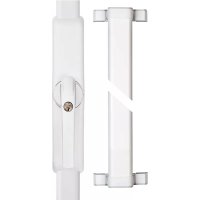
FCA3000 / FSA3550 is a retrofit system for motor-operated locking and unlocking of windows and patio doors that open inwards with 7 mm square shaft and a backset of at least 30 mm. The window sash width must be at least 60 mm.
In addition to the convenience function of the FCA3000, the FSA3550 also offers a window locking function with two locking bars. The system comprises three components: the wireless window actuator, the wireless remote control and the wireless keypad. In order to use the wireless window actuator as intended, you require a HomeTec Pro remote control or keypad. The remote control can also be used in combination with the keypad, as can multiple remote controls. For FSA3550, a matching set of locking bars (page 7) is also required.
FR
In addition, the FCA3000 / FSA 3550 offers a break-in monitoring function. With the window closed and the pressure cylinder pressed in, attempts to force the window result in the integrated acoustic alarm being triggered with a sound pressure level of approx. 110 dBA. Motorised opening and closing of the FCA3000 / FSA3550 is also possible with the cylinder pushed in.
Before fitting, please check the adjustment of your window / patio door. Ensure that the window is in perfect condition and operates easily. Windows / patio doors that are not in perfect condition or are difficult to operate lead to reduced battery life!
The product is intended only for operation in dry internal rooms. Like all technical devices, the FCA3000 /
FSA3550 can fail for various reasons.
It must always be possible to operate one main access point to the property from outside properly. In an emergency or panic situation, in the event of a fault or if the battery is flat, the window / patio door can be unlocked mechanically from inside by hand, using the window handle.
Contact a specialist company if necessary!
Operating temperature range: 0^ to +40^
Radio frequency:
868,0 MHz - 868,6 MHz
Maximum radiated transmission
power: < 10dBm eirp
868,0 MHz - 868,6 MHz
868,0 MHz - 868,6 MHz
(in addition to FCA3000)
as an extra for FSA3550
as an extra for glass break detector
Battery instructions
When inserting the batteries, ensure the polarity is correct!
Batteries must be kept out of reach of children. Children can put batteries in their mouths and choke. This can cause serious injury. Seek immediate medical attention in this event!
Contact with expired or damaged batteries may cause chemical burns! In these cases, use suitable protective gloves and clean the battery compartment with a dry cloth.
Batteries must not be dismantled, pierced, otherwise damaged, short-circuited, heated or thrown into an open fire (risk of explosion!).
NL
Battery instructions
When inserting the batteries, ensure the polarity is correct!
Batteries must be kept out of reach of children. Children can put batteries in their mouths and choke. This can cause serious injury. Seek immediate medical attention in this event!
Contact with expired or damaged batteries may cause chemical burns! In these cases, use suitable protective gloves and clean the battery compartment with a dry cloth.
Batteries must not be dismantled, pierced, otherwise damaged, short-circuited, heated or thrown into an open fire (risk of explosion!).
NL
- Use the ABUS Home Tec Pro CFF3000 remote control / ABUS Home Tec Pro CFT3000 keypad (available separately) for all menu items except 1
- Programming of the drive is carried out on two levels.
Level 1: Programming and clearing of remote control(s) and keypad, and factory reset.
Level 2: Advanced menu for setting signal tones, torque of the drive and activation of tilt function - Always scroll through a menu with keys 1 and 2, cancel a function with key 3 and confirm a function with key 4.
- Every button press is confirmed by a signal tone: a sustained tone as a confirmation/acknowledgement; a double tone as an erroneous or impermissible button press.
- You can find an overview of the program structure and the assignment table under 7., page 47, 52.
1. Level 1 - Programming the drive
-
Aim: programming of the drive for your window is required on initial commissioning and after a factory reset
-
Starting position: window handle is in "closed" position, but the cylinder must be unlocked
- Press keys 1 + 2 simultaneously, after a short time both LEDs flash yellow
-
Confirm "closed" position by pressing key 4; a long signal tone sounds
-
Turn the handle to "open" position
-
Confirm "open" position by pressing key 4; a long signal tone sounds
-
Turn the handle back to "closed" position. When the position is reached, a long signal tone sounds
-
The wireless window drive is now programmed for the window and the two LEDs go out
-
Possible error message: if a position is not detected, instead of a long tone, a double tone sounds. Move the window handle to the correct position and confirm it again.
2. Level 1 - Programming of remote control(s) and keypad
- Aim: programming of transmitters so that you can operate the drive conveniently with the remote control / keypad. You have the option to set up a maximum of 9 transmitters. If all memory locations are occupied, you can only open this menu item after deleting min. 1 transmitter.
-
Starting position: the drive must have been programmed for the window (see menu 1)
-
Press keys 1 + 2 simultaneously, after a short time LED1 turns green
-
Confirm the programming process by pressing key 4; both LEDs flash. In delivered state, the first free memory space is indicated by the colour combination green / green. If transmitters have already been programmed, the next free memory space is displayed (colour combination green / yellow, then green / red, and so on, see configuration table >> 7., page 50).
-
Now confirm the remote control / keypad to be programmed (see instructions CFF / CFT). If programming is successful, a sustained tone sounds and the LEDs indicate the next free memory space.
-
To exit the menu item, press key 3.
3. Level 1 - Clearing remote control(s) and keypad
- Aim: you want to clear a programmed transmitter, e.g. because the remote control has been lost
-
Press keys 1 + 2 simultaneously, after a short time LED1 turns green
-
Press key 2; LED1 turns yellow
-
Confirm your intention to clear the transmitter by pressing key 4
-
The first assigned memory space is displayed (colour combination green / green). If more than one memory space has been assigned and you wish to clear one of them, switch to the required space by pressing key 1 or 2
-
Press and hold key 4 for approx. 2 seconds; both LEDs flash
-
Press and hold key 4 for approx. two seconds again and the memory space will be cleared. An acoustic confirmation sounds and the LEDs go out
-
To exit the menu item, press key 3
4. Level 1 - Resetting to factory settings (factory reset)
- Aim: you want to clear the drive settings. There are three options to choose from: I.) Clearing the programming for your window and any other settings on the advanced menu (see 5.). II.) Clearing all saved transmitters. III.) Complete factory reset
- Press keys 1 + 2 simultaneously, after a short time LED1 turns green.
- Press key 2 twice in succession; LED1 turns red.
- Confirm your intention to carry out a factory reset by pressing key 4
- LED1 is red, LED2 is green = option I. This position resets the programming process and all settings on the advanced menu
- Pressing key 1 or 2 switches to option II or option III: LED1 is red, LED2 is yellow = option II. This position clears all transmitters (remote controls, keypad). LED1 is red, LED2 is red = option III. This position triggers a complete factory reset. The drive is then in its delivered condition
- With the LED display required, press and hold key 4 for approx. 2 seconds; both LEDs flash alternately
- Press and hold key 4 again for approx. 2 seconds and the reset is carried out. An acoustic confirmation follows and the LEDs go out.
- To exit the menu item, press key 3
5. Level 2 - Advanced menu settings
The settings on the advanced menu are optional. You can modify the default values for the drive on three submenus: A) Signal tones, B) Torque and C) Tilt function.
To access level 2, first complete the following two steps:
- Press keys 1 + 2 simultaneously, after a short time LED1 turns green.
- Press keys 1 + 2 simultaneously again, after a short time LED1 flashes green.
A) Signal tones (LED 1 flashes green)
- Confirm your intention to change the signal tones by pressing key 4
- Choose the required setting by pressing key 1 or 2:
LED 1 green / LED 2 green: signal tone in all end positions (factory setting)
LED 1 flashes green / LED 2 lights yellow: signal tone on motorised locking
LED 1 flashes green / LED 2 lights red: no signal tones*

- Alarm signals for required battery change, overload of the drive and magnetic displacement (attempt at burglary) and key tones for the drive cannot be switched off!
B) Torque
- Switch to this menu item by pressing key 2. LED1 flashes yellow
- Confirm your intention to change the torque by pressing key 4
- Choose the required setting by pressing key 1 or 2:
LED 1 flashes yellow / LED 2 lights green: torque restriction set (ca. 6 Nm). LED 1 flashes yellow / LED 2 lights red: maximum torque (ca. 8 Nm)
C) Setting the tilt function
- Switch to this menu item by pressing key 2. LED1 flashes red
- Confirm your intention to activate the tilt function by pressing key 4
- Choose the setting required by pressing key 1 or 2: LED 1 flashes red / LED 2 lights green: tilt function inactive LED 1 flashes red / LED 2 lights red: tilt function active*

- If this setting is chosen, the window moves when pressing the transmitter's "open" button from the tilt position to the "open" position. In doing so, the window must always be brought in manually!

When using the tilting function, always pull the window by hand until the drive has reached its rest position before actuating the drive! In particular with older windows and patio doors, there is a risk that the casement will be lifted out of its anchoring, when it is not brought in manually.

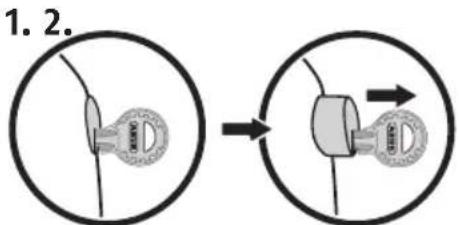
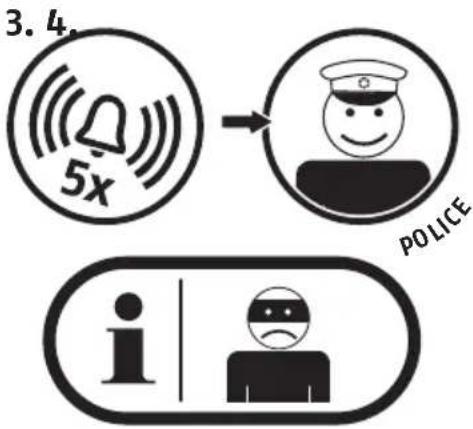
In case you hear a signal tone five times immediately after unlocking and opening the device (both electronically with remote control or keypad, and mechanically with a key), most likely there has been an attempted burglary.
Please check your window for possible evidences of a forced entry and, if need be, inform the police. (Note: do not confuse the five sustained tones with the five short tones that indicate a battery change is due that take place before the drive starts to move!)
FR Remarques generales
| - Open menu level 1 by pressing and holding keys 1 and 2 simultaneously for approx. 2 seconds - Scroll through the menu levels by pressing key 1 or 2 - Select a menu item by pressing key 4, exit the menu item by pressing key 3 - Open advanced menu by pressing keys 1 and 2 simultaneously from menu level 1 (LED1 turns green) | ||||||||
| Level 1 Level 2 (advanced menu) | ||||||||
| Programming handheld transmitters LED 1 LED 2 | >Selection key 4<Back key 3 | Memory locationsLED 1 LED 2 | Setting signal tonesLED 1 LED 2>Selection key 4<Back key 3 | >Selection key 4<Back key 3 | InformationLED 1 LED 21>Selection key 42>Selection key 3 | Signal tones- in all end positions-on motorised locking-no signal tones(alarm tones such as low battery level or drive overloaded and key tones for the drive are not turned off) | ||
| v^Key 1 or 2 Key 1 or 2 | v^ | |||||||
| Clearing handheld transmitters LED 1 LED 2 | >Selection key 4<Back key 3 | Memory locationsLED 1 LED 2 | Setting TorqueLED 1 LED 2>Selection Taste 4<Back key 3 | >Selection Taste 4<Back key 3 | InformationLED 1 LED 21>Selection key 42>Selection key 3 | Torque-restriction on(ca. 6 Nm)- maximum (ca. 8 Nm) | ||
| v^Key 1 or 2 Key 1 or 2 | v^ | |||||||
| Factory settingsLED 1 LED 2 | >Selection key 4<Back key 3 | InformationLED 1 LED 2 | Setting tilt functionLED 1 LED 2>Selection key 4<Back key 3 | >Selection key 4<Back key 3 | InformationLED 1 LED 21>Selection key 42>Selection key 3 | tilt function-inactive-active | ||

Be careful when using magnets:
- Risk of trapping fingers!
- Keep product away from children due to small parts.
In particular, seek immediate medical attention if magnet is swallowed.
Credit or debit cards with magnetic strips may be damaged. - For persons with pacemakers, defibrillators or other implanted devices – the magnet may adversely affect such devices, so ensure sufficient distance (approx. 20cm) between the magnet and implanted device during installation.
NL
If the battery charge is too low, five short beeps are sounded before the movement begins or when the cylinder is pushed in. It is still possible to set the alarm for a short time, however. Please replace the flat batteries promptly when the signal tone sounds: slide the top cover upwards. Remove the batteries and insert new alkaline batteries. "Ready-to-use" batteries are also suitable, e.g. "Eneloop type BK-3MCCE". Follow the battery instructions and always replace all batteries! 4.4, page 13.
Note: do not confuse the five short beeps with the five sustained beeps that are reporting an attempt at burglary, and those that take place after the drive has started to move!
-
The drive cannot be programmed, there is no acknowledgement tone = = > drive plate on back of housing is not set correctly (go to 4.2f)
-
It is not possible to move to zero position (handle in closed position) = = > Adjust ease of operation of the door, fixing screws may be too tight loosen slightly, optimise mechanical fitting
-
The wireless remote control or wireless keypad in combination with another HomeTec Pro door or window drive are not working properly Program the 1st drive with a single click and the 2nd drive with a double click on the wireless remote control (see CFF3000 wireless remote control manual) Program the drives separately on the keypad (drive 1, drive 2, drive 3) (see CFT3000 wireless keypad manual)
-
When opening the window / patio door from its tilt position, and it falls out of its anchoring => Deactivate tilt function or support door during motorised movement (go to 7, menu level 2, Setting tilt function)
-
During the motorised movement, a warning signal sounds, the drive jams and the window handle also stops in an undefined position (overload of the drive) Check ease of movement of the window / patio door and adjust as necessary Increase drive torque if necessary (go to 7, menu level 2, Setting torque)
-
A short beep sounds five times before motorised movement or when pressing in the pressure cylinder = = > "Low batt" message, replace all batteries with new alkaline batteries or fully charged "ready-to-use" batteries (go to 4.4)
-
A sustained beep sounds five times after motorised movement or when pressing in the pressure cylinder An attempt at burglary has likely taken place. Please check your window for possible evidences of a forced entry and, if need be, inform the police.
-
When the cylinder is pushed in, and there is no acknowledgement tone after 2 seconds = = > The window handle is not in closed position = = > Check the magnet position (go to 8)
-
The handle cannot be operated mechanically = = > Cylinder pushed in, unlock with key
-
When the pressure cylinder is pushed in in closed position and the acknowledgement tone sounds, it is followed by the alarm tone > Glass breakage sensor is defective or incorrectly connected (go to GBM, page 57) > Wire bridge accidentally removed without connection of a glass breakage sensor (go to GBM, page 57)
FR FAQ
ABUS products are designed, manufactured and tested in accordance with applicable regulations with great care. The warranty exclusively covers faults that are caused by material or manufacturing defects. If a material or manufacturing defect can be proven, the product will be repaired or replaced at the discretion of the warrantor. In such cases, the warranty ends with the termination of the original warranty period. Any further claims are expressly excluded. ABUS assumes no liability for defects or damage that has been caused by external influences (e.g. transport, external forces), improper use, normal wear and tear or non-compliance with this operating and installation instructions document. The included batteries are not covered by the warranty. If a warranty claim is asserted, the product must be returned with the original receipt with date of purchase and a brief written description of the fault.
Declaration of Conformity
ABUS August Bremicker Sohne KG, Altenhofer Weg 25, 58300 Wetter hereby declares that the Wireless system type HomeTec Pro is in compliance with the essential requirements and other relevant provisions of Directive 2014/53/EU. The full EU Declaration of Conformity text can be found at: www.abus.com.
Disposal
Dispose of the device in accordance with EU Directive 2002/96/EC - WEEE (Waste Electrical and Electronic Equipment). If you have any questions, please contact the municipal authority responsible for disposal. You can get information on collection points for waste equipment from your local authority, from local waste disposal companies or your dealer.
Subject to technical alterations. No liability for mistakes and printing errors.

© ABUS 2018. ABUS August Bremicker
Söhne KG, DE-58292 Wetter
Tel.: +49 (0) 23 35 63 40
www.abus.com|info@abus.de