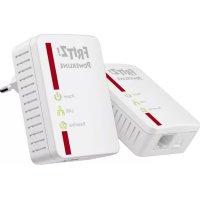
FRITZ!Powerline 510E Set - Powerline Adapter AVM - Free user manual and instructions
Find the device manual for free FRITZ!Powerline 510E Set AVM in PDF.


| Product type | Powerline Adapter |
| Brand | AVM |
| Model | FRITZ!Powerline 510E Set |
| Dimensions (H x W x D) | 68 mm x 58 mm x 31 mm |
| Weight | Approx. 75 g |
| Power supply | 230 V, 50 Hz |
| Power consumption (active) | 2 W |
| Standby consumption | 0.5 W |
| Powerline transmission rate | Up to 500 Mbit/s (gross) |
| Ethernet interface | Fast Ethernet 100 Mbit/s |
| Encryption | AES 128-bit, automatic encryption from factory |
| Compatible standard | IEEE P1901 |
| Compatibility | Powerline devices class 200, 500 and 1200 Mbit/s |
| Main features | Home network extension via power line, secure encryption, firmware update, management via FRITZ! Powerline or FRITZ! Box |
| Safety | Indoor use, dry, dust-free; do not open; clean after disconnection |
| Maintenance and cleaning | Unplug before cleaning, use a damp cloth |
| Package contents | 2 FRITZ!Powerline 510E adapters, power cord, quick start guide |
| Status display | LED indicators: Power, LAN, Powerline |
| Security button | Security button: short press for secure connection, long press (10-15 s) for reset |
| Temperature range | 0 °C to +40 °C |
| Repairability | Not user-serviceable; no spare parts available |
Frequently Asked Questions - FRITZ!Powerline 510E Set AVM
User questions about FRITZ!Powerline 510E Set AVM
0 question about this device. Answer the ones you know or ask your own.
Ask a new question about this device
Download the instructions for your Powerline Adapter in PDF format for free! Find your manual FRITZ!Powerline 510E Set - AVM and take your electronic device back in hand. On this page are published all the documents necessary for the use of your device. FRITZ!Powerline 510E Set by AVM.
USER MANUAL FRITZ!Powerline 510E Set AVM
natural_image
Two FRITZ! Powerline devices on a blue background, one white and one white with red buttons (no visible text or symbols on the devices themselves)Diagnostics and Maintenance
The FRITZ!Powerlinie transfers diagnostics data to AVM, which support AVM in further developing the product. This allows you to benefit directly from optimizations and FRITZIOS updates. For more detailed information, see the help in the user interface at http://fritz.powerline.
Legal Notice
The licensing conditions are specified in the user interface:
1. Open a web browser
2. Enter http://fritz.powerline in the address field. The FRITZ!Powerline user interface opens.
Click "Help / Legal Notice"
Disposal
In accordance with the Electrical and Electronic
Equipment Act, the FRITZ!Powerline 510E Set
and cables may not be disposed with household waste.
Please bring these to your local collection points for
disposal
Service
Service information and help can be found on our web-
site and in the social networks:
Downloads en.avm.de/nc/service/downloads
Support request en.avm.de/service/support-request/
your support request
Social networks

FRITZ!Powerline
510E
Set
en.avm.de
Package Contents and Device Features
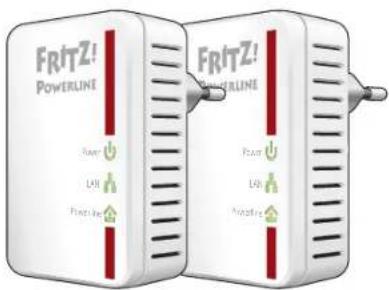
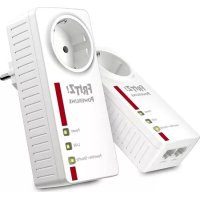
2 FRITZ!Powerline 510E devices
natural_image
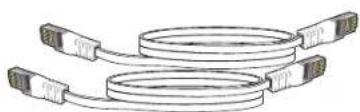
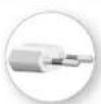
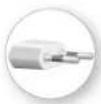
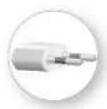
Illustration of two coaxial USB connectors with coiled cable (no text or symbols)2 LAN cables
Power plug
•Power supply
• Interface to the powerline network

Status display
•Three LEDs show the connection status
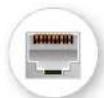
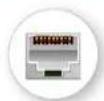
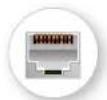
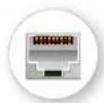
LAN port
•For connecting network devices

Security button
• Establish a secure powerline connection (press briefl y)
- Restore factory settings (press for 10 to 15 seconds)
Security
- Operate the FRITZ!Powerline 510E Set in dry places free of dust and protected from direct sunlight, and provide for sufficient ventilation.
- Connect the FRITZ!Powerline 510E Set to easily accessible outlets.
● The FRITZ!Powerline 510E Set is intended for indoor use only. Never let liquids get inside the housing of the devices. - Do not open the FRITZ!Powerline 510E Set. Opening and/or repairing the device can present a hazard.
- Remove the FRITZ!Powerline 510E Set from the mains before cleaning. Clean the device using a moist cloth.
This Is the FRITZ!Powerline 510E Set
This quick introduction shows you the possibilities for deploying and operating the FRITZ!Powerline 510E Set. Comprehensive information is presented in the PDF manual available on our website at en.avm.de/service.
With the FRITZ!Powerline 510E Set you can transmit data over the electrical wiring in your household at gigabit speeds. Via this connection your network devices can conveniently exchange data, and can access your home network and connect to your internet router.
To launch operation, insert the FRITZ!Powerline devices in any outlets and connect them with your FRITZ!Box, your computer and other network devices – that's all.
With the AVM FRITZ!Powerline software you manage your powerline network and can view detailed information about connections.
As the FRITZ!Powerline 510E Set is preconfigured and encrypted upon delivery, it is ready for immediate use.
Have fun with your FRITZ!Powerline 510E!
Optimizing the Data Rate
A powerline network is influenced by many factors. With the following steps you can contribute to an optimal data rate in your powerline network:
- Insert powerline devices directly into wall outlets and avoid using multi-outlet strips.
- If you can't avoid using multi-outlet strips:
-Use a multi-outlet strip without surge protection.
-Connect as few devices as possible to the multi-outlet strip.
- Insert your powerline device in the first socket, directly at the cable.
- If you cannot avoid using a multi-outlet strip with surge protection, then the surge protection should be located behind the powerline device.
● The data rate in a powerline network drops for:
-a connection over multiple phases
- a connection has to pass through a junction box, a circuit breaker, a dimmer or ballast units
-use of a power drill or a vacuum cleaner
Attempt to minimize these influences.
- The quality of your powerline network can also be optimized using the AVM FRITZ!Powerline software (see page 9).
Status Display
| LED FRITZ!Powerline 510E | ||
| [CSGA] | on Has electrical power | |
| fl ashing slowly | Is on standby | |
| off Has no electrical power | ||
| [ACXB] | on the LAN port is in use | |
| off No LAN cable is connected or the device on the LAN cable is switched off | ||
| [GASS] | on Is connected with the powerline network and ready for data exchange | |
| fl ashing Implementing security settings or restarting | ||
| off Did not detect any compatible powerline devices or did not detect any devices that use the same network key | ||
AVMFRITZ!Powerline
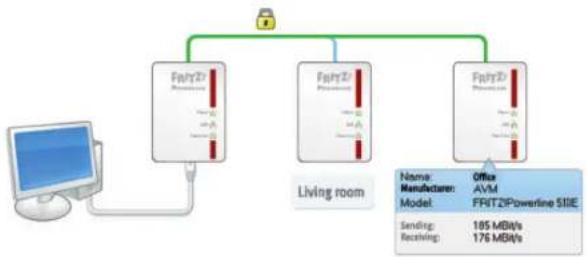
With the AVM FRITZ!Powerline software you manage your powerline network. AVM FRITZ!Powerline offers you the following features:
- Overview of all FRITZ!Powerline devices and powerline devices from other manufacturers that combine to make up your powerline network
● The connection data of your powerline devices
● You see whether the powerline network is encrypted securely - You can switch the LEDs of your FRITZ!Powerline devices on and off
- You can perform an update of the device software (firmware) for your FRITZ!Powerline devices
For a free download of AVM Powerline, go to en.avm.de/service/fritzpowerline/software-for-fritzpowerline.
flowchart
graph TD
    A["Computer"] --> B["Fw/T2"]
    B --> C["Fw/T2 / Powertrain"]
    C --> D["Fw/T2 / Powertrain"]
    D --> E["Fw/T2 / Powertrain"]
    E --> F["Living room"]
    G["Name: Office\nManufacturer: AVM\nModel: FF/RT2/Powerline SIIIE\nSending: 105 MBit/s\nReceiving: 176 MBit/s"] --> B
    G --> D
    G --> E
Setting Up the Powerline Network
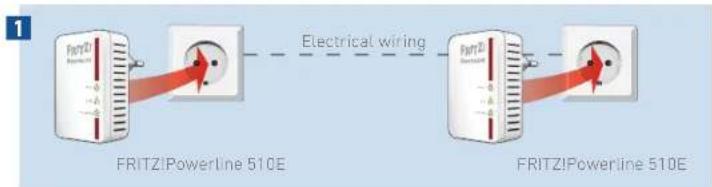
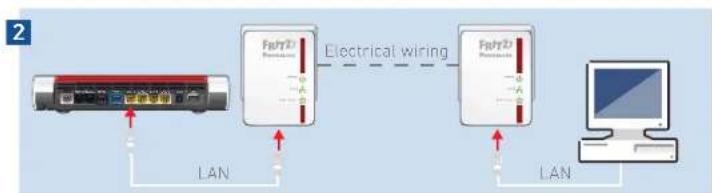
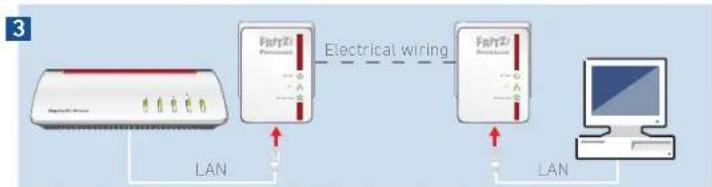
- Plug two FRITZ!Powerline 510E devices into any outlets in your home.
- Connect your FRITZ!Box to one FRITZ!Powerline 510E, and your computers or other network devices to the second FRITZ!Powerline 510E using the LAN cables.
- The powerline network is established, automatically encrypted, and can be used immediately.
flowchart
graph LR
    A["Device 1"] -->|LAN| B["Fdry2 Network"]
    B -->|Electrical wiring| C["Fdry2 Network"]
    C -->|LAN| D["Computer"]
flowchart
graph LR
    A["Fair21 Phone"] -->|LAN| B["Fair21 Provider"]
    B -->|Electrical wiring| C["Fair21 Provider"]
    C -->|LAN| D["Computer"]
Expanding the Powerline Network
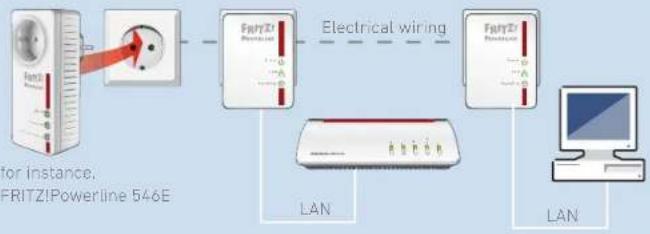
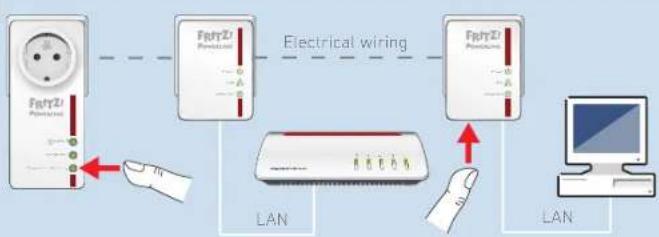
- Plug the new powerline device that is to expand the network into an electrical outlet.
- The connect button on the new powerline device for one second to set up a new connection (see the documentation of the new powerline device).
Within two minutes:
Press the "Security" button on a FRITZ!Powerline 510E in the existing powerline network and hold it down for one second.
- The new powerline device is connected with the powerline network and can be used immediately.
1
flowchart
graph LR
    A["FRITZ! Powerline 546E"] --> B["Electrical wiring"]
    B --> C["LAN"]
    C --> D["Computer"]
    style A fill:#f9f,stroke:#333
    style B fill:#ccf,stroke:#333
    style C fill:#cfc,stroke:#333
    style D fill:#fcc,stroke:#333
2
flowchart
graph LR
    A["Power Source"] --> B["Electrical wiring"]
    B --> C["LAN"]
    C --> D["Computer"]
FRITZ!Powerline in Your FRITZ!Box
FRITZ!Powerline 510E and other power-line adapters in your home network are displayed in the FRITZ!Box user interface (under "Home Network / Home Network Overview").
In the details of FRITZ!Powerline 510E you receive a variety of information about the device and can configure the following settings for the FRITZ!Powerline 510E.
● Perform update of the device software (fi rmware)
● Enable Green mode (save power)
- Switch off LEDs
You can also integrate powerline devices into the powerline network by simply entering the device password, without using the buttons.
Details for FRITZ:Powerline
| Powerline Properties | |
| Manufacturer | AVM GmbH |
| Model | FRITZ/Powerline 530E |
| Powerline firmware | 2.2.1-00 |
| Speed class | 1.2 GB/Us |
| Transmission properties | Multiple Input Multiple Output (P) |
| Encryption | Individual |
| Connected network devices | MHz-boxMAC address: 78-48.516,DE:98.8DInformation at this time) |
Connection Statistics
| The FRITZ! Box can be set to record connection statistics for the p |
| Record statistics |
Connecting Powerline Devices
| You can integrate powerline devices in the network without push | |
| Device password: | |
| Note: The device password on the back panel is also called the I located in an outlet close by to launch operation. | |
Reset:
| Click here to restore the network password for powerline from tl |
Technical Specifications
● Height 68 mm x width 58 mm x depth 31 mm
● 230 V, 50 Hz A/C
0 °C to +40 °C
● Average power consumption: ca. 2 W
● Power consumption on standby: ca. 0.5 W
● Weight: approx. 75 g
- Expands your home network using the wiring in your house
● Powerline transmission at up to 500 Mbit/s (gross) in the home network for HD video, music, photos, NAS links, surfing, and gaming
- Fast Ethernet (100 Mbit/s) for connecting computer, smart TV, Blu-ray, sound system and game consoles
● Powerline connection at the push of a button: secure encryption with AES 128-bit
● Compatible with IEEE P1901 - Compatible with 200 Mbit/s, 500 Mbit/s and 1200 Mbit/s powerline devices
- Update (fi rmware) with the AVM FRITZ!Powerline software
Declaration of CE Conformity
AVM declares herewith that FRITZ!Powerline 510E is compliant with the basic requirements and the relevant rules in directives 2014/30/EU or 2014/35/EU, 2009/125/EC and 2011/65/EU.
The declaration of CE conformity is available at http://en.avm.de/ce.
natural_image
Illustration of two coaxial USB connectors with coiled cable (no text or symbols)2 LAN-Kabel


Stromstecker
•Stromversorgung
natural_image
Illustration of two coaxial USB cables with connector connectors (no text or symbols)2 cables LAN
natural_image
Illustration of two coaxial USB connectors with coiled cable (no text or symbols)2 câbles LAN



natural_image
Illustration of two coaxial USB connectors with coiled cable (no text or symbols)2 cavi LAN


natural_image
Illustration of two coaxial USB connectors with coiled cable (no text or symbols)2 LAN-kabels
Stroomstekker
• Stroomvoorziening
flowchart
graph TD
    A["Computer"] --> B["Fpart2"]
    B --> C["Fpart21"]
    C --> D["Fpart22"]
    D --> E["Living room"]
    E --> F["Name: Office\nManufacturer: AVM\nModel: FRIT2IPowerline 510E\nSending: 185 MBids\nReceiving: 176 MBids"]
Details for PRT20000000
| Powerline Properties | |
| Manufacturer | AIM GmbH |
| Model | FBITZ/Powerline 510E |
| Powerline firmware | 2.2.1-00 |
| Spend class | 1.2 GBH/s |
| Transmission properties | Multiple input Multiple Output (P) |
| Encryption | Individual |
| Connected network devices | InbitboxMAC address: 76483h/De9680information at this time) |
Connection Statistics
| The FBIT2 line can be set to record connection statistics for the j |
| Record statistics |
Connecting Powerline Devices
| You can integrate powerline devices in the network without pull |
| Device password: |
| Note: The device password on the back panel is also called the E located in an outlet close by to launch operation. |
Result
| Click here to restore the network password for powerline from it |
Technische gegevens
- Diagnostics and Maintenance
- Legal Notice
- Disposal
- Service
- FRITZ!Powerline
- 510E
- en.avm.de
- Package Contents and Device Features
- Security
- This Is the FRITZ!Powerline 510E Set
- Optimizing the Data Rate
- AVMFRITZ!Powerline
- Setting Up the Powerline Network
- Expanding the Powerline Network
- FRITZ!Powerline in Your FRITZ!Box
- Technical Specifications
- Declaration of CE Conformity
- Technische gegevens
Brand : AVM
Model : FRITZ!Powerline 510E Set
Category : Powerline Adapter