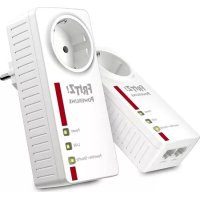
FRITZ!Powerline 1220E - Powerline Adapter AVM - Free user manual and instructions
Find the device manual for free FRITZ!Powerline 1220E AVM in PDF.



| Product Type | Powerline Adapter |
| Brand | AVM |
| Model | FRITZ!Powerline 1220E |
| Dimensions (H x W x D) | 132 x 59 x 78 mm |
| Weight | 220 g |
| Power Supply | 230 V, 50 Hz, AC |
| Power Consumption (active) | Approx. 3 W |
| Power Consumption (standby) | Approx. 0.5 W |
| Maximum Powerline Rate (gross) | Up to 1,200 Mbit/s |
| Powerline Technology | MIMO 2x2, HomePlug AV2, IEEE P1901 |
| Ethernet Ports | 2 x Gigabit Ethernet (10/100/1000 Mbit/s) |
| Network Security | AES-128 bit encryption, Security button |
| LED Indicators | 3 LEDs: Power, LAN, Powerline/Security |
| Operating Temperature | 0 °C to +35 °C |
| Humidity | Indoor use, dry and dust-free |
| Integrated Socket | Yes, with mains filter, max 10 A / 2300 W |
| Compatibility | With other HomePlug AV2 and IEEE P1901 powerline adapters |
| Management and Updates | Via FRITZ!Box, FRITZ!Powerline software, or web interface |
| Manufacturer Warranty | 2 years |
| Cleaning | Disconnect, use a damp cloth |
| Recycling | Do not dispose of with household waste, follow local regulations |
Frequently Asked Questions - FRITZ!Powerline 1220E AVM
User questions about FRITZ!Powerline 1220E AVM
0 question about this device. Answer the ones you know or ask your own.
Ask a new question about this device
Download the instructions for your Powerline Adapter in PDF format for free! Find your manual FRITZ!Powerline 1220E - AVM and take your electronic device back in hand. On this page are published all the documents necessary for the use of your device. FRITZ!Powerline 1220E by AVM.
USER MANUAL FRITZ!Powerline 1220E AVM
Service information and help can be found on our website and in the social networks:
Service
en.avm.de/service
Manual
Downloads en.avm.de/nc/service/downloads
Support request
en.avm.de/service/support-request/your-support-request
Social networks

FRITZ!Powerline 1220E
en.avm.de
AVM GmbH, Alt-Moabit 95, D-10559 Berlin, Germany info@avm.de

Installation and Operation
English 4
Deutsch 16
Español 28
Français 40
Italiano 52
Nederlands 64
Package Contents and Device Features
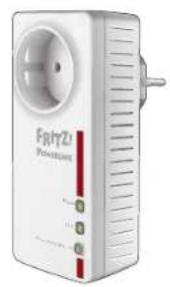
natural_image
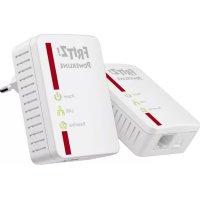
White FRITZ Wireless adapter device with power plug and indicator lights (no readable text or symbols beyond branding)1 FRITZ:Powerline 1220E
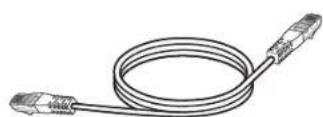
1 LAN cable

•Power supply
- Interface to the powerline network

- Status display
•Three LEDs show the connection status

•For establishing a secure powerline connection
•Factory Settings

•For connecting network devices

• Line filter to protect connections from interference
- Connecting multi-outlet strips
Security
- Operate FRITZ!Powerline 1220E in a dry place that is free of dust and protected from direct sunlight, and provide for sufficient ventilation.
- Connect FRITZ!Powerline 1220E to an easily accessible outlet.
• FRITZ! Powerline 1220E is intended for indoor use only. Never let liquids get inside the device. - Do not open FRITZ!Powerline 1220E. Opening and/or repairing the device can present a hazard.
- Remove FRITZIPowerline 1220E from the mains before cleaning. Clean the device using a moist cloth.
FRITZ!Powerline 1220E
This quick introduction shows you the possibilities for deploying and operating FRITZ!Powerline 1220E. Comprehensive information is presented in the PDF manual available on our website at en.avm.de/service.
With FRITZIPowerline 1220E you can transmit data over the electrical wiring in your household at gigabit speeds. Via this connection your network devices can conveniently exchange data as well, and can access your home network and connect to your Internet router.
To launch operation, insert the FRITZ!Power-line device in any outlet and connect it with your FRITZ!Box, your computer and other network devices – that's all.
With the AVM FRITZ!Powerline software you manage your powerline network and can view detailed information about connections.
FRITZIPowerline 1220E as an individual device can be integrated into existing power-line networks in just a few steps.
Have fun with your FRITZ!Powerline 1220E!
Optimizing the Data Rate
A powerline network is influenced by many factors. With the following steps you can contribute to an optimal data rate in your powerline network:
- Insert powerline devices directly into wall outlets.
- Connect multi-outlet strips to the outlet on your powerline adapter.
•The data rate in a powerline network drops
- for connections over multiple phases
- when junction boxes are located on the path between your powerline devices
- when the connection has to pass through a circuit breaker, dimmer or ballast
- whenever power drills or vacuum cleaners are used
Attempt to minimize these influences.
• The quality of your powerline network can also be managed and optimized using the AVM FRITZ!Powerline software.
AVMFRITZ!Powerline
With the AVM FRITZ!Powerline software you manage your powerline network. AVM FRITZ!Powerline offers you the following features:
•Overview of all FRITZ!Powerline devices and powerline devices from other manufacturers that combine to make up your powerline network
• the connection data of your powerline devices
- You see whether the powerline network is encrypted securely
•You can switch the LEDs of your FRITZ!Powerline devices on and off
- You can perform an update of the device software (fi rmware) for your FRITZ!Powerline devices
For a free download of AVM Powerline, go to en.avm.de/nc/service/downloads.
Requirements for Gigabit Data Rates
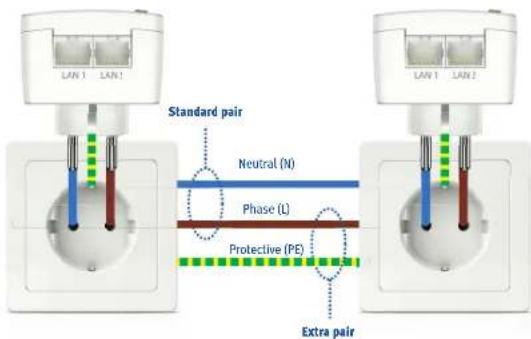
A modern circuit has 3 wires: the phase (L), the neutral (N) and the protective (PE). Many older circuits have only two wires, the phase (L) and the neutral (PEN), which takes on the task of the protective wire. For high data rates with gigabit speeds FRITZIPowerline 1220E deploys MIMO technology, which requires a circuit with 3 wires and protective contact sockets. Using MIMO, FRITZIPowerline 1220E can compose an additional wire pair for data transmission on the phase and the protective wires, so that the transmission potential is 60 - 80% higher than in a conventional powerline connection. FRITZIPowerline 1220E can also be deployed in circuits with 2 wires, but its complete potential cannot be exploited in these circuits.
Setting Up the Powerline Network
- Plug two FRITZ!Powerline 1220E devices into any outlets in your home.
- Connect your FRITZ!Box to one FRITZ!Powerline 1220E, and your computers or other network devices to the second FRITZ!Powerline 1220E using the LAN cables.
- The powerline network is established, automatically encrypted, and can be used immediately.
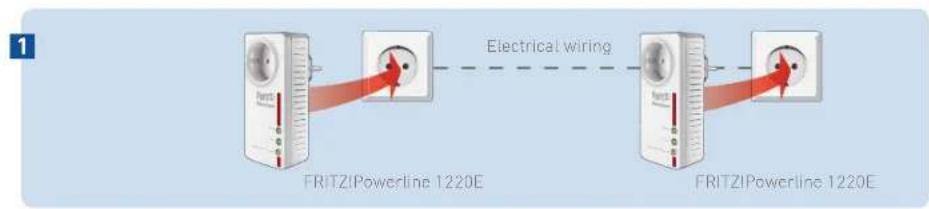
flowchart
graph LR
    A["FRITZIPowerline 1220E"] -->|Electrical wiring| B["FRITZIPowerline 1220E"]
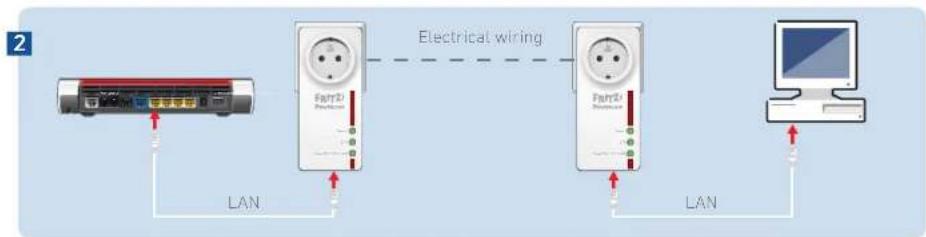
flowchart
graph LR
    A["Device"] -->|LAN| B["Fair3D"]
    B -->|Electrical wiring| C["Fair3D"]
    C -->|LAN| D["Computer"]
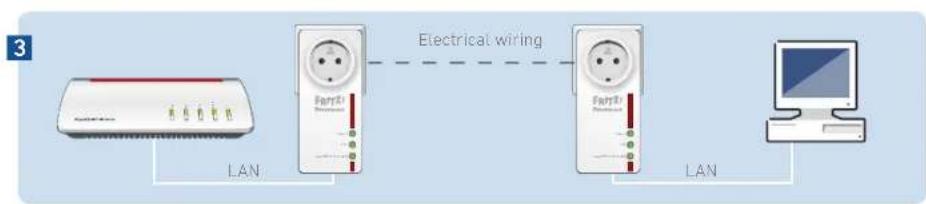
flowchart
graph LR
    A["Router"] -->|LAN| B["Fair&T"]
    B -->|Electrical wiring| C["Fair&T"]
    C -->|LAN| D["Computer"]
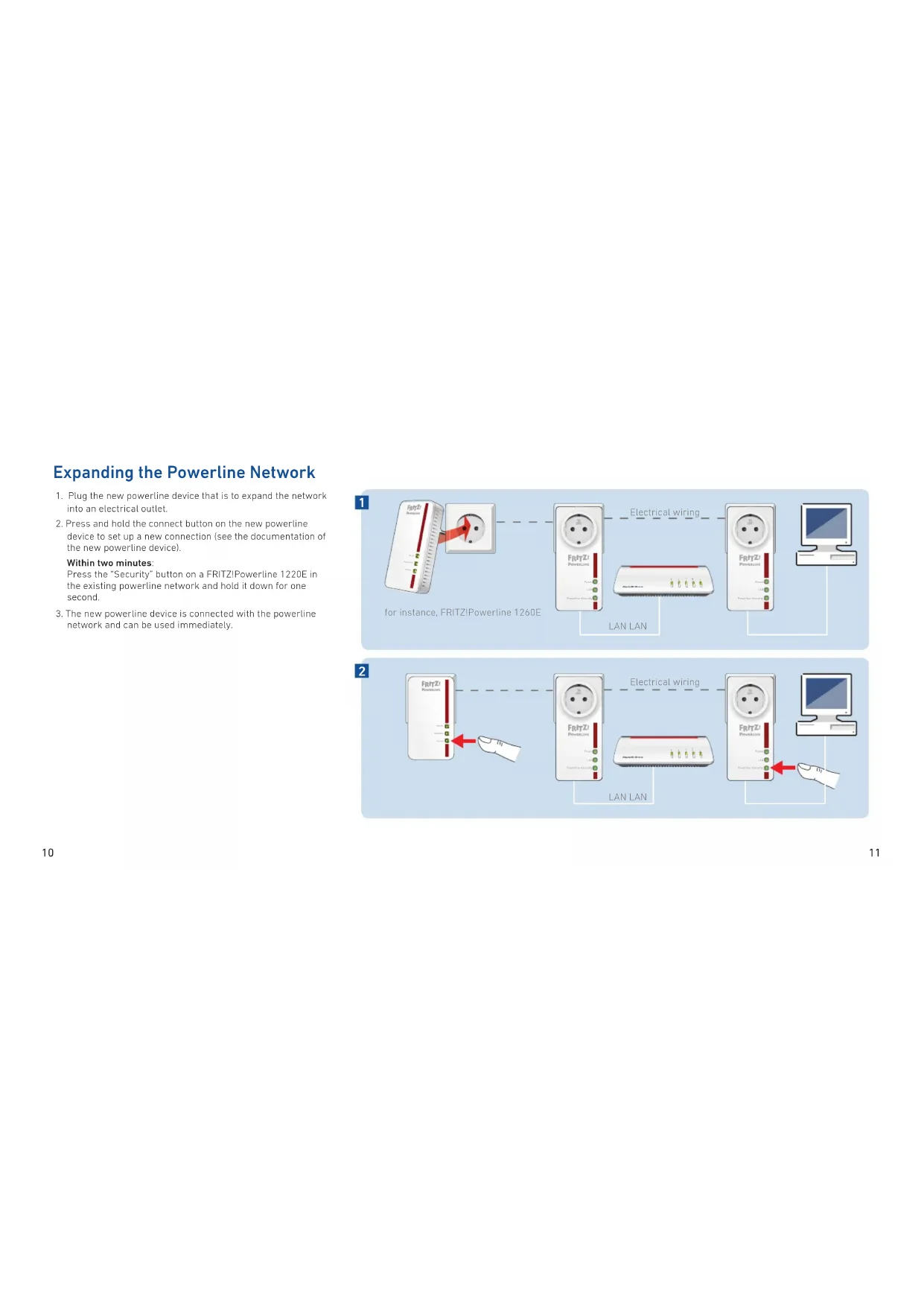
Expanding the Powerline Network
- Plug the new powerline device that is to expand the network into an electrical outlet.
- Press and hold the connect button on the new powerline device to set up a new connection (see the documentation of the new powerline device).
Press the "Security" button on a FRITZ!Powerline 1220E in the existing powerline network and hold it down for one second. - The new powerline device is connected with the powerline network and can be used immediately.
Within two minutes:
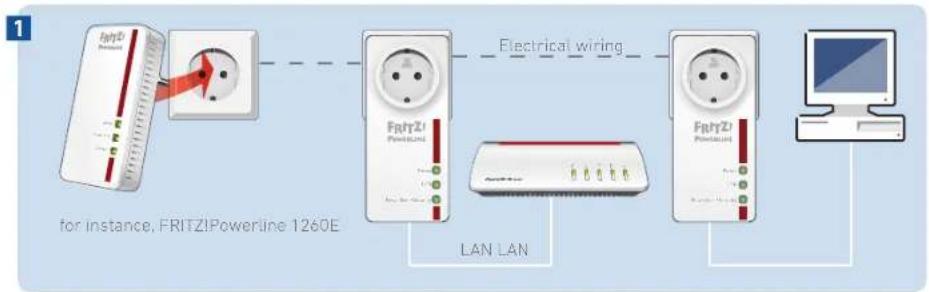
flowchart
graph LR
    A["FRITZ! Powerline 1260E"] -->|Electrical wiring| B["FRITZ! Powerline"]
    B --> C["LAN LAN"]
    C --> D["Computer"]
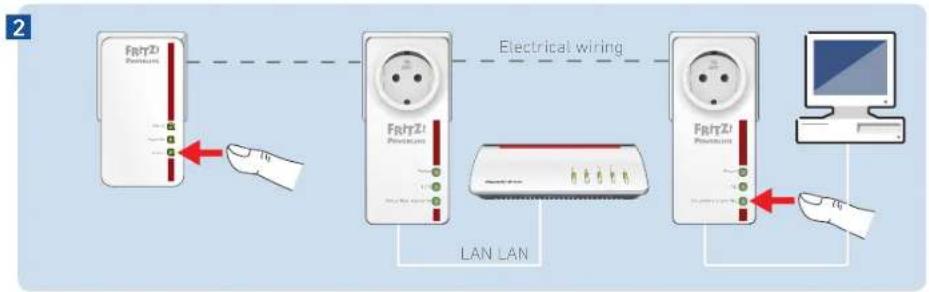
flowchart
graph LR
    A["FRTZI Power Station"] -->|Electrical wiring| B["FRTZI Power Station"]
    B --> C["LAN LAN"]
    C --> D["Computer"]
    style A fill:#f9f,stroke:#333
    style B fill:#ccf,stroke:#333
    style C fill:#cfc,stroke:#333
    style D fill:#fcc,stroke:#333
Status display and operation
| Display/Operation | Condition | |
| Power | on has electric power | |
| fl ashing slowly on standby | ||
| off has no electric power | ||
| LAN | on LAN port in use | |
| off no LAN cable is connected or the device on the LAN cable is switched off | ||
| Powerline - Security | on connected with the powerline network and ready for data exchange | |
| fl ashing resetting or adopting security settings | ||
| off did not detect any compatible powerline devices or did not detect any devices (that use the same network key | ||
| press briefly | integrating safely into an existing powerline network | |
| press and hold (for 10 to 15 sec.) | reset |
FRITZ!Powerline in Your FRITZ!Box
FRITZ!Powerline 1220E and other power-line adapters in your home network are displayed in the FRITZ!Box user interface (under "Home Network / Network").
In the details of FRITZ!Powerline 1220E you receive a variety of information about the device and can configure the following settings for the FRITZ!Powerline 1220E.
• Perform update of the device software (fi rmware)
- Enable Green mode (save power)
- Turning off the LEDs
You can also integrate powerline devices into the powerline network by simply entering the password, without using the buttons.
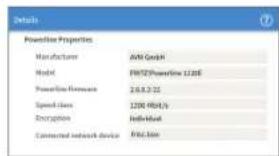
Technical specifications
• Height 132 mm x width 59 mm x depth 78 mm
-230 V, 50 Hz A/C
- 0 °C to +35 °C
•Average active power: ca. 3 W
•Active power on standby: ca. 0.5 W
•Weight: approx. 220 g
•Gigabit powerline with 2 x 2 MIMO technology
• Expands your home network using the wiring in your house
- Socket for maximum load of 10 A / 2300 W
•Powerline transmission at up to 1200 Mbit/s (gross) in the home network for HD video, music, photos, NAS links, surfing, and gaming
- 2 x gigabit Ethernet (1000 Mbit/s) for connecting computer, smart TV, Blu-ray, sound system and game consoles
•Powerline connection at the push of a button: secure encryption with AES 128-bit
•Standardized in accordance with Home Plug AV2, compatible with IEEE P1901
•Works with all current powerline adapters
- Update (firmware) via FRITZ!Box or with the AVM FRITZ!Powerline software
Legal Notice
Declaration of CE Conformity
CE AVM declares herewith that the device is compliant with the basic requirements and the relevant rules in directives 2014/30/EU, 2014/35/EU, 2009/125/EC and 2011/65/EU.
The long version of the declaration of CE conformity is available at http://en.avm.de/ce.
Diagnostics and Maintenance
The FRITZ!Powerline 1220E transfers diagnostics data to AVM, which support us in further developing the product. This allows you to benefit directly from optimizations and FRITZIOS updates. For more detailed information, see the help on the user interface at http://fritz.powerline.
Disposal
In accordance with European directives, FRITZ!Powerline 1220E and its cable may not be disposed with household waste. Please bring these to your local collection points for disposal.
Manufacturer's Warranty
We offer a manufacturer's warranty of 2 years for this original product. The warranty period begins with the purchase date from the first end user. Compliance with the warranty period can be proven by submission of the original invoice or comparable documents. This warranty does not restrict your warranty rights based on the contract of sale or other statutory rights.
Within the warranty period, we will remove defects to the product which are demonstrably due to faults in materials or manufacturing. Our warranty does not cover defects which occur due to incorrect installation, improper use, non-observance of instructions in the user manual, normal wear and tear or defects in the environment of the system (third-party hardware or software). We may, at our discretion, repair or replace the defective product. Claims other than the right to the removal of defects which is mentioned in these terms of warranty are not constituted.
We guarantee that the software conforms with general specifications, not. however, that the software meets your individual requirements. Delivery costs will not be reimbursed. Products which have been replaced revert to our ownership. Claims recognized under warranty entail neither an extension or recommencement of the warranty period. If we reject a warranty claim, this claim lapses no later than six months after being rejected by us.
This warranty shall be governed by German substantive law, to the exclusion of the United Nations Convention on Contracts for the International Sale of Goods (CISG).
natural_image
White FRHTZ Wireless adapter device with power outlet and indicator lights (no readable text or symbols beyond branding)1 FRITZ!Powerline 1220E
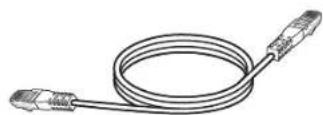
1 LAN-Kabel
natural_image
White FRITZ1 power adapter device with a circular vent and three indicator lights (no visible text or symbols on the device body)1 adaptador FRITZ!Powerline 1220E
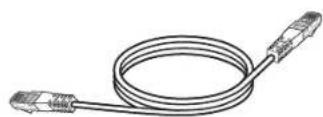
1 cable LAN
natural_image
White FRITZ1 Wireless adapter device with power outlet and three indicator lights (no visible text or symbols on body)1 FRITZ!Powerline 1220E
1 cable LAN
natural_image
White FRITZ power adapter device with a circular socket and three green indicator lights (no visible text or symbols on the device body)1 FRITZ!Powerline 1220E
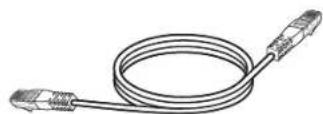
1 cavo LAN
en.avm.de/nc/service/downloads.
natural_image
White FRITZ power adapter device with a spout and three green indicator lights (no visible text or symbols on the device body)1 FRITZ!Powerline 1220E
1 LAN-kabel
en.avm.de/nc/service/downloads.
- FRITZ!Powerline 1220E
- en.avm.de
- Package Contents and Device Features
- Security
- Optimizing the Data Rate
- AVMFRITZ!Powerline
- Requirements for Gigabit Data Rates
- Setting Up the Powerline Network
- Expanding the Powerline Network
- Within two minutes:
- FRITZ!Powerline in Your FRITZ!Box
- Technical specifications
- Legal Notice
- Declaration of CE Conformity
- Diagnostics and Maintenance
- Disposal
- Manufacturer's Warranty
Brand : AVM
Model : FRITZ!Powerline 1220E
Category : Powerline Adapter