PIP11 - Baby monitors MOTOROLA - Free user manual and instructions
Find the device manual for free PIP11 MOTOROLA in PDF.



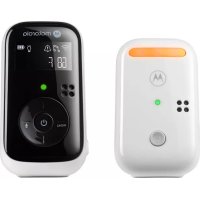
| Product Type | Digital Audio Baby Monitor |
| Brand | Motorola |
| Model | PIP11 |
| Baby Unit Power Supply | AC adapter (DC jack) |
| Parent Unit Power Supply | Rechargeable Ni-MH 2 x AAA batteries (included) + AC adapter |
| Battery Life (Parent Unit) | Approximately 16 hours after initial charge |
| Main Features | Night light, microphone, speaker, temperature sensor, two-way communication, lullabies, sound alert (Vox) |
| Display | LCD screen on parent unit with status icons |
| LEDs | Power/connection LED on both units |
| Range | Not specified |
| Frequency | Not specified |
| Care and Cleaning | Clean with a dry cloth; do not use liquids |
| Safety | Keep cords out of reach of children (more than 1 meter); use only the provided adapters |
| Spare Parts and Repairability | Rechargeable batteries are replaceable; for any other parts, contact customer service |
| General Information | User manual available for download; standard manufacturer warranty |
Frequently Asked Questions - PIP11 MOTOROLA
User questions about PIP11 MOTOROLA
0 question about this device. Answer the ones you know or ask your own.
Ask a new question about this device
Download the instructions for your Baby monitors in PDF format for free! Find your manual PIP11 - MOTOROLA and take your electronic device back in hand. On this page are published all the documents necessary for the use of your device. PIP11 by MOTOROLA.
USER MANUAL PIP11 MOTOROLA
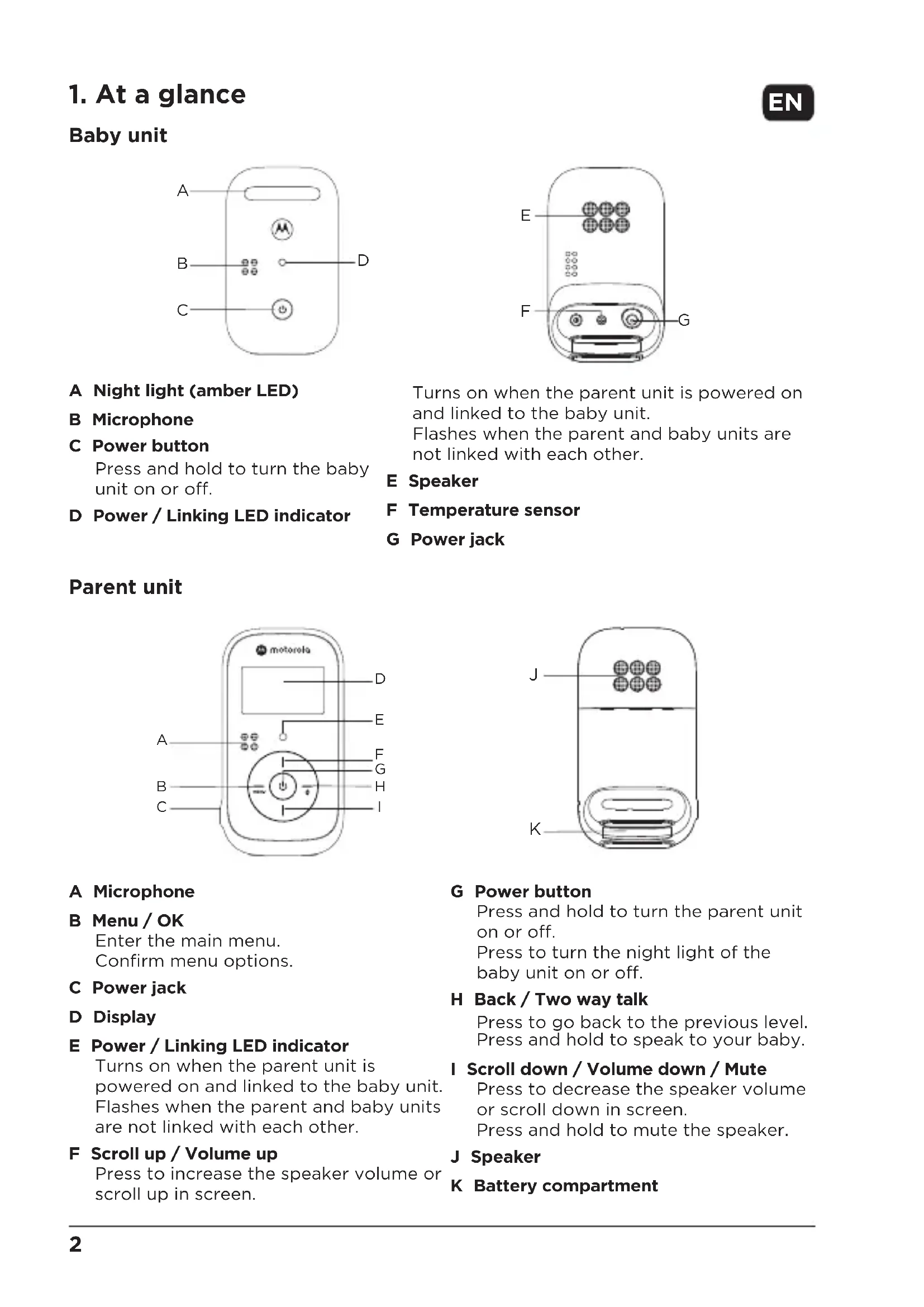
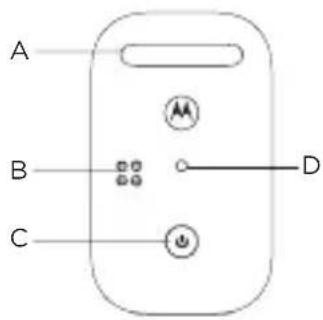
Press and hold to turn the baby unit on or off.
D Power / Linking LED indicator
Turns on when the parent unit is powered on and linked to the baby unit.
Flashes when the parent and baby units are not linked with each other.
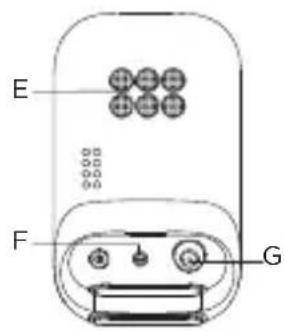
E Speaker
F Temperature sensor
G Power jack
Parent unit
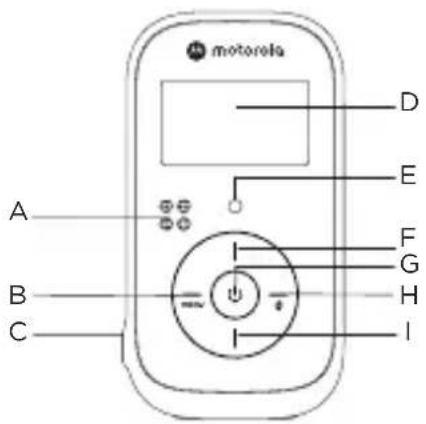
A Microphone
B Menu / OK
Enter the main menu.
Confirm menu options.
C Power jack
D Display
E Power / Linking LED indicator
Turns on when the parent unit is powered on and linked to the baby unit. Flashes when the parent and baby units are not linked with each other.
F Scroll up / Volume up
Press to increase the speaker volume or scroll up in screen.
G Power button
Press and hold to turn the parent unit on or off.
Press to turn the night light of the baby unit on or off.
H Back / Two way talk
Press to go back to the previous level. Press and hold to speak to your baby.
I Scroll down / Volume down / Mute
Press to decrease the speaker volume or scroll down in screen.
Press and hold to mute the speaker.
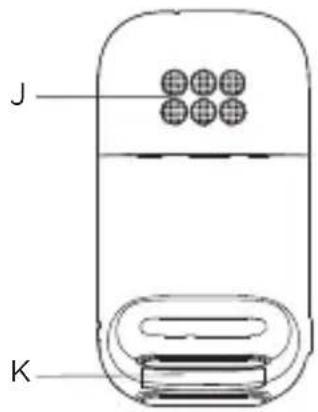
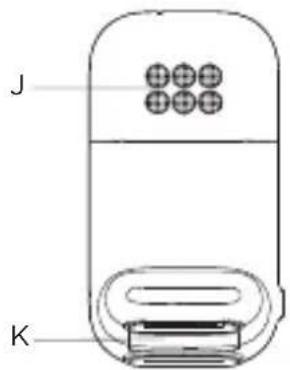
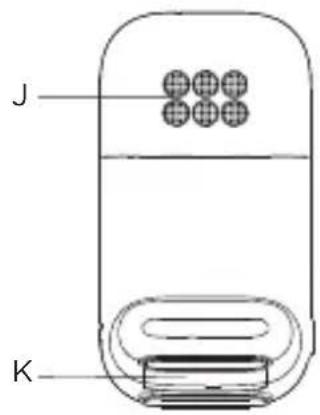
J Speaker
K Battery compartment
2. Connect and charge
Baby unit
natural_image
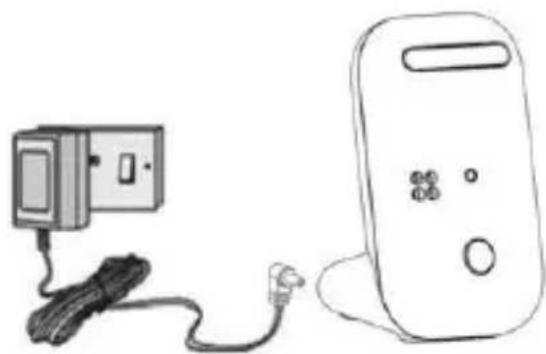
Line drawing of a portable electronic device connected to a cable and plug (no text or symbols)- Plug the DC plug of the power adaptor into the DC jack on the rear of the baby unit and plug the other end of the AC adaptor into the AC power outlet.
- Switch on the AC power.

WARNING
Strangulation Hazard. Children have STRANGLED in cords. Keep this cord out of the reach of children (more than 1 meter or 3 feet away). Do not remove the tags from the AC Adapters. Only use the AC Adapters provided.
Parent unit
natural_image
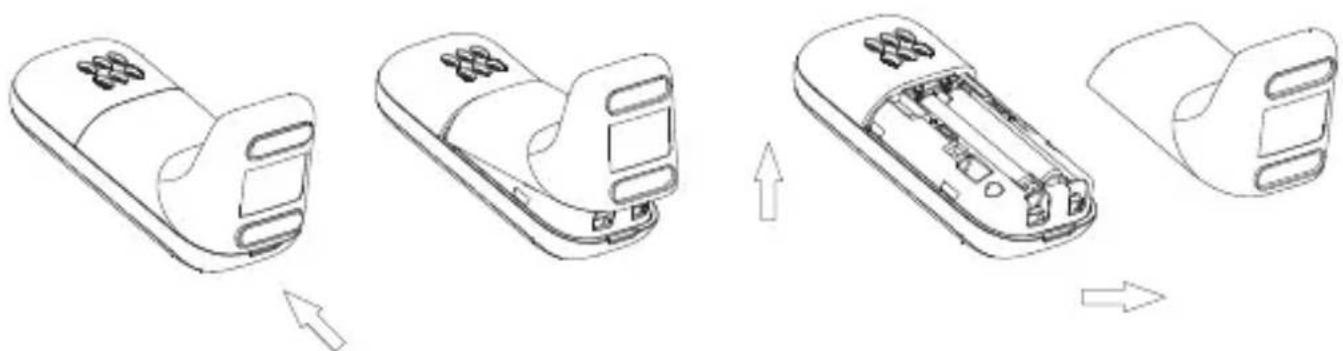
Line drawings of a handheld device showing internal components and assembly steps (no text or symbols)- Lift up the battery cover to remove it from the the parent unit.
- Insert the rechargeable Ni-MH battery cells supplied. Note the '+' and '-' markings inside the battery compartment and insert in the correct direction.
- Slide the battery cover back into place.
Warning! Use only the approved rechargeable Ni-MH battery cells (2 x AAA Ni-MH rechargeable batteries) supplied with your PIP11.
natural_image
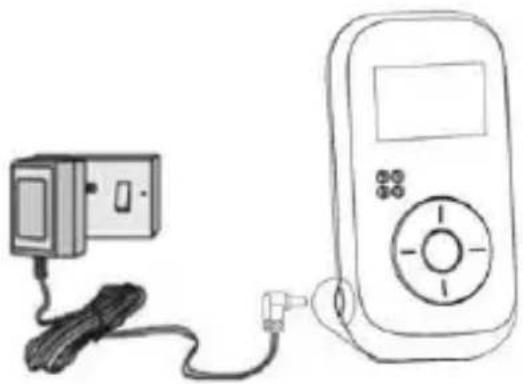
Line drawing of a portable electronic device connected to a cable and a power cord (no text or symbols)- Plug the DC plug of the power adaptor into the DC jack on the side of the parent unit and plug the other end of the AC adaptor into the AC power outlet.
- Switch on the AC power. The parent unit turns on.
- When charging the batteries for the first time, charge for at least 16 hours continuously.
- When the parent unit is fully charged, Will appear steadily on the display.
Note
If is shown on the display, recharge the parent unit before using it again. When charging, will scroll on the display.
3. Display icons

Turns on when the parent unit is connected and within range. Flashes when the parent unit is not connected and out of range.

Turns on when listening to lullabies.

Turns on when the sound alert is activated. Flashes when the sound alert is triggered.

Turns on when the speaker volume is off.

Turns on when the night light is on.

Indicates the current battery level.
Note
If you do not press any button on the parent unit for 30 seconds, the display will automatically return to standby.
1. Überblick
Babyeinheit
natural_image
Line drawing of a handheld device connected to a cable and a rectangular device (no text or symbols)natural_image
Line drawings of a car interior showing progressive assembly from top to bottom panel (no text or symbols)natural_image
Line drawing of a portable electronic device connected to a cable and a power cord (no text or symbols)A Microphone
B Menu / OK
natural_image
Line drawing of a device with cable and connector, no text or symbols presentnatural_image
Line drawings of a mobile phone casing showing internal components and assembly steps (no text or symbols)natural_image
Line drawing of a portable electronic device connected to a cable and a power cord (no text or symbols)A Microfoon
B Menu / OK
Open het hoofdmenu.
Bevestig menu-opties.
C Voedingsaansluiting
D Display
E Aan/Uit/koppeling-LED-indicator
natural_image
Line drawing of a mobile phone connected to a cable and a device (no text or symbols)natural_image
Line drawings of a device's internal components and assembly, showing sequential steps from top view to front view (no text or symbols)natural_image
Line drawing of a portable electronic device connected to a cable and power plug (no text or symbols)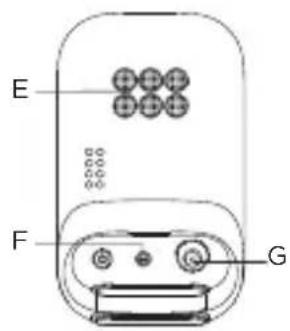
natural_image
Line drawing of a mobile phone connected to a cable and plug (no text or symbols)natural_image
Line drawings of a handheld device showing internal components and assembly steps (no text or symbols)natural_image
Line drawing of a portable electronic device connected to a cable and a power cord (no text or symbols)natural_image
Line drawing of a mobile phone connected to a cable and a device (no text or symbols)natural_image
Line drawings of a handheld device showing internal components and assembly steps (no text or symbols)natural_image
Line drawing of a portable electronic device connected to a cable and plug (no text or symbols)A Microfone
B Menu / OK
natural_image
Line drawing of a portable electronic device connected to a cable and plug (no text or symbols)natural_image
Line drawings of a car interior showing the open and closed views of a device, with arrows indicating transformation (no text or symbols present)natural_image
Line drawing of a portable electronic device connected to a cable and a power cord (no text or symbols)natural_image
Line drawing of a handheld device connected to a cable and a separate electronic device (no text or symbols visible)natural_image
Line drawings of a car interior showing the open and closed views of the door (no text or symbols)natural_image
Line drawing of a portable electronic device connected to a cable and plug (no text or symbols)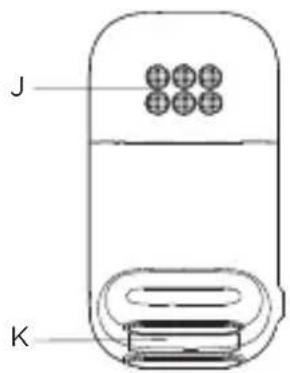
A Mikrofon
B Menu / OK
natural_image
Line drawing of a device with a cable and a rectangular box connected to a rounded rectangular device (no text or symbols)natural_image
Line drawings of a handheld device showing internal components and assembly steps (no text or symbols)natural_image
Line drawing of a portable electronic device connected to a cable and a power cord (no text or symbols)natural_image
Line drawing of a handheld device connected to a cable and a rectangular device (no text or symbols)natural_image
Line drawings of a handheld device showing internal components and assembly steps (no text or symbols)natural_image
Line drawing of a portable electronic device connected to a cable and a power cord (no text or symbols)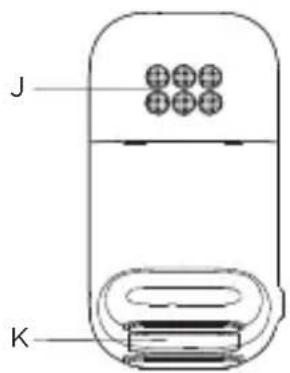
A Mikrofón
B Ponuka/OK
natural_image
Line drawing of a mobile phone connected to a cable and plug (no text or symbols)- Jednosmernú zástrčku napájacieho adaptéra zapojte do konektora DC na zadnej strane detského zariadenia a druhý koniec AC adaptéra zapojte do AC napájacej zásuvky.
- Zapnite AC napájanie.

VÝSTRAHA
natural_image
Line drawings of a handheld device showing internal components and assembly steps (no text or symbols)natural_image
Line drawing of a portable electronic device connected to a cable and a power cord (no text or symbols)- Jednosmernú zástrčku napájacieho adaptéra zapojte do konektora DC na zadnej strane rodičovského zariadenia a druhý koniec AC adaptéra zapojte do AC napájacej zásuvky.
- Zapnite AC napájanie. Rodičovské zariadenie sa zapne.
- Pri prvom dobíjaní batérií nabíjajte kontinuálne 16 hodín.
- Ked'je rodičovské zariadenie úplne nabité, na displeji bude svitetit
Poznámka
natural_image
Line drawing of a handheld device connected to a cable and a separate electronic device (no text or symbols visible)natural_image
Line drawings of a handheld device showing internal components and assembly steps (no text or symbols)natural_image
Line drawing of a portable electronic device connected to a cable and a power cord (no text or symbols)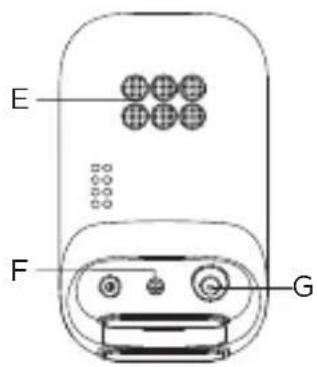
A Natlampe (ravfarvet LED)
B Mikrofon
C Afbryderknap
A Mikrofon
B Menu / OK
Indtast hovedmenu.
Bekræft menuvalg.
C Strømstik
D Visning
E Strøm- / Forbindelses-LED-indikator
natural_image
Line drawing of a device with a cable and a rectangular box connected to a rounded rectangular device (no text or symbols)natural_image
Line drawings of a handheld device showing internal components and assembly steps (no text or symbols)natural_image
Line drawing of a portable electronic device connected to a cable and a power cord (no text or symbols)For customers in Europe and UK:
Imported and Distributed by: A.I.&E., Adriaan Mulderweg 9-11, 5657 EM Eindhoven, The Netherlands. Edco UK Ltd, 1st Floor, Two Chamberlain Square, Birmingham, B3 3AX, UK.
EU Declaration of Conformity
Hereby, MZGW declares that the radio equipment type is in compliance with RE Directive 2014/53/EU. The full text of the EU declaration of conformity is available on the website: motorolanursery.com.
UK Declaration of Conformity
Hereby, MZGW declares that this product is in compliance with the requirements for UKCA marking. The Declaration of Conformity can be obtained at motorolanursery.com.
Distributed or sold by Meizhou Guo Wei Electronics Co. LTD., official licensee for this product. MOTOROLA and the Stylized M Logo are trademarks or registered trademarks of Motorola Trademark Holdings, LLC. and are used under license. All other trademarks are the property of their respective owners. 2022 Motorola Mobility LLC. All rights reserved.
Version 1 (EU)