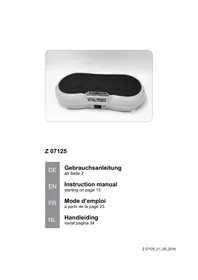
05032 - Fitness Equipment VitalMaxx - Free user manual and instructions
Find the device manual for free 05032 VitalMaxx in PDF.



User questions about 05032 VitalMaxx
0 question about this device. Answer the ones you know or ask your own.
Ask a new question about this device
Download the instructions for your Fitness Equipment in PDF format for free! Find your manual 05032 - VitalMaxx and take your electronic device back in hand. On this page are published all the documents necessary for the use of your device. 05032 by VitalMaxx.
USER MANUAL 05032 VitalMaxx
8 Maulschlüssel (1 x)
9 Links Pedal (1 x)
1,5 V-Batterie, AAA (1 x)
natural_image
Line drawing of a person in a relaxed pose with arms raised (no text or symbols)natural_image
Line drawing of a person in a dynamic pose, possibly performing a martial arts or exercise pose (no text or symbols)natural_image
Line drawing of a person performing a plank exercise (no text or symbols)natural_image
Line drawing of a person in a seated yoga pose (no text or symbols)Inserting / Changing the Battery in the Training Computer 13
Before Training 13
Setting Up the Device 14
Use 14
After Training 15
Cleaning and Storage 16
Disposal 17
Technical Data 18
Notes on the declaration of conformity 18
ITEMS SUPPLIED
(Picture A)
1 Rear foot (1 x)
2 Washer (4 x)
3 Screw (4 x)
4 Main unit with training computer (1 x)
5 Right pedal (1 x)
6 Front foot (1 x)
7 Hexagon key (1 x)
8 Spanner (1 x)
9 Left pedal (1 x)
1.5 V battery, AAA (1 x)
Operating instructions (1 x)
Check the items supplied for completeness and the components for transport damage. If you find any damage, do not use the device but contact our customer service department.
Remove any possible films, stickers or transport protection from the device.
Never remove the rating plate and any possible warnings!
AT A GLANCE
(Picture B)
10 Carrying handle
11 Adjusting knob (set torque resistance)
12 Training computer
Dear Customer,
We are delighted that you have chosen the MAXXMEE mini trainer.
Before using the device for the first time, please read through these operating instructions carefully and keep them for future reference and other users. They form an integral part of the device. The manufacturer and importer do not accept any liability if the information in these operating instructions is not complied with.
If you have any questions about the device and about spare parts/accessories, contact the customer service department via our website: ww.ds-group.de/kundenservice
We hope you have a lot of fun with your MAXXMEE mini trainer.
SYMBOLS

Danger symbol: This symbol indicates possible dangers. Read the associated safety notices carefully and follow them.

Supplementary information

Read the operating instructions before use!

Symbol for direct current
SIGNAL WORDS
Signal words indicate hazards if the associated notices are not followed.
WARNING – medium risk, may result in serious injury or death
NOTICE – may result in risk of damage to material
INTENDED USE
This fixed training device is intended to be used for fitness training and a workout of the muscles. It is intended to be used exclusively while sitting down. Never stand on the device.
■ The device is not designed for medical or therapeutic purposes.
■ The device must not be used by several people at the same time.
■ Caution – the training data of this device have a low level of accuracy. The device is not suitable for high accuracy purposes.
■ The device is designed for a maximum load of 100 kg.
■ This device is designed exclusively for use in the home.
■ The device is for personal use only and is not intended for commercial applications.
■ Use the device only for the specified purpose and as described in the operating instructions. Any other use is deemed to be improper.
■ The warranty does not cover faults caused by incorrect handling, damage or attempted repairs. The same applies to normal wear and tear.
EN
SAFETY NOTICES
■ The safety level of the device can only be maintained if it is regularly checked for damage. Each time before you use the device, it should therefore be inspected for any signs of damage (loose screws, worn parts, etc.). If you hear unusual noises from the device during use, stop exercising immediately. Have defective parts replaced immediately and do not use the device until it has been repaired! In the event of any damage, please contact the customer service department or a specialist workshop.

WARNING – Danger of Injury
This device may be used by children aged 8 and over and by people with reduced physical, sensory or mental abilities or a lack of experience and / or knowledge if they are supervised or have received instruction on how to use the device safely and have understood the dangers resulting from failure to comply with the relevant safety precautions.
■ Children must not play with the device.
■ Cleaning and user maintenance must not be carried out by children, unless they are supervised.
The device is not a toy! Parents and other people in supervisory capacities should be aware of their responsibility because, due to children's natural instinct for play and desire to experiment, it is foreseeable that situations and behaviour will occur for which the training device is not constructed.
■ Do not leave the device unattended in the presence of children and animals.
If you have any health concerns (risk group), consult a doctor before using the device. If necessary, coordinate
the training programme with your doctor.
■ Pregnant women should not use the device or only after consulting their doctor.
- Keep the fastening and packaging materials away from children and animals. There is a danger of suffocation.
■ Batteries can be deadly if swallowed. The battery and the device should be kept out of the reach of young children and animals. If a battery is swallowed, immediate medical attention must be sought. There is a danger of burns from battery acid.
If a battery leaks, do not allow your skin, eyes and mucous membranes to come into contact with the battery acid. If you touch battery acid, rinse the affected areas with abundant clear water straight away and seek medical assistance immediately. There is a danger of burns from battery acid.
■ Place the device down on a secure and horizontal surface.
■ If adjusting devices are left protruding, they may impede the movement of the user.
■ Before each use, check all parts, especially the pedals, for tightness and wear.
NOTICE – Risk of Damage to Material and Property
■ Use only the battery type specified in the technical data.
■ The batteries must not be charged or reactivated in any way, disassembled, thrown into a fire, immersed in liquids or short-circuited.
■ Always take the batteries out if they are dead or if you will not be using the device for a prolonged period. This will prevent any damage caused by leaks.
■ Remove batteries that have leaked from the device immediately and clean the contacts in the device.
■ Ensure that the training computer cannot come into contact with water!
■ Protect the device from: extreme temperatures, strong temperature fluctuations, persistent moisture, wet conditions, direct sunlight and impacts.
- Do not use any caustic or abrasive cleaning agents or pads to clean the device. These may damage the surface.
ASSEMBLY
Follow these assembly instructions step by step to prevent any errors during setup and subsequent use.
- Place all parts carefully on the floor. To be on the safe side, place a protective film or blanket underneath the parts to prevent any damage to delicate floor coverings.
- Screw the feet (1, 6) onto the bottom of the main unit (4). To do this, use the washers (2) and screws (3) as well as the hexagon key (7) supplied. (Picture D)
- Turn the pedals (4, 9) tight on the pedal mounts using the spanner (8) which is supplied. Make sure that the markings L (left) and R (right) on the pedals and mounts match. (Picture E) The right pedal (right-hand thread) is tightened in the clockwise direction. The left pedal (left-hand thread) is tightened in the anticlockwise direction.
Adjusting the Pedal Straps
The size of the strap on the pedal can be changed. To do this, loosen the screws on the straps, adjust them to the size you want and then turn them hand-tight again. (Picture F)
INSERTING / CHANGING THE BATTERY IN THE TRAINING COMPUTER
- Pull the training computer (13) out of the main unit (4).
- Insert a 1.5 V battery, AAA type into the battery compartment on the back of the training computer. Pay attention to the correct polarity (+ / -). (Picture G)

Before inserting the battery, check whether the contacts in the device and on the battery are clean, and clean them if necessary.
- Carefully insert the training computer into the main unit.
If the training computer stops working, the batteries need to be replaced.
BEFORE TRAINING
A warm-up is an essential part of any sporting activity. All physical and mental aspects of your performance are thereby stimulated and enhanced. It also greatly reduces the risk of injury.
The following exercises warm up large muscle groups through movement.
- Jogging: Jog slowly on the spot or around the room for a few minutes.
- Knee bends: Stand with your legs the width of your shoulders apart, keep your upper body straight and bend and then stretch your knees. Repeat approx. 5 – 10 times.
- Upper body twist: Stand with your legs the width of your shoulders apart, keep your upper body straight, raise your arms to shoulder height at the sides and bend so that your hands are in front of your chest. Twist your upper body as far as possible to the right and left. Repeat approx. 10 times.
EN
- Side bends: Stand with your legs the width of your shoulders apart, keep your upper body straight. Then slowly tilt your upper body to the sides. Stretch the arm on the stretched side of the body over your head as you do this. Repeat approx. 10 times.
- Arm circles: Stand upright, stretch out your right arm and swing it forwards. Change direction after 5 – 10 swings. Then swing with your left arm.
SETTING UP THE DEVICE
Please Note!
■ The free area must include the space required for an emergency dismount. If training devices are set up in the immediate vicinity of one another, they can share one free area.
■ The free area in the direction from which you access the training device must be at least 0.6 m greater than the exercise area.
Place the device on the floor. Protect any delicate surfaces (laminate, parquet floor, etc.) from scratches etc. with a protective mat.
Depending on your body size, leave plenty of space on all sides (at least 0.6 metres at the sides and rear, at least 1 metre at the front and 1.5 metre above) so that you have enough room to move about in during a workout. (Picture H)
USE
Please Note!
■ When doing the exercises, wear well-fitting, loose, comfortable clothing and non-slip trainers. Make sure that nothing can get caught in the moving parts of the device.
■ CAUTION! Stop the training immediately if you start to feel weak, dizzy or unwell in some other way. If you feel sick, have pain in your chest or arms, an irregular heartbeat or other unusual symptoms, seek medical attention immediately.
■ We explicitly point out that improper use of the device and excessive training can be detrimental to your health.
Tips For Healthy Training

Do not train if you are feeling tired or exhausted. Never work out on a full stomach. Do not eat anything for approx. one hour before and after training. Always remember that the body needs a lot of fluid during sporting activity.
It is not about doing a few exercises quickly, but about training regularly over a long period of time.
How quickly progress is made depends on a person's particular physical condition. You should start slowly and start with shorter sessions and give the body time to adjust. The more consistently and regularly you train, the longer you can make the sessions. We recommend a training time of approx. 20 to 30 minutes on the device. Start with a low torque resistance and increase the intensity gradually until you reach the desired performance level that you are still capable of maintaining. Allow the training to fade out with a slow pace and low torque resistance.
Setting the Torque Resistance
The torque resistance is adjusted using the adjusting knob (11):
- Increase resistance: Turn screw towards+
- Reduce resistance: Turn screw towards -
Training
The device can be used to train both the leg muscles and the arm muscles.
Legs (Picture I):
- Place the device on the floor.
- Sit down in front of it on a chair or stool.
- Place your feet in the pedal straps and pedal at an even pace.
Arms (Picture J):
- Place the device on a table.
- Sit down in front of it on a chair or stool.
- Hold the pedals firmly with your hands and turn them at an even pace.
As soon as the pedals are moved, the training computer (12) switches on.
Functions of the Training Computer (Picture C)
By turning the pedals or pressing the button on the training computer (12), it is switched on.
Two values are shown on the display in each case: At the top (next to K) is the speed in km/h, with the following values displayed below one after the other:
TIME Training time in minutes and seconds
ODO Total distance covered in km (NOTICE: The display is reset to zero by taking out and reinserting the batteries.)
DIST Distance covered in the single workout in km
CAL Calories consumed (approximate value)
- After it is switched on, SCAN flashes at the edge of the bottom row and the values mentioned above are run through one after the other. To permanently select a value that has just been displayed, press the button. To change the display, press the button again and the training computer will revert to SCAN mode.
- Keep the button pressed down for a few seconds to reset all data to zero (apart from the ODO display).
- If there is no activity for approx. 4 minutes, the training computer will automatically switch off.
AFTER TRAINING
After training, you should always perform stretching exercises in order to slowly restore your circulation to a normal level. You will find a few example exercises below:
natural_image
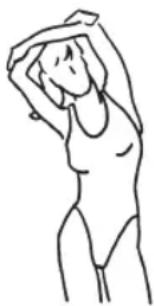
Line drawing of a person in a relaxed pose with arms raised (no text or symbols)Upper body: Stand upright, cross your arms over your head and pull your left elbow to the right with your right hand. The upper body moves gently as you do this. Stay in this position for 15 – 20 seconds. Change sides.
natural_image
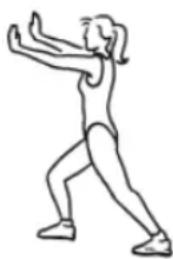
Line drawing of a person in a dynamic pose, possibly performing a martial arts or exercise pose (no text or symbols)Calves: Stand up. Place your right leg in front of you and bend it slightly while your left leg remains stretched. Push your left heel down onto the floor. Stay in this position for 15 – 20 seconds. Change sides.
EN
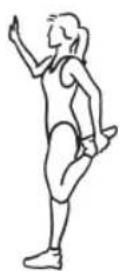
Front of thighs: Stand on one leg, bend the other one and grab your foot with your hand. Pull it up to your buttocks and hold this position for 15 – 20 seconds Change sides.
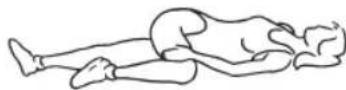
Back: Lie down flat on your back. Bend your right leg and place it over your left leg which is still stretched out. Your hip twists but both shoulders must remain on the floor. Stay in this position for 15 – 20 seconds. Change sides.
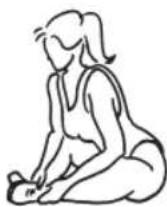
Inside of thighs: Sit down on the floor, turn your knees to face outwards, place the soles of your feet together and pull towards your body. Place your hands around your ankles and press your knees gently down to the floor with your elbows. Keep your back straight as you do this. Stay in this position for 15 – 20 seconds.
natural_image
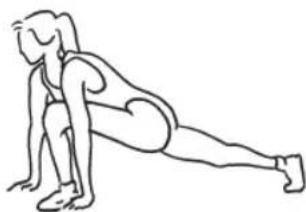
Line drawing of a person performing a plank exercise (no text or symbols)Whole leg: Squat down, rest your hands on the floor next to your feet and stretch one leg out behind you. The thigh and lower part of your front leg form a right angle, and the foot rests fully on the floor. Stay in this position for 15 – 20 seconds. Change sides.
natural_image
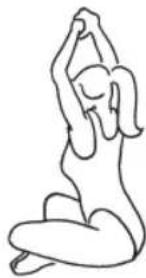
Line drawing of a person in a seated yoga pose (no text or symbols)Shoulders/back: Sit cross-legged on the floor with a straight back. Fold / clasp together your hands and stretch your arms out above your head. Stretch your back. Stay in this position for 15 – 20 seconds.
CLEANING AND STORAGE
Please Note!
■ No liquid must get into the training computer. Never immerse the device in water!
■ Do not use any sharp or abrasive cleaning agents or cleaning pads to clean the device. These may damage the surfaces.
- If necessary, wipe down the device with a damp cloth and mild cleaning agent if required.
- Store the device in a dry place which is protected from direct sunlight and is out of the reach of children and animals.
DISPOSAL

Dispose of the packaging material in an environmentally friendly manner so that it can be recycled.
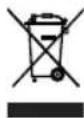
The adjacent symbol (crossed-out bin underlined) means that used devices should not be disposed of in the domestic waste, but should instead be taken to special collection and return systems.
Owners of used devices must remove from the used device any used batteries or rechargeable batteries which are not encapsulated by the used device and can be removed in a non-destructive way and dispose of them separately (see also the section on battery disposal).
Owners of used devices from private households can take them free of charge to the collection points of the public waste disposal authorities or the disposal points which are set up by manufacturers and distributors under the Electrical Equipment Act. Businesses which market electrical and electronic devices are also obliged to take back used devices.

(Rechargeable) batteries must not be disposed of along with the household waste. Consumers are legally obliged to dispose of (rechargeable) batteries separately.
(Rechargeable) batteries can be handed in free of charge at a collection point of the local authority/district or in retailers so that they can be disposed of in an environmentally friendly way and valuable raw materials can be recovered. If they are not disposed of properly, toxic ingredients may escape into the environment and cause harm to the health of humans, animals and plants.
Only dispose of (rechargeable) batteries when they are discharged. If possible, use rechargeable batteries rather than single-use batteries.
In the case of (rechargeable) batteries containing lithium, tape over the poles before you dispose of them to prevent a short circuit. A short circuit may cause a fire or explosion.
TECHNICAL DATA
Article number: 05032 (grey), 09705 (purple)
ID of the operating instructions: Z 05032_09705 M DS V5 0922 mh
Device
Model number: JHK-20562
Class: HC (Use at home, training data with low level of accuracy)
Max. load capacity: 100 kg
Base area: 50 cm ^2 base area
Weight: 5 kg
Complies with the standards: EN ISO 20957-1:2013, EN ISO 20957-5:2016
Brake system: speed independent
Training computer
Model number: Ms001
Voltage supply: 1.5 V DC (1 x 1.5 V battery, AAA)
All rights reserved.

NOTES ON THE DECLARATION OF CONFORMITY
The declaration of conformity for this device can be requested from: