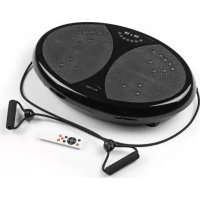
02753 - Fitness Equipment VitalMaxx - Free user manual and instructions
Find the device manual for free 02753 VitalMaxx in PDF.



| Brand | VitalMaxx |
| Model | 02753 |
| Device type | Vibrating training device |
| Use | Domestic |
| Dimensions (L x W x H) | 61 x 41 x 11.5 cm |
| Net weight | 9 kg |
| Power supply | 220 – 240 V ~ 50 – 60 Hz |
| Max power | 200 W |
| Protection class | I |
| Maximum load capacity | 120 kg |
| Vibration levels | 99 |
| Automatic programs | 10 |
| Manual mode | Yes |
| Remote control | Yes, with 2 AAA 1.5 V batteries (not included) |
| Resistance bands | 2 with handles |
| Band stretch length | 85 – 200 cm |
| Tensile force (at 200 cm) | 44.5 N ± 2 N |
| Main material | Plastic and metal |
| Safety | Auto shut-off, overload protection, main switch |
| Maintenance | Soft damp cloth, mild detergent |
| Included accessories | Resistance bands, remote control, power cord, exercise poster, instruction manual |
| Model number | RB-CFM006 |
| Certification | EN ISO 20957-1, DIN 32935, DIN EN 60335-1 |
Frequently Asked Questions - 02753 VitalMaxx
User questions about 02753 VitalMaxx
0 question about this device. Answer the ones you know or ask your own.
Ask a new question about this device
Download the instructions for your Fitness Equipment in PDF format for free! Find your manual 02753 - VitalMaxx and take your electronic device back in hand. On this page are published all the documents necessary for the use of your device. 02753 by VitalMaxx.
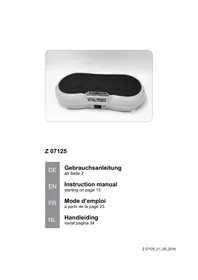
USER MANUAL 02753 VitalMaxx
02753
DE
Gebrauchsanleitung
ab Seite 3
EN
Operating Instructions
starting on page 14
FR
Mode d'emploi
Before Initial Use 19
Inserting / Changing Batteries in the Remote Control 19
Preparing the Device for Use 19
Using the Device 20
After Training 21
Cleaning and Storage 22
Troubleshooting 22
Technical Data 23
Disposal 23
Dear Customer,
We are delighted that you have chosen this vibrating trainer.
Before using the device for the first time, please read through these operating instructions carefully and keep them for future reference and other users. They form an integral part of the device.
The manufacturer and importer do not accept any liability if the information in these operating instructions is not complied with.
If you have any questions about the device and about spare parts / accessories, contact the customer service department via our website:
Explanation of the Symbols


Danger symbols: These symbols indicate risks of injury (e.g. from electricity or fi re).
Read through the associated safety notices carefully and follow them.
Read operating instructions before use.

Circuit symbol for DC voltage
Supplementary information
Explanation of the Signal Words
DANGER warns of serious injuries and danger to life
WARNING warns of possible serious injuries and danger to life
CAUTION warns of slight to moderate injuries
NOTICE warns of material damage
Intended Use
- This device is intended to be used for a workout of the muscles through vibrations (up and down movement).
- The device is not suitable for therapeutic purposes!
- The permissible body weight of the user is no more than 120 kg.
- The device may only be used by one person at a time.
- The device is for personal use only and is not intended for commercial applications.
- The device should only be used as described in the operating instructions. Any other use is deemed to be improper.
- The warranty does not cover faults caused by incorrect handling, damage or attempted repairs. The same applies to normal wear and tear.
Safety Notices
WARNING: Read all safety notices, instructions, illustrations and technical data provided with this device. Failure to follow the safety notices and instructions may result in electric shock, fire and / or injuries.
This device may be used by children aged 8 and over and by people with reduced physical, sensory or mental abilities or a lack of experience and / or knowledge if they are supervised or have received instruction on how to use the device safely and have understood the dangers resulting from failure to comply with the relevant safety precautions.
■ Children must not play with the device.
- Cleaning and user maintenance may not be carried out by children without supervision.
Children younger than 8 years of age and animals must be kept away from the device and the connecting cable.
■ The device must always be disconnected from the mains power when it is not being used and before assembling, disassembling or cleaning the device.
■ Always check the device and accessories for damage before putting them into operation. If the device, the connecting cable or the remote control shows visible signs of damage, the device must not be used.
■ The expander bands may only be used with this device. They must not be attached to doors, windows or other objects.
■ WARNING – The maximum possible stretch length of the ex-pander bands is 200 cm. Do not over-extend this stretch length!
■ Always protect the expander bands from sunlight in order to avoid discolouration and damage to the material.
If the connecting cable for this device is damaged, it must be replaced with a special connecting cable which is available from the manufacturer or its customer service department.
- Do not make any modifications to the device. If the device is damaged, it must be replaced by the manufacturer or customer service department or a similarly qualified person (e.g. specialist workshop) in order to avoid any hazards.

DANGER – Danger of Electric Shock
■ Use the device only in closed rooms.
■ Do not use the device in rooms with high humidity.
■ Never immerse the device and the connecting cable in water or other liquids and ensure that these components cannot fall into water or become wet.
- Should the device fall into water, switch off the power supply immediately. Do not attempt to pull the device out of the water while it is still connected to the mains power!
■ Never touch the device and the connecting cable with wet hands when the device is connected to the mains power.

WARNING – Danger of Injury
- Danger of suffocation! Keep children and animals away from the packaging material.
■ The device must not be used if you have recently fractured a bone or have operation scars that have not yet healed. - Do not use the device if you have vein inflammation, thromboses, swellings or acute infl ammation. Ask the relevant doctor whether it is safe for you to use the device.
■ Please consult a doctor before using the device if you belong to a health risk group, if you have problems with your balance or cardiovascular system or orthopaedic problems. If necessary, the training programme should be agreed with the doctor.
■ Pregnant women should not use the device or should use it only after consultation with their doctor.
■ Danger of burns from battery acid!
- Batteries can be deadly if swallowed. Batteries and the remote control should be kept out of the reach of children and animals. If a battery is swallowed, immediate medical attention must be sought.
- If a battery leaks, avoid physical contact with the battery acid. Wear protective gloves. If you touch battery acid, rinse the affected areas with abundant clear water straight away and seek medical assistance immediately.
- Danger of tripping! Make sure that the connecting cable does not present a trip hazard.
WARNING – Danger of Fire
- Do not use the device in rooms containing easily ignitable or explosive substances. Never operate the device in the vicinity of a gas source.
- Do not operate the device in the vicinity of combustible material.
■ Do not cover the device during operation in order to prevent it from catching fire. - Do not insert anything into the ventilation openings of the device and make sure that these do not become clogged.
NOTICE – Risk of Damage to Material and Property
■ Switch off the device and pull the mains plug out of the plug socket if an error occurs during operation, or before a thunderstorm.
■ When you pull it out of the plug socket, always pull on the mains plug and never the mains cable! Never pull or carry the device by the connecting cable.
- Do not exceed the maximum loading capacity for the device so that the device is not damaged.
■ Use only original accessories in order to guarantee that there is no interference that may prevent the device from working and to avoid possible damage.
■ Protect the device from heat, naked flames, sub-zero temperatures, persistent moisture, wet conditions, direct sunlight and impacts.
NOTICE – Risk of Damage to Material and Property from Batteries
■ Use only the battery type specified in the technical data.
■ Always replace all batteries together. Do not use batteries of different types or brands, or batteries with different capacities.
■ Take the batteries out of the remote control when they are dead or the device is not being used. This will prevent any damage caused by leaks.
■ Remove a dead battery from the remote control immediately.
Items Supplied
• Vibrating trainer (1 x)
- Expander band with grip (2 x)
- Remote control (1 x)
- Connecting cable (1 x)
- Poster with suggested exercises (1 x)
- Operating instructions (1 x)
Please Note: Two batteries (1.5 V; AAA) are required to operate the remote control. These are not supplied with the device.
Check the items supplied for completeness and the components for transport damage. If there is any damage, do not use the device but contact our customer service department.
Device Overview
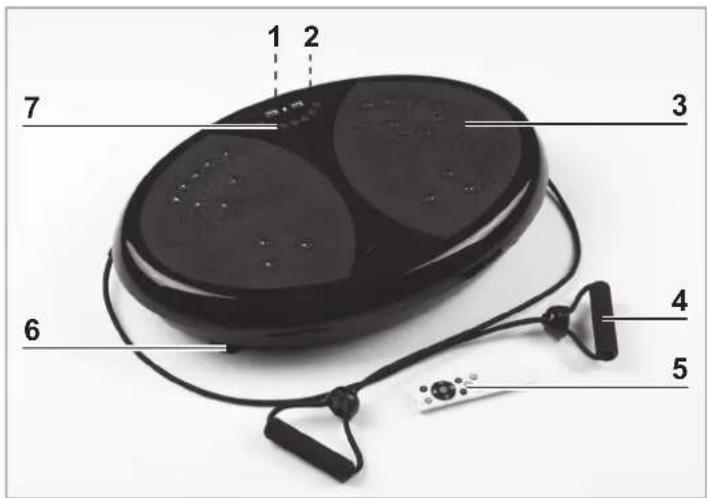
1 Socket for the connecting cable (on the back)
2 I/0 main power switch (on the back)
3 Vibrating plate
4 Expander band
5 Remote control
6 Foot
7 Control panel
Control Panel
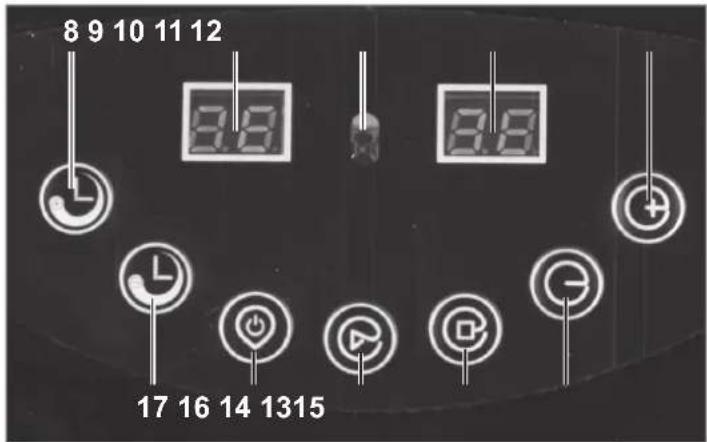
8 Increase workout time
9 Time / programme display: remaining time in minutes, active programme
10 Receiver (remote control)
11 Speed display: Vibration level
12 + Increase vibration level
13 - Reduce vibration level
14 ■ Stop programme
15 ▶ Start programme
16 ⏻ Standby on / off
17 Reduce workout time
Remote Control
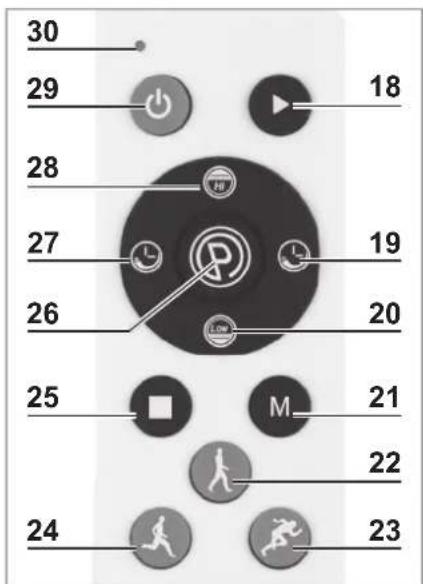
18 ▶ Start programme
19 Increase workout time
20 Low Reduce vibration level
21 M switch between vibration levels 20, 50 and 80
22 Quick-selection button vibration level 20
23 Quick-selection button vibration level 80
24 Quick-selection button vibration level 50
25 ■ Stop programme
26 Choose from 10 auto programmes and manual mode
27 Reduce workout time
28 Increase vibration level
29 ⏻ Standby On / Off
30 Control lamp
Before Initial Use
- Remove any possible fi lms, stickers or transport protection from the device. Never remove the rating plate or any possible warnings.
- Insert batteries into the remote control (5) (see "Inserting / Changing Batteries in the Remote Control").
Inserting / Changing Batteries in the Remote Control
Before inserting the batteries, check whether the contacts in the remote control (5) and on the batteries are clean, and clean them if necessary.
- Open the battery compartment on the back of the remote control: press the locking catch on the battery compartment cover and remove it.
- Remove any used batteries and insert two new batteries (1.5 V, AAA) into the battery compartment. Pay attention to the correct polarity (+ / -).
- Insert the battery compartment cover and flip it shut. You must hear and feel it engage. Replace the batteries when the power of the remote control starts to wane.
Preparing the Device for Use

PLEASE NOTE!
■ Only connect the device to a plug socket that is properly installed and matches the technical data of the device. The plug socket must also be readily accessible after connection so that the connection to the mains can quickly be isolated.
- Lay the connecting cable in such a way that it does not become squashed or bent and does not come into contact with hot surfaces.
- Place the device on a dry, even and firm surface. If the device is used on a carpet, make sure that the ventilation openings on the bottom of the device remain clear.

Protect sensitive floor coverings on which the device is placed with a mat if necessary.
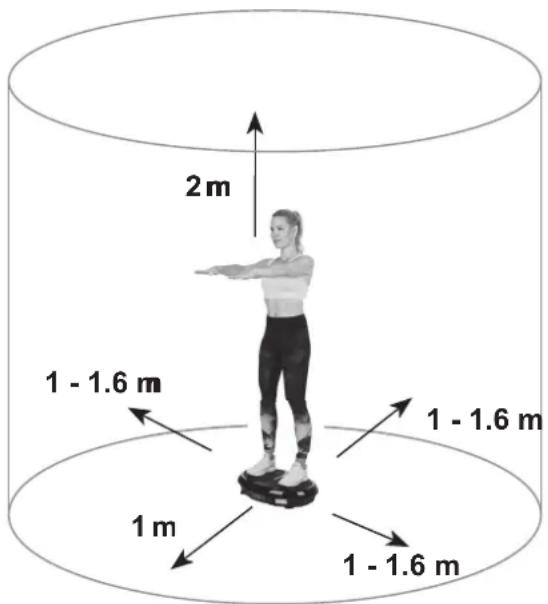
Depending on your body size, leave plenty of space on all sides of the training device (at least 1 metre to the sides, 2 metres above) so that you have enough room to move about in during a workout. Furthermore, the free area in the direction from which you access the training device must be at least 0.6 m greater than the exercise area. The free area must include the space required for an emergency dismount. If training devices are set up in the immediate vicinity of one another, they can share one free area.
- First connect the connecting cable to the socket (1) of the device and then to a properly installed, easily accessible plug socket.
Attaching / Detaching Expander Bands
Attach the expander bands to the device for advanced exercises for the muscles in your upper body, e.g biceps or triceps curls.
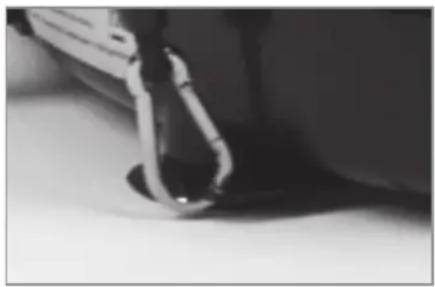
- Turn over the device so that the bottom is pointing upwards. On the bottom there are two rails with eyelets.
- Use a hex key (size 5 mm or 3/16") to undo the screws and the pull the rails out so that the eyelets are sticking out. Adjust the precise pull-out length and the angle to your individual arm length and position.
3. Tighten the screw using the hex key and fix the rail in the position you want!
- Hook the snap hooks of the expander bands into the eyelets.
The expander bands are detached in the reverse order.
IMPORTANT! When the expander bands are not being used, always take them off and fi x the rails with eyelets on the bottom so that they do not stick out.
Using the Device

PLEASE NOTE!
■ Stop using the device immediately if you start to feel weak or dizzy. If you feel sick, have a pain in your chest or arms, an irregular heartbeat or other unusual symptoms, seek medical attention immediately.
■ CAUTION – Danger of Crushing! Never place your hands and feet between the frame and vibrating plate while the device is in operation.
■ When doing the exercises, wear loose, comfortable clothing and non-slip trainers.
- Start with the slowest vibration level and gradually increase the level of intensity. We explicitly point out that improper use of the device and excessive use can be detrimental to your health.
- Do not kneel, stamp or jump on the vibrating plate to prevent injuries and damage to the device.
- Do not stand on just one side of the vibrating plate. This would cause the device not to work properly and it could tip over.
Basic Use of the Device
Only basic use of the device is described below. The various possible applications and exercises are explained on the poster supplied with the device.
The device can be controlled both with and without the remote control. To make it easier to operate, we recommend using the remote control. Direct it towards the receiver of the device.
10 automatic training programmes are stored in the device. Each programme has a different sequence of different vibration strengths. For a varied workout, we recommend that you choose a training programme.
Ensure that you are properly warmed up before you use the device.
-
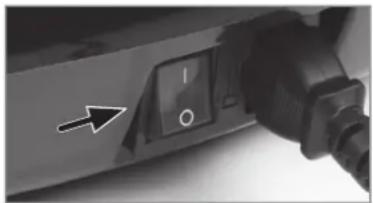
Flip the I/0 main power switch (2) to position I. It lights up and the device is supplied with power. In addition, you will hear two beeps and the displays (9, 11) will show “—”. The device is in stand-by mode.
-
Press the ⏻ button (16) on the device or the ⏻ button (29) on the remote control to activate the device. The time / programme display (9) will show "HA" and the speed display (11) will show "00". The abbreviation "HA" stands for the manual programme, in which the training duration and the vibration level can be set individually.
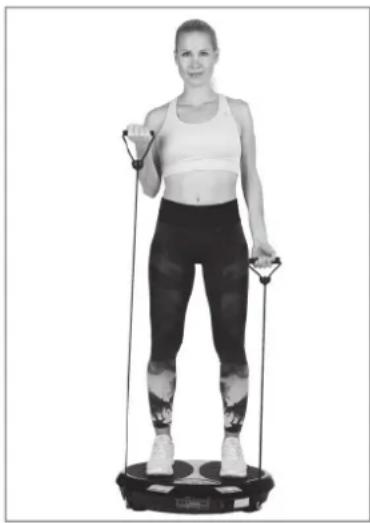
- Training with a training programme:
-You can repeatedly press the Ⓟ button (26) on the remote control to choose one of the 10 auto programmes (P0 - P9).
Please Note: The auto programmes can only be set via the remote control!
Training without a training programme:
The device must be in manual mode. To do this, press the Ⓓ button on the remote control until "HA" appears in the time / programme display.
-Use the ⏻ button (8 or 19) and ⏻ button (17 or 27) to set the training time you want (max. 15 minutes).
-
Stand on the vibrating plate (3). Distribute your weight evenly on both feet.
-
To start the device, press the ▶ button (15 or 18). The device then starts to vibrate. The Time display then alternately shows the remaining workout time in minutes and the active programme (with training programme) or "HA" (without training programme).
- In manual mode, the vibration level can be changed with the + (12) and - (13) buttons on the device or with the Hi (28) and Low (20) buttons on the remote control or with the quick-selection buttons (22, 23, 24).
- The device stops automatically after the preset time has elapsed. The device can be stopped at any time by pressing the ■ button (14 or 25). Please Note: If the device is not in operation and no buttons are pressed, the device switches to stand-by mode after approx. 4 minutes.
- Step off the vibrating plate, flip the I / 0 main power switch to position 0 and pull the mains plug from the plug socket.
After Training
We recommend always performing a few stretching exercises in order to slowly restore your circulation to a normal level:
Upper body: Stand upright, cross your arms over your head and pull your left elbow to the right with your right hand. The upper body moves gently as you do this. Stay in this position for around 15 – 20 seconds. Change sides.
Calves: Stand up. Place your right leg in front of you and bend it slightly while your left leg remains stretched. Push your left heel down onto the floor. Stay in this position for around 15 – 20 seconds. Change sides.
Thighs: Stand on one leg, bend the other one and grab your foot with your hand. Pull it up to your buttocks and hold this position for around 5 – 20 seconds. Change sides. Sit down on the floor, turn your knees to face outwards, place the soles of your feet together and pull towards your body. Place your hands around your ankles and press your knees gently down to the floor with your elbows. Keep your back straight. Stay in this position for around 5 – 20 seconds.
Back: Lie down fl at on your back, bend your right leg and place it over your left leg, your hip twists but both shoulders remain on the floor. Stay in this position for around 5 – 20 seconds. Change sides.
Shoulders / back: Sit down cross-legged with a straight back, fold / clasp together your hands and stretch your arms out above your head. Stretch your back. Stay in this position for around 15 – 20 seconds.
Cleaning and Storage

PLEASE NOTE!
- Do not use any caustic or abrasive cleaning agents or cleaning pads to clean the device. These may damage the surfaces.
- Wipe the device and accessories with a damp, soft cloth and a little mild cleaning agent if required. Then thoroughly dry them off.
- Store the device in a dry place that is protected from frost and direct sunlight and is not accessible to children and animals.
Troubleshooting
If the device does not work properly, first check whether you are able to rectify the problem yourself. If the problem cannot be solved with the steps below, contact the customer service department.

Do not attempt to repair an electrical device yourself!
| Problem Possible cause $solution | ||
| The device does not work, the I/0 main power switch (2) does not light up. | The connecting cable is not connected to the device and / or the plug socket correctly. | Check that the two plug connectors fi t correctly. |
| The plug socket is defective. | Try another plug socket. | |
| There is no mains voltage. | Check the fuse of the mains connection. | |
| The device switches off before the set workout time has elapsed. | The device has been overloaded. | Flip the I / 0 main power switch (2) to position 0. Wait a moment before it is switched back on. |
| The device makes unusual noises or does not vibrate correctly. | The weight on the vibrating plate (3) is distributed unevenly or only one side of the device has a load on it. | The weight on both halves of the device must be balanced for the device to be able to work properly. |
| Maximum load capacity has been exceeded. | Please note that the device can hold a max. load of 120 kg. | |
Technical Data
Article number: 02753
Model number: RB-CFM006
Class: HB (home use)
Stretch length: 85 – 200 cm
Force: 44.5 N ± 2 N (with a stretch length of 200 cm)
Voltage supply:
Device: 220 - 240 V \~ 50 - 60 Hz
Remote control: 3 V DC (2 x 1.5 V battery, AAA)
Power: max. 200 W
Protection class: I
Max. loading capacity: 120 kg
Device dimensions: approx. 61 x 41 x 11.5 cm
Device weight: approx. 9 kg
Cable length: 1.5 m
Vibration levels: 99
Programmes: 10 auto programmes
ID of operating instructions: Z 02753 M DS V1 1019

The training device conforms to EN ISO 20957-1; DIN 32935 and DIN EN 60335-1
Disposal

Dispose of the packaging material in an environmentally friendly manner so that it can be recycled.

Batteries should be removed from the remote control prior to disposal and disposed of separately from the device at suitable collection points.
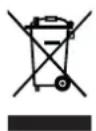
The device is governed by the European Directive 2012/19/EU on waste electrical and electronic equipment (WEEE). Do not dispose of the device as normal domestic waste, but rather in an environmentally friendly manner via an officially approved waste disposal company.
Customer Service / Importer:
Tel.: +49 38851 314650* (Calls to German landlines are subject to your provider's charges.)
All rights reserved.
Sommaire
WAARSCHUWING – Brandgevaar
- EXPLANATION OF THE SYMBOLS
- EXPLANATION OF THE SIGNAL WORDS
- INTENDED USE
- SAFETY NOTICES
- DANGER – DANGER OF ELECTRIC SHOCK
- WARNING – DANGER OF INJURY
- WARNING – DANGER OF FIRE
- NOTICE – RISK OF DAMAGE TO MATERIAL AND PROPERTY
- NOTICE – RISK OF DAMAGE TO MATERIAL AND PROPERTY FROM BATTERIES
- ITEMS SUPPLIED
- DEVICE OVERVIEW
- CONTROL PANEL
- REMOTE CONTROL
- BEFORE INITIAL USE
- INSERTING / CHANGING BATTERIES IN THE REMOTE CONTROL
- PREPARING THE DEVICE FOR USE
- PLEASE NOTE
- ATTACHING / DETACHING EXPANDER BANDS
- TIGHTEN THE SCREW USING THE HEX KEY AND FIX THE RAIL IN THE POSITION YOU WANT
- USING THE DEVICE
- BASIC USE OF THE DEVICE
- AFTER TRAINING
- CLEANING AND STORAGE
- TROUBLESHOOTING
- TECHNICAL DATA
- DISPOSAL
- CUSTOMER SERVICE / IMPORTER
- SOMMAIRE
- WAARSCHUWING – BRANDGEVAAR
Brand : VitalMaxx
Model : 02753
Category : Fitness Equipment