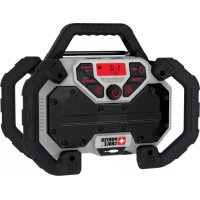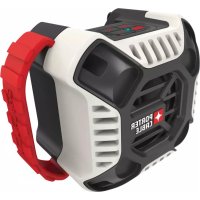
PCC772B - Speaker Porter-Cable - Free user manual and instructions
Find the device manual for free PCC772B Porter-Cable in PDF.



| Product Type | Wireless Bluetooth Speaker |
| Brand | Porter-Cable |
| Model | PCC772B |
| Power Supply | Porter-Cable 20 V max battery pack (not included) or 120 V AC, 60 Hz power adapter |
| Connectivity | Bluetooth® and auxiliary input (3.5 mm jack) |
| Bluetooth Range | Approximately 10 m (33 ft) without obstacles |
| Main Functions | Wireless music playback, auxiliary mode, incoming call management |
| Controls | Power button, volume buttons (+/-), Bluetooth/auxiliary button |
| Light Indication | Blue light in Bluetooth mode, green light in auxiliary mode |
| Maintenance and Cleaning | Disconnect before cleaning; use a damp cloth with mild soap; do not immerse |
| Safety | Do not use near water; avoid heat sources; use only with recommended accessories |
| Spare Parts and Reparability | No user-serviceable parts; contact a Porter-Cable authorized service center |
| Warranty | Limited 3-year warranty (2-year for battery pack); 90-day money-back guarantee |
| Certifications | Complies with FCC Part 15 and Industry Canada RSS standards; Class B digital device |
Frequently Asked Questions - PCC772B Porter-Cable
User questions about PCC772B Porter-Cable
0 question about this device. Answer the ones you know or ask your own.
Ask a new question about this device
Download the instructions for your Speaker in PDF format for free! Find your manual PCC772B - Porter-Cable and take your electronic device back in hand. On this page are published all the documents necessary for the use of your device. PCC772B by Porter-Cable.
USER MANUAL PCC772B Porter-Cable
natural_image
Close-up of a black and gray portable device labeled 'PORTER CABLE' with no visible text or symbols on its body.www.portercable.com
Thank you for choosing PORTER-CABLE! To register your new product, go to: www.portercable.com/ServiceAndSupport/ProductRegistration.aspx
It is important for you to read and understand this manual.
The information it contains relates to protecting YOUR SAFETY and PREVENTING PROBLEMS. The symbols below are used to help you recognize this information.
⚠️ DANGER: Indicates an imminently hazardous situation which, if not avoided, will result in death or serious injury.
⚠ WARNING: Indicates a potentially hazardous situation which, if not avoided, could result in death or serious injury.
⚠️CAUTION: Indicates a potentially haz ard ous situation which, if not avoided, may result in minor or mod er ate injury.
CAUTION: Used without the safety alert symbol indicates a potentially hazardous situation which, if not avoided, may result in property damage.
IMPORTANT SAFETY INSTRUCTIONS
WARNING:
-
Read these instructions.
-
Keep these instructions.
-
Heed all warnings.
-
Follow all instructions.
-
Do not use this apparatus near water.
-
Do not block any ventilation openings. Install in accordance with the manufacturer's instructions.
-
Do not install near any heat sources such as radiators, heat registers, stoves or other apparatus (including amplifiers) that produce heat.
-
Do not defeat the safety purpose of the polarized or grounding-type plug. A polarized plug has two blades with one wider than the other. A grounding type plug has two blades and a third grounding prong. The wide blade or the third prong are provided for your safety. If the provided plug does not fit into your outlet, consult an electrician for replacement of the obsolete outlet.
-
Protect the power cord from being walked on or pinched particularly at plugs, convenience receptacles, and the point where they exit from the apparatus.
-
Only use attachments/accessories specified by the manufacturer.
-
Unplug this apparatus during lightning storms or when unused for long periods of time.
-
Refer all servicing to qualified service personnel. Servicing is required when the apparatus has been damaged in any way, such as power-supply cord or plug is damaged, liquid has been spilled or objects have fallen into the apparatus, the apparatus has been exposed to rain or moisture, does not operate normally, or has been dropped.
-
Apparatus shall not be exposed to dripping or splashing and no objects filled with liquids, such as vases, shall be placed on the apparatus.
-
Do not use under wet conditions or in presence of flammable liquids or gases.
The lightning flash with arrowhead symbol, within an equilateral triangle, is intended to alert the user to the presence of uninsulated “dangerous voltage” within the product’s enclosure that may be of sufficient magnitude to constitute a risk of electric shock to persons.
The exclamation point within an equilateral triangle is intended to alert the user to the presence of important operating an maintenance (servicing) instructions in the literature accompanying the product.
ADDITIONAL SAFETY RULES FOR Bluetooth® SPEAKER
• DO NOT splash or immerse in water or other liquids.
- Please note that changes or modifications not expressly approved by the party responsible for compliance could void the user's authority to operate the equipment.
NOTE: The Bluetooth ^® word mark and logos are registered trademarks owned by the Bluetooth ^® , SIG, Inc. and any use of such marks by DeWALT is under license. Other trademarks and trade names are those of their respective owners.
• This Class B digital apparatus complies with Canadian ICES-003.
- This device complies with Part 15 of the FCC rules and Industry Canada License-exempt RSS standard(s). Operation is subject to the following two conditions:
1) This device may not cause harmful interference, and
2) This device must accept any interference received, including interference that may cause undesired operation.
NOTE: This equipment has been tested and found to comply with the limits for a Class B digital device, pursuant to Part 15 of the FCC Rules. These limits are designed to provide reasonable protection against harmful interference in a residential installation. This equipment generates, uses and can radiate radio frequency energy and, if not installed and used in accordance with the instructions, may cause harmful interference to radio communications. However, there is no guarantee that interference will not occur in a particular installation. If this equipment does cause harmful interference to radio or television reception, which can be determined by turning the equipment off and on, the user is encouraged to try to correct the interference by one or more of the following measures:
– Reorient or relocate the receiving antenna.
– Increase the separation between the equipment and speaker.
- Connect the equipment into an outlet on a circuit different from that to which the speaker is connected.
– Consult the dealer or an experienced radio/TV technician for help.
- Under Industry Canada regulations, this radio transmitter may only operate using an antenna of a type and maximum (or lesser) gain approved for the transmitter by Industry Canada. To reduce potential radio interference to other users, the antenna type and its gain should be so chosen that the equivalent isotropically radiated (e.i.r.p.) is not more than that necessary for successful communication.
- To comply with FCC/IC RF exposure limits for general population/uncontrolled exposure, the antenna(s) used for this transmitter must be installed to provide a separation distance of at least 20 cm from all persons and must not be co-located or operating in conjunction with any other antenna or transmitter.
⚠ WARNING: To reduce the risk of fire or electric shock, do not expose this apparatus to rain or moisture. Use only in dry locations. USE ONLY WITH PORTER-CABLE BATTERY PACKS. OTHERS MAY BURST CAUSING PERSONAL INJURY AND DAMAGE. WHEN USING THE AC RECEPTACLE, FULLY INSERT ATTACHMENT PLUGS. DO NOT USE THE RECEPTACLE IF THE ATTACHMENT PLUG CANNOT BE FULLY INSERTED.
⚠ WARNING: To prevent electric shock, match wide blade of plug to wide slot fully insert.
- Do not disassemble speaker. Take it to an authorized service center when service or repair is required. Incorrect reassembly may result in a risk of electric shock, electrocution or fire.
- Disconnect the speaker from the outlet before attempting any cleaning. This will reduce the risk of electric shock. Removing the battery pack will not reduce this risk.
- This speaker is designed to operate on 120 Volts, 60 Hz AC. It also operates on PORTER-CABLE battery packs. Do not use any other voltage. Only use adapter provided.
The label on your tool may include the following symbols. The symbols and their definitions are as follows:
V.....volts
Hz......hertz
min......minutes
or DC...direct current
Class I Construction (grounded)
☐ ......Class II Construction (double insulated)
△……shock hazard symbol
A.....amperes
W......watts
\~ or AC......alternating current
n_0 ......no load speed
± ....earthing terminal
⚠️ ......safety alert symbol
.../min or rpm...revolutions or reciprocation pe
NBC ...... no battery connection
- USE PROPER EXTENSION CORD. Make sure your extension cord is in good condition. When using an extension cord, be sure to use one heavy enough to carry the current your product will draw. An undersized cord will cause a drop in line voltage resulting in loss of power and overheating. The following table shows the correct size to use depending on cord length and nameplate ampere rating. If in doubt, use the next heavier gauge. The smaller the gauge number, the heavier the cord.
| Minimum Gauge for Cord Sets | |||||
| Volts | Total Length of Cord in Feet | ||||
| 120V | 0-25(0-7,6m) | 26-50(7,6-15,2m) | 51-100(15,2-30,4m) | 101-150(30,4-45,7m) | |
| 240V | 0-50 | 51-100(0-15,2m) | 101-200(15,2-30,4m) | 201-300(30,4-60,9m) | (60,9-91,4m) |
| Ampere Rating | |||||
| More Than | Not more Than | American | Wire | Gage | |
| 0 | - | 6 | 18 | 16 | 16 14 |
| 6 | - | 10 | 18 | 16 | 14 12 |
| 10 | - | 12 | 16 | 16 | 14 12 |
| 12 | - | 16 | 14 | 12 | Not Recommended |
SAVE THESE INSTRUCTIONS
COMPONENTS
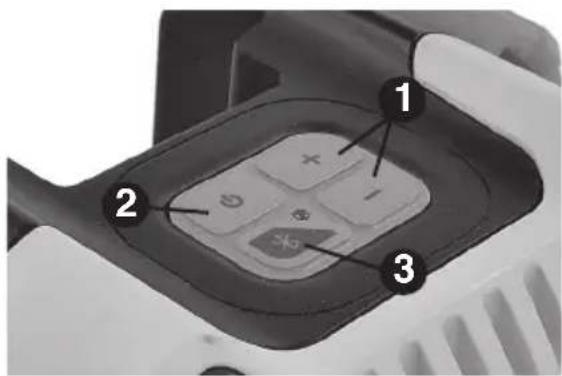
- Volume buttons
- Power button
- Bluetooth ^® / Auxiliary mode button
- 20v Max* battery port
- Auxiliary jack
-
Auxiliary jack holder
-
AC adapter port (PCC772B ONLY - not shown)
- AC adapter (PCC772B ONLY - not shown)
text_image
Close-up of a handheld device's interior panel with numbered annotations pointing to key components.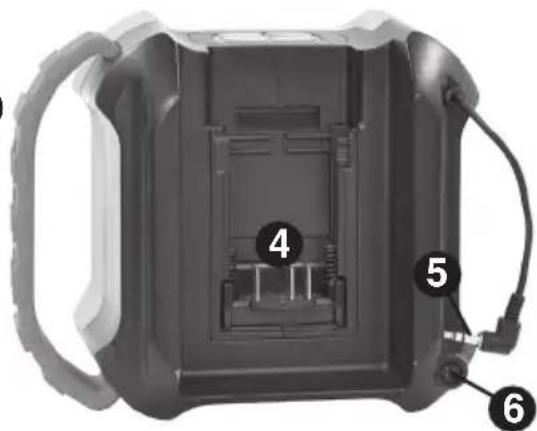
natural_image
Interior view of a black plastic enclosure with labeled parts (4, 5, 6), no visible text or symbols beyond labelsPOWER/VOLUME ADJUSTMENT
- To operate as a corded product (PCC772B ONLY), insert the AC adapter (8) into the AC adapter port (7), then plug the adapter into an appropriate AC power outlet or generator.
- To operate as a cordless product, insert a fully charged 20v Max* Porter Cable battery (not included) into the battery port (4). Be sure battery is fully seated.
- To turn the speaker on, press the power button (2). Press the power button again to turn the speaker off.
- Press the "+" button (1) to increase the volume. To decrease the volume, press the "-" button.
NOTE: If the battery is attached to the speaker and the AC adapter is plugged in at the same time, the speaker will run off of the adapter and not drain the battery. Having both attached simultaneously will not charge the battery.
Bluetooth® AND AUXILIARY FUNCTION
When the speaker is turned on, it will automatically be in Bluetooth mode. To switch to auxiliary mode, press and hold the Bluetooth button (3) until the light turns green. To switch back to Bluetooth mode, simply press and hold the Bluetooth button again. The blue light will flash again.
USING Bluetooth ^® WIRELESS TECHNOLOGY ^*
- Turn the speaker on.
- The speaker should already be in Bluetooth mode. If not, press the Bluetooth button (3).
- Find "P3BTS" under devices on your Bluetooth enabled device and select to pair. The blue light will flash while the pairing takes place. Once the pairing is successful the blue light will remain steady.
- Begin playing music on your device.
NOTE: The speaker does not have to be in the Bluetooth mode when pairing, only when listening.
*The Bluetooth® word mark and logos are registered trademarks owned by Bluetooth SIG, Inc. and any use of such marks by Porter Cable is under license. Other trademarks and trade names are those of their respective owners.
LISTENING IN AUXILIARY MODE
To listen to a device in auxiliary mode, press and hold the Bluetooth button (3) until the blue light turns green. Plug the auxiliary jack (5) into the auxiliary port of your device. When finished, unplug the jack and store it in the auxiliary jack holder (6).
INCOMING CALL
If your phone receives a call while it is connected to the speaker it will ring through the speaker.
Samsung\*\*
To transfer the call to your phone, deselect the headset option on your phone. The speaker will remain mute until the call is over. End the call normally with your cell phone. The speaker will resume previous function.
**Samsung ^ is a registered trademarks of Samsung Group.
iPhone ^® \*\*\*
To transfer the call to your phone, select "audio source" on your phone, then select "iPhone." The speaker will remain mute until the call is over. End the call normally with your cell phone. The speaker will resume previous function.
***iPhone® is a registered trademark of Apple Inc.
TROUBLESHOOTING
PROBLEM
POSSIBLE CAUSE
POSSIBLE SOLUTION
- Unit will not • Cord not plugged in. • Plug tool into a working outlet.
power on • Circuit fuse is blown. product repeatedly causes the circuit fuse to blow, discontinue use immediately and have it serviced at a Porter Cable center or authorized servicer.) - Replace circuit fuse. (If the
- Circuit breaker is tripped. - Reset circuit breaker. (If the product repeatedly causes the circuit breaker to trip, discontinue use immediately and have it serviced at a Porter Cable service center or authorized servicer.)
- Cord or switch is damaged.
at a Porter Cable Service
Center or Authorized Servicer - Battery not charged. • Charge battery.
- Battery is not fully connected.
- Push battery fully into battery port and ensure it is properly connected.
- Battery does not have - Charge battery. ough power.
- Battery has been removed. • Replace battery.
- Adapter unplugged without - Plug adapter into outlet or tery in place. properly insert battery.
- Power to outlet is off when - Ensure wall outlet is receiving adapter. power or properly insert battery.
- Bluetooth • Device roamed out of range.
- Bring device into range of speaker.
disconnected.
• Device may need to be paired to
the speaker again. See "Using Bluetooth
- If two or more devices are paired
to speaker, disconnect the speaker in the settings of the one of the devices.
For assistance with your product, visit our website at www.portercable.com for a list of service centers, or call the PORTER-CABLE Customer Care Center at (888) 848-5175.
MAINTENANCE
⚠ WARNING: Disconnect the speaker from the AC outlet before cleaning. Dirt and grease may be removed from the exterior of the speaker using a cloth. Do not use water or any cleaning solutions.
⚠ WARNING: Never use solvents or other harsh chemicals for cleaning the non-metallic parts of the speaker. These chemicals may weaken the materials used in these parts. Use a cloth dampened only with water and mild soap. Never let any liquid get inside the tool; never immerse any part of the tool into a liquid.
⚠️CAUTION: NEVER spray or in any other way apply lubricants or cleaning solvents inside the tool. This can seriously affect the life and performance of the tool.
SERVICE NOTES
This product is not user serviceable. There are no user serviceable parts inside the speaker. Servicing at an authorized service center is required to avoid damage to static sensitive internal components.
REPLACEMENT PARTS
Use only identical replacement parts. For a parts list or to order parts, visit our service website at www.portercable.com. You can also order parts from your nearest PORTER-CABLE Factory Service Center or PORTER-CABLE Authorized Warranty Service Center. Or, you can call our Customer Care Center at (888) 848-5175.
SERVICE AND REPAIRS
All quality tools will eventually require servicing and/or replacement of parts. For information about PORTER-CABLE, its factory service centers or authorized warranty service centers, visit our website at www.portercable.com or call our Customer Care Center at (888) 848-5175. All repairs made by our service centers are fully guaranteed against defective material and workmanship. We cannot guarantee repairs made or attempted by others.
You can also write to us for information at PORTER-CABLE, 4825 Highway 45 North, Jackson, Tennessee 38305, (888) 848-5175 - Attention: Product Service. Be sure to include all of the information shown on the nameplate of your tool (model number, type, serial number, etc.).
ACCESSORIES
⚠ WARNING: Since accessories, other than those offered by PORTER-CABLE, have not been tested with this product, use of such accessories with this tool could be hazardous. To reduce the risk of injury, only PORTER-CABLE recommended accessories should be used with this product. A complete line of accessories is available from your PORTER-CABLE Factory Service Center or a PORTER-CABLE Authorized Warranty Service Center. Please visit our Web Site www.portercable.com for a catalog or for the name of your nearest supplier.
THREE YEAR LIMITED WARRANTY
PORTER-CABLE will repair or replace, without charge, any defects due to faulty materials or workmanship for three years from the date of purchase for tools (two years for batteries). This warranty does not cover part failure due to normal wear or tool abuse. For further detail of warranty coverage and warranty repair information, visit www.
portercable.com or call (888) 848-5175. This warranty does not apply to accessories or damage caused where repairs have been made or attempted by others. This warranty gives you specific legal rights and you may have other rights which vary in certain states or provinces.
In addition to the warranty, PORTER-CABLE tools are covered by our:
1 YEAR FREE SERVICE: PORTER-CABLE will maintain the tool and replace worn parts caused by normal use, for free, any time during the first year after purchase.
90 DAY MONEY BACK GUARANTEE: If you are not completely satisfied with the performance of your PORTER-CABLE Power Tool for any reason, you can return it within 90 days from the date of purchase with a receipt for a full refund – no questions asked.
LATÍN AMERICA: This warranty does not apply to products sold in Latin America. For products sold in Latin America, see country specific warranty information contained in the packaging, call the local company or see website for warranty information.
To register your tool for warranty service visit our website at www.portercable.com.
WARNING LABEL REPLACEMENT
If your warning labels become illegible or are missing, call (888) 848-5175 for a free replacement.
PORTER CABLE.
4825 Highway 45 North
Jackson, Tennessee 38305
(888) 848-5175
www.portercable.com
LIGNES DIRECTRICES EN MATIÈRE DE SÉCURITÉ - DÉFINITIONS
text_image
Close-up of a handheld device's interior panel with numbered annotations pointing to key components.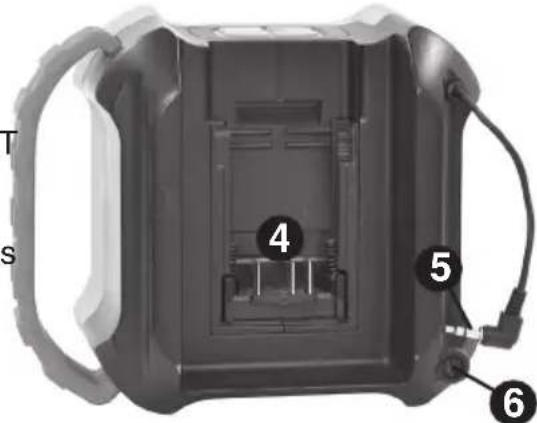
text_image
T s 4 5 6MISE EN MARCHE/RÉGLAGE DU VOLUME
4825 Highway 45 North, Jackson, Tennessee 38305
text_image
Close-up of a handheld device's keypad with numbered labels pointing to key functions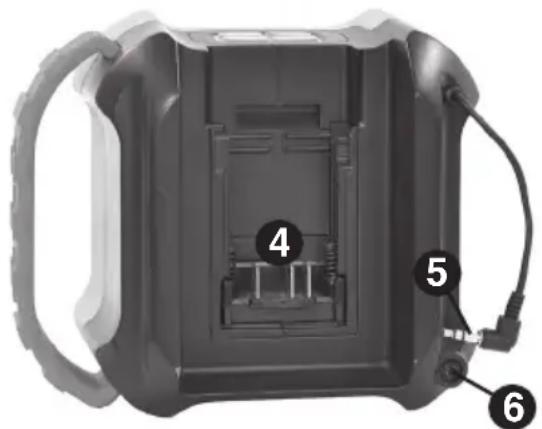
natural_image
Interior view of a black plastic enclosure with labeled parts (4, 5, 6), no visible text or symbols beyond labelsENCENDIDO Y APAGADO/AJUSTE DE VOLUMEN
4825 Highway 45 North Jackson, Tennessee 38305 (888) 848-5175
Catalog Number PCC772
March
2015
Form # 90616599
Printed
in