USER MANUAL Miimo HRM 70 Live Honda
natural_image
Line drawing of a Miimo Honda robotic vacuum cleaner (no text or symbols on the device itself)
Owner's Manual (Original instructions)
IdentificationMachine 4
Operation 4
Maintenance....5
Storage in winter 5
SoftwareUpdate....5
Battery Hazards 5
SafetyWarningsforDockingStationandPowerSupply 6
Symbols 6
Intended Use. 6
Technical Data 7
Noise/VibrationInformation 7
ExplanationofFigures 8
Installation 8
AddingafurtherGarden/LawnArea(seefigureI) 9
Mowing 9
MenuNavigation 10
Troubleshooting 12
After-salesServiceandApplicationService 14
Transport....14
Disposal 14
English
Thank you,
for purchasing the Miimo Robotic Mower.
Please read the safety instructions provided below before installing the Miimo.
Safety Notes
Warning! Read all safety warnings and all instructions. Make yourself familiar with the controls and the proper use of the machine. Please keep the instructions safe for later use!
SERIAL NUMBER
DATE OF PURCHASE
YOU SHOULD RECORD BOTH SERIAL NUMBER AND DATE OF PURCHASE AND KEEP IN A SAFE PLACE FOR FUTURE REFERENCE
Identification of Machine
![HONDA Hendra Motor Europe Ltd. Cain Road, Brackwell R012 1HL, United Kingdom Hendra Motor Europe Ltd. - Auto Office, Wijiguardsveld (Record Y), 9300 Auto, Belgium HRM70E C MABY-XXXXXX / XXXXXXXX 3600HB0700 7.6kg MM/YYYY 45.0 Wh 18.0V DC: 4.0A: 2.5Ah IPX4 15cm 3200 1/mix 797 Made in Hungary [1] [2] [3] [4] [5]](/content/2026/04/622983/images/4c10ab39fd6bf8d5da7d645f09d4c460e5d4e8e6a82daed17eefda1c561ae776.jpg)
[1] Name and address of the manufacturer.
[2] Name and address of the importer.
[3] Model-type.
[4] Serial number.
[5] Conformity mark according to EC directive(s).
Explanation of symbols on the machine

General hazard safety alert.
Ensure no exits are blocked or obstructed by the machine.

Warning: Read user instructions before operating the machine.

Warning: Operate the On/Off switch before working on or lifting the machine.

Caution: Do not touch rotating blades. The blades are sharp. Beware of severing toes or fingers.

Wait until all machine components have completely stopped before touching them. The blades continue to rotate after the machine is switched off, a rotating blade can cause injury.

Make sure that bystanders are not injured by foreign objects being thrown away.
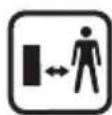
Warning: Keep a safe distance to the product when operating.

Do not ride on the machine.

Battery charger contains a safety transformer.
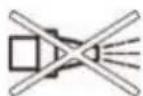
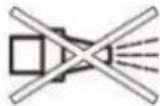
Do not use a high-pressure washer or a garden hose to clean the machine.
Operation
Before working on the mower itself (e.g. maintenance, tool change, etc.) as well as during transport and storage, switch off the mower by the On/Off switch.
▶ Children should be supervised to ensure that they do not play with the machine.
▶ Never allow children, persons with physical, sensory or mental limitations or a lack of experience and/or knowledge and/or people unfamiliar with these instructions to use the mower. Local regulations may restrict the age of the operator.
▶ Do not operate the machine when barefoot or wearing open sandals, always wear substantial footwear and long trousers.
▶ Avoid mowing in bad weather conditions especially when there is a risk of lightning.
The user is responsible for accidents or hazards occurring to other people or their property.
▶ If any hazard occurs whilst the machine is operating immediately press the red STOP button.
▶ Ensure correct installation of the perimeter wire as instructed in the installation guide.

For complete instructions on the Miimo installation, please refer to the Installation Guide provided with the product.
▶ Periodically inspect the area where the mower is used and remove all stones, sticks, wires and other foreign objects.
▶ Do not run any live mains cables in the working area. If a mains cable becomes entangled in the robotic mower it must be isolated before any attempt to remove it.
▶ Periodically inspect to see that the blades, blade bolts and cutter assembly are not worn or damaged. Replace worn or damaged blades and bolts in sets to preserve balance.
▶ Never operate the machine with defective guards or without safety devices.
▶ Do not put hands or feet near or under rotating parts.
▶ Never pick up or carry the machine while the motor is running.
▶ Do not leave the machine to operate unattended if you know that there are pets, children or people in the immediate vicinity.
▶ Start the machine according to the instructions standing well away from rotating parts.
▶ Do not use the product at the same time as a sprinkler or use the schedule to ensure that the two systems never run simultaneously.
▶ If for any reason the product is submerged, take it away from water and turn it off using the On/Off switch. Do not attempt to switch the product on but contact your Authorized Honda Dealer.
▶ Do not modify this product. Unauthorized modifications may impair the safety of your product and may result in increased noise and vibration.
Turn off the product using the On/Off switch:
– before clearing a blockage,
– before checking, cleaning or working on the machine,
– before storage,
- if the machine vibrates abnormally (stop and check immediately),
– after striking a foreign object, inspect the machine for damage and get advice on necessary repairs from your Authorized Honda Dealer.
Maintenance
▶ Always wear gardening gloves when handling or working near the sharp blades.
▶ Before working on the mower, turn it off using the On/Off switch.
▶ Before working on the docking station or power supply, remove plug from mains.
Clean the exterior of the machine thoroughly using a soft brush and cloth. Do not use water, solvents or polishes. Remove all grass and debris, especially from the ventilation slots.
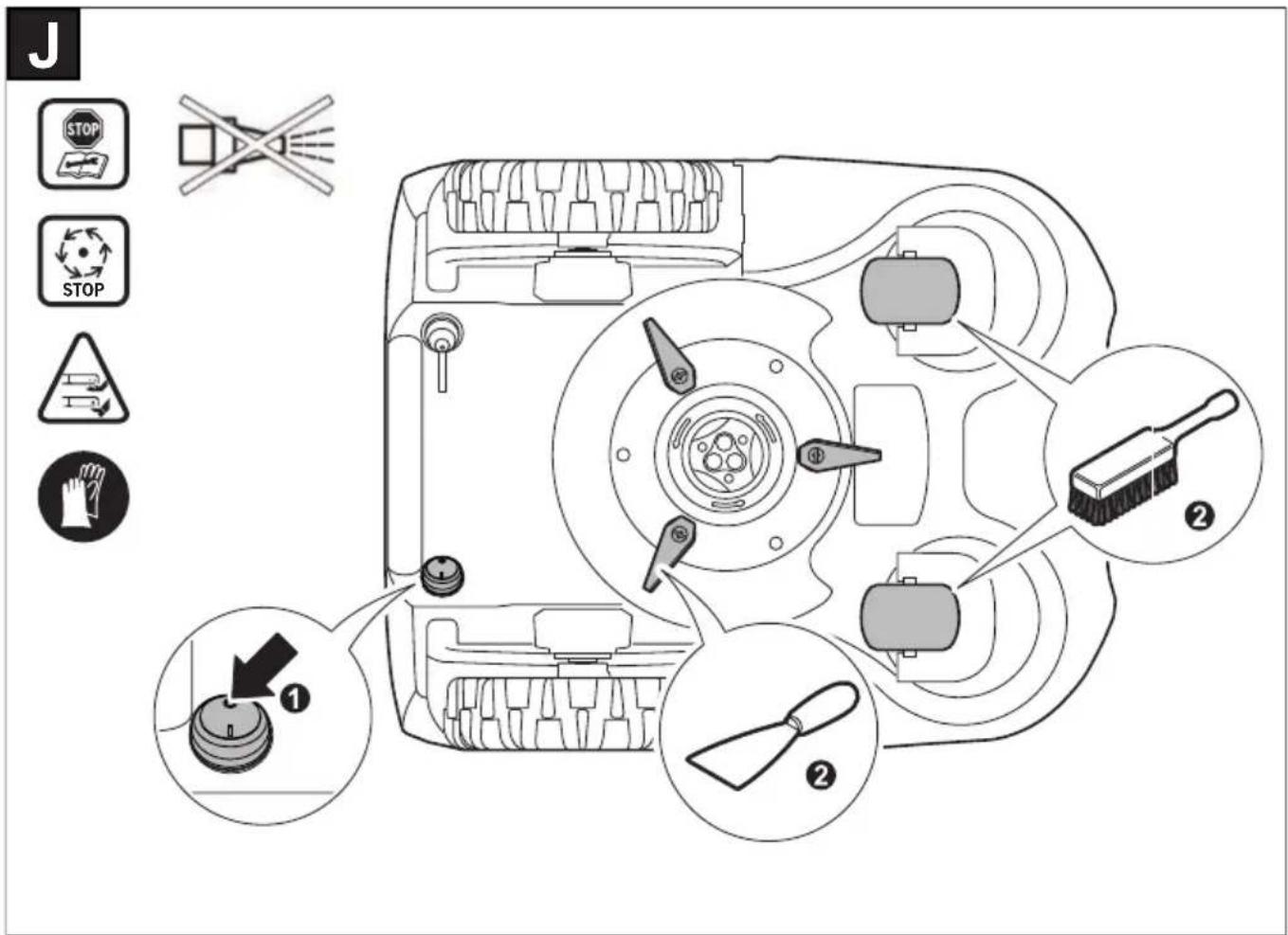
Turn the mower upside down and clean the blade area and the swivel castors regularly. Use a stiff brush or scraper to remove compacted grass clippings (see figure J).
Blades are reversible.
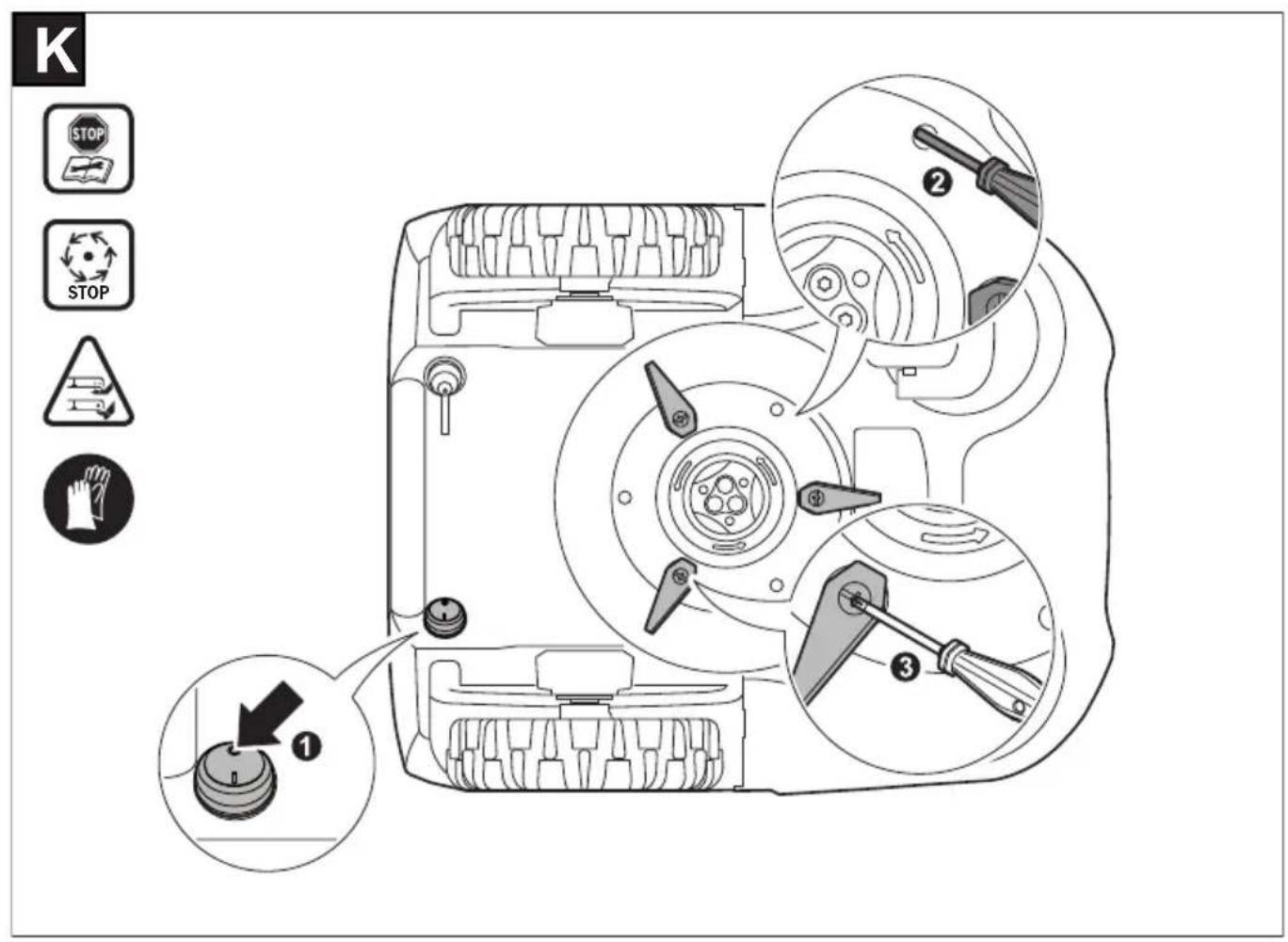
▶ Make sure all nuts, bolts and screws are tight to ensure safe working with the garden tool. (see figure K)
▶ Periodically visually inspect the machine and replace worn or damaged parts for safety.
▶ Ensure that only official Honda replacement parts are used.
▶ Replace all blades and bolts as a set as required.
Storage in winter
▶ Turn off the mower using the On/Off switch.
The mower will operate between 5 °C and 45 °C. During the winter season once the temperature in the garden is consistently below 5 °C store the mower and the docking station in a secure, dry place, out of the reach of children.
Do not place other objects on the mower or docking station.
It is recommended to use the original packaging when transporting Miimo over long distances.
- Store the mower only within a temperature range between -20^ and 50^ . As an example, do not leave the mower in the car in summer.
Software Update
The mower has a USB interface which is to be used exclusively for software updates that is performed by your Honda authorized dealer. Use only approved USB.org sticks (formatted to FAT 32) and approved USB.org OTG cables.
▶ Do not use the USB interface for any additional purposes. Do not plug any external devices.
▶ You can also enable automatic software updates in the Miimo Settings Menu of the Mii-monitor Smartphone Application.
Battery Hazards
▶ Recharge only in the Honda approved docking station.
▶ Miimo will operate between 5 °C and 45 °C. If the battery temperature is outside this range, Miimo will display a message and will not leave the docking station. If operating, Miimo will return to the docking station or stay in place.
▶ If the battery becomes defective, liquid can escape and come into contact with adjacent components. Check any parts concerned and contact the Authorized Honda Dealer.
▶ In the unlikely event of liquid being ejected from the battery avoid all contact with the machine. If contact with the liquid occurs, seek medical advice.
▶ Do not open the machine or battery. Danger of short circuit and electric shock.
▶ Protect the machine against fire. Danger of battery explosion. In case of fire or battery explosion contact the emergency services.
▶ In case of damage and improper use of the machine, vapours may be emitted from the battery. Provide for fresh air and seek medical attention in case of complaints. The vapours can irritate the respiratory system.
Safety Warnings for Docking Station and Power Supply
▶ Only use the original Honda docking station and power cord to charge the mower. Otherwise there is danger of fire and explosion.
▶ Check the docking station, power supply unit, cables and plugs periodically. If damage or ageing is detected, isolate from the docking station or power supply and do not use them. Never open the docking station or power supply yourself. Have repairs performed only by a qualified Honda technician and only using original spare parts. A damaged docking station, power supply, cable or plug increases the risk of an electric shock.
▶ Do not operate the docking station and power supply on easily flammable surfaces (e.g., paper, textiles, etc.) or surroundings. The heating of the docking station and power supply during the charging process can pose a fire hazard.
▶ Supervise children at all times. This will ensure that children do not play with the docking station, power supply or the machine.
▶ The voltage indicated on the power supply must correspond to the voltage of the power source.
We recommend that the power supply is only connected into a socket which is protected by a circuit-breaker that would be actuated by a 30 mA residual current. Check your Residual Current Device (RCD) at regular intervals.
▶ The supply cord must be inspected for signs of damage at regular intervals.
▶ In the event of flooding of the docking station turn off power supply at mains and contact Authorized Honda Dealer.
▶ Never touch the mains plug or any other plugs with wet hands.
▶ Do not run over, crush or pull the cables. Protect the cables from heat, oil and sharp edges.
The power supply is double insulated for safety and requires no earth connection. The operating voltage is 230 V AC, 50 Hz (for non-EU countries 220 V, 240 V as applicable). Contact your Authorized Honda Dealer for details.
If in doubt contact a qualified electrician or the nearest Authorized Honda Dealer.
Symbols
The following symbols are important for reading and understanding the operating instructions especially the diagrams. Please take note of the symbols and their meaning. The correct interpretation of the symbols will help you to use the garden product in a better and safer manner.
Symbol Meaning

Wear protective gloves

Permitted action

Prohibited action

Accessories/Spare Parts
Intended Use
The mower is intended for domestic lawn mowing. Do not operate the mower indoors.
Do not use the mower for any other purpose because of the increased risk of accidents and damage to the mower. Never attempt to modify the mower in any way since this may result in accidents or damage to the mower.
Technical Data
| Robotic Lawnmower SI Unit HRM70 Live |
| Cutting width cm 19 | | |
| Height of cut mm 30–50 | | |
| Slope angle (max.) °/% 15/27 | | |
| Size of lawn area | | |
| - maximal m | 2 | 700 |
| - per charge up toA) | m2 | 85 |
| Weight according to EPTA-Procedure 01:2014 kg 7.6 | | |
| Protection type IPX4 | | |
| Serial number see type plate on mower | | |
| Operating frequency range (Inductive sensor) kHz | 5 | |
| max. magnetic field strength (Inductive sensor) (at 10 m) | dBμA/m 44 | |
| Operating frequency range (GSM) | MHz | 880-960 |
| MHz | 1710-1880 |
| Max. transmit power (GSM) | dBm 33 | |
| Battery | | Li-Ion |
| Rated voltage | VDC | 18 |
| Capacity | Ah 2.5 | |
| Number of battery cells | | 5 |
| Operating time, up toA) | min 75 | |
| Charging period (max.) | min 60 | |
| Perimeter wire | | |
| - wire supplied | m | 175 |
| - minimum required length | m 20 | |
| - maximum permissible length | m | 350 |
| Docking station | | |
| Input voltage | VDC 24 | |
| Power consumption charging/perimeter wire switched on | W | 73/2.6 |
| Charging current (up to) | A | 2.3 |
| Allowable charging temperature rangeB) | °C | 5–45 |
| Weight according to EPTA-Procedure 01:2014 kg | 1.65 | |
| Protection type IPX4 | | |
| Power supply unit | | |
| Switzerland | | 80004-Y0H-003 |
| United Kingdom | | 80003-Y0H-003 |
| Rest of Europe | | 80002-Y0H-003 |
| Input voltage (AC) | V | 220–240 |
| Protection class | | ☐/II |
| Frequency | Hz 50–60 | |
| Output voltage (DC) | V 24 | |
| Protection type IPX7 | | |
| Weight | kg | 1.25 |
A) Depends on cutting height, grass conditions and moisture
B) Internal battery temperature
The specifications apply to a rated voltage [U] of 230 V. These specifications may vary at different voltages and in country-specific models.
Noise emission values determined according to EN 50636-2-107.
Typically the A-weighted noise levels of the product are: Sound power level 61 dB(A). Uncertainty K = 2 dB.
Explanation of Figures
| Action Figure Page |
| Accessories | A 100 |
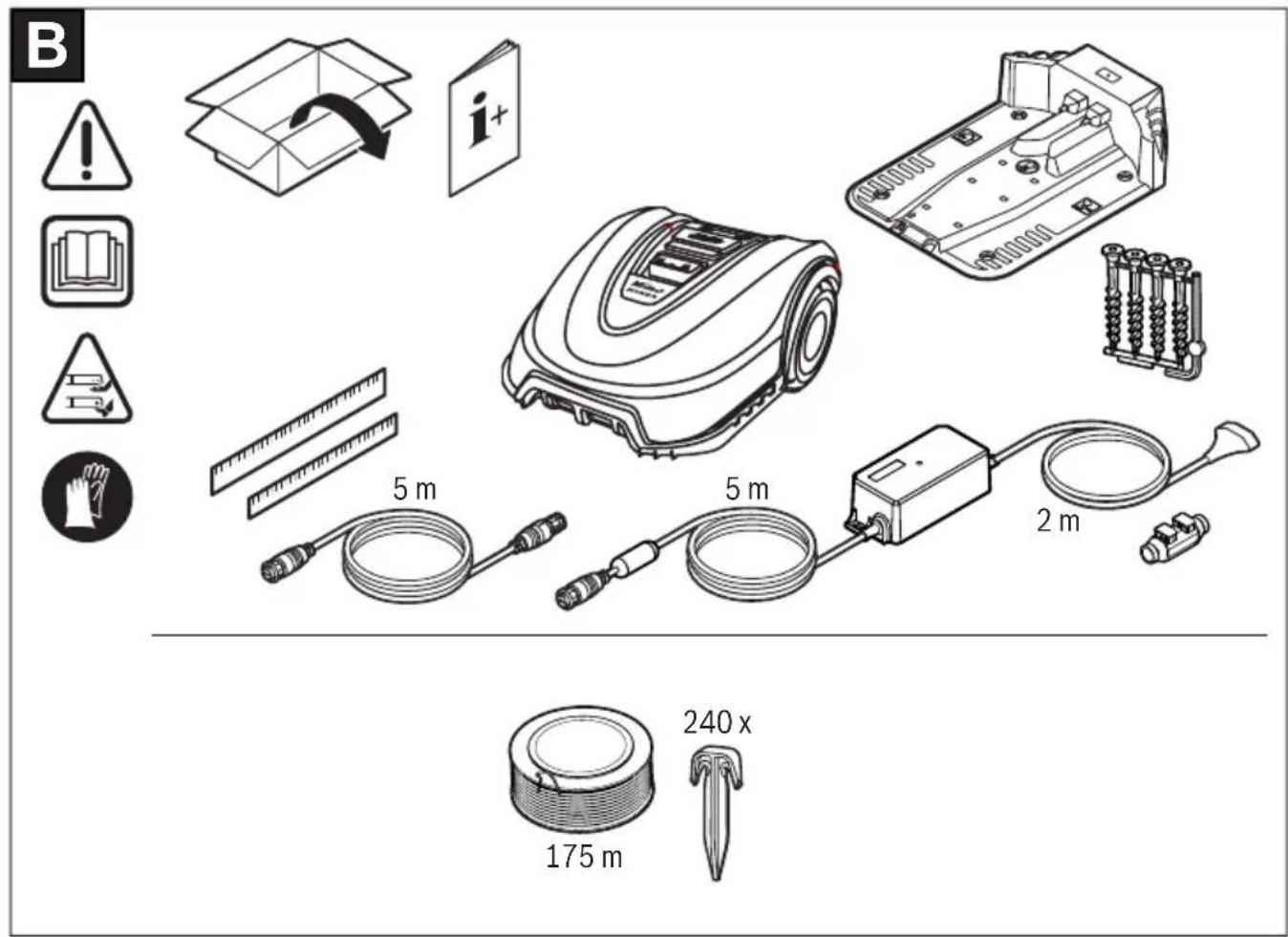
| Delivery scope/unpacking the mower | B 101 |
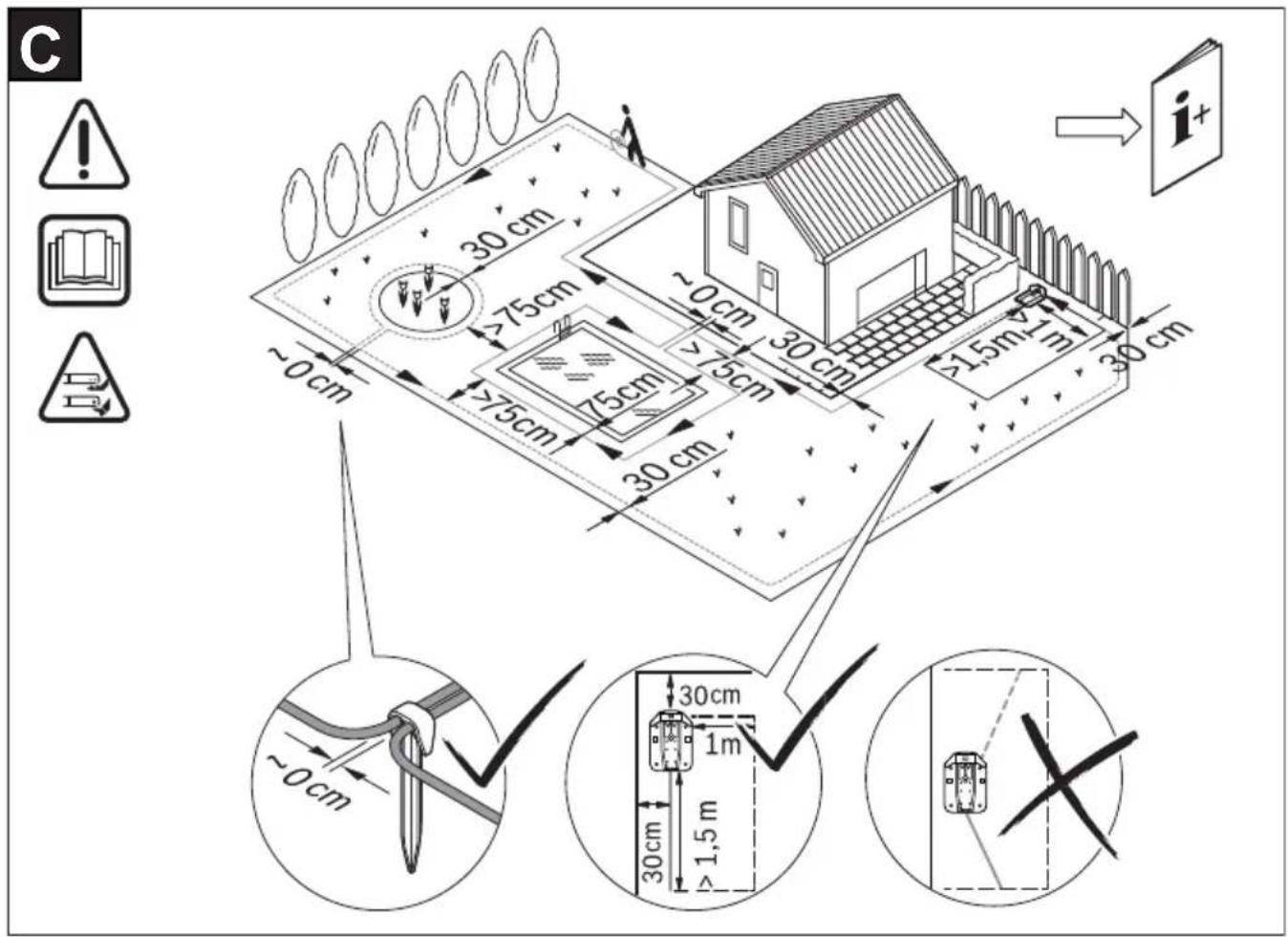
| Laying out perimeter wire | C 101 |
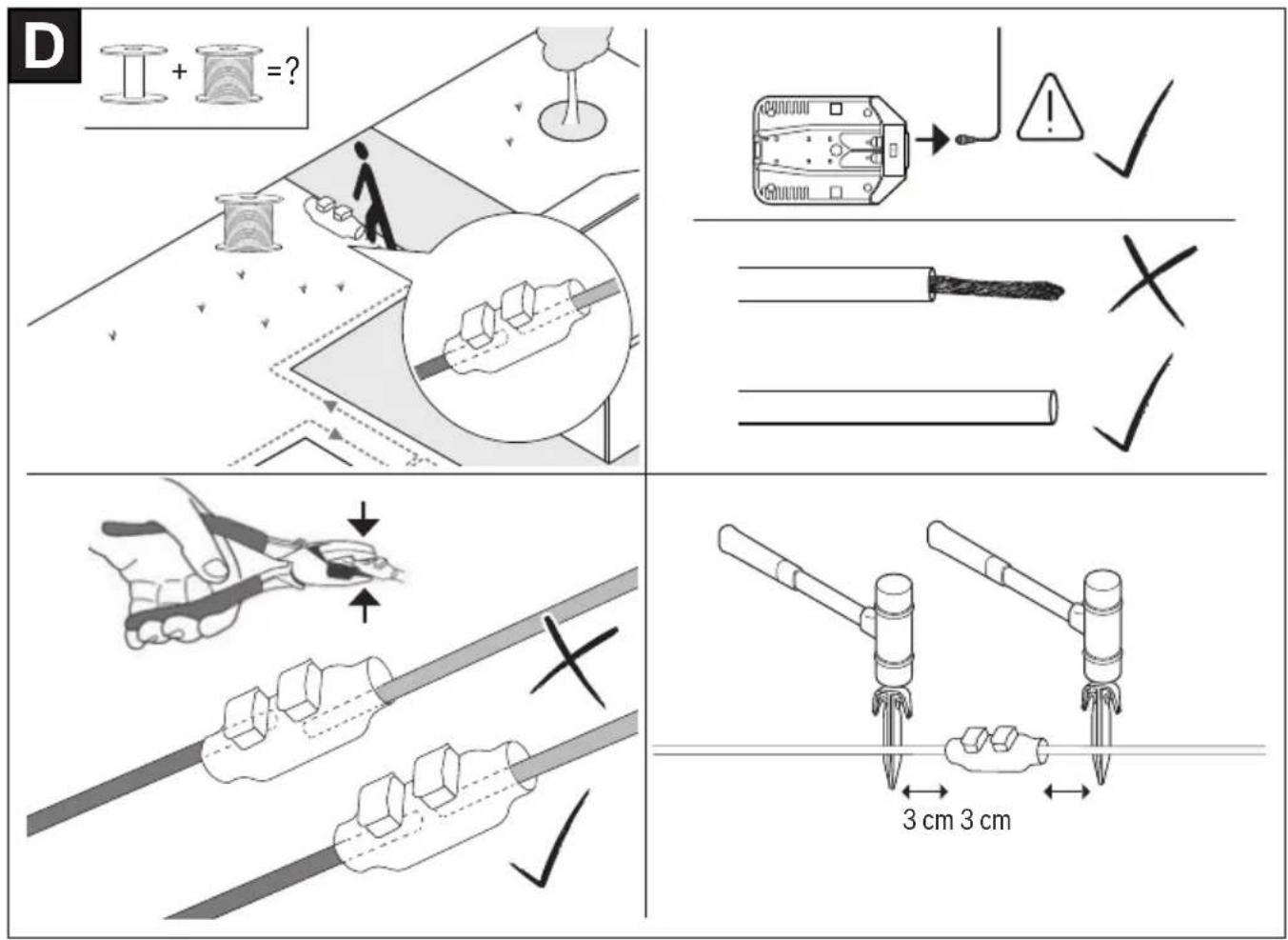
| Extending perimeter wire | D 102 |
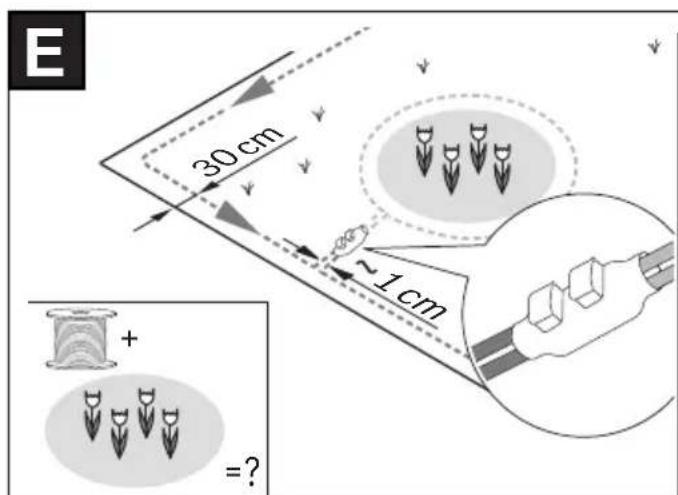
| Laying perimeter wire around new inner object | E 102 |
| Lifting up and carrying the mower | F 103 |
| Setting the height of cut | G 103 |
| Place and Mow | H 104 |
| Adding a further lawn area | I 104 |
| – with additional docking station (right) | |
| – without additional docking station (top left) | |
| Cleaning | J 105 |
| Maintenance | K 105 |
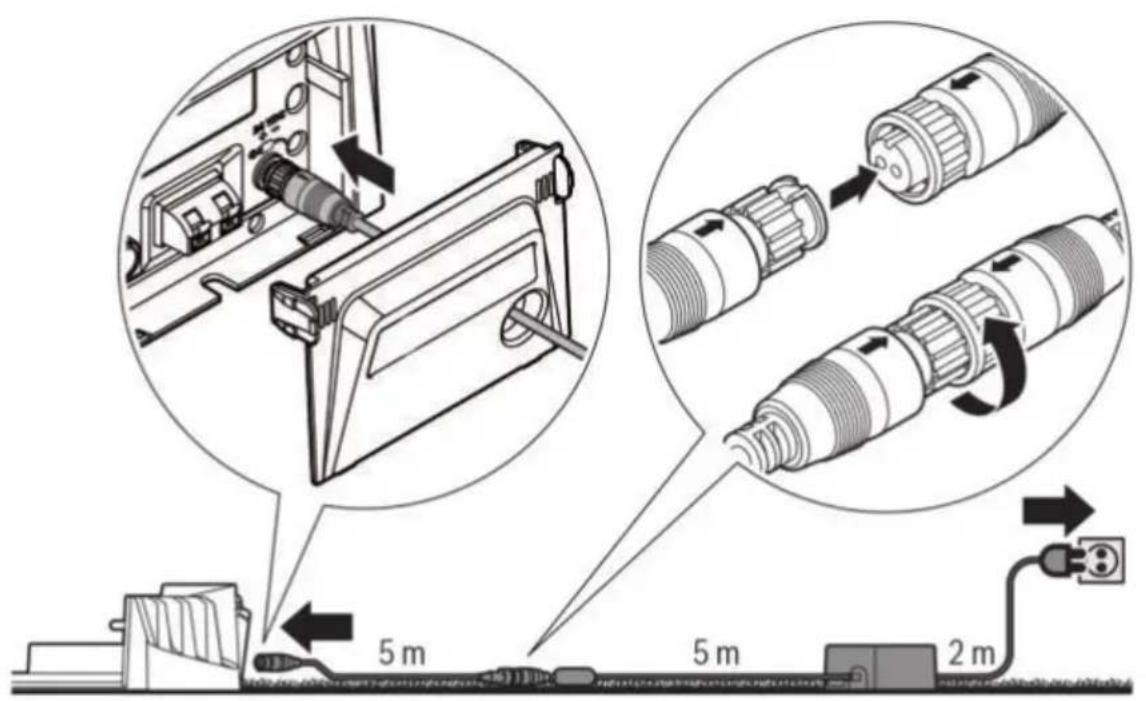
| Power supply unit connection | L 106 |
Installation
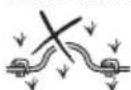
Check if the perimeter wire is fully pegged to the ground avoiding any slack lengths of wire. Any loose wire can be a trip hazard.
Remove stones, loose pieces of wood, wire, live mains cables and other foreign objects from the cutting area.
Make sure that the cutting area is even and has no ditches, grooves and steep slopes above 15^/27% that are clear obstructions for the mower.
The docking station must be positioned on the wire at an outer edge of the cutting area. It may not be positioned on the side of a tool or garden shed standing as an island within the lawn to be mowed.
It is recommended that you mow your lawn once with a conventional lawnmower before installing and before the first mowing of the new season and whenever the grass clippings would be longer than 5 mm.
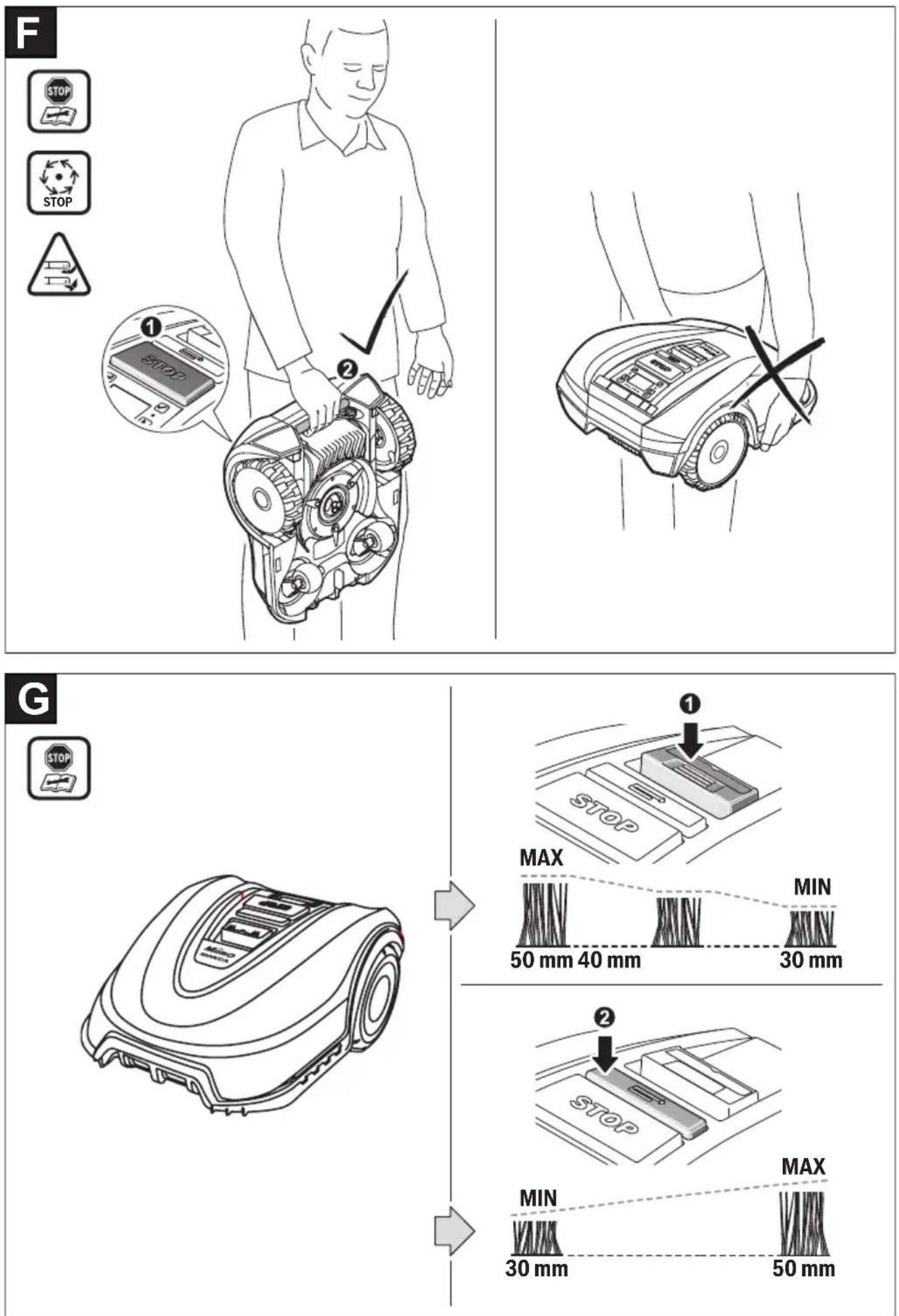
The mower's cutting system is designed to cut small lengths of grass (30–50 mm). The clippings can remain as mulch to fertilize the lawn. The height of cut for mower can be adjusted to 30, 40 and 50 mm.
It is recommended to start with a higher setting and then gradually decrease the height of cut as the wire disappears under the grass. This prevents your Miimo from cutting the wire.
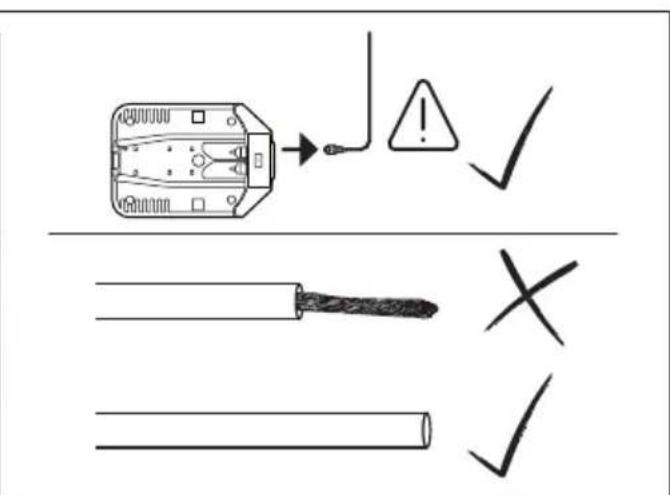
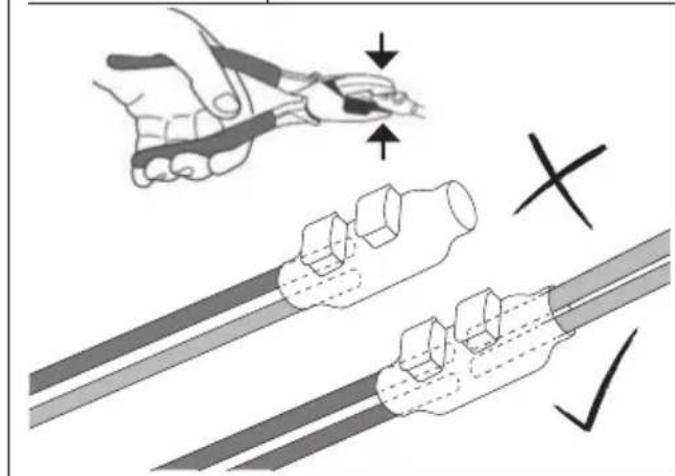
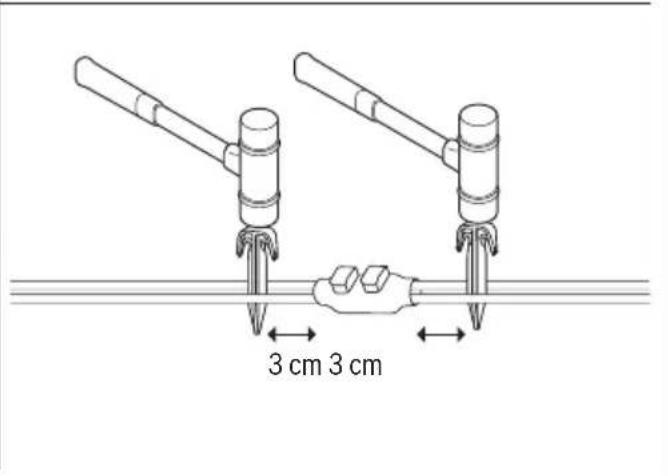
Additional perimeter wire can be added using a wire connector (see figures D–E).
The perimeter wire can be extended up to a maximum length of 350 m.
The perimeter wire can be buried up to 5 cm under the ground (or under non-metallic slabs).
To avoid causing damage to the perimeter wire, do not verticut or rake the area where it is positioned.
When laying out the wire avoid angles of less than 45^ . This can affect the performance.
Display
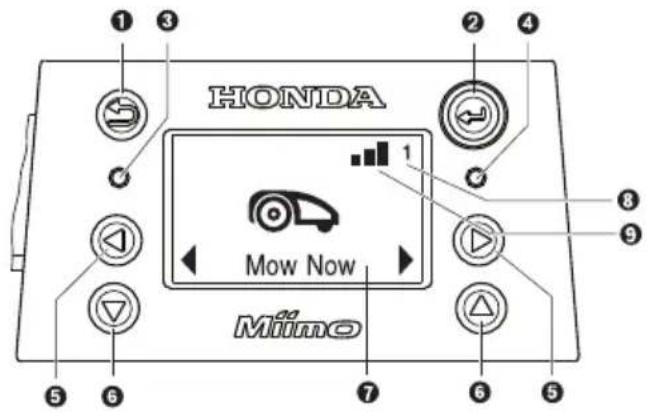
| Symbol Meaning |
| 1 | | Back button |
| 2 | | Confirm buttonIf the confirm button is pressed whilst mowing, the mower will return to the docking station |
| 3 | | Red LED on: mower error |
| 4 | | Green LED on: mower is switched on Green LED off: The mower is inactive and your four-digit PIN code is required for activation.Or the mower is shut off, the On/Off switch must be turned on and your four digit PIN code must be entered to activate the mower.Note: during a software update, the green LED and red LED will be on. |
| 5 | | Left/right button |
| 6 | | Down/up button |
| 7 | | Display with dialog screen |
| 8 | 1 2 3 | Garden number (shown when more than one garden map in the mower memory) |
| 9 | | Network signal present |
| | Network signal absent |
The display switches into sleep mode, if no input is made for 10 minutes.
To install the Miimo to an additional lawn area, please follow the instructions in the Installation Guide.
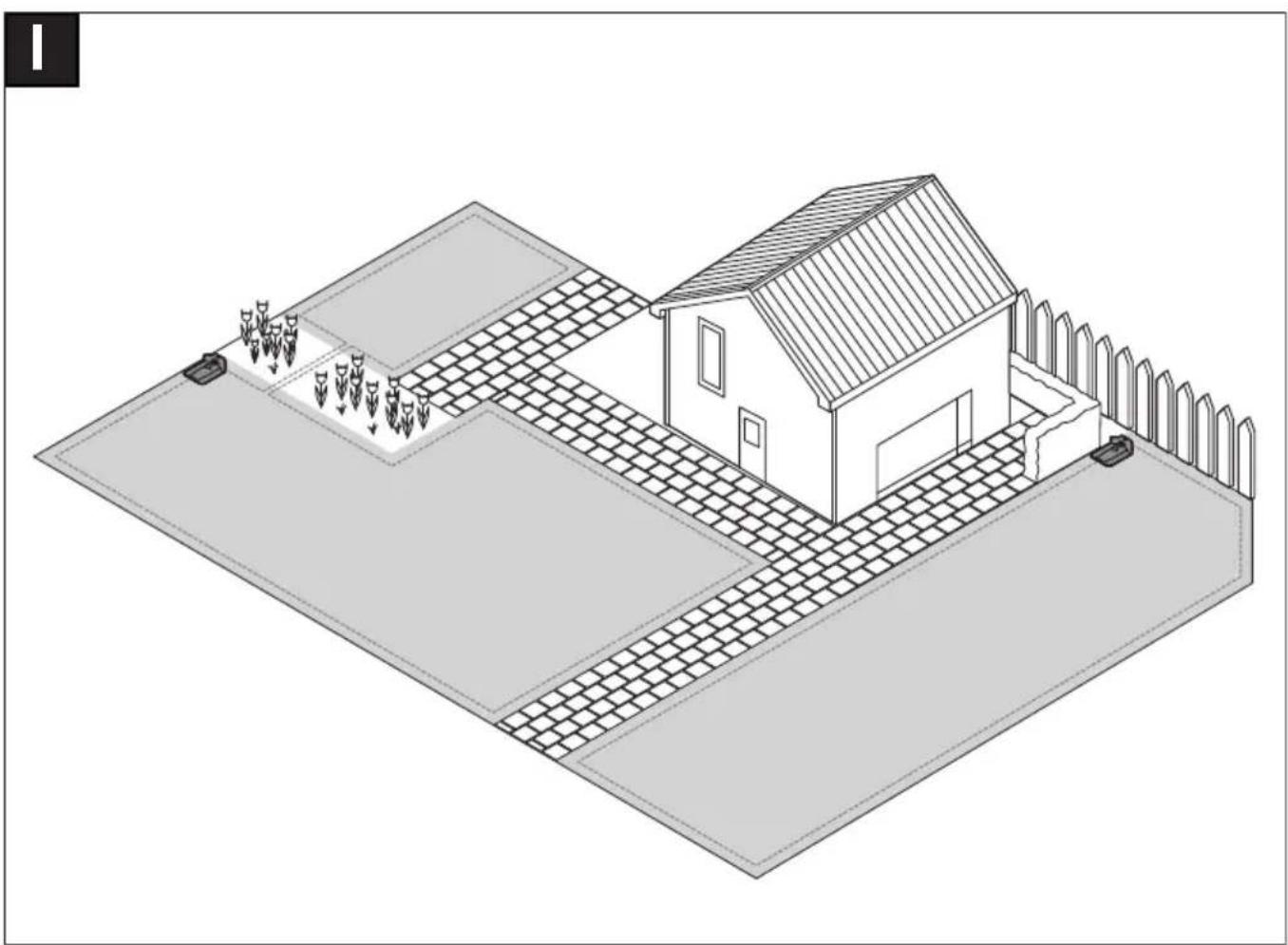
Separate lawn area with separate docking station (see figure I, right): The mower can be used on up to three different lawns. For an additional lawn area, a separate docking station (see figure A) and the necessary perimeter wire and pegs are required. If a schedule or the Honda “Smart Timer” calendar function is selected, it will cut the grass of the area it is in, within the time slots.
Switch off the mower when transporting it between the individual lawn areas.
Note: software updates have to be carried out on the mower in every docking station.
To ensure remembering which docking station belongs to which garden, it is recommended to label the docking stations with the garden number and description when storing them for winter.
Without separate docking station: It is possible to connect the lawn areas by placing the perimeter wire between the two lawn areas parallel to each other as close as possible (see figure I, top left). The additional lawn area without docking station is not recorded in the map memory and the mower will not use the Map & Mow cutting strategy in this lawn area without the docking station. The maximum recommended lawn area without a docking station is 50 m². The mower will mow until it runs out of battery and will need to be carried back to the docking station for charging.
Mowing
▶ Do not let children ride the mower.
▶ Press the stop button on top of the mower before lifting. Always lift the mower by its handle. (see figure F)
Make sure the cutting area is free of small animals such as hedgehogs or tortoises.
After successful installation, you can begin mowing immediately by pressing “mow” on the free Honda Mii-monitor App. You could also set up a programmed schedule, using the Honda “Smart Timer” functionality, which can also plan future cutting sessions based on when it is forecasted to rain.
A manual “calendar” can also be set up according to your specific needs.
The mower must mow a lawn area 3 times completely (do 3 full cuts) to learn the lawn area. During the learning phase, the visual result may not be optimal.
Approximate runtimes for complete garden coverage using Map & Mow are listed below. Please note that the runtimes will vary depending on the lawn complexity and number of objects within the garden.
100 m ^2 4 h
500 m² 16 h
700 m² 22 h
Set a schedule with frequent repetitions. This achieves good mowing results, the battery charge lasts longer and you avoid clippings on the lawn.
When the mower is mowing
In “manual” mode, the mower works until the lawn is mowed. Mowing is interrupted only for charging the battery. When the lawn area is mowed, the mower returns to the docking station.
In the programmable “Calendar” mode or with the Honda “Smart Timer” calendar function, the mower operates continuously for a set period of time. Mowing is interrupted only for charging the battery. If the lawn area is mowed before the time period expires, the mower returns to the dock.
To stop mowing prematurely, press the Dock button in the Honda Mii-monitor App. You could also send the mower back to the docking station by pressing the
Energy saving mode
The mower reduces its energy consumption by automatically switching off the power in the perimeter wire when it is not mowing and not being charged.
To wake up the mower remotely from the energy saving mode, press “Mow” in the Honda Mii-monitor App. When a Calendar or the Honda “Smart Timer” functionality becomes active, the wire signal will start up automatically.
Mowing small lawn areas with "Place & Mow"
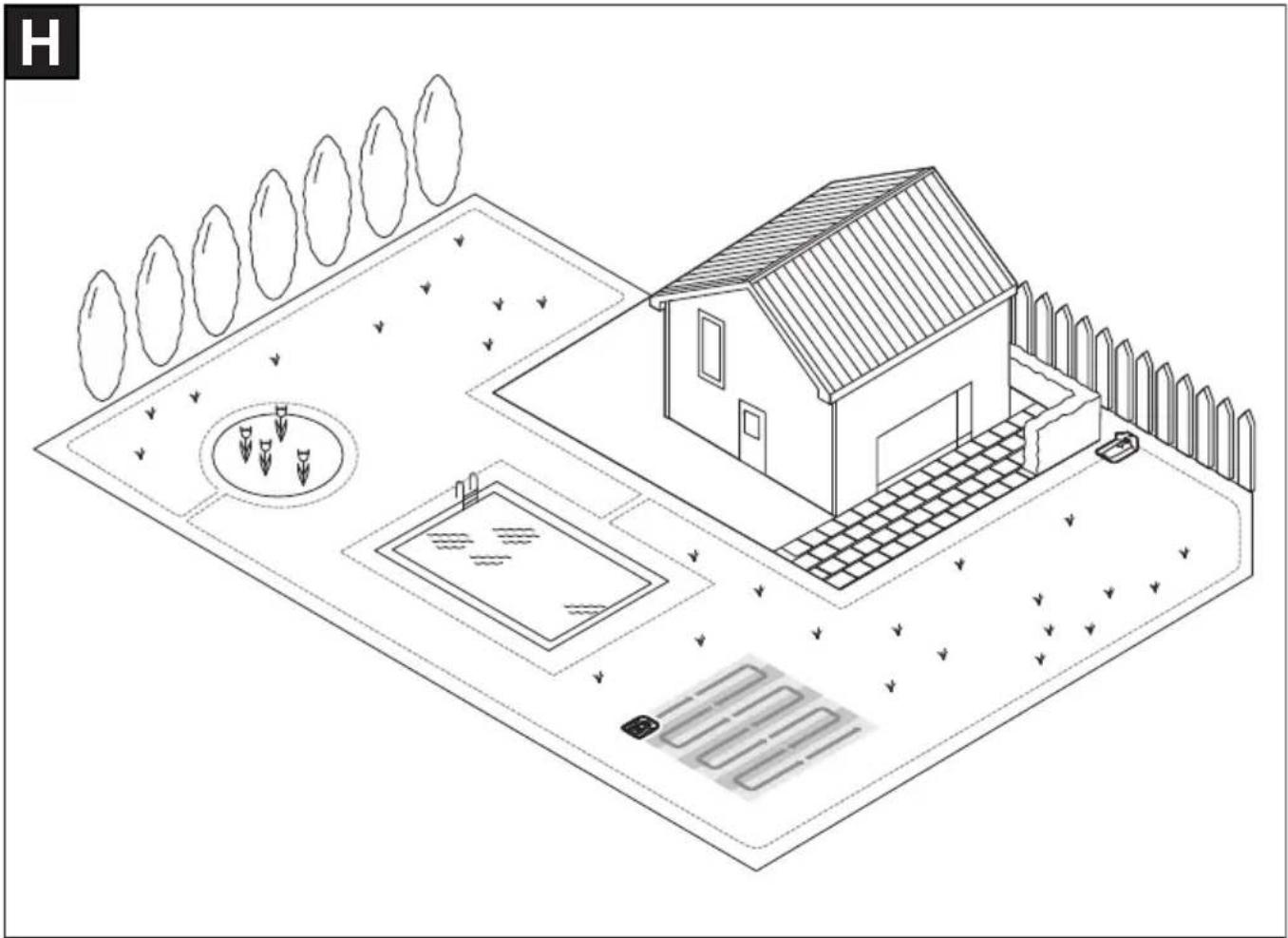
Place & Mow is intended for mowing small areas that require special treatment without having to mow the whole lawn, such as the area under a piece of garden furniture that has been removed. The mower is positioned at the lower left corner of the intended area to mow (see figure H). The final mowed area depends on the lawn conditions; it will not necessarily be an exact square. After completion of “Place & Mow”, follow the instructions on the screen.
Note: For safety reasons, “Place & Mow” cannot be used outside the perimeter wire.
Sensors
The mower is equipped with the following sensors:
- The lift-up sensor is activated when the mower is lifted.
- The rollover sensor detects when the mower tips over.
- The tilt sensor is activated when the mower reaches a slope angle of 32^ .
When one of the sensors is activated, e.g. the lift-up sensor, the drive motors and cutting blades are stopped. A message is indicated in the display, e.g. "lift-up".
- The obstacle sensor detects objects/obstacles alongside the entire front edge of the mower and causes a change of direction.
Battery charging
The battery is equipped with temperature monitoring that al-lows charging only if the battery internal temperature is in the range between 5 °C and 45 °C.
The lithium-ion battery is supplied partially charged. It is recommended to charge the mower during installation of the perimeter wire in the docking station.
The lithium-ion battery can be charged at any time without reducing its service life. Interrupting the charging procedure does not damage the battery.
When the battery is run flat or discharged, the mower is shut off by means of a protective circuit: the blades no longer move.
The table below explains the various menu items available on Miimo. Most of these functions are also available on the Honda Mii-monitor App.
| Main Menu Sub-menu 1 Sub-menu 2 Explanation |
 Mow now Mow now | | | Pressing the confirm button will send the mower to mow.In “Off/Manual“, the mower works until the display shows “garden complete”.In “Calendar” mode the mower will operate until the end of the time period or until the display shows “garden complete” (whichever comes first). |
 Calendar Calendar | Smart Timer | | The Honda “Smart Timer” function is optimised based on the size of the lawn area and gives additional functionality to connect to a local weather data provider.In the default setting, the mower does two full cuts a week and starts at 8 am.You can set up your Smart Timer schedule by using the free Honda Mii-monitor App. |
| Calendar Edit (selected day) Program a mowing schedule by setting individual mowing days and slots (up to 2 per day). |
|
|
|
|
|
|
|
|
|
|
|
|
|
|
|
|
|
| Don't mow/Delete slot | This will delete the corresponding slot for the selected day.The number of full cuts per week for the actual schedule are shown at the bottom of the display. |
|
|
|
|
|
|
|
|
|
|
|
|
|
|
|
|
|
| Off/Manual Choose this option when no schedule should be used. Themower starts mowing only by activating “Mow now”. |
Main Menu Sub-menu 1 Sub-menu 2 Explanation
| Settings |  | Place & Mow Select between a size of 2 m x 2 m, 3 m x 3 m and 4 m x 4 m. |
| Mow without docking station | Mower will mow in the additional lawn area without docking station in random mode until it runs out of battery. |
| Mowing mode | | |
 | Auto Lock If buttons are not pressed for 3 min. they will be automatically locked. Recommended for safety reasons and protection against theft. |
| Security |
| - On PIN code is required for reactivation after Auto Lock. |
| - Off The buttons are always ready for input. |
| Change PIN Changing of a PIN code requires entering of existing PIN code first. |
| Alarm |
| - On Alarm is activated. |
| - Off Alarm is deactivated. |
 | | Change the date and time. |
| Date & Time | | |
 | | Change the display language. |
| Set Language | | |
| Info | System status Information on battery charge, system information and operating and charging time for the mower. |
 | Wire ID Change the perimeter wire ID when possible interferences are nearby. |
| Advanced | Sensor setting/Lawn condition | Select between Low (uneven ground), Normal and High (slippery ground). Mower bump sensor will become more or less sensitive depending on lawn condition selected. |
| Remap Deletes the current map of the garden. |
| Factory Reset Reset the mower to factory settings will delete all personal settings (not PIN). After a factory reset, the mower will need to remap the the lawn areas. |
| Garden Overview Displays the number of mapped gardens, their size, their wire ID and the date of the last time the garden was cut. |
| Delete garden | Delete one specific garden map or select to delete all maps at once. |
| Name mower Change the name shown in the display. This can be also be changed in the Honda Mii-monitor App. Only letters of the Latin alphabet are possible. The number of letters is limited. This function is not available in every language. In some languages (e.g. Czech or Polish) a name change doesn't have effect on display due to specific grammar requests. |
 | Level check Information about the ground angle of the mower. If the mower is in the docking station and the dot on the display is not within the indicated circle, the docking station must be mounted at a new, more level location. |
| Tools | Wire signal Detects the wire signal received from the perimeter wire, indicating its strength (for Service Agent). The mower will not receive a wire signal while in the docking station. |
Troubleshooting


| Problem Possible Cause Corrective Action |
| The LED on the docking station flashes | The perimeter wire is cut, too long or too short. Wire not connected and mower not in the docking station. | Check that the perimeter wire is not interrupted and is between 20 and 350 meters in length. Then switch power supply off and then on again.Follow instructions in Installation Guide to install the mower. |
| Excessive vibrations/ noise | Blade bolt loose Tighten blade bolt to torque of 2.5 Nm. |
| Cutting blade damaged/bent Replace cutting blade (see figure K). |
| Mower not docking reliably | Perimeter wire not properly attached to docking station | Follow instructions in Installation Guide on layout of perimeter wire. |
| Perimeter wire close to a source of interference | Remove any excess (e.g. coiled up) perimeter wire around the docking station.Change perimeter wire ID in the menu. |
| Mower fails to operate | On/Off switch not turned on Remove mower out of docking station, turn On/Off switch on and place mower back into docking station (ensure docking station is on - LED lights up green). |
| Possible clogging Always turn On/Off switch off first, then check underneath the mower. Clear out as necessary (always wear protective gloves). |
| Battery not fully charged Place mower in the docking station to allow to charge.Docking station must be on. |
| Grass too long Mow lawn with conventional lawnmower to its lowest height-of-cut setting before using the mower. |
| Battery too hot/cold The mower operates when the battery internal battery temperature is between 5 °C - 45 °C. Allow mower to cool down/warm up. If the error occurs frequently, the docking station should be positioned in the shade. |
| Mower standing on lawn with the display switched off | Operational problems Press confirm button for screen to light up, or place mower in docking station. |
| Mower does not charge | Battery too hot/cold The mower operates when the battery internal temperature is between 5 °C - 45 °C. Allow mower to cool down/warm up. If the error occurs frequently, the docking sta-tion should be positioned in the shade. |
| Docking station not switched on Switch on power supply to docking station. If docking station does not start, contact your Authorized Honda Dealer. |
| Charging pins corroded Clean the charging pins. |
| Mower out of perimeter wire | Perimeter wire on a slope Leave 30 cm between the perimeter wire and the slope 15°/27%. |
| Obstacle near perimeter wire Remove obstacle. |
Problem Possible Cause Corrective Action
| Parts of the lawn area left uncut | Mower requires more cuts to finish garden | Allow mower to run for 3 full cuts to cover whole lawn area. |
| Time slot not long enough for garden size | Increase mowing time slot or use Honda “Smart Timer” Calendar Function. |
| Distance between perimeter wires too small | Increase distance between the perimeter wires to a minimum of 75 cm. |
| Rough mowing conditions Select | “uneven ground/low sensitivity” option from menu item “lawn condition/bump sensor”. Flatten garden/remove/bumps/mark out unsuitable areas with the perimeter wire – Please follow the instructions in the Installation Guide. |
| Grass too long Select “uneven ground/low sensitivity” option from menu item “lawn condition/bump sensor”. |
| Slopes in garden too steep Ensure mower only operates on slopes of 15 degrees or less and full garden is not on a slope. |
| Mower gets stuck in garden | Objects/obstacles not marked out | Use the perimeter wire to mark off obstacles where the mower often gets stuck. |
| Newly laid turf Allow a few weeks for the soil to settle before using the mower. Select “uneven ground/low sensitivity” option from menu item “lawn condition/bump sensor”. After watering, wait as long as possible until you start the mower. |
| Mower unintentionally cuts flowers, etc. or runs over certain obstacles | Objects/obstacles below 5 cm not marked out | Mark obstacle using perimeter wire leaving 30 cm from object or remove objects/obstacles. |
| Mower does not appear to cut logically | Map & Mow system depends on the garden conditions. Mower does not necessarily have to continue in the next uncut area. | Further information can be found on the Installation Guide. If behaviour re-occurs often, remap garden. |
| Mower does not always go in a straight line when travelling between areas | No corrective action needed. |
| Mower frequently does not find right position or turns on the spot | Change wire ID. |
| Wire crossed while marking an object | Follow instructions in the Installation Guide. |
| Mower runs in random paths in an additional lawn without docking station. | Normal behavior. The Map & Mow system only works in areas with docking station. |
| Perimeter wire keeps being cut | Wire is not taut between pegs Distance between pegs is more than 75 cm | Make wire taut and ensure distance between pegs is maximum 75 cm. Follow instructions in the Installation Guide. Use the wire connectors to repair the cut. |
Problem Possible Cause Corrective Action
| Mower leaves ragged finish/poor quality of cut | The mower does not mow often enough | Mow more frequently for a good result (e.g. by means of more/longer slots in schedule). |
| Cutting blades blunt Reverse or replace cutting blades (see figure K). |
| Possible clogging Always turn On/Off switch off first, then check underneath the mower. Clear out as necessary (always wear protective gloves). |
| Perimeter wire not detected | No power at the docking station Check if the docking station is powered up (LED is on). |
| Perimeter wire cut Check perimeter wire for damages. |
| Wrong installation (e.g. not enough distance between wires) | Follow instructions in the Installation Guide. |
| Perimeter wire close to a source of interference | Remove any excess (e.g. coiled up) perimeter wire around the docking station. Change perimeter wire ID in the menu. |
| Height-of-cut button stuck | Possible clogging Always turn isolator On/Off off first, then check underneath the mower. Clear out as necessary (always wear protective gloves). |
After-sales Service and Application Service
In all correspondence and spare part orders, please always include the 4+7 digit article number given on the type plate of the mower.
It is possible, that the software version of your mower is required (see "Menu > Settings > Info").
If the mower is requested to be Returned to the authorised Honda dealer, the mower and docking station must always be return together.
The product must be periodically inspected and maintained for safety and to keep it running at a high level of performance.
Periodic maintenance will also help to extend service life.
Honda recommends annual service to be completed by your local authorised Honda dealer.
Transport
The contained lithium-ion batteries are subject to the Dangerous Goods Legislation requirements. The batteries are suitable for road-transport by the user without further restrictions.
When shipping through third parties (e.g.: by air transport or forwarding agency), special requirements on packaging and labelling must be observed. For preparation of the item being shipped, consulting an expert for hazardous material is required.
Disposal

The garden product, batteries, accessories and packaging should be sorted for environmental-friendly recycling.
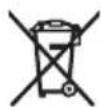
Do not dispose of garden products and batteries/rechargeable batteries into household waste!
Only for EC countries:
According to the European law 2012/19/EU, electrical and electronic equipments that are no longer usable, and according to the European law 2006/66/EC, defective or used battery packs/batteries, must be collected separately and disposed of in an environmentally correct manner.
Battery packs/batteries:
Li-Ion:
Please observe the instructions under Transport.
Inhalt
Deutsch 16
IdentifikationderMaschine 16
Wartung 17
LagerungimWinter 17
Software-Update....17
Identification machine 44
Fonctionnement 44
Entretien 45
Blocs-batteries/batteries :
Lithium-ion :
(Estonia/Latvia/Lithuania)
NCG Import Baltics OU
Meistri 12
13517 Tallinn
Harju County Estonia
Tel.: +372 651 7300
Fax: +372 651 7301
info.baltic@ncgimport.com
BELARUS
JV Scanlink Ltd
Montazhnikov lane 4th, 5-16 Minsk
220019
Republic of Belarus
Tel.: +375172349999
Fax: +375172380404
honda@jpmotors.lt
BELGIUM
Honda Motor Europe Ltd
Doornveld 180-184
1731 Zellik
Tel.: +32 2620 10 00
Fax: +32 2620 10 01
http://www.honda.be
bh_pc@honda-cu.com
BULGARIA
Premium Motor Ltd
Andrey Lyapchev Blvd no 34
1797 Sofia
Bulgaria
Tel.: +3592 423 5879
Fax: +3592 423 5879
http://www.hondamotor.bg
office@hondamotor.bg
CROATIA
AS Domžale Moto center d.o.o.
Brezence
SI-8216 Mirna Peč
Tel.: +386 1 562 37 00
http://www.honda-as.com
info@honda-as.com
CYPRUS
Powerline Products Ltd
Cyprus - Nicosia
Vasilias 18 2232 Latsia
Tel.: 0035799490421
info@powerlinecy.com
http://www.powerlinecy.com
CZECH REPUBLIC
BG Technik cs, a.s.
U Zavodiste 251/8
15900 Prague 5 - Velka
Chuchle
Tel.: +420 2 838 70 850
Fax: +420 2 667 111 45
http://www.honda-stroje.cz
DENMARK
TIMA A/S
Ryttermarken 10
DK-3520 Farum
10442 Athens, Greece
Tel: +30 210 519 31 10
Fax: +30 210 519 31 14
mail@technellas.gr
HUNGARY
MP Motor Co., Ltd.
Kamaraerdei ut 3.
2040 Budaors
Tel.: +36 23 444 971
Fax: +36 23 444 972
http://www.hondakisgepek.hu
info@hondakisgepek.hu
IRELAND
Two Wheels ltd
M50 Business Park, Ballymount
Dublin 12
Tel.: +353 1 4381900
Fax: +353 1 4607851
http://www.hondaireland.ie
sales@hondaireland.ie
ISRAEL
Mayer's Cars and Trucks Co.Ltd. -
Honda Division
Shevach 5, Tel Aviv, 6777936
Israel
+972-3-6953162
OrenBe@mct.co.il
ITALY
Honda Motore Europe Ltd
The Associated Motors
Company Ltd.
New Street in San Gwakkin Road
Mrichel Bypass, Mrichel QRM17
Tel.: +356 21 498 561
Fax: +356 21 480 150
mgalea@gasanzammit.com
NORWAY
Berema AS
P.O. Box 454 1401 Ski
Aries Power Equipment
Puławska 467
02-844 Warszawa
Tel.: +48 (22) 861 43 01
Fax: +48 (22) 861 43 02
http://www.ariespower.pl
http://www.grow.com.pt
geral@grow.com.pt
ROMANIA
Agrisorg SRL
Sacadat Str Principala
Nr 444/A Jud. Bihor
Romania
Tel.: (+4) 0259 458 336
info@agrisorg.com
SERBIA & MONTENEGRO
AS Domžale Moto center d.o.o.
Brezence
SI-8216 Mirna Peč
Tel.: +386 1 562 37 00
http://www.honda-as.com
info@honda-as.com
SLOVAK REPUBLIC
Honda Motor Europe Ltd
SPAIN & all Provinces
Greens Power Products, S.L.
Poligono Industrial Congost –
- The undersigned, Peter Neckebroeck, on behalf of the authorized representative, herewith declares that the machinery described below fulfils all the relevant provisions of:
● Directive 2006/42/EC on machinery
- Directive 2014/30/EU on electromagnetic compatibility
- Directive 2014/35/EU relating to electrical equipment designed for use within certain voltage limits
● Directive 2014/53/EU on radio equipment
- Directive 2011/65/EU – (EU) 2015/863 on the restriction of the use of certain hazardous substances in electrical and electronic equipment
- Description of the machinery
| a) Product: | Robotic lawnmower |
| b) Function: | Cutting of grass |
| c) Model | d) Type | e) Serial number |
| HRM70E | EC / BC / SC *2 | |
- Manufacturer
Honda Motor Europe Ltd.
Cain Road, Bracknell, RG12 1HL, United Kingdom
-
Authorized representative and able to compile the technical documentation
Honda Motor Europe Ltd – Aalst Office
Wljngaardveld 1 (Noord V), 9300 Aalst, Belgium
-
References to applied standards
| EN 60335-1:2012+AC:2014+A11:2014+A13:2017+A14:2019 |
| EN 50636-2-107:2015+A1:2018+A2:2020 |
| EN 55014-1:2017 |
| EN 55014-2:2015 |
| EN 50665:2017 |
| EN 50581:2012 |
| ETSI EN 301 489-1 V2.2.3 |
| ETSI EN 301 489-3 V2.1.1 |
| ETSI EN 301 511 V12.5.1 |
| draft ETSI EN 301 511 V12.5.5 |
| ETSI EN 303 447 V1.1.1 |
| draft ETSI EN 303 447 V1.2.1 |
| draft ETSI EN 301 489-52 V1.1.0 |
- 2014/53/EU: Annex III (Module B, EU-type examination)
The notified body (ACB, Inc., 1588) performed EU-type examination and issued the EU-type examination certificate: *2
- Done at:
- Date:
Aalst, Belgium
*2
Peter Neckebroeck
Head of Certification
Honda Motor Europe Ltd – Aalst Office
*1: See Specification page/ voir la page Spécifications/ Siehe Spezifikationsseite/ Vedere la pagina delle specifiche/ Zie pagina met specificities/ Se specifikationssidan/Pozrite si stránku s technickou dokumentáciou
*2: See Original EC Declaration of Conformity/ voir la Déclaration CE de conformité d'origine/ Siehe Original-EG-Konformitätserklärung/ Vedere la Dichiarazione di conformità CE originale/ Zie originele EG-verklaring van overeenstemming/ Se ursprunglig EG-försäkran om överensstämmelse/ Pozrite si pôvodné ES vyhlåsenie o zhode
| Français. (French)Déclaration CE de Conformité1. Le soussigné, Petere Neckebroeke, représentant du constructeur, déclare que la machine décrit ci-dessous répond à toutes les dispositions applicables de* Direktive Machine 2006/42/CE* Direktive 2014/30/UE en lien avec la compatibilité électromagnétique* Direktive 2014/35/UE relatives au matériel électrique destiné à être employé dans certaines limites de tension* Direktive 2014/53/UE concernant les équipements hertziens* Direktive 2011/65/UE relative à la limitation de l'utilisation de certaines substances dangereuses dans les équipements électriques et électroniques2. Description de la machinea) Produit: Tondeuse à gazon robotiséeb) Fonction : couper de l'herbe (tondre)c) Modèle d) Type e) Numéro de série3. Constructeur4. Représentant autorisé et en charge des éditions de documentation techniques5. Référence aux normes appliquées6. 2014/53/UE : ANNEXE III (Module B, Examen UE de type)l'organisme notifié (ACB,Inc.,1588) a réalisé Examen UE de type et a délivré le certificat d'examen UE de type:7. Fait à 8. Date | Italiano (Italian)Dichiarazione CE di Conformità1. Il sottoscritto, Petere Neckebroeke in rappresentanza del costruttore, dichiara qui di seguito che la macchina sotto descritta soddisfa tutte le disposizioni pertinenti delle:* Direttiva macchine 2006/42/CE* Direttiva 2014/30/UE sulla compatibilità elettromagnetica* Direttiva 2014/35/UE relative al materiale elettrico destinato ad essere adoperato entro talunli limiti di tensione* Direttiva 2014/53/UE riguardante le apparecchiature radio* Direttiva 2011/65/UE sulla restrizione dell'uso di determinate sostanze pericolose nelle apparecchiature elettriche ed elettroniche2. Descrizione della macchinaa) Prodotto: Rasaerba robotizzatob) Funzione : Taglio di erbac) Modelo d) Tipo e) Numero di serie3. Costruttore4. Rappresentante autorizzato e competente per la compilazione della documentazione tecnica5. Riferimento alle norme applicate6. 2014/53/UE: ALLEGATO III (Modulo B, Esame UE del tipo)l'organismo notificato (ACB, Inc., 1588) ha effettuatoEsame UE del tipo e rilasciato il certificato di esame UE del tipo:7. Fatto a 8. Data | Deutsch (German)EG-Konformitätserklärung1. Der Unterzeichner, Petere Neckebroeke der den Hersteller vertritt, erklärt hiermit dass das hierunter genannte Maschine allen einschlägigen Bestimmungen der * entspricht.* Maschinenrichtlinie 2006/42/EG* Richtlinie 2014/30/EU über die elektromagnetische Verträglichkeit* Richtlinie 2014/35/EU betreffend elektrische Betriebsmittel zur Verwendung innerhalb bestimmter Spannungsgrenzen* Richtlinie 2014/53/EU über Funkanlagen* Richtlinie 2011/65/EU zur Beschränkung der Verwendung bestimmter gefährlicher Stoffe in Elektro- und Elektronikgeräten2. Beschreibung der Maschinea) Produkt: Rasenmäh Robalerb) Funktion : Gras schneidenc) Modell d) Typ e) Seriennummer3. Hersteller4. Bevolimächtigter und in der Position, die technische Dokumentation zu erstellen5. Verweis auf aufwendbare Standards6. 2014/53/EU: ANHANG III (Modul B, EU-Baumusterprüfung)Die notifizierte Stelle (ACB, Inc., 1588) hat EU-Baumusterprüfung und folgende EU-Baumusterprüßbescheinigung ausgestellt:7. Ort 8. Datum |
| Nederlands (Dutch)EG-verklaring van overeenstemming1.Ondergetekende, Petere Neckebroeke, verlegenwoordiger van de constructeur, verklaart hiermee dat het fieronder beschreven machine voldoet aan alle toepasselijke bepalingen van:* Richtlijn 2006/42/EG betreffende machines* Richtlijn 2014/30/EU betreffende elektromagnetische overeenstemming* Richtlijn 2014/35/EU inzake elektrisch materiaal bestemd voor gebruik binnen bepaalde spanningsgrenzen* Richtlijn 2014/53/EU betreffende radioapparatuur* Richtlijn 2011/65/EU betreffende beperking van het gebruik van bepaalde gevaarlijke stoffen in elektrische en elektronische apparatuur2. Beschrijving van de machinea) Product: Robotmaaierb) Functie : gras maaienc) Model d) Type e) Serienummer3. Fabrikant4. Gemachtigde van de fabrikant en in staat om de technische documentatie samen te stellen5. Referentie voor toegopaste normen6. 2014/53/EU: BIJLAGE III (Module B, EU-typeonderzoek)De aangemelde instantie (ACB, Inc., 1588) heeft een EU-typeonderzoek uitgevoerd en het certificaat van EU-typeonderzoek afgegeven:7. Plaats 8. Datum | Dansk (Danish )EF OVERENSTEMMELSEERKLÆRING1. UNDERTEGNEDE, Petere Neckebroeke, SOM REPRÆSENTERER PRODUCENTEN, ERKL/ERER HERMED AT MASKINEN, SOM ER BESKREVET NEDENFOR, OPFYLDER ALLE RELEVANTE BESTEMMELSER IFOLGE:* MASKINDIREKTIV 2006/42/EF* Direktiv 2014/30/EU om elektromagnetisk kompatibilitet* Direktiv 2014/35/EU lovgivning om elektrisk materiel bestemt til anvendelse inden for visse spændingsgrænser* Direktiv 2014/53/EU om radioudstyr* direktiv 2011/65/EU om begrænsning af anvendelsen af visse farlige stoffer i elektrisk og elektronisk udstyr2. BESKRIVELSE AF PRODUKTETa) Produkt: Robotplæneklipperb) ANVENDELSE : Græsklipncac) Model d) TYPE e) SERIENUMMER3. PRODUCENT4. AUTORISERET REPRÆSENTANT OG I STAND TIL AT UDARBEJDE DEN TEKNISKE DOKUMENTATION5. Hanvisning til anvendte standarder6. 2014/53/EU: BILAG III (Modul B, EU-typeapfrøvning) det bemyndigede organ (ACB, Inc., 1588) har foretaget EU-typeapfrøvning og udstedt EU-typeapfrøvningsattest:7. STED 8. DATO | Ελληνικά (Greek)ΕΚ-Δήλωση συμμόρφωσης1. Ο κατώθε υπογεγραμμένος, Petere Neckebroeke, εκτηρουσιπόντας τον κατασκευαστή, δηλώνω ότι το παρακάτω περιγραφόμενο όχημα πληροί όλες τις σχετικές προδιαγραφές του:* Οδηγία 2006/42/ΕΚ για μηχανές* Οδηγία 2014/30/ΕΕ σχετικά με την ηλεκτρομαγνητική συμβατότητα* Οδηγία 2014/35/ΕΕ αναφεραμένων στο ηλεκτρολογικό υλικό που προορίζεται να χρησιμοποιηθεί εντός ορισμένων αρίων τάστωες* Οδηγία 2014/53/ΕΕ σχετικά με το ραδιοεξοπλισμό* Οδηγία 2011/65/EE για τον περιορισμό της χρήσης ορισμένων επικινδυνων ουσιών σε ηλεκτρικό και ηλεκτρονικό εξοπλισμό2. Περιγραφή μηχανιμματοςa) προϊόν: Αυτώματο χλοσκοπτικόb) Λεπουργία : για κώμιο γραστιδιούc) Μοντέλο d) Tútopos e) Αρίθμος σειράς παραγωγής3. Κατακευαστής4. Εξουσιοδοτημένος αντιπρώσιωτος και ελναι σε θέση να καταρτίσει τον τεχινικό φακέλο5. Παρατομητί στα ισχύοντα πρότυπα4. Παρατομητί στα ισχύοντα πρότυπα6. 2014/53/ΕΕ: ΠΑΡΑΡΤΗΜΑ III (Ενότητα Β, Εξέταση τύπου ΕΕ)o κοινοτοιημένος οργανισμός (ACB, Inc., 1588) πραγματοποίησε Εξέταση τύπου ΕΕ και εξέδωσε το πιστοποιητικό εξέτασης τύπου ΕΕ:7. Η δοκιμή έγνε 8. Ημερομηνία |
| Svenska (Swedish )EG-försäkran om överensstämmelse1.Undertecknad, Petere Neckebroeke, representant för tillverkaren, deklarerar härmed att maskinen beskriven nedan fullöljer alla relevanta bestämmelser enl:* Direktiv 2006/42/ΕG gällande maskiner* Direktiv 2014/30/EU på elektromagnetisk kompatibilitet* Direktiv 2014/35/EU om elektrisk utrustning avsedd för användning inom vissa spänningsgränser* Direktiv 2014/53/EU om radioutrustning* direktiv 2011/65/EU om begränsning av användning av vissa farliga ämnen i elektrisk och elektronisk utrustning2. Maskinbeskrivninga) Produkt: Robotgråsklippareb) Funktion : gräsklippninc) Modell d) Typ e) Serienummer3. Tillverkare4. Auktoriserad representant och ska kunna sammenställa teknik dokumentationen5. Referens för tillämpad standard6. 2014/53/EU: BILAGA III (Modul B, EU-typkontroll) det anmälda organet (ACB, Inc., 1588) har utfört EU-typkontroll och utfärdat EU- typprovningsintyg:7. Ultärdat vid 8. Datum | Español (Spanish)Declaración de Conformidad CE1.El firmante, Petere Neckebroeke, en representación del fabricante, adjunto declara que la máquina abajo descrita, cumple das cláusulas relevantes de:* Directiva 2006/42/CE de maquinaria* Directiva 2014/30/UE sobre compatibllidad electromagnética* Directiva 2014/35/UE sobre el material eléctrico destinado a utilizarse con determinados límites de tensión* Directiva 2014/53/UE sobre equipos radioeléctricos* Directiva 2011/65/UE sobre restricciones a la utilización de determinadas sustancias peligrosas en aparatos eléctricos y electrónicos2. Descripción de la máquinaa) Producto: Robot cortacéspedb) Función : Cortar el céspecd) Modelo d) Tipo e) Número de serie3. Fabricante4. Representante autorizado que puede compilar el expediente técnico5. Referencia a normas aplicadas6. 2014/53/UE: ANEXO III (Módulo B, Examen UE de tipo)El organismo notificado (ACB, Inc., 1588) ha efectuado Examen UE de tipo y expedido el certificado de examen UE de tipo:7. Realizado en 8. Fecha | Română (Romanian)CE -Declaratie de Conformitate1.Subsemnatul Petere Neckebroeke, reprezentand producatorul, declar prin prezenta faptul ca echipamentul descris mai jos indeplineste toate conditlile necesare din:* Directiva 2006/42/CE privind echipamentul* Directiva 2014/30/UE privind compatibllitatea electromagnetică* Directiva 2014/35/UE cu privire la echipamentele electrice destinate utilizării în cadrul unor anumite limite de tensiune* Directiva 2014/53/UE privind echipamentele hortzione* Directiva 2011/65/UE privind restricliile de utilizare a anumitor substanțe periculoase în echipamentele electrice și electronice2. Descrierea echipamentului: Produsul: Masina de tuns robotizatabDomeniu de utilizare : tunderea ierbiliC) Model d) Tip e) Serie produs3. Productor4. Repreferant autorizat și abilitat să realizeze documentație tehnica5. Referință la standardele aplicate6. 2014/53/UE: ANEXA III (Modulul B, Examinarea UE de tip)organismul notificat (ACB, Inc., 1588) a efectuatExaminarea UE de tip și a emis certificatul de examinare UE de tip:7. Emisa la 8. Data |
| Português (Portuguese)Declaração CE de Conformidade1. O abaixo assinado, Petere Neckebroeke, representante do fabricante, declara que a máquina abaixo descrita cumpre todas as estipulações relevantes da:• Directiva 2006/42/CE de máquina• Directiva 2014/30/UE relativa à compatibilidade electromagnética• Directiva 2014/35/UE relativa à harmonização das legislações dos Estados-Membros no dominio do material eléctrico destinado a ser utilizado dentro de certos limites de tensão• Diretiva 2014/53/UE relativa aos equipamentos de rádio• Directiva 2011/65/UE relativa à restrição do uso de determinadas substâncias perigosas em equipamentos eléctricos e electrónicos2. Descrição da máquinaa) Produto: Robot corta relva b) Função : corte de relva3. Fabricante4. Mandatário com capacidade para compilar documentação técnica5. Referência às normas aplicadas6. 2014/53/UE: ANEXO III (Módulo B, Exame UE de tipo) o organismo notificado: (ACB, Inc., 1588) Efetuou Exame UE de tipo e emiliu o certificado de exame UE de tipo:7. Feito em 8. Data | Polski (Polish )Deklaracja Zgodności WE1.Nízej podpisany Petere Neckebroeke reprezentujący producenta, niniejszym deklaruje , ze urządzenie opisane poniżej spełnia wszelkie właściwe postanowienia:* Dyrektywy maszynowej 2006/42/WE* Dyrektywa 2014/30/UE Kompatybilności Elektromagnetycznej* Dyrektywa 2014/35/UE odnoszącej się do sprzętu elektrycznego przewidzianego do stosowania w określonych granicach napięcia* Dyrektywa 2014/53/UE w sprawie urządzeń radiowych* Dyrektywy 2011/65/UE w sprawie ograniczenia stosowania niektórych niebezpiecznych substancji w sprzęcie elektrycznym i elektronicznym2. Opis urządzenia:a) Produkt: Robot koszącyb) Funkcja: ścinanie trawyc) Model d) Typ e) Numer seryjny3. Producent4. Upoważniony Przedstawiciel oraz osoba upoważniona do przygotowania dokumentacji technicznej5. Odniesienie do zastosowanych norm6. 2014/53/UE: ZAŁĄCZNIK III (Moduł B, Badanie typu UE)jednostka notyfikowana (ACB, Inc., 1588) przeprowadziła Badanie typu UE i wydała certyfikat badania typu UE:7. Miejsce 8. Data | Suomi / Suomen klieli (Finnish)EY-VAATIMUSTENMUKAISUUSVAKUUTUS1. Allekirjoittanut valmistajan edustaja Petere Neckebroeke vakuuttaa tãen, että alla mainittu kone/tuote täyttää kaikki seuraavia määräyksiä:* Konedirektivi 2006/42/EY* Direktivi 2014/30/EU sähkömagneettinen yhteensopivuus* Direktivi 2014/35/EU tietyllä jännitealueella toimivia sähkölatiteita koskevan jäsenvaltioiden lainsäädännön lähentämisestä* Direktivi 2014/53/EU radiolaitteista* direktivi 2011/65/EU tiettyjen vaarallisten aineiden käytön rajoittamisesta sähkö- ja elektronikkalaitteissa2. TUOTTEEN KUVAUSA) Tuote: Robottiruhonleikkurib) Toiminto : ruhon leikkaucs) Malli d) TYYPPI e) SARJANUMERO3. VALMISTAJA4. Valmistajan edustaja ja teknisten dokumettien laatia5. Viittaus sovellettuihin standardeihin6. 2014/53/EU: LIITE III (Moduuli B, EU-typpitarkastus) ilmoitettu laitos (ACB, Inc., 1588) suoritti EU-typpitarkastus ja antoi EU-typpitarkastustodistuksen:7. TEHTY 8. PAIVÄMÄÄRÄ |
| Magyar (Hungarian)EK-megfelelőségi nyilatkozata1. Alulirott Petere Neckebroeke mint a gyártó képviselője nyilatkozom, hogy ay általunk gyártott gép megfelel az összes, alább felsorolt direktlívának:* 2006/42/EK Direktlívának berendezésekre* Irányelyv 2014/30/EU megfelelnek az elektromágneses* Irányelyv 2014/35/EU a meghatározott feszültséghatáron belüli használatra elektromos berendezésekre* 2014/53/EU irányelve a rádióberendezésekről* Tanács 2011/65/EU egyes veszélyes anyagok elektromos és elektronikus berendezésekben való alkalmazásának korlátozásáról2. A gép lelrásaa) Termék: Robotfünyírób) Funkció : fü levágásac) Modell d) Tipus e) Sorozatszám3. Gyártó4. Meghatalmazott képviselője és képes összeállítani a műszaki dokumentációt5. Referencia az alkalmazott szabványokhoz6. 2014/53/EU: III. MELLÉKLET (B modul, EU-tipusvizsgálat)A(z) (ACB, Inc., 1588) bejelentett szervezet elvégezte a(z) EU-tipusvizsgálat, és a következő EU-tipusvizsgálati tanúšitványt adta ki:7. Keltezés helye 8. Keltezés ideje | Cestina (Czech)ES – Prohlásení o shodě1.Zástupce výrobce, Petere Neckebroeke svým podpisem potvrzuje, že stroj popsaný niže splňuje požadavky příslušných opatření:* Smérnice 2006/42/ES pro strojní zařízení* Smérnice 2014/30/EU týkající se elektromagnetické kompatibility* Smérnice 2014/35/EU týkajících se elektrických zařízení určených pro používání v určitých mezích napětí* Smérnice 2014/53/EU o rádiových zařízeních* Rady 2011/65/EU o omezení používání některých nebezpečných látek v elektrických a elektronických zařízeních2. Popis zařízenía) Výrobek: Robotická sekačkab) Funkce : Sekání trávyc) Model d) Typ e) Výrobní číslo3. Výrobce4. Zplnomocněný zástupce a osoba pověřená kompletatác technické dokumentace5. Odkaz na platné standardy6. 2014/53/EU: PRÍLOHA III (Modul B, EU přezkoušení typu)oznámený subjekt (ACB, Inc., 1588) proved EU přezkoušení typu a vydal certifikát EU přezkoušení typu:7. Podepsáno v 8. Datum | Latviešu (Latvian)EK atbilstíbas deklarácija1.Zemák minětais Petere Neckebroeke kā ražotāja pärstāvis ar šo apstiprina, ka zemák aprakstitie mašina, atbilst visám zemák norádítio direktívu sadajám:* Direktīva 2006/42/EK par mašinám* Direktīva 2014/30/ES par elektromagnétisko saderību* Direktīva 2014/35/ES uz elektroiekārtm, kas paredzětas lietošanai noteiktās sprieguma robežās* Direktīva 2014/53/ES par radioiekārtm* Direktīva 2011/65/ES por dažu bīstamu vielu izmantošanas ierobežošanu elektriskās un elektroniskās iekartās2. Iekártas apraksts a) Produkts: Robotizětie záles pljavějib) Funkcija : záles plaušanc) Modeli d) Tips e) Sérijas numurs3. Ražotājs4. Autorizětais pärstāvis, kas spēj sastādít tehnisko dokumentáciju5. Atsaucce uz pieměrotajiem standartiem6. 2014/53/ES: III PIELIKUMS (B modulis, ES tipa pārbaude)paziņotā struktūra (ACB, Inc., 1588) ir veikusi ES tipapārbaude un izdevusi ES tipa pārbaudes sertifikátu:7. Vieta 8. Datums |
| Slovenčina (Slovak)ES vyhlásenie o zhode1.Dolupodpísaný pán Petere Neckebroeke zastupujúci výrobcu týmto vyhlasuje, že uvedený strojové je v zhode s nasledovnými smernicami:* Smernica 2006/42/ES (Strojné zariadenia)* Smernica 2014/30/EÚ na elektron magneticků kompatilitiu* Smernica 2014/35/EÚ týkajúcich sa elektrického zariadenia určeného na používanie v rámci určitých limitov napätia* Smernica 2014/53/EÚ o rádiovom zariadení* Rady 2011/65/EÚ obmedzení používania určitých nebezpečných látok v elektrických a elektronických zariadeniach2. Popis strojaa) Produkt: Robotická kosačkab) Funkcia : Kosenie trávyc) Model d) Typ e) Výrobné číslo3. Výrobcaa) Autorizovaný zástupca schopný zostaviť technickú dokumentáciu5. Referencia na použité normy6. 2014/53/EÚ: PRÍLOHA III (Modul B, EU skúška typu) notifikovaný orgán (ACB, Inc., 1588) vykonal EU skúška typu a vydal certifikát EU skúšky typu:7. Miesto 8. Dátu | Estei (Estonian)EU vastusdeklaratsioon1.Allakirjutanu, Petere Neckebroeke, kinnitab tootja volitatud esindajana, et allpool kirjeldatud masina vastab köikidele alljärgnevate direktiivide sätetele:* Masinate direktív 2006/42/EU* Elektromagnetilise ühilduvuse direktiiv 2014/30/EL* Direktiiv 2014/35/EL teatavates pingevahemikes kasutatavaid elektriseadmeid* Direktiiv 2014/53/EL raadioseadmete* direktiiv 2011/65/EL teatavate ohtlike ainete kasutamise pilramise kohta elektri- ja elektronikaseadmetes2. Seadmete kirjeldusa) Toode: Robotniidukb) Funktsiooon : muru niitminec) Mudel d) Tüüp e) Seerianumber3. Toojtá4. Volitatud esindaja, kes on pádev tätitma tehnilist dokumentatsiooni5. Viide kohaldatud standarditele6. 2014/53/EL: III LISA (Moodul B, ELi tüübihindamine) teavitatud asutus (ACB, Inc., 1588) teostas ELi tüübihindamine ja andis välja ELi tüübihindamistöendi:7. Koht 8. Kuupáev | Slovensčina (Slovenian)ES izjava o skladnosti1. Spodaj podpisani, Petere Neckebroeke, ki predstavljam proizvajalca, izjavljam da spodaj opisana stroj ustrezav vsem navedením direktivam:* Direktiva 2006/42/ES o strojih* Direktiva 2014/30/EU o elektrromagneti združljivosti* Direktivo 2014/35/EU v zvezi z električno opremo, konstruirano za uporabo znotraj določenih napetostnih* Direktiva 2014/53/EU o radijski opremi* Direktiva 2011/65/EU o omejevanju uporabe nekaterih nevarnih snovi v električni in elektronski opremi2. Opis napravea) Proizvod: Robotska kosilnicab) Funkcija : košenje travec) Model d) Tip e) Serijska številka3. Proizvajalec4. Pooblaščeni predstavnik ki lahko predloži tehnično dokumentacijo5. Sklic na uporabljene standarde6. 2014/53/EU: PRÍLOGA III (Modul B, EU-pregled tipa) je priglašeni organ (ACB, Inc., 1588) izvedel EU-pregled tipa in izdal certifikat o EU-pregledu tipa:7. Kraj 8. Datum |
| Lietuvių kalba (Lithuanian)EB atliklies deklaracija1.Žemiau pasirašes, p. Petere Neckebroeke atstovaujantis gamintoja, deklaruoja, kad žemiau aprašyta mašina atitinka visas išvardintų direktyvų nuostatas:* Mechanizmų direktyva 2006/42/EB* Direktyva 2014/30/ES dėl elektromagnetinio suderinamumo* Direktyva 2014/35/ES susijusių su elektrotechniniais gaminiais, skirtais naudoti tam tikroje įtampos ribose* Direktyva 2014/53/ES dėl radijo ryšio įrenginių* direktyva 2011/65/ES dėl tam likrų pavojingų medžiagų naudojimo elektros ir elektroninėje įrangojė apribojimo2. Parietaiso aprašymasa) Gaminys: Robotai vejapjovėsb) Funkcija : žolės pjovimasc) Modelis d) Tipas e) Serijos numeris3. Gamintojas4. Igaliotasis atstovas ir galintis sudaryti techninę dokumentaciją5. Nuoroda j taikytus standartus6. 2014/53/ES: III PRIEDAS (B modulis, ES tipo tyrimas) notifikuotoji įstaiga (ACB, Inc., 1588) atliko ES tipo tyrimas ir išdavė ES tipo tyrimo sertifikatą;7. Vieta 8. Data | Български (Bulgarian)EO декларация за съответствие1. Допуподписалият се Petere Neckebroeke, представляващ производителя, с настоящото декларирам, че машините, описани по-долу, отговарят на всички съответни разпоредби на:* Директива2006/42/ΕΟ относно машините* Директива 2014/30/EC за Електромагнитна съвместимост* Директива 2014/35/EC въа връзка с електрическото оборудване, предназначено за използване при някои ограничения на напрежението*Директива 2014/53/EC относно радиосъоръженията* Директива 2011/65/EC година относно ограничението за употребата на определени опасни вещества в електрическото и електронното оборудване2. Описание на машинитеa) Продукт: косачка-роботb) Функция : косене на тревас) Модел d) Тип e) Сериен номер3. Производител4. Упълномощен представител и отговорник за съставяне на техническа документация5. Препратка към приложените стандарти6. 2014/53/EC: ПРИЛОЖЕНИЕ III (Модул В, EC изследване на типа)нотифицираният орган (ACB, Inc., 1588) извърши EC изследване на типа и издаде сертификата за EC изследване на типа:7. Място на изготвяне 8. Дата на изготвяне | Norsk (Norwegian)EF- Samsvarserklæring1. Underlegnede, Petere Neckebroeke representerer produsenten og herved erklærer at maskineri beskrevet nedenfor innfrir relevant informasjon fra følgende forskrifter.* Maskindirektivet 2006/42/EF* Direktiv 2014/30/EU om Elektromagnetisk kapabilitet* Direktiv2014/35/EU relatert til eletrisk utstyr laget for bruk innenfor visse spenningsgrenser.* Direktiv 2014/35/EU om radio utstyr* Direktiv 2011/65/EU om restriksjoner av bruk av visse farlige matrialer i eletrisk og eletronisk utstyr.2. Beskrivelse av produkta) Produkt: Robot gressklipperb) Funksjon : Klippe gressc) Modell d) Type e) Serienummer3. Produsent4. Autorisert representant og i stand til à utarbeide den tekniske dokumentasjonen5. Henvisning til brukte standarder6. 2014/53/EU: Vedlegg III (modul B, EU-type undersøkelse)Det tekniske kontrollorgan (ACB, Inc., 1588) utførte EU-typeprøving og utstedte EU-typeprøvingssertifikatet:7. Sted 8. Dato |
| Türk (Turkish)AT Uygunluk BeyanıAşağıda imzası bulunan Petere Neckebroeke, üreticinin adina, bu yazıyla birlikte aşağıdaki makine ile ilgili tūm hükümlülüklerin yerine getirildiğini beyan etmekledir:* Makina Emniyet Yönetmeliği 2006/42/AT* Elektromanyetik uyumlulukla ilgili 2014/30/AB no' lu yönetmelik* 2014/35/AB belirli voltaj aralıklarında kullanılmak üzere dizayn edilmiş ekipmanlar hakkındaki yönetmelik*Radyo Ekipmanlarının 2014/53/AB sayılı direktif* 2011/65/AB elektrikli ve elektronik ekipmanlarda bazı tehlikeli maddelerin kullanımının yasaklanmasına ilişkin yönetmelik2. Makinanın tarifiá) Ürün: Robotik çim biçme makinasıb) İşlevi : Çimlerin kesilmesic) Model d) Tipi e) Seri numarası3. Imalatçı4. Teknik dosyayı hazırlamakla yetkili olan Toplulukta yerleşik yetkili temsilici5. Uygulanan standartlara istinaden6. 2014/53/EU: Ek III (Modül B, AVRUPA(EU)-tip IncelemeOnaylanan kuruluş (ACB, Inc., 1588), AVRUPA(EU)-tip Incelemeyi uyguladi ve AVRUPA(EU) tip Incelemesertifikasını yayınladi:7. Beyanın yeri : 8. Beyanın tarihi : | Islenska(Icelandic)EB-Samræmisyfirlýsing1.Undiritaður, Petere Neckebroeke, fyrir hönd framleidandans, lýsir hér með yfir því að vélin sem lýst er hér að neđan samræmist öllum gildandi ákvæðum tilskipunar:*Leiðbeiningar fyrir vélbúnað 2006/42/EB*TILSKIPUN 2014/30/EU VARDANDI SAMHÆFNI RAFSEGULSVIDSTILSKIPUN 2014/35/EU varðandi rafknúin tæki sem notast innan tiltekins volta ramma og* Tilskipun 2014/53/EU um útvarpstæki* Tilskipun 2011/65/EU varðandi leiðbeiningar um notkun á hættulegum efnum i raf og rafeinda búnaði2. Lýsing á vélbúnaðia) Okutæki: Sjálfstýrð sláttuvélb) Virkni : Gras slegióc) Gerő d) Tegund e) Serial númer3. Framleidandi4. Löggildir adólar og fær um að taka saman tækniskjölin5. Tilvísun til višeigandi staðla6. ESB reglugerð 2014/53: viðauki 111 (module B, ESB gerðarprófun)Tilkynnt gerð (ACB, Inc., 1588) hefur staðist ESB gerðarpróf og fengið EB gerðarprófunar vottorð:7. Gert hjá 8. Dagsetning | Hrvatski(Croatian)EK Izjava o sukladnosti1.Potpisani, Petere Neckebroeke u ime proizvođač, ovime izjavljuje da strojevi navedeni u nastavku ispunjavaju sve važeće odredbe:* Propisa za strojeve 2006/42/EK* Propisa 2014/35/EU na elektromagnetsku kompatibilnost* Direktiva 2014/35/EU se odnosi na električnu opremu predvidjenu za koristenje unutar odredjenih naponskih granica.* Direktiva 2014/53/EU o radijskoj opremi* Direktiva 2011/65/EU o ograničenju odredjenih opasnih supstanci u elektricnoj i elektronskoj opremi.2. Opis strojevaa) Proizvod: Robot kosilica za travub) Funkcionalnost : rezanje travec) Model d) Tip e) Serijeski broj3. Proizvođač4. Ovlašteni predstavnik i osoba za sastavljanje tehničke dokumentacije5. Referencija na primijenjene standarde6. 2014/53/EU: PRILOG III. (Modul B, EU ispitivanje tipa) prijavljeno tijelo (ACB, Inc., 1588) provelo je EU ispitivanje tipa i izdalo potvrdu o EU ispitivanju tipa:7. U 8. Datum |
A
| Part description/Beschreibung des Teils/Descrizione della parte/Description de la pièce/Beschrijving van onderdelen/Beskrivning av reservdel/Popis dielu | Partnumber/Teilenummer/Numero categorico/Référence de la pièce/Onderdeelnummer/Reservdelsnummer/Číslo dielu |
| Power supply unit (EU)/Netzteil (EU)/Unità di alimentazione (UE)/Bloc d'alimentation (UE)/Vocdingscenheid (EU)/Strömförsörjningsenhet (EU)/Napájací zdroj (EU) | 80002-Y0H-003 |
| Power supply unit (UK)/Netzteil (UK)/Unità di alimentazione (UK)/Bloc d'alimentation (UK)/Vocdingscenheid (UK)/Strömförsörjningsenhet (UK)/Napájací zdroj (UK) | 80003-Y0H-003 |
| Power supply unit (CH)/Netzteil (CH)/Unità di alimentazione (CH)/Bloc d'alimentation (CH)/Voedingseenheid (CH)/Strömförsörjningsenhet (CH)/Napájací zdroj (CH) | 80004-Y0H-003 |
| Blades and bolts (pack of 3 each)/Messer und Schrauben (Packung à jeweils 3 Stück)/Lame e bulloni (confezione da 3 pezzi ciascuna)/Lames et boulons (lot de 3 de chaque)/Messen en bouten (set van 3 elk)/Knivar och bultar (paket med 3 vardera)/Nože a skrutky (každý po 3 kusy) | 80018-Y0E-003 |
| Blades and bolts (pack of 9 each)/Messer und Schrauben (Packung à jeweils 9 Stück)/Lame e bulloni (confezione da 9 pezzi ciascuna)/Lames et boulons (lot de 9 de chaque)/Messen en bouten (set van 9 elk)/Knivar och bultar (paket med 9 vardera)/Nože a skrutky (každý po 9 kusov) | 80019-Y0E-003 |
| Bolt (single)/Schraube (einzeln)/Bullone (singolo)/Boulon (unique)/Bout (enkel)/Bult (enkel)/Skrutka (jedna) | 80020-Y0E-003 |
| Bolts (pack of 3)/Schrauben (Packung à 3 Stück)/Bulloni (confezione da 3)/Boulons (lot de trois)/Bouten (set van 3)/Bultar (3-pack)/Skrutka (sada 3) | 80021-Y0E-003 |
| Bolts (pack of 9)/Schrauben (Packung à 9 Stück)/Bulloni (confezione da 9)/Boulons (lot de neuf)/Bouten (set van 9)/Bultar (9-pack)/Skrutka (sada 9) | 80022-Y0E-003 |
| Boundary wire (125m)/Begrenzungsdraht (125 m)/Cavo perimetrale (125 m)/Fil périmétrique (125 m)/Begrenzingskabel (125 m)/Begränsningskabel (125 m)/Obvodový drôt (125 m) | 80023-Y0E-003 |
| Pegs (pack of 50)/Stifte (Packung à 50 Stück)/Picchetti (confezione da 50)/Cavaliers (lot de 50)/Pinnen (set van 50)/Märlor (50-pack)/Kolíky (sada 50) | 31225-VP7-000 |
| Docking station pegs (set)/Stifte für Ladestation (Satz)/Picchetti per base di ricarica (set)/Cavaliers pour la station de charge (ensemble)/Pinnen laadstation (set)/Märlor till dockningsstation (sats)/Kolíky nabíjacej stanice (sada) | 80024-Y0E-003 |
natural_image
Isometric line drawing of a rural home with a barn, water features, and trees (no text or symbols)
natural_image
Isometric architectural rendering of a house with tiled roof and adjacent courtyard (no text or symbols)
L
HONDA

3RY0H600
00X3R-Y0H-6000
EN DE IT FR
NL SV SK PP
Printed in Europe