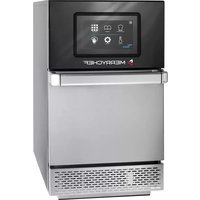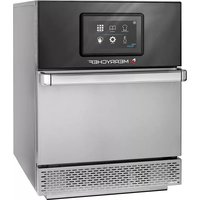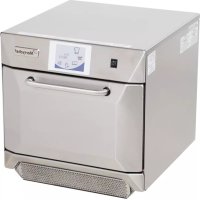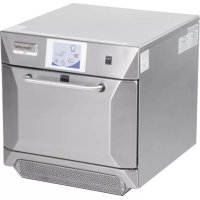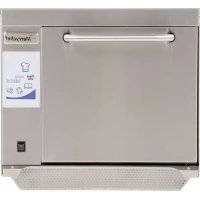
Eikon E3 - Oven Merrychef - Free user manual and instructions
Find the device manual for free Eikon E3 Merrychef in PDF.



| Product Type | Combination microwave oven with digital programming |
| Brand | Merrychef |
| Model | Eikon E3 |
| External Dimensions (H x W x D) | 551 x 598 x 622 mm |
| Internal Dimensions (H x W x D) | 319 x 332 x 325 mm |
| Cavity Capacity | 34.4 litres |
| Net weight (packed) | 62.5 kg |
| Electrical supply | 208/240 V, 60 Hz, 3 kW (EE) / 4.3 kW (XE) / 4.7 kW (XX) |
| Microwave power | 700 / 1000 W (selectable) |
| Convection power | 3 kW |
| Number of programmable recipes | Up to 1024 |
| Touch screen | easyTOUCH colour |
| Cooking functions | Microwave, convection, combination cooking |
| Multi-stage programming | Up to 6 stages per program |
| Operating ambient temperature | Below 40 °C |
| Noise level | Below 70 dB(A) |
| Ventilation system | Removable front air filter, metal grease filter |
| Catalytic converter | Depending on configuration (optional) |
| Safety | Door lock, mandatory earthing, automatic shut-off |
| Maintenance | Cleaning with non-caustic agent, abundant rinsing |
| Supplied accessories | Turntable, air filter |
| Connectivity | USB MenuConnect port for program updates |
| After-sales service | Repairs only by authorised Merrychef agent |
Frequently Asked Questions - Eikon E3 Merrychef
User questions about Eikon E3 Merrychef
0 question about this device. Answer the ones you know or ask your own.
Ask a new question about this device
Download the instructions for your Oven in PDF format for free! Find your manual Eikon E3 - Merrychef and take your electronic device back in hand. On this page are published all the documents necessary for the use of your device. Eikon E3 by Merrychef.
USER MANUAL Eikon E3 Merrychef
These ovens offer operators the flexibility of combination cooking with additional control over fan speed and microwave power.
Combination cooking enables high quality results to be achieved in a fraction of the time taken by conventional cooking, particularly when baking, browning, roasting and grilling dishes.
Once established, precise instructions for combination or convection cooking of selected items may be programmed into the oven's memory so that they can be repeated easily and accurately. Up to 1024 programs can be stored and simply recalled.
Multistage Programming
The oven controls offer even greater flexibility by allowing multistage programming. This enables the exact conditions required for quality results to be set according to the food type.
A single cooking program can have up to 6 stages, each stage controlled with its own time, fan speed and microwave power settings, (model dependent).

PRECAUTIONS TO AVOID POSSIBLE EXPOSURE TO EXCESSIVE MICROWAVE ENERGY
a) Do not attempt to operate this oven with the door open since open-door operation can result in harmful exposure to microwave energy. It is important not to defeat or tamper with the safety interlocks.
b) Do not place any object between the oven front face and the door or allow soil or cleaner residue to accumulate on sealing surfaces.
c) Do not operate the oven if it is damaged. It is particularly important that the oven door closes properly and that there is no damage to the (1) door (bent) (2) hinges and latches (broken or loosened) (3) door seals and sealing surfaces.
d) The oven should not be adjusted or repaired by anyone except properly qualified service personnel.
The instructions outlined in this guide are intended to ensure the safety and long life of your Merrychef oven.
PLEASE READ THE FOLLOWING SAFETY INSTRUCTIONS CAREFULLY
CONTENTS
IMPORTANT INFORMATION READ BEFORE USE
Users are cautioned that maintenance and repairs should be performed by a Merrychef authorized service agent using genuine Merrychef replacement parts. Merrychef will have no obligation with respect to any product that has been improperly installed, adjusted, operated or not maintained in accordance with national and local codes or installation instructions provided with the product, or any product that has its serial number defaced, obliterated or removed, or which has been modified or repaired using unauthorized parts or by unauthorized service agents. For a list of authorized service agents, please refer to the back page of this booklet. The information contained herein (including design and parts specifications) may be superseded and is subject to change without notice.
This is a Quick Start Guide only. For further information refer to the relevant Installation and Operating instructions available from www.merrychef.com
The easyToUCH screen display, layout and icons shown herein, are for guidance purposes only and are not intended to be an exact representation of those supplied with the oven.
INTRODUCTION 2
SAFETY & REGULATIONS
IMPORTANT SAFETY INSTRUCTIONS 4
PRECAUTIONS TO BE OBSERVED 6
SUITABLE COOKING UTENSILS 7
MAIN FEATURES 8
PRODUCT DETAILS
TECHNICAL SPECIFICATIONS 10
Specifications 10
Serial Number (Rating Plate): 10
INSTALLATION 11
OVEN LOCATION AND POSITIONING 11
Preparing to clean the oven 18
Cold oven CLEANING INSTRUCTIONS e3 19
Cold oven CLEANING INSTRUCTIONS e4 20
Cold oven CLEANING INSTRUCTIONS e5 20
FAULT FINDING
FAULT FINDING CHART 23
Quick Service Guide original instructions
Part Number 32Z3802 US Issue 3
IMPORTANT SAFETY INSTRUCTIONS
When using electrical appliances basic safety precautions should be followed, including the following:
WARNING To reduce the risk of burns, electric shock, fire, injury to persons, or exposure to excessive microwave energy:
- Read all instructions before using the appliance.
- Read and follow the specific "PRECAUTIONS TO AVOID POSSIBLE EXPOSURE TO EXCESSIVE MICROWAVE ENERGY" found on the Introduction page.
- This appliance must be grounded. Connect only to a properly grounded outlet. See "ELECTRICAL INSTALLATION".
- Install or locate this appliance only in accordance with the provided installation instructions.
- Some products such as whole eggs and sealed containers — for example, closed jars — may explode and should not be heated in this oven.
- Use this appliance only for its intended use as described in the manual. Do not use corrosive chemicals or vapours in this appliance. This type of oven is specifically designed to heat, cook or dry food. It is not designed for industrial or laboratory use.
- This appliance should not be used by children.
- Do not operate this appliance if it has a damaged cord or plug, if it is not working properly, or if it has been damaged or dropped.
- This appliance should be serviced only by qualified service personnel. Contact the nearest authorized service facility for examination, repair or adjustment.
10 Do not cover or block any openings on the appliance including air vents/filters and steam outlet.
11 Do not store this appliance outdoors. Do not use this product near water — for example, near a kitchen sink, in a wet basement, or near a swimming pool, and the like.
12. Do not immerse the cord or plug in water.
13. Keep the cord away from heated surfaces.
14. Do not let cord hang over edge of table or counter.
15. Either:
i) When cleaning surfaces of door and oven that come together on closing the door, use only mild non-abrasive soaps, or detergents applied with a sponge or soft cloth.
ii) When separate cleaning instructions are provided, see door surface cleaning instructions.
16. To reduce risk of fire in the cavity:
i) Do not overcook food. Carefully attend appliance if paper, plastic or other combustible materials are placed inside the oven to facilitate cooking.
ii) Remove wire twist-ties from paper or plastic bags before placing bag in oven
iii) If materials inside the oven should ignite, keep oven door closed, turn oven off, and disconnect the power cord, or shut off power at the fuse or circuit breaker panel.
iv) Do not use the cavity for storage purposes. Do not leave paper products, cooking utensils or food in the cavity when not in use.
17. Liquids, such as water, coffee, or tea are able to be overheated beyond the boiling point without appearing to be boiling. Visible bubbling or boiling when the container is removed from the
microwave oven is not always present. THIS COULD RESULT IN VERY HOT LIQUIDS SUDDENLY BOILING OVER WHEN THE CONTAINER IS DISTURBED OR A UTENSIL IS INSERTED INTO THE LIQUID.
- DO NOT operate using microwave only or combination function without food or liquid inside the oven as this may result in overheating and may cause damage.
- NEVER remove the exterior of the oven.
- NEVER remove any fixed internal parts of the oven.
- NEVER tamper with the control panel, door, seals, or any other oven part.
- DO NOT obstruct air vents/filters or steam outlet.
- NEVER hang dish towels or cloths on any part of the oven.
- If the door seals are damaged, the oven must be repaired by an approved Service Agent.
- If the power cable is damaged in any way it MUST be replaced by an approved Service Agent.
- When handling hot liquids, foods, and containers, care should be taken to avoid scalds and burns.
- When heating liquids using microwave only or combination function, the contents should be stirred prior to heating to avoid eruptive boiling.
- Feeding bottles and baby food jars should not be heated with this appliance.
-
Never use the oven to heat alcohol, e.g. Brandy, rum etc. Food containing alcohol can more easily catch fire if overheated, observe caution and do not leave the oven unattended.
-
Never attempt to deep fry in the oven.
- The appliance is not intended for use by infants, children or infirm persons without supervision.
- Infants and children should be supervised to ensure that they do not play with the appliance.
SAVE THESE INSTRUCTIONS
Quick Service Guide original instructions
Part Number 32Z3802 US Issue 3
PRECAUTIONS TO BE OBSERVED
- Read this manual before using your oven.
- As with all electrical appliances, it is wise to have the electrical connections inspected at least once a year.
- The oven interior, door seals should be cleaned frequently, following the instructions described in the cleaning section, failure to do so could possibly result in a hazardous situation.
- Switch off the oven at the end of all the cooking sessions for that day.
- The oven should not be used to dry linen.
- As with any cooking appliance, care should be taken to avoid combustion of the items within the oven.
- Food in combustible plastic or paper containers should be transferred to a microwave/oven proof containers to avoid the possibility of ignition.
If smoke is observed:
Switch off •
Isolate from the electrical supply •
Keep the door closed to stifle any flames ●
- Items should be unwrapped when using convection and combination functions.
- Eggs in shells and whole hard-boiled eggs should not be heated in the oven as they may explode.
- Food with a skin, e.g. Potatoes, apples, sausages etc. should be pierced before heating.
- Food should not be heated in a completely sealed container as the build-up of steam may cause it to explode.
- Excess fat should be removed during 'roasting' and before lifting heavy containers from the oven.
- In the event of glass breaking or shattering within the oven, ensure that food is totally free of glass particles. If in doubt, dispose of any food that was in the oven at the time of the breakage.
- DO NOT attempt to operate the oven with: object caught in door, that does not close properly or damaged door, hinge, latch, sealing surface or without food in the oven.
SUITABLE COOKING UTENSILS
Manufacturer's instructions should be checked to determine the suitability of individual containers or utensils using each of the cooking functions. The following chart provides general guidelines:
| Heat resistant containers | ||
| Toughened glassVitreous ceramicsEarthenware(porcelain/crockery/china etc.) | ✓✓✓ | Do not use items with metallic decoration. |
| Metallic & Foil Trays | ||
| Metallic traysDO NOT USE ANY OTHER METAL OR FOIL CONTAINERS | ✓ | Metallic trays may only be used when placed on the VITREOUS RACK in the oven cavity. Note: Do not cook food directly on the vitreous enamel rack. |
| Plastic containers | ||
| Dual-ovenable plastic containers | ✓ | (up to certain temperatures) are now available.Check manufacturer's instructions before use. |
| Disposables | ||
| DO NOT USECombustibles (paper/card etc.) | ✕ | |
| Other utensils | ||
| Tie tagsCutleryTemperature probes | ✕✕✕ | No kitchen utensil should be left in food while it is cooking in the oven. |
MAIN FEATURES
ON/OFF SWITCH1
When switched ON the easyToUCH screen illuminates the oven controls. Note; turning this switch OFF does not isolate the oven from the electricity supply.
easyToUCH SCREEN CONTROL PANEL2
See 'OPERATION & CONTROLS' for details.
RATING PLATE3
Located on the rear panel of the oven states the serial number, model type & electrical specifications.
MenuConnect™ 4
A USB socket located under the Merrychef logo allows changes to programs stored on the oven (See USB MenuConnect™ User Manual, and Operation & Controls section of this manual, for details of updating oven programs).
AIR OUTLETS5
Air used to cool internal components and steam from the cavity escape through the air outlet vents located on the rear of the oven and side panel of the e5 model. The air outlets must be kept free from obstruction and they will not allow microwave energy to escape into the environment.
AIR INLET FILTER6
The air filter situated at the lower front of the oven is part of the ventilation system and must be kept free of obstruction and cleaned daily as described under 'Cleaning & Maintenance'. Note, the oven will not operate without the air filter fitted.
DOOR HANDLE7
This is a rigid bar which is pulled downwards and away from the oven to open.
OVEN DOOR8
This is a precision-made energy barrier with three microwave safety interlocks. The door must be kept clean (see 'CLEANING') and should NOT be used to support heavy objects.
DOOR SEALS9
These ensure a tight seal around the door. They should be kept clean and checked regularly for signs of damage. At the first sign of wear they should be replaced by a Merrychef approved Service Agent.
CONVECTION FAN, GREASE FILTER & CATALYTIC CONVERTOR 10 (model dependant)
The metal grease filter grill covering the convection fan must be kept clean and free of debris. Great care should be taken when cleaning this area of the oven noting the different oven requirements shown under 'Cleaning & Maintenance' in this manual.
OVEN CAVITY11
The oven cavity is constructed from stainless steel and must be kept clean by following the cleaning instructions in the 'Cleaning & Maintenance' section of this manual.

text_image
e3 11 10 9 8 7 6 5 4 3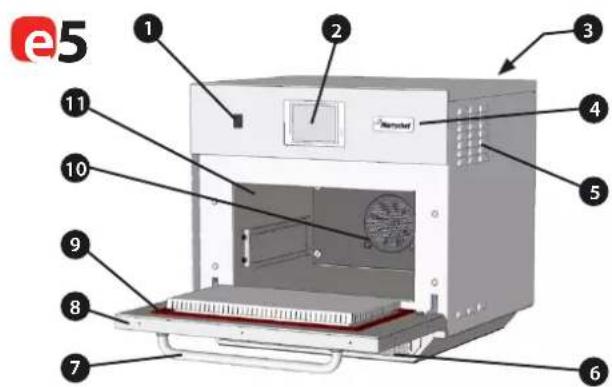
text_image
e5 1 2 3 4 5 6 7 8 9 10 11
text_image
e4 1 2 3 4 5 6 7 8 9 10 11TECHNICAL SPECIFICATIONS
Specifications
| Description unit | e3 | e4 | e5 | |
| Touch screen controls programs | 1024 | 1024 | 1024 | |
| Ambient operating temperature °C/°F | <40/104 | <40/104 | <40/104 | |
| External HxWxD mm | 551x598x622 | 591x584x750 | 642x711x705 | |
| External HxWxD inches | 21.7x23.5x24.5 | 23.3x23.0x29.5 | 25.3x28.0x27.8 | |
| Internal HxWxD mm | 319x332x325 | 218x375x312 | 258.4x495x363.5 | |
| Internal HxWxD inches | 12.6x13.1x12.8 | 8.6x14.8x12.3 | 10.17x19.49x14.31 | |
| Cooking chamber Ltr (cu.ins) | 34.4 (2113) | 25.5 (1566) | 44.4 (2730) | |
| Power output microwave Watts | 700/1000 | 1500 | 1400 | |
| Power output convection kW | 3 (3/1.5 EE) | 3.2 | 3.2 | |
| Power supply Hz | 60 | 60 | 60 | |
| Power supply V | 208 & 240 | 208 & 240 | 208 & 240 | |
| Power supply kW | 3(EE) 4.3(XE) 4.7(XX) | 6.2 | 6.2 | |
| Unpackaged oven weight nett Kg (lbs) | 62.5 (138) | 82.5 (182) | 94.0 (207) | |
| Sound pressure level dB(A) | <70 | <70 | <70 | |
| Stacking (with kit) oven | 0 | 1 | 0 |
Serial Number (Rating Plate):
Serial number: YY MM SITE SERIAL i.e. 10 06 2130 12345 (1006213012345)
Oven manufactured 2010 in June at Sheffield (UK), production number 12345.
Model Number: MODEL CONVECTION MICROWAVE VOLTAGE HERTZ LEAD PLUG COMMUNICATION VERSION
CUSTOMER/ACCESSORY COUNTRY i.e. e4C S V MV 6 D F U 1 GM US (e4CSVMV6DFU1GMUS)
model e4C, 3200W, 1500W, 208V or 240V, 60Hz, 2P+GND (30A), moulded NEMA 6-30P plug, USB, 1, General Market, USA.
INSTALLATION
OVEN LOCATION AND POSITIONING
Choose a site away from major heat sources.
DO NOT position so that hot air is drawn in from fryers, grills, griddles, etc.
A heat barrier to the height of the oven must be installed if sited next to a burner, stove or range.
Place the oven on a permanent nonslip/nonflammable flat surface that is LEVEL, STABLE and STRONG enough for the oven and contents.
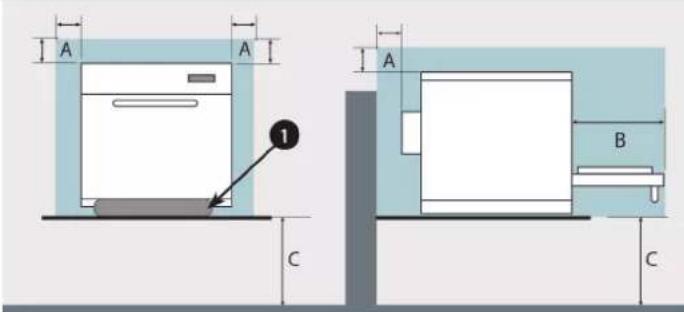
Allow a minimum clearance (A) of 2 inches (50mm) around the oven for hot air to escape.
Allow sufficient clearance (B), in front of the oven for the door to open fully.
Position the oven (e4 & e5 models only) at least 36 inches (916mm) (C) above the floor.
The air intake is located at the lower front of the oven (1) and it is important that the airflow is as cool as possible and not preheated by other appliances such as burners, stoves, ranges, fryers, grills and griddles as this will deteriorate the life and performance of the oven.
Do not affix labels/stickers to oven other than those applied or approved by the manufacturer.

The oven will not operate without the AIR FILTER correctly fitted in place.

DANGER!
THIS APPLIANCE MUST BE EARTHED. FAILURE TO DO SO MAY RESULT IN ELECTRIC SHOCK AND DEATH.
The oven must be connected to an outlet that is properly installed and grounded. If in doubt consult a qualified electrician.
Please refer to the Merrychef website www.merrychef.com for full electrical installation details. Should you not have access or require further clarification, please contact a Service Agent.
text_image
A A 1 C A B CHANDLING & STORAGE:
When moving an oven always observe and follow National and local requirements for lifting and moving heavy objects. Do not use the oven door handle to lift oven.
When not in use, electrically disconnect the oven and store safely in a dry cool place, do not stack ovens.
QUICK START GUIDE: QUICK SERVICE OVEN
START UP
- Switch the oven on;
Make all the relevant safety checks and ensure the oven is clean and empty before pressing the oven switch down to activate the oven. - The easyToUCH screen illuminates with the display briefly showing the serial number and oven data. Lightly tap the screen once to freeze the display, tap again to continue.
- When the oven is setup with two or more preheating temperatures a choice is displayed.
Scroll arrows at the bottom of the screen indicates there are more temperature choices not shown on screen, if necessary, use the scroll arrows, then select the temperature required to start preheating the oven.
- During preheating the display shows the progress as the oven heats up to the set temperature. (To stop the oven heating touch the red 'X' symbol.)
- The oven is ready to use when the 'COOKBOOK' is displayed.


text_image
eiko TAP TO 100 500 250 LAB 275 3 4 PRICE: XE UI DOWN: 80.0 SAS VIEW: 90.0 RECOMPRESSION DATE: ONION WORTH DATE SERIAL NUMBER: 800 250°C 250°C STOP/CANCEL5 COOKBOOK DISPLAY
MULTIPLE LANGUAGES INSTALLED
DISPLAYS ALL COOKING PROGRAMS (Optional)
SHOWS PROGRAM GROUPS
FAVOURITES (Optional)
PROGRAM GROUP
Each group contains a collection of cooking programs.
CHANGE OVEN TEMPERATURE (Optional)

text_image
BURGERS CHICHEN COOKIES DONUTS HOTDOGS ITALIAN SUBS BEAT BALL SUBS PIZZAS SUB CLUBSUSING A COOKING PROGRAM

Taking all the necessary precautions to ensure you do not burn yourself, open the oven door to place the food into the hot oven and close the door.
- Select a program group, for example, 'BURGERS' to display the individual cooking programs.
- Select a cook program to start, for example, 2 BURGERS.
- Follow instructions if displayed on the screen.
- Touch the green tick to cook.
The cooking time counts down for each program stage. - When the program ends a red bar is displayed usually with an audible sound - open the door or touch the red 'X' to return to the cook program.
Note; opening the oven door during cooking stops the cooking program and displays a warning. Closing the door allows the user to continue or cancel the cooking program.

OPERATING GUIDE: FULL SERVICE OVEN
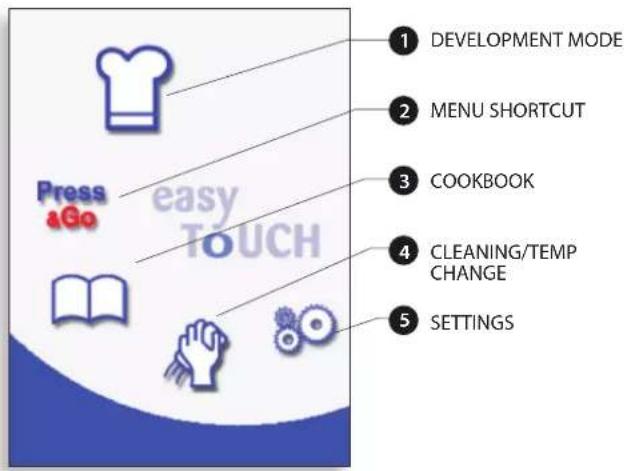
easyToUCH MAIN MENU & KEYBOARD SCREEN
MAIN MENU SCREEN:
- DEVELOPMENT MODE enables multistage cooking programs to be developed, then stored under a name and symbol for reuse.
- PRESS & GO allows quick access to use the cooking programs that are already stored.
- COOKBOOK contains the oven's cooking programs. It displays Favourites, Cooking Program Groups and a complete listing of all cooking programs available.
- CLEANING/TEMP CHANGE allows the oven temperature to be changed and the oven to be prepared for cleaning with reminders displayed to assist during the cleaning process.
- SETTINGS are used to control the oven settings and functions including time and language, loading cooking programs and for service and maintenance purposes.
- KEYBOARD SCREEN is used to enter an authorised password to enter data for programs and may restrict operator access to some functions.
text_image
1 DEVELOPMENT MODE 2 MENU SHORTCUT 3 COOKBOOK 4 CLEANING/TEMP CHANGE 5 SETTINGS Press &Go easy TOUCHPRESS & GO
Running a cooking program from the Press & Go menu.
- Select 'PRESS & GO' from the main menu screen.
- Select the item required to cook.
- The display shows the temperature, cooking time, microwave power and fan speed while the timer counts down. The timer bar turns red to indicate the cooking cycle has finished.
Choosing which cooking programs are shown in the 'PRESS & GO' menu screen.
- After selecting 'PRESS & GO' from the main menu screen, select the EDIT symbol.
- Two lists are displayed, the 'PRESS & GO' menu items are shown in the upper list and the lower list shows other menu items which are available. Both lists can be scrolled up or down using the arrows on the extreme right.
- Select an item, then choose whether to change its order within the menu or to remove it into the lower list.
- Select an item to move into the upper list, making it available in the 'PRESS & GO' menu.
- Select backspace to return to the menu screen when finished.

text_image
Press aGo easy TOUCH PISS aGo STEPASTI SUPPLE- RENTS BUTTON VEREMUER PISSO CHINESE LED PISS2 00:00 225°C 00:30 100 X 100 X
text_image
1 Press &Go ANTIPRESTI SUPPLE- PARTS BUTTON VENTIGENER FISH2 CHICKEN LED Change the order of a selected item shown in the Press & Go screen. Move a selected item to or from the Press & Go screen. Select to scroll a list up or down. 2 Press &Go PRESS &GO ANTIPRESTI SUPPLE- PARTS BUTTON VENTIGENER FISH2 3 4 5USING A COOKBOOK PROGRAM

WARNING: ENSURE THERE IS FOOD PRODUCT IN THE OVEN BEFORE STARTING A COOKING PROGRAM.
To find the required Program in the cookbook.
- Select 'COOKBOOK' from the main menu screen.
- Select the ALL MENUS symbol.
- Use scroll up/down arrows to find the program.
NOTE: if an image has a red line around it the oven temperature is set too high or too low for that recipe. See 'CHANGING THE OVEN TEMPERATURE'.
Taking all the necessary precautions to ensure you do not burn yourself, place the food product into the hot oven cavity and close the door.

WARNING: HOT SURFACE HAZARD
- Select the required cooking program to start cooking.
For example, '1 BURGER'. - The program either starts immediately displaying a countdown timer, or an instruction is displayed first; follow the stage instruction then select OK to start cooking. If the oven door is not opened within 30 seconds a warning message appears.

text_image
1 Press &Go easy TOUCH
text_image
2 BITPASTS APPLE STRADD. BANANA SODDER BANETTE LONG BANETTE BUB SUPPLE-ROOTS DRUM FLOWER BHATMUST PRETIZED.
text_image
3 PULL SRAIN BURG 1 BURGER 2 BURGERS 3 BURGERS 4 BURGERS CHICKEN 1 PIECE CHICKEN 2 PIECES CHICKEN 3 PIECES CHICKEN 4 PIECES
text_image
4 FL 1 BURGER 2 BURGERS 3 BURGERS 4 BURGERS CHICKEN 1 PIECE CHICKEN 2 PIECES CHICKEN 3 PIECES CHICKEN 4 PIECES
text_image
PLACE A PATTY IN THE OVEN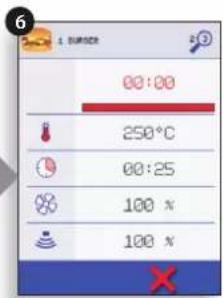
text_image
00:00 250°C 00:25 100 % 100 %
- The cooking timer counts down to zero and makes a sound to indicate an operator action is required at the end of a cooking stage or the end of a cooking program.
Once the cooking program has finished, opening the oven door to remove the food returns the display to the 'COOKBOOK' screen.
Note; opening the oven door during cooking stops the cooking program and displays a warning. Closing the door allows the user to continue or cancel the cooking program.
To check the oven temperature when cooking, lightly tap the temperature displayed, the oven cavity temperature is shown with an asterisk.
SCREEN SAVER
An active screen saver will mask the screen showing a moving image. To use the touchscreen, tap the screen to deactivate the screen saver.
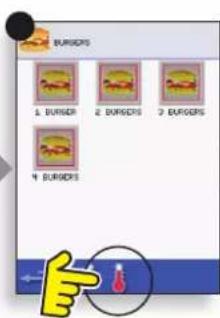
CHANGING THE OVEN TEMPERATURE
- Take note of the temperature required for the recipe and select OK.
- Select the temperature symbol.
- An asterisk next to the number indicates the present oven temperature, select the required oven temperature for the recipe. Once the oven is at the required temperature continue from selecting the 'COOKBOOK' in step 1.

text_image
eikon
text_image
INVALID OVEN TEMP FOR THIS RECIPE OVEN TEMP: 225°C RECIPE TEMP: 250°C
text_image
BURGERS 1 BURGER 2 BURGERS 3 BURGERS 4 BURGERS

text_image
*225°C GREEN/THUST 250°C LUNCH 275°CQuick Service Guide original instructions
Part Number 32Z3802 US Issue 3
IMPORTANT: the oven must be cooled down before the cleaning processes are carried out.
- In Full Serve mode, select the CLEANING symbol from the main menu.
- In Full or Quick Serve mode, select the blue thermometer symbol to disable heating and start the cooling cycle.
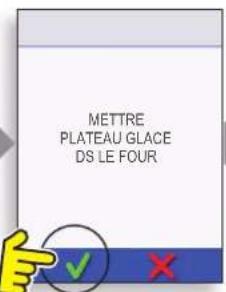
- Taking all necessary precautions place a suitable heaped container of ice, into the hot oven cavity. Select the OK symbol to continue.
- The cooling progress is displayed and takes approximately 30 minutes.
- The oven is now ready for cleaning. Select OK on the screen after completing each stage.

Preparing to clean the oven
For the oven to operate at peak efficiency, the cavity, door, air filter and grease filter must be kept clean.
A daily cleaning routine will ensure that you comply with the required hygiene standards and will help to maintain and prolong the efficiency of your oven.
Equipment required (not supplied):
Non-caustic proprietary branded oven cleaner, heat proof gloves, protective rubber gloves, non-abrasive nylon scrub pad, cleaning towel and cloths, eye protection and dust mask (optional).
CAUTION: WEAR PROTECTIVE RUBBER GLOVES WHEN CLEANING THE OVEN.
NEVER use sharp implements or harsh abrasives on any part of the oven.

WARNING: DO NOT USE CAUSTIC CLEANERS ON ANY PART OF THE OVEN OR OVEN CAVITY AS IT WILL CAUSE PERMANENT DAMAGE TO THE CATALYTIC CONVERTORS
Complete COOL DOWN procedure and allow the oven and accessories to cool before commencing cleaning.

DO NOT USE TOOLS

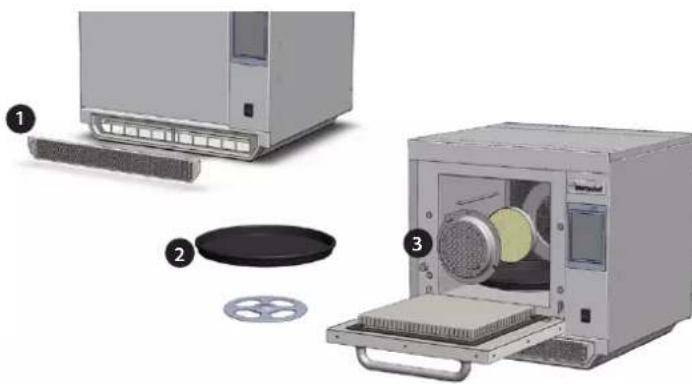
Cold oven CLEANING INSTRUCTIONS e3
REMOVE & CLEAN Oven Parts:
- Remove the air filter at the base of the oven.
- Open the oven door and lift out the turntable.
- For ovens with a catalytic converter; open the oven door and undo fasteners to remove the catalytic convertor when required or at least once a month.
Wash all parts in warm soapy water. Wash off using a clean cloth and plenty of clean, warm water.
Dry using a fresh, clean cloth.
natural_image
Exploded view diagram of a microwave oven system showing internal components and parts (no text or labels)Quick Service Guide original instructions
Part Number 32Z3802 US Issue 3

Cold oven CLEANING INSTRUCTIONS e4
REMOVE & CLEAN Oven Parts:
- Remove the air filter at the base of the oven.
- Open the oven door, remove the rack, pull the grease filter handle downwards and lift out.
- Undo the fasteners securing the top impinger plate.
- Remove top impinger plate and lift out bottom impinger plate.
Wash all parts in warm soapy water. Wash off using a clean cloth and plenty of clean, warm water.
Dry using a fresh, clean cloth.

Cold oven CLEANING INSTRUCTIONS e5
REMOVE & CLEAN Oven Parts:
- Remove the air filter at the base of the oven.
- Open the oven door to remove any cooking trays/rack.
Wash all parts in warm soapy water. Wash off using a clean cloth and plenty of clean, warm water.
Dry using a fresh, clean cloth.

natural_image
Illustration of a kitchen appliance with a digital display and a partially visible side panel (no text or symbols)
natural_image
Diagram of a printer with a green cover and red base, no visible text or symbols
natural_image
Illustration of a white kitchen oven with control panel and ventilation slots (no text or symbols)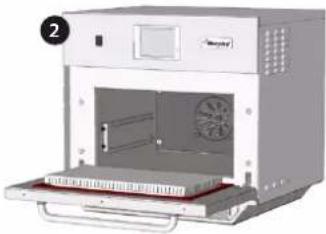
natural_image
Exterior view of a modern kitchen oven with fan and door (no text or symbols visible)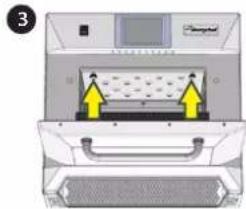
natural_image
Diagram of a printer or scanner device with yellow arrows indicating directional movement (no text or symbols present)
natural_image
Exploded view diagram of a multi-tiered storage or rack assembly (no text or symbols)CLEAN THE OVEN:
- Remove any spillages with disposable paper wipes.
Use a dry clean brush to remove any food particles from between the oven floor and the inside of the front door.
- Wear protective rubber gloves and protective glasses, carefully spray a non-caustic proprietary branded Oven Cleaner onto all the internal surfaces of the oven except the door seal (A).
DO NOT spray directly into the fan opening at the rear inside of the oven.
- For difficult areas, leave to soak for 10 minutes with the oven door open.
Use a non-abrasive nylon scrub pad/sponge to clean the cavity, roof and the inside of the door. Do not scrub the door seal or use metallic scourers.
- Wash off using a clean cloth and plenty of clean warm water and dry using a fresh clean cloth or paper towel.
Replace all the cleaned oven parts.
Close the oven door and wipe the outside of the oven with a damp cloth.

DO NOT USE THE OVEN WITHOUT A CLEAN AIR FILTER IN PLACE

APPLY OVEN PROTECTOR:
- Only apply to a clean oven. Spray proprietary branded Oven Protector onto a sponge.
- Spread Oven Protector lightly onto all internal surfaces of the oven.
- Spread Oven Protector lightly onto the internal surface of the oven door avoiding the door seal.
Switch on the oven and preheat. When the oven has reached operating temperature it will take about 30mins to cure the Oven Protector.
Note: Oven protector turns light brown when cured.

natural_image
Three-panel sequence showing gloved hands cleaning a lab appliance: first in a cleanroom, second in a white container, and third in a red tray (no text or symbols visible)FAULT FINDING CHART
Although every effort is made to ensure your oven will continue to perform to a high standard, please check the chart to see if the problem can be easily resolved before contacting your service agent.
| PROBLEM POSSIBLE CAUSE REMEDY | ||
| The oven does not work and the display screen is blank | The oven has no power | Check if there is a power cut.Check the isolator switch is ON or the oven is plugged in correctly.Check the oven switch is ON. |
| Some screen controls do not work Unauthorised access Contact the authorised user. | ||
| Display shows a warning message Details are shown on screen Follow the instructions displayed. | ||
| The oven does not cook the food correctly | Oven not cleanFood not at correct temperatureModified or wrong program selectedFood wrappedFood removed early | Clean the oven (see cleaning).Use the correct cooking program.Unwrap food for non-microwave cooking.Check all the cooking stages have been followed correctly. |
| The oven does not finish cooking | Warning message displayedOven door openedNo air filter or incorrectly fittedOven overheating | Close oven door.Refit air filter.Allow the oven to cool down.Check and remove any restrictions around the air vents. |
| Display shows an error code Oven malfunction | Note the error code and contact your Service Agent. | |

Merrychef
Merrychef USA
1111 North Hadley RD
Fort Wayne
IN 46804 USA
Phone: 877/404 - 6872
Fax: 800/285 - 9511
e-mail: info@merrychefusa.com
www.merrychefusa.com

anitowoc
Merrychef reserves the right to change product specifications without notice and accepts no liability for any inaccuracies, errors or omissions contained herein.
INTRODUCTION
MANUTENTION ET ENTREPOSAGE:
natural_image
Interior kitchen scene showing a stainless steel bowl on a tray, with a person in the background (no visible text or symbols)
text_image
METTRE PLATEAU GLACE DS LE FOUR

text_image
50°C 58°Cnatural_image
Exploded view diagram of a microwave oven system showing internal components and parts (no text or labels)Guide du service rapide - Instructions initiales
natural_image
Illustration of a kitchen appliance with a door, front panel, and side panel (no text or symbols visible)
natural_image
Diagram of a printer with a green cover and paper filter inside, showing internal structure (no text or symbols)
natural_image
Illustration of a white kitchen oven with a handle and control panel, no visible text or symbols
natural_image
Exterior view of a microwave oven with fan and control panel (no text or symbols visible)
text_image
Diagram of a device with labeled components and directional arrows indicating movement or process flow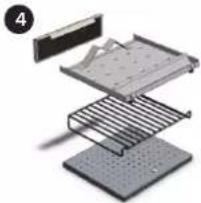
natural_image
Exploded view diagram of a multi-tiered storage or rack assembly (no text or symbols visible)NETTOYAGE DU FOUR :
1111, North Hadley Road
Fort Wayne
IN 46804 USA
Téléphone : +1 877-404-6872
MANUSEIO E ARMAZENAGEM:
text_image
Image showing a T-shirt icon, PDA logos, and an arrow pointing to a food item with food cuts.
text_image
TEMP. INVÁLIDA PARA A RECEITA TEMP FORNO : 225°C TEMP RECEITA : 250°C

text_image
BURGERS 1 BURGERI 2 BURGERS 3 BURGERS 4 BURGERS

text_image
*225°C WRIGHT/LEFT 250°C LUNCH 275°C E/WHOFnatural_image
Exploded view diagram of a microwave oven system showing internal components and parts (no text or labels)natural_image
Illustration of a kitchen appliance with a digital display and a separate shelf (no text or symbols visible)
natural_image
Diagram of a printer with a green screen and red base, no visible text or symbols
natural_image
Illustration of a white kitchen oven with control panel and ventilation slots (no text or symbols)
natural_image
Interior view of a microwave oven with fan and control panel (no visible text or labels)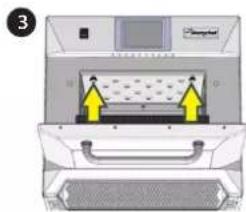
natural_image
Diagram of a printer or scanner with yellow arrows indicating compression or movement, no visible text or symbols
natural_image
Exploded view diagram of a multi-tiered storage or rack assembly (no text or symbols)LIMPE O FORNO:
natural_image
Three-panel sequence showing gloved hands cleaning a lab appliance: first in a cleanroom, second in a lab with clear glass, third in a red tray (no text or symbols visible)text_image
Image showing a T-shirt icon, PDA logos, and an arrow pointing to a food item with food cuts.
text_image
TEMP INVÁLIDA PARA LA RECETA TEMP HORNO : 225°C TEMP RECETK : 250°C

text_image
BURGERS 1 BURGER 2 BURGERS 3 BURGERS 4 BURGERS

text_image
*225°C 250°C LUNCH 275°Cnatural_image
Exploded view diagram of a microwave oven system showing internal components and parts (no text or labels)natural_image
Illustration of a kitchen appliance with a digital display and side panel (no text or symbols)
natural_image
Diagram of a printer with a green screen inside, showing internal structure and no text or symbols
natural_image
Illustration of a white kitchen oven with a control panel and ventilation slots (no text or symbols visible)
natural_image
Exterior view of a microwave oven with fan and control panel (no text or symbols visible)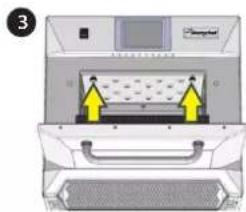
text_image
Diagram of a computer monitor with labeled ports and directional arrows indicating movement or process flow