XEDAI - Receiver LD Systems - Free user manual and instructions
Find the device manual for free XEDAI LD Systems in PDF.



| Product type | Expansion module for Ethernet control and Dante audio network |
| Brand | LD Systems |
| Model | XEDAI |
| Compatibility | LD IPA power amplifiers |
| Dimensions (W × H × D) | 82.5 × 36.5 × 76.3 mm |
| Weight | 0.055 kg |
| Power consumption (Ethernet) | 1.075 W (link disabled), 1.375 W (link enabled) |
| Power consumption (Dante) | 0.875 W (link disabled), 0.925 W (link enabled) |
| Interfaces | RJ45 Ethernet (control), RJ45 Dante (audio) |
| Ethernet chip | STM32H743 |
| Dante chip | UXT-01-004 |
| Dante audio channels | 4 × 4 |
| Dante sampling frequency | 44.1 / 48 / 88.2 / 96 kHz |
| Network protocols | TCP/IP, UDP, Dante |
| Default IP address | 192.168.0.192 |
| Configuration software | QUESTRA (free), Dante Controller |
| Control elements | IP reset button |
| LED indicators | Status (white/red), RJ45 Link/Activity |
| Box contents | XEDAI expansion module, mounting instructions |
| Safety | Installation by qualified personnel only; keep out of reach of children (small parts) |
Frequently Asked Questions - XEDAI LD Systems
User questions about XEDAI LD Systems
0 question about this device. Answer the ones you know or ask your own.
Ask a new question about this device
Download the instructions for your Receiver in PDF format for free! Find your manual XEDAI - LD Systems and take your electronic device back in hand. On this page are published all the documents necessary for the use of your device. XEDAI by LD Systems.
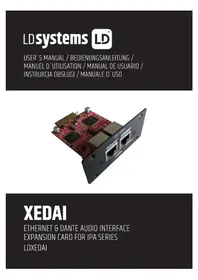
USER MANUAL XEDAI LD Systems
XEDAI
ETHERNET & DANTE AUDIO INTERFACE
EXPANSION CARD FOR IPA SERIES
LDXEDAI
CONTENTS / INHALTSVERZEICHNIS / CONTENU / CONTENIDO / TREŚĆ / CONTENUTO
ENGLISH
INFORMATION ON THIS QUICK GUIDE 4
PRODUCT INFORMATION 4
SAFETY INSTRUCTIONS 4
SCOPE OF DELIVERY 5
ASSEMBLY 5
CONNECTIONS, CONTROLS AND INDICATORS 6
NETWORK CONNECTION 7
DANTE™ CONTROLLER 9
TECHNICAL DATA 10
DISPOSAL 11
MANUFACTURER'S DECLARATIONS 12
DEUTSCH
PRODUKTINFORMATIONEN 13
INFORMATIONS SUR LE PRODUIT 22
CONSIGNES DE SÉCURITÉ 22
CONTENU DU CARTON 23
ASSEMBLY 23
CONNECTIONS, CONTROLS AND INDICATORS 24
CONNEXION RÉSEAU 25
LOGICIEL DANTE™ CONTROLLER 27
CARACTÉRISTIQUES TECHNIQUES 28
MISE EN DÉCHETTERIE 29
DÉCLARATIONS DU FABRICANT 30
ESPAÑOL
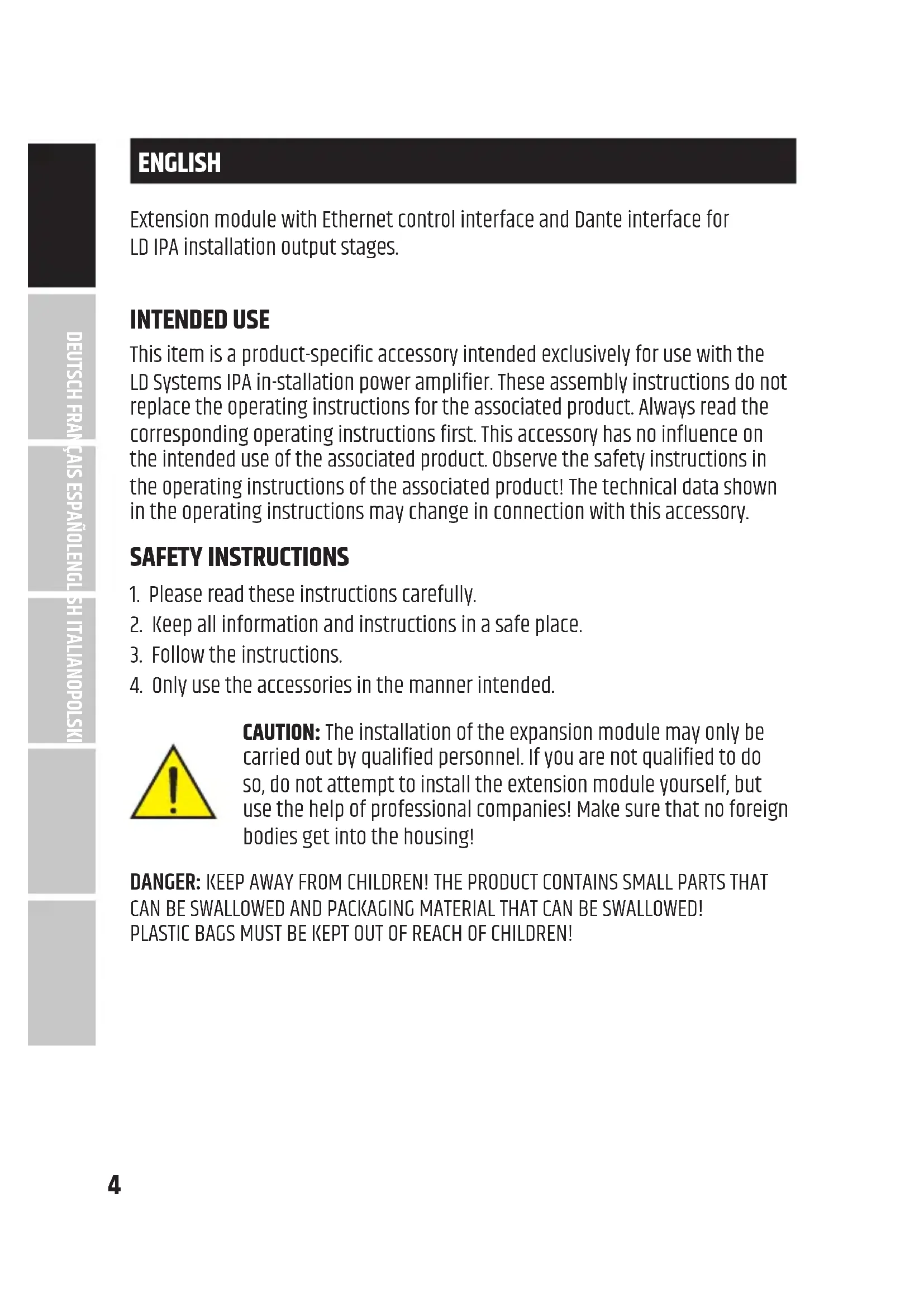
Extension module with Ethernet control interface and Dante interface for LD IPA installation output stages.
INTENDED USE
This item is a product-specific accessory intended exclusively for use with the LD Systems IPA in-stallation power amplifier. These assembly instructions do not replace the operating instructions for the associated product. Always read the corresponding operating instructions first. This accessory has no influence on the intended use of the associated product. Observe the safety instructions in the operating instructions of the associated product! The technical data shown in the operating instructions may change in connection with this accessory.
SAFETY INSTRUCTIONS
- Please read these instructions carefully.
- Keep all information and instructions in a safe place.
- Follow the instructions.
- Only use the accessories in the manner intended.

CAUTION: The installation of the expansion module may only be carried out by qualified personnel. If you are not qualified to do so, do not attempt to install the extension module yourself, but use the help of professional companies! Make sure that no foreign bodies get into the housing!
DANGER: KEEP AWAY FROM CHILDREN! THE PRODUCT CONTAINS SMALL PARTS THAT CAN BE SWALLOWED AND PACKAGING MATERIAL THAT CAN BE SWALLOWED! PLASTIC BAGS MUST BE KEPT OUT OF REACH OF CHILDREN!
SCOPE OF DELIVERY
Remove the product from the packaging and remove all packaging material. Please check that the delivery is complete and intact and please notify your distributor immediately after purchase if the delivery is not complete or damaged. The scope of delivery of the product includes:
• 1x XEDAI extension module
- Assembly instructions
ASSEMBLY
- Disconnect the power amplifier completely from the mains (pull out the mains plug)!
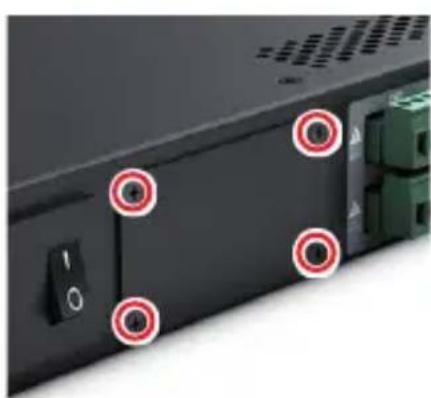
- Loosen and remove the four screws from the cover of the expansion slot using a suitable tool (see markings in the illustration). Keep the cover for later conversion.
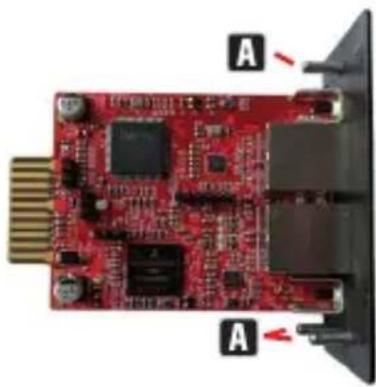
- Slide the expansion module into the expansion slot, making sure that the contact strip of the module slides correctly into the connection strip of the power amplifier. Asymmetrically mounted guide pins on the module's plate ensure that the module cannot be installed the wrong way round A.
- Now screw the module to the power amplifier housing using the screws previously loosened from the expansion slot cover.
CONNECTIONS, CONTROLS AND INDICATORS
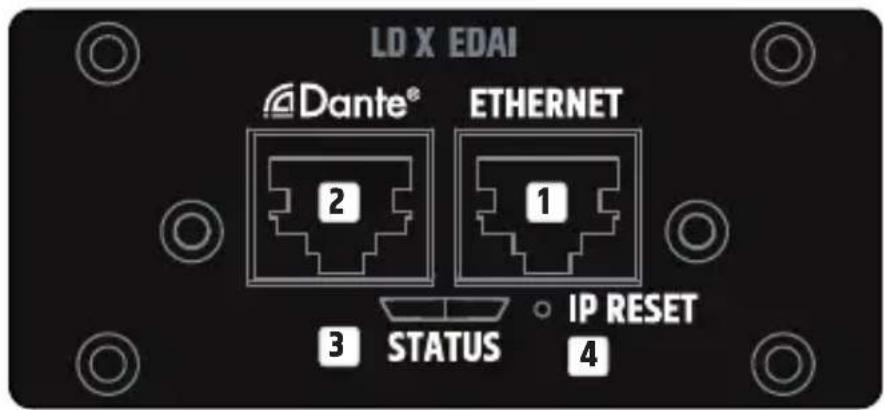
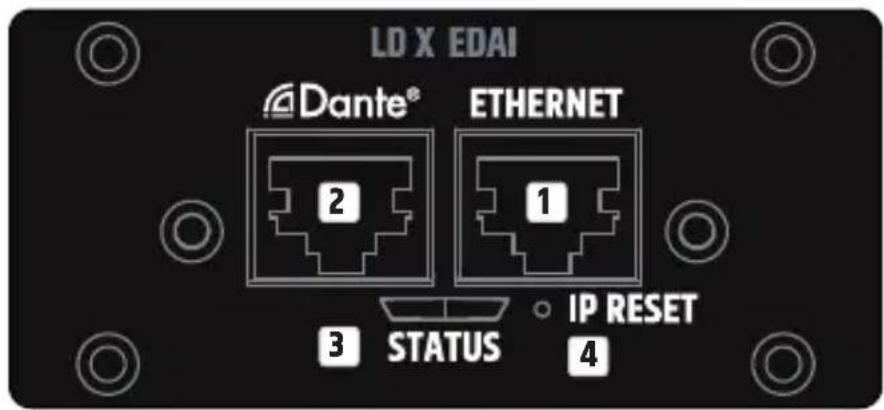
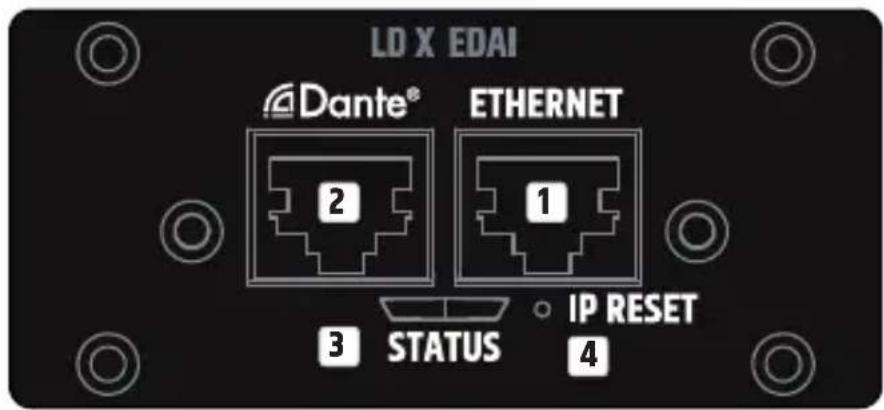
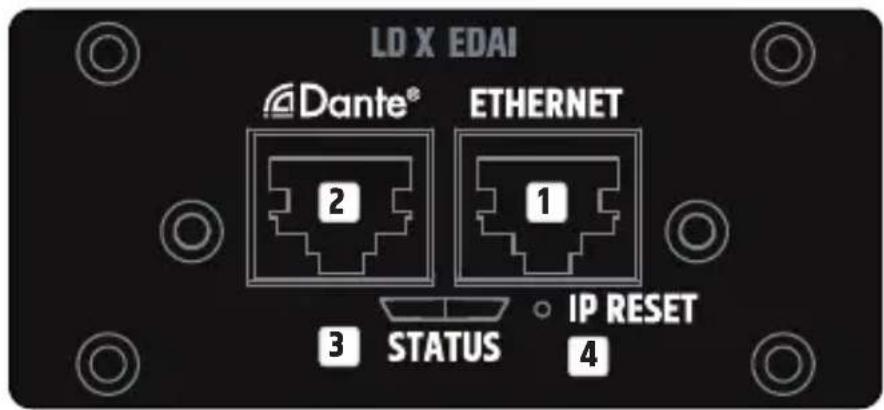
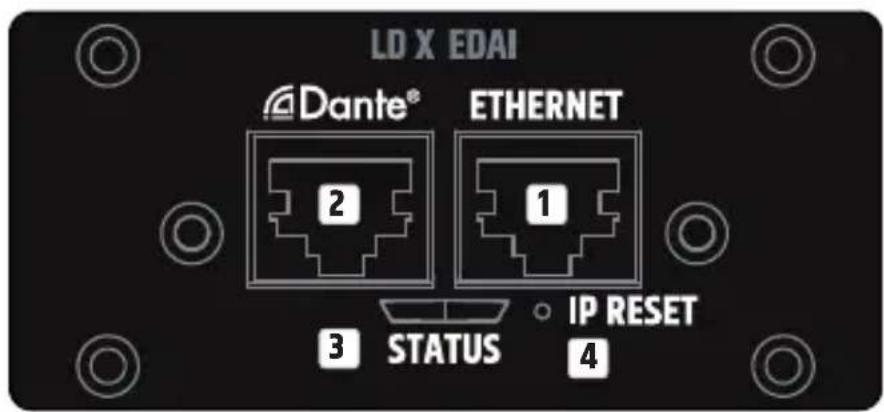
1 ETHERNET
Ethernet interface with RJ45 socket for controlling the installation amplifier via QUESTRA application software available free of charge.
2 DANTE™
Dante™ interface with RJ45 socket for connecting the IPA amplifiers to a Dante™ audio network (4 IN - 4 OUT).
3 STATUS
The status LED provides information about the internal integration between the card and the main board in the IPA power amplifier (firmware compatibility, internal communication problems):
- White flashing during start-up. The unit is loading the data for IPA.
- Permanently white: The network stack in the card is ready – The IP settings have been configured properly.
- Permanent red – Firmware is not compatible with motherboard, problems with network stack.
- White flashing (slow/fast) during IP reset procedure.
4 IP RESET
Long press activates the IP reset procedure. Initially, the status LED flashes slowly in white and when the button is pressed for 5 seconds, the status LED flashes quickly to indicate that the IP reset procedure will be carried out after the button is released.
NETWORK CONNECTION
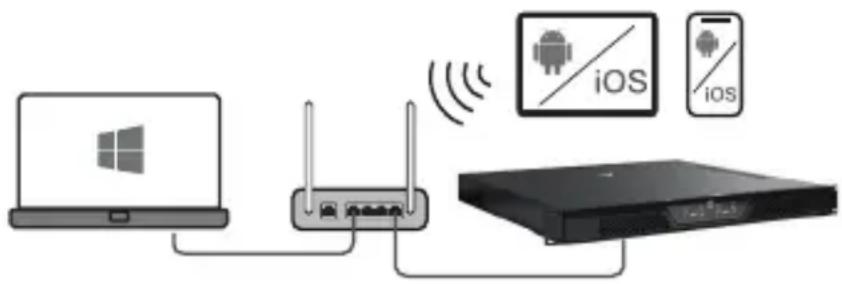
The XEDAI module from LD Systems enables remote control of compatible devices, such as IPA Series amplifiers, via the network. Once the XEDAI module is installed in a device, it can be connected to a network infrastructure and controlled via a computer using LD Systems QUESTRA software.
PREREQUISITES FOR OPERATION
• Computer with QUESTRA software installed
- Network interface (router, switch) with activated multicast traffic (activate IGMP protocol).
- Ethernet cable. Use a standard RJ45 Ethernet cable (Cat 5e or better) for all wired connections.
FIRST STEPS
The XEDAI modules are delivered with a pre-configured static IP address (192.168.0.192) as standard. To be able to recognise the unit with the Questra software, please make sure that the IP settings of the computer on which the Questra software is installed are configured in the same network range as the XEDAI modules. See notes below.
- IP range : 192.168.0.X/24 (where X can be any value between 1 and 254, except 192 which is already used by default by the XEDAI modules)
• Network mask : 255.255.255.0
Once a device with a XEDAI module is connected to a network and switched on, it will appear under the AVAILABLE DEVICES section in the ADD DEVICES field on the left. Please note that multicast traffic must be enabled in the switch/router for the device to be detected.
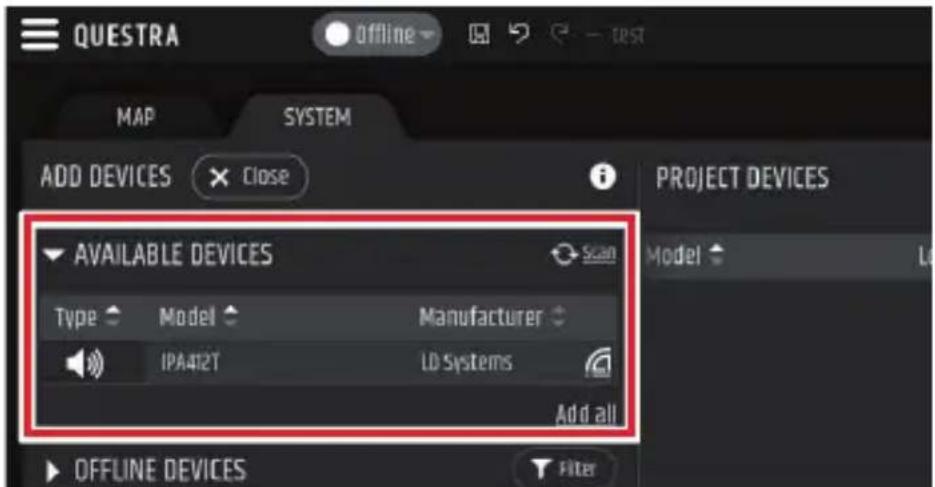
Drag and drop the device into the PROJECT DEVICES area to be able to configure it. Then click the Offline button at the top of the screen and select Download from Devices and connect to connect to the device.
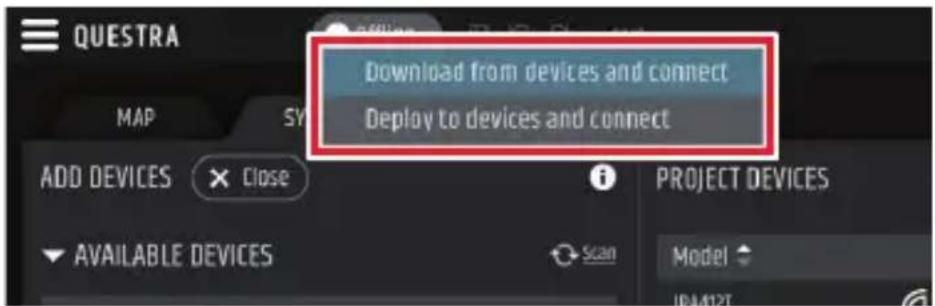
Once the unit is online, click on the unit in the PROJECT DEVICES list and select the SETTINGS menu on the right to go directly to the settings menu and change the IP settings of the unit. For more details about the complete unit configuration with the QUESTRA software, please download the latest version from the LD Systems website (www.ld-systems.com) to your computer and read the user manual.
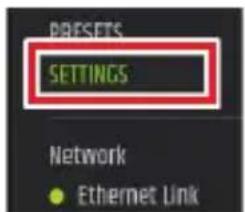
QUESTRA SOFTWARE
The Questra software not only enables comprehensive configuration of compatible devices, such as IPA Series amplifiers, but also provides integration capabilities for third-party remote control units and allows users to create their own custom control panels that can be controlled via the Questra remote control apps available for iOS, Android, Windows and MAC OS.
Please download the latest version of the QUESTRA software from the LD Systems website (www.ld-systems.com) to your computer, check the system requirements for the software and follow the software instructions to start configuring a unit.
DANTE™ CONTROLLER
Setting up a Dante™ network is done with the help of the freely available software DANTE™ CONTROLLER. Download the software from the manufacturer's website www.audinate.com and install it on a computer. Connect the Ethernet interface of the computer to the Dante™ network where the Dante™ interface of the XEDAI module is connected using a network cable (Cat. 5e or better) and run the Dante™ Controller software. The software has automatic device detection. Signal routing is done by mouse click and the device and channel designations can be edited individually by the user. IP address, MAC address and other information about the devices in the Dante™ network can be displayed in the software.
When the configuration of the units in the Dante ™ network is complete, the Dante ™ Controller software can be closed and the computer disconnected from the network. The settings in the units on the network are retained.
TECHNICAL DATA
Article number LDXEDAI
Product type Expansion module for Ethernet control and audio networking via Dante™ from Audinate
Compatibility LD IPA installation power amplifiers
Control element Button for IP reset
Application software QUESTRA (free download)
Display elements RJ45 LEDs: Link / Activity 2-colour LED for internal connection status
Dimensions (W × H × D) 82.5 × 36.5 × 76.3 mm
Weight 0.055 kg
Ethernet
Interface RJ45
Chip STM32H743
Transmission protocol TCP/IP & UDP
Ethernet Standard 10/100 Base-T
Parallel connections 4
Power consumption 1.075 W (Link Down), 1.375 W (Link Up)
Dante™
Interface RJ45
Chip UXT-01-004
Transmission protocol Dante network audio
Audio channels 4 × 4
Sampling rate 44.1 / 48 / 88.2 / 96 kHz
Ethernet Standard 10/100 Base-T
Power consumption 0.875 W (Link Down), 0.925 W (Link Up)
DISPOSAL

PACKAGING :
- Packaging can be disposed of via the usual waste disposal channels.
- Please separate the packaging according to the waste disposal and materials regulations in your country.

DEVICE :
- This device is subject to the European Directive on Waste Electrical and Electronic Equipment in its applicable version. WEEE Directive- Waste Electrical and Electronical Equipment. Old devices and batteries do not belong in household waste. The old device or batteries must be disposed of via an approved waste disposal service or a municipal waste disposal facility. Follow the directives in your country!
- Follow the disposal laws in your country.
- As a private customer, you can obtain information on environmentally friendly disposal options from the retailer from whom you purchased the product or from the relevant regional authorities.
MANUFACTURER'S DECLARATIONS
MANUFACTURER'S WARRANTY & LIMITATION OF LIABILITY
Adam Hall GmbH, Adam-Hall-Str. 1, 61267 Neu Anspach, Germany
E-mail Info@adamhall.com / +49 (0)6081 / 9419-0.
Our current warranty conditions and limitation of liability can be found at:
https://cdn-shop.adamhall.com/media/pdf/MANUFACTURERS-DECLARATIONS_LD_SYSTEMS.pdf.
Contact your distribution partner for service.
UKCA-CONFORMITY
Hereby, Adam Hall Ltd. declares that this product meets the following guidelines
(where applicable) Electrical Equipment (Safety) Regulations 2016
Electromagnetic Compatibility Regulations 2016 (SI 2016/1091)
The Restriction of the Use of Certain Hazardous Substances in Electrical
and Electronic Equipment
Regulation 2012 (SI 2012/3032)
Radio Equipment Regulations 2017(SI 2016/2015)
UKCA-DECLARATION OF CONFORMITY
Products that are subject to Electrical Equipment(Safety)Regulation 2016,
EMC Regulation 2016 or
RoHS Regulation can be requested at info@adamhall.com.
Products that are subject to the Radio
Equipments Regulations 2017 (SI2017/1206) can be downloaded from
www.adamhall.com/compliance/.
CE CONFORMITY
Adam Hall GmbH hereby confirm that this product meets the following guidelines (where applicable):
Low-Voltage Directive (2014/35/EU)
EMC Directive (2014/30/EU)
RoHS (2011/65/EU)
RED (2014/53/EU)
CE DECLARATION OF CONFORMITY
Declarations of conformity for products subject to the LVD, EMC, RoHS Directive can be requested from info@adamhall.com.
Declarations of conformity for products subject to RED can be downloaded from www.adamhall.com/compliance/.
Misprints and errors as well as technical or other changes are reserved!
DEUTSCH
ERSTE SCHRITTE
QUESTRA SOFTWARE
Power consumption 0.875 W (Link Down), 0.925 W (Link Up)
ENTSORGUNG

VERPACKUNG :
INFORMATIONS SUR LE PRODUIT
CONNEXIONS, COMMANDES ET INDICATEURS
1 ETHERNET
PREMIÈRES ÉTAPES
DÉCLARATION DE CONFORMITÉ CE
CONEXIONES, CONTROLES E INDICADORES
1 ETHERNET
PRIMEROS PASOS
POŁĄCZENIA, ELEMENTY STERUJĄCE I WSKAŹNIKI
1 ETHERNET
PIERWSZE KROKI
COLLEGAMENTI, CONTROLLI E INDICATORI
1 ETHERNET
PRIMI PASSI

- XEDAI
- CONTENTS / INHALTSVERZEICHNIS / CONTENU / CONTENIDO / TREŚĆ / CONTENUTO
- ENGLISH
- DEUTSCH
- ESPAÑOL
- INTENDED USE
- SAFETY INSTRUCTIONS
- SCOPE OF DELIVERY
- ASSEMBLY
- CONNECTIONS, CONTROLS AND INDICATORS
- 1 ETHERNET
- 2 DANTE™
- 3 STATUS
- 4 IP RESET
- NETWORK CONNECTION
- PREREQUISITES FOR OPERATION
- FIRST STEPS
- QUESTRA SOFTWARE
- DANTE™ CONTROLLER
- TECHNICAL DATA
- ARTICLE NUMBER LDXEDAI
- ETHERNET
- DANTE™
- DISPOSAL
- PACKAGING
- DEVICE
- MANUFACTURER'S DECLARATIONS
- MANUFACTURER'S WARRANTY & LIMITATION OF LIABILITY
- UKCA-CONFORMITY
- UKCA-DECLARATION OF CONFORMITY
- CE CONFORMITY
- CE DECLARATION OF CONFORMITY
- ERSTE SCHRITTE
- ENTSORGUNG
- VERPACKUNG
- INFORMATIONS SUR LE PRODUIT
- CONNEXIONS, COMMANDES ET INDICATEURS
- PREMIÈRES ÉTAPES
- DÉCLARATION DE CONFORMITÉ CE
- CONEXIONES, CONTROLES E INDICADORES
- PRIMEROS PASOS
- POŁĄCZENIA, ELEMENTY STERUJĄCE I WSKAŹNIKI
- PIERWSZE KROKI
- COLLEGAMENTI, CONTROLLI E INDICATORI
- PRIMI PASSI
Brand : LD Systems
Model : XEDAI
Category : Receiver