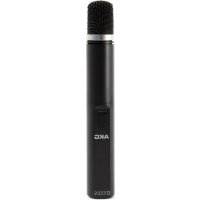
C1000S Mk4 - Microphone AKG - Free user manual and instructions
Find the device manual for free C1000S Mk4 AKG in PDF.


| Product Type | Electrostatic Condenser Microphone |
| Brand | AKG |
| Model | C1000S Mk4 |
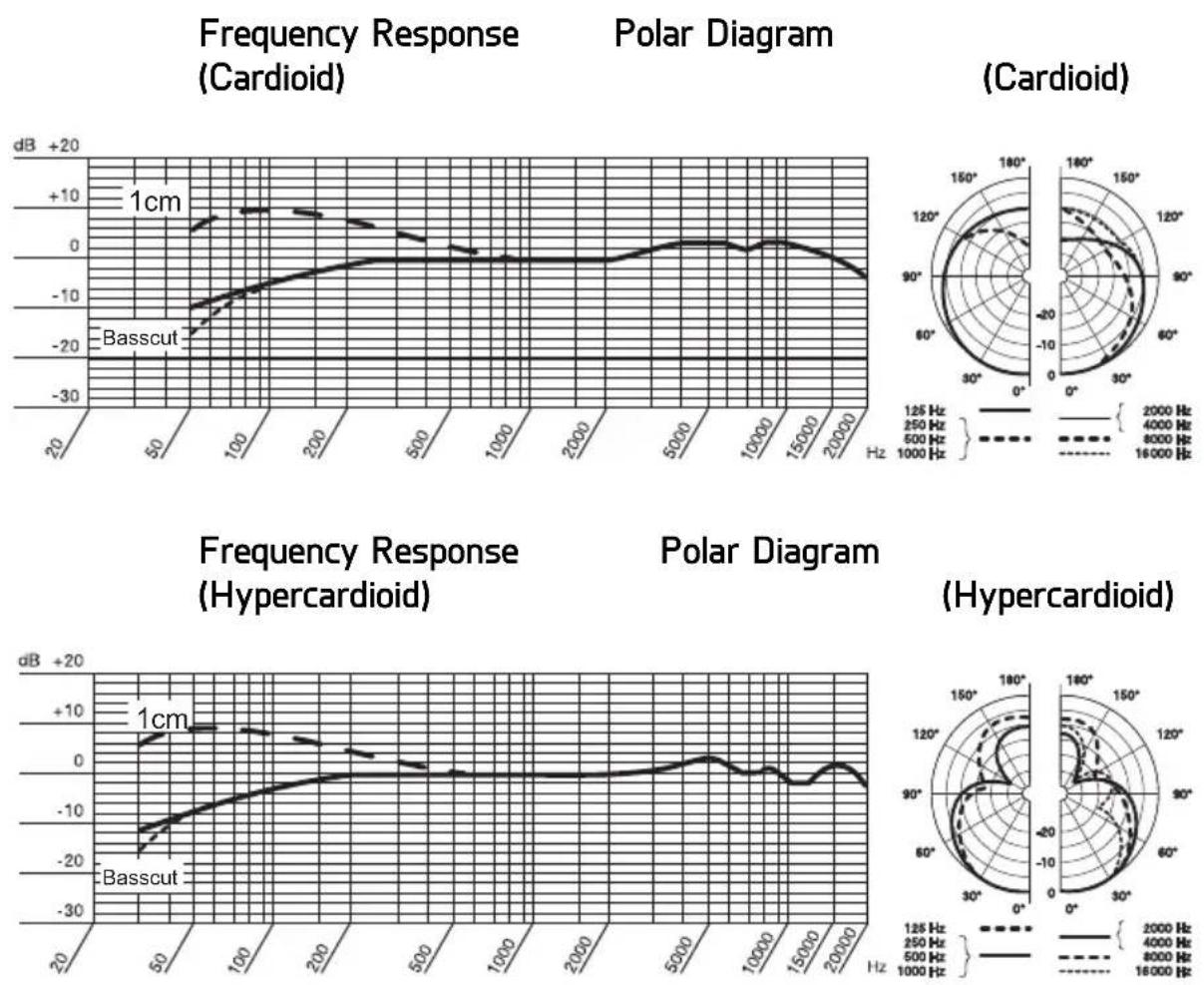
| Polar Pattern | Cardioid / Hypercardioid (with PPC1000 converter) |
| Frequency Range | 50 Hz - 20 kHz |
| Sensitivity | 6 mV/Pa (-44 dBV) |
| Maximum Sound Pressure Level | 137 dB SPL (distortion < 1%) |
| Equivalent Noise Level | 32 dB (CCIR 468-3) / 21 dB-A |
| Signal-to-Noise Ratio | 73 dB (A-weighted) |
| Impedance | 200 ohms |
| Recommended Load Impedance | ≥ 2000 ohms |
| Power Supply | Phantom power 9 to 52 V (IEC 61938) or 2 AA batteries |
| Current Consumption | Approx. 3 mA |
| Connector | 3-pin XLR |
| Dimensions | ø 33.5 × 229 mm |
| Net Weight | 320 g |
| Low-Cut Filter | Switchable (flat or 80 Hz) |
| Pre-Attenuation | Switchable -10 dB |
| Included Accessories | SA63 stand adapter, W1001 windscreen, PPC1000 converter, PB1000 adapter, carry pouch |
| Microphone Cleaning | Slightly damp cloth |
| Internal Windscreen Cleaning | Wash with soapy water, dry overnight |
| Color | Matte blue-gray |
| Switchable Polar Pattern | Yes, via PPC1000 converter |
| Presence Optimization | PB1000 adapter (5 dB boost between 5-9 kHz) |
Frequently Asked Questions - C1000S Mk4 AKG
User questions about C1000S Mk4 AKG
0 question about this device. Answer the ones you know or ask your own.
Ask a new question about this device
Download the instructions for your Microphone in PDF format for free! Find your manual C1000S Mk4 - AKG and take your electronic device back in hand. On this page are published all the documents necessary for the use of your device. C1000S Mk4 by AKG.
USER MANUAL C1000S Mk4 AKG
Please read the manual before using the equipment!
MODE D'EMPLOI 30
natural_image
Black AKG audio recording device with textured microphone and control buttons (no visible text or symbols on body)Inhaltsverzeichnis
1 Safety and Environment....17
Environment....17
2 Description....18
Introduction....18
Scope of supply....18
Optional Accessories....18
Summary 18
Controls 19
3 Powering 21
Battery power 22
Inserting/replacing and testing the batteries....22
Connecting to a balanced input....23
Connecting to an unbalanced input....23
Phantom power 24
4 Application 25
Installing the PPC1000 or PB1000 ....25
5 Cleaning 25
Microphone....25
Internal Windscreen....25
6 Troubleshooting....26
7 Specifications....27
1 Safety and Environment

ATTENTION
Risk of damage
Please make sure that the piece of equipment your microphone will be connected to fulfills the safety regulations in force in your country and is fitted with a ground lead.
Environment

- When the product reaches the end of its life, separate the housing, electronics and cables and dispose of all components in accordance with local waste disposal regulations.

- The packaging can be recycled. Dispose of the packaging in a suitable collection system.
2 Description
| Introduction | Thank you for purchasing an AKG product. This Manual contains important instructions for setting up and operating your equipment. Please take a few minutes to read the instructions below carefully before operating the equipment. Please keep the Manual for future reference. Have fun and impress your audience! |
| Scope of supply | C1000S MicrophoneSA63 Tripod adapterW1001 Foam wind guardPPC1000 Polar pattern converterPB1000 Presence boost adapterCarrying bagPlease check that the packaging contains all the components listed above. If anything is missing, please contact your AKG dealer. |
| Optional Accessories | For optional accessories, refer to the current AKG catalog or folder, or visit www.akg.com. Your dealer will be glad to help. |
| Summary | The C1000S cardioid/hypercardioid condenser microphone has been specifically designed for professional live, recording, and broadcast use with vocals and instruments. You can power the microphone either from external phantom power (9 to 52 V to IEC 61938) or use two AA batteries and connect the microphone directly to a mixer, recording device, etc.The combination of a high quality backplate condenser transducer and capsules shock mount optimises handling and cable noise rejection. The microphone body consists of a solid aluminium shaft and screw-on front tube with a rugged stainless steel mesh cap. The microphone uses an internationally standardised 3-pin male XLR output connector. |
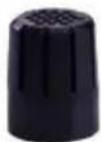
PPC1000 Polar pattern converter
Slipping the PPC1000 Polar Pattern converter onto the capsule will change the microphone's pickup pattern from cardioid to hypercardioid. This makes the microphone even less sensitive to sounds from the sides and rear, which is particularly beneficial when using the monitor speakers on stage.

PB1000 Presence boost adapter
The PB1000 Presence Boost Adapter boosts the sensitivity of the microphone by approx. 5 dB between 5 kHz and 9 kHz for optimum intelligibility of speech.
Controls
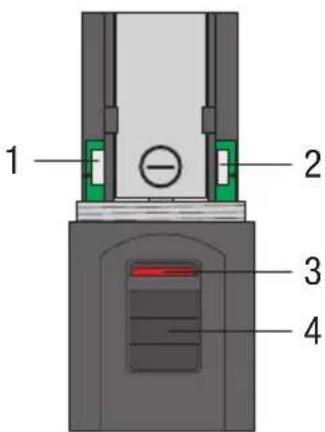
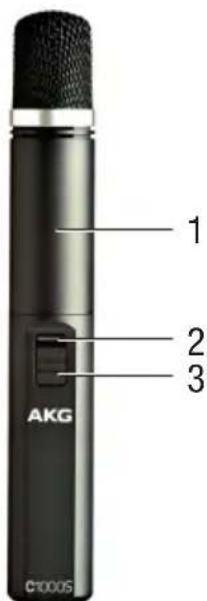
Figure 1: Controls
1) Attenuation selector switch
2) Bass-cut selector switch
3) Status LED
4) On/Off Switch
Attenuation selector switch
Selector switch 1 on the left-hand side of the microphone enables you to increase the mic level by 10 dB to enable distortion-free recording of very loud sound sources and in close proximity to sound sources. This attenuation prevents the microphone output level from exceeding critical control limits, particularly at low frequencies, in miniature transformers that are used in mixing desk inputs, for example.
Bass-cut selector switch
Rumble or wind noises, etc., may cause distortion at the lowest frequencies, but these can be reduced by simply using the switchable bass-cut. The bass-cut also counteracts the proximity effect that can occur when the microphone is only a short distance (less than 15 cm) from the sound source.
Status LED
This LED indicates the current battery status:
- LED flashes momentarily when switching ON and then extinguishes: Battery is OK.
- LED lit constantly: Battery life of about 60 minutes remaining.

NOTE
When you use the microphone with phantom power, the Status LED will not be lit.
On/Off Switch
The microphone provides an on/off switch with no audible click. In the Off position, the batteries are not used.

NOTE
Switch the microphone off when it is not in use, thus prolonging the battery life.
3 Powering
The C1000S is a condenser microphone and therefore needs a power supply. When powered by two AA batteries, the microphone can be used independently of external phantom power without a loss in audio quality. When operating using external phantom power, however, the microphone will automatically switch from battery to phantom power mode.
The microphone provides a balanced output on a 3-pin male XLR connector:
Pin 1: ground
Pin 2: hot
Pin 3: return
You can connect the microphone either to a balanced microphone input with or without phantom power or an unbalanced microphone input.
Battery power
Inserting/replacing and testing the batteries
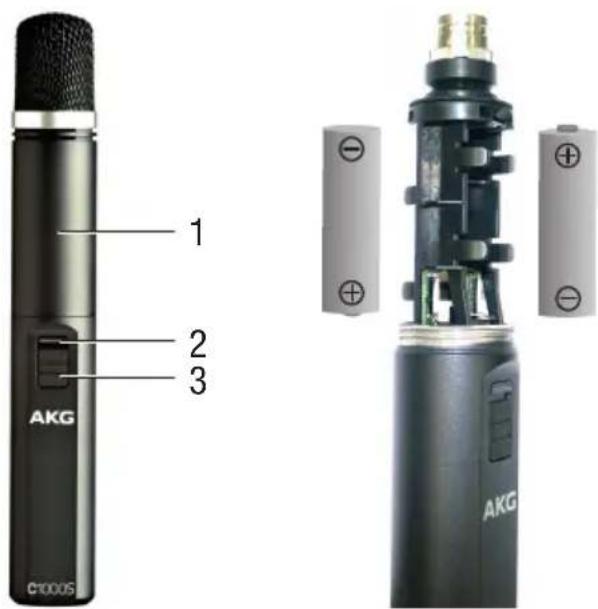
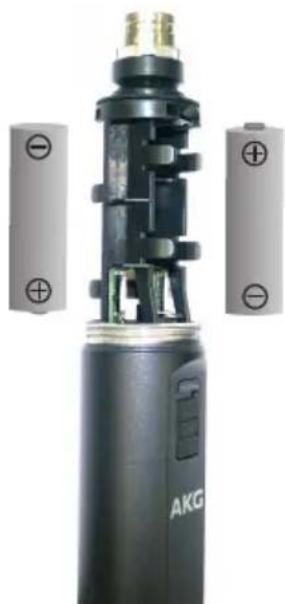
Figure 2: Insert batteries
1) Unscrew the wire-mesh cap (1).
2) Insert two AA batteries into the battery compartment to conform with the polarity marks (+/-).
If the batteries are inserted incorrectly, the microphone will not work.
3) Screw the wire-mesh cap back onto the microphone.
4) Slide the on/off switch (3) up to "ON" to switch power to the microphone on.
The Status LED (2) will flash momentarily. If the batteries are in good condition, the Status LED will extinguish.
If the Status LED fails to flash, the batteries are dead. Insert new batteries.
If the Status LED lit constantly, the batteries will be flat within about one hour. Replace with new batteries as soon as possible.
Connecting to a balanced input
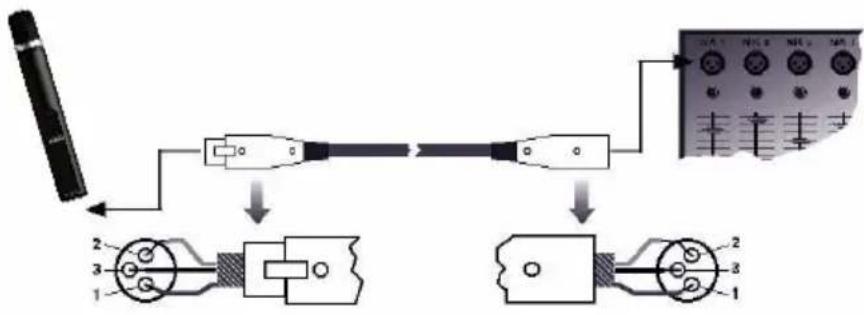
Figure 3: Connecting via a balanced XLR cable
Use a commercial XLR cable.
The length of the cable does not affect signal quality.
Connecting to an unbalanced input
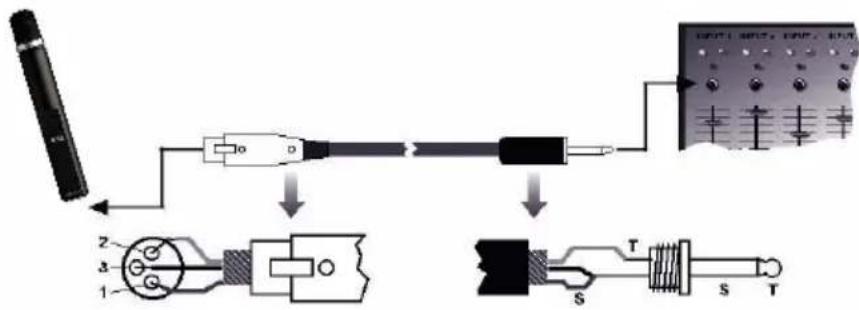
Figure 4: Connecting via an unbalanced cable
To connect the microphone to an unbalanced microphone input (1/4" jack), use a cable with an XLR connector and a 1/4" TS jack plug.

NOTE
Unbalanced cables may pick up interference from stray magnetic fields (nearpower or lighting cables, electric motors, etc.) like an antenna. This may cause hum or a similar noise if you use a cable that is longer than 5 m (16 feet).
Phantom power
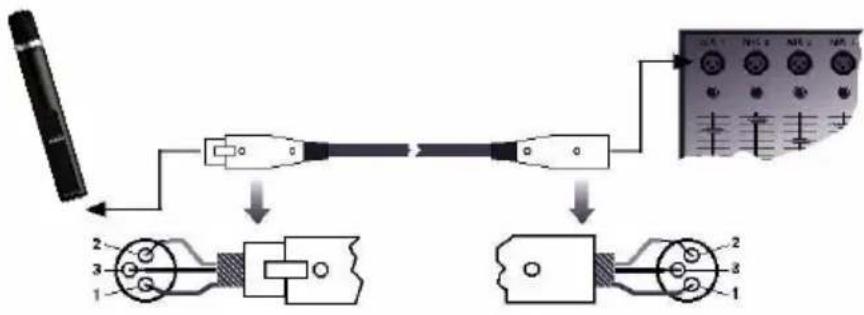
Figure 5: Connecting via a balanced XLR cable
1) Use an XLR cable to connect the microphone to a balanced XLR input with phantom power.
2) Switch on the phantom power. (Refer to the instruction manual of the unit to which you connected your device).

NOTE
The microphone will automatically switch from battery mode to phantom power mode and deactivate the Status LED.
Therefore, you do not need to remove the batteries from the microphone. The Status LED will remain off.
4 Application
Installing the PPC1000 or PB1000
1) Unscrew the wire-mesh cap.
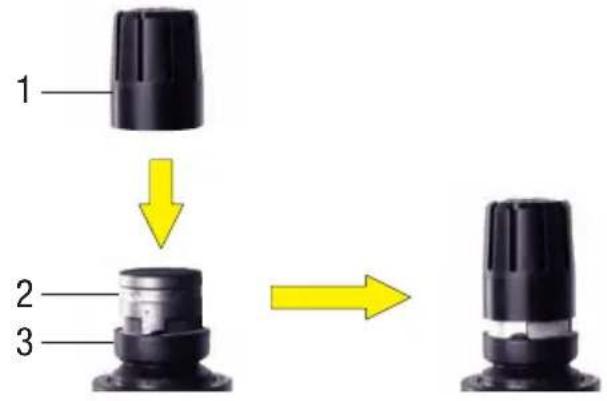
Figure 6: Installing the PPC1000 or PB1000

Risk of damage
When installing or removing the PPC1000 or PB1000, make sure to grip the microphone capsule (2) and rubber shock mount (3) firmly to prevent the capsule from being accidentally detached from its position.
2) Slip the PPC1000 or PB1000 (1) onto the microphone capsule to the stop, slightly turning it as you push it into position.
5 Cleaning
Microphone
- Use a soft cloth moistened with water to clean the surface of the microphone body.
Internal Windscreen
1) Unscrew the front grill from the microphone CCW.
2) Remove the windscreen from the front grill and wash the windscreen in soap suds.
3) Allow the windscreen to dry overnight.
4) Replace the windscreen in the front grill and screw the front grill on the microphone CW.
6 Troubleshooting
| Problem | Possible cause | Remedy |
| No sound | Power to mixer and/or amplifier is off. | Switch power to mixer and/or amplifier on |
| Channel or master fader on mixer, or volume control on amplifier is at zero. | Set channel or master fader on mixer or volume control on amplifier to desired level. | |
| Microphone is not connected to mixer or amplifier. | Connect microphone to mixer or amplifier. | |
| Cable connectors are seated loosely. | Check cable connectors for secure seating. | |
| Cable is defective. | Check cable and replace if damaged. | |
| No supply voltage. | Switch phantom power on. Check cable and replace if damaged. | |
| Batteries dead/no batteries inserted. | Check/insert batteries. | |
| Distortion | Gain control on mixer set too high. | Turn gain control down. |
| Mixer input sensitivity too high. | Connect a 10-dB attenuation pad between microphone cable and input. | |
| Microphone sound becomes increasingly dull. | Internal or external windscreen attenuates high frequencies when soiled. | Clean internal or external windscreen. |
7 Specifications
Working principle: Pre-polarised condenser microphone
| Polar pattern: Cardioid, hypercardioid (with | PPC1000 mounted) | |
| Frequency range: 50 to 20,000 Hz | ||
| Sensitivity: 6 mV/Pa (-44 dBV) | ||
| Max. SPL for 1% THD: 137 dB | ||
| Equivalent noise level (CCIR 468-3): | 32 dB | |
| Equivalent noise level: 21 dB- | A | |
| Signal/noise ratio (A-weighted): | 73 dB | |
| Electrical impedance: 200 ohms | ||
| Recommended load impedance: | ≥2000 ohms | |
| Bass cut filter slope: Switchable to linear, 80 Hz | ||
| Attenuation: Switchable to -10 dB | ||
| Powering: 9 to 52 V phantom power to IEC 61938 or two | ||
| AA alkaline or rechargeable batteries | ||
| Current consumption: approx. 3 mA | ||
| Connector: | 3-pin XLR | |
| Finish: | matte grayish blue | |
| Dimensions: | ø 33.5 x 229 mm / ø 1.32 x 9.01 in. | |
| Net weight: | 320 g | |
| Shipping weight: | 510 g | |
This product conforms to the standards listed in the Declaration of Conformity. To view a copy of the Declaration of Conformity for this product, visit http://www.akg.com or contact sales@akg.com.
Sommaire
broche 2 = point chaud
broche 3 = point froid
natural_image
Close-up of a black AKG device with attached battery plates and internal circuitry (no visible text or symbols)natural_image
Close-up of a black AKG device with attached battery plates and internal circuitry (no visible text or symbols)Figura 2: Colocar pilas
Colocar/trocar e testar as baterias....78
Conexão à entrada balanceada....79
Colocar/trocar e testar as baterias
natural_image
Close-up of a black AKG device with exposed internal components and two gray battery cells (no text or symbols visible)For other products and distributors worldwide visit www.akg.com


ROHS OK
Technische Änderungen vorbehalten. Specifications subject to change without notice. Ces caractéristiques sont susceptibles de modifications. Ci riserviamo il diritto di effettuare modifiche tecniche. Nos reservamos el derecho de introducir modificaciones técnicas. Especificações sujeitas a mudanças sem aviso prévio. Printed in China (P.R.C.) 12/12/5021629

- Inhaltsverzeichnis
- Safety and Environment
- Risk of damage
- Environment
- Description
- PPC1000 Polar pattern converter
- PB1000 Presence boost adapter
- Controls
- Attenuation selector switch
- Bass-cut selector switch
- Status LED
- On/Off Switch
- Powering
- Battery power
- Inserting/replacing and testing the batteries
- Phantom power
- Application
- Cleaning
- Troubleshooting
- Specifications
- Sommaire
- Colocar/trocar e testar as baterias
- ROHS OK
Brand : AKG
Model : C1000S Mk4
Category : Microphone