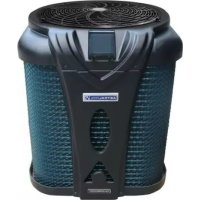
APH3 Inverboost - Heat pump ASTRALPOOL - Free user manual and instructions
Find the device manual for free APH3 Inverboost ASTRALPOOL in PDF.


| Product Type | Heat pump for swimming pool |
| Brand | AstralPool |
| Model | APH3 Inverboost (ref. 68837, 68838, 68839, 68840) |
| Dimensions (L x W x H) | 820 x 695 x 830 mm (68837/68838) / 950 x 900 x 1025 mm (68839/68840) |
| Net weight | 70 kg (68837), 75 kg (68838), 92 kg (68839), 111 kg (68840) |
| Electrical supply | 220-240 V / 50-60 Hz / 1 phase |
| Max current | 8.1 A (68837) to 16 A (68840) |
| Recommended circuit breaker | 13 A (68837) to 24 A (68840) |
| Heating power (Air 28°C / Water 28°C) | 13-3 kW (68837) to 24-6 kW (68840) |
| COP (Air 28°C / Water 28°C) | 6.7 to 16.3 depending on model and conditions |
| Refrigerant | R32 |
| Refrigerant charge | 1400 g (68837) to 3000 g (68840) |
| Recommended pool volume | 18-66 m³ (68837) to 68-135 m³ (68840) |
| Recommended water flow rate | 4 m³/h (68837) to 8 m³/h (68840) |
| Heat exchanger type | Titanium with twisted tube |
| Hydraulic connection | Diameter 50 mm |
| Sound level at 1 m | 40-54 dB(A) (68837) to 42-60 dB(A) (68840) |
| Operating modes | Heating, cooling, automatic |
| Ventilation modes | Silent, Smart, Powerful |
| Remote control | 10 m cable, display and Modbus |
| Protections | High/low pressure, frost protection, water flow, overheating, 3 min delay |
| Included accessories | Hydraulic fittings, drainage kit, control cable, winter cover, anti-vibration pads |
| Warranty | 2 years |
Frequently Asked Questions - APH3 Inverboost ASTRALPOOL
User questions about APH3 Inverboost ASTRALPOOL
0 question about this device. Answer the ones you know or ask your own.
Ask a new question about this device
Download the instructions for your Heat pump in PDF format for free! Find your manual APH3 Inverboost - ASTRALPOOL and take your electronic device back in hand. On this page are published all the documents necessary for the use of your device. APH3 Inverboost by ASTRALPOOL.
USER MANUAL APH3 Inverboost ASTRALPOOL
- Operators of equipment that contains fluorinated greenhouses gases in quantities of 5 tons of CO_2 , equivalent or more and not contained in foams shall ensure that the equipment is checked for leaks.
- For equipment that contains fluorinated greenhouse gases in quantities of 5 tonsequivalent or more, but of less than 50 tons of CQ equivalent: at least every 12 months.
Picture of the equivalence CO
- Load in kg and Tons amounting. CO
| Load and Tons amounting £0 | Frequency of test |
| From 7 at 75 kg load = from 5 at 50 Tons | Each year |
Do no release R32 coolant liquid into the atmosphere. This is a fluoride greenhouse effect gas coverage Kyoto agreement with a global warming potential (GWP) = 675 -(see the European Community regulations on fluoride greenhouse effect gases Regulation (EU) No 517/2014).
Concerning the Gas R32, 7.40kg amounting at 5 tons ^2pfc mitment to check each year.
Training and certification
- The operator of the relevant application shall ensure that the relevant personnel have obtained the necessary certification, which implies appropriate knowledge of the applicable regulations and standards as well as the necessary competence in emission prevention and recovery of fluorinated greenhouse gases and handling safety the relevant type and size of equipment.
Record keeping
- Operators of equipment which is required to be checked for leaks, shall establish and maintain records for each piece of such equipment specifying the following information:
a) The quantity and type of fluorinated greenhouse gases installed;
b) The quantities of fluorinated greenhouse gases added during installation, maintenance or servicing or due to leakage;
c) Whether the quantities of installed fluorinated greenhouse gases have been recycled or reclaimed, including the name and address of the recycling or reclamation facility and, where applicable, the certificate number;
d) The quantity of fluorinated greenhouse gases recovered
e) The identity of the undertaking which installed, serviced, maintained and where applicable repaired or decommissioned the equipment, including, where applicable, the number of its certificate;
f) The dates and results of the checks carried out;
g) If the equipment was decommissioned, the measures taken to recover and dispose of the fluorinated greenhouse gases.
- The operator shall keep the records for at least five years, undertakings carrying out the activities for operators shall keep copies of the records for at least five years.
Formation et certification
User and Service manual
SWIMMING POOL HEAT PUMP
APH3 INVERBOOST (R32 gas)
INDEX
1.Description
2. Transport information
3. Specifications
4. Accessories and options
5. Location and connection
6. Electrical Wiring
7. Start-up of the Heat Pump
8. Parameters
9. Troubleshooting
10. Exploded Diagram and Maintenance
Thank you for using APH3 INVERBOOST swimming pool heat pump for your pool heating, it will heat your pool water and keep the constant temperature when the air ambient temperature is at 20 to 50

ATTENTION: This manual includes all the necessary information with the use and the installation of
heat pump.
- The installer must read the manual and attentively follow the instructions in implementation and mainte
- The installer is responsible for the installation of the product and should follow all the instructions of the manufacturer and the regulations in application. Incorrect installation will invalidate the guarantee.
- The manufacturer declines any responsibility for the damage caused by any third party, object ingression of the errors due to the installation that do not follow the manual guidelines. Any use that is not as inte the manufacturer will invalidate the guarantee.

WARNING:
Important notice:
- Please always keep the heat pump in a well ventilated place and away from anything which could cause fire.
- Do not braze or weld the pipe if there is refrigerant inside machine. Please do not charge the gas when in a confined space.
- Please always empty the water in heat pump during winter time or when the ambient temperature drops below 0^ , or else the Titanium exchanger will be damaged because of being frozen, in such case, your warranty will be lost.
- Please always cut the power supply if you want to open the cabinet to reach inside the heat pump.
- The vacuum must be made to the heat pump before charging the R32 gas through the shut-off valve, located inside the machine.
- Please keep the display controller in a dry area to protect the display controller from being damaged by humidity.
- Action of filling gas must be conducted by professional with R32 operating license.
1. Description
1.1 With your Heat Pump is supplied:
- Water connection assembly 50~mm (pcs: 2)
-User and service manual - Condensed connection (Water nozzle Drain hose 4-way connection)
- 10 meters' signal wire(Display, Modbus)
- Waterproof box
- Winter cover
1.2 Dimension
Model 68837/68838


1.Description
Models 68839/68840
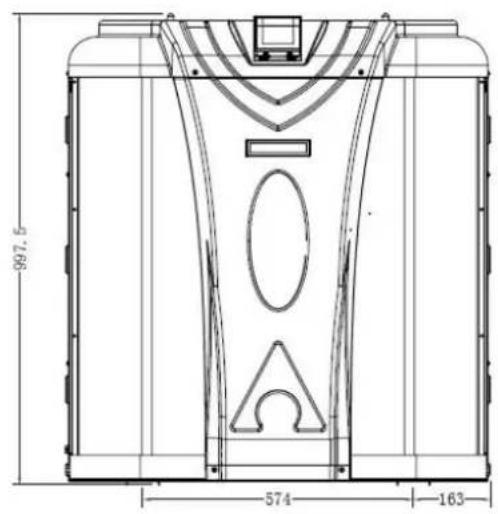

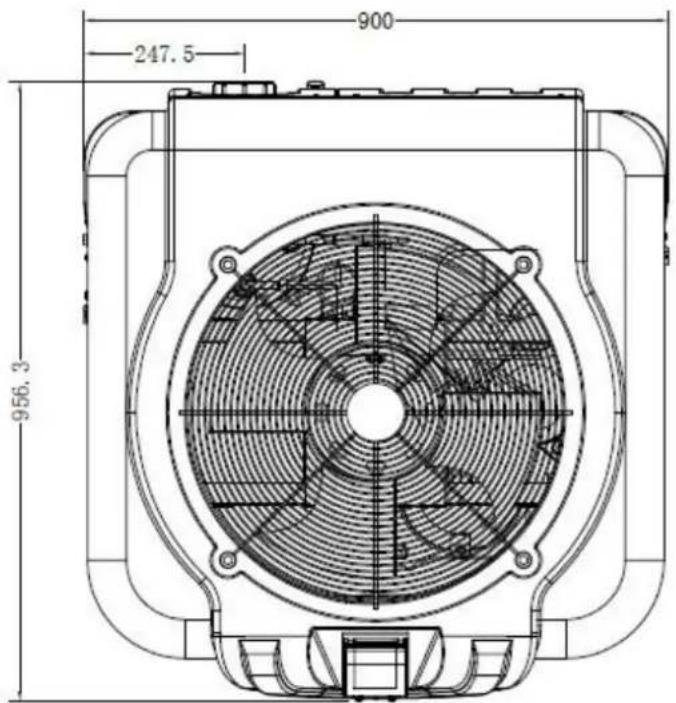
2. Transport information
2.1 Delivery of the unit

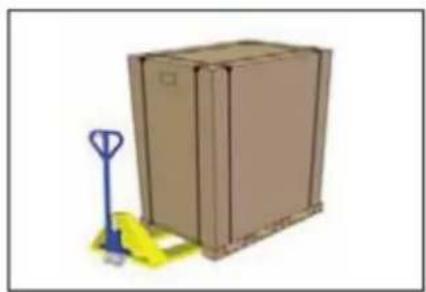
For the transportation, the heat pump are fixed on the pallet and covered with a cardboard box.
To protect from any damage, the heat pump must be transferred in its package.
All material, Even if the transport is chargeable to supplier, can be damaged during its routing at the customer and it is the responsibility of the addressee to make sure of the correspondence of the delivery.
The addressee has to written all the reserves at the reception on the delivery note of the carrier if he notices damages of the packaging. DO NOT FORGET TO CONFIRM BY REGISTERED LETTER TO THE CARRIER UNDER 48 H.
2.2 Stock advice

-
The warehouse should be bright, spacious, open, well ventilated, have ventilation equipment and no fire source.
-
Heat pumps must be stored and transferred in vertical position in its original packaging. If it is not the case, cannot be operated until a minimum period of 24H has passed before the unit can have the electrical power turned on.
FORBIDDEN

2.3 Transfer to the final position
-
During the unpacking of the product and the transfer from the pallet to the final place of installation, it is necessary to maintain the heat pump in a vertical position.
-
Smoking and the use of flames are prohibited near R32machine.
-
Water connection are not to be used as load bearing handles. The manufacturer would not take the responsibility in case of damage to the water pipes.
Technical data APH3 INVERBOOST pool heat pumps
CE Standard, R32, ABS Cabinet
| Model | 68837 | 68838 | 68839 | 68840 | |
| * Performance at Air 28, Water 28C, Humidity 80% | |||||
| Heating capacity | kW | 13-3 | 15.5-3.2 | 20.5-4.6 | 24-6 |
| Power consumption | kW | 1.94-0.19 | 2.28-0.21 | 3.05-0.29 | 3.41-0.37 |
| C.O.P. | 16-6.7 | 15.4-6.8 | 16-6.7 | 16.3-7 | |
| * Performance at Air 15, Water 26C, Humidity 70% | |||||
| Heating capacity | kW | 9.6-2 | 11.3-2 | 14-3 | 18.5-4.2 |
| Power consumption | kW | 1.84-0.26 | 2.22-0.31 | 2.7-0.36 | 3.55-0.53 |
| C.O.P. | 8.0-5.2 | 6.6-5.1 | 8.2-5.1 | 7.92-5.21 | |
| Compressor type | MITSUBISHI | MITSUBISHI | MITSUBISHI | MITSUBISHI | |
| Voltage | 220~240V /50Hz or 60Hz/1PH | ||||
| Rated current | A | 8.1 | 9.8 | 12.0 | 16.0 |
| Minimum fuse | A | 13 | 15 | 18 | 24 |
| Advised pool volume | m³ | 18-66 | 28-86 | 58-122 | 68-135 |
| Advised water flux | m³/h | 4.0 | 5.0 | 6.0 | 8.0 |
| Water pressure drop | Kpa | 14 | 15 | 18 | 20 |
| Heat exchanger | Twist-titanium tube in PVC | ||||
| Water connection | mm | 50 | |||
| Fan quantity | 1 | ||||
| Ventilation type | Vertical | ||||
| Fan speed | RPM | 550-850 | 550-850 | 550-850 | 550-850 |
| Power input of Fan | W | 10-120 | 10-120 | 10-120 | 10-120 |
| Noise level(1m) | dB(A) | 40-54 | 41-56 | 41-56 | 42-60 |
| Refrigerant (R32) | g | 1400 | 1800 | 1800 | 3000 |
| CO2 equivalent | T | 0.95 | 1.22 | 1.22 | 2.03 |
| Net weight | kg | 70 | 75 | 92 | 111 |
| Gross weight | kg | 88 | 94 | 115 | 137 |
| Net dimension | mm | 820*695*830 | 820*695*830 | 950*900*1025 | 950*900*1025 |
| Packing dimension | mm | 920*755*980 | 920*755*980 | 1050*960*1175 | 1050*960*1175 |
- Above data are subjects to modification without notice.
4. Accessories and options
4.1 Accessories list

Water nozzle, 3 pcs
4-way connection, 1 pc
Drain hose, 4pcs

Waterproof box, 1 pc
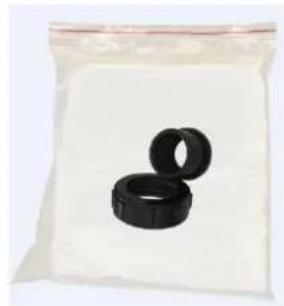
Water connection assembly, 2 sets
Winter cover, 1pc

10M Signal wire, 1 pc
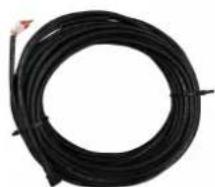
Modbus signal wire, 1 pc
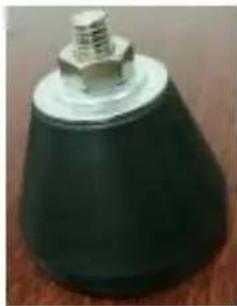
Anti-vibration base, 4 pcs
4.2 The Kit By-Pass
The kit By-Pass is the essential accessory for the installation of your heat pump, it is also a tool for the optimization of the heating of the water. The valves allow the optimum flow of water using a manometer to make sure the optimized running of the compressor, see paragraph 5.6 controls of the pressure.

4. Accessories and options
4.3 Accessories Installation
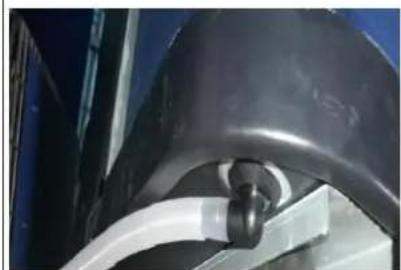
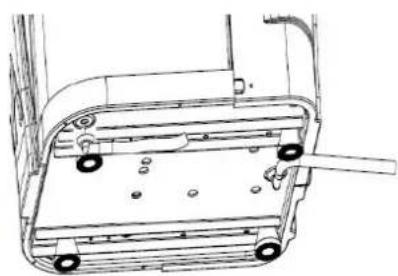
Draining plug
- Install the draining plug under the bottom panel
- Connect with a water pipe to drain out the water.
Note: Lift the heat pump to insta the draining plug. Never overturn the heat pump, it could damage the compressor.
You have to put the drain pipes with silicone or liquid Teflon to avoid leaks.
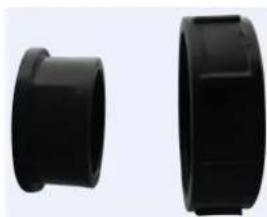

Water Inlet & outlet junction
- Install the two joints like the picture shows
- Screw them onto the water Inl & outlet connection


Mains cable wiring
- Open the cover of the termina box (marked red) on the side of machine
- Tight the cables in the correct connections, L N E, inside the terminal block.


Filtration pump wiring (Dry contact)
- Open the cover of the termina box (marked red) on the side of machine
- Tight the cables in the correct connections, 1 2, inside the terminal block.
ATTENTION:
Please observe the following rules when installing the heat pump:
- Any addition of chemicals must take place in the piping located downstream from the heat pump.
- Always place the heat pump on a solid foundation and use the included rubber avoid vibration and noise.
- Always hold the heat pump upright. If the unit has been held at an angle, wait hours before applying mains power to the heat pump.
5.1 Heat pump location
The unit will work properly in any desired location as long as the following three items are present:
- Fresh air
- Electricity
- Swimming pool filters
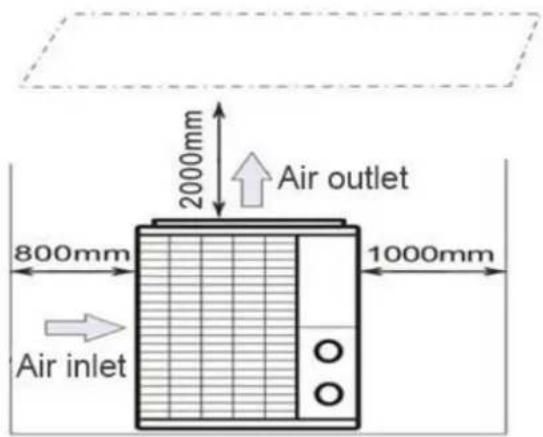
The unit may be installed in virtually any outdoor location as long as the specified minimum distances to other objects are maintained (see drawing below). Please consult your installer for installation with an indoor pool
Installation in a windy location does not present any problem at all, unlike the situation with a gas heater (including pilot flame problems).
ATTENTION: Never install the unit in a closed room with a limited air volume in which expelled from the unit will be reused, or close to shrubbery that could block the air in locations impair the continuous supply of fresh air, resulting in reduced efficiency and possible preventing sufficient heat output.
See the drawing below for minimum dimensions.
5. Location and connection
5.2 Check-valve installation

NOTE
Note: If automatic dosing equipment for chlorine and acidity (pH) is used, it is essential to protect the heat pump against excessively high chemical concentrations which may corrode the heat exchanger. For this reason, equipment of this sort must always be fitted in the piping on the downstream side of the heat pump, and it is SMART recommended to install a check-valve to prevent reverse flow in the absence of water circulation. Damage to the heat pump caused by failure to observe this instruction is not covered by the warranty.

5.3 Typical arrangement

This arrangement is only an illustrative example.

NOTE
The factory supplies only the heat pump. All other components, including a bypass if necessary, must be provided by the user or the installer.
ATTENTION:
In order to heat the water in the pool (or hot tub), the filtration pump must be caused the water to circulate through the heat pump. The heat pump will not start water is not circulating.
5. Location and connection
5.4 Initial operation
After all connections, have been made and checked, carry out the following procedure:
- Switch on the filtration pump, check for leaks and verify that water is flowing from and to the swimming pool.
- Connect power to the heat pump and press the On/Off button on the LED control panel. The unit will start up after the time delay expires (see below).
- After a few minutes, check whether the air blowing out of the unit is cooler.
- When turn off the filtration pump, the unit should also turn off automatically, if not, then adjust the flow switch.
- Allow the heat pump and the filtration pump to run 24 hours a day until the desired water temperature is reached. The heat pump will stop running at this point +1^ . After this, it will restart automatically (as long as the filtration pump is running) whenever the swimming pool water temperature drops 1 degree below the set temperature (for example, if you set the temperature 28^ , the heat pump will stop when the temperature at 29^ . While it will restart when the temperature of the water down to 27^ )
Depending on the initial temperature of the water in the swimming pool and the air temperature, it may take several days to heat the water to the desired temperature. A good swimming pool cover can dramatically reduce the required length of time.

NOTE
Water Flow Switch:
It is equipped with a flow switch for protecting the HP unit running with adequate water flow rate. It will turn on when the filtration pump runs and shut it off when the pump shuts off.
Time delay - The heat pump has a built-in 3-minute start-up delay to protect the circuitry and avoid excessive contact wear. The unit will restart automatically after this time delay expires. Even a brief power interruption will trigger this time delay and prevent the unit from restarting immediately. Additional power interruptions during this delay period do not affect the 3-minute duration of the delay.
5. Location and connection
5.5 Condensation
The air drawn into the heat pump is strongly cooled by the operation of the heat pump for heating the pool water which may cause condensation on the fins of the evaporator.

NOTE
The amount of condensation may be as much as several litters per hour at high relative humidity. This is sometimes mistakenly regarded as a water leak.
5.6 Pressure gauge display (R32)
Examine the pressure gauge which indicates the refrigerant gas pressure of the unit, the below table shows the normal value of the gas pressure (R32) when the machine is in power off or running conditions.
| Unit Condition | Power Off | |||
| Ambient (°C) | -5~5 | 5~15 | 15~25 | 25~35 |
| Water temp (°C) | / | / | / | / |
| Pressure gauge (Mpa) | 0.68~0.93 | 0.93~1.25 | 1.25~1.64 | 1.64~2.1 |
| Unit Condition | Running | ||||
| Ambient (℃) | / | / | / | / | / |
| Water temp (℃) | 10~15 | 15~20 | 20~25 | 25~30 | 30~35 |
| Pressure gauge (Mpa) | 1.3~1.8 | 1.5~1.9 | 1.6~2.3 | 1.9~2.8 | 2.1~3.5 |
6. Electrical Wiring
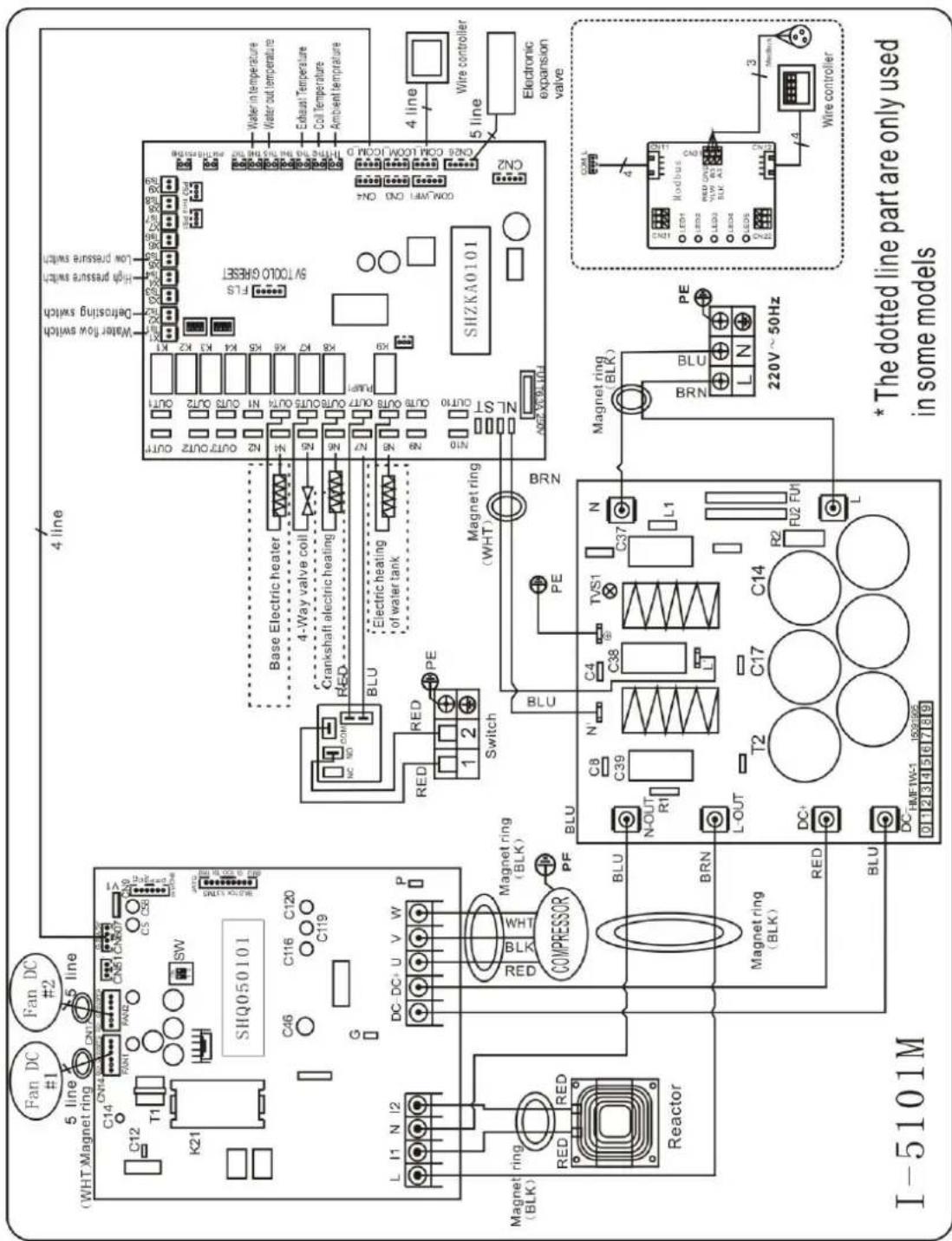
6.1 Inverter swimming pool heat pump wiring diagram
Ref.68837/68838/68839
Basic Electrical Wiring
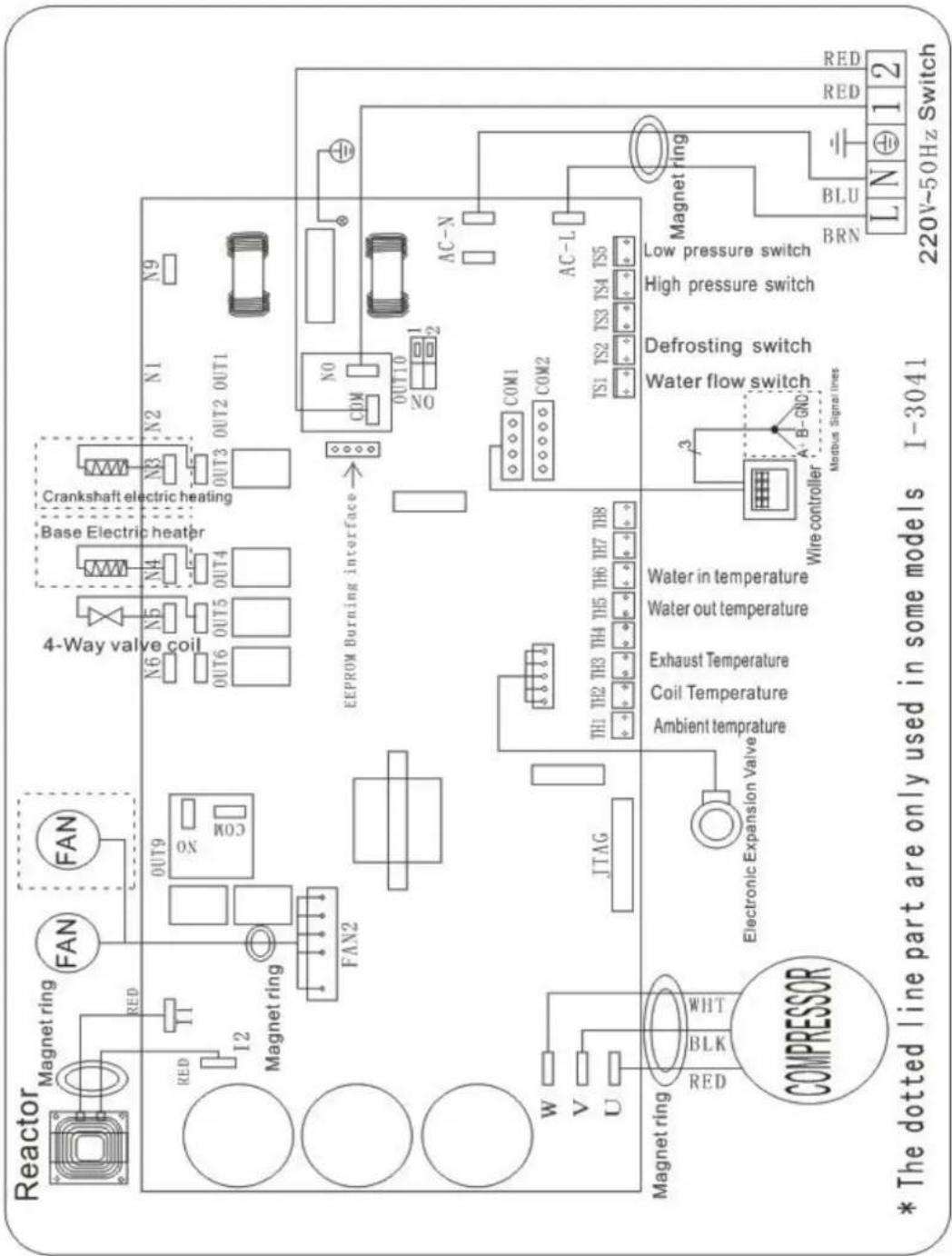
6.2 Inverter swimming pool heat pump wiring diagram
Ref.68837/68838/68839
Electrical Wiring with MODBUS module

6.3 Inverter swimming pool heat pump wiring diagram
68840
Basic Electrical Wiring

6. Electrical Electric Wiring
6.4 Inverter swimming pool heat pump wiring diagram
68840
Electrical Wiring with MODBUS module
6. Electrical Wiring
6.5 Electrical protection
The power supply for the heat pump must come, preferably, from an exclusive circuit with regulatory protection components (30mA differential protection) and a magneto-thermal switch.
- The electrical installation must be carried out by a specialized professional (electrician) in accordance with the standards and regulations in force in the country of installation.
- The heat pump circuit must be connected to a safety earth circuit at the terminal block.
- The cables must be properly installed to prevent interference.
- The pump is intended for connection to a general power supply with earth connection.
- Section of the cable; This section is indicative and should be checked and adapted according to the needs and conditions of use.
- The tolerance of acceptable voltage variation is +/- 10% during operation.
The connections must be dimensioned according to the power of the device and the state of installation.
| Models | Circuit breaker | Maximum length of the wire | |||
| 2,5 mm² | 4 mm² | 6 mm² | 10 mm² | ||
| 68837 | 13 A | 45 m | 75 m | 110 m | 185 m |
| 68838 | 15 A | 34m | 54m | 80 m | 135 m |
| 68839 | 18 A | 32 m | 50 m | 75 m | 128m |
| 68840 | 24 A | / | 35m | 52 m | 95m |

These values are given as a guideline, only an authorized electrician can determine the value
corresponding to your installation. The electricable must be equipped with a ground connection and with a circuit breaker with difference 30mA .
6. Electrical Wiring
6.6 Installation of the remote display
Photo(1) Photo(2) Photo(3) Photo(4)


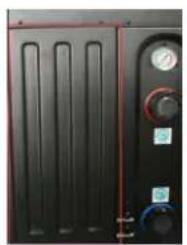

- The side with plug connects with the control panel (photo1)
- The other side of the signal wire. (photo2)
- Open the cover of the terminal box and pass through it the cable of the remote screen. (photo3,)
- Insert the wiring into the designated position (upper right corner) on the Modbus Module. (photo4)
6.7 Installation of the Modbus Signal Wire
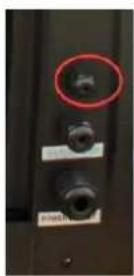
Photo(5) Photo(6) Photo(7)


Photo(8) Photo(9)
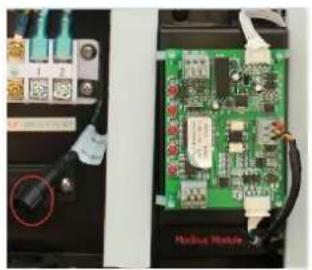

- Open the Back panel (photo5)
- Take the Modbus signal wire from the accessories (photo 6) and put the one end through the hole (Photo 7)
- Put the round end of the signal wire into the designated position. (photo 8)
- Three wire terminal“:A+”, “B-”, “GND” (Photo 9)
6.8 Connection heating priority (option of running)
Dry contact timer connection

Timer
Dry contact pump connection
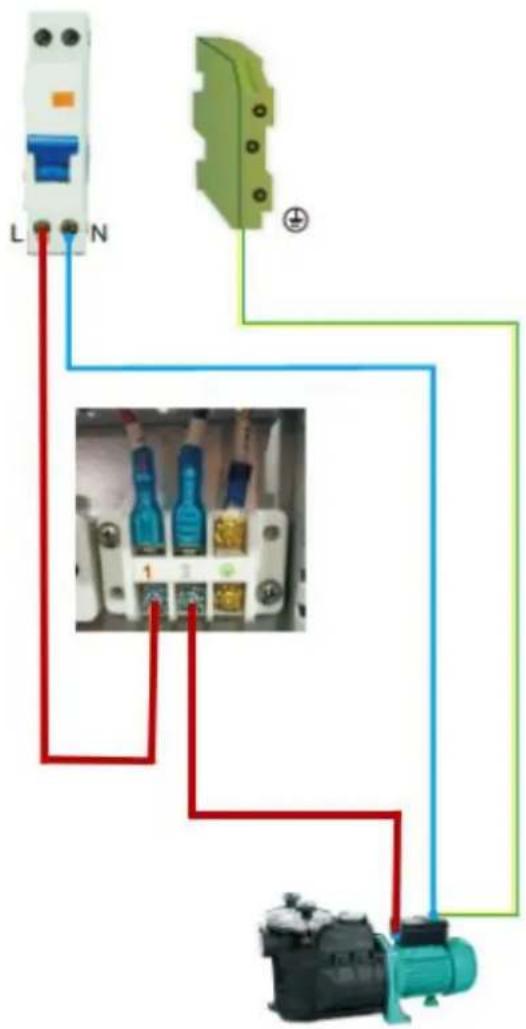
Water pump
7. Start-up of the Heat Pump
Operation
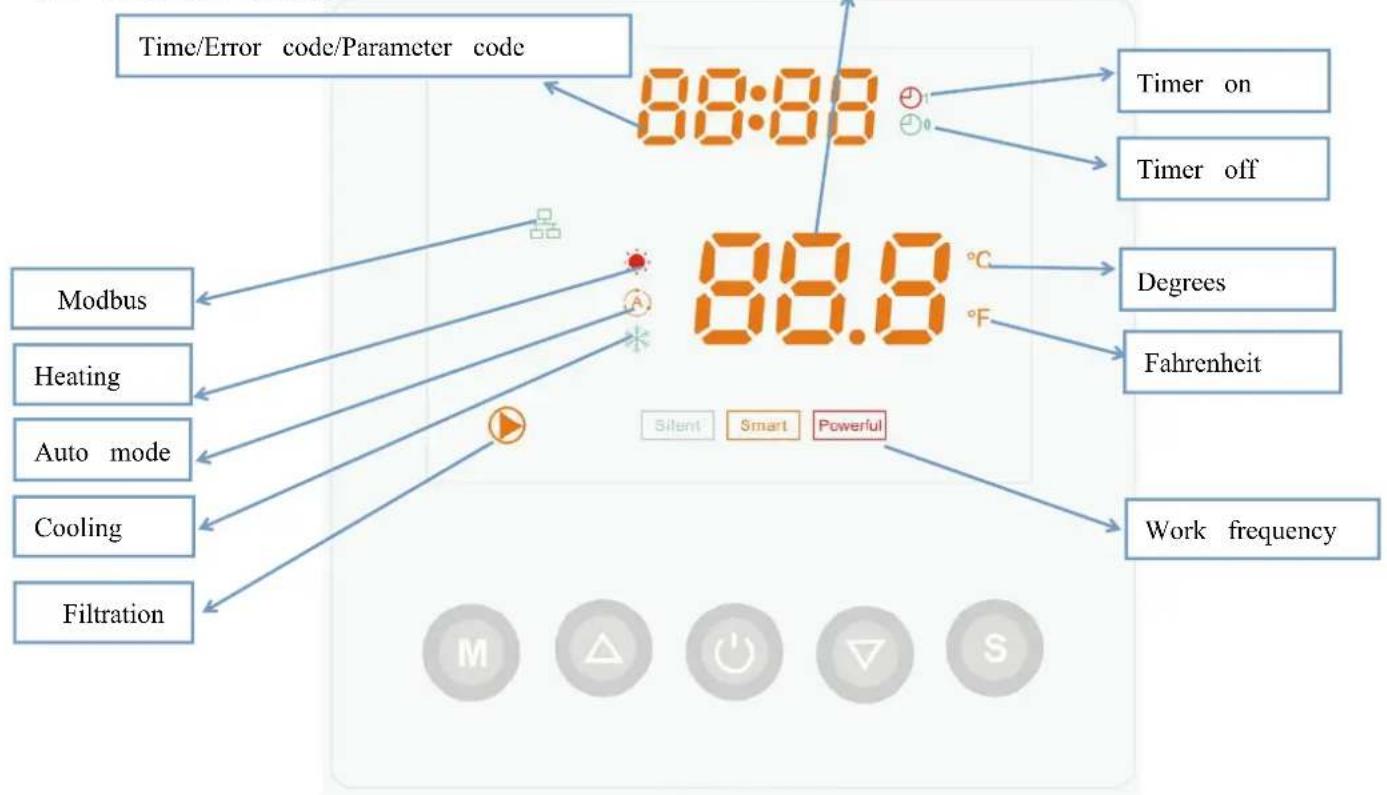
7.1. Controller display
7.2. Turn on/Turn off the heat pump
Press to turn on the heat pump, it will show setting temperature firstly, after 5 second, it show water inlet temperature.
Press to turn off the heat pump.
7.3. Water temperature setting
Press or directly to setting target water temperature.
Cooling: 6C≤ T set ≤ 35^
Heating: 15^ ≤ T set ≤ 41^
Remark: When defrosting, the heating symbol will flash
7.4. Lock/Unlock the screen
Press and on the same time in 5 second to lock the screen, and Press and on the same time in 5 second again to cancel the locking.
7. Start-up of the Heat Pump
7.5. Working frequency

Press to choose three mode as below: Silent / Smart /Powerful
The set frequency indicator light is always on, while the working frequency light flashes.
When the set frequency stage is the same with the working one, its frequency light will flash.

7.5.1
Choose the Powerful, the light will be on, the heat pump will operate in 'Full output' only.

7.5.2
While you choose the Smart, the heat pump will operate in 'Small output', 'Medium output' and 'Full output'
7.5.3
While you choose the Silent, the heat pump will just operate in 'Medium output' and 'Small output'
When in 'Small output', the light of Silent will flash.
When in 'Medium output', the lamp of Silent is lighting, the lamp of Smart will be flash.
7.5.4 Working mode
There are 3 modes for the unit, Heating only, Auto mode(heating and cooling switch), Cooling only.
Operation logic of Auto Mode: set temperature: 28^

7.5.4.Heating operation logic
| Working status | Working mode | Water in temperature-T1 | For example, water in temperature-T1 | Heat pump working level | |
| 1 | Start-up of heat pump | When you select the "Smart working mode" | T1<Tset-1 | T1< 27°C | Powerful mode-frequency F9 |
| 2 | Tset-1≤T1 < Tset | 27°C ≤ T1 <28°C | Frequency: F9 -F8-F7,...,-F2 | ||
| 3 | Tset≤ T1 <Tset+ | 28°C ≤ T1 <29°C | Silent mode-frequency F2 | ||
| 4 | T1≥Tset+1 | T1≥29°C | HP will be Standby ,stop working till the water in temperature dropping to less 28°C. | ||
| 5 | When you select the "Silent working mode". | T1<Tset | T1< 28°C | Smart mode -frequency F5. | |
| 6 | Tset≤T1 < Tset+1 | 28°C ≤ T1 < 29°C | Silent mode-frequency F2/F1. | ||
| 7 | T1≥Tset+1 | T1≥29°C | HP will be Standby ,stop working till the water in temperature dropping to less 28°C. | ||
| 8 | When you select the "Powerful working mode." | T1<Tset+1 | T1<29°C | Powerful mode-frequency F10/F9 | |
| 9 | T1≥ Tset+1 | T1≥29°C | HP will be Standby, stop working till the water in temperature dropping to less 28°C. | ||
| 10 | Re-start to heat water in standby status | When HP is working at "Smart mode" | T1≥Tset | T1≥28°C | Standby |
| 11 | Tset>T1≤Tset-1 | 28°C >T1 ≥ 27°C | Silent-frequency F2 | ||
| 12 | Tset-1> T1≤Tset-2 | 27°C >T1 ≥ 26°C | Frequency: F2 -F3-F4,...,-F9 | ||
| 13 | <Tset-2 | <26°C | Powerful-frequency F9 | ||
| 14 | When HP is working at "Silent mode" | ≥Tset | ≥28°C | Standby | |
| 15 | Tset>T1≤Tset-1 | 28°C >T1 ≥ 27°C | Silent mode-frequency F2/F1 | ||
| 16 | T1<Tset-1 | T1<27°C | Smart -frequency F5 | ||
| 17 | When HP is working at "Powerful mode" | T1<Tset-1 | T1<27°C | Powerful -frequency F10/F9 | |
7.5.5. Cooling operation logic
| Working status | Working mode | Water in temperature | For example, water in temperature | Heat pump working level | |
| 1 | Start-up of heat pump | When you select the "Smart working mode" | T1 ≦ Tset-1 | T1 ≦ 27°C | Standby. |
| 2 | Tset-1<T1 ≦ Tset | 27°C < T1 ≦ 28°C | Silent mode-frequency F2 | ||
| 3 | Tset<T1 ≦ Tset+1 | 28 < T1 ≦ 29°C | frequency: F9 -F8-F7,...,- F2 | ||
| 4 | T1 ≦ Tset+1 | T1 ≦ 29°C | Powerful mode-F9 | ||
| 5 | When you select the "Silent working mode". | T1 ≦ Tset-1 | ≤ 27°C | Standby | |
| 6 | Tset-1<T1 ≦ Tset | 27°C < T1 ≦ 28°C | Silent mode - frequency F2/F1 | ||
| 7 | T1>Tset | T1>28°C | Smart mode -frequency F5 | ||
| 8 | When you select the "Powerful working mode." | T1>Tset-1 | T1>27°C | Powerful mode-frequency F10/F9 | |
| 9 | T1 ≦ Tset-1 | T1 ≦ 27°C | Standby | ||
| 10 | Re-start to cool water in standby status | Smart | T1 ≦ Tset-1 | T1 ≦ 27°C | Standby |
| 11 | Tset ≦ T1 < Tset+1 | 28 ≦ T1 < 29°C | Silent- frequency F2 | ||
| 12 | Tset+1 ≦ T1 < Tset+2 | 29 ≦ T1 <30°C | Frequency: F2 -F3-F4,...,- F9 | ||
| 13 | T1 ≦ Tset+2 | T1 ≦ 30°C | Powerful mode -frequency F9 | ||
| 14 | Silent | Tset<T1 ≦ Tset+1 | 28 < T1 ≦ 29°C | Silent mode-frequency F2/F1 | |
| 15 | T1 >Tset+1 | T1 >29°C | Smart mode-frequency F5 | ||
| 16 | Powerful | T1 >Tset+1 | T1 >29°C | Powerful mode-frequency F10/F9 | |
| 17 | T1 ≦ Tset-1 | T1 ≦ 27°C | Standby | ||
7.6. Parameter checking or setting
7.6.1 Press 5S and then press to check the parameter from d0-d14.
| Code | Parameter | Range | Remark |
| d0 | IPM module temperature | 0-120°C | Real value |
| d1 | Water inlet temp. TH6 | -9°C~99°C | Real value |
| d2 | Water outlet temp. TH5 | -9°C~99°C | Real value |
| d3 | Ambient temp. TH1 | -30°C~70°C | Real value<-9 flash |
| d4 | Frequency limitation code | 0,1,2,4,8,16 | Real value |
| d5 | Coil temperature TH2 | -30°C~70°C | Real value<-9 flash |
| d6 | Gas exhaust temperature TH3 | 0°C~125°C | Real value |
| d7 | Step of EEV | 0~99 | N*5 |
| d8 | Compressor running frequency | 0~99Hz | Real value |
| d9 | Compressor current | 0~30A | Real value |
| d10 | Current fan speed | 0-1200 (rpm) | Real value |
| d11 | Error code for last time | All error code | |
| d12 | MODBUS COM | 0 - 5 | Only Modbus function |
| d13 | MODBUS ID Address. | 1 - 88 | Only Modbus function |
| d14 | Product code parameter | 001- 999 | Only Modbus function |
7. Start-up of the Heat Pump
Remark:
(1) In the time programming mode, when the display is off, you can start the machine manually by turning on the display and the machine will work until the scheduled programming.
(2) d4: 0 - no limit frequency; 1-coil temperature limited frequency; 2 - overheating or overcooling limited frequency; 4 - drive current limited frequency; 8 - drive voltage limited frequency; 16 - drive high temperature limited frequency.
(3)Product code parameter P(Modbus Only): Press and at the same time in 5 second, the first digital
number in the upper flash, press or to choose the target number from O-F, then press go to adjust
the second number. So does the third and forth number. Lastly press to save the setting and exit, or it automatically exist after 15 seconds.
| Code with connect | Parameter P | Description |
| 68837 | OCE5 | APH3 INVERBOOST 14KW |
| 68838 | OCE6 | APH3 INVERBOOST 17KW |
| 68839 | OCE7 | APH3 INVERBOOST 21KW |
| 68840 | OCE8 | APH3 INVERBOOST 26KW |
7.6.2 Press 5S and then press to check the parameter from P0-P7.
| Code | Name | Range | Default | Remark |
| P0 | Mandatory defrosting | 0-1 | 0 | 0: defrosting mode;1: mandatory defrosting |
| P1 | Working mode | 0-2 | 1 | 1: Heating mode;0: cooling mode;2: Auto mode |
| P2 | Timer on/off | 0-1 | 0 | 1: Timer on/off is under function;0: Timer on/off is out of function (The setting of P5 and P6 won't work) |
| P3 | Filtration pump | 0-1 | 0 | 1: Always running0: Depends on the running of compressor |
| P4 | Current time | HH:MM | 00: 00 | 0-23:0-59 |
| P5 | Timer on | HH:MM | 00: 00 | 0-23:0-59 |
| P6 | Timer off | HH:MM | 00: 00 | 0-23:0-59 |
| P7 | T1 Inlet water temp. correction | -9~9 | 0 | Default setting: 0 |
| P8 | Debug mode | 0-1 | 0 | 1: P9, P10, P11(could be adjusted)0: automatic(not adjusted) |
| P9 | Compressor frequency | 18-110 | 50 | Manual adjustment |
| P10 | EEV Initial opening | 0-470 | 350 | Manual adjustment |
| P11 | DC fan speed | 300-1000 | 500 | Manual adjustment |
| P12 | MODBUS COM | 0 - 5 | 0 | Only Modbus function |
| P13 | MODBUS ID Address.. | 1 - 88 | 9 | Only Modbus function |
7.6.2.1 When there is on one parameter checking, Press M again, and then press or to setting relative parameter.
7. Start-up of the Heat Pump
7.6.2.2. When there is on parameter checking Current time, Press M again to set the HOUR, then press or to adjust "HOUR" from 0-23. Press once again to set the MINUTE, press or to adjust the MINUTE from 0 to 59. and press to save the new setting.
7.6.2.3. When there is on parameter checking Timer on setting, Press M again to set the HOUR, then press or to adjust "HOUR" from 0-23. Press M again to set the MINUTE, press or to adjust the MINUTE from 0 to 59. and press to save the new setting.
7.6.2.4. When there is on parameter checking Timer off setting, Press M again to set the HOUR, then press or to adjust “HOUR” from 0-23. Press again to set the MINUTE, press or to adjust the “MINUTE” from 0 to 59. and press to save the new setting.
7.6.3 Parameter settings or checking: P8/P9/P10/P11
7.6.3.1. Press M first and then press S and on the same time in 15 second, the screen flash and press or to enter parameter checking.
7.6.3.2. Press again and press or to set parameter if needed, and press to confirm the setting then press to save the setting and exit.
7.6.4 Heating priority (see the paragraph 6.8), option of connection
Filtration pump logic: P3=1: Always running; P3=0: Depends on the running of compressor.
Option 1; P3=0 Filtration pump is related to heat pump operation to start and stop.
Filtration pump starts 60s before compressor, filtration pump starts 30s and then the water flow switch detect flow. Before the heat pump enters into Standby mode, the compressor stops first and after 5 minutes filtration pump stops.
| Condition | Example | Water pump working logic | ||
| Heating mode | P3=0, T1≥Tset-0.5℃, last for 30 minutes | P3=0, T1≥27.5℃, last for 30 minutes | 1. Then it enters into standby mode for 1 hour (It will not restart except turn it on manually.) | 2. After 1 hour, the filtration pump will restart for 5 minutes. If the T1≤27℃, the heat pump will start to work until T1≥27.5℃ and last 30 minutes to go into standby |
| Cooling mode | P3=0, T1≤Tset+0.5℃, last for 30 minutes | P3=0, T1≤28.5℃, last for 30 minutes | 1. Then it enters into standby mode for 1 hour (It will not restart except turn it on manually.) | 2. After 1 hour, the filtration pump will restart for 5 minutes. If it tests T1≥29℃, the heat pump will start to work until T1≤28.5℃ and last 30 minutes to go into standby |
7. Start-up of the Heat Pump
Option 2; P3=1 Filtration pump is always on, P2=0 the timer function is no active
Under condition P3=1, when T1 ≥ Tset + 1°C (T1 ≥ 29°C) last for 3 minutes, heat pump will be in standby, while filtration pump is always on.
Under option 2, with activation of the timer; P2 = 1 to start and stop the filtration pump according the programming of the P4 (time), P5 (timer ON) and P6 (timer OFF)
Condition for the heat pump start, timer ON actives;
When the timer reaches the set time of TIMER ON, the filtration pump will start and after 5 minutes the heat pump start. The heat pump stays in stop if the water in temperature is ≥ Tset+1°C, before the TIMER OFF, the filtration is still activated.
Condition to stop the heat pump, timer OFF actives;
When the timer reaches the set time of the TIMER OFF, the heat pump will stop and after 5 minutes the filtration pump stops.
If heat pump is turned ON/OFF manually, the filtration pump will start and stop accordingly.
NOTE :
Tset = Tsetting water temperature
For example : Tset = 28°C Tsetting water temperature in your pool heat pump
Tset-0.5 = less 0.5°C than Tsetting temperature, Tset-0.5 = 28-0.5=27.5°C
Tset+0.5= more 1°C than Tsetting temperature, Tset+ 0.5 = 28+0.5=28.5°C
7.7. Reset function
Long press and M" in 10 second to reset the data.
7.8.
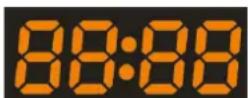
7.8.1 It show current time or timer on/off if there is in parameter P4,P5,P6.
7.8.2 It show error code when there is troubleshooting in the heat pump.
Remark: it shows current time with below situation:
a、Compressor start within 10 minutes
b、Heat pump operation frequency change
c、During defrosting
d、Working mode is cooling mode

7.9.
7.9.1 Normally it show the temperature.
7.9.2 It show the parameter when there is parameter checking.
7.9.3 It show the parameter code when there is in P4, P5, P6.
8. Troubleshooting
8.1 Error code display on LED wire controller
| Malfunction | Error code | Reason | Solution |
| Inlet water temperature sensor failure d1-TH6 | PP01 | 1. The sensor in open or short circ2. The wiring of sensor is loose | 1. Check or change the sensor2.Re-fix the wiring of the sensors |
| Outlet water temperature sensor failure d2-TH5 | PP02 | 1. The sensor in open or short circ2. The wiring of sensor is loose | 1. Check or change the sensor2.Re-fix the wiring of the sensors |
| Heating piping sensor failure d5-TH2 | PP03 | 1. The sensor in open or short circ2. The wiring of sensor is loose | 1. Check or change the sensor2.Re-fix the wiring of the sensors |
| Ambient temperature sensor failure d3-TH1 | PP05 | 1. The sensor in open or short circ2. The wiring of sensor is loose | 1. Check or change the sensor2.Re-fix the wiring of the sensors |
| Exhaust piping sensor failure d6-TH3 | PP06 | 1. The sensor in open or short circ2. The wiring of sensor is loose | 1. Check or change the sensor2.Re-fix the wiring of the sensors |
| Antifreeze protection in Winter | PP07 | Ambient temperature or water inlet temperature is too low | 1. Check the d1((inlet water temp.) and d3(outlet water temp.)2. Normal protection |
| Low ambient temperature protection | PP08 | 1. Out of the normal operating ambient temperature for this machine by checking d32. Sensor abnormality d3-TH1 | 1. Stop using, beyond the scope of using2.Change the sensor |
| Piping temperature too high protection under cooling mode d5-TH2 | PP10 | 1. Ambient or the water temperatu is too high in cooling mode2. Refrigeration system is abnormal3. Pipe temperature sensor(d5-TH2) failure | 1. Check the ambient temperature2. Check refrigeration system3. Change the pipe temperature sensor (d5-TH2) |
| Over low protection for outlet water temperature in cooling mode | PP11 | 1. Low water flow2. Outlet water temperature sensor d2-TH5 abnormal3. The difference of outlet water temperature and set temperature is 7°C or above in cooling mode | 1. Check filtration pump and waterway system2. Change outlet water temperature sensor d2-TH53. Change the set temperature. |
| High pressure failure TS4 | EE01 | 1. Ambient temperature is too high2. Water temperature is too high3. Water flow is too low4. Fan motor speed is abnormal or fan motor is damaged under cooling mode5. Gas system jammed6. High pressure wire is loose or damaged7. Too much refrigerant | 1. Choose the silent mode2. Check the water flow or filtration pu3. Check the fan motor under cooling mode, replace a new one if it is abnormal4. Check and repair the refrigerating system5. Reconnect the high pressure wire or replace a new high pressure switch6. Check and repair the refrigerating system |
8. Troubleshooting
| Malfunction | Error code | Reason | Solution |
| Low pressure failure TS5 | EE02 | 1. EEV has blocked or pipe system is jammed2. Fan motor speed is abnormal or fa motor is damaged under heating mode3. Gas leakage4. Low pressure wire is loose or damaged | 1. Check the EEV and piping system2. Check the fan motor under heating mode, replace a new one if it is abnormal3. Check refrigeration system or check the pressure value through the high-pressure gauge4. Reconnect the low pressure wire or replace a new low pressure switch |
| Water flow failure TS1 | EE03 Or "ON" | 1. The wiring of water flow switch is loose or water flow switch damaged2. No/Insufficient water flow. | 1. Check the wiring of water flow switch change a new one.2. Check the filtration pump or the waterway system if there is air or jamm inside |
| Over heating protection for water temperature (d2-TH5) in heating mode | EE04 | 1. Low water flow2. Water flow switch is stuck and the water supply stops3. d2-TH5 outlet water temperature sensor is abnormal4. The difference of outlet water temperature and set temperature is 7°C or above in heating mode | 1. Check the water flow switch if it works well2. Check the filtration pump or the waterway system if there is air or jamm inside3. Check d2-TH5 outlet water temperature sensor or replace a new one.4. Change the set temperature. |
| d6-TH3 Exhaust too high protection | EE05 | 1. Lack of gas2. Low water flow3. Piping system has been blocked4. Exhaust temp. sensor failure d6-TH55. Ambient temperature is too high | 1. Check the pressure gauge, and fill with some gas if it is lack of gas2. Check the filtration pump or the waterway system if there is air or jamm inside3. Check the piping system if there was any block4. Change a new exhaust temp. sensor d6-TH35. Check whether the current ambient temp. and water temp. are beyond the running temp. of the machine |
| Controller failure | EE06 | 1. Signal is not well connected or damaged2. Controller failure | 1. Stop the power supply and restart.2. Re-connect the signal wire or replace new one3. Replace a new controller |
8. Troubleshooting
| Malfunction | Error code | Reason | Solution |
| Compressor current protection | EE07 | 1. The compressor current is too large instantaneously2. Wrong connection for compressor phase sequence3. Compressor accumulations of liquid and oil lead to the current becomes larger4. Compressor or driver board damaged5. The water flow is abnormal6. Power fluctuations within a short tin | 1. Check if the power in the normal ran2. Check the compressor3. Check the compressor phase4. Check the phase sequence connection5. Check the waterway system and filtration pump6. Check mains power input |
| Communication failure between controller and main board | EE08 | 1. Signal wire is not well connected or damaged2. Controller failure3. Driving failure | 1. Stop the power supply and restart.Re-connect the signal wire or replace a new one2. Check the controller or replace a new one3. Check the driving system or update |
| Communication failure between Main control board and Driving board | EE09 | 1. Poor connection of communication wire2. PCB failure3. The wire is damaged | 1. Stop the power supply and restart.2. Reconnect the communication wire or replace a new one3. Check the wirings according to the electric diagram4. Replace a new PCB |
| VDC voltage too high protection | EE10 | 1. Line voltage is too high2. Driver board is damaged. | 1. Check whether the power supply is normal2. Change driver board or main board |
| IPM module protection | EE11 | 1. Data mistake2. Wrong compressor phase connection3. Compressor liquid and oil accumulation lead to the current becomes larger4. Poor heat dissipation of drive module or high ambient temperature5. Compressor or driver board damaged | 1. Program error, turn off electricity supply and restart after 3 minutes2. Check compressor sequence connection3. Check the pressure of system by pressure gauge4. Check if the ambient and water temperature is over high5. If it is the refrigeration system failure send it to the service center6. Change driver board |
| VDC voltage too low protection | EE12 | 1. Mother line voltage is too low2. Driver board is damaged. | 1. Check if the power supply is in the normal range2. Change driver board |
8.8.TroubleshootingTroubleshooting
| Malfunction | Error code | Reason | Solution |
| Input current over high protection. | EE13 | 1. The compressor current is too large momentary2. The water flow is abnormal3. Power fluctuations within a short time4. Wrong reactor | 1. Check the compressor if it works normally2. Check the waterway system3. Check if the power is in the normal ra4. Check if the reactor is used correctly. |
| IPM module thermal circuit is abnormal | EE14 | 1. Output abnormality of IPM module thermal circuit2. Fan motor is abnormal or damag3. Fan blade is broken | 1. Check if the motor speed is too low of fan motor is damaged, replace it by a ne one.2. Replace a new driver board3. Change the fan blade if it is broken |
| IPM module temperature too high protection | EE15 | 1. Output exception of IPM module thermal circuit2. Fan motor is abnormal or damag3. Fan blade is broken4.The screw on driver board is loose | 1. Check the main board or replace the driver board2. Check if the motor speed is too low of fan motor is damaged, replace it by a ne one if any failure.3. Change the fan blade if it is broken4. Check the screw on driver board |
| PFC module protection | EE16 | 1. Output exception of PFC module2. Fan motor is abnormal or damag3. Fan blade is broken4. Input voltage leap, input power is abnormal | 1. Check the main board or replace the driver board2. Check if the motor speed is too low of fan motor is damaged, replace it by a ne one.3. Change the fan blade4. Check the input voltage |
| DC fan motor failure | EE17 | 1. DC motor is damaged2. For the tri-phase check if the neutral is connected3. Main board is damaged4. The fan blade is stuck | 1. Detect DC motor for mono phase machine, replace a new one if any failure2. Check the wiring connection for tri-pharmachine3. Check the board, replace a new driver board or main board if any failure4. Check if there is any barrier in front of fan blade and remove it |
| PFC module thermal circuit is abnormal | EE18 | The driver board is damaged | 1. Check if the motor speed is too low of fan motor is damaged, replace it by a ne one.2. Change a new driver board |
| PFC module high temperature protection | EE19 | 1. PFC module thermal circuit output abnormal2. Fan motor is abnormal or damaged3. Fan blade is broken4. The screw in the driver board is not tight | 1. Check the main board or replace the driver board2. Check if the motor speed is too low or fan motor is damaged, replace it by a new one if any failure3. Change the fan blade if it is broken4. Check the screw on driver board |
| Input power failure | EE20 | The supply voltage fluctuates too much | Check whether the voltage is stable |
| Software control exception | EE21 | 1. Compressor runs out of step2. Wrong program3. Impurity inside compressor causes the unstable rotate speed | 1. Check the main board or change a new one2. Update the correct program3. Check the refrigeration system |
| Current detection circuit failure | EE22 | 1. Voltage signal abnormal2. Driver board is damaged3. Main board failure | 1. Change a new main board2. Change a new driver board |
| Compressor start failure | EE23 | 1. Main board is damaged2. Compressor wiring error or poor contact or unconnected3. Liquid accumulation inside4. Wrong phase connection for compressor | 1. Check the main board or change a new one2. Check the compressor wiring according to the circuit diagram3. Check the compressor or change a new one |
| Ambient Temperature device failure on Driver board | EE24 | Ambient Temperature device failure | Change driver board or main board |
| Compressor phase failure | EE25 | Compressors U, V, W are just connected one phase or two phases. | Check the actual wiring according to the circuit diagram |
| Four-way valve reversal failure | EE26 | 1. Four-way valve reversal failure2. Lack of refrigerant (no detect when d5-TH2 or d3-TH1 malfunction) | 1. Switch to Cooling mode to check the 4-way valve if it has been reversed correctly2. Change a new 4-way valve3. Fill with gas |
| EEPROM data read malfunction | EE27 | 1. Wrong EEPROM data in the program failed input of EEPROM data2. Main board failure | 1. Re-enter correct EEPROM data2. Change a new main board |
| The inter-chip communication failure on the main control board | EE28 | Main board failure | 1. Stop electricity supply and restart it2. Change a new main board |
8.2 Other Malfunctions and Solutions (No display on LED wire controller)
| Malfunctions | Observing | Reasons | Solution |
| Heat pump is not running | LED wire controller no display. | No power supply | Check cable and circuit breaker if it is connected |
| LED wire controller. Displays the actual time. | Heat pump under standby status | Startup heat pump to run. | |
| LED wire controller displays the actual water temperature. | 1. Water temperature is reaching to setting value, HP under constant temperature status. 2. Heat pump just starts to run. 3. Under defrosting. | 1. Verify water temperature setting. 2. Startup heat pump after a few minutes. 3. LED wire controller should display "Defrosting". | |
| Water temperature is cooling when HP runs under heating mode | LED wire controller displays actual water temperature and no error code displays. | 1. Choose the wrong mode. 2. Figures show defects. 3. Controller defect. | 1. Adjust the mode to proper running 2. Replace the defect LED wire controller, and then check the status after changing the running mode, verifying the water inlet and outlet temperature. 3. Replace or repair the heat pump unit |
| Short running | LED displays actual water temperature, no error code displays. | 1. Fan NO running. 2. Air ventilation is not enough. 3. Refrigerant is not enough. | 1. Check the cable connections between the motor and fan, if necessary, it should be replaced. 2. Check the location of heat pump unit, and eliminate all obstacles to make good air ventilation. 3. Replace or repair the heat pump unit. |
| Water stains | Water stains on heat pump unit | 1. Concreting. 2. Water leakage. | 1. No action. 2. Check the titanium heat exchanger carefully if it is any defect. |
| Too much ice on evaporator | Too much ice on evaporator. | 1. Check the location of heat pump unit, and eliminate all obstacles to make good air ventilation. 2. Replace or repair the heat pump unit. |
8 8TroubleshootingTroubleshooting
Remarks:
- In heating mode, if the water out temperature is higher than the set temperature over 7^ , LED controller
displays EE04 for water over-heating protection.
- In cooling mode, if the water out temperature is lower than the set temperature over 7^ , LED controller displays PP11 for water over-cooling protection.
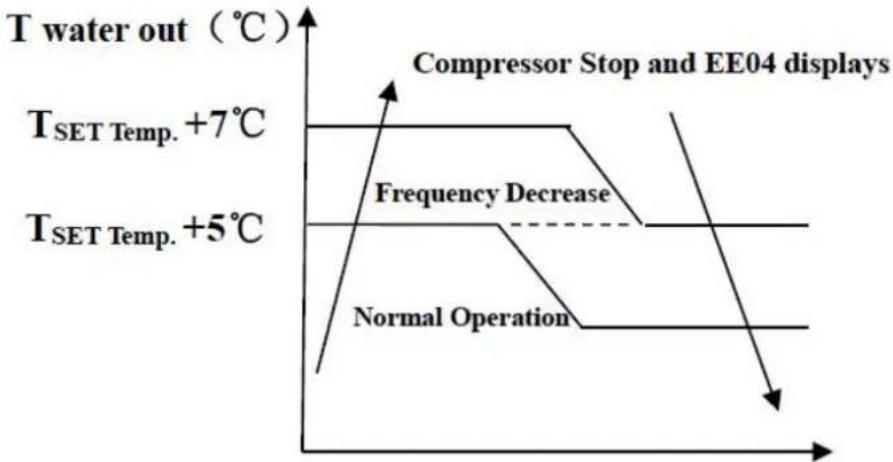
EE04 Water Overheating Protection

PP11 Water Overcooling Protection
For example as below:
| Mode | Output water temperature | Set Point Temperature | Condition | Malfunction |
| Heating mode | 36℃ | 29℃ | Tout -Tset ≧7℃ | EE04 Overheating protection for water temperature (d2-TH5) |
| Cooling mode | 23℃ | 30℃ | Tset -Tout ≧7℃ | PP11 Too low protection for water temperature (d2-TH5) |
9. Exploded Diagram
9. 1 Exploded Diagram Model:68837/68838
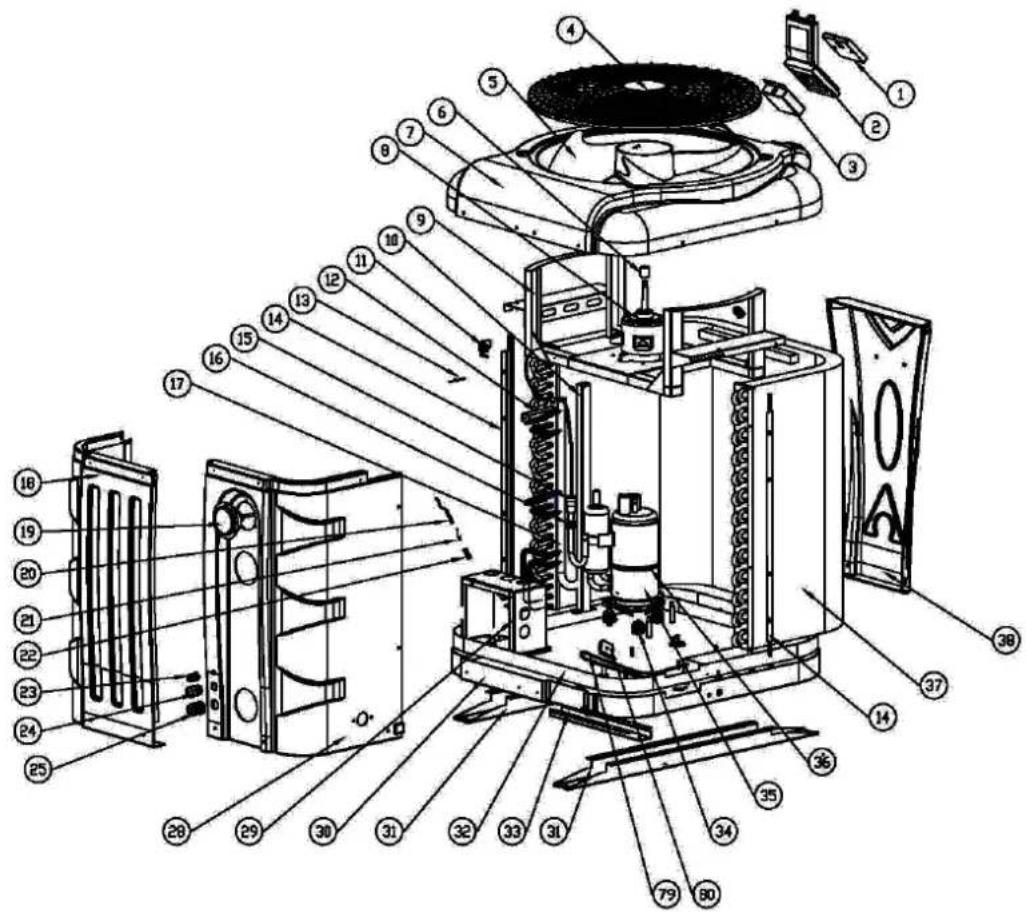
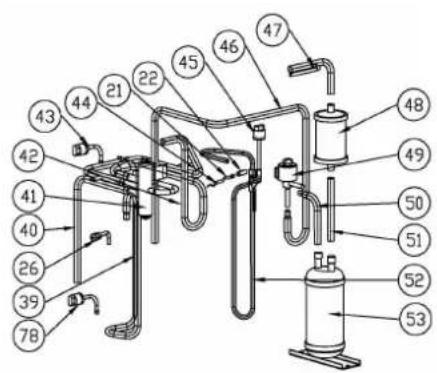


Part list 68837
| NO | ERP | Spare parts | NO | ERP | Spare parts |
| 1 | 117020198 | Controller | 41 | 121000006 | 4 way valve |
| 2 | 133020064 | Waterproof controller box | 42 | 113030104 | 4-way valve to exchanger |
| 3 | 108010075 | Controller box | 43 | 112100046 | Low pressure switch 0.1-0.3 |
| 4 | 133020078 | Fan grill | 44 | 117110021 | Discharge temp. sensor d6-TH3 |
| 5 | 132000015 | Fan blade | 45 | 112100030 | High pressure switch |
| 6 | 108010024 | Fan motor tube | 46 | 113080070 | EEV to distribution piping |
| 7 | 133270007 | Top cover | 47 | 113170034 | Exchanger to filter |
| 8 | 112000031 | Fan motor | 48 | 120000066 | Filter |
| 9 | 108640010 | Fan motor bracket | 49 | 119000021 | EEV |
| 10 | 108640008 | Pillar | 50 | 113120021 | Liquid storage tank to EEV |
| 11 | 133020010 | Ambient temperature sensor clip | 51 | 113130016 | Filter to Liquid storage tank |
| 12 | 108640004 | Pillar | 52 | 113010206 | Gas exhaust |
| 13 | 117110020 | Ambient temperature sensor. d3-TH1 | 53 | 105000004 | Liquid storage tank |
| 14 | 108640014 | Protective mesh baffle | 54 | 112100021-1 | Water flow switch |
| 15 | 103000183 | Distribution tube | 55 | 112100021-1 | Sealing ring |
| 16 | 136020005 | Rubber fixing block | 56 | 133020026 | Rubber ring on water connection |
| 17 | 103000183 | Collective piping | 57 | 133020012 | Red rubber ring |
| 18 | 133270004 | Side panel | 58 | 102050004 | Water connection sets |
| 19 | 106000011 | Pressure gauge | 59 | 117110011 | Water outlet temperature sensor d2-TH5 |
| 20 | 117110004 | Evaporator temperature sensor d5-TH2 | 60 | 108010025 | Exchanger temperature sensor clip |
| 21 | 113190001 | Clip | 61 | 133020011 | Blue rubber ring |
| 22 | 113190001 | Sensor holder | 62 | 117110012 | Water inlet temperature sensor d1-TH6 |
| 23 | 110000008 | Cable connector | 63 | 102040629 | Titanium heat exchanger |
| 24 | 110000011 | Cable connector | 64 | 150000110 | Drainage plug |
| 25 | 110000012 | Cable connector | 65 | 108640006 | Electric control box cover |
| 26 | 120000097 | Gas valve | 66 | 117240002 | magnet ring |
| 27 | N/A | N/A | 67 | 117100047 | PCB |
| 28 | 133270003 | Side panel | 68 | 108640015 | Electric control box |
| 29 | 108640003 | Electric control box support | 69 | 136020003 | Trunking |
| 30 | 133270006 | Bottom plate | 70 | 115000004 | 5-ways terminal block |
| 31 | 108640019 | Chassis foot | 71 | 136010004 | Clip |
| 32 | 108640021 | Base tray | 72 | 117240003 | Magnet ring |
| 33 | 108640020 | Chassis foot | 73 | 117010095 | Modbus Module |
| 34 | 101000181 | Compressor + damping feet | 74 | 108640016 | Module support |
| 35 | 101000181 | Compressor + damping feet | 75 | 136020003 | Trunking |
| 36 | 142000074 | Compressor heating resistor | 76 | 117230003 | Reactor |
| 37 | 103000183 | Evaporator | 77 | 108640007 | Reactor box |
| 38 | 133270002 | Front panel | 78 | 116000074 | Low pressure switch 0.2-0.35 |
| 39 | 113020296 | Gas return piping | 79 | 142000028 | Evaporator heating resistor |
| 40 | 113060116 | 4-way valve to gas collect pipe | 80 | 108480015 | Evaporator heating resistor support |
Part list 68838
| NO | ERP | Spare parts | NO | ERP | Spare parts |
| 1 | 117020198 | Controller | 41 | 121000006 | 4 way valve |
| 2 | 133020064 | Waterproof controller box | 42 | 113030104 | 4-way valve to exchanger |
| 3 | 108010075 | Controller box | 43 | 112100046 | Low pressure switch 0.1-0.3 |
| 4 | 133020078 | Fan grill | 44 | 117110021 | Discharge temp. sensor d6-TH3 |
| 5 | 132000015 | Fan blade | 45 | 112100030 | High pressure switch |
| 6 | 108010024 | Fan motor tube | 46 | 113080070 | EEV to distribution piping |
| 7 | 133270007 | Top cover | 47 | 113170034 | Exchanger to filter |
| 8 | 112000031 | Fan motor | 48 | 120000066 | Filter |
| 9 | 108640010 | Fan motor bracket | 49 | 119000021 | EEV |
| 10 | 108640008 | Pillar | 50 | 113120021 | Liquid storage tank to EEV |
| 11 | 133020010 | Ambient temperature sensor clip | 51 | 113130016 | Filter to Liquid storage tank |
| 12 | 108640004 | Pillar | 52 | 113010206 | Gas exhaust |
| 13 | 117110020 | Ambient temperature sensor. d3-TH1 | 53 | 105000004 | Liquid storage tank |
| 14 | 108640014 | Protective mesh baffle | 54 | 112100021-1 | Water flow switch |
| 15 | 103000184 | Distribution tube | 55 | 112100021-1 | Sealing ring |
| 16 | 136020005 | Rubber fixing block | 56 | 133020026 | Rubber ring on water connection |
| 17 | 103000184 | Collective piping | 57 | 133020012 | Red rubber ring |
| 18 | 133270004 | Side panel | 58 | 102050004 | Water connection sets |
| 19 | 106000011 | Pressure gauge | 59 | 117110011 | Water outlet temperature sensor d2-TH5 |
| 20 | 117110004 | Evaporator temperature sensor d5-TH2 | 60 | 108010025 | Exchanger temperature sensor clip |
| 21 | 113190001 | Clip | 61 | 133020011 | Blue rubber ring |
| 22 | 113190001 | Sensor holder | 62 | 117110012 | Water inlet temperature sensor d1-TH6 |
| 23 | 110000008 | Cable connector | 63 | 102040626 | Titanium heat exchanger |
| 24 | 110000011 | Cable connector | 64 | 150000110 | Drainage plug |
| 25 | 110000012 | Cable connector | 65 | 108640006 | Electric control box cover |
| 26 | 120000097 | Gas valve | 66 | 117240002 | magnet ring |
| 27 | N/A | N/A | 67 | 117100047 | PCB |
| 28 | 133270003 | Side panel | 68 | 108640015 | Electric control box |
| 29 | 108640003 | Electric control box support | 69 | 136020003 | Trunking |
| 30 | 133270006 | Bottom plate | 70 | 115000004 | 5-ways terminal block |
| 31 | 108640019 | Chassis foot | 71 | 136010004 | Clip |
| 32 | 108640018 | Base tray | 72 | 117240003 | magnet ring |
| 33 | 108640020 | Chassis foot | 73 | 117010095 | Modbus Module |
| 34 | 101000189 | Compressor + damping feet | 74 | 108640016 | Module support |
| 35 | 101000189 | Compressor + damping feet | 75 | 136020003 | Trunking |
| 36 | 142000074 | Compressor heating resistor | 76 | 117230003 | Reactor |
| 37 | 103000184 | Evaporator | 77 | 108640007 | Reactor box |
| 38 | 133270002 | Front panel | 78 | 116000074 | Low pressure switch 0.2-0.35 |
| 39 | 113020296 | Gas return piping | 79 | 142000028 | Evaporator heating resistor |
| 40 | 113060116 | 4-way valve to gas collect pipe | 80 | 108480015 | Evaporator heating resistor support |
Model:68839/68840

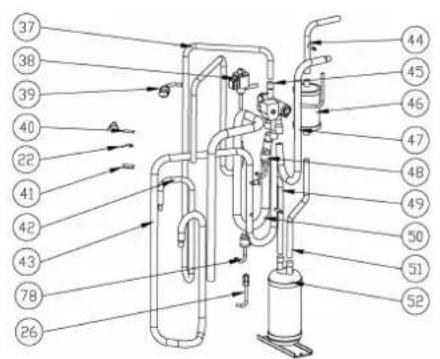

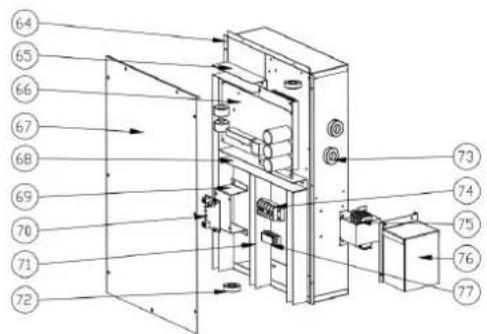
9. ExptodolecDDaggaam
Part list 68839
| NO | ERP | Spare parts | NO | ERP | Spare parts |
| 1 | 117020198 | Controller | 41 | 113190001 | Sensor holder |
| 2 | 133020064 | Waterproof controller box | 42 | 113010237 | Gas exhaust |
| 3 | 110000008 | Cable connector | 43 | 113020333 | Gas return piping |
| 4 | 108010075 | Controller box | 44 | 113170035 | Exchanger to filter |
| 5 | 133280007 | Top cover | 45 | 121000009 | 4 way valve |
| 6 | 133020079 | Fan grill | 46 | 120000066 | Filter |
| 7 | 132000023 | Fan blade | 47 | 113030102 | 4-way valve to exchanger |
| 8 | 112000031 | Fan motor | 48 | 112100046 | Low pressure switch 0.1-0.3 |
| 9 | 108650011 | Fan motor bracket | 49 | 113120024 | Liquid storage tank to EEV |
| 10 | 133020010 | Ambient temperature sensor clip | 50 | 113060114 | 4-way valve to gas collect pipe |
| 11 | 117110020 | Ambient temperature sensor d3-TH1 | 51 | 113130019 | Filter to Liquid storage tank |
| 12 | 108650004 | Pillar | 52 | 105000004 | Liquid storage tank |
| 13 | 108650018 | Protective mesh baffle | 53 | 102050004 | Water connection sets |
| 14 | 103000185 | Evaporator | 54 | 133020012 | Red rubber ring |
| 15 | 136020005 | Rubber fixing block | 55 | 133020026 | Rubber ring on water connection |
| 16 | 133280003 | Side panel | 56 | 102040630 | Titanium heat exchanger |
| 17 | 106000011 | Pressure gauge | 57 | 112100021-1 | Sealing ring |
| 18 | 133280004 | Side panel | 58 | 112100021-1 | Water flow switch |
| 19 | 110000011 | Cable connector | 59 | 108010025 | Exchanger temperature sensor clip |
| 20 | 110000012 | Cable connector | 60 | 117110011 | Water outlet temperature sensor d2-TH5 |
| 21 | 117110004 | Evaporator temperature sensor d5-TH2 | 61 | 133020011 | Blue rubber ring |
| 22 | 113190001 | Clip | 62 | 117110012 | Water inlet temperature sensor d1-TH6 |
| 23 | 113190001 | Sensor holder | 63 | 150000110 | Drainage plug |
| 24 | 108650003 | Electric control box support | 64 | 108650014 | Electric control box |
| 25 | N/A | N/A | 65 | 136020003 | Trunking |
| 26 | 120000097 | Gas valve | 66 | 117100048 | PCB |
| 27 | 101000189 | Compressor + damping feet | 67 | 108650015 | Electric control box cover |
| 28 | 101000189 | Compressor + damping feet | 68 | 136020003 | Trunking |
| 29 | 142000074 | Compressor heating resistor | 69 | 108640016 | Module support |
| 30 | 108650022 | Chassis foot | 70 | 117010095 | Modbus Module |
| 31 | 108650023 | Chassis foot | 71 | 136020003 | Trunking |
| 32 | 136010023 | Water nozzle | 72 | 117240002 | Magnet ring |
| 33 | 133280006 | Bottom plate | 73 | 117240003 | Magnet ring |
| 34 | 108650021 | Base tray | 74 | 115000004 | 5-ways terminal block |
| 35 | 108650009 | Pillar | 75 | 117230002 | Reactor |
| 36 | 133280002 | Front panel | 76 | 108650008 | Reactor box |
| 37 | 113080071 | EEV to distribution piping | 77 | 136010004 | Clip |
| 38 | 119000021 | EEV | 78 | 116000062 | Low pressure switch 0.2-0.35 |
| 39 | 112100030 | High pressure switch | 79 | 142000147 | Evaporator heating resistor |
| 40 | 117110021 | Discharge temp. sensor d6-TH3 | 80 | 108480015 | Evaporator heating resistor support |
Part list 68840
| NO | ERP | Spare parts | NO | ERP | Spare parts |
| 1 | 117020198 | Controller | 41 | 113190001 | Sensor holder |
| 2 | 133020064 | Waterproof controller box | 42 | 113010233 | Gas exhaust |
| 3 | 110000008 | Cable connector | 43 | 113020329 | Gas return piping |
| 4 | 108010075 | Controller box | 44 | 113170035 | Exchanger to filter |
| 5 | 133280007 | Top cover | 45 | 121000009 | 4 way valve |
| 6 | 133020079 | Fan grill | 46 | 120000066 | Filter |
| 7 | 132000023 | Fan blade | 47 | 113030102 | 4-way valve to exchanger |
| 8 | 112000031 | Fan motor | 48 | 112100046 | Low pressure switch 0.1-0.3 |
| 9 | 108650011 | Fan motor bracket | 49 | 113120024 | Liquid storage tank to EEV |
| 10 | 133020010 | Ambient temp. sensor clip | 50 | 113060114 | 4-way valve to gas collect pipe |
| 11 | 117110020 | Ambient temperature sensor. d3-TH1 | 51 | 113130019 | Filter to Liquid storage tank |
| 12 | 108650004 | Pillar | 52 | 105000004 | Liquid storage tank |
| 13 | 108650018 | Protective mesh baffle | 53 | 102050004 | Water connection sets |
| 14 | 103000186 | Evaporator | 54 | 133020012 | Red rubber ring |
| 15 | 136020005 | Rubber fixing block | 55 | 133020026 | Rubber ring on water connection |
| 16 | 133280003 | Side panel | 56 | 102040627 | Titanium heat exchanger |
| 17 | 106000011 | Pressure gauge | 57 | 112100021-1 | Sealing ring |
| 18 | 133280004 | Side panel | 58 | 112100021-1 | Water flow switch |
| 19 | 110000011 | Cable connector | 59 | 108010025 | Exchanger temperature sensor clip |
| 20 | 110000012 | Cable connector | 60 | 117110011 | Water outlet temperature sensor d2-TH5 |
| 21 | 117110004 | Evaporator temperature sensor d5-TH2 | 61 | 133020011 | Blue rubber ring |
| 22 | 113190001 | Clip | 62 | 117110012 | Water inlet temperature sensor d1-TH6 |
| 23 | 113190001 | Sensor holder | 63 | 150000110 | Drainage plug |
| 24 | 108650003 | Electric control box support | 64 | 108650014 | Electric control box |
| 25 | N/A | N/A | 65 | 136020003 | Trunking |
| 26 | 120000097 | Gas valve | 66 | 117100048 | PCB |
| 27 | 101000185 | Compressor + damping feet | 67 | 108650015 | Electric control box cover |
| 28 | 101000185 | Compressor + damping feet | 68 | 136020003 | Trunking |
| 29 | 142000074 | Compressor heating resistor | 69 | 108640016 | Module support |
| 30 | 108650022 | Chassis foot | 70 | 117010095 | Modbus Module |
| 31 | 108650023 | Chassis foot | 71 | 136020003 | Trunking |
| 32 | 136010023 | Water nozzle | 72 | 117240002 | Magnet ring |
| 33 | 133280006 | Bottom plate | 73 | 117240003 | Magnet ring |
| 34 | 108650021 | Base tray | 74 | 115000004 | 5-ways terminal block |
| 35 | 108650009 | Pillar | 75 | 117230002 | Reactor |
| 36 | 133280002 | Front panel | 76 | 108650008 | Reactor box |
| 37 | 113080071 | EEV to distribution piping | 77 | 136010004 | Clip |
| 38 | 119000022 | EEV | 78 | 116000062 | Low pressure switch 0.2-0.35 |
| 39 | 112100030 | High pressure switch | 79 | 142000147 | Evaporator heating resistor |
| 40 | 117110021 | Discharge temp. sensor d6-TH3 | 80 | 108480015 | Evaporator heating resistor support |
9.3 Maintenance
(1) You should check the water supply system regularly to avoid the air entering the system and occurrence of low water flow, because it would reduce the performance and reliability of HP unit.
(2) Clean your pools and filtration system regularly to avoid the damage of the unit as a result of the dirty of clogged filter.
(3) Only a qualified technician is authorized to operate the cooling system pressure.
(4) Please always drain the water from the heat pump when it is stopped during the winter or when the ambient temperature falls below , otherwise the titanium exchanger will be damaged by freezing, in which case it will be lost the guarantee. You should discharge the water from the drainage, if HP unit will stop running for a long time (especially during the winter seasons).
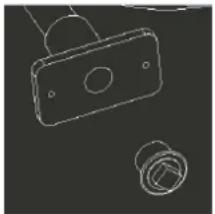
(5) In the way, you should check the unit is water fully before the unit starts to run again.
(6) After the unit is conditioned for the winter season, it is recommended to cover the heat pump with special winter heat pump.
(7) When the unit is running, there is all the time a little water discharge under the unit
4.3 Accessories Installation
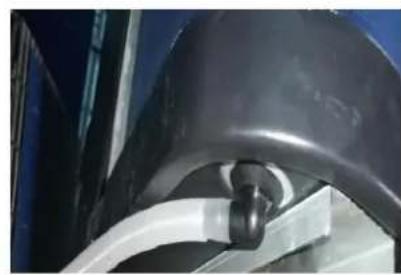

Ref.68837/68838/68839
Ref.68837/68838/68839

* Above electrical wiring diagram only for your reference, please subject machine posted the wiring diagram
second again to cancel the locking.
adjust the second number. So does the third and forth number. Lastly press to save the setting and exit, or it automatically exist after 15 seconds.
| Code avec connexion | Paramètre P | La description |
| 68837 | OCE5 | APH3 INVERBOOST 14KW |
| 68838 | OCE6 | APH3 INVERBOOST 17KW |
| 68839 | OCE7 | APH3 INVERBOOST 21KW |
| 68840 | OCE8 | APH3 INVERBOOST 26KW |
CE-norm, R32, ABS-kast
| Model | 68837 | 68838 | 68839 | 68840 | |
| * Prestaties bij Air 28, het water 28, luchtvochtigheid 80% | |||||
| Verwarmingscapaciteit | kW | 13-3 | 15.5-3.2 | 20.5-4.6 | 24-6 |
| Energieverbruik | kW | 1.94-0.19 | 2.28-0.21 | 3.05-0.29 | 3.41-0.37 |
| C.O.P. | 16-6.7 | 15.4-6.8 | 16-6.7 | 16.3-7 | |
| * Prestaties bij Air 15, het water 28, luchtvochtigheid 70% | |||||
| Verwarmingscapaciteit | kW | 9.6-2 | 11.3-2 | 14-3 | 18.5-4.2 |
| Energieverbruik | kW | 1.84-0.26 | 2.22-0.31 | 2.7-0.36 | 3.55-0.53 |
| C.O.P. | 8.0-5.2 | 6.6-5.1 | 8.2-5.1 | 7.92-5.21 | |
| Compressor type | MITSUBISHI | MITSUBISHI | MITSUBISHI | MITSUBISHI | |
| Voltage | 220~240V /50Hz or 60Hz/1PH | ||||
| Nominate stroom | A | 8.1 | 9.8 | 12.0 | 16.0 |
| Minimale zekering | A | 13 | 15 | 18 | 24 |
| Aanbevolen poolvolume (met afdekzeil) | m3 | 18-66 | 28-86 | 58-122 | 68-135 |
| Geadviserde waterflux | m3/h | 4.0 | 5.0 | 6.0 | 8.0 |
| Waterdrukval | Kpa | 14 | 15 | 18 | 20 |
| Warmtewisselaar | Twist-titanium tube in PVC | ||||
| Wateraansluiting | mm | 50 | |||
| Fan hoeveelheid | 1 | ||||
| Ventilatie type | Vertical | ||||
| Ventilator snelheid | RPM | 550-850 | 550-850 | 550-850 | 550-850 |
| Ingangsvermögen van Fan | W | 10-120 | 10-120 | 10-120 | 10-120 |
| Geluidsniveau (1m) | dB(A) | 40-54 | 41-56 | 41-56 | 42-60 |
| Koelmiddel (R32) | g | 1400 | 1800 | 1800 | 3000 |
| CO2 gelijkwaardig | T | 0.95 | 1.22 | 1.22 | 2.03 |
| Netto gewicht | kg | 70 | 75 | 92 | 111 |
| Bruto gewicht | kg | 88 | 94 | 115 | 137 |
| Net dimensie | mm | 820*695*830 | 820*695*830 | 950*900*1025 | 950*900*1025 |
| Verpakking dimensie | mm | 920*755*980 | 920*755*980 | 1050*960*1175 | 1050*960*1175 |
The kit By-Pass is the essential accessory for the installation of your heat pump, it is also a tool for the optimization of the heating of the water. The regulation of the valves allows to optimize the flow of water and with the manometer to make sure the optimize running of the compressor, see paragraph 5.6 controls of the pressure.

4. Toebehoren lijst
Ref.68837/68838/68839
Tset- 0.5 = 28 - 0.5 = 27.5^
Tset+ 0.5 = 28 + 0.5 = 28.5^
7.7. Resetfunctie
For example as below:
Ref.68837/68838/68839
Ref.68837/68838/68839
4. Accessories and options
4.1 Accessories list
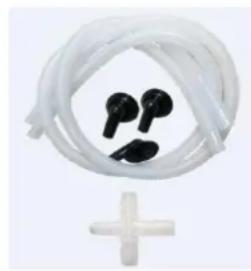
4.2 Daser Bypass-Kit
Ref.68837/68838/68839
Ref.68837/68838/68839
Tset = Tsetting Wassertemperature
Tset-0.5 = less 0.5°C than Tsetting temperatur; Tset-0.5 = 28-0.5=27.5°C
Tset+0.5= more 0.5°C than Tseting temperatur; Tset+ 0.5 = 28+0.5=28.5°C
7.7. Rückstellfungtion:
Ref.68837/68838/68839
Ref.68837/68838/68839
4.3 Accessories Installation


Jato de drenagem
Ref.68837/68838/68839
Ref.68837/68838/68839
Tset-0.5 = less 0.5^ than Tsetting temperatura, Tset-0.5 = 28-0.5=27.5°C
Tset+0.5= more 0.5°C than Tsetting temperatura, Tset+0.5 = 28+0.5=28.5°C
7.7. Funcão de reposicao:
1.1 In accordance with these provisions, the seller guarantees that the product corresponding to this guarantee ("the Product") is in perfect condition at the time of delivery.
1.2 The Guarantee Term for the Product is two (2) years from the time it is delivered to the purc
1.3 In the event of any defect in the Product that is notified by the purchaser to the seller during Guarantee Term, the seller will be obliged to repair or replace the Product, at his own cost and wherever deemed suitable, unless this is impossible or unreasonable.
1.4 If it is not possible to repair or replace the Product, the purchaser may ask for a proportional reduction in the price or, if the defect is sufficiently significant, the termination of the sales contract.
1.5 The replaced or repaired parts under this guarantee, will not extend the guarantee period of the original Product, but will have a separate guarantee.
1.6 In order for this guarantee to come into effect, the purchaser must provide proof of the date of purchase and delivery of the Product.
1.7 If, after six months from the delivery of the Product to the purchaser, he notifies a defect in Product, the purchaser must provide proof of the origin and existence of the alleged defect.
1.8 This Guarantee Certificate is issued without prejudice to the rights corresponding to consumers under national regulations.
2 INDIVIDUAL TERMS
2.1 This guarantee covers the products referred to in this manual.
2.2 This Guarantee Certificate will only be applicable in European Union countries.
2.3 For this guarantee to be effective, the purchaser must strictly follow the Manufacturer's instruction included in the documentation provided with the Product, in cases where it is applicable according to the and model of the Product.
2.4 When a time schedule is specified for the replacement, maintenance or cleaning of certain parts components of the Product, the guarantee will only be valid if this time schedule has been followed.
3 LIMITATIONS
3.1 This guarantee will only be applicable to sales made to consumers, understanding by "consumer", person who purchases the Product for purposes not related to his professional activities.
3.2 The normal wear resulting from using the product is not guaranteed. With respect to expendable consumable parts, components and/or materials, such as batteries, light bulbs, etc. the stipulations in the documentation provided with the Product, will apply.
3.3 The guarantee does not cover those cases when the Product; (I) has been handled incorrectly; (II) has been repaired, serviced or handled by non- authorised people or (III) has been repaired or serviced no original parts. In cases where the defect of the Product is a result of incorrect installation or start-up, this guarantee will only apply when said installation or start-up is included in the sales contract of the Product has been conducted by the seller or under his responsibility.
ES-CERTIFICADO DE
GARANTÍA 1 ASPECTOS
GENERALES
1.1 In order to reduce the amount of waste of electric and electronic apparatus, to reduce the danger components, to encourage the reuse of apparatus, to assess waste and to set up a suitable waste treatment with the aim of improving the efficiency of environmental protection, a set of rules has been established applicable to the manufacture of the product and other rules regarding the correct environmental treatment v these products become waste.
1.2 It is also intended to improve the environmental practices of all agents involved in electrical and electronic goods, including manufacturers, distributors, users and particularly those directly involved in the treatment of waste derived from these apparatus.
1.3 From 13th August 2005, there are two ways of disposing of this apparatus:
1.4 If you purchase a new equivalent apparatus or which has the same functions as the one you w dispose of, you can hand it over, free of charge, to the distributor when making your purchase, or
1.5 You can take it to local collection points.
1.6 We shall cover waste treatment costs.
1.7 The apparatus are labelled with a symbol of a "crossed-out waste container". This symbol means that the apparatus is subject to selected waste collection, different from general waste collection.
1.8 Our products are designed and manufactured with top-quality, environmental-friendly materials and components, which can be reused and recycled. In spite of this, several parts of this product are not biodegradable and therefore it should not be left in the environment. For the correct recycling of this product please completely detach the electrical motor from the rest of the filtration equipment.

ES - CONTENEDOR DE BASURA CON RUELAS TACHADO
-The products listed above are in compliance with the safety prescriptions:
2014/30/EU Electromagnetic compatibility Directive (EMC)
2014/35/EU Low voltage Directive (LVD)
2011/65/EU European Directive (RoHS)
EU REACH regulation 1907/2006.
2012/19/EU WEEE
2006/42/EC Machine directice
ERP EN 14511-3 :2013
Name and position: Michael Chen, Director
signatur/ firma/ Unterschrift/ Assinatura
FLUIDRA
Fluidra Global Distribution
Ametllers n^ 6 Polinya (Barcelona) Spain
www.astralpool.com